Hello fellow space person!
Update 0.2.2 has been released:
Added the first pages to the helper
Helper is accessible via the '?' button
Modified the delivery request for production resources to drones
Energy is transfered without drones
Other materials are requested twice (this reduces the waiting time between productions)
Fixed the reset of production in modules when loading a savegame
If a trader didn't sell/buy an item, the standard value of trades is now showing 0 as it should
Some bugs have been fixed and a big junk of work has been going to the next big feature update.
It’s Not A Moon Update 0.2 – first feature Update
Hello fellow space person!
It has been a week since release, so it’s time for the first feature update.
(starting a new game is recommended but not necessary) Here is what changed:
Modules that produce items got their own inventory
This was necessary for the new feature: Drones!
Modules now need the required item for production in their inventory. These items are delivered by drones
Produced Items end up in the module inventory and need to be delivered to the station
Current exception are modules that produce energy. Produced energy goes directly into the station inventory
There is a new module available: The Drone Controller
This module adds 5 drones to the maximum of controllable drones
You can buy more drones with 5 crystals and 20 gold bars (this is subject to change)
Small changes:
The production queue and ongoing production for ships didn’t save. This has been fixed.
Added a category for camera controls. That should make it clear what the invert-toggles do.
There was a bug that prevented a trader from landing if there was a trade module available. This has been fixed.
What’s next?
In the next smaller updates, I will add pages to the helper (currently only showing the ‘welcome’ message). This will give a basic rundown of game features and should solve most of the questions regarding basic gameplay.
While in 0.2 I will extend the functionality of drones and modules.
I will add an inventory window for the modules and some settings for priorities and minimum stock.
There will be a way to layout your modules to prevent the need for drone deliveries.
Update 0.1.2
Hello there,
small update.
Added the option to invert each of the camera controls
Update 0.1.1
Hello there!
The first small update with a requested change is here.
slightly changed the timing for optional missions
optional missions don't open the mission window directly anymore
you get a notification button and open the window by clicking on it
Time Scale can be manipulated by keyboard ('1' to '3'. 'Space' pauses the game)
It’s Not A Moon – Early Access Release
Hello fellow Space Person!
Today is the day. It’s Not A Moon is available to buy.
After the silence the last weeks I will give you another update on the important things that have changed.
Savegame Management o Went from one possible save file to multiple
o Added a window to manage your saves
o Implemented support for Steam cloud
UI Improvements o The indicators for items and ships floating in space scale with thedistance to your station
o Added a window to let you set up the limit of production for all items
o Added an icon that shows when a module is in repair mode
o You can turn off the automatic repair for each ship you own
Animations and sounds o Added a bunch of animations and sounds to modules
o Your Station will now lose parts and explode if it gets destroyed
you will return to the main menu
Ships o The small bomber received a new (WIP) model and an icon
Modules o Added the laser module, perfect for cutting through the hull of an enemy cruiser
o Added the HyperDrive
The current goal of the game is to build and activate it
o Added a bunch of icons for the modules
Missions o Moved the tutorial from older versions into the provisional story missions
o Added 2 types of optional missions
Acquire X of item Y
Destroy X of enemy ship Y
o The player gets rewarded with either Gold Bars or a Blueprint*
*Research improvements o Blueprints
Most researches are now hidden behind blueprints
Get blueprints by solving optional missions
Weapon damage types o Added 4 Types of damage : Physical, Explosion, Heat, Electric
o Ships have different resistances against those damage types
o Implemented a target preference system
ships and modules should now choose their targets by damage type
e.g. prevents a minigun targeting a capital ship first
Bugfixes and balancing o Yes. Lots of em.
DevUpdate 8 - Research UI and preparation for the big boom
Hello fellow Space Person!
What happened this week?
Reworked weapon system Previously, weapons used a script to get all their info. It contained 2 things: the damage the weapon does and the time between the shots.
This system worked for the 2 weapons that were available in game: A cannon and a grenade launcher in various sizes.
The problem with this was that anything else than a one shot weapon would feel wrong.
I mean, it would not be a problem to add a mashine gun like weapon and just reduce the cooldown between shots… but what about a weapon that needs some state between shooting and waiting?
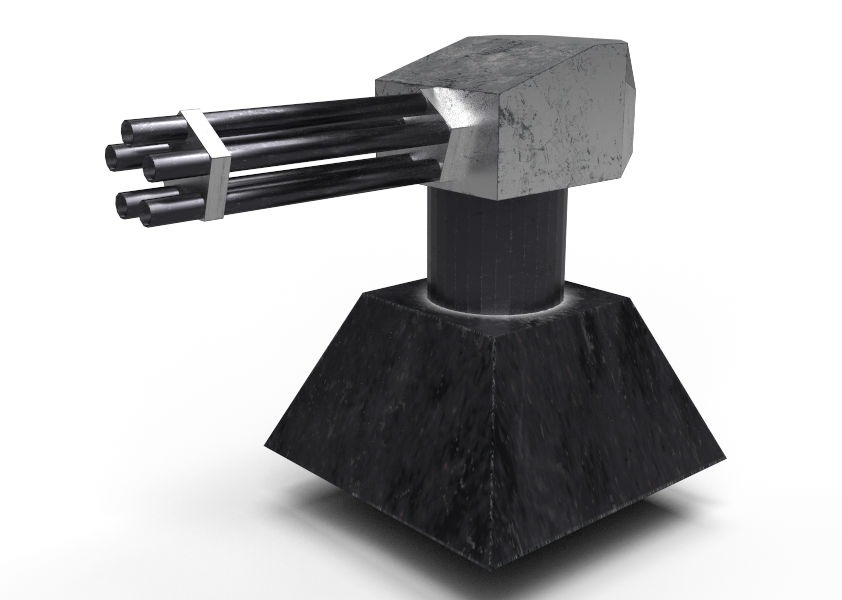
An example for this would be the new 'Gattling Tower' and the minigun on the new 'Gunship' (also the laser weapons that will be integrated later… because what's a space game without lazors?!).
A minigun type weapon needs a certain time to spin up, spits out more than a single shot and then has to cool down for a while.
So I have decided to take all the time I need to integrate a different system for this and also completely rewrite the AI weapon handling. I am now able to add as many stages for a shooting sequence as I want.. and attach different sounds and animations to this stages.
While this sounds boring for the player, it makes the work needed to create different weapons way easier… and that might be something that makes it a good thing for players too!
Additionally to this, I am (finally!) working on a concept to make weapons more or less effective in different situations. It feels wrong to shoot a big cruiser with a mashine gun and do more damage than with a cannon. So I will add damage types and resistances to weapons and ships.
The cool thing: I can add shields that do more than just reduce the damage a ship/station takes (because that is pointless, since I could just add a few percent to the ship hull and have the same effect).
Additions:
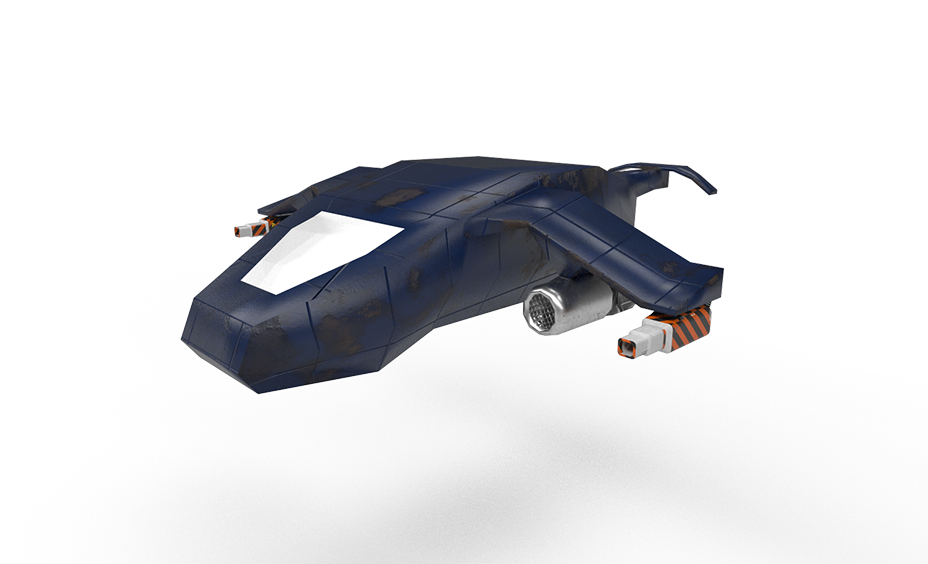
Added the gunship for enemy faction
Added the gunship for player faction (including research tree implementation)
Added the minigun tower (including research tree implementation)
Changes:
The effect for the gates was made more "portaly"
The research UI has been reworked
It now shows the project in different colors, depending if it is researchable or already researched
Also added a small disclaimer what is needed to research a project
Fixes:
The changes on the weapon system got rid of most of the bugs that prevented ships/towers from shooting
A pivot problem with the debris of a destroyed cruiser has been fixed.
DevUpdate 7 - Fighting annoyances and gunships
Hello there!
This week I have concentrated on getting rid of some of the most annoying bugs in the game.
There has been a big overhaul for the buildmode. It should now be way easier to place the module on the connector you want to use.
I have added a small info panel that tells you how to place a module and how to cancel the placement procedure.
The modules that you might want to build first now appear in order. You don't have to build in that order, but it seems to be the best way to start.
Scrolling in menus should not zoom the camera anymore. Additionally I have increased the scroll speed and the camera zoom speed ( a slider to change camera zoom speed will be added later).
Additionally to the rotation check that prevents rotating towards 'nothing', a check to prevent not rotating when entering a station and therefore flying into 'nothing' was added.
The speed of ships starting from hangar has been increased.
Bugfixes
Fixed an exploit that allowed to build as many scrap haulers as you want as soon as the condition to build them apply.
There was a problem in the trade window that prevented trading with the last item in the list. That is fixed now.
The production selection window now closes when the module is deselected or a different module is selected.
It should not be possible to place big modules on small connector spots. It should also not be possible anymore to place a module on an already occupied slot.
The smaller, researchable upgrades for ships and modules work now.
Fixed a bug that spawned a small hanging module on the connector above it when loading.
Modified the distance calculation of haulers when mining. That should reduce the chance for them to bounce off their target object.
Additions
Added visual effects that show the damage of the station. They appear in 3 steps at the moment (70% - 40% and 10% hull damage). More effects and steps will be added.
I have made it clear in the tutorial that the rotation - UI appears on top of the station. The tutorial is obviously not done yet and will later be accompanied by an ingame manual.
Added a gunship for the enemy. This is supposed to close the gap between the small easily destroyed bombers and the big cruisers. A version of it will also be available for the player.
Update 190220 - Fixes, fixes, fixes
Hello there!
A new update with bugfixes has been released. There are the following changes:
Changed a few things in the module builder. It should be easier to place modules on the connector spot you want
Prevented that modules can be placed on already occupied connectors
Prevented modules to be placable on the wrong sized connector
I have somehow managed to break loading the research progress in the previous update. That should be fixed now
Upgrades for 'Fighter S' and core station inventory size work now, that will allow more upgrade researches in future updates
Fixed: a small module on the down of the station occasionally appearing on the up (when loading)
Made start procedure of all ships faster (that might change again, in case they are too fast now)
Some balancing changes on building costs
190219 Update - Small annoyances, be gone!
Greetings!
I am uploading an update right now. This update will get rid of many of the small annoyances in the game.
It fixes or adjusts the following problems:
Made it clear (in the tutorial) that the rotation station has the UI at the top
Fix: Scrolling in any UI window makes camera move
Made scrolling in UI windows faster
Made camera zoom faster
Fix: It wasn't possible to trade with the last Item in the trade window because the entries were too wide.
Fix: The production selection window stayed open when closing the module info window or switching the selected module
Made start procedure of fighters faster
The screen resolution option in the options window has been made non interactable for now. The other options are available and working, but not yet saving when leaving the game
DevUpdate 6 - Preventing the void of Space
Hello there!
What happened this week?
Worked on some objects that appear in the background of a galaxy. Some of those will be 'printed' on to the skybox, some will be used as 3D background objects.
Added a check to prevent the player from rotating in a direction without a sector/gate. That should prevent the player from flying into the void of space. What it doesn't do yet is preventing the player from keeping their current rotation and confirming it (and thus, flying into the void of space). That is not too complicated to check and fix, so the next update will definitly fix this.
There is a problem with the AI and their avoidance of obstacles. I carry this around since a few months (because it's solvable with a click of a button and is not a big problem while developing) but it just doesn't feel right for a released game. I have some possibilities to avoid this from happening and I am currently trying them out to find the best solution.
As you can see, I am busy with fixing bugs and annoyances. That means release isn't that far away.
The tutorial that is in the game since months is getting filled with more information.
The mechanics for it will also be used for story telling later on (the first released versions might just be sandboxes).
This week, I also had to use some time to prepare a Demo build. That is more or less done. The Demo will go live shortly before game release.