

Jamm
BUG FIX
Lighting, Color Themes, and Nature updates
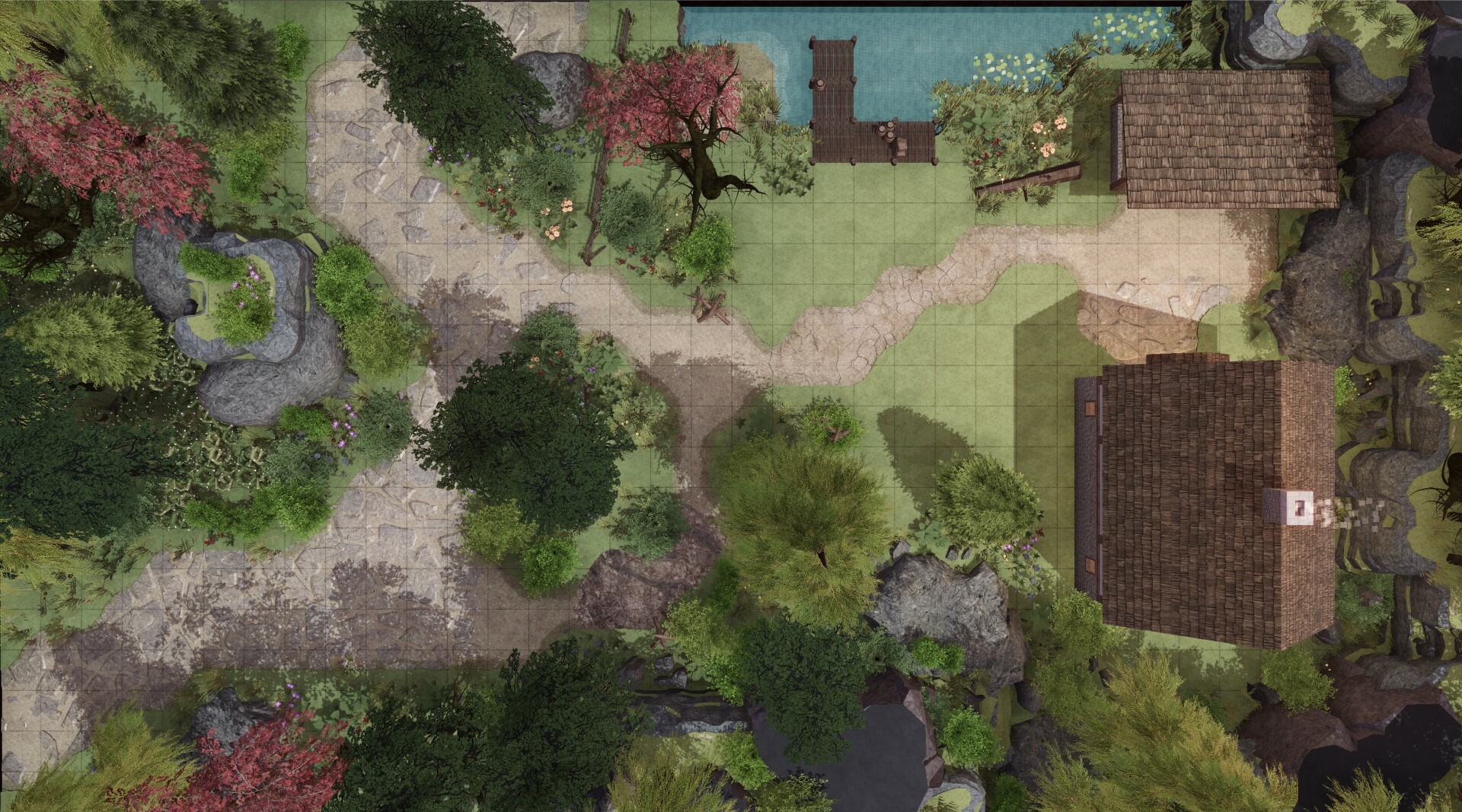
Lighting
Added features to provide more control with how you illuminate your maps.
• New ambient lighting system to soften the feel of the scene.
• Adjustable shadow brightness.
• Change the direction of the sun.
• 7 presets for time of day. Morning / Midday / Afternoon / Dusk / Evening /Night / Dungeon (limited light). These presets control height of the sun in the sky, color and brightness of the sun, color and brightness of the ambient light, and skyboxes.

Color themes
• Rebalanced the JAMM color palette to work with the new features for a more natural visual experience.
• Altered the SATURATION color theme to fall more in line with the previous JAMM colors

New Nature Assets
Components to add detail to your dirt paths/etc.
• 5 stone road variations
• Cracked earth asset
• Muddy earth asset
• 9 new forest groundcover assets
• 4 columnar stone formations
• Beachfront asset to create larger beaches or sandbars.
• 2 stairways assets to access Hills and Cliffs


Water
• Added a new tool under FX tab to place animated water. Can change direction and elevation of water. When toggled you can place objects on the water plane. Fun feature for when you use the TV function within JAMM to send a real time map to a tabletop TV.

Seasonal
• Updated the pumpkin patch
• Added 5 new twisted dead trees
• Added some animated spirits to haunt your maps.
• More dramatic lightning effects

Major Update - JAMM v1.5
JAMM update v1.5 release
+ Performance increase.
+ Improvements to Dirt and Hill environment. Create shores, dirtier caves, multi-tiered cliffs.
+ A new Blueprint system to build multi level structures along with 170+ new 3d props.
+ Undo/Redo for Environmental painting.
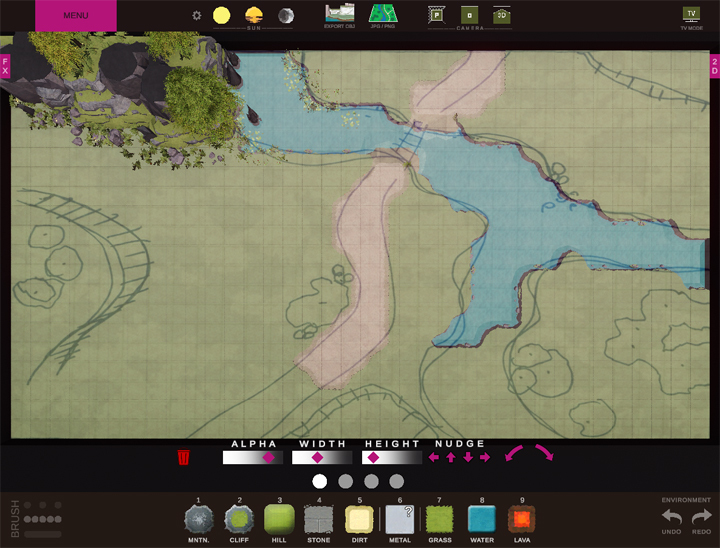
+ 2D map importer to allow you to sketch over your hand drawn/rendered maps
+ Tabletop TV mode to send a clean real-time JAMM session to a second connected display.
+ Many other Quality of Life improvements.
NOTE:
To increase performance of the app while adding new features some code had to be rebuilt. While most existing saved maps will load 100% fine, you may find that some elements may have shifted during this update. eg. columns may now be half a grid off, ships may have moved 10-20 feet from where they were. Please use the new asset Edit tool within JAMM to move these elements back into their place as needed.
GENERAL APP:
+ Added Undo/Redo feature for Environmental painting. (mountain / cliff / hill / grass / stone / dirt / metal / water / lava)
- Undo/Redo for other aspects of the app is in development but is not available at this time.
+ Optimized performance for larger maps. (10-20% quicker)
+ New edit mode for placed assets. (click and drag with left mouse button to move assets / press z and x buttons to rotate assets)
+ New delete mode for placed assets. (press left mouse button to delete individual assets / hold right mouse button to mass delete)
+ When creating a new map the app will now recall the last map size that you used.
+ Tool Palette sub-menus can be expanded/collapsed all at once.
+ New Sketch system under the 2D tab allows one to easily import 2d jpg/png maps (hand drawn, rendered, etc) over your map area so that you can trace over them easily.
+ Cursor changes were tweaked to help identify where you are in any camera view.
+ 2d elements can now be selected in all camera views.
+ Most assets are now visible (at the cursor) before placing onto the map.
+ Assets that have an icon with a "r" overlay indicate that they have multiple variations. Pressing the "R" button (before placing the asset) will cycle through any available options.
+ Labeled the side tabs and top buttons for clarity.
BLUEPRINTS:
+ Added a new Blueprint system that allows you to build multi-level structures with various 3D props.
+ Blueprints are containers that can be moved around the map as a single entity.
- Containers can have the option to toggle floors on/off or be hidden all together.
- Each Blueprint container has its own menu of tools including (Floors, Walls, Doors, Windows, Stairs, Railings, Props, and Levels).
- NOTE: At this time there are no roof model components.
+ Added 170 new 3D props as a "starter set" for use within the blueprint system. More to come.
+ New UI for finding and organizing props (by category, button, and search).
+ 3d props can be rotated prior to or after placing by pressing the z and x buttons.
+ Props can be drag and dropped between levels or environment.
+ New props will export through existing OBJ export button.

NEW MODEL CONTENT:
+ Rebuilt the Hill environment to take on some Cliff like qualities
- Cliffs + Hills now interact to create intermediate cliffs to give players more options of movement.

+ Rebuilt the Dirt environment to interact with Water and Mountains differently.
- Dirt + Water now interact to create shorelines that roll into the water.
- Dirt + Mountain now interact to create a more natural, dirtier cave system.


+ New Lava specific landforms are available to give players options to navigate closer to the lava.

+ Added a handful of new models under the palettes
TABLETOP TV MODE:
+ A NEW GM mode to allow a live JAMM session to be used on a second connected device without any user interface. (ie tabletop TV play).
+ Buttons to lock zoom/pan option during play.
+ DM facing virtual dice tray with two tray size options.
+ Mode to "close the curtains" on the second display so that the GM can load or build new maps privately.
+ Still exploring if it makes sense to include other features to the map maker (digital player/monster markers, initiative tracker, damage trackers, etc).

LIGHTING:
+ New lighting settings create a consistent experience in both Perspective camera and Orthographic camera.
+ Reworked auto-exposure settings to allow images to pop more.
MATERIALS:
+ Tweaked most materials to better perform predictively as you toggle between Perspective and Orthographic mode.
+ Rebalance materials (dirt/water/grass) to accommodate new dirt model upgrades.
+ New "Poche" for top of mountains. 3 options: textured (standard) / dark (cut stone) / light (snow).
FX:
+ Tweaked smoke/fog/steam effects to have more transparency.
+ Colored lights have been tweaked for better performance.
+ Added a Reflection option under Weather. This will greatly tax your computer but is a great tool for capturing 1st person views when water is present.
+ Added 4 new grid styles.
If you have any thoughts and suggestions for JAMM please let me know! Additionally, if you have any issues with JAMM or find any bugs please do the same. I'm always looking for ways to make the app better for everyone. Thank you!
cavebearhelp@gmail.com
or
https://discord.gg/jdT4bw88wV
GLOBAL FIX FOR SAVE/LOAD FUNCTION
• Some JAMM map files not being able to load.
• Some elements not loading into the correct location and/or correct scale.
While saving maps there was a chance for a computer’s regional settings to override JAMM’s settings for Digit Grouping. Turns out there are at least 7 ways numbers are grouped in the world! (see below) Having the computer swap “,” commas, “.” periods (hard stops), or spaces with one another caused unpredictable results when parsing data.
DIGIT GROUPING STYLES:
Style A: 10,000,000,000
Style B: 10 000 000 000
Style C: 10.000.000.000
Style D: 10’000’000’000
Style E: 10˙000˙000˙000
Style F: 100,0000,0000
Style G: 10,00,00,00,000
SOLUTION:
JAMM will now ignore regional settings when saving and loading. This will fix issues with NEW maps but may not be enough to repair all existing 'damaged' map files without manual effort.
MANUAL EDIT:
If you want to manually edit EXISTING JAMM save file use a text editor and open the .JAMM file. Scroll down to the bottom of the file and you will see any Walls / Doors / Windows / Fences / Bridges / Cars / Ships / House / 2d Assets, that are present in that map.
Example: wFence_01/321.340/175.000/0.000/20.000/1.067/1.000/1.000
Variables listed above are: Object Name / Rotation along the Y axis / Location along the X axis / Location along the Y axis / Location along the Z axis / Scale along the X axis / Scale along the Y axis / Scale along the Z axis
In this example the 175.000 is equal to 175 NOT 175 x 1000. If you see commas replace them to match the Example string formatting above. Or if you wish, you can delete individual rows that start with and end with .
Please drop me an email if you find any bugs while using the app and I'll be happy to squash them. Or if you have any ideas that you’d like to see in future updates please let me know. cavebearhelp@gmail.com
Thank you!
Update Notes for Jan 27 (90+ New Models)

NEW MODELS: 90+ models
• Special Trees – Added: Cherry Blossom, Japanese Maple, Giant Tree, Stump, Fallen Tree (stretch)
• Grass - Added: Bushes, Thuju (stretch), Hedges (stretch)
• Fey – Added: Various Mushrooms and ‘Noodles’ (sizes/types)
• Outcrop – Added: 2 larger rock formations (Boulders and Buttes)
• Spires – Added: Hoodoo formation
• Rocks – Added: Chips
• Stairs – Added: Fake 3d stairs (stretch) for stone, dirt, and wood stairs.
• Tents – Added: Various Market Tents, Pup Tents, Circus Tents (small and large)
• Garden – Added: Raised Podium / Pedestal, Fountains, Grass Pavers (use on stone), Plaza garden
• Ancient – Added: Circle of Stones / Slabs / Stonehenge / Cliffs, Obelisk
• FX – Added: Animated Auras, Magic FX, Isolated Fog, Void to Abyss, Steam
• Lights – Added 6 colored light sources for more dramatic lighting
MISC:
• Provided option to adjust sun brightness
• Updated some of the stone materials
• Added: Ability to place more content on hills and cliffs
• Most trees and shrubs can now be exported to OBJ


Please drop me an email if you find any bugs while using the app and I'll be happy to squash them. Or if you have any ideas that you’d like to see in future updates please let me know. cavebearhelp@gmail.com
Thank you!
Update Notes for Dec 11 (Saving + OBJ)
+Fixed the wood floor asset. Had invalid mesh data that would throw a red flag when exporting a scene to OBJ.
Please let me know if you find any bugs while using the app and I'll be happy to squash them. cavebearhelp@gmail.com.
Thank you!