There's a new patch for Kerfuffight, which means there are new patch notes!
Have a look!
Added warnings when walking in front of trapped knights or on trap doors.
A warning will show up when the wind rises before starting to push players off the stage.
A visual countdown is now visible around weapon pickups to show when they will turn into a trap.
Tips have been added to each loading screen.
Now, some explanations:
Added warnings when walking in front of trapped knights or on trap doors.
This was added mainly for trapped knights as I feel some players had trouble seeing them as potential damage sources and would sometimes wonder how they got hurt when hit by the trap. A small warning and sound will now appear when triggering a trapped knight. I also made trap doors produce the same warning and sound for consistency purposes.
A warning will show up when the wind rises before starting to push players off the stage.
Windy Woods strong winds are also a concept I feel players have some trouble understanding at first. That's why I also added a warning and warning sound to the HUD when the wind rises so players know danger is coming.
A visual countdown is now visible around weapon pickups to show when they will turn into a trap.
Again, the fact that weapons turn into traps if left unattended didn't seem evident enough. It would be particularly confusing with more lethal traps if they'd spawn and kill a player almost instantly. That's why I added a visual countdown to show how much time is left before a certain weapon turns into a trap.
Tips have been added to each loading screen.
Nothing is as good as clear visual warnings for players to understand your game systems and that's what I tried to fix in this patch. Though I figured adding tips on top of making better warnings could only help players better understand the various gameplay systems of Kerfuffight.
That's it for these Kerfuffight's patch notes. As always, you can like us on Facebook and follow us on Twitter. Also, don't forget to head over to our Steam page if you want to buy Kerfuffight!
Have a great day!
A Kerfuffight postmortem
Hi everyone!
Kerfuffight has been out for almost a month now and I think it's about time to reflect on the journey that was developing the game.
Development for Kerfuffight lasted for about a year, and like any project, it had its ups and downs. Before I started working on the game, I was wondering what kind of approach I should take. Making a game requires money and there's numerous way to fund a video game project.
A lot of other devs will often try to fund their projects with crowdfunding, but I was scared to try that approach seeing how many projects either fail or barely make it but then are chained to costly promises they made to their backers.
That's why in the end I decided to scale down and fully fund the game with my own money. That came with its benefits, but also its problems.
I had a lot of flexibility while developing Kerfuffight but from day 1, I was on a tight budget. This meant I had to make everything myself, from scripting to 3D modelling. (I did pay Tristan for music because even if I try I can't compose at all.)
Being the only developer for an indie game is not necessarily a bad thing but I knew when I started that I could only work on Kerfuffight for about a year.
That's why I decided to focus on local multiplayer and simple cel-shaded graphics. In a multiplayer game, especially in a brawler/fighting game, you only need small arena type levels which are a lot easier to build than a fully-fledged linear and story-driven level you'd find in a singleplayer game. As for cel-shaded graphics, they give a nice aesthetic while saving you time on texturing.
Even though I made those choices to save time on development, creating assets took around 80% of my time during the year.
In the end, I like the final look of Kerfuffight, but it lacks the "wow" factor that draws people into your game only by looking at a picture or a video of your project.
Going forward, I would try to outsource some assets to make sure the next game I make is not only fun but stylish and good looking.
Another problem with developing the game alone and on my own funds was that I had little time and little budget for marketing. Like every other developer will tell you, marketing is one of the most critical aspects of making a game.
I tried to share as much as I could about the game via social media or other online means (like this dev blog for example) but even though I started doing that almost 6 months before release, I think I should've started sooner. Especially on Steam.
Kerfuffight's Steam store page was set up closer to release than it should have which meant it couldn't gather as much attention on than it could have.
I was scared people would look down on the game if it didn't look finished in the first screenshots. After this year though, I learned that a lot of gamers enjoy seeing games in their earliest stages and following their development from day 1.
In the end, Kerfuffight was a great learning experience. They say that your first ten projects are going to suck and that you should get through them as quickly as you can, but in the end, even though it didn't sell as much as I would've liked, Kerfuffight's reception was really positive. So even though the game didn't become a hit, I still think Kerfuffight was a success. It made me that much more aware of the different challenges that making a game presents.
Speaking of which, no amount of tutorials will make you fully prepared for the real deal. Don't get me wrong, if you want to make a game, go for it! Worst case you'll learn a lot and it'll help you make better games in the future. Just don't quit your day job for that if you can not afford to!
Thanks to everyone who followed Kerfuffight's development. Going forward, I will still be updating the game and adding some small features that couldn't quite make it in the final build, but I will slow down with these dev blogs as there is not much more to say about the game or its development. I will also close down the Discord server since that was sadly not as popular of an option as I hoped it would have been. Though as always you can follow Kerfuffight on Facebook or Twitter to be the first to know when a new patch comes out.
Have a great day!
-Felix Laplante
Kerfuffight, behind the scenes (continued)!
Hi everyone!
Looks like a lot of you liked last week article!
I only showed the movement blueprint last week, but if someone was to copy-paste that script in their project, they'd notice that their character would move around while always facing the same direction.
That's why this week I'm going to show you the blueprint script that handles what direction the player is facing.
(To see each picture in their original size, you can right-click on them and select "open in a new tab".)
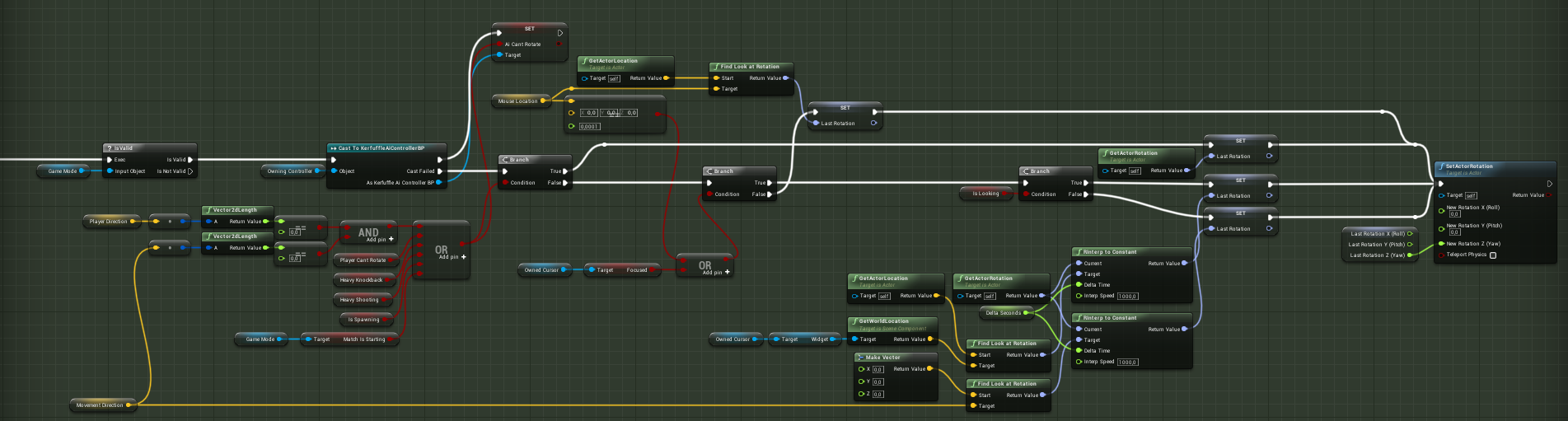
This is the whole script that controls the player character rotation so it's always facing the direction that the player inputs. It's triggered every frame and handles both mouse inputs and gamepad inputs.
Unlike the script I showed last week, this one is on the player character and not on the player controller. The reason for that is that it is also partly used by AIs. AIs have their own controller but they use the same character so some scripts are shared between both types of controllers via the player character.
Let's look at the first part of the script.
First, it needs to check if the game mode is valid. Since this part of the blueprint is executed every frame it has the chance to execute before the "Game Mode" variable is assigned. As you can see that variable is used a bit later in this blueprint and it would generate an error in case it was not valid at this point.
Next, we check if this character is controlled by an AI or player controller. If it's controlled by the former, we simply send back if the AI can rotate based on some conditions.
Speaking of these conditions, they also control if we want the player to be able to rotate or not. These conditions depend on what type of game you're making, but the first is probably one you'd end up adding to your project too. It will stop the player from rotating if no direction or movement inputs are given by the player.
If ever the condition returns false, we check if the mouse location is different than 0 (note that only the player using a mouse is going to be able to influence this variable). If it is, we then use that location and the current player location to determine which direction we want to face.
You might also have noticed here that the condition check will be true when we want the player to NOT be able to rotate.
We then enter part 2 of the script.
Here, the script chooses what rotation to give the player depending on what path it is on.
Starting from the top, it will keep it's current rotation if the player can't rotate. The next two outcomes will only occur if the player can rotate. If it can rotate and "is looking" (a variable that checks if a direction input is given by the player). If it is then the player direction will be dependent on the cursor's position relative to the player's position and if it is not, the rotation will follow the direction of the current movement direction.
Anywho, that's all for the direction script Don't hesitate to let me know if you want me to keep writing about the various scripts that make Kerfuffight work or what you want to be covered next.
Until then, you can like Kerfuffight on Facebook, follow it on Twitter or join the Discord.
Have a great day!
Kerfuffight, behind the scenes!
Hi everyone!
Like I said last week, some people showed interest in knowing how Kerfuffight worked behind the scenes. Especially since it's using Blueprint (Unreal 4's visual scripting tool) entirely. Well, I'm happy to oblige!
(To see each picture in their original size, you can right-click on them and select "open in a new tab".)
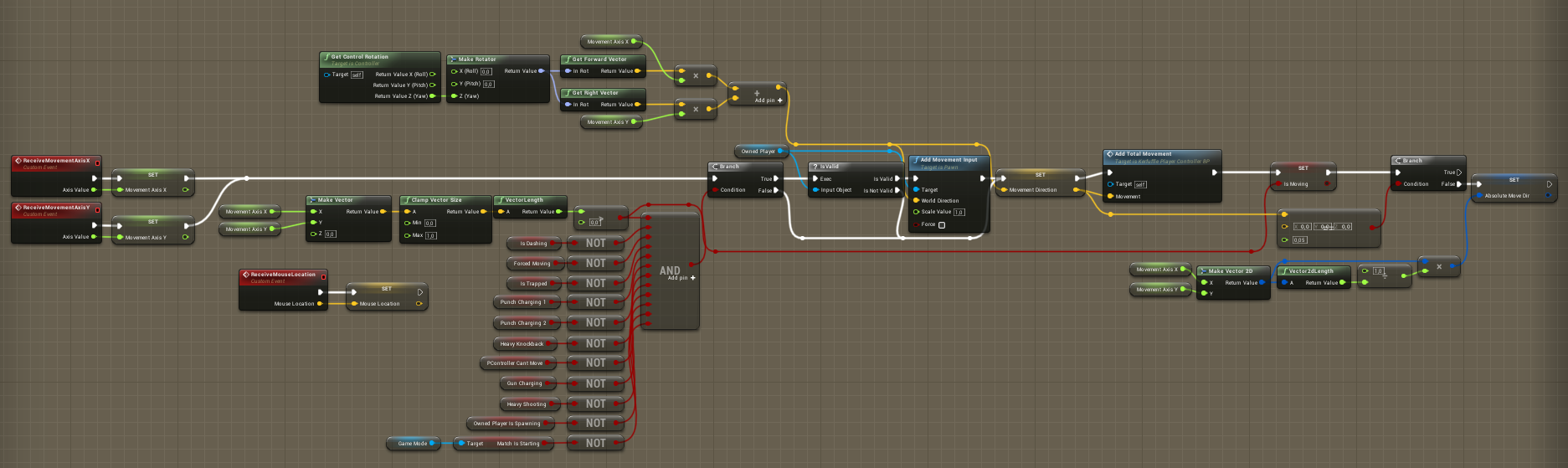
This is the script that handles player movement in the game for both keyboard and gamepad (there's another script that handles sorting keyboard and gamepad inputs but that'll be topic for another day). It's stored on the player controller which, like its name suggests, controls the player.
Like I established previously, this script starts by receiving the value of the keyboard's or gamepad's X and Y axes. It then stores each in an appropriately named variable.
Before going any further, the script is stopped by a wall of conditions. If any of these conditions fail, the player won't be able to move.
(You can also notice there's an event to store the current mouse location, that's not relevant to this script).
As you can see here, if the condition check doesn't give out "true", it will skip the movement node. But if it does, that's when movement happens. First, the script checks if the owned player (the controlled player) is valid. If it is, it adds movement input to it in a given direction. It gets that direction from getting the rotation of the controller.
To help you visualize, the controller is usually aligned with the camera.
After that, the script gets both the forward and right vector from that rotation (think of them as directions). It then multiplies both vectors by the movement axes and adds both results. This gives us the direction in which we want to move the player aligned with the controller.
That direction is then stored in a variable.
The last part of the script is not too complicated. It's mostly storing information in variables to use in other scripts. The "Add Total Movement" function is used to store how many units a player travelled in a match (the "Runner" and "Statue" awards are given based on that information). The script then saves in another variable if the player is moving or not.
The last variable is a bit more interesting. In some cases, it's useful to know what was the last direction the player went in. Especially when you want to execute a direction based action while the player is not moving. In Kerfuffight's case that would be when dashing, so you don't dash in no direction.
Anywho, that's all for the movement script Don't hesitate to let me know if you want me to keep writing about the various scripts that make Kerfuffight work or what you want to be covered next.
Until then, you can like Kerfuffight on Facebook, follow it on Twitter or join the Discord.
Have a great day!
AI Update
Hi everyone!
Kerfuffight's first patch notes are here!
Have a look!
Completely reworked the Ai system.
Removed the god-like tracking powers of the bots.
Added a system to help bots if they get stuck somewhere.
Removed bots' cursors.
Reduced the range of the cursor when using a gamepad while the hammer is equipped to better reflect its actual range.
Restored collision to the debris objects around the stages.
Removed collision from the shrubs on Snowman Island.
Reduced the boomerang's collision size.
Extended the carabine's bullet collision size.
Now, some explanations:
Completely reworked the Ai system.
The previous AI system was too hard to work with. Since I wanted to update some Ai behaviours this patch, I took the liberty to rework the entire Ai system in Kerfuffight. It should now be easier to apply fixes if needs be in the future.
Removed the god-like tracking powers of the bots.
The AIs were a bit too efficient when using weapons. Now, they won't be able to track another player while attacking.
Added a system to help bots if they get stuck somewhere.
In some rare occasions, the bots would manage to get out of the NavMesh making them unable to move. They should now try to return to the playing field when stuck.
Removed bots' cursors.
The bots had no use for their cursors besides obstructing the view of other players so they were removed.
Reduced the range of the cursor when using a gamepad while the hammer is equipped to better reflect its actual range.
Like the note says, this only affects players using a gamepad. The cursor could go further than what the hammer range actually was leading to confusion. The cursor now stops at the appropriate range.
Restored collision to the debris objects around the stages.
Before Kerfuffight's launch, I removed the collision of the various debris surrounding each stage in order to prevent players from being able to stand on them. Turns out the confusion generated by going through a seemingly solid object was greater than landing on it, so I restored the collision.
Removed collision from the shrubs on Snowman Island.
The shrubs are too small not noticeable enough to justify having a collision. So it was removed.
Reduced the boomerang's collision size.
It was too easy in the previous version to hit other players and environment objects with the boomerang. To fix that, the boomerang collision was reduced.
Extended the carabine's bullet collision size.
This is the opposite of the last note. The carabine's bullet collision size was extended to make it easier to hit other players.
That's it for Kerfuffight's first patch notes. As always, you can like us on Facebook, follow us on Twitter or join our Discord. Also, don't forget to head over to our Steam page if you want to buy Kerfuffight!
Have a great day!
Post-launch Dev Blog
Hi everyone!
Kerfuffight is finally here! But now that it is, you might wonder; "What now?!"
That's a legitimate question and that's why I'm going to address it in today's dev blog!
As some of you might have noticed, achievement support was added yesterday. That's my first step toward supporting Kerfuffight post-launch.
Now that the game is available to the public, it's easier for me to see what works with game and what doesn't. That said you can expect a balance patch to be coming soon (especially to tone down the AI opponents almost flawless way of playing!)
Besides that, I saw some requested features that were thought of but ultimately didn't make it in the final release. Some of those features might be added to the game, but before it's in the works, I can't confirm anything. Once it is, you can be sure I'll post about it on social media or in one of these dev blogs.
Also, did you know Kerfuffight was built entirely with Unreal 4's visual scripting tool "Blueprint". If some of you are interested, I could use the weekly dev blogs to showcase some of the game's scripts.
Until then, you can like us on Facebook, follow us on Twitter or join our Discord. Also, don't forget to head over to our Steam page if you want to get Kerfuffight!
Have a great day!
Achievements
Hi everyone,
I hope you're enjoying Kerfuffight!
Some of you might have been disappointed at launch that the game didn't support Steam Achievements. Time to turn that frown upside down because achievements are now live!
You can hop in the game right now and start earning achievements. You might notice the unlock conditions are the same as the one you'll find on the unlock board in the game. When adding achievement support, I wanted to reward players who want to unlock everything and tying achievements to the in-game unlock system seemed like the right way to do it.
Because of that, achievements are retroactive! If you already obtained some unlocks in the game, you should earn some achievements next time you open Kerfuffight!
If for any reason, achievements don't unlock when they should, please contact me via the game's support email.
Have a great day!
-Felix Laplante
Kerfuffight is live!
It's time!
After over a year of intense work, Kerfuffight is finally available on Steam.
I hope you enjoy the game as much as I enjoyed making it!
-Felix Laplante
New Dev Blog
The word is out! We announced Kerfuffight's release date two days ago. Come read more about it in this week's dev blog!