
Kinacoustic
[Update] 2.0 Some New Looks + Bug fixes
Todays update is version 2.0 and will bring you some big and small features that I’ve been working on for a while as well as a new trailer!
New Features:
- The first thing you might notice is the background is slightly more defined. This is just something that I thought looked better.
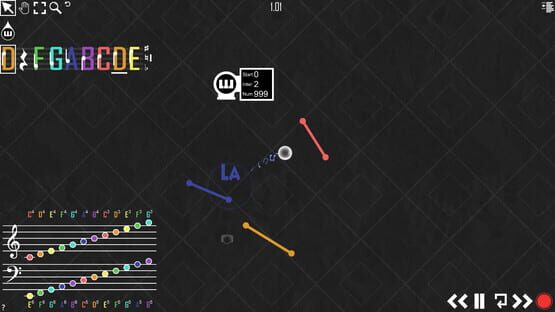
- We also added Do-Re-Mi-Fa-Sol-La-Ti particles to pop up when a Drop bounced on a line.
- With the new particle feature we also added toggles to the existing particle effects as well as this one. You can now disable: Bounce Particles, Line Bounce Animations, and Drop Particle Trails.
- I also reworked the camera Alt-tracking feature. It should be slightly better with more complex songs.
- In addition to improving the camera we added settings for the Upward, Downward and Horizontal movement speed of the camera for added control
- We also added some cheat codes to make features that shouldn’t be included in the options avaliable to players who want added control without the necessary support.
“moviemode” cheat code will disable the UI.
“cameraclamp” will disable/re-enable the camera’s zoom clamp.
- Some random small pause menu improvements.
- Made the Main Menu look a lot nicer.
- Made the "Basic Main Menu" mode more distinguishable.
- Main Menu Spotlight. This will be a place where we will feature community videos, workshop items, updates or anything else we find appropriate.
- Twitter and Subreddit links on the Main Menu.
- New workshop “.KAC Icon”
Bug Fixes:
- General preformance optimizations
- Fixed right clicking point ends glitch.
- Fixed a ton of Drag Box selection issues.
- Fixed zooming in lag spike.
- Fixed Drop Emitters not starting at 0.00 when running at 30fps
- Fixed Line and Sustain Orb drag ray UI interference.
Thanks for supporting Kinacoustic. If you would like to see the new trailer check it out here: https://www.youtube.com/watch?v=qH_Lp9Rd1js
If you find any bugs please email us at: contactus@kinacoustic.com
Happy Kina-Composing!
[Update] 1.5.6 Bug Fixes and Small Additions
New Features:
- You can now unload Sound Packs. Now when you have a Sound Pack loaded you will see an "Unload" button next to it. Note: When you save a song it keeps track of which Sound Packs you currently have loaded. If you don't use a certain Sound Pack in your song, it's advised to unload it before you save.
- Workshop Button. When in-game if you press pause there will now be a Steam Workshop button so you can quickly and easily browse the Steam Workshop.
Bug Fixes:
- Fixed a bug that would not allow the game to load the Sound Packs automatically when loading a save calling for those Sound Packs.
- Fixed some internal errors that sometimes appeared when loading a song or a new game. (Should very slightly increase load times in these situations).
Thanks again for supporting the game!
If you find any bugs please email us at: contactus@kinacoustic.com
Happy Kina-Composing :D
[Update] 1.5.5 Seamless Workshop Subscribing
This update brings you seamless Workshop Subscribing for .KAC and SoundPacks. What this means, is you no longer have to move the files manually. They will move themselves when you open the game.
Some things to note. If you subscribe to something and the file has the same name as a file you already have, it will not overwrite it.
Another thing to note is Sound Packs will still be named by their Item Number. So you might want to manually rename those after they are moved into the "SoundPacks" folder.
In this update I've also added an error message that appears when you try loading a song that calls for Sound Packs you don't have (or are named something different).
I really glad the Workshop Integration update (1.5) has been so well received!
I look forward to seeing what else you Kina-Composers create.
[Update] Kinacoustic 1.5.2 Bug Fixes.
Fixed a bug that was causing saves to upload to the workshop when they should just save.
Sorry for any inconvinences these might have caused.
[Update] Kinacoustic 1.5 Workshop Implementation, Metronome, Ball Tracking.
Workshop support - Upload and Consume Sound Packs and .KAC Saves. Here's a video guide for how to get started.
https://www.youtube.com/watch?v=hFYPLsaYn88
Metronome - Go to the level settings in game to set the metronome's BPM (Beats Per Minute). After you set the metronome you will see it pulsing on the pause button when the game is un-paused. This will sync up with the Clock so it should stay synced with all your Drop Emitter settings.
Better Drop Tracking - Previously you could use the Left ALT key to track the Drops and change the settings in the in-game options. That ability is still there but now the tracking is smarter and it will juggle fitting the camera with multiple Drops on screen. Also now you can double tap Left ALT instead of holding it to track Drops indefinitely.
Bug Fixes:
-Fixed a bug when having multiple sound packs loaded at once
-Fixed some more bugs with the undo redo function causing objects to get permanently stuck to the cursor.
(Update) Kinacoustic 1.3.5 Bug Fixes and Small Additions.
New Features:
- Added a stat window by pressing BackQuote " ` ". This displays Total Lines, Total Drop Emitters, Total Sustain Orbs and Background Size.
- Made the "drag-to-resize-value-line" prettier.
Bug Fixes and Optimizations:
- Fixed a bug when using the Drag Box via the Tool Bar from not registering over Drop Emitter UI panels.
- Fixed another undo / redo bug that occurred with lines specifically.
- Fixed CTRL + Z from freezing the line rotation while undoing
- Disabled Drop Emitter halos as they were being rendered off-screen (and they weren't visible)
- Fixed mouse wheel from updating units on screen more then necessary (causing a small lag spike)
- Fixed a bug that occurred when moving an object right after a scene has loaded causing the undo history to mess up.
- Fixed a big bug that prevented people with a corrupted undo / redo cache from saving.
- Fixed a bug that prevented objects from being selectable upon initial creation.
(Update) Kinacoustic 1.3.4. Bug Fixes
Thanks for supporting the game! :D
35% sale for last 24 hours of Steam Summer Sale!
(Update) Kinacoustic 1.3.3. Undo & Redo functionality, also stability improvments throughout.
To start off, we added a major function in the form of control. Now you can undo and redo any of these actions:
- Object movement
- Object value change
- Object creation
- Object deletion
We've also added a number of stability enhancements to make the game run better.
- Added Refresh Rate setting in the in-game options (this fixes a big CPU problem that I apologize for not catching sooner) it defaults to 60ghz.
- Copy and Paste buttons on the tool bar.
- Made screen transitions load faster.
- Made huge projects stop lagging because of emitter canvases being rendered off-screen.
- Drag selection fine tuning.
- Various other smaller bug fixes.
Thanks for the continued support of Kinacoustic! If you do find a bug please email us at: contactus@kinacoustic.com
(Update) Kinacoustic 1.1.0
I also changed the Line Thickness resizer and Sustain Orb resizer to be generally slower as it was too strong initially.
I also added a drag and drop Delete Button so you dont have to physically press "Delete" you can instead drag the object(s) you want to delete over the trash can and let go of the mouse.
Thanks for the early support guys please contact if you find any other bugs.