

Laser Ball
UPDATE 0.84 - SCORING CHANGES! - Plus NEW Score Indicators Show You Total Score Adds As You Get Them!
In addition, this update adds floating reasons why you died above the location of your death, such as "Acid Death" if you touch the acid, "Electro-fried" if you touch a colored ball, or "Time Up!" if time runs out on you causing you to lose a life.
Scoring has been changed to better balance depositing balls in the deposit bin as I didn't realize how few points the game gave you for each deposit until I added the above mentioned scoring indicators.
Depositing a ball is now worth about 4x the value previously seen before this patch. Each ball deposited is worth less points than the last ball because the level gets easier as you clear the balls out. You'll now see the exact points scored for each ball you deposit with the score multiplier calculated for you.
Hitting the wrong colored ball with a laser beam is more costly than before. The cost for each wrong ball hit with a laser has been increased from 15 points per level to 50 points per level. For example, on level 3 now, if you neutralize the wrong colored ball with a laser, it will deduct 150 points from your total score.
Due to the increased speed of scoring, the first extra life is now 4,000 points (previously 1,000 points) and as before, the required points for each extra life doubles each time you earn an extra life.
The volume of the electricity from the balls was also reduced in this patch, as they seemed a little loud especially when 8 or 9 balls were on the screen.
-------------------
Known issue:
There is a known bug that sometimes happens where you'll advance a level when only 8 balls have been deposited. Usually it works correctly, and usually all 9 balls need to be deposited before you'll advance a level.
This isn't a game breaking issue, but I'm still trying to figure out exactly what causes this because it seems to happen only on a very rare occasion.
There may be more issues or silly little bugs in the game due to all the recent changes I've made in the code with the recent changes made in update 0.83 and 0.84. Please report them on the sticky thread for reporting bugs if you come across one and try to give as much detail as you can if you do report anything.
I hope you are enjoying all the recent changes I've made to Laser Ball to try and make it a more enjoyable gaming experience!
:-)
UPDATE 0.83 - New Player and New Electricity Charged Ball Graphics! Lots More!
- NEW PLAYER MODEL: He looks better now, and is also shorter which helps maneuver him better and more safely in tough situations!
- NEW BALL TEXTURE: All of the balls have been re-textured now to give them a better overall look.
- NEW ELECTRICITY SPARK EFFECTS ON ALL COLORED BALLS: New charged effects appear around every colored ball, making it easier to see that these balls are dangerous to touch.
- NEW BORDER COLOR GRADIENTS: New color gradients better reflect the ball that matches the ball colors that need to be shot with the laser gun to neutralize them as "safe to touch"
- NEW ELECTRICAL SOUND EFFECTS: Every ball now sparks and puts of the sound of real electricity arcs. The more colored balls that are dangerous to touch that are on the screen, the louder the sound effects of the electrical arcs and sparks will be!
SLIGHT INCREASE IN STARTING BALL SPEED: The balls simply started too slow before, and this has been changed just a touch. The starting speed of the ball movement now is just about the same speed as level 3 would have been before. Yes, this makes the game a little more challenging starting out, but it also balances with the smaller player size and mobility in this patch as well.
LASER GUN STAYS IN LAST POSITION WITH EACH NEW LEVEL: The laser gun used to be re-positioned at the top of the screen every time you advanced a level. The gun now stays in its current position as you advance every level. Only starting a new game will position the laser gun back at the top center of the screen.
MUSIC ADDED TO WELCOME SCREEN: New Creative Commons music from Audionautix ("Whats It To Ya Punk") has been added to the welcome screen only. The music not only helps set the mood of the game, but also gives you a reference of game volume when adjusting the game volume slider.
MOUSE CURSOR REMOVED DURING GAME: While playing the game (not at the welcome screen), the mouse cursor is now hidden from view. (If you have the windowed mode on, you can still see your mouse cursor if it's not positioned over the game window)
NEW ZAP SOUND ON CONTACT WITH CHARGED BALLS: You'll now hear a loud electrical zap sound if your player gets electrocuted due to contacting a colored ball!
NEW PLAYER RE-SPAWN SOUND EFFECT: When your player re-spawns, you'll now hear a new spawn effect.
PLAYER NO LONGER STOPS IN A RUNNING POSITION: Player now stands normally when you aren't moving him.
---------------------------------------------
I think that's about it. No scoring changes or anything drastic in that regard have been changed. Your player still moves exactly the same speed as before, and the game still plays the same exact way. This was mostly just an update to make the game look and sound better than before.
I hope that you enjoy the changes! Please let me know below!
Also, if you have enjoyed Laser Ball.. Please consider letting me know with your opinions in a review here on Steam! In fact, even if you hate Laser Ball, please feel free to leave a negative review, but if you do, please give specific reasons as to why you didn't enjoy it or why you didn't like my game. My goal with every game I launch on Steam is to launch fun games to play that also offer a high replay value. Reviews help me know how the public reception is for my games and as a new indie game developer, it is very valuable feedback that can help me grow and make my games better.
- Thank you!
UPDATE 0.82 - New In-Game Tutorial Teaches You "Hands On!" + Volume Slider + More!
Hopefully this new tutorial will help newcomers catch on to how the game is played without needing to read any instructions before jumping in and playing the game!
Other changes made in this update:
- Added a volume slider for the game on the welcome screen.
- Added a save feature to the game that saves your volume level and the last setting you had selected for the tutorial (checked or unchecked). Whenever you launch Laser Ball now, your previously used settings on these two things will be loaded automatically. (On same PC or other Windows device)
- Change in Scoring: Scoring has been increased only in the situation that you drop all 9 balls into the Deposit Bin and have time remaining (not the red fast moving time). If you succeed in delivering all the balls to the deposit bin before they turn white due to running out of time, you'll now get a much more substantial bonus. The new bonus is 10 X the timer value, then take that number and multiply it by your current level. For example, if you finish level 2 before the original timer runs out, and have 20 shown on that timer when you finish.. you'll get 10 x 20 = 200, then 200 x level 2 = 400 bonus points. Previously the formula was the same except it was 3.5 X the timer then that multiplied by the current level. So previously in the above example, the bonus would have been 3.5 X 20 = 70 X level 2 = 140 bonus points. This new formula gives you almost TRIPLE the bonus points as before, so all the more reason to make every single second count!
- The game now starts in full screen mode when launched. (Alternating between full screen and windowed mode is still achieved by pressing the F key on your keyboard)
- In windowed mode, the game screen is now completely re-sizeable by just grabbing a corner of the window by holding your left mouse button and dragging to the desired size.
- From the Paused screen (accessed by hitting your ESC key on the keyboard or your START button on a controller).. you can now exit the game to the Welcome screen by hitting the Q key on your keyboard. (The game gives you this information when the game is paused). Exiting the game will cause you to lose your current game progress and score.
- The timer in game now shows a numerical value (counts down from 100 to 0)
...Hopefully these additions and changes make for a better game experience when you play Laser Ball now! :-)
Have a great weekend all!
UPDATE 0.81 - Controller Support Added + More Changes!
CONTROLLER CONTROLS:
Left Stick = Move your player in any direction
To Rotate the Laser Gun: You have the option of using either the left and right shoulder buttons or move the right stick left or right to rotate the fun clockwise and counter clockwise around the screen
A, B, or X buttons are used to Fire the laser gun and drop a ball in the deposit bin
The Start Button will pause and un-pause your game
The Select Button will swap between full screen and windowed mode
----------------------------------------------
CHANGES MADE TO THE GAME:
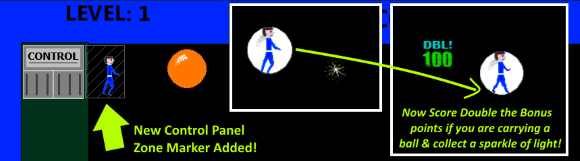
- Added a new control panel access area to the right side of the control panel to show you where you can stand to access the control panel outside of the safe zone (handy to know and see if the safe zone is filling with acid)
- Added double point scoring if you collect a sparkle of light while carrying a ball over if you collect it while not carrying a ball. This should make things more interesting during your games for those players trying to maximize their score!
- Changed the game to give you a chance to shoot the correct ball when you run out of time and all the remaining balls are white and you die trying to the collect the wrong white ball. After dying, if all the balls are white because you had run out of time, you'll now have a short time period to shoot and collect the correct ball before the timer runs down again.
BUGS FIXED:
- Fixed an issue that prevented you from losing points sometimes if your laser hit multiple wrong colored balls in a single shot. This has now been fixed and seems to be working as intended.
* GAME HAS SUCCESSFULLY LAUNCHED! * (..On time too! Woot! Woot!)
I've added 5 new Steam achievements to celebrate today's launch, bringing the total to 8! Some of these, like making level 20 and 25 should definitely provide a challenge to even the most coordinated and nimble players out there!
Have fun out there and be very careful to not fall for those April fools jokes this year like you were so gullible for last year eh? ;-) Heheh! ..Have a great weekend everyone!
New Tutorial Added As Launch Approaches Tomorrow!
I've added arrow key support in this update for anyone who might prefer using the arrow keys to move their character instead of the WASD keys. (you can use either the arrow keys or the WASD keys to move your character now)
Also changed in this update was a slight increase in the rate at which the timer counts down each level as you progress through the game. Now, as you advance a level, every level, the timer will slowly move down faster than the previous level played. This should help increase the challenge of the game in addition to the increase in speed of the bouncing balls for every level you advance.
I look forward to the response of players who buy and play my new retro action arcade game once it launches tomorrow!
Have a good weekend everyone!
Steam Leaderboard Scoring & Steam Achievements Added!
I've recently patched the game to send your high score in Laser Ball to the Steam leaderboard high scores for this game and added the first three of what should be several Steam achievements.
Leaderboard scoring and achievements should be live on launch day, March 30, 2018.