

Over two million visitors have traveled to the Pale City with Mono and Six in the months since Little Nightmares II was released.
Now, we have a special treat for good little children. The Little Nightmares II: Enhanced Edition offers these visitors a way to take advantage of more powerful hardware for an even deeper dive into a beautifully distorted world where all your bad dreams come true.
If you already own Little Nightmares II, then this Enhanced Edition is already available to you for no additional charge. If you haven’t purchased the game yet, it will be included in your digital copy of Little Nightmares II.
What does this new edition do?
This update for Little Nightmares II has four features that will surround you with the sights and sounds of the Pale City like never before. Allow us to elaborate.
Ray-Traced Reflections let you see live reflections in shiny surfaces throughout the game, like the cold, damp tiles of the Hospital wards or the dull glass of a deactivated TV.
Improved Volumetric Shadows add even more depth and detail to every object and enhance how rays of light are interrupted by moving objects, like the Hunter ripping away at his prey in front of his boarded-up workshop window or the Doctor tending to his patients under a swinging ceiling lamp.
Interactive Particles dance and swirl realistically through the air as characters move through a scene. It’s so evocative you might almost feel the need to sneeze when landing on a dusty rug in the attic or flinch when motes of burning ash spills through a furnace vent.
Immersive Audio wraps you in a three-dimensional soundscape if you’re using 5.1 or 7.1 speakers or headphones. You’ll hear each echoing swat of the Teacher’s ruler getting closer and closer as you creep through the School’s air ducts and track the clatter of hordes of Patients as they snatch at you from the dark.
The combination of all these features creates a masterful experience rendered in crisp 4k resolution.
How to launch Little Nightmares II Enhanced Edition:
After the release of “Little Nightmares II - Enhanced Edition”, you will be able to choose between the original game and the Enhanced Edition.
First off, if you want to launch the Enhanced Edition, don’t launch the game from the desktop shortcut. Please only launch the game from the library or you will not be able to play the Enhanced Edition.
When starting the game from the library, a launcher will pop up and let you choose between “Little Nightmares II” and “Little Nightmares II - Enhanced Edition”.
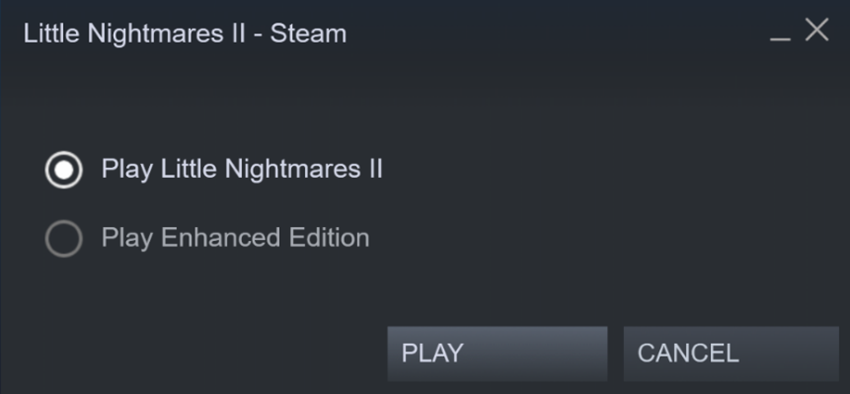
If the launcher does not pop-up:
Please verify that the Enhanced Edition is available and activated in your DLC list.
On the library page, open the DLC section and enable “Little Nightmares II – Enhanced Edition” if this DLC is disabled. Alternatively, you can right click on “Little Nightmares II” in the game library, then select Proprieties > DLC to access this menu.
We hope you enjoy this Enhanced version of Little Nightmares II and all the little details of the world waiting to be revealed to you in your Enhanced playthrough. Thank you so much to the entire Little Nightmares community for supporting the franchise over the past four years, your passion has allowed it to grow beyond our wildest dreams!
[previewyoutube="TEfOYtm40gM;full"]