

Logic World
Logic World Wednesdays: The Uneventful Edition
I haven't been able to work on Logic World much this week, but in the time I've been able to carve out for it I've been plugging away at bugfixes and stability improvements. My current task is sorting out the various networking issues with the game. I hate networking. What a mess it all is. Can somebody remind me why I decided to make this game multiplayer?
This week I made a decision I'd like to share with you: we'll be reducing the scope of update 0.91 in order to get it out to you faster. I'm aiming to publish 0.91 around the end of September, with a public preview sometime before that. 0.91 will contain performance enhancements, a whole lot of bugfixes & stability improvements, and a few smallish features like the simulation controls. Meanwhile, the new building mechanics I've been planning -- included the much-coveted ability to save and load subassemblies -- will be coming in update 0.92 a few months later.
More development updates soon! Not too soon, though -- I'll be on holiday with my family next week, so I won't be around for a LWW. I expect the blog will return on the 31st.
Keep on Gamin'
Logic World Wednesdays: The Hot-Reloadable Edition
Here are some highlights from my work week:
Hot-reloadable SUCC files
If you've poked around in the Logic World game files, you've probably noticed that there's a lot of data stored with my custom SUCC file format. In order to assist with development & debugging, I've made most of these files hot-reloadable: you can edit them on disk, and when you save the file, the game will reload the appropriate data and even update the user interface to reflect it. This includes `settings_master.succ` and its 100+ secret settings -- you no longer need to restart the game to change them.
Note that this change applies to SUCC files outside the `GameData` folder. `GameData` files (i.e. mods) already have some SUCC hot-reloading support in 0.90.
.NET 6
I've upgraded the server runtime from .NET Core 3.1 to .NET 6.0. This is a more modern .NET and brings with it gratuitous performance improvements. I haven't really tested to see how it affects LW, but it seems kinda faster!
The Most Important Video Game Feature in the History of Video Game Features, Maybe Ever
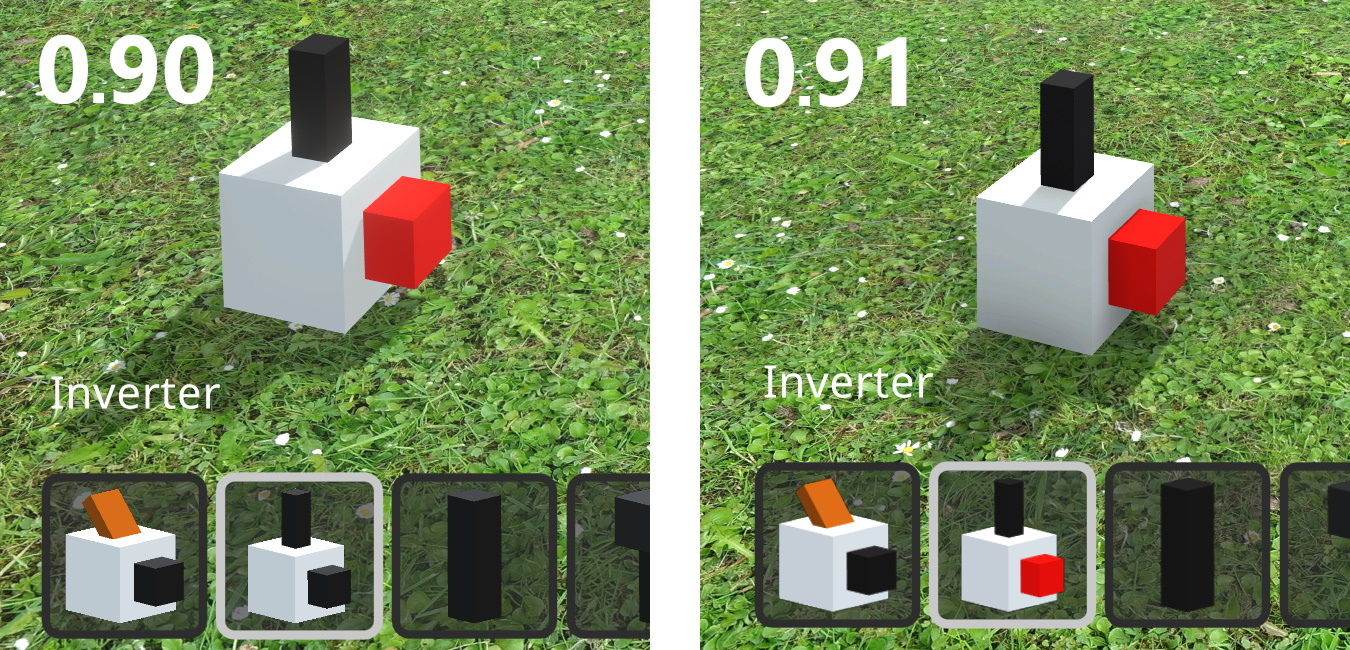
I made the inverter output render as "on" in the item thumbnail.
-------------------------------
Thanks for reading! More soon. Love, Jimmy
Logic World Wednesdays: Thrilling Thumbnails
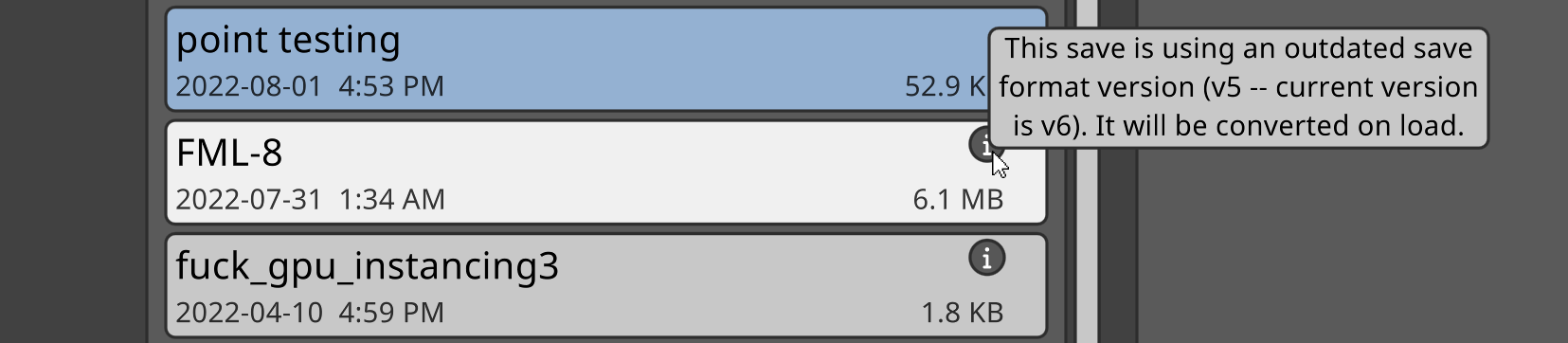
But my biggest task this week by far was to make some major updates to the world objects shader. This all started when I decided to address an issue with how thumbnails (the little isometric component graphics that appear in the Selection Menu and on the hotbar) are rendered. In 0.90, thumbnails look different depending on the scene in which they are generated. This is because the thumbnail renders use exactly the same materials as are used to render objects in the world. World objects are affected by environment lighting, so thumbnails are too.

This is kind of weird, but it's not a big deal in 0.90; I'm not sure if anybody but me has even noticed it. However, for some upcoming features I plan to add for 0.91, thumbnails really ought to be generated consistently and reliably, and look identical no matter where the generation happens.
So, I've upgraded the shader I wrote for GPU instancing. It now has two lighting modes: environment lighting and custom lighting. We use this new "custom" lighting mode for thumbnail renders, and so now it doesn't matter where they're created, they always have consistent lighting. I also added support to the shader for rendering in non-instanced mode, so we can use it for non-instanced decorations like the clicky part of buttons and switches, and these decorations will also have consistent, custom lighting applied to them in thumbnail renders.
Here's the result:

If you look closely, you'll notice a few more differences in the appearance of thumbnails between 0.90 and 0.91:
- Thumbnail renders are now anti-aliased, so the lines are smooth instead of jaggy. I already did this a few months ago, but I remember it was REALLY HARD so please appreciate it anew!
- I fixed some artifacts along the edges of thumbnail renders, most noticeably in components with pegs that go right to the edge like D-Latches and Sockets.
- The lighting is softer, with less contrast between the sides and tops of blocks. For now, the lighting otherwise emulates the 0.90 Grasslands appearance, but I'm still tweaking this. There will be secret settings for all the variables of thumbnail lighting, in case you want to customize it :)
Also: while I was mucking around in the shader code, I found a way to make it run a little bit faster! So that's nice.
It's such a small, subtle change, but it took hours and hours of banging my head against the code to make it happen. I'm still very new to graphics programming; I'm learning quickly, but this stuff is still taking me 10x longer than it would for someone experienced. However, it's all done now. Thumbnail lighting is independent of environment lighting, my shader is faster and more capable, and the shader code is much more organized & reusable. I'm happy with the graphics work I've done this week.
I've got a few more small maintenance tasks on my list -- none of them nearly as daunting as shader work, thankfully. After those are taken care of, I'll spend most of the next two weeks on bugfixing. Thank you to everyone who's reported a bug in 0.90 (especially Ecconia <3), I will be going through them very soon. After that, I'll add a couple cool new building mechanics, and then Logic World's first major update will be ready for release!
Thanks for reading. See you next Wednesday.
-Jimmy
Logic World Wednesdays: A Big Ball of Inverters
Framerate go brrrrr - Jimmy
I've spent the last several weeks working on major performance improvements for Logic World update 0.91. The primary goal of these improvements is to enable much bigger builds by shortening loading times, increasing framerates, and lowering RAM usage for worlds with a very high number of components.
I'm finally at the stage where I can demo these performance improvements in-game! Here's a video showing off a test save that contains 1,000,000 inverters and 10,000 wires -- something that would be completely impractical in 0.90.
[previewyoutube="MyI9iUZ8O74;full"]
I was almost at this point last week, but I ran into two major roadblocks, the tales of which I will presently regale you with.
Annoying roadblock #1: shadows not working properly
I spent forever getting my instancing shader to render shadows, as I showed off last time. Imagine my dismay when I integrated the shader with Logic World and the shadows broke. After extensive investigation, the issue turned out to be with using multiple meshes. Instancing a single mesh many times, as I was doing in my demo scene where I developed the shader, would result in correct shadows. However, as soon as you introduced a second instancer with a different mesh, the shadows would break.
This made no sense and was extremely confusing. I'm still new to working with shaders & general graphics tech, so trying to fix a bug this outrageous was a daunting task. Nevertheless, I took the plunge; I read up on how shadowmaps work and tried everything I could think of to make them look normal again. After three days of this I had eliminated dozens of potential solutions, but was no closer to understanding the cause of the issue. Then, on a whim, I updated Unity to the latest patch release... and the bug was fixed!!!
ALL ALONG IT WAS A UNITY BUG AND NOT A JIMMY BUG. Three days trying to fix it when it was completely out of my hands, and all I had to do was press "update". Well, lesson learned: in the future, when my code doesn't work, I'll be much quicker to blame someone else.
Annoying roadblock #2: invisible thumbnail renders
Logic World renders thumbnails for the items on your hotbar. This thumbnail-rendering system broke when I made the switch to GPU instancing. The world renders itself using Unity's Graphics.DrawMeshInstancedIndirect function, but this unfortunately is incompatible with Camera.Render, which is what we were using to render the thumbnails. Camera.Render executes in the middle of a frame, but DrawMeshInstancedIndirect only actually instances the meshes at the end of a frame. Therefore, those instances couldn't be seen by Camera.Render, and all the thumbnails were empty images.
I did some reading, and I figured out that I should be able to instance the mesh during Camera.Render using something called camera command buffers. I wrote the code to do this, but it didn't work. I did some more reading, and it turns out that camera command buffers are not compatible with Unity's Scriptable Render Pipeline, which Logic World uses.
So instead I started mucking around with Scriptable Render Features, which as far as I can tell are the only way of executing command buffers during Camera.Render in SRP. I did get the mesh instancing to work with this, but I couldn't figure out how to make it work with any lighting, so all the thumbnail renders were dark and ugly.
Finally I gave up on doing things in a good clean way and implemented a crappy hacky solution. The only way I have of properly rendering the objects is with Graphics.DrawMeshInstancedIndirect, but that doesn't work until the end of the frame. So, we'll simply wait until the end of the frame to render the thumbnail. This unfortunately means that there will be one frame of delay between when we request a thumbnail and when it gets rendered; it also means that we can only render one thumbnail per frame, as otherwise the two items would overlap in the render. However, I believe I can mostly work around these issues by beginning thumbnail renders as soon as the game starts, so that every thumbnail you need is already rendered by the time you load into a world.
Overall it took about two days to fix all the issues with thumbnail renders. Bleh. While I was there, though, I took the opportunity to up the quality: thumbnail renders are now anti-aliased. It's a subtle change, but a nice one. You might be able to notice the difference in the above video; the edges are much softer and less jagged.
What's next?
After I'd finished with the above two issues, it's thankfully been relatively smooth sailing to integrate the new rendering tech with Logic World. I've carefully checked everything, and all the visuals in 0.91 are now identical to the visuals in 0.90, down to every channel of every pixel. Objects look exactly the same, but they're much faster to render in large-world scenarios.
I've still got a few more things to finish up with the optimizations, but I'm finally almost done with them. Once they're finished, I'll do a hefty round of bugfixing, and then I finally get to work on new features again!
The hardest part of 0.91 is finished, and the update will be in your hands soon.
---------------------------------------------
View this post on logicworld.net
More Logic World Wednesdays
https://store.steampowered.com/app/1054340/Logic_World/
Logic World Wednesdays: Season Premier
Configurable simulation speed - Jimmy
Logic World launched with the ability to change the simulation speed using console commands, but this was an awkward and unwieldly process. I've been working on a proper user interface for changing the speed, which also allows you to pause the simulation and then advance it step-by-step.
[previewyoutube="ubmdTi-srXs;full"]
Shoutout to @LOOPS99 for building the Fibonacci machine shown in the video. You can check out that build here.
Soundtrack publication
In case you missed it: this week, the Logic World Original Soundtrack was published on internet music websites! You can read more about the soundtrack, and find links to all your favorite music places, in this blog post.
[previewyoutube="l0fFw0iizOc;full"]
Since the initial soundtrack launch, there have been a few updates. First, the Logic World Theme is now available on Bandcamp and Soundcloud. Second, we've started working to get the soundtrack published as a Steam DLC. Thank you to the folks who've requested that; we hear you, and it is coming!
A few words from Logic World composer Markku Wainman on the soundtrack launch:
> A big thank you to those who have been listening to the album. The reception has been amazing and I really appreciate all the kind words.
Revamped changelog - Jimmy
You may not know this, but Logic World has an in-game information page to display the changelog. In 0.90.3 this is a simple, single page of text, like the Credits and Roadmap pages.
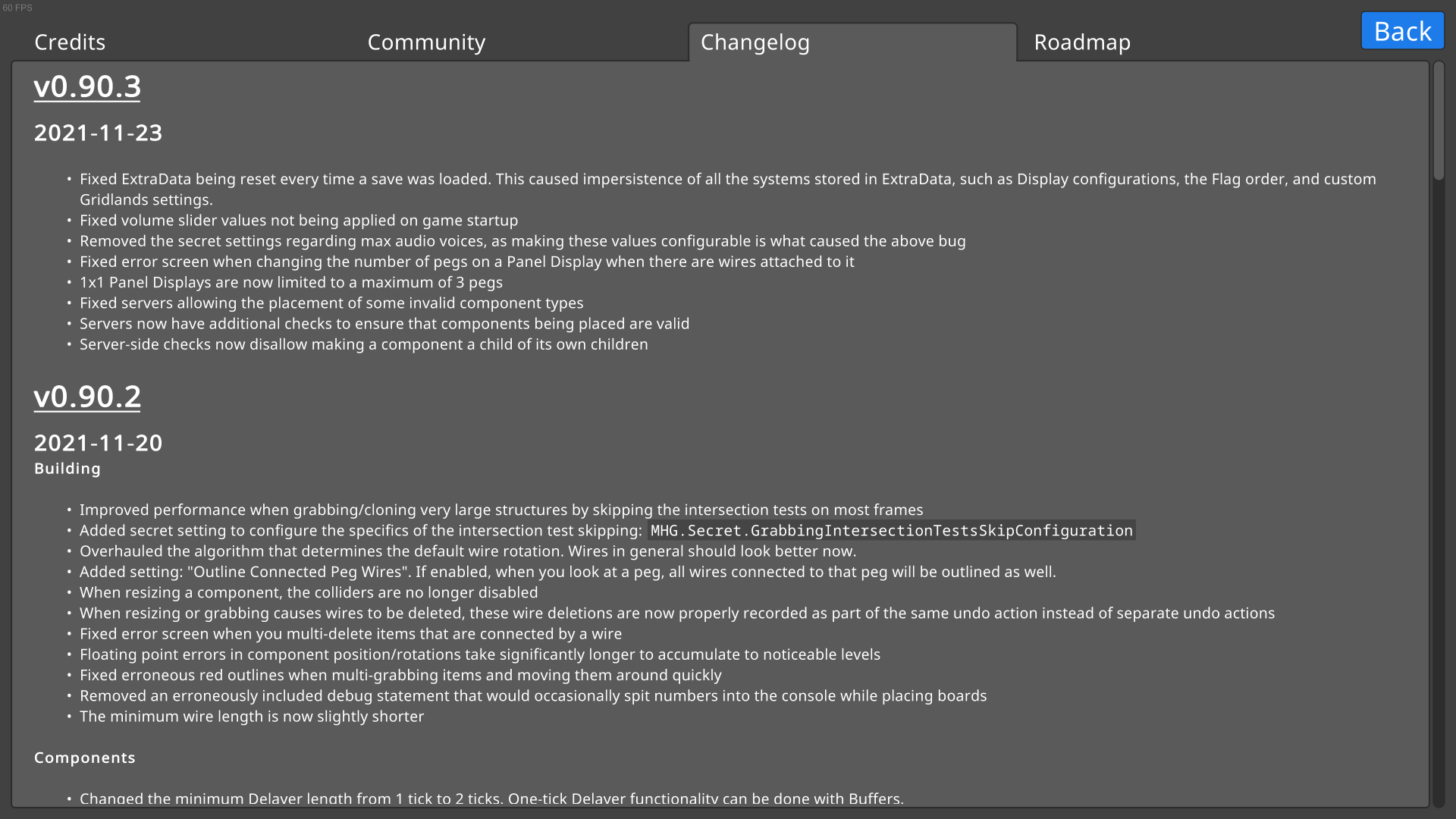
However, after just three updates, it's clear that this approach scales poorly. First, there's the performance issue: in 0.90.3, when you open the Changelog page, there is a lag spike as Unity converts the 13,000 characters into a single mesh for rendering. Second, there's the usability issue: a single-page giant block of text is not fun to navigate!
We make a lot of changes to Logic World, and our changelogs are very detailed, so these problems were only going to get worse with time. Thus I've remade the Changelog page from scratch. Starting in 0.91, the individual changelogs for each version can be expanded and collapsed by clicking on the headers. The giant block of text is no more, which fixes both issues described above.
[previewyoutube="oD-TTmHe9Zw;full"]
Better handling of exceptional SUCC - Jimmy
If you've gone digging around in the Logic World game files, you've probably encountered some files with the extension `.succ`. These files contain data formatted as text that is easy for humans to read and edit. They are generated and read using my custom data serialization library, SUCC.
Previously, a significant limitation of SUCC has been its poor error messages. When something went wrong, there were very few clues about what exactly that thing was. Well, this week I've finally added good error handling to SUCC! When something goes wrong, SUCC will now provide:
- A description of the error
- The path of the file in which the error occurred
- The line number on which the error occurred
This change won't affect most players, but if you're a modder or tinkerer it will probably improve your life at some point. When you accidentally screw up your SUCC formatting, the new error messages will tell you exactly where to go and what to fix.
If you're a big nerd and want to look at these changes in more detail, you can check out the pull request here.
Optimization work - Jimmy
I've started working on some serious optimizations for Logic World. These will drastically improve loading times for large worlds, and significantly improve framerates while playing in large worlds.
This work is in the early stages and I don't have anything to show for it just yet, but things look very promising, and I expect to have more concrete news soon. Stay tuned :)
---------------------------------------------
That's all for this week, but we'll be back next Wednesday with another juicy blog post. To make sure you don't miss it, you can sign up for our newsletter. Consider also joining the official Discord.
See you next Wednesday!
View this post on logicworld.net
More Logic World Wednesdays
https://store.steampowered.com/app/1054340/Logic_World/
The Logic World Original Soundtrack is now available to stream and download!
[previewyoutube="l0fFw0iizOc;full"]
Where can I get it?
Wherever you get your music, Logic World is there!
- Spotify: https://open.spotify.com/album/7bhGjykTos9uWsdqUSEAZq
- Bandcamp: https://markkuwainman.bandcamp.com/album/logic-world-original-video-game-soundtrack
- Apple Music: https://music.apple.com/album/1604541523
- Tidal: https://store.tidal.com/album/212083784
- Deezer: https://www.deezer.com/album/286891282
- Soundcloud: https://soundcloud.com/markku-wainman-433596264/sets/logic-world-original-video-game-soundtrack
- Youtube: in addition to the "full OST" video embedded above, you can listen to this playlist of the individual songs
If you like DRM-free video games like Logic World, you'll probably like DRM-free music. While most of the above platforms are streaming-only, you can purchase a DRM-free, ultra-high-quality download of the soundtrack at Bandcamp. It's the best way to directly support Markku and his work!
Wow that album art is beautiful! Tell me more about it!
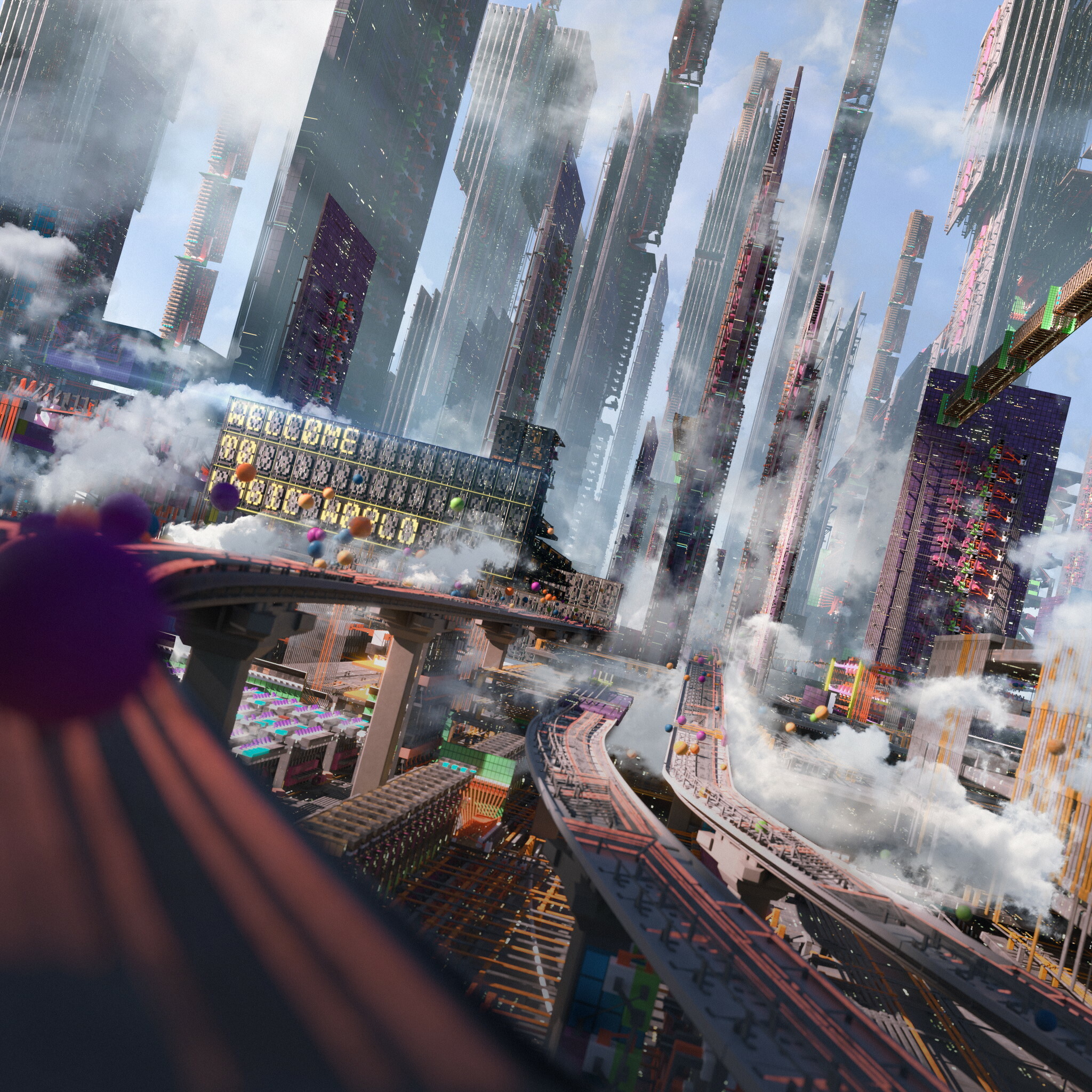
The gorgeous artwork you see on the album cover was specially commissioned for this soundtrack. It was created by the insanely talented Michael Yoshimura. You should definitely check out michael's website, and follow him on instagram @yoshimura_mike. And if you need some art made, commission him!
You can get the album art in ultra high quality here, and you can get a clean version without the foreground text here.
Wait, I thought you said this would happen next Friday, on the 11th?
That we did, discerning one! But in the immortal words of the great Alanis Morissette, life has a funny way of sneaking up on you. Why did this happen a week early? We don't know! We're just reacting to it. Enjoy the early release!
Ok music is cool and all but when are we getting news about game updates
Our development blog, Logic World Wednesdays, will return next Wednesday, February 9th!
---------------------------------------------------
Enjoy the soundtrack! Stream it, add it to your playlists, tell all your friends about it. We're very proud of this music, and we're so happy to be sharing it with you today.
Logic World v0.90.3 is now available
0.90.3 Changelog
- Fixed ExtraData being reset every time a save was loaded. This caused impersistence of all the systems stored in ExtraData, such as Display configurations, the Flag order, and custom Gridlands settings.
- Fixed volume slider values not being applied on game startup
- Removed the secret settings regarding max audio voices, as making these values configurable is what caused the above bug
- Fixed error screen when changing the number of pegs on a Panel Display when there are wires attached to it
- 1x1 Panel Displays are now limited to a maximum of 3 pegs
- Fixed servers allowing the placement of some invalid component types
- Servers now have additional checks to ensure that components being placed are valid
- Server-side checks now disallow making a component a child of its own children
Logic World v0.90.2 is now available
But maybe updates can! We've got a big juicy update for you today, full of improvements and fixes.
0.90.2 Changelog
Building
- Improved performance when grabbing/cloning very large structures by skipping the intersection tests on most frames
- Added secret setting to configure the specifics of the intersection test skipping: MHG.Secret.GrabbingIntersectionTestsSkipConfiguration
- Overhauled the algorithm that determines the default wire rotation. Wires in general should look better now.
- Added setting: "Outline Connected Peg Wires". If enabled, when you look at a peg, all wires connected to that peg will be outlined as well.
- When resizing a component, the colliders are no longer disabled
- When resizing or grabbing causes wires to be deleted, these wire deletions are now properly recorded as part of the same undo action instead of separate undo actions
- Fixed error screen when you multi-delete items that are connected by a wire
- Floating point errors in component position/rotations take significantly longer to accumulate to noticeable levels
- Fixed erroneous red outlines when multi-grabbing items and moving them around quickly
- Removed an erroneously included debug statement that would occasionally spit numbers into the console while placing boards
- The minimum wire length is now slightly shorter
Components
- Changed the minimum Delayer length from 1 tick to 2 ticks. One-tick delayer functionality can be done with Buffers.
- Fixed being unable to adjust the delay length of Delayers in some circumstances where you should be able to
- Fixed text rendering breaking on some Linux systems when toggling a Label's monospace on or off
- Fixed error screen that could occur when moving many Sockets at once
- Fixed not being able to rotate Buffers without grabbing them first
- Fixed errors when changing the peg count of Displays that have wires between their pegs
- Fixed music components making awful clicking noises when they come into our out of the render distance range
- Removed the "applause" sound effect instrument from Singers, as it caused various bizarre issues
Modding
- Overhauled LogicScript. There are a lot of changes, for the new documentation see https://github.com/pipe01/LogicScript/wiki
- You can now edit ComponentList files while in-game, and your changes will be hot-reloaded
Worlds
- Gridlands and Grasslands: changed the angle of the world light source to align with the location of the sun
- Gridlands: fixed boards being fine-placed on the ground sometimes having inverted fine placement point axes
- Test world: fixed not being able to press the big clicky button
User Interface
- Added setting: "Help Menu Starts Open"
- Moving the mouse on the main menu now twirls the background camera a little
- Added several secret settings related to the main menu background camera; they all start with the prefix MHG.Secret.MainMenuBackgroundCamera
- Edit Display Configuration Menu: The "Set All States" UI is now only shown for configurations with more than one peg
- Create Sandbox Menu: hitting the Enter key when typing in the Title textbox will now create a new sandbox
- The console will now automatically clear when it exceeds 400 messages. This limit is configurable with the secret setting FancyPantsConsole.MessageLimitBeforeAutoClearing. This is just a temporary solution to prevent lag; we'll do a proper overhaul of the console soon.
- Removed crosshair options that look like weapon scopes
OBJ export
You can now export your builds to the .obj file format. If you use Blender, use the plugin https://github.com/Red-3D/ObjFix to make your exports look correct.
- Added command: objexport.world [int textResolution]
- Added command: objexport.allworlds [int textResolution]
Audio
- When many components and wires are placed at once (i.e. when a large assembly is cloned), only one sound will now play. Previously you'd get insane sound playage, with one sound effect per component or wire created during the operation. You can revert to the old behavior by turning off the new secret setting MHG.Secret.RestrictCrazyBuildingSounds
- Added support for loading MP3 and AIFF sound files
- Removed the legacy Exclusive Peg sound effects from the game files
- Added an unused sound effect for resizing components
- Added secret setting: MHG.Audio.Secret.MaxVirtualVoices
- Added secret setting: MHG.Audio.Secret.MaxRealVoices
- Tweaked how Barrier sounds propagate in 3D space, and fixed being able to hear them at infinite distance
Music
- Added setting: "Music Frequency"
- Updated the secret settings under MHG.Secret.GameplayMusicTiming for the new Music Frequency system
- All music tracks have been updated to fade in gradually so they don't spook you when they start playing
- All music is now shipped as 320kbps .mp3s in the game files. These are much smaller than the old .wavs, and the smaller file size should fix the game lurching when music starts to play on older hardware.
- Endless Curiosity: added a new instrument to the intro
- Endless Curiosity: tuned some instruments that were out of key
- Endless Curiosity: adjusted frequencies and relative volumes across the piece
- Time and Science: adjusted frequencies in the 6kHz-12kHz range
- Fixed game music not playing until the game was paused/unpaused if a music component was played and "Music Components Stop Game Music" was enabled
Localization
- Simplified Chinese now correctly identifies itself as "简体中文", instead of "普通话"
- Simplified Chinese now uses correctly localized glyph styles for CJK characters
- Fixed Slovenian localization being mislabeled as Slovak and using Slovak sample text
- Added a scrollbar to the list of translators in the language credits, so the list doesn't get cut off if there are too many translators. Shoutout to the huge and awesome German translation team for being the first language that needed this!
- Fixed not being able to scroll down to view more languages if there were enough languages in the languages list
- Added WIP Romanian translation
- Updated translations & translator credits for Chinese (Simplified), Croatian, Czech, Dutch, French, German, Polish, Portuguese (BR), Russian, Swedish, and Ukrainian
Servers and Multiplayer
- Fixed the infamous "cuddle bug", where you'd be shoved around by other players while someone was in the process of joining the server
- The server will now reject building requests with component types not installed on the server (i.e. modded components on an unmodded server)
- The server will now reject building requests for dynamic components with peg counts that are outside the server limits. Server limits can be configured from the new componentrestrictions.succ configuration file.
- Fixed servers getting crazy errors if a connected player attempts to run an admin command when there are no admins on the server
- Previously, the server config value for timeout was called PlayerTimeoutMilliseconds and had a default value of 25000. However, this value was actually in
- seconds*, so connected players would effectively never timeout. The value has been properly renamed, and the default timeout value is now 60 seconds.
- Fixed the integrated server not starting when there are no network interfaces available
Misc. Settings
- Fixed real-time reflection settings not working in some circumstances
- Fixed "See Your Own Shadow" being stuck on after turning it off, until you reload the world
- Fixed footstep sounds playing when you toggle "See Your Own Shadow"
- Fixed your footstep sounds getting louder and louder the more you toggle "See Your Own Shadow"
- Changed "Crouch Time" max value from 5.0 to 1.0
- Changed "Max Inverse Coyote Time" max value from 5.0 to 1.0
- Changed "Player Gravity Scale" min value from 0.0 to 0.1
- Fix typo in some graphics setting descriptions (refelctions -> reflections)
- Fixed typo in a setting description (hobar -> hotbar)
Miscellaneous
- CJK characters will now be displayed in non-CJK languages with Simplified Chinese styling instead of Japanese
- Added secret setting: LogicUI.Secret.CjkDefaultFontStyle, only used for non-CJK languages
- Add secret settings to control clipping planes: MHG.Secret.PlayerCamera.NearClipPlane and MHG.Secret.PlayerCamera.FarClipPlane
- Fixed ExtraData files being created with no value in the Data field
- More information is now logged for some errors
What's Next
Unless any major critical bugs are discovered with 0.90.2, this will be the last 0.90.x version. After the insanity of launch, we badly need a rest. We're going to take a vacation now, but we'll be back in about a month to work on update 0.91, which should be out in January. That update will include many highly-requested features, like the ability to save subassemblies and load them in other worlds.
This next year is going to be fantastic for Logic World. Throughout 2022 we'll be releasing several major and awesome updates, a whole lot of Logic World Wednesdays blog posts, and one or two very cool surprises. If you like Logic World today, then Logic World this time next year is going to blow your freakin' mind.
Thanks again for playing and for caring about our game. It really means the world to us. Until next time!
-Jimmy & Felipe
Logic World v0.90.1 is now available
We're going to repay your kindness with many many updates to Logic World, all of them free and all of them awesome. That starts literally right now, as update 0.90.1 is now available for download!
0.90.1 Changelog
Horrible critical issues
- Fixed being unable to load a world when the system language is set to Slovak or Czech (#91)
- Fixed being unable to load a world when the local network does not support IPv6
Tweaks
- Added a little "Are you sure you want to quit the game?" confirmation popup when you press "Quit Game" in the pause menu. Like all confirmation popups in Logic World, this can be skipped by holding shift while you click the button.
- Moved some buttons around on the error screen
- Added a button on the main menu to open the Creation Hub
- Various aesthetic tweaks to the Languages menu
- Color Picker RGB/HSV sliders are now shown by default (previously they were hidden by default and had to be manually expanded)
- Renamed the secret setting MHG.Networking.Secret.InternetProtocol to MHG.Networking.Secret.InternetProtocolOverride. The client will now select an appropriate protocol by default.
- Renamed the server config value InternetProtocol to InternetProtocolOverride. The server will now select an appropriate protocol by default.
- Added server config value: AllowConnectionsFromADifferentGameVersion
- The gameinfo command now prints the commit sha and the date/time at which the commit was made
- Doubled the placing range of Fixed Placement Points (at the top of Mounts and Flags)
- Fully disabled Unity analytics and hardware reporting
- The default bindings for Increase/Decrease Multi-Wire Placing Offset now include options to use Q/E in addition to scroll up/down. You will need to reset these settings to use the new default bindings.
Buffers
- Renamed Buffer to "Fast Buffer"
- Tweaked Fast Buffer geometry and colors
- Added new "Buffer" component, which is like a Fast Buffer but it has an output peg and has a delay of one tick. Buffers are smaller than Fast Buffers, and can be fine-rotated.
Modding
- Fixed the game not loading C# code files
- Added the following interfaces to LogicAPI: ICustomDataManager, ICustomDataManagerFactory
- Added the following interfaces to LogicAPI.Server: IPeg, IInputPeg, IOutputPeg, ILogicManager, IWorldMutationManager
Localization
Added work-in-progress translations for the following languages:
- Bulgarian
- Chinese (simplified)
- Croation
- Czech
- Dutch
- Estonian
- Finnish
- French
- German
- Hebrew
- Hungarian
- Japanese
- Polish
- Portuguese (Brazil)
- Russian
- Slovak
- Swedish
- Ukrainian
Bugz
- Fixed Relays not propagating the signal in some situations where multiple connected relays opened in the same tick (#111)
- Fixed sometimes failing to start the integrated server because the chosen port was in use. Previously we used an available TCP port; now we correctly use an available UDP port.
- Fixed circuit boards flying away like a butterfly when you try to place them on the bottom of a Mount or Flag
- Fixed Multi-Select still using Z after the initial state entry if Multi-Select was rebound to a different control
- Fixed being able to make Circuit Boards so dark the grid lines disappear
What's Next
We'll be releasing 0.90.2 sometime next week, and then we are finally taking a damn vacation. 0.90.2 will be the last update for a while. Let us know in the comments of this post what fixes and tweaks you'd most like to see in that update.
Happy Halloween!
An update on Logic World development!
As many of you have noticed, the game is not quite flawless. Please go here for a list of commonly encountered issues and ways to deal with them, as well as instructions for reporting any new bugs you discover.
We will be releasing a patch update, 0.90.1, to address as many issues as we can. I would love to get this update out to you tonight, but unfortunately there’s an issue: I have been working very long hours for the past month or so to prepare for this launch. As a result I gave myself a repetitive strain injury. My wrists are in pretty constant pain, especially while I’m typing (editor’s note: Jimmy is dictating to his mother, currently transcribing his words). At this point I really need to take a few days to let myself heal.
Thus, I won’t be working on Logic World for a few days. I expect to release 0.90.1 late next week. I’m sorry for the delay, but my health must take priority 🙂
Thanks for a great launch, my friends! Many more updates to follow.
-Jimmy