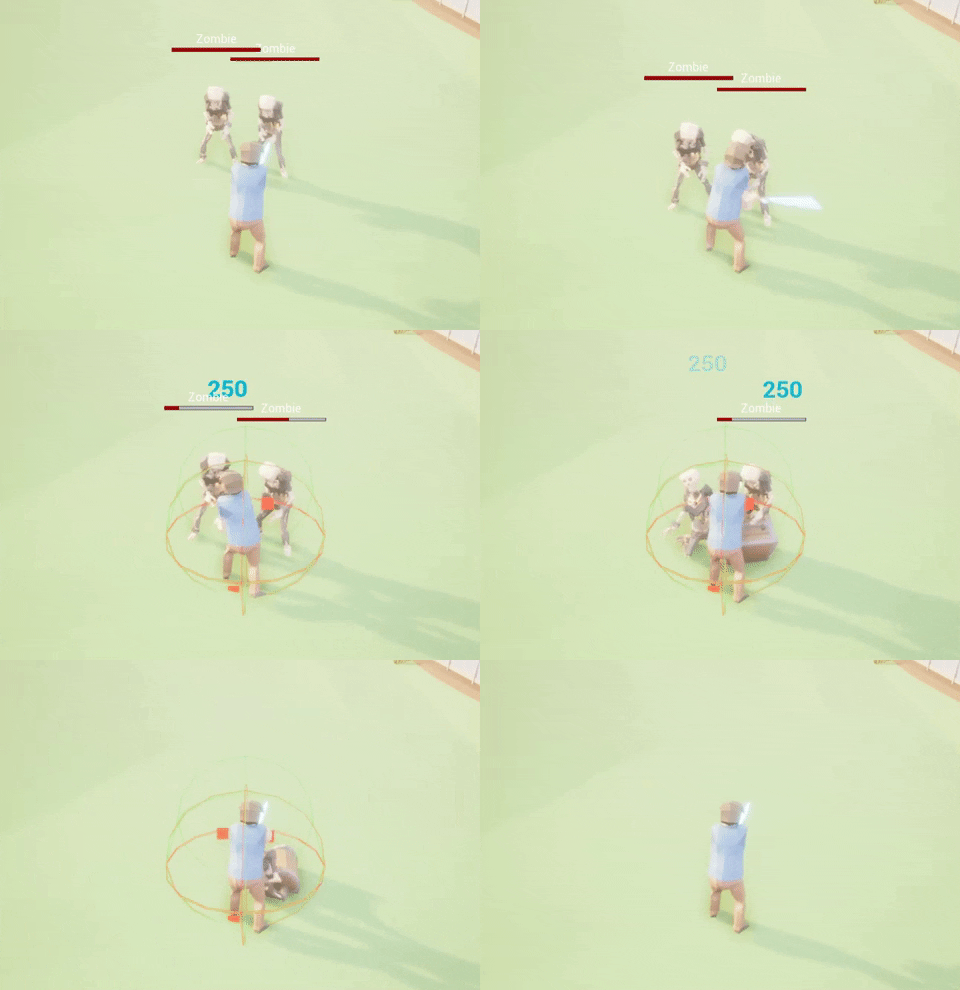
In this update, I add a combat system to the game and try about getting items from monsters.
Get New Sword from Dungeon Keeper
The Dungeon Keeper is on the left side where you were spawned in the game. You can talk to the NPC to get a new sword and use it to combat monster
Attack Monsters
Fight Mode controls the character as follows. - Left Click: Attack monster - Right Shift: Block Attack from Monster - Press 1 Button(Equip Sword): Switch from Normal mode To Fight mode - Press X Button: Switch from Fight mode To Normal mode
Collect DarkSoul
- Every you kill 1 Ghost you will earn 1 DarkSoul - DarkSoul can collect to 200 in this update - Give 200 DarkSoul to Dungeon Keeper you will receive DarkPortal -----------> Next Update - Use the DarkPortal to Teleport to Dungeon -----------> Next Update
Devblog#15 Combat Mode(work in progress)
I would like to inform you about the next update. I have been doing a new Combat system and Dungeon to the game (Not finished). I want to finish as soon as possible.
Dungeon
If you are interested, send a message to ask for key - m.me/loopcraft - https://steamcommunity.com/app/871160/discussions/
See you next update. ːrfga_mayorː
Devblog#14 Update v0.1.3(Export/Import & Unbox)
Export/Import
Player can Export/Import item between Warehouse <-> World Marketplace at LoopEx Station
Unbox
Items that can be opened are items on World Marketplace (Steam Inventory) and the result items will receive on World Marketplace too.
Spooky Gift Box
The rate of opening items in the Spooky Gift Box. * I have increased the time of buying the Spooky Gift Box at Halloween Shop until 31 Dec 2020
See you next update.
Devblog#13 v0.1.2b Convert Item (Fix bug)
I added a Convert Item NPC to the game. This NPC can interact and show Spooky Gift Box in your bag.
This page you can select and convert item to 'New Spooky Gift Box'
Devblog#12 Emergency Update v0.1.2a(fix bug)
This week, I worked on export items to the Steam Inventory. And I found the Important bug that the Spooky Gift Box buys before this update v0.1.2a (November 5, 2020) CAN NOT EXPORT.
The solution to this problem
I changed the type of old version item to 'Lock!! Spooky Gift Box'.
I will have NPC to exchange items (from Lock!! Spooky Gift Box ===> The New Spooky Gift Box) in a couple of days. And 'The New Spooky Gift Box' CAN EXPORT
The purchased after this update v0.1.2a (November 5, 2020) players will receive 'The New Spooky Gift Box' that can be export.
Sorry for the inconvenience
Devblog#11 Update v0.1.2 Buy & Sell items to NPC Shop
Buy Items from Halloween Shop
Pumpkin Seeds - Use this item to grow pumpkins in the plant box.
Fertilizer - Use this to reduce the planting time for 2 hr. And can use for all plants to be added after this.
Spooky Gift Box - This item can export to the Steam Inventory. When opened, will receive the items inside. (The received items and rate of opening items in the box I will show in the next update).
Pumpkin Pie - This item restores your HP +50 points.
Pumpkin Jam - This item restores your SP +50 points.
* [Spooky Gift Box, Pumpkin Pie, Pumpkin Jam]: These items can buy only at Halloween Event (Halloween Shop will close on 20 November 2020). ** [Spooky Gift Box]: Buying this item from the shop, It will be sent to your LoopEx Warehouse and prepare to export to World Marketplace(Steam Inventory) in the next update.
Sell Items to The Farmer Truck
For selling, I decided to add gameplay to sell items. Players have to pick up the items from storage and go to sell at the NPC. And I will add gameplay the same this to grow and apply manure for the plant replace click on the widget in the future update.
Planning for the next update
Export Items from LoopEx Warehouse to World Marketplace(Steam Inventory).
Open Gift Items on World Marketplace(Steam Inventory).
See you next update.
Devblog#10 Small Update v0.1.1a
New in this update v0.1.1a
New shop system. You can buy Pumpkin Seeds from Halloween Shop.
Increase your Plantbox from 3 to 7.
Next update v0.1.2
Buy more items from Halloween Shop.
Sell items to shop to earn money.
Temporary User Inventory to know the items are you received.
Devblog#9 The New Update & Halloween Event
The New Update & Roadmap
Hello all players. After a long time away, I came back to update this game again. In this version, I have changed the map to 'The Local Farm' map. This map you will play in the single-player mode. Later updates I plan for the players to can buy and sell items to NPC, decorate your farm, grow many fruits and vegetables, and fight with monsters. All items received will be stored on the server. There will be some items that can craft and export to the Stream Inventory. However, in this mode, you can not meet the other players until the Multiplayer mode has been updated. I expect it will take about 14 months from now. I have a friend who owns the Villages™ (AKA simonjames247) will take over as an Engineer to develop that mode and I will change my role to Game Designer and determine the direction of this game.
In this update (Halloween Event)
This update is just around Halloween. So I invite the players to grow pumpkins in the glasshouse. The pumpkins plant in the plant box and take 12 hours to grow before harvest. The product will receive 12 Pumpkins and 1 Shell (A new currency that will use to buy the item in this map and cosmetic things). For the first time, the pumpkin seeds will give away from the system 30 each. And the next update v.0.1.2, I will add the shop to let players purchase more pumpkin seeds and New Halloween Collection items.
Don't worry about the old version items
The items from the old game version(Log, Scrap Stone, Wood, Brick) are store in the server not deleted. I will plan to convert them to a new database in later updates.
Devblog#8 Sawmill & Brick Maker
Update v0.0.7
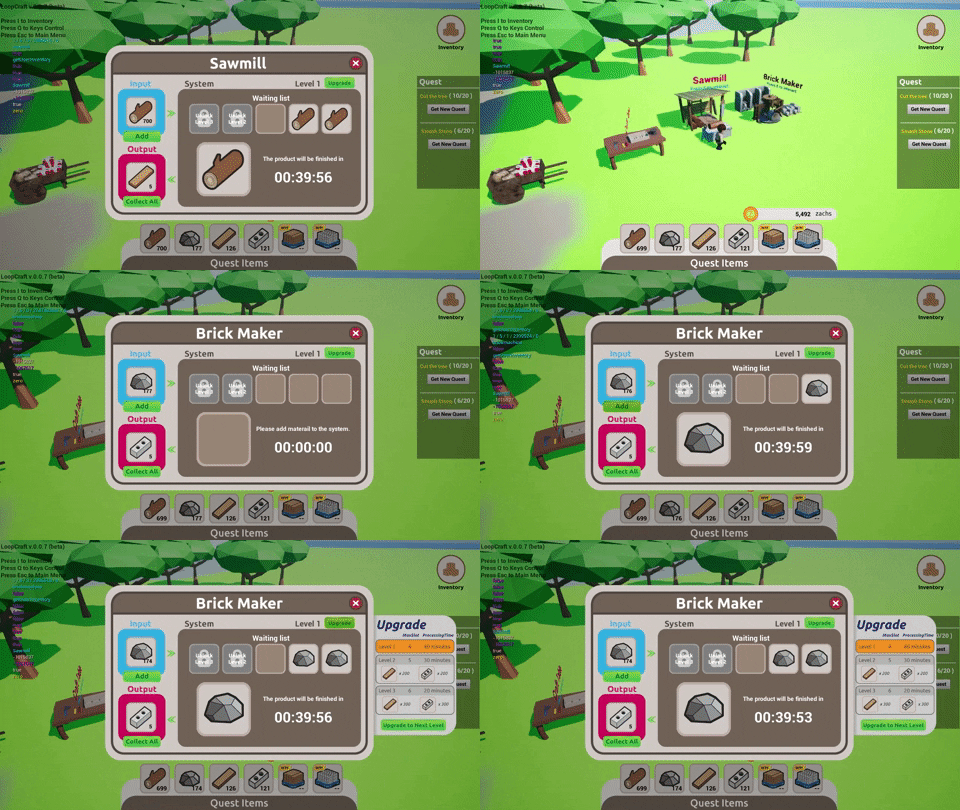
In this update I add 2 new transform system in-game
Sawmill - The Log transformed into Wood
Brick Maker - The Scrap Stone transformed into Brick
1. Adding Material
Material items in the bag will show on the input slot. Press the add button will cause the item to be added to the system and the time will start to countdown. Adding more items, it will stay in the waiting list area. And when the items that are finished work Items that are waiting will be activated automatically.
2. Collect product
When the product completed, the item will move to the output slot. You can collect it into your in-game inventory.
3. Upgrade transform system
Upgrade the system level to reduce time and increasing the number of the slot for loading raw materials
If you are interested, send a message to ask for key - m.me/loopcraft - https://steamcommunity.com/app/871160/discussions/
See you next update. ːrfga_mayorː
Devblog#7 New Stone Zone
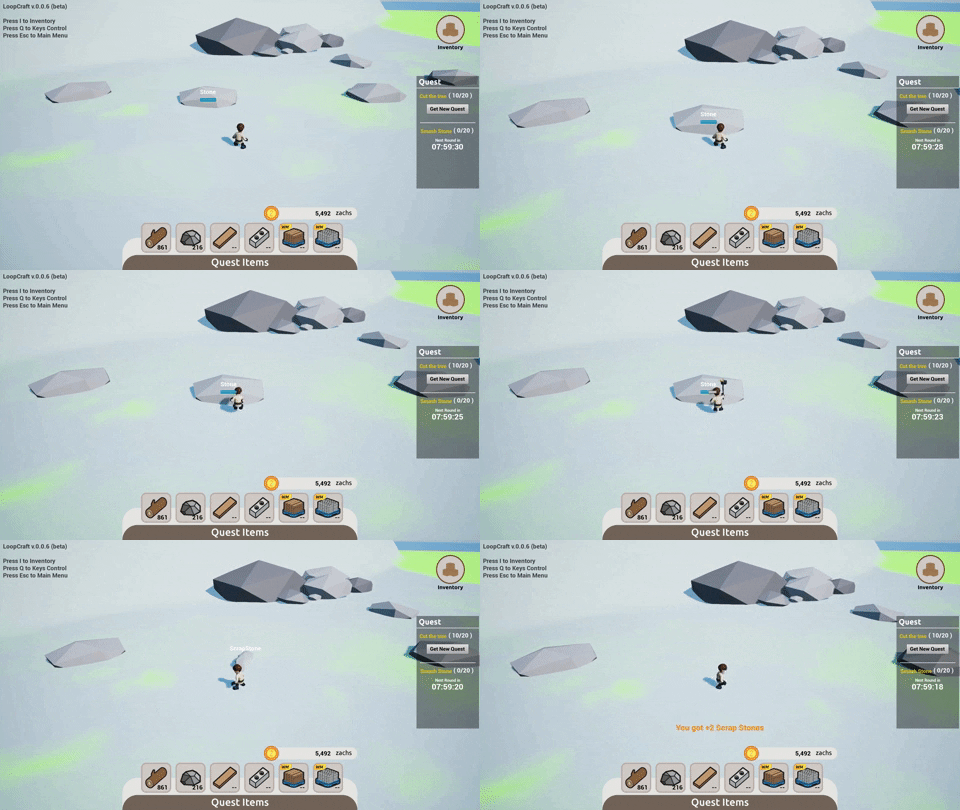
In this update v.0.0.6
I have changed the backend code that connects with the server and improved code with Steam Inventory Service.
Improve about actor name, not show alway but will show only the character approach.
Add new hammer animation.
Add new zone to smash Stone and collect Scrap Stone for processing to new products in the next version.
If you are interested, send a message to ask for key - m.me/loopcraft - https://steamcommunity.com/app/871160/discussions/