Explanatory pages have been added in the conductor's music stand in the tutorial.
Fixed errors that caused the menu to not work correctly with some headsets.
Compatibility with most VR headsets available on the market has been improved.
Fixed most of the bugs that have been reported.
Improvements to all currently available music pieces.
Optimization has been improved.
Hotfix 1.2.2
General performance improvements.
Minor bug fixes.
Now on the music stand you can see the first page of the score.
Hotfix 1.2.1 (left-handed option)
Added the left-handed option in the Options menu. note: In the tutorial the left-handed option is not available in the explanation, but it is available for the playable test. note: The left-handed option is not yet available in casual mode.
Added the option to choose the skin color of the hands (3 skin tones) in the Options menu.
Fixed a bug that prevented obtaining the "Focus" Baton.
A bug that prevented getting 100% accuracy in some musical pieces has been fixed.
Performance optimizations.
1.2 Patch
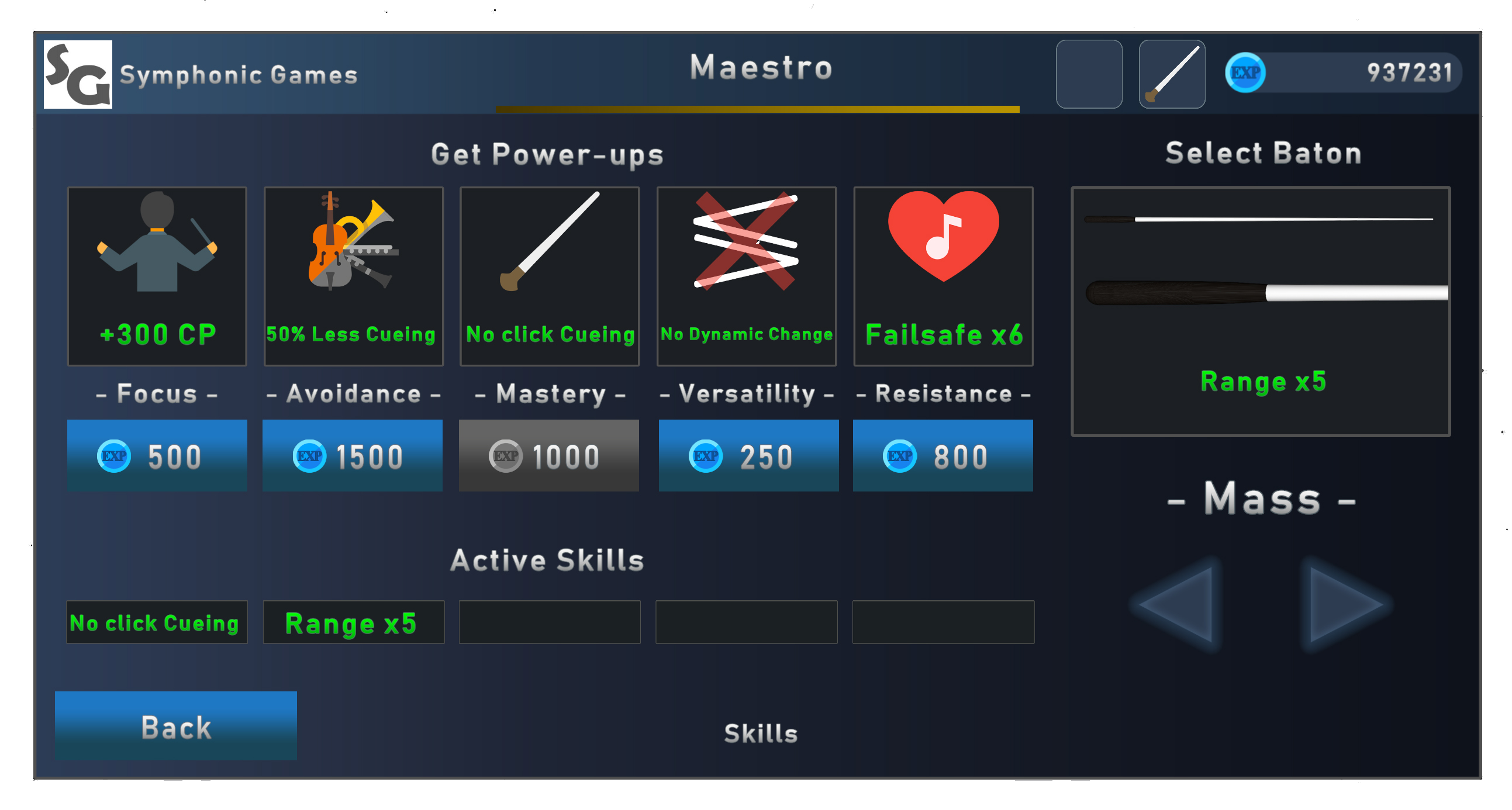
Welcome to patch 1.2! This update brings some important gameplay changes (Power-ups and new Skills) and many improvements. We have taken a little longer than we had planned for this update, but after a lot of testing it is here and we hope you enjoy it. We have also added the first movement of Beethoven's Symphony No. 5. We know you're looking forward to conducting new pieces and we've been working hard on it. We make each piece sound its best and offer a 100% score-based conducting experience. It is a handcrafted work of musical synchronization that has taken us a little longer than planned, but we already have several pieces of music almost ready to add to the repertoire within the next few weeks. The main changes in this update are the Power-ups. As you well know, batons provide skills that help conducting. Now, in exchange for experience, temporary skills can be added for each concert. For example if you activate "Maestry" power-up during a concert you won't have to click the ensure entry by instrument. By using baton skills with Power-ups, the conducting experience will be totally different at each concert and will adjust to the conducting style of each player.
Power-ups
Focus
Skill: +50 CP Add 50 conducting points for the next concert. Every time you get a new title another 50 conducting points are added up to a maximum of +300 CP.
Avoidance
Skill: 50% Less Cueing The number of times you have to ensure correct entries by instruments during the next concert is halved.
Maestry
Skill: No click cueing No need to click to ensure correct entries by instruments during the next concert. You will only have to point your hand at the instrument.
Versatility
Skill: No Dynamic Change There will be no Dynamic Changes during the next concert.
Resistance
Skill: Failsafe Avoid a failure during the next concert. Every time you get a new title Failsafe is added up to a maximum of 6.
Beethoven's Symphony No. 5
The first movement of Beethoven's Symphony No. 5 has been added. In gameplay you can see the use of: Baton: Prestige (Range x16, No Click Cueing, No EXP) Power-ups: Resistance (Failsafe x6), Avoidance (50% Less Cueing) Game Mode: Realistic
Creative Mode
We are still working on more features for the creative mode and especially on new animations that detect note by note, so the visual realism will be far superior to the current basic animations. At the moment in this update we add a sensibility option to adjust the bpm detection to the player's needs. note: the sensibility before this update was at 1.
Patch Notes
Added Symphony No. 5 - I. Allegro con brio (Beethoven).
New Skills: 50% Less Cueing, No Dynamic Change, Failsafe.
Sensitivity adjustment for BPM detection in Creative Mode
Improvements to all currently available music pieces.
Clicking on "Start" now activates a red sphere to start the concert manually.
Fixed a bug that made the spheres stay green for a while.
Fixed a bug that caused errors when trying again (try again) to detect spheres.
Fixed a bug that reset the graphics options.
Now when you get the title "Maestro" the concert halls are with the full audience.
General optimizations and minor bugs fixed.
Hotfix 1.1.2
Symphony in D "La Veneziana" – I Allegro by Antonio Salieri added.
Fixed a bug with "Water Music - G.F.Händel".
Fixed a bug of some Batons when starting the music after a Fermata.
Fixed a bug when trying to play a piece again after finishing it successfully.
Fixed a bug related to audience applause.
Skills on some batons have been improved.
Minor optimization improvements.
Minor bug fixes.
Customizable SoundFont for Creative Mode
What is a SoundFont?
SoundFont it’s a kind of library which contains the samples associated to each instruments. Basically it’s the sound quality of each instrument.
A SoundFont contains hundreds of samples and instruments. Also, there are hundreds of SoundFonts available on the web! free or not, with different styles (general, classic, jazz, electro...), with different quality and size. The possibilities are huge, quite infinite!
SoundFont(R) is a registered trademark of E-mu Systems, Inc.
Maestro VR uses the SoundFont as the main sound source and now you can modify it and use the one you want or even create your own libraries to get the orchestra to sound the way you like it best.
This is an option that requires advanced computer skills. But you can create your own sound libraries for Maestro VR. Have a look to these two applications for editing SoundFonts:
Viena. Free and exhaustive functions. Interesting also to understand how works a synthesizer based on SoundFont. Polyphone. Free and easy-to-use. Perfect for copy / paste presets between SoundFonts. Also there is an On-line SoundFonts repository with a powerful search engine. A must have!
Tips: try General Midi SoundFont to get a large variety of instruments and a compatibility with Midi norm.
Add a new SoundFont to Maestro VR
1. Download a SoundFont (.sf2) from the websites.
2. Go to the game installation folder and search for the \SoundFonts folder inside Maestro VR_Data.
4. Launch Maestro VR and select the Soundfont in Creative Mode.
And that's it!
Patch notes 1.1.1
Soundfonts (.sf2) can now be added for creative mode.
Minor bugs fixed.
Maestro VR - Casual Mode
As many of you know, Maestro VR is a rhythmic simulator game that is quite technical and strict in terms of orchestral conduction. This makes many of you find it difficult to play. It is what we intend. We want the player to require a lot of practice before unlocking batons that will give you freedom to move your hands.
But we still want to make the conductor experience a little more accessible to a general public and we love to make your requests. That is why we have been working for some time on a game mode focused on casual players and inspired by traditional rhythm game mechanics. The casual mode implements the hand detection system, so the gameplay should be a bit more comfortable. We did not plan to release this mode so soon, but thanks to the great reception of Early Access we want to hear your opinions on this game mode to further improve the experience of conducting. At the moment in casual mode only Water Music by Händel will be available. We want to get as much feedback as possible before adding more pieces of music.
We also want to announce that we are working on support for Leap Motion, since we have implemented Hand Tracking for the future version of Meta Quest and we are liking gesture recognition a lot. That is why we'll implement it in PCVR through Leap Motion Controller.
All your feedback is very important to us, so do not hesitate to write in the forum or send us an email to contact@maestrovr.com
Patch notes 1.1.0
Casual Mode implemented.
Hands motion detection improved.
Water Music by George Frideric Handel available in Casual Mode.
Minor bugs fixed.
Hotfix 1.0.5
Minor bugs fixed.
Revised and improved some batons skills.
Fixed issue with baton skills in creative mode.
Maestro VR Early Access Begins!
Maestro VR is an educational rhythmic video game exclusive for virtual reality, which aims to simulate the experience of conducting an orchestra using realistic technical patterns that will help understand the complexity of a conductor's work. We also intend that Maestro VR become an educational tool to make known how an orchestra works and how it has evolved through different periods of music history. Currently in this first version in Early Access, Maestro VR has a Tutorial that teaches the main game mechanics and the main instruments of the orchestra. This first version has 18 pieces of music available to play in the main mode of the game. During the weeks following the launch of Early Access we'll add more music pieces from different eras. We'll be focused on improving and observing how these first 18 pieces of music work. In creative mode, 2 pieces of music are available in midi format and others are available in the Steam Workshop. To modify midis files and share them in the Steam Workshop we recommend reading the Game Manual. We hope you share your creations in MIDI format through the Steam Workshop, since it is very easy to add it to the game with just one click when subscribing. One of our goals for the Early Access release is for you to be able to share MIDI files with the community. Creative Mode allows you to manipulate tempo through the game's main spheres system and through a hand detection system that we're still working on improving. This last system will be implemented later for another Game Mode focused more on the casual player, being a simpler system and more similar to a rhythmic game of hand movements. Soon we'll give more information about our Road Map.
We hope you enjoy this first part of Maestro VR and we look forward to all your feedback, as it will help us improve and make the orchestral conducting video game that we all want.
We wish you good concerts and lots of practice... lots of Practice!!!
Andrés Soto & SG team
Maestro VR - Early Access
Why Early Access? “Maestro VR still has a lot of development to do. Early access is extremely valuable to us at this stage, as it will help us get a better idea of how people use the app and what kind of improvements they would like to see. We'd also like to foster a community around the app that will get people to share their creations in midi format supported by the app, which is one of the main ways Maestro VR shines as a teaching tool.”
Approximately how long will this game be in Early Access? “With the current list of upcoming features, a realistic estimate would be a full release in mid to late 2023.”
How is the full version planned to differ from the Early Access version? “The full version will include features such as:
More musical pieces to conduct in different Eras.
Online Mode.
Improved animations.
More Concert Halls.
Additional midi functions in Creative Mode.
Various optimizations.
These features will be slowly added to the game during the early access period. Community feedback will play a big role in determining which of these should be prioritized or if there are other crucial features that need to be added.”
What is the current state of the Early Access version? “Maestro VR currently features:
More than 20 musical pieces ready for conducting.
5 Classical Music Eras.
3 concert halls.
14 Batons with skills.
4 difficulty modes.
Experience and Titles System.
Load custom Midi files in Creative Mode.
3 Game Modes in Creative Mode.
More than 50 Steam achievements.
Tutorial translated and dubbed into 8 languages.
”
Will the game be priced differently during and after Early Access? “There are currently no plans to change the price of the Early Access version, though this will change after Early Access ends.”
How are you planning on involving the Community in your development process? “Community feedback will play a big role in determining which next features to prioritize. The community will also be invaluable when it comes to creating and sharing midi files for conducting new pieces of orchestral music.”