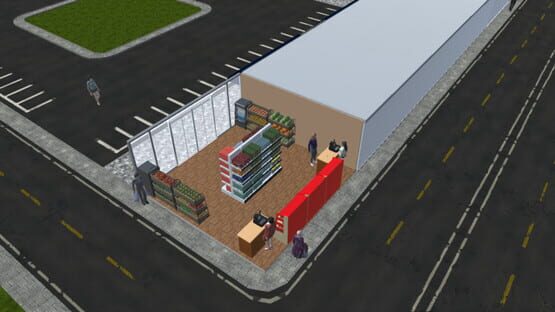
Market Tycoon V. 1.1.22 (New Feature & Improvements)
In this version of Market Tycoon, we added a new feature to help you know where an item can be placed.
When placing or moving an item, there would be a semi-transparent clone of the item you are placing on the positions you can place your item in.
We also increased day length by 25% please let us know if it needs any change.
This update includes, but not limited to:
• Placing indicator feature.
• Increased in day length by 25%.
• Few bug fixes.
In our previously announced that the next update will feature a new staff management system, we are still working on it and we expect that it would be ready in the following week.
Thank you and please if you found any bugs, let us know through our email contact@protectiongames.com or post on the Bug Reports thread here.
Market Tycoon V. 1.1.21 (New Feature)
In this version of Market Tycoon we added a new feature.
Now you can know what and how many items are on the Rack, Fridge, or Freezer.
More features to come in the next update, let's say "Staff Managment"
Market Tycoon V. 1.1.19 (Bug Fixes)
There isn't much to say about this update. More bug fixes, this one include a bunch of them.
Bug fixes including but not limited to:
•Grammer/Spelling mistakes.
•When item is expired it removes the entire stock
•Nigative stock
•Customers not going to new cashier
•Other minor bug fixes
We also added in-game bug reporter in case your game could not be loaded.
Please if you found any bugs, let us know through our email contact@protectiongames.com or post on the Bug Reports thread here.
Market Tycoon V. 1.1.17 (Item Popularity)
In this version of Market Tycoon, we've added a new feature "Item Popularity" now you can know what items people are more interested in. In the items menu as well as the Item Stats & discount page (Discounts previously) there will be a popularity indicator, as the item get more interest from your customers a + sign will be added and vice versa less interest - sign will be added, now be aware just because an item has - sign does not mean it's not selling, it just means that this item sells less compared to other items. The popularity indicator will get more accurate as time passes by. You will need to explore, items that have not made it to your market will have a ???? sign indicating that interest for this item is unknown.
Here is how popularity feature looks from the items menu:
Thank you, and please if you found any bugs, let us know through our email contact@protectiongames.com or post on the Bug Reports thread here.
Market Tycoon V. 1.1.15 (Improvements)
In this version of Market Tycoon we improved on the message system, insted of just saying "X has expired" it will now tell you exactly how many of that item is expired for example "12 Cans of tuna has expired".
We also fixed how the items are taken from the back or under and it makes the market look weird, now beware that after this update some items will look like this on old game saves
to fix that simply wait for the item to be sold and restock that item by going to the item menu and buying it (Do not use the restock all feature or restock from item menu) or you can destroy the item and buy it again. This problem will not happen on new game saves nor will it happen if you bought the item again from the items menu it will only happen for some items on old game saves and it will be fixed once you sell or destroy the item and rebuy it again.
Here are some before and after images:
Thank you, and please if you found any bugs, let us know through our email contact@protectiongames.com or post on the Bug Reports thread here.
Market Tycoon V. 1.1.14 (What shelf this items go with?)
Many were confused about knowing what shelf can an item be placed in, and for that issue, we added a new button on the items menu called "Accepted shelves" when clicking this button you will be shown all shelves that this item can be placed in.
Please if you found any bugs, let us know through our email contact@protectiongames.com or post on the Bug Reports thread here.
Enjoy,
Market Tycoon V. 1.1.12 (Financial report bug fixed)
Market Tycoon V. 1.1.12 This is a small update fixing the financial report bug, unfortunately, if you experienced this bug the update won't fix it but it will not happen in the future or in your current game and the financial report will work as expected, it will not load the lost data as the bug caused it not to be saved.
Please if you found any bugs, let us know through our email contact@protectiongames.com or post on the Bug Reports thread.
In Case you missed Market Tycoon V. 1.1.11 release notes, here it is:
A new feature has been added, restock single item, to do that a new button has been added next to the move and destroy button, to restock click the restock button from the items menu and simply click on the item you want to restock.
Market Tycoon V. 1.1.9
In this version, a new feature has been added, move item and destroy item.
Open the item menu and on the left you will find 2 new buttons Move and Destroy, to move an item click on move then select the item you want to move and simply place it to a new place. To destroy an item click on destroy then click on the item you want to destroy, beware, you will only get 20% of the item value by destroying it.
Market Tycoon V. 1.1.6 (Bug Fixes and Multiple Game Saves)
In this update, multiple game saves feature has been added. When clicking Continue in Main Menu you will have your old game save under the name AutoSave0, please be aware, Market Tycoon does not have Auto-Save feature, in here it's just used as a namespace. After saving your new game the AutoSave0 namespace will be deleted and you will be able to use your new game save under a name of your choosing. Technically there aren't a limit for how many game save you can have, it's as much as your machine can save.
This update includes but not limited to:
• Multiple Game Saves Feature.
• Customers in market counter fixed.
• Small AI improvements.
• Slight Graphics improvements.
• Minor bug fixes.
Please if you found any bugs, report it.
Market Tycoon V. 1.1.4
In this update more bug fixes, this update include but not limited to:
• Fixed some Saving/Loading Issues. (If you experienced a save/load bug this update MIGHT not fix the problem, but the bug should not happen again if you started a new game.)
• Fixed a small problem on restocking items sometimes it would not restock. (In a future update, we will give you more choices on what items you want to restock other than restocking the whole rack, fridge, or freezer. We also wanted to inform you that you can restock items by selecting the item you want to restock from the items menu and act like placing the item on top of the existing one to restock it)
• Few more minor bug fixes and improvements.
Thanks to everyone who has reported any bug found, please if you find a bug, report it we are always listening.