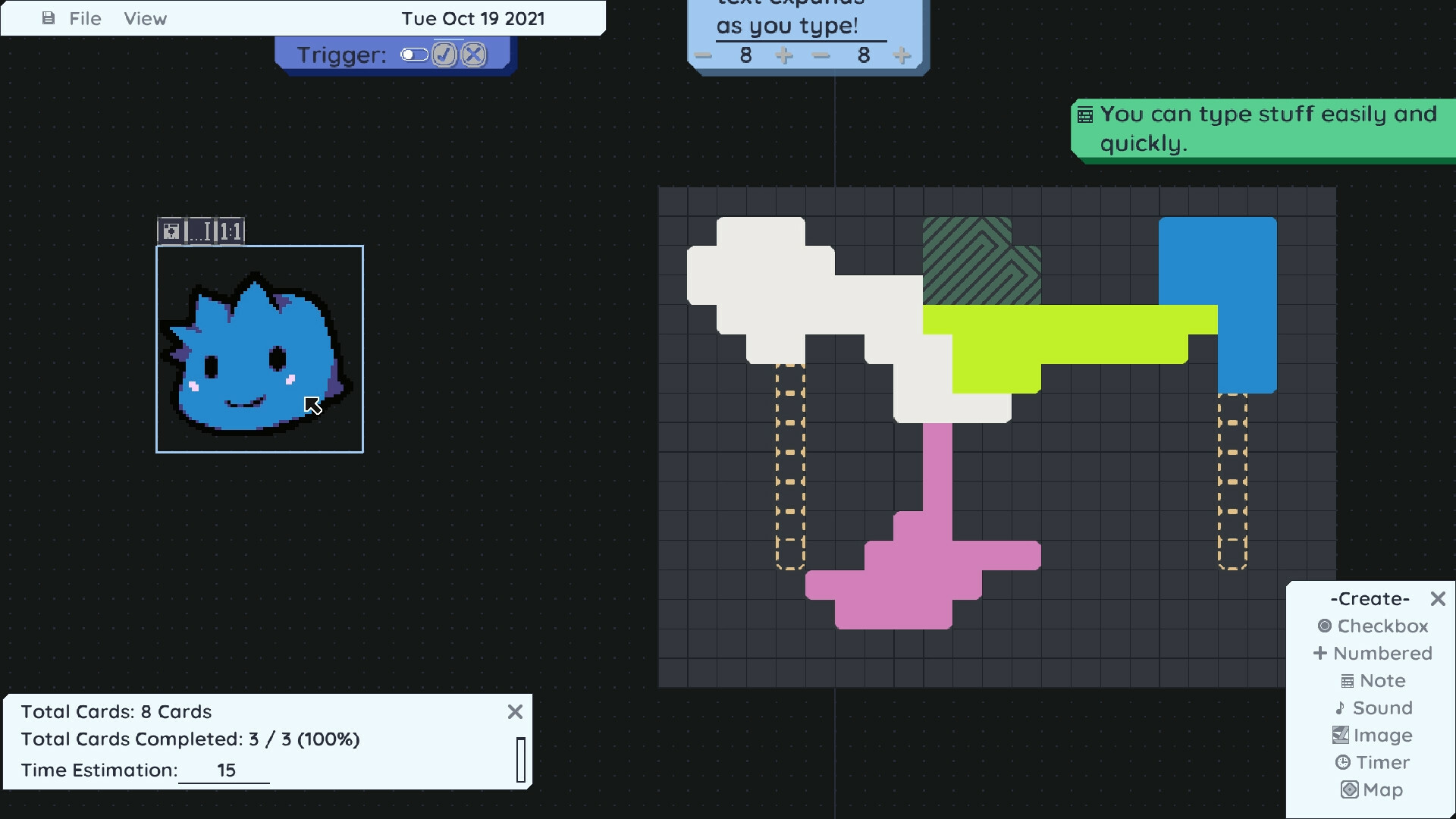
Looks like I'll be able to keep it up with monthly (or more frequent) updates to MasterPlan, which is good. Here's v0.8.0 Alpha 6 - this update is mainly a quality of life and bugfix release, and primarily features a few things to improve workflow and make MasterPlan more stable.
To kick things off, there's one major-ish addition in this update, which is the Hierarchy menu.
Hierarchy Menu
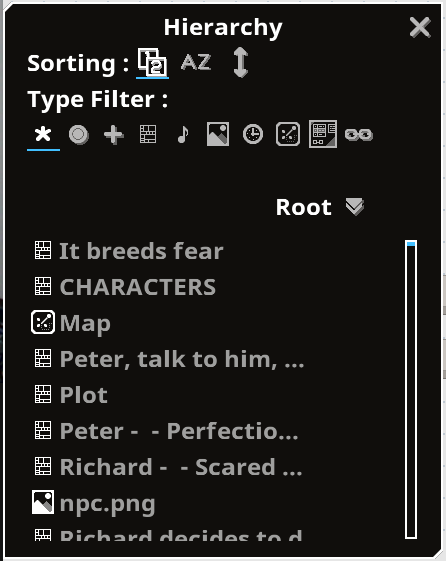
The Hierarchy menu allows you to easily view your project at a glance and see it in an ordered list. You can filter the list by card type, or change the sorting on the list to alphabetically or spatially sorted. It's not necessarily the fastest thing on earth, as there's still ways it could be optimized to run smoother. However, it's still useful, so I decided to push it out in its current state. Hopefully you'll find it useful as well for navigating larger projects!
Automatic Backups
Automatic backups have been re-implemented from version 0.7, as well, giving you the ability to automatically create backups of your projects on a timed basis (i.e. every 10 minutes). By default, every saved project will create backups automatically and they'll be created in the same folder as the project itself. MasterPlan will also automatically delete old backups that exceed a certain maximum number per project (i.e. 6 backups per save file). Of course, these options are tweak-able in the settings section. (As an aside, MasterPlan will also not delete a backup project if you're currently working from it.)
By means of these automatic backups, you can have a bit more peace-of-mind. Of course, you may still want to use a versioning system or other manual backup system to be absolutely SURE you don't lose any data / information.
Roadmap
I've neglected creating a public roadmap for awhile now, and for that, I apologize! I decided to go ahead and create the roadmap over on the same site where the documentation is held, the github repository for the project. This way, any users can keep up with the current progress of the project and see how far it has to go before completion. Please continue to feel free to give feedback for me through the usual means (here, Discord, etc.) if you feel like a feature should be added or removed, or perhaps bumped up in priority to arrive sooner than planned. I appreciate the feedback I've received so far, and will continue to try to make MasterPlan work even better.
Sub-page Offsetting Bug
This update has a fix for projects that used sub-pages and found that they pointed to the wrong destination pages on load. Saving such projects now should correctly point to the desired destination page (yay!), but unfortunately, I have not been able to automatically fix those projects that have this issue (aww!). Really sorry about that!
I wanted to resolve this cleanly, but there wasn't an easy "one-size-fits-all" solution for this problem. If you have a project that uses subpages and the destinations are wrong (i.e. you open a sub-page and it doesn't lead to where it should), you'll have to manually fix this. However, this update does feature a tool to flatten projects, pulling all cards out of sub-pages to the root page to allow you to easily restructure, and the "lost" data may still be in your project, allowing you to easily rebuild it (you can search for the data using either the Find tool or the new Hierarchy tool to search for extra "Root" pages, or just flatten the project to pull all data from all sub-pages to the root page). After flattening the pages, you should be good to simply delete all existing sub-page cards and restructure.
Sorry about that, again, and thanks for your patience in regards to this!
___
Anyway, that's about it for the big stuff! Hope to see MasterPlan continue to grow, and I thank you for being patient with MasterPlan's progress.
____
Here's the detailed changelog:
QoL: Adding Hierarchy menu. This menu allows you to see your project at a glance with each card listed under its named page. You can filter out cards by card type, or sort them alphabetically or by position on the page.
QoL: If MasterPlan crashed when attempting to autoload a project, it won't automatically try to load that project again when restarted.
QoL: Sub-page Card screenshots now resize to fill the Card, rather than being cropped.
QoL: You can now double-click on Sub-page Cards to open them, rather than needing to press their Open buttons.
QoL: Zoom goes out to 5% now, instead of 25% minimum. Adding a shorcut for this zoom level as well.
QoL: Adding Flatten Project tool to Edit menu. This tool allows you to pull all cards from sub-pages and place them into the main / root page, organized horizontally going to the right.
QoL: Reworked map and image icons for enhanced readability.
QoL: Adding keyboard shortcut to open the help documentation on Github.
QoL: Adding keyboard shortcuts (the function keys, by default), to open the Create, Edit, Hierarchy, and Stats menus.
QoL: Scrolling through menus via the mouse wheel is now absolute, rather than being relative to the overall "height" of the menu.
QoL: MasterPlan will now warn you on load if a project contains orphaned pages (pages that cannot be reached through sub-pages).
RE-IMPLEMENTATION: Re-implementing Cut Card context menu option / keyboard shortcut.
RE-IMPLEMENTATION: Adding mouse wheel sensitivity for scrolling menus.
FIX: Files that no longer exist will now be removed from the Open Recent... menu. This triggers when any project is attempted to be loaded.
FIX: Loading a recent project now properly closes the file menu.
FIX: Triggering Find to find a Card on another page no longer deselects the text (i.e. Ctrl+F no longer cancels out editing the find text).
FIX: MasterPlan should no longer crash if a Card is too large (i.e. if it requests a texture of a size that is too large for the video card to generate. Instead, the texture size will be capped).
FIX: MasterPlan should, again, no longer save sub-pages incorrectly, such that sub-pages point to incorrect locations. If you have a project that has sub-pages in the incorrect order or pages that are inaccessible from sub-page cards, unfortunately, the best result would probably be to use the Flatten Project tool to effectively start over - really sorry for the inconvenience on this bug!
FIX: MasterPlan should, again, be compiling partially statically on Linux, such that SDL is no longer a dynamic dependency (so you shouldn't have to install SDL to use MasterPlan).
FIX: Quick hot-fix to fix not being able to click buttons in the context menu. Whoops!
FIX: Also fixes the context menu contents being in the previous position for a single frame.
FIX: Link Cards can now have customized colors.
FIX: Window transparency will be more accurately set / the window won't be very slightly transparent sometimes.
CHANGE: Keyboard shortcuts have been edited, so be aware of this - you may wish to reset all shortcuts to default, to ensure there's no keyboard shortcut conflicts.
CHANGE: Previous sub page menu is now at the bottom-center, by default.
Adding basic roadmap on Github: https://github.com/SolarLune/masterplan/wiki/Roadmap
Anyway, thanks a lot! Really appreciate everybody's support, as usual~
v0.8.0 Alpha 5 Release!
Hello!
Sooo here's another update for MasterPlan, this time bringing it up to v0.8.0 alpha 5!
As usual, let's go over the bigger stuff first:
Link Cards
A new type of Card, the Link Card, has been added to MasterPlan!
You can use this to point to Cards on your project and jump to them easily, giving you control over the structure of your plan from a "macro" scale. If the Link Mode is set to File Mode (the disk icon), then you can also use Link Cards to link to files or programs on your computer to open or execute them, right from MasterPlan. If the card links to a file, then MasterPlan will have the OS open the file using whatever the default program that's associated with the filetype is.
(As an aside, note that in this update, any copied Sub-Page Cards will no longer reference a single sub-page. This is because you can use Link Cards to point to sub-pages.)
As usual, be sure to back up any existing important projects before loading and saving it with this new version of MasterPlan!
Card Sliding
Cards can, once again, be moved via the keyboard! If a card moves into another one, they will swap position, and you can move multiple Cards at once by simply selecting them beforehand. This was a good feature back in v0.7, and it's good to have it re-implemented in v0.8 (though it's still not absolutely perfect). Tab and Shift+Tab (by default) can also be used to cycle through Cards in order, going from the top-left to the bottom-right.
Window Transparency
In MasterPlan v0.7, there was a feature to make the background of MasterPlan's window transparent, thereby allowing you to literally see through it to windows in the background. While I would love to reimplement this feature, unfortunately, the new framework I'm using doesn't support it out of the box. For now, I've implemented window transparency. With window transparency, you can make the entire window transparent on certain events (i.e. when you tab away from the window, when the mouse exits MasterPlan's window, etc). _____
In any case, those are the real broadstrokes of this update, along with a variety of other fixes and improvements. For past changelogs or the manual, feel free to see the Wiki here.
Adding the Link Card type. The Link Card can be used to link to another card, either on the current page or another sub-page. This is done by pressing the Link button - after a Card is linked, the card will change color slightly and an icon will appear, indicating a link is established. Pressing the "Jump" button on the Card (or pressing Enter) will then jump to the target location. Link Cards can also be set to link to programs or files on your computer and can open them right from MasterPlan. Pressing "Execute", in this case, will attempt to run or open the file as applicable.
RE-IMPLEMENTATION: You can now move and select cards via the keyboard. Moving cards in this way will attempt to have them swap with their neighbors.
RE-IMPLEMENTATION: You can now again skip numbering top-level cards (so they can serve as categories, effectively).
RE-IMPLEMENTATION: Adding option to outline the window in a colored rectangle.
QoL: Adding window transparency.
QoL: Arrows no longer point to Cards quite so oddly.
QoL: Keybindings can be searched by key / mouse button name as well now, rather than just by shortcut name.
QoL: The rows for each shortcut in the keybindings section now have alternating background colors for readability.
QoL: The screenshot area for subpages are now shown by means of a rectangle and a small camera icon beneath the sub-page name displayed on the grid background.
QoL: Loading projects now outputs more information to logs.
QoL: Separating keybinding for open / close sub-page out to two separate bindings.
QoL: Adding setting to focus on cards when undoing or redoing.
QoL: Add Log message when disconnecting all arrows from a Card via the keyboard shortcut.
QoL: MasterPlan should now be built at least partially statically moving forward, making for a smoother experience on Linux without the need to install SDL-related dependencies.
QoL: You can now use zooming and panning shortcuts while connecting Cards via arrows.
CHANGE: Moving borderless window to Visual options section.
CHANGE: Rewording some shortcut names.
MINOR CHANGE: The bar in scrollbars are now colored and positioned properly.
FIX: Map palette no longer closes when clicking away from the editing map.
FIX: Maps are no longer blank right after autoloading on Windows.
FIX: A single path in the Open Recent... menu is now no longer blank.
FIX: Moving from subpages where you're editing text now properly deactivates the text editing mode. This also fixes the inability to use shortcuts after leaving the subpage in this case.FIX: Create menu is now sized a bit more properly.
FIX: MP no longer crashes if the custom font path is a directory.
FIX: Copying sub-pages no longer reference the original page. Instead, the copy just has the name and leads to a new, blank page. NOTE: This applies to any existing v0.8 saves with multiple sub-pages referencing a page.
FIX: MP no longer crashes if placing cards too far away from the center. Previously, this was about the distance away from the edge of the grid as that is from the center.
FIX: Minor fix - copying and pasting cards now only displays a message if cards are actually selected / in the paste buffer to do so.
FIX: Don't allow numbered cards to have negative tasks completed (Thanks, @Peter0x44!)
FIX: MP no longer crashes if a theme lacks a color for an element. Instead, the event is logged at the bottom-left and the element is colored bright pink to destroy your optic nerve for making such an obvious mistake you piping hot fool.
FIX: MP no longer crashes if opened when using a theme that no longer exists. Now it defaults to Sunlight if the theme is no longer available for whatever reason.
FIX: Cards that are linked via arrows with a joint and placed very closely to the joint won't point to the top-left corner of the screen.
FIX: Saving a project should now work a bit more reliably as we now manually sync the changes to disk after writing the file out.
FIX: Contextual buttons above Maps and Images now are colored properly regardless of theme.
FIX: Creating Cards via the Create menu now selects them automatically.
MINOR FIX: Pressing Enter / Return when editing text no longer triggers the key press for shortcuts that use it.
MINOR FIX: Horizontal spacing improved for rows of elements with manually defined spacing.
Thanks a lot, as usual, for your support and feedback! Looking back on v0.7, v0.8 looks and feels so much better, haha. See ya! - SolarLune
v0.8.0 Alpha 4.2 Release
Yo! Here's another quick quality of life / minor fix patch - below, I'll list the changes. I've also started mirroring these changelogs over on MasterPlan's Github Wiki here, which is nice to have as an additional mirror for information and changelog data. ____
RE-IMPLEMENTATION: Adding movement smoothing option. Defaults to on; turning it off makes movement, zooming, and menu scrolling absolute, rather than softened. QoL: Removing "colored area" around editable text labels. QoL: Fix text rendering artifacts on menus. (Thanks, @ishidex2!) QOL: If path names in the Open Recent menu have the same filename, more of the path will be displayed to make it unambiguous. (Thanks, @ishidex2!) FIX: The completion color for custom colored Cards is now tweaked slightly for enhanced visibility. FIX: MasterPlan no longer crashes when saving pages when subpages were created out of order.
___
That's it for this time - thanks!
MasterPlan Alpha 4.1 Update
Hello!
Here's a quick set of hotfixes and other minor improvements being brought to alpha 4.1!
One nice new feature here is that menus are now able to be anchored to the sides or corners of the window. When anchored, they'll generally try to stay in the same location even if the window changes size.
Anyway, here's the changelog below. Thank you for your patience and participation in the community!
_____
QoL: Menus can now be anchored. By dragging them to a side or corner of the screen, they will stay there even after resizing MasterPlan's window. QoL: The main menu can now be moved from the top-left corner and positioned wherever you want. QoL: Either of the Find Next or Find Prev. keybindings now open the Find menu. Related to this, there is no longer a need for the keybinding to summon the Find Menu, specifically, and so it has been removed. QoL: Using Find Next or Find Prev. to cycle through found Cards now highlights the text to search for, making it easier to quickly look for several cards in sequence. QoL: Adding keybinding to remove all links from the currently selected Card. FIX: Removing a joint in a link now properly generates an undo state. FIX: Creating a joint just creates one undo state (after dropping it). FIX: Some menus' buttons were largely invisible with some themes (internally, this was due to IconButtons defaulting to white). This is now resolved. FIX: MasterPlan no longer crashes when presing the Clear button in the Find menu when first summoning it. FIX: Find menu now properly loops through all found Cards when searching (previously, it would loop erratically, sometimes selecting the same Card twice). FIX / QoL: You can now use the Find menu to search sub-pages (previously, it only searched the current page). FIX: MasterPlan no longer crashes when loading projects featuring subpages that were created out of order (i.e. if you created two subpages, deleted them, created one more, and then saved the project). FIX: MasterPlan no longer crashes if a card was in a stack when linking (via a line) to another card above in that stack. FIX: Don't log "Deleted 0 Cards." when pressing delete without having a card selected.
Catch you guys later~
MasterPlan v0.8.0 Alpha 4 Is Here!
HELLO!
It's been awhile; very very sorry about that!
I got sick for a few days back in December, which threw off my schedule and workflow.
I was working on a boards menu / hierarchy, but found it unsatisfactory. After some more work on MasterPlan, I thought, "Well, since I'm already late, I should make this update a big bigger," and kept working on it to try to make it even better. That was probably not a great idea, since I'm so late now, haha. Apologies, again!
In any case, here's, finally, another update for MasterPlan - huzzah! There's a few cool features in this update.
Card Coloring
Firstly, you can color your Cards now!
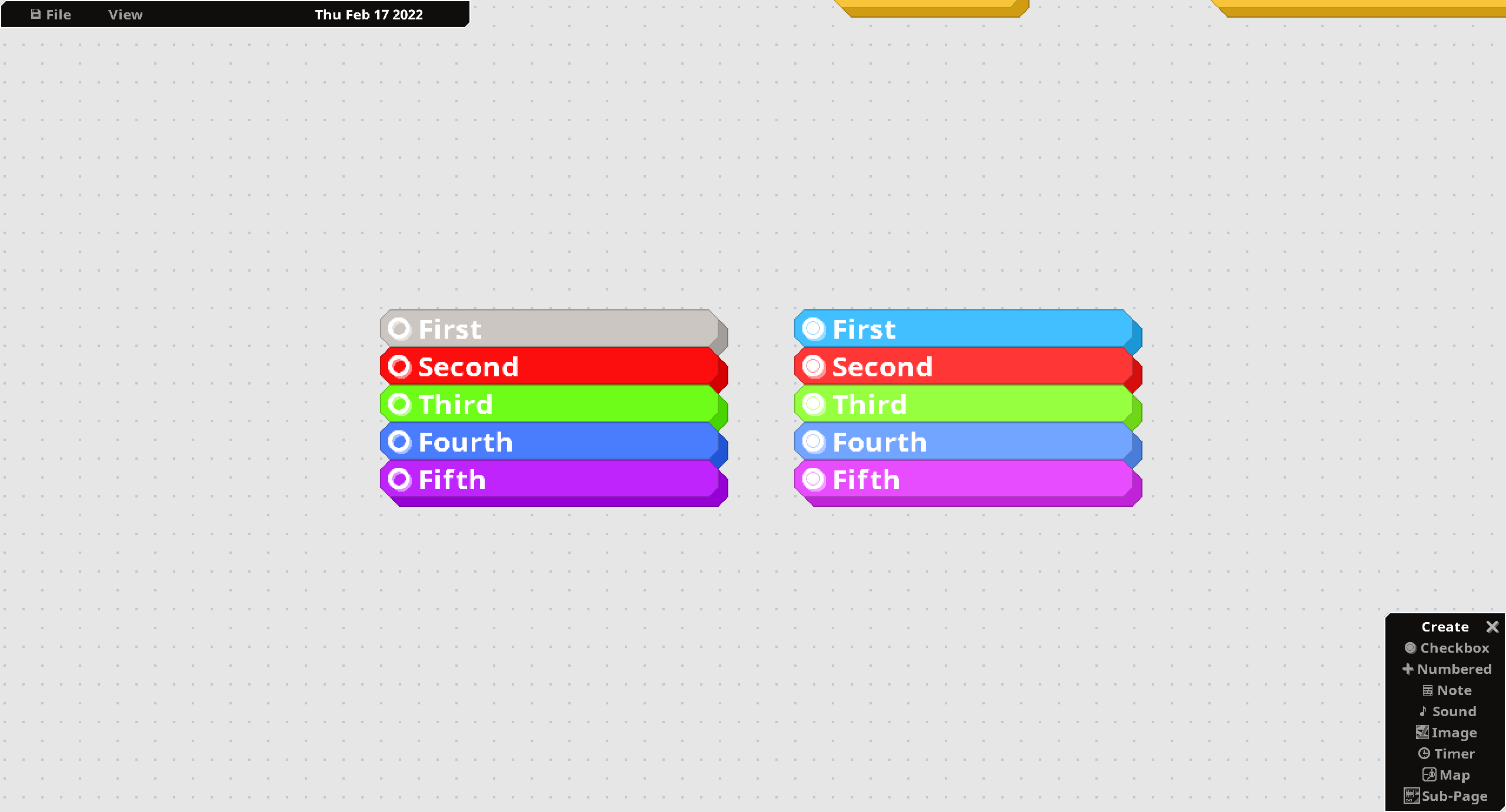
As of this new version, coloring your Cards is easily done on a per-Card basis, simply by using the new Edit > Color menu. You can either select the color using a color picker, or type (or paste) in a hexadecimal color code (like #FF002A). You can color (or reset the color of) multiple Cards at a time using this same menu.
Sub-Pages
You have access to Sub-Pages now!
Sub-Pages are Cards that transport you to new boards. You can open them up and place Cards within them (including other Sub-Page Cards). If you copy a Sub-Page Card, the pasted Card will reference the same underlying sub-page, which might be a pleasant side effect if you want multiple ways to get to a specific location. (Note that I still want to implement a system that allows you to jump to a card on-command; this is just an additional little feature that seems fine to leave in for now.)
When you are finished populating a Sub-Page with cards and exit it, the Sub-Page card itself will display what's inside that sub-page - specifically, what's underneath the two origin axes (where the grid's center is).
Feel free to use Sub-Pages to help organize your project even more effectively!
It will serve as an easy-to-access central repository where I can write up documentation on how to use MasterPlan effectively, and will contain helpful illustrations and GIFs when necessary. The wiki is currently hosted on the GitHub repository for MasterPlan - while it could be hosted on another wiki hosting service, I find GitHub's Wiki section easy to read. It's also ad-free, so it should be perfectly fine (at least, for now).
The wiki is also easily accessible from within MasterPlan itself, right from the File menu.
Also, RAM / VRAM usage also shouldn't be nearly as bad now! Huzzah!
Other News
Branch Movement
Also, as of this update, v0.8 will no longer be on a beta branch, but will rather be placed onto the main branch. The older original version of MasterPlan (v0.7) will instead be pushed to a new branch that you can opt into to use (so I'll just be effectively reversing the current situation, where v0.7 is on the main branch and v0.8 is on a beta branch).
This way, existing users who want to use the older version of MasterPlan can continue to do so, while those who want the current version of MasterPlan can also do so while expecting to see updates coming through regularly.
This is being done because I feel like MasterPlan v0.8 is easier to use, more intuitive, is more indicative of the finished product, and is just more polished than v0.7. I also want to use it more for marketing purposes, thereby allowing people to see, not the rough gem that 0.7 was, but the much more polished product that 0.8 is and continues to grow to be.
To use the old v0.7 version of MasterPlan, simply right-click on MasterPlan in your library, go to Betas, and select the alpha_0.7 branch. To use the latest, v0.8 version of MasterPlan, simply leave the beta section set to None, and update when you have the opportunity (or uninstall and reinstall).
*Note that v0.8 still doesn't load v0.7 projects yet, but I would still heavily recommend v0.8; it's pretty sick (in a good way)!
Price Change
In other news, the price for MasterPlan has gone up a bit - from $18 to $20. This is mainly because the longer I work on MasterPlan, the better it gets, and the more effective of a planning tool it becomes. It only makes sense, then, to raise the price to remain compelling with what you, as a user, receive. That said, I'm never going to make the price prohibitive; it probably will max out at around $25, and even then will go on sale periodically (like it currently does).
Overall, it's been quite a wild ride working on MasterPlan, but I'm finally getting to the point where I personally feel like it's actually comfortable and nice to use. I'm proud of it, and I enjoy using it, which is a good sign, haha.
Ubuntu Support
Oh, also, due to changes in the way I've built MasterPlan, it should now work fine on Ubuntu (specifically) without you needing to build it yourself. This is because previously, it was built on my personal machine, which has a newer libc version than the LTS version of Ubuntu. Just be sure to install SDL2 and an X11 dev package for clipboard support (libx11-dev, xorg-dev, or lix11-devel, as is available on your OS), and you'll be good to go.
I'll need to tackle M1 Mac development next; I might have a few ideas on that front, as well.
____
Anyway, here's the full changelog:
IMPROVEMENT: Adding sub-pages. A sub-page is a card that allows you to access another page, thereby giving you more means of planning and organizing your project. IMPROVEMENT: Adding a "Help" link to File menu. The help link takes you to a wiki, located on the Github repo for MasterPlan. The Help wiki will serve as a useful online central reference on using MasterPlan, and will be updated as MasterPlan grows. IMPROVEMENT: Adding customizeable colors. Cards' colors can now be customized using the Edit > Set Color menu. IMPROVEMENT: Sounds can now trigger other Cards on playback completion when placed in a vertical stack, or when connected via links. IMPROVEMENT: Line arrowheads now will have a black outline if they have a white fill color (like images). IMPROVEMENT: Adding buttons to shift map elements around from the palette menu. IMPROVEMENT: Adding Stop All Sounds keybinding. IMPROVEMENT: Shadows are no longer transparent and aren't as dark. RE-IMPLEMENTATION: Reimplementing the ability to take screenshots (defaults to F11). RE-IMPLEMENTATION: Reimplementing the borderless window option. RE-IMPLEMENTATION: Reimplementing the option to automatically load the last opened project. RE-IMPLEMENTATION: Reimplementing loading a plan from file system by double-clicking on it in Windows when MasterPlan is associated with .plan files, or by passing in the path to the plan as the first argument when starting MasterPlan. QoL: Cards and menus are now resizeable from all sides, not just the right and bottom. QoL: Cards can now only be resized when selected (which makes selecting cards easier, since you no longer have to worry about accidentally resizing a card when you mean to click on it). QoL: Messages that repeat are now combined (i.e. spamming Ctrl+Z becomes "Undo event triggered. x10" instead of creating 10 individual "Undo event triggered" messages). QoL: Line arrowheads now use the main color, rather than the outline color (again). Reeeeeeeeal quick QoL: Resizing multiple cards now requires holding the new resize cards shortcut (left-shift by default), which means moving multiple cards is easier. QoL: Adding Deselect all cards shortcut (Left Ctrl + Left Shift + A). CHANGE: Focus on Cards now defaults to Left Shift + F. CHANGE: Removing overview devlog button (as the overview video is old). CHANGE: Adding Moss, Terra Cotta, and NS-DOSS themes. CHANGE: Focusing on Cards now zooms into the Card as well. FIX: Sound play button now properly changes back to play when the Sound is stopped. FIX: Changing fonts no longer causes maps to turn invisible. FIX: MasterPlan internally refreshing textures (i.e. when resizing the window on Windows or changing fonts) no longer leaks RAM / VRAM like a son of a gun. FIX: Short messages (that appear at the bottom-left) now appear long enough and are timed properly. FIX: The keybinding to unlock the aspect ratio when scaling an image now properly works when holding the key. FIX: The Menu close button no longer is always white, but rather changes color according to the theme. FIX: Maps no longer internally each create their own palette menu (whoops). They share one menu now, of course, thereby lowering memory usage. FIX: Undoing now works correctly when loading projects. FIX: You can no longer open the context menu (right click) while a fullscreen prompt is open. FIX: You can now undo and redo while editing text or with the context menu open. FIX: Themes refresh every second when the Visual Settings menu is open. FIX: Loading projects should no longer set the project's modified status. FIX: Pasting cards from the context menu pastes them from where the menu opens, rather than from where you click on the "Paste Cards" menu. FIX: Numbering is no longer broken, displaying a variety of 0's, for when a card is underneath a non-numberable card (like a Note). FIX: Non-numberable cards (like Notes) placed between a parent and its numberable children no longer break dependency in a stack. FIX: Projects should no longer save links between cards incorrectly. Again. Internally, this was because it was previously possible to create cards that shared IDs, thereby making them link incorrectly when the project is loaded. This should fix the issue. (Although you will need to re-create the previously broken links and resave your project. Sorry!) FIX: MasterPlan is now built using Ubuntu 20.10, so if you're running Linux (particularly a stable distro like Ubuntu), you should be good to use MP directly from Steam or itch, rather than needing to build it yourself due to libc issues.
Welp, that's about it - thanks a lot for your patience! I hope you enjoy using MasterPlan, and I hope to keep getting updates out, and more regularly, at that.
- SolarLune
v0.8.0 Alpha 3 Release!
Yo, 'sup!
It's been almost three weeks since the last update - apologies for letting time get away from me!
I've been cracking away on both MasterPlan, and a cool 3D software renderer that I've written from scratch in Golang named Tetra3d! Check it out if you want something slow (but useable) and jank (and awesome) for gamedev, lol
In any case, here's MasterPlan v0.8.0 Alpha 3! This one is a bit of a minor update, but it's kind of important because I've finally gotten the text to not be so manky! Huzzah!!!
I definitely spent hours over the past several months, trying to figure out exactly why the text looked so bad. As it turns out, it was just a single line of code that was doing something I hadn't considered. Just change a couple of numbers and the text doesn't look thrashed anymore.
That's coding, I guess, haha. ¯\_(ツ)_/¯
This fix should apply to any font displayed within MasterPlan, including custom fonts, which is cool. Other than that, this update also has some fixes / optimizations and quality of life improvements, like searchable keybindings and the old Load Recent menu (so you can easily access recently loaded projects). Anyway, here's the full change-log:
Double-click settings (save previous task type, double-click to create a card) have been combined into a single dropdown.
Adding option to search for keybindings.
Adding confirmation dialog on creation of new project or on project load if the current project has been modified.
RE-IMPLEMENTATION: Saving a project now also saves the camera location and zoom level.
RE-IMPLEMENTATION: Adding project name and "MODIFIED" status to titlebar. The modified status is set when something in the project changes that necessitates the creation of an undo state.
RE-IMPLEMENTATION: Adding "Load Recent..." menu to easily access previously loaded projects. The maximum number is 10 (this is arbitrary).
FIX: Lines between cards that are directly next to each other no longer glitch out and point to the top-left infinitely.
FIX: Text on cards no longer looks trashy on the edges for some characters.
FIX: Undoing no longer deselects the current tool for Maps.
FIX: You can no longer partially undo the loading of a project (i.e. undo right after loading).
FIX: Lines from Cards that have no color (like from images) now have black outlines.
FIX: You can now more easily click on line endings or nodes that are on top of Cards.
CHANGE: Line arrowheads are now colored instead of white.
FIX: You no longer accidentally click on something in the background by clicking on a button in a menu that then closes.
OPTIMIZATION: Cards no longer attempt to render if offscreen.
Rewording some shortcuts.
___
Anyway, that's about it this time. Thanks a lot - I hope to have something more substantial for the next one, hopefully sooner than three weeks from now!
- SOLVRLUNE (we're in 2021, so everything has to be spelled like this now, sorry, it's the rules)
v0.8.0 Alpha 2 Update!
Hello!
Here's another update for MasterPlan, bringing it up to v0.8.0 Alpha 2! Huzzah~
This version brings a few major features, as well as some QoL improvements. One major new feature in Alpha 2 is the ability to create joints in lines. This has been a fairly well-requested feature, and I'm a bit excited to have finally got it working acceptably. It should help to make using lines more comfortable and make the project's flow easier to visually comprehend.
To add a joint, simply click on the circle in the center of a line / between existing joints, and then drag it around. You can delete a joint by double-clicking on it. Joints move with their Cards if both Cards at the end of a line are moved together, as well.
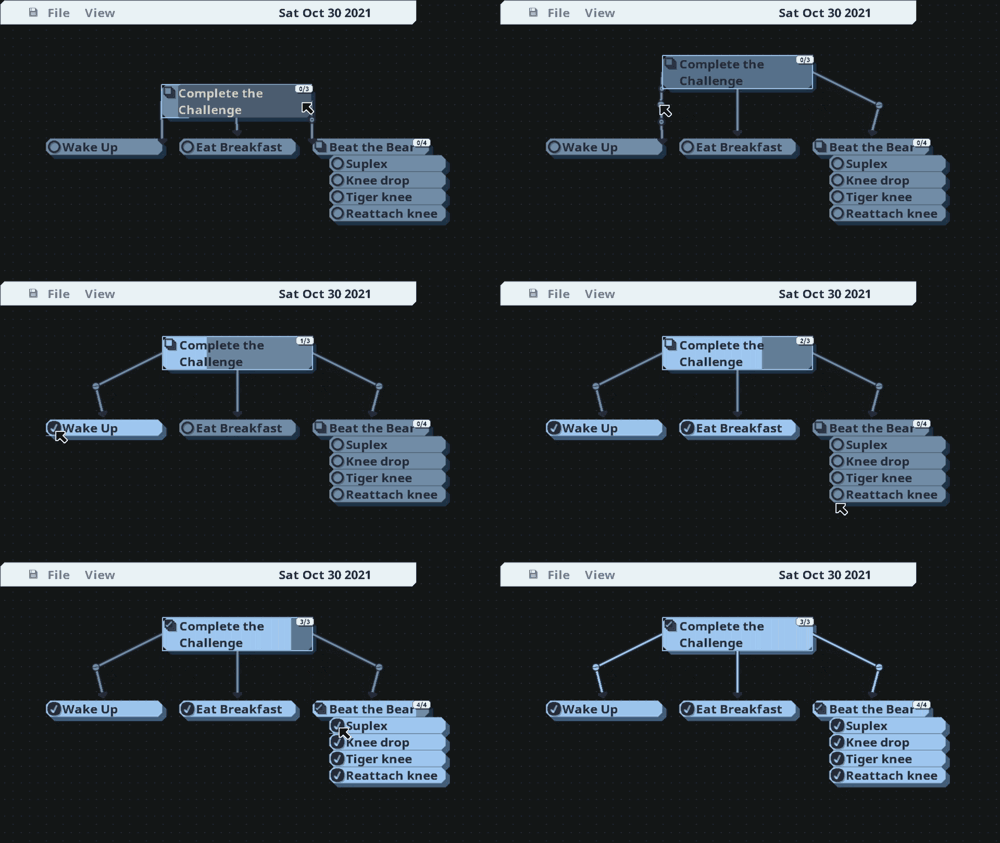
You also now have the ability to link Cards to indicate dependency. Specifically, lines indicate that the starting card depends on any linked cards for completion. In the GIF below, the main Checkbox Card entitled "Complete the Challenge" is complete only when its three linked Cards are. As can be seen, this also works for Cards in a list that depend on completion of their children as well. Dependent cards changes icon to show this, going from the normal circular icon to a set of squares.
Unfortunately, while lines have been improved, I had to change how they are saved and loaded, which means that lines saved in the previous 0.8 alpha will not load properly in this one (though the project should load properly otherwise). Apologies!
Another, more minor, new feature is the ability to resize multiple Cards at the same time - simply select multiple cards, and then resize one - the others will follow.
As you can see in the above GIF, another minor improvement is that now the first line of text on Cards is the title (and so has a line drawn below it). This means that you can easily make a title on a Card by simply typing your title, and then creating a newline underneath for any descriptive bits.
This line existed in the previous version, but simply was at the bottom of all of the text on the Card. By moving it up to be under the first line, it serves double-duty as visual flair, as well as content segmentation.
Custom fonts were also re-implemented - simply go to the Visual Options in Settings, and select a custom .otf or .ttf file to use it in MasterPlan. Note that it might not look right unless you restart MasterPlan after changing the font (for now).
There's also bugfixes including panning no longer feeling like garbagio, and Windows no longer crashes when loading JPEG files! Hooray~!
Installation: To download and try out MasterPlan v0.8 on Steam, all you have to do is right-click on MasterPlan in your library, go to Properties, Betas, and enter the beta access code: "alphamasterplan" (without double-quotes). Click on Check Code, and you'll gain access to the v0.8 alpha branch. This is done so that people aren't surprised by this sudden change while they're trying to use MasterPlan on a daily basis. Please do let me know if things don't work properly, or if you have any questions or feedback.
___
Anyway, let's take a look at the detailed changelog:
Adding ability to create joints in links between Cards. To create joints, click on the circle at the center of a link. To delete a joint, double-click on one. You can move all joints in a link by simply moving both cards at the ends of the link.
Lines have been visually simplified; they no longer have "dots" traveling from start to end, but are rather simply lines that have arrows that point to the ending Card.
You can now indicate dependency with links between Cards. For example, you can link a Checkbox to a Numbered Card to indicate that the Checkbox will be completed when the Numbered Card is completed.
Adding ability to resize menus and Cards from bottom and right, in addition to just the bottom-right corner.
Adjusting area around Cards for resizing. Previously it wrapped around the Card's right and bottom completely; now, it leaves a small gap at the left and top edge, allowing for the resize border of a neighboring card to be easily reachable. Conclusion: It's now easier to consistently resize cards that are in a stack, despite the area being smaller overall.
Adding option to reverse panning in the Input menu.
It's now possible to resize multiple cards by simply selecting multiple cards and then resizing one of them. The others will copy the one you're resizing.
The line underneath editable text now draws underneath the first line of text. By entering a newline, you can create a "title" that sits on the line.
Selecting Cards by any means will now visually raise them to sit on top of others; previously, this only happened when clicking directly on them.
Messages now take longer to display in proportion to their length, making them easier to read.
RE-IMPLEMENTATION: Whatever card you previously created will be what is created when double-clicking. Also adding a setting to turn this off - if off, double-clicking will simply create a Checkbox card (unless you simply disabled double-clicking entirely).
RE-IMPLEMENTATION: You can now use a custom font for use in MasterPlan by specifying a .ttf or .otf file. Note that doing this rebuilds the font glyphs used for displaying text, and so text may not display correctly until restarting MasterPlan. This is planned to be improved, though it's not a pressing issue.
RE-IMPLEMENTATION: Checkboxes are now able to serve as parent Tasks / Cards by having them at the head of a stack. An indicator of its childrens' completion will appear at the right-hand side, and the icon for the parent Card will change to a set of squares. All children and grand-children are included in the count.
RE-IMPLEMENTATION: You can now properly paste todo lists in as plain text and paste them into MasterPlan as Cards. For Checkbox Cards, use [ ] at the beginning of the list. For Numbered Cards, use the same format, but with numbers inside ( like [13/209] ).
CHANGE: Reworking the Checkbox icon for the umpteenth time.
CHANGE: Resizing rectangle size is now 16 pixels large; it was previously 32 pixels large.
CHANGE: Linking cards now uses the color white as opposed to the menu color if the linking card has no color (like images).
CHANGE: Lines are now a smidge thicker.
FIX: Panning has been fixed. Previously, it was both way too sensitive or not sensitive enough depending on how slowly or quickly you moved the mouse.
FIX: Lines anchor to Cards more naturally.
FIX: Lines are now copied properly when copying Cards.
FIX: Lines between Cards should be tied together properly now.
FIX: The Numbered Card's text is now properly centered.
FIX: Undoing and redoing handles card link creation or deletion properly.
FIX: Pasting a Card with a filled background bar (like a Numbered card or a parented Checkbox card) no longer has the bar start at an infinite length.
FIX: Cards no longer draw their number even if they're deleted.
FIX: Targa (.tga) image files are now properly loaded and displayed.
FIX: MasterPlan no longer crashes when loading JPEG files on Windows - this was due to a missing DLL file (libjpeg-9.dll).
FIX: MasterPlan should no longer crash when loading TIFF files on Windows - if it was happening, it was probably due to a missing DLL file (libtiff-9.dll).
FIX: Timers should trigger properly now.
FIX: Timer mode, trigger mode, and maximum time are now properly saved.
___
Welp, that's about it. As an aside, ideally, I'd like to stick to updates every week or two now - I feel like an update every week would be great, but giving me an extra week in case something comes up (either in real life or in development of MasterPlan) helps to give me some breathing room to deal with it.
Anyway, that's it. Thanks a lot, as usual! - SolarLune
v0.8 Alpha 1 Release!
TL;DR: MasterPlan v0.8 Alpha is out, beta branch code is: alphamasterplan. I'm working on it, it's feeling a lot better. Huzzah!
Phew!
It's been quite a few months (over six, I reckon!!!), but finally, here's the first public alpha for MasterPlan v0.8!
I've reworked the program from scratch to get to this point, and while it is indeed still an alpha and is not as full-featured as v0.7 just yet, I believe it is largely improved in fundamentals. MasterPlan has gotten more polished, more visually appealing, and is easier to use and read than ever before.
Thank you very much for your patience so far as I've taken quite a bit of time to get even here - without that patience, I wouldn't have been able to stick with it for all this time. However, I should now be able to push out updates more frequently as it's easier to deploy smaller builds once I get bugfixes and major releases (like this one) out of the way.
Please note that MasterPlan v0.8 is, indeed, alpha software, and so will be unstable or not work quite right sometimes. Please be patient as the kinks are ironed out. MasterPlan v0.8 also currently cannot load v0.7 plans; only v0.8 plans will load for now while I work on attaining feature parity between the two. After this is done, 0.7 plans will load in v0.8, unless the community deems the backwards compatibility unnecessary. Finally, If you want to use MasterPlan v0.8, you are encouraged to do thorough backups of any plans created with it.
To download and try out MasterPlan v0.8 on Steam, all you have to do is right-click on MasterPlan in your library, go to Properties, Betas, and enter the beta access code: "alphamasterplan" (without double-quotes). Click on Check Code, and you'll gain access to the v0.8 alpha branch. This is done so that people aren't surprised by this sudden change while they're trying to use MasterPlan on a daily basis. Please do let me know if things don't work properly, or if you have any questions or feedback.
There's still a ton to reimplement, even just to get MasterPlan to the level of v0.7 in terms of features. However, I believe MasterPlan is a great tool, and am willing to keep on cranking away on it. (It also shouldn't take quite as long to redo things I've already done for v0.7; time is mostly taken improving, not reimplementing.)
Anyway, here's a video showing an overview of the new v0.8 update, because it's kind of a lot for now (I'll document changes in text as we go on):
[previewyoutube="43sotReXnGA;full"]
Hope you all enjoy it, and thank you so much, again, for the support you've given so far. I really do appreciate it! - SolarLune
EDIT: One last thing before I forget, the new version of MasterPlan is built on SDL2. This means that for Linux users who want to run MasterPlan v0.8, you'll need to install libsdl2, libsdl2-image, libsdl2-ttf, and libsdl2-gfx (or their equivalents on your distribution). Thanks!