

McRogue
Updates on hold
I want to let you know that I can no longer work on McRogue due to legal restrictions as I've taken a new position at a game company. My intent was to get the game to the full v1.0 release, but it became very clear soon after Early Access launch that was not going to be financially viable. I've been looking at alternatives to keep the development going via other means, but it doesn't look promising.
Please know that I'm as disappointed as you about this.
Rory
Build Notes 0.0.72
- You must now continually punch a rune to open it. You need about five punches within a second or so. This means that you can now longer just run by a rune and open it.
- Add new upgrade sounds for when you're successfully starting to activate it.
- Make swamp mesh collision more closely match the mesh shapes
- You can now bounce off the top of the stump-like objects in the swamp. Slam attack into them to bounce higher - this will let you then perform another slam attack at maximum power.
- Tune the death effects
- Add death effect sounds
- Add new gun sound
- Improve slam attack effects and sounds
- Lowered the upgrade run attractor offset
Build Notes 0.0.71
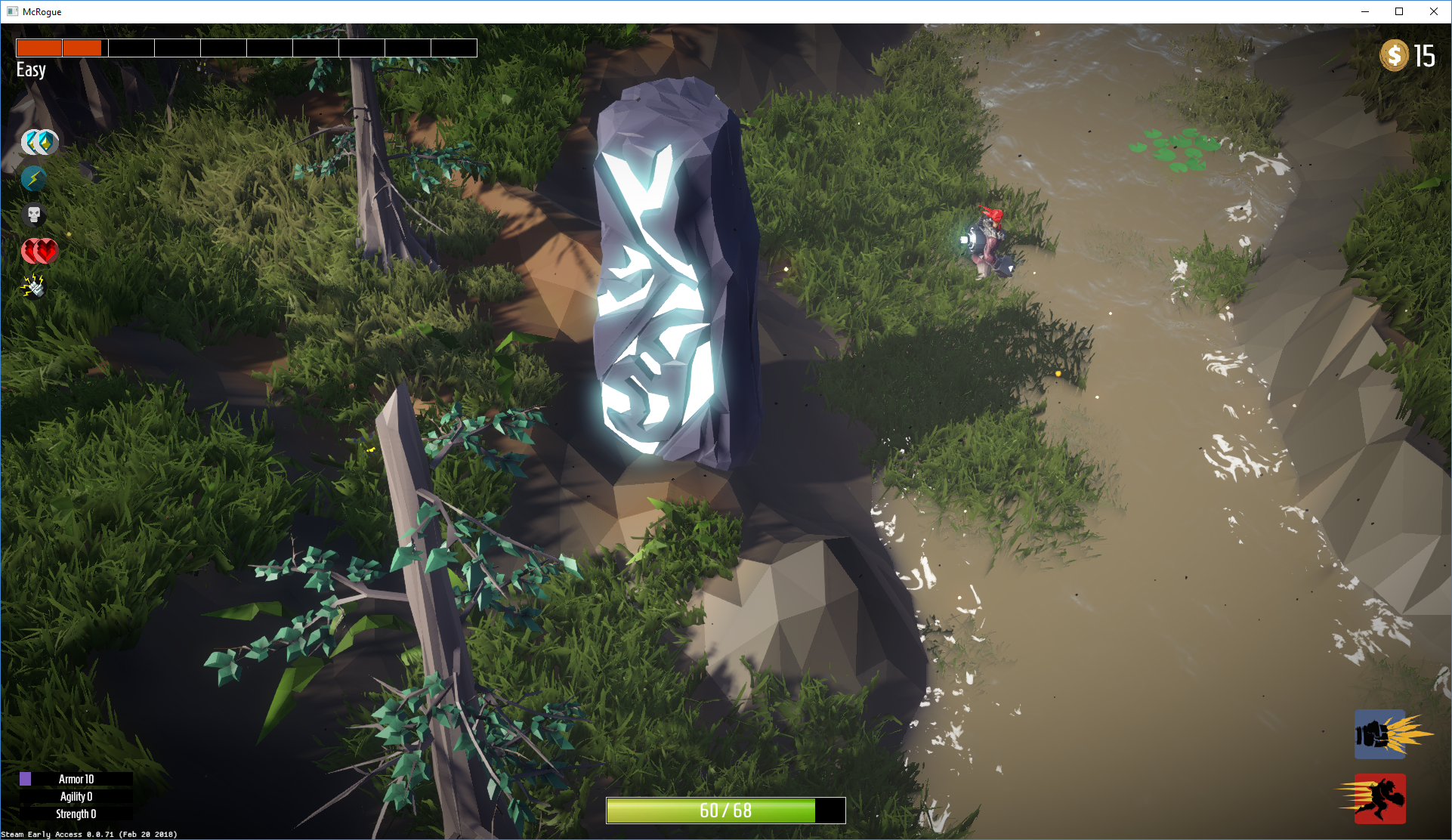
This build gives some much needed love to the swamp level. The swamp level was at 'Stage 1' of development, meaning that it had the basic meshes in place, but just the standard layout and terrain. This update brings it to 'Stage 2' meaning that it now has representative layout, proper terrain and general tuning. The next stage is to add the landmark objects and there will be one more stage to add gameplay objects too.
- Tweak the layout structure of the swamp to generate a couple of large areas, but a lot more smaller ones.
- Add screen-space reflections to the water shader
- Add a new graphics option to use low quality water without screen-space reflections
- Tune the way the coastal foam goes in and out so that it's less synchronized.
- Fix a lighting bug that caused the indirect diffuse lighting to be too dark
- Tweak swamp fog settings
- Fix lily pads all spawning in a line
- Tune swamp water to look muddy
- Tweak the swamp terrain gradient to remove greens
- Make the swamp water a bit deeper and adjust the player slowdown to compensate
- Add more hills to the swamp
- Use the new distortion method to generate the clear areas of the swamp
- Tune the swamp grass color so that it grows healthy grass around runes and dead grass around mines
- Remove any possibility of generating lakes in the swamp. The water is so murky that it's not fair if you suddenly fall into a lake and get damaged.
- Increase the distance between upgrade runes
Build Notes 0.0.70
- Add procedural mesh deformation and hit wobble for landing punches on world meshes. This can look a bit funny in extreme cases, so we'll no doubt make more changes in the future.
- Add impact particle effect when hitting rocks
- Add new impact sounds for rocks
- Add impact sound for hitting the ground
- If you connect on a punch, you now get a temporary speed boost, allowing you to punch again more quickly. This stacks up as you connect more and more punches.
Build Notes 0.0.68
- Generate face normals in the pixel shader - this is significantly faster than using the geometry shader for lower-end machines.
- If the game can't enter full screen mode, run in windowed mode instead. This can happen if the full screen mode is set to something invalid.
- Make the game tolerant of running out of dynamic buffer space. In
- really* extreme cases with lots of enemies on screen who all die simultaneously, the game would crash previously. It will now freeze until the buffers fall back to normal levels.
I'll look at doing some particle throttling asap, since that seems to be the source of the buffers going over-capacity. In this case, we probably need throttling anyway since there are likely hundreds of thousands of particles on screen.
There's also currently no cap on the number of enemies in the world. There's room for optimization in extreme scenarios, but my (4 year old) dev machine manages to run about 250 enemies simultaneously at about 20 fps. There's room for improvement there, but I think I'll probably cap the number of enemies to something like 64.
Build Notes 0.0.66

- Add a control experiment to allow gun aiming on the right stick (there are no bindings just yet for the keyboard since we're still testing out using the mouse to move)
- The correct Xbox interface now shows up if you're using an Xbox 360 Wireless controller.
- Proper icon for the teleporter in the map
Build Notes 0.0.64
Remappable Controls

You can now remap controls from within the game. Some of the control icons aren't quite right (for example it shows 'select' rather than 'back' for the Xbox 360), but the controls should be mapped correctly.
You can map any in-game action to any controller input (axis or button) or to the keyboard / mouse. Whichever controller you use to initiate the action remapping is the the controller the game will look for the new control on.
Move to Cursor
When using the keyboard/mouse to control the game, you'll now see an extra control in the options menu called 'Move to Cursor'. When this control is held down, McRogue will now run in the direction of the cursor.
It's not exactly the 'Diablo' controls that some were asking for but it might help those who dislike WASD. I specifically didn't want to do the 'click to move here' controls since I don't think that indirect control like this fits the game. All the other controls will work the same as usual, so you don't have to click on enemies to attack them as you would in Diablo (just press punch to punch).
Move to Cursor is not mapped by default, so if you want to use it then make sure you map it first!
Build Notes 0.0.63
- Make it harder for the Irn Brute to push you through the level
- In the worst case, if you get pushed through the level, respawn back on top again
- Fix potential crash when rendering decals
Build Notes 0.0.62
- Switch everyone over to the 32-bit build for a while so that Steam Error Reporting works
- Fix 32-bit only crash when recycling enemies
- Add proper map icons for upgrades and health (teleporter still placeholder)
Build Notes 0.0.59
Damage
Most of the enemies were already set up so that their main attack animations are not interruptible by default. This to ensure that they can be effective when you're wailing your fists around everywhere.
However, there are now certain types of damage that can request to interrupt character attack animations. For the player, this means the ground pound (triple jump) and gun blast. For non-player damage, this includes the worm hits and explosions from mines.
These hits will knock characters out of their attack animations into the hit reaction.
Ground Pound
Based on the damage changes, I went back in and tweaked the ground pound quite a bit. The knockback is much more effective now, and I made it more consistent.

It also grows stronger the longer you're in the air, so if you jump off a cliff and do a ground pound then you will get an attack that's almost double as effective.
The ground pound effect now scales to match the strength of the ground pound damage.
Gun & Targeting
The gun no longer has separate properties for damage and knockback. They matched each other anyway. Like the ground pound, the gun will now interrupt attack animations and knock enemies back even when they're attacking.

On a related note, I've changed the targeting so that the direction is instantaneous. Previously if you were aiming in a direction different to the one McRogue is facing, the targeting direction swing around to follow McRogue's rotation as he turns around.
This would show as the gun sometimes aiming off to the side. With instantaneous aiming, this is no longer a problem. There's still a priority system to adjust the final aim.
Dash
As mentioned yesterday, I've increased the default dash cooldown quite a bit. It's now at four seconds to fill from empty. This means that if you spam it you can only dash once every two seconds or so.
The dash used to be directed by the targeting system because it used to damage enemies. It no longer does this and will just follow your aim direction.
Other Stuff
- Fix a bug where the game would only ever generate the swamp level after the first playthrough.
- Set up the box art for McRogue on Twitch
- There's now a small hit reaction window on the player when McRogue is hit by interruptible damage. There's no actual animation yet though.
- There was a bug due to an implicit type conversion that caused the jumping enemies ('frogs') to not jump properly. This has been fixed.
- Reduced the Steam Statistics timeout. This probably won't affect you, but in the case where the game can't contact Steam, it won't take quite as long to launch.