We just released v.0.1.3 which includes a rework of the tech-system. We’ve changed the way of acquiring new parts (technologies) so that you will not only need “experience points”, but also specific resources to research and unlock new parts. This enables a more diverse gameplay as you’ll need to explore, kill, gather and construct to be able to reach more advanced technologies. Currently this change is only implemented in the new Survival Mode, but we plan on adding it to Story Mode at a later point as well.
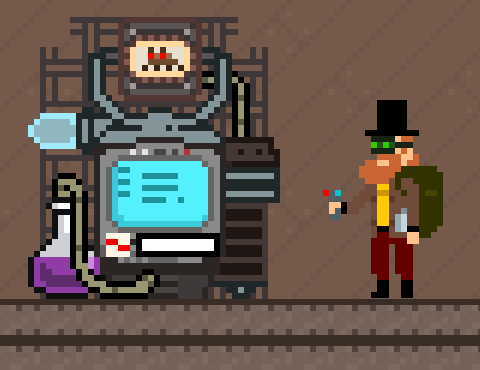
The new tech-system is centered around the new Research Facility which is now essential for acquiring technologies. At the start of a new game, you will only be able to construct from a small assortment of basic parts and must gather the necessary resources to build the Research Facility which will allow you to unlock and add even more parts to your assortment. Once you have the Research Facility you can use it to research different resources to unlock machine-parts that requires that or those specific resources. Let me give you an example:
You have built your Research Facility and have gathered some wood. You put the wood in the Research Facility and the facility turns on, indicating it’s researching the properties of the wood while consuming the wood in the progress. When it’s done you’ll notice that all parts that solely requires wood to be build is now visible in the crafting menu.
If you want to unlock parts that require two or more different resources, you’ll need to research all the resources needed for that specific parts. So, in this example if I wanted to build a Storage box, I would need to research copper as well since the Storage box requires both wood and copper to be build.
So that’s it? I just throw all the different resources in the Research Facility and then I’ll be able to construct any part in the game? Nope that’s too easy, there’s more:
Once you have researched a part and it’s made visible in the crafting menu you’ll have to spend your “experience points” to fully unlock that specific part. Doing so will allow you to permanently craft that part - provided that you have the requisite resources to do so every time.
The more valuable the part, the more it will cost to unlock - e.g. unlocking the Ladder costs 1 level while the Sawblade requires 6 levels to unlock. So, don’t go spending all your levels at once, choose carefully what you want. Of course, you can always go into a blood frenzy, killing enough enemies to gather experience for the 160 levels which is currently needed if you want to unlock every single part in the game.
Let us know what you think about the new tech-system in the comment section below!
Greetings
Needo and the rest of Team Mechanic Miner.
Patch Notes v.0.1.3 (26/07/2018)
We know it has been awhile, but we finally released v.0.1.3 introducing a new tech-system, new game mode, new mobs, character customization, performance optimization and a bunch of fixes. We would like to send our thanks to all our alpha testers who helped with a lot of bug reports - we couldn’t fix everything for this patch, but we’re working on it! Good luck and good testing!
• The blueprint menu has been updated and optimized. The blueprinting menu should now load faster and has been divided into a “local” blueprints folder and a “workshop” blueprints folder. The blueprints are also now sorted by date created and it’s possible to enter the workshop directly from the menu. • When blueprinting (“b”) an object, other objects touching that object will also be part of that blueprint. This means that you can now blueprint a “tank” with the tracks.
• Traveling between instances while mounted an object (e.g. a vehicle) will now bring the mounted object and anything it touches with you. This means you can now travel between instances with a tank (with the tracks!) • The crafting menu have been updated. The crafting menus now has pages with up to 7 parts on each. You can use the arrows on screen the mouse scroll-wheel to go back and forth between pages. • When recycling (using ”t”) the thing you’re about to recycle will now be indicated with red.
• The light in the caves now also disappear/diminish when it’s night.
• Tweaked cave-in chance.
• Increased aggression range of bats and cave squids.
• There’s now a chance that bats will spawn when you harvest resources in the mine and rocks in the overworld.
• Resources will now drop in the world when a chest is destroyed. Any parts will be converted back to resources.
• Resources will now drop in stacks. Before resources dropped one-by-one. • General performance optimization. We changed the way tiles are dynamically loaded so tiles are now unloaded if not used. This should especially improve performance in bigger worlds .
• Changes the layout of the “Controls” and “New Game” menu.
• Added ambient sounds to the spaceship and biomes.
• Added character customization. When starting a new game It’s possible to change the characters hat, head, jacket and shirt to a total of 1024 different combinations. • Logic Gates and Switches will now automatically connect when placed right next to another connectable object. This works similar to how lever, boiler and engines would connect when close placed next to each other. • The number of enemies will increase the deeper you go down in the mines/caves.
• Adjusted attack damage values for Wrots, Cave Squid and Mini-roach (ranged attack).
• Increased the experience required to get a level by 100%.
• You can now scroll through the saved games menu by clicking the arrows on the screen. Before you could only use the mouse scroll-wheel.
• Added “save game” button in the menu.
• New part / mechanic: Research Facility. We changed the way new technologies are acquired: The player will now start with a limited set of available parts. To get new parts (technologies) the player must acquire the necessary resources for each specific part and then put them in the Research Facility. This will make the respective parts available for unlocking by using a specific amount of experience points. These changes only apply to the new survival mode • New Mode: Survival mode. [I]Survival mode offers a new and harder experience for players who likes a challenge. In Survival mode you start with nothing and it’s up to you to choose what you want to do. But be careful, survival is made difficult by the night mobs who’ll repeatedly attack you during the night, and the reoccurring Aether Storms that makes the animal life on the planet go berserk. [/I]
• Survival mode: Resources do not respawn when entering a new instance (like in story/creative mode).
• Survival mode: Aether Storm. Every 5. day (the night before) an Aether Storm will occur on the planet. The Aether Storm will replenish all resources on the planet and make all hostile mobs aggressive towards the player. • Survival mode: Added water/ocean on the very far edges of the world. Note: This is very very (very!) far out • New Mob: Demon Flyer. The Demon Flyer is an airborne hostile mob that will spawn on the overworld during the night and despawn when the day arrives. • New mob: Demon Interceptor. The Demon Interceptor is a ground walking hostile mob that will spawn in the mines and on the overworld during the night (although on the overworld, they will despawn when the day arrives). • New mobs: Added two new evolved kind of Cave Squids. You’ll find these deep in the mines.
• New mob: Evil Plant. The Evil Plant can’t move but will attack the player when getting too close.
• New mob: Maggot. Maggot attacks will cause the player to become poisoned. Yuck! • New vegetation: Maggot Nest. Will yield wood when harvested, doing so has a chance of spawning a Maggot.
• New vegetation: Scorched tree. Will yield wood when harvested.
• Fixed a bug where a schematic would be displayed when trying to create new parts while your inventory was full.
• Fixed a bug where it was possible to create a floating block by attaching a coupling to a block, then lifting (both) blocks in the air, holding the coupling part. Then grapple-locking the entire thing and removing the blocks around it by left clicking slightly next to the blocks.
• Fixed a bug where SHIFT + LEFT CLICK while having a blueprint on the cursor would cause the blueprint to get stuck on the cursor.
• Fixed a bug where fusing and deleting at the same time would cause the blocks to float in the air.
• Fixed a bug when deleting a Flux capacitor, you did not get the flux back that you stored in it.
• Fixed a bug when creating a new game, the game title box couldn’t hold the entire text (name of the game).
• Fixed a bug where John were not during his dishes.
• Fixed a bug where holding down RIGHT CLICK while mounting a lever with E would cause the multitool sound to repeat for 20-30 sec.
• Fixed a bug when starting crafting something, and then starting a new game before the crafting was done, would cause that thing to transfer to the other game.
• Fixed a bug where lifting up the air tether would cause it to become blue.
• Fixed a bug where placing a ladder next to another object would cause the ladder to become solid.
• Fixed a bug where the game would crash when creating big enclosures.
• Fixed a bug where resources would be deleted if you picked up a resource from the ground and then entered an instance.
• Fixed a bug where a vehicle/contraption would be fully repaired when entering an instance with it.
• Fixed a bug where objects sometimes would transfer to a new game when creating a game while already in a game.
• Fixed a bug where you could crash the game by SHIFT + LEFT CLICK next to the ballista or lamp a specific amount of times.
• Fixed a bug where it was possible to make everlasting “ghostblocks” by placing one type of block, and then swapping to another block using the hotkeys while stile holding down LEFT CLICK.
• Fixed a bug where pressing t (to recycle) on the tutorial car would cause the wheels to get recycled. Nothing should be recycled.
• Fixed a bug where picking up an item from a storage chest, then running away while it’s on the mouse, would cause you to not be able to place any kind of block in the world until that specific storage chest was destroyed.
• Fixed a bug where the game would crash when dislodging a lever from an engine.
• Fixed a bug where the game would not start in the native resolution when launched the first time.
• Fixed a bug where The Dweller would not destroy machinery that was far inside of it (when attacking).
• Fixed a bug where the user could create and build blueprints with plumbing, which are not yet unlocked.
• Fixed a bug where the sofa and TV would appear on the surface right after crashing with the crashpot in the tutorial.
• Fixed a bug where the game time were not saved when quitting the game.
• Fixed a bug where resources on the cursor would be deleted when opening a storage chest and then placing them inside the storage chest.
• Fixed a bug where harvesting iron would cause the mining-sound to keep playing even after the iron depot was exhausted.
• Fixed a bug where splitting resources in a container would cause the resource stack to be duplicated.
• Fixed a bug where objects sometimes would disappear when off-screen (out of vision from the player).
• Fixed a bug where water and stones sometimes can’t be harvested, and the hitbox was not on the actual resource.
• Fixed a bug where it was possible to destroy a resource from your inventory by picking it from the ground, then unsuccessfully placing it in a filled slot (slot A) in the inventory bar, then afterward placing it in another filled slot (slot B).
• Fixed a bug that would cause some players to crash when ending the tutorial (exiting the cave).
• Fixed various bugs in the Load Menu.
• Fixed a bug where the frogs sometimes would spawn in the ceiling of the tutorial cave.
• Fixed a bug where blueprints weren’t removed from the inventory when used using the hotkey.
• Fixed a bug where you sometimes couldn't recycle (“t”) stuff in story mode.
• Fixed a bug where the game time weren’t saved when quitting the game.
• Fixed a bug where enemies were able to attack blueprints on the cursor.
Development update (16.07.2018)
The observant Mechanic Miner might already have noticed, but we’ve been very quiet the last couple of months. We haven’t been that active in our community and there haven’t been any patches or new content for weeks. Although Mechanic Miner was never abandoned, it has been very quiet here in the office… until now.
Over half a year ago, we started the process of negotiating an investment deal that was supposed to provide us with the necessary funding to keep on developing Mechanic Miner. Unfortunately, this process had some complications and took way more time than we expected.
Consequently, we were left without funding for months and were rapidly running out of money. This meant that many of us had to find other ways to support ourselves while putting all the time possible into Mechanic Miner.
Although we had other offers (like a publisher deal) that could provide us with the necessary funding, we were set on this particular investment deal as it would secure us with almost full control of the game, allowing us to make the best version of Mechanic Miner possible. Thus, backing out of the investment deal wasn’t an option.
Without the funding it was inevitabl that, the development of Mechanic Miner slowed down a great deal and to a point where it stopped almost completely. This was - of course - extremely inconvenient and frustrating! Not only were we almost done with v.0.1.3 which we really wanted to push into the alpha build, but we also had to reconsider everything we had planned – worst of all we had to push the release of Early Access (more on this later). Personally, it created a lot of frustration amongst the team as we could not work on the game we loved and already invested so much time in.
Fortunately, the investment deal finally went through and we’re all back at the office, working full time on Mechanic Miner. This means that you guys will hear a lot more from us in the coming days/weeks!
Our first order of business is to finish v.0.1.3! As mentioned before, we’re almost done with v.0.1.3 which among other things includes survival mode and character customization. Furthermore, we’re working on a revisited and more detailed roadmap that will reveal our development plans all the way to Early Access (and some beyond). Our plan is to release v.0.1.3 within 2 weeks, and sometime after that reveal the roadmap along with more information on the Early Access release date and pricing of Mechanic Miner.
In the end we would just like to emphasize how much we’ve missed working full time on Mechanic Miner, and just how extremely happy and proud our community makes us. You guys stuck around even in this dry period and we’re so thankful and glad that we’re finally able to create more content for you guys to test.
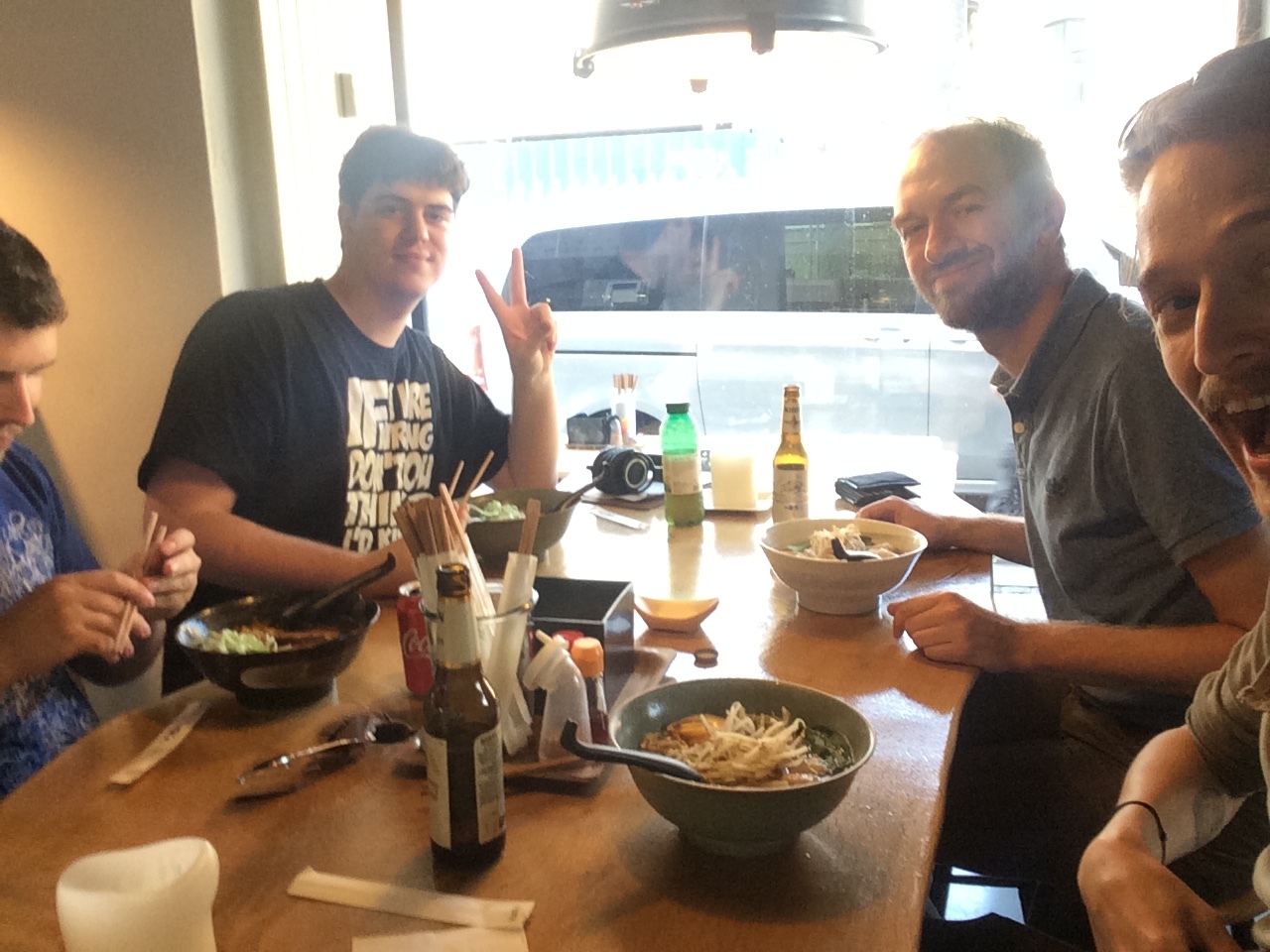
Here’s a picture of us celebrating the investment deal at the local ramen restaurant.
Greetings
Team Mechanic Miner
Patch Notes v.0.1.2 (20/02/2018)
v.0.1.2 is out! The patch features the long-awaited pistons and sliders along with a bunch of fixes for the tutorial. Our goal with this patch was to give the existing players some new parts to play with, while giving new players a better - and less buggy - experience when they try out the game for the first time. Enjoy!
New Part: Pistons: It’s possible to augment the length (1 to 8) and damping (1 to 3) of the engine before crafting it.
New Part: Sliders: It’s possible to augment the length (1 to 8), spring (1 to 3) and damping (1 to 3) of the engine before crafting it.
Part: Sawblades now damage all mobs.
Part: Spikes now damage all mobs.
Part: The boiler will now flash if empty and something tries to drain steam from it.
Tutorial: While building the bridge and the frame of the vehicle, the guiding outline and the placed blocks will float until the respective object is fully build.
Tutorial: Disabled fusing doing the tutorial. An icon have been added to show the player that it’s not possible to use the fusing tool.
Tutorial: Disabled dislodge doing the tutorial. An icon have been added to show the player that it’s not possible to use the dislodging tool.
Tutorial: Disabled blueprint building in the tutorial.
Tutorial: When the player is supposed to add belts to the vehicle, a text explaining so is shown above the vehicle.
Tutorial: The player can no longer move while changing rooms on the spaceship.
Tutorial: The player can no longer build ladders and wheels in the first part of the tutorial.
Tutorial: Updated the background graphics in conservatory.
Tutorial: Updated the graphics for the blackboard pulldown.
Tutorial: You can now skip the intro cutscene.
Tutorial: The piranhas now leaps up over the water randomly and when getting aggroed by the player. They’re also killable now.
Added a icon to show the player that it’s not possible to build while on a lever.
Added better developer tools for picking up crash reports.
Added a visual indicator on the inventory bar indicating if a part is currently being created.
The “complete quest” animation has been made bigger and also moved higher up on the screen.
You can now attach wheels to static structures again.
Fixed a bug where the player were able to build planks before the guiding outline of bridge and the frame of the vehicle in the tutorial appeared.
Fixed a bug where workshops items sometimes wouldn’t download automatically when the player had subscribed to the item.
Fixed a bug where the waterfall in the frog-area in the tutorial would sometimes use the wrong graphic.
Fixed a bug where some saved games would cause mobs/bosses to respawn the first time they are reloaded.
Fixed various bugs that would allow the player to build the bridge and/or vehicle frame in the tutorial incorrect.
Fixed a bug where deleting (using “T”) items in the inventory would also delete world machines behind the interface.
Fixed a various bugs causing logic gates to change configuration.
Fixed a bug where dislodging logic gates would cause the game to crash.
Fixed a bug where building planks for the first time would give you 20 free planks.
Fixed a bug where changing instance the first time would cause the frame rate to drop.
Fixed a bug where blueprints from the workshop sometimes wouldn’t show up on the blueprint tab.
Fixed a bug where grappling lock under some circumstances wouldn't let go.
Fixed a bug where the flux capacitor sound keeps looping.
Fixed a bug where the wrots wouldn’t attack while draining the vortex.
Fixed a bug where the Hillbite did not attack the player when nearby.
Fixed a bug where the player would keep velocity when entering use mode (e.g. mounting a ladder), causing the player to continue in same velocity when exiting use mode.
Fixed a bug allowing infinite fuel consumption for balloons.
Fixed a bug where the manganese would spawn too close to the entrance, making it possible for the player to harvest it without entering the poisonous fume.
Fixed a bug causing the grappling lock to get stuck when going down the escape pod.
Fixed a bug where building a sawblade on a static object would cause the game to crash.
Fixed a bug where the game would crash when dislodging connected plumbings.
Fixed a bug causing the propellers to work incorrectly when more propellers were attach to the same object.
Hotfix v.0.1.1b (05/02/2018)
Balanced Roach-like Beast (Boss).
Balanced Tunnel Dweller (Boss).
Part: The balloon now inflates faster.
Part: The propeller is now working again.
Part: The screw is now working again.
Fixed a bug where the Roach-like Beast (Boss) was unkillable.
Hotfix v.0.1.1a (26/01/2018)
Fixed a bug where the wheels in the tutorial does not start flashing when the player is asked to remove it.
Fixed various bugs where going up or down from the cave in the tutorial (in the marshes) would cause the game to crash.
Fixed a bug where you would not respawn with a vehicle if you died in the water doing the tutorial.
QoL-improvements in v.0.1.1
We just released v.0.1.1 of Mechanic Miner which features a lot of QoL-improvements. These improvements will not only make building stuff more smooth, but will also allow you to build stuff that wasn’t possible before.
We’ve added the ability to lock objects in place with the multitool gun. This will allow players to easily add or remove blocks and parts to the locked object. This feature is especially useful when trying to connect object like couplings or for just lifting an object while building beneath it. While the object is grapple locked, the player can build and craft like normally, but moving the player will break the grapple lock.
To Grapple lock an object hold the object in the air using right-click, then click the middle mouse button once to lock it in place.
We’ve also added the ability to fuse objects together. This is especially useful if you want to repair vehicles or a machinery that you accidently cut in two pieces. Fusing works with both building blocks (like planks, plate, bricks, etc.) and parts (like boilers, engines, levers, etc.). Fusing works well with the new grapple lock, allowing you to easily fuse two objects correctly together.
To fuse two objects, pick up one object using right-click, then move it close to the other object while holding down SHIFT. When you see an animation beneath the cursor and the block has turned green release right-click and the objects will fuse.
Along with the new ability to fuse objects, we added the ability to dislodge (some) objects from each other. Dislodging works with parts (like boilers, engines, levers, etc.) and works great with the new ability to fuse objects. Did you place the engine the wrong place? No problem, just dislodge it and fuse it in the right place.
To dislodge a object hold down SHIFT then right-click on the object (and hold), the object is now no longer attached to whatever it was attached to before.
We also added the ability to make connections (cable, belts and pipes) work across joints. This feature is not only a QoL-improvement, but will allow players to build new kind of setups.
To cross a connection, drag the cable (or pipe, or belt) to the joint on each side of the joint
Good luck and have fun! We would love to see what kind of crazy inventions you’ll come up with, so be sure to share them! If you missed the patch notes for v.0.1.1, you can find them here.
Patch Notes v.0.1.1 (23/01/2018)
v.0.1.1 is finally here! This is our first semi-major patch release since the closed alpha began. The patch features the new creative game mode, new parts and QoL-improvements. We would like to send our thanks to all our alpha testers who helped with a lot of bug reports and also a special thanks to Myrathi for the valuable feedback.
Added the ability to lock objects in the air (grapple lock) while lifting them up with the multitool and pressing middle-mouse button. You can lock one object at the time and use your multitool on other items while doing so. Moving to far away will cause the locked item to release.
Added the ability to fuse parts by dragging the parts next to each other while holding shift. When the part is able to fuse, you’ll see a small “fusing” animation beneath the cursor.
<*>Added the ability to dislodge (de-fuse) plumbing/parts (not building blocks) by holding shift and right-clicking on the plumbing/part.
<*>Added the ability to connect pipes, cables and belts across joints. To connect pipes/cables/belts across joints, connect one line of pipe/cable/belts from one side to the bearing, and then another line of pipe/cable/belts from another side to the bearing. <*>Added “Creative mode”. Mechanic Miner now has two game modes: Creative and Story mode. Creative mode features following: Immortality, flying mode (press space twice in a row), endless resources (nothing cost resources), no resource consumption (In boilers, railguns, ballistas, etc.), flat and normal landscape. <*>Added a small “connection” animation beneath the cursor when you’re able to connect couplings. This animation should help players identify if they are connecting or fusing items. <*>Added music to the game. [I]Added 3 new themes to respectively the overworld/creative, dungeons/mines/caves and Boss fights.
Updated the options menu. You can now control SFX volume, Music volume, Difficulty, Display mode and resolution in the options menu.
Added a save/load feature to the game. [I]You can now save and load multiply games. You can also rename saved games.
<*>Added Steam Workshop: You can now share your blueprints on the Steam Workshop directly through the game.
<*>Changed the way blueprints are created. Creating a blueprint using the hotkey “b” will create an entire new blueprint no matter what. If you want to overwrite an existing blueprint go into the blueprint menu, choose the blueprint you want to overwrite and choose “edit” and then click the object that is going to overwrite it. <*>Changed the interaction between the cursor and the “crafting menu”. The crafting menu will now only close when the player click outside of the crafting menus border. <*>New part: Added not-gate to the game. The not-gate has 4 inputs/output connections respectively showed as a blue and orange dot when a cable is connected (you can switch between input/output by left-clicking the dots). The output connections will emit a signal when no input signals are on. <*>New part: Added and-gate to the game. The and-gate has 4 inputs/output connections respectively showed as a blue and orange dot when a cable is connected (you can switch between input/output by left-clicking the dots). The output connections will emit a signal when all input signals are on. <*>Updated part: The engine (iron engine) was changed. It’s now possible to augment the speed (“low” and “normal”) of the engine before crafting it. This change will allow new kind of setup to work, including the famous mecha-spider. <*>Removed part: Engine small was removed from the game. The small engine didn’t really fit into our “big is better” ideology. <*>Story mode: Scorpions and beehives now spawn in the desert. It’s now possible to obtain wax by harvesting beehives. <*>Story mode: Techs now needs to be unlocked in story mode (only). Unlocking different techs will give you access to different parts depending on the tech unlocked. Note that all these techs were unlocked automatically pre-v.0.1.1 <*>Fixed a bug where rotated hatches would not create enclosures.
<*>Fixed a bug where pressing up left/right + up/down while being on a lever would cause a sound glitch.
<*>Fixed part of a bug that caused entire circuits of cable or belts to change type. We’re still looking into this, and under some rare situations this might still occur. <*>Fixed a bug where players sometimes would get stuck under a entrance/exit to a mine/cave.
<*>Fixed a bug where wrots couldn’t get hit by projectiles and having their health bar shown when in idle state.
<*>Fixed a bug where the timer would not save its duration when exiting the game.
<*>Fixed a bug where the game would crash when deleting a ladder the player were climbing.
<*>Fixed a bug where the player was able to climb under the floor using the ladder in the tutorial/intro.
<*>Fixed a bug where the player were able to climb through the hatches in the intro without them being open.
<*>Fixed a bug where the game would crash shortly after using the escape pod in the tutorial.
<*>Fixed a bug where the game would crash when trying to remove the wheel from the tutorial car when asked to do so.
<*>Fixed a bug where the exit-button were replaced with the “Respawn on continue”-button.
Endnote: We originally intended to implement pistons and slides in v.0.1.1, but since they aren’t ready yet, we decided to release v.0.1.1 without them to not delay the patch even further.
Hotfix v.0.1.0c (21/12/2017)
We temporary changed the Roach boss so he's vulnerable to the Sawblades damage all the time. The Roach boss seemed too hard for some players and will need to be reworked at a later point.
Added a button to toggle on and off "respawn on continue". Use this function if you get stuck to respawn the last place you entered an instance.
The schematic for the "Precious metal" quest have been updated to better reflect how the Air pump setup should be made and placed.
Fixed a bug where the oasis in the desert would never contain any water. Now the oasis will always have some water.
Fixed a bug where swapping an item from your hand with an item in the storage and moving away from the storage would cause the original item to be destroyed.
Fixed a bug where it was possible to use/place an item without the cost of resources while it was being created simply by using the inventory hotkeys.
Fixed a bug that allowed players to run through The Dweller (worm). The Dweller now collides with the player.
Fixed a bug where player placed items/parts in the world would disappear when entering and exiting mines/caves too many times while the items/parts were to far away. A special thanks to WHO? and Spoon for sending us the game data that helped us find and fix this bug.
Hotfix v.0.1.0b (15/12/2017)
Better developer tools for picking up crash reports. Call out to all alpha testers: please send in crash reports if crash!