Update 30 :: Training is now available on the experimental branch! The Training Update still has more in development, but most of the new features are in place. This update focuses, as the name implies, on the ability to train colonist attributes and job roles. Be sure to check it out if you would like to provide feedback and bug reports.
In the previous developer log I talked a bit about the new objects being added for colonist training. These new objects will allow you to train colonist attributes as well as transfer job experience from one colonist to another. While developing these new mechanics there was a bit of an issue when it came to when colonists would train vs. other activities.
My initial plan was to have colonists perform training actions when they didn’t have other activities, such as work, to perform. While this worked it was awkward and didn’t allow a lot of player control. So I decided to add in something that has been on the list of a while, but didn’t feel critically important until now.
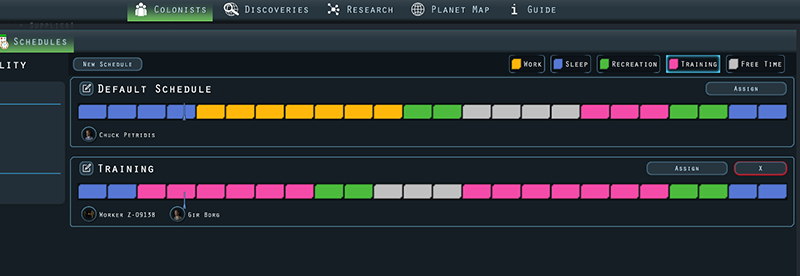
Colonist Schedules
In order to have more control over what activities a colonist is doing, I’ve added a new colonist schedule system. You can have multiple schedules and assign colonists to a given schedule. In each schedule you can define, per hour, what activities are performed during the day.
Colonists assigned to a schedule will determine what actions they can or can not perform based on their assigned schedule. This also means that you will need allow for sleep and recreation time as colonists will no longer perform these automatically during work hours.
In addition to specific activity types there is also free time which provides no restriction to what a colonist can do. This means that during free time they will behave as they do currently without a schedule.
The benefit of schedules, of course, is more control over what colonists can do and when. This also means that you can define training time for colonists which resolves my initial concerns regarding the new training mechanics.
How It Works
The colonist AI uses GOAP, Goal Oriented Action Planning, to generate a chain of actions to satisfy a goal. Every action has preconditions, effects and conditional validation to determine if an action can be performed. For example the FindWork action has an effect of StayAlive and a precondition of DoWork. The StayAlive effect will satisfy a colonists primary goal, but some other action will need to satisfy the precondition of DoWork.
In the above example the Construct action has an effect of DoWork that can satisfy the FindWork action. If the Construct action passes it’s conditional validation (has a valid target, low enough action cost etc.) then we can chain these actions together and have the colonist perform them.
Actions can now define a schedule activity and if the defined activity doesn’t match the colonists current schedule activity then the action can’t be performed. Since all of the work actions will chain through the FindWork action then I can add the work activity to the FindWork action. This means that colonists can only perform work actions if they are inside of a work activity block in their schedule. This same method is used for the other actions such as recreation, sleep and training.
The scheduling system, as well several other new features, will be available in the coming experimental branch for Update 30.
It’s that time again to see what’s being worked on. Update 29 was originally intended to focus on colonist training, but I got a bit side tracked with some other features and tweaks. Now that those features are out the door, I’ve continued work on colonist training and, of course, some new tweaks.
Colonist training will allow you to train attributes and job skills. This is especially useful for newly created clones that may not have the attributes or job skill you hoped for.
Attribute Training
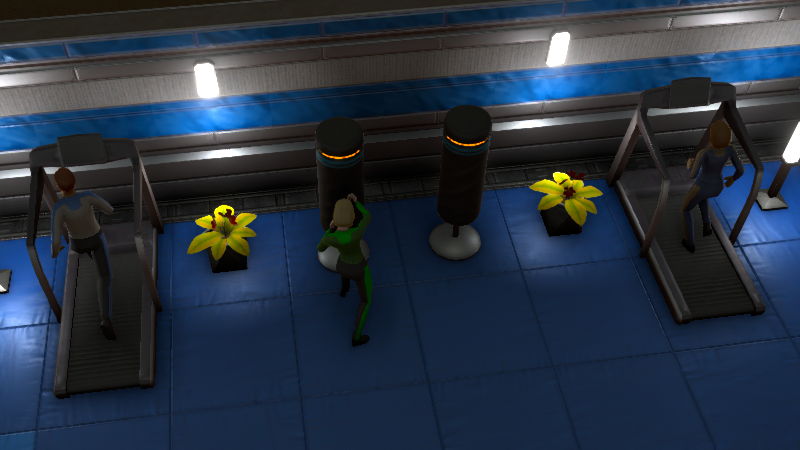
Colonists will be able to increase their athletics and muscles by hitting the gym. Additional equipment is in development for training smarts as well.
The way it currently works is that colonists will spend time training if they don’t have any active jobs to do. While this is functional, I’m also looking into adding some more control over colonist priorities outside of work activities.
Job Training
The memory transfer station is in development to help train job skills. The memory transfer station will allow you to train a job skill from one colonist to another.
This means you can take a colonist who is already high level in a given job and transfer their skill to another colonist up to that level. The memory transfer will still take a bit of time, but far faster than the old fashion way.
Tech Tree
The technology tree is getting a visual upgrade. The updated tech tree shows much more information at a glance including unlock items, cost and if there are required discoveries.
Keep an eye out for more information and certainly let me know what you think of what’s in development.
Patch Update 29.2
Howdy Folks!
Thanks for the great feedback and bug reports. Patch update 29.2 is a tiny patch update to address a critical issue with the copy and paste feature not always working correctly on craft queues.
The next content update is also in development and I'll have some info and pretty pictures to share soon. :)
Fixed: Copy & Paste for craft queues not working correctly in some instances
Patch Update 29.1
Howdy Folks
So the previous patch to fix a crash problem for some users resulted in a crash problem for all users. This was certainly not intended and patch update 29.1 should hopefully resolve the startup crash for everyone. Please let me know if it resolves crashing on startup. Thanks for the support and the reports everyone. :)
Sorry to hear that some folks were experiencing issues with the game crashing on launch after the update yesterday. 29.0.1 is a small patch update to address this issue. If you were experiencing this issue, please let me know if this patch update resolves it.
I’m excited to announce the release of update 29 :: Copy & Paste. In this updated I’ve added the ability to copy & paste some object and colonist settings as well as tweaking various systems. A huge thank you for all of the feedback and bug reports during the experimental and test build phases.
Copy & Paste
The new copy and paste feature allows for quickly changing lights, storage containers, colonist colors, crops and more.
Colonist/Vehicle Selection
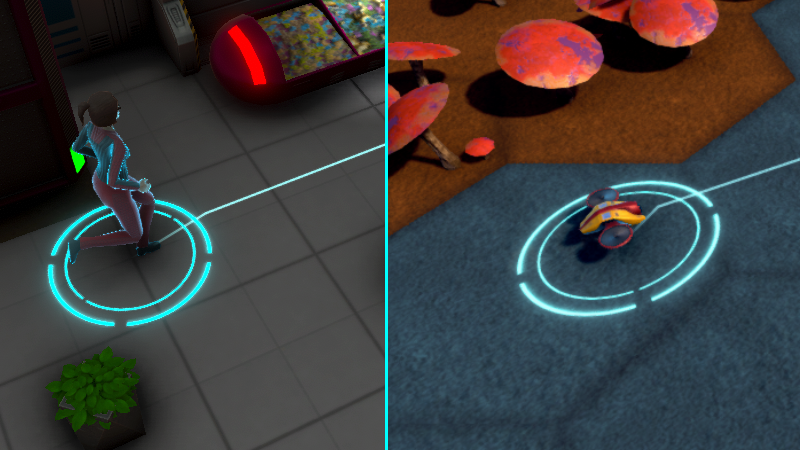
Colonists and vehicles have a new selection graphic. Their current path preview has also been visually updated.
Selection Visuals
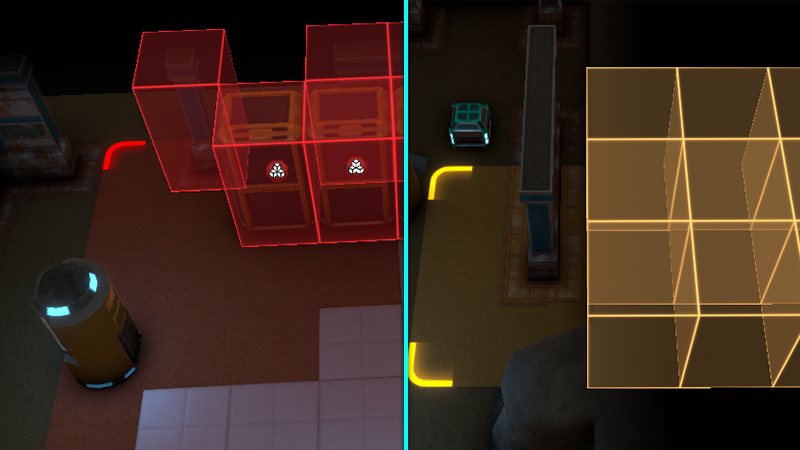
Drag selection for mine, harvest and deconstruct has been updated to show a selection area. Mine, deconstruct and harvest visuals are now colored differently as well.
When placing or selecting objects the object footprint has been visually updated.
Plant Pots
Plant pots now use a selection grid instead of a drop down for choosing plants.
Xeno Mold
Xeno mold will no longer spread through walls and has a maximum spread count. Xeno mold can no longer completely spread over the entire map. To further assist in cleaning up xeno mold, the janitor job role experience gain has been increased.
Additional Changes and Fixes
Some items would disappear from containers if a colonist attempted to pick up items that would take them over their carry capacity. Thankfully I was able to replicate, with the help of a bug report, and fix this issue.
Panning the camera using the mouse while a colonist/vehicle was selected would snap the camera back to the selected colonist/vehicle or deselect when you stopped dragging. This behavior was different than how it worked when panning the camera via the keyboard. This has been adjusted so that the target will no longer be deselected and the camera won’t snap back to the selection. This should make selecting destinations for vehicles easier and more consistent.
There a bunch of additional tweaks, changes and fixes. Check out the release notes below and be sure to let me know what you think of the copy & paste update.
Added new copy settings feature which allows for copying settings and then applying them to valid targets.
Added copy settings feature to lights
Added copy settings feature to storage containers
Added copy settings feature to plant pots
Added copy settings feature to craft queue
Added copy settings feature to crops. Will only copy the assigned crop to targets that don’t have a crop already assigned.
Added copy settings feature to colonist roster
Added copy colors button for colonist and object custom colors.
Visuals
Added new visual for selected colonists and vehicles
Updated selected object footprint visuals
Updated drag selection cursor and visuals
Updated selection visuals and color for mining, deep mining, deconstruction and harvest
Hover icons should now be better positioned over objects
Changed color and thickness of colonist path preview
Fog of war lowered to better cover hidden tiles
Change to the look of crystals in the crystal fields biome
Misc
Replaced drop down selection on plant pots with toggle buttons
Stasis capsules can no longer be selected for deconstruction if not opened.
Selected objects no longer deselected when moving the camera using the mouse
Improvements to mouse selection logic
Minor performance improvement when many hover icons are on screen
Water pumps should now receive higher priority when power is delivered on a power network
Updated some object, item and research descriptions
Crafting section header text on crafting stations changed to Craft Queue
Added guide section button to craft queue
Added guide section button to expedition list
Added guide section button to vehicle list
Increased experience gain for janitor job role
Changed default keybind for center camera to the home key.
Xeno mold can now only replicate to neighboring tiles and can no longer spawn through walls.
Xeno mold will now only spread up to a fixed amount instead of possibly covering the entire map
Fixes
Fixed: Crop info showing incorrect label text
Fixed: Fertilizer Station missing description
Fixed: Unable to assign colonists to Fertilizer Station roster
Fixed: Missing text for glow bulb in plant pot
Fixed: Memory issue caused by UI grid items not being removed properly
Fixed: Memory issue caused by craft queue not clearing data properly when closed
Fixed: Grammatical mistakes. I’m sure there is still more.
Fixed: Thermal vents positioned at the edge of the map in some instances. This fix will only affect new games.
Fixed: Missing minimap color for stone floor
Fixed: Items disappearing if colonist attempts to pick up more than they can carry
Fixed: Unable to select items on ground if covered in xeno mold/fluid spill
Fixed: HUD inventory category buttons retaining focus after being clicked. Pressing space after clicking a category would still pause the game, but would also toggle the category opened/closed.
Copy & Paste Update Now On Test Build Branch
Howdy Folks!
The Copy & Paste update is now available on the Test Build branch. A huge thanks for all the feedback on the Copy & Paste update while it was on the experimental branch. This new update is now considered stable and ready for the final round of testing.
Update 29 :: Copy & Paste Test Build Info https://steamcommunity.com/app/704510/discussions/3/3130542300091378605/
About Test Build Branch The optional Test Build branch is for testing the latest features before they go live to everyone. As it is a testing version there can be more bugs/issues than in the normal version. If using the Test Build branch, please report any issues you encounter or any feedback on new game play mechanics. Your feedback and/or reports will help to ensure the final version is the best it can be.
Update 29 Now On Experimental Branch
Howdy Folks!
Update 29 :: Copy & Paste is now available on the Experimental Branch! As mentioned before, I got a bit side tracked. New starting game options and colonist training has been pushed back a bit in favor of various quality of life additions and tweaks. You can now check out this new content on the Experimental Branch.
See the update 29 info link below for patch notes. Let me know what you think of the new content and certainly let me know what isn’t working.
The copy and paste feature allows you to quickly and easily copy settings from one object and paste them on another. Copy and paste works on lights, crops, craft queues, rosters, plant pots and storage containers.
Selection Visuals
Selection visuals have been updated for deconstruction, harvest, mining and deep mining.
Visuals for colonist and object selection have also been updated.
I had originally planned for Update 29 to focus on additional options when starting a new game as well as training equipment for colonists. While this content is still in development I got a bit side tracked with various other tweaks, changes and fixes. Let’s take a look at what I’ve been doing.
Copy & Paste
A new copy paste feature is being added that will allow you to copy settings from one object to another. This includes the ability to copy storage container filters, crop settings and lighting.
Mouse Selection
I’ve dug into the mouse drag selection code to make selection more consistent and improve performance. Visuals related to object selection has been updated including area highlighting during mouse drag, selection visuals and more.
When selecting objects for deconstruction, mining or harvesting the selection graphics are now colored separately to make it more obvious which mode you are in.
Stasis capsules can no longer be selected for deconstruction if their is an occupant.
Colonist & Vehicle Selection
Colonists and vehicles now have a new selection circle. This should improve the user experience, especially on the planet map where vehicles can be hard to spot even when selected.
Additional Changes
A big complaint has been the inability to move the camera using the mouse without it snapping back to a selected colonist or vehicle. This was an oversight on my part as this already worked correctly when using the keyboard to move the camera. This has now been fixed.
Many other minor changes and improvements have been added or are being worked on. I plan to release this update next week on the experimental branch.
Thanks for all the support, feedback and bug reports. Hope everyone has a great weekend! 🙂