Patch update 22.3 is a teeny tiny patch update to address an issue with the mod manager. Thank you all for the feedback and reports. Keep an eye out for a developer log next week that will go over some of the new stuff I've been working.
Optimization to planet map generation. Minor performance increase when loading or starting a new game.
Fixed: Cells in range not calculating correctly. This caused an issue with decor radius as well as a performance issue with colonists.
Fixed: Colonists eating at table before table is finished being constructed
Fixed: Nightstand emitting light even when not powered
Fixed: Vehicle auto explore action not working when loading a saved game
Fixed: Create Expedition inventory values incorrect when decreasing values in item selection
Fixed: Selection cursor offset when selecting tiles to mine/deconstruct
Fixed: Performance issue when selecting large areas to mine/deconstruct
Fixed: Planet map interface lowering frame rate the longer it’s open. More work to be done on this one, but this fix shows frame rate improvement so far.
Patch Update 22.1
Howdy Folks,
Thanks for playing Mercury Fallen and for the great feedback on Update 22. Update 22.1 is a small patch to fix up some reported issues.
Fixed: Plant Pot info window not showing correctly
Fixed: New game not always generating the correct number of colonists
Fixed: Colonists not always going to the closest available neighboring tile from target. Most noticeable when mining/constructing.
Update 22
Howdy Folks,
Update 22 is here and brings a whole bunch of new user interface changes, bug fixes and a few other tweaks.
Face Lift
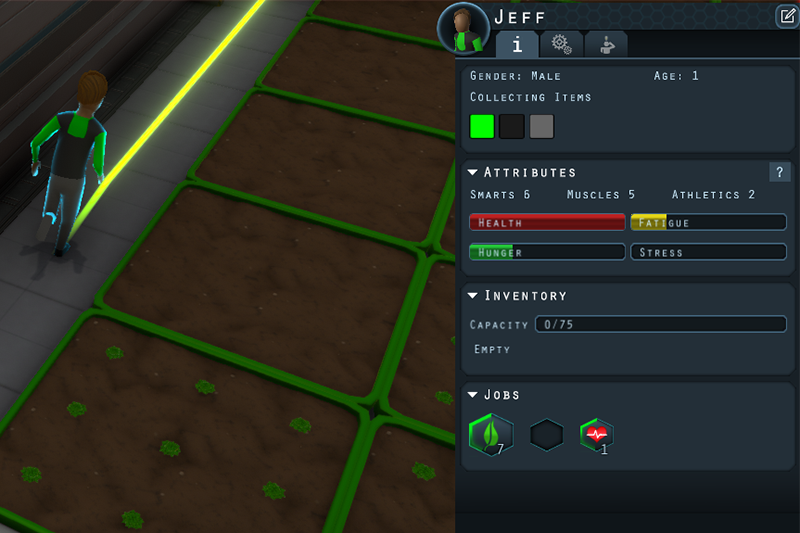
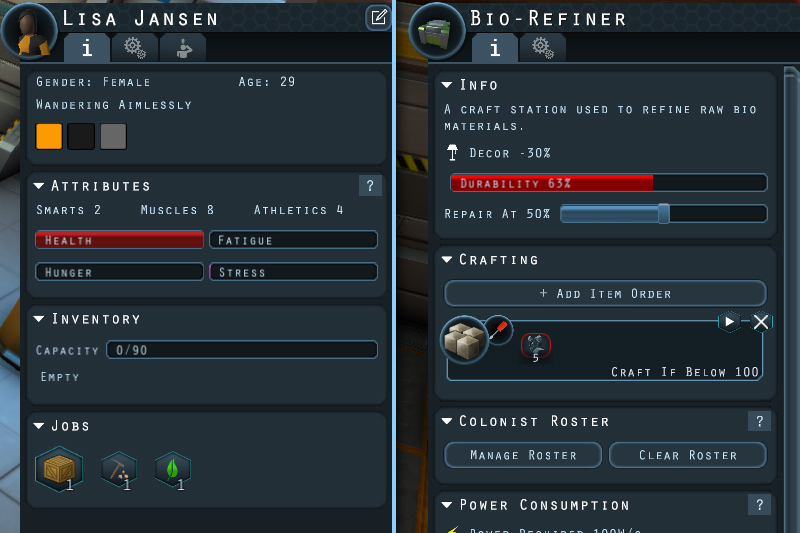
I’ve updated the look of many windows in the game, including the object/colonist info window. The object/colonist window now share a uniform tabbed design that allows for better organization of content. Additional changes to where information is located in these tabs will likely happen in future updates.
Construction Queue
A construction queue window has been added that lists objects currently under construction. You can drag and drop items to re-order the list as well as quickly move them to the top/bottom. The list can be filtered by structure category to assist in finding the object your looking for.
Mini-map Improvements
The mini-map can now be zoomed using the scroll wheel. Click and drag to pan the field of view. Colonist dots now have a hover tool-tip.
Planet Map
The planet surface map has had several changes made to its interface. The left side info panel is now divided into tabbed sections and a new section has been added which lists constructed buildings.
A mini-map has been added to the planet surface.
Moving Forward
I had hoped to integrate game balance changes in this update, but the UI changes took longer than expected. The next update will focus on some large scale changes to game balance. Stay tuned for more information regarding these changes.
Check out the release notes below for all of the changes and fixes in Update 22.
Colonists can now walk in water tiles at 50% movement speed
Minor change to the look of dirt/ore tiles
Doors now have a decor bonus
Colonists no longer gain a positive bonus from low stress during poi story actions. This ensures their success chance is based more on skill, similar to robots.
Further optimizations to colonist planning and critical need checks to improve game performance
Added crafting section to guide
User Interface
Added Construction Queue window
Added Minimap to planet surface interface
Minimap can now be zoomed using scroll wheel
Minimap can be panned by clicking and dragging while zoomed in
Colonist/vehicle dots on minimap now have a hover tooltip
Improved resulting camera position when clicking on minimap to move camera
Rebuilt/updated user interface window and tab system with new look and functionality
Updated look of object/colonist selection window with new tab display.
Planet map side info now divided into tabbed sections
Added buildings list to planet map side info. Clicking the buildings icon will move the camera and select the building.
Updated look of many in game windows
Fixes
Fixed: Object selection floor highlight creating highlight object data for every placed structure. Now generates data as needed instead of generating them all at start and hiding/showing them as needed.
Fixed: Incorrect icons for controls/key binds setting tabs
Fixed: Soft lock when loading a saved game or quitting to menu while colonists are repairing machines
Fixed: Job role selection window not closing when colonist is deselected
Fixed: Stretched textures on dirt/ore tiles
Fixed: Vehicle auto explore action not working or behaving erratically
Fixed: Storage containers dropping double the amount of resources to construct it when deconstructed
Fixed: Rename buttons missing tooltips on colonist management screen
Fixed: Can zoom in/out on planet map when cursor is over other interface elements
Fixed: POI icons not showing on planet map in some instances
Fixed: Minimap updating even when no changes have occured. This should improve performance.
Update 22 Test Build Now Available
Update 22 is now available on the Test Build branch. There are still more changes in development for this update, but I wanted to get some initial feedback on the content so far.
Click the following link for more details: https://steamcommunity.com/app/704510/discussions/3/1697221160918434561/
About Test Build Branch
The optional Test Build branch is for testing the latest features before they go live to everyone. As it is a testing version there can be more bugs/issues than in the normal version. If using the Test Build branch, please report any issues you encounter or any feedback on new game play mechanics. Your feedback and/or reports will help to ensure the final version is the best it can be.
Dev Log #51
Howdy Folks!
A huge thank you for playing Mercury Fallen. There some big user interface changes coming that I’m very excited about.
It all started with wanting a better system for handling tabbed windows. It turned into a face list for most of the windows in the game. The info window for objects and colonists is currently separated into two different windows, and I had wanted to unify them for a long time. In order to do so, however, there were two elements that would have to change.
One Info Window To Rule Them All
Colonists generated a texture for their portrait icon, whereas objects and machines used pre-generated sprites. It was fairly straightforward to consolidate those objects, as I just needed to update the portrait generation code to convert a created image into a sprite. This way, the info window didn’t care about the source of its data, as long as it got a sprite to display for its header graphic.
The more complex task was updating the info window to use tabs. The data that represents an object or colonist in the game uses a custom component system. These components can reference a UI section class, which is what binds these components to a visual output in the info window. When the window is created, it looks through all of an object’s components and generates UI sections for the ones that reference a UI section class. While this system worked very well, the problem was that there was no binding or definition for them to be listed under a specific tab within a window. I also had no consistent definition of what a tab was, or how tabs were generated. The colonist window controller manually placed component UI sections under specific tabs that were defined solely within the colonist UI window.
To resolve this issue, I created GDUITab data objects that store info for each icon, tool-tip and, of course, reference id. Components could now reference which tab they should appear in. When the info window is created, it looks through all of the target components and automagically gets or creates a new tab to put the UI content in the right place. This allows me to fully unify the colonist and object windows into the same system, and have a nice generic tab system to be used in other windows as well.
In the process of creating this, the info window design also got a facelift, which I’m applying to other windows in the game. Since objects and colonists now use the same tabbed design, some sections, such as equipment management, will be moved into new tabs.
I now have a generic tabbed window system that can be used in other places. A sample of this was sneakily — or accidentally? — added in the settings window in the last update.
Planet Map Interface
Creating a generic tabbed window/panel system was something I wanted to do so that I could update the planet map interface. Vehicles and expeditions have been put under separate tabs to avoid scrolling past your growing list of vehicles to start and manage expeditions.
I’m working on a new section which will show a list of constructed buildings.
Construction Queue Window
A construction queue window has been a highly requested feature and a lot of work has been put into it so far. The new construction queue window is a visual breakdown of all objects that have been placed for construction.
You will be able to click and drag to reorder the list, quickly move objects to the top or bottom of it, and, with the click of a button, select any object on the list for more details. The construction queue list can also be filtered by category to help find specific types of objects.
Going Forward
Aside from UI changes, I’m working on various improvements to game flow and progression. There are many mechanics that made more sense before the addition of the planet surface and expeditions, and while some of these elements have been tweaked, I’m reviewing everything to try and provide better game pacing and progression. While the focus of the game is exploration and expansion, there is a shifting focus towards additional hazards — for without risk, there is no reward.
My goal is not to turn Mercury Fallen into a challenging survival game. The Mercury Fallen project is primarily about developing a game that I personally enjoy, and I enjoy exploring and creating without feeling like I could lose everything because of a random event, or being suddenly overwhelmed by combative forces. I do occasionally enjoy a bit of chaos, but at a pace I choose, and not a pace that is enforced.
I’ve focused mainly on the safe haven experience of Mercury Fallen to this point, but I do plan to add additional hazards and challenges. It’s important that the player has some agency over when and how they approach these challenges.
I’m working on changes to the underground world generation that will include some resources that can be acquired early on, and re-balancing the materials that can be acquired underground. Hazards are in the works that will make mining a bit more interesting.
I have a lot of things in mind moving forward, and can’t go into a lot of detail about all of them quite yet. But in the meantime, let me know what you think of these new changes and what you are excited to see in Mercury Fallen.
Work has commenced on the next content update, but in the mean time some additional issues were brought to my attention. This update includes a few small additions and several bug fixes.
I’m currently working on various UI improvements as well as changes to game balance and progression which will be included in the next content update. Keep an eye out for more information regarding these changes in the next developer log.
Added Deselect All option buttons for mining and deep mining.
Added button click audio to various tab/toggle buttons
Added pickup and dropoff sound for storage and item containers
Added plant harvested sound
Adjusted volume/range of various sounds. Still needs more work.
Colonists now default to idle animation instead of showing t-pose when loading saved game.
Updated how colonist portrait icons are generated to attempt to resolve issues with them not appearing in some instances
Re-worked some user interface code to prepare for new content
Fixed: Performance issue when colonists are hauling items to storage when there are many items on the ground
Fixed: Equipment items unable to be installed and not appearing in hud inventory after loading a saved game.
Fixed: Various callback issues in inventory system
Fixed: Highlighted colonist card not being removed properly when closing colonist management screen using tab/escape button.
Fixed: Expedition vehicle not being loaded correctly in some instances causing expedition team to become disconnected from expedition.
Fixed: Colonists loading incorrect instance IDs causing rosters to not load correctly
21.0.12 Hot Fix
Howdy Folks!
Thank you for playing Mercury Fallen and for the great reports. This is a tiny hot fix release to resolve a critical issue. After loading a saved game inventory quantities would stop being updated. This resulted in colonists not performing various actions as new items that were mined/crafted/collected weren't reflected in the global inventory. This issue should now be fixed.
Fixed: Inventory quantities not being updated in global inventory. This negatively affected various colonist actions that use global inventory to test if items are available.