I wanted to share some insight on the current state of development, so let's jump right in!
I'm working on something HUGE! There's no ETA yet, it may be a month or 3 months...it's a lot of work, but I don't want to keep you all in the dark, I want to let you know that the game is absolutely still being worked on with full dedication!
The goal for next update is to include the following:
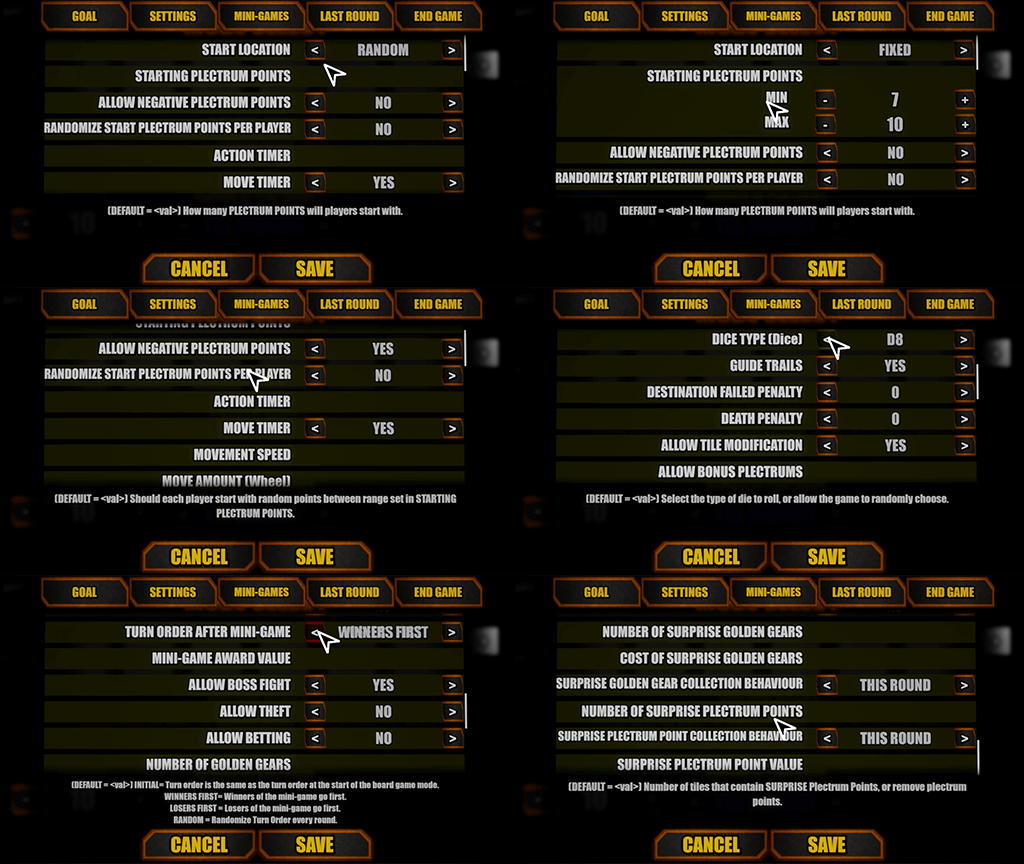
Comprehensive board game customization menu where players can tweak a plethora of values, board game mode goals, and their relevant settings.
Multiple new board game goals/win conditions, and the ability to (at this stage) have a primary and secondary goal.
Multiple new built in board game modes to play.
Further improvements to board game features and functionality.
This is all incredibly time consuming to get working properly, but it's also something I absolutely love in ALL games, not just party games, when the developers let me choose the way I want to play, and allow me to tweak and change as many values as possible. So I want YOU to have the freedom to play the way YOU want to play.
I have been working relentlessly on getting the customization menu fully working first with keyboard/mouse interaction. Controller interaction with menu's in UE4 is unfortunately a bit of a nightmare to implement, but hopefully I will figure it out quickly in time once the customization menu is actually complete.
There's going to be a lot that just is impossible to cover in a news update post, but as the update draws nearer, I will of course have more to show and talk about that are finalized.
I will however include a basic overview of what you can do within the customization menu:
Set a PRIMARY and optional SECONDARY goal.
Change settings relevant to the selected PRIMARY and SECONDARY goals. (For example, if the PRIMARY goal is to collect THE HIGHEST number of PLECTRUMS (the games' currency), and there's no SECONDARY goal, then there won't be any options related to GOLDEN GEARS.
Select what mini-games are allowed in the mode. You can also save your own custom PRESETS, and select them from a drop down menu to easily switch mini-game presets.
Change TILE settings, allowing you to control what tiles are allowed, and eventually (probably not this update) allow you to tweak individual tile settings to control their behaviour.
Change ITEM settings, allowing you to control what items are allowed, and eventually (probably not this update) allow you to tweak individual item settings, such as WHERE an item can be found, cost of items, and so on.
Change END GAME settings, so you can determine what the gameplay is like in the last x amount of rounds (IF there is a round limit), or what occurs when players are getting close to winning.
This will mostly be used as a balancer of sorts...or imbalancer if you're chaotic evil like me :)
SAVE/LOAD Custom modes, Mini-Game Presets, Tile Presets, Item presets etc.
NOTE: Definitely will not be in this update, but workshop support for custom modes is absolutely planned in the future, closer to full 1.0 launch.
Please bear in mind that this is a HUGE undertaking, especially for one developer. So it's not something that will be done in a few weeks (that would be nice though), but I believe that gameplay customization is absolutely critical for a game like Metal Heads, and will literally be a game changer.
I have been working almost full time hours again on the game due to minimal day job hours where I only work weekends for now (due to my spinal injury (which is confirmed to be a herniated disc and 3 bulged discs)), so I've been making fantastic progress in such a small amount of time.
I have no ETA on when this update will happen, but rest assured that I am doing my best to ensure that it is in your hands as soon as possible, the sooner, the better!
I hope you all have an AWESOME day, and if you have any questions, or wish to discuss this update, please feel free to either post in the comments, post on the DISCUSSION FORUM, or join the
Lastly, as part of the STEAM SPRING SALE, Metal Heads is 20% off. Every wishlist, every post liked, every demo download, every purchase helps Metal Heads in a huge way, more than just financially, but due to how Steam prioritizes visibility, so any support you give, even if not financial, is super helpful! THANKS :D
ROCK ON!
HOTFIX: Board Game Golden Gear collection bug fix.
VERSION: SALTY SNOW #1.27.3 (public)
HOTFIX: - Fixed bug where if the player landed on the exact same space as a Golden Gear, and could not afford the Golden Gear, they would never be able to reach their destination and would instead have to wait for the timer to run out.
I am really sorry that this bug has been in the game for so long, I had no idea and only stumbled across it by mistake today while testing board game mode customization.
If you run into bugs like this, please post it in the forums or join the discord community.
Thank you for your patience, now back to the grind I go!
ROCK ON!
HOTFIX: More crash fixes
VERSION: SALTY SNOW #1.27.1
This hotfix should fix some issues that were occurring within Unreal Engine 4 that were resulting in Metal Heads crashing.
Both the full and demo version have been updated.
ROCK ON!
HOTFIX: Crash fixes Coallateral mini-game and updated bug reporter.
Hi everyone!
Thanks to a few of the bug reports that have come in (now that there's a functional bug reporter), there are 2 main crashes that have been reported so far. SUMMARY: (CRASH FIX)- Fixed Coallateral physics bug crashing the game. (POSSIBLE CRASH FIX)- Players using Dolphin/Wii controllers, sensor bars or using 3rd party controller emulation software should still be able to play without a crash. If using these things and it's still crashing, unplug those controllers, and/or turn off the emulation software and try again. (Updated Crash Reporter)- More information on the crash reporter, specifically targeted to those using Dolphin/Wii controllers etc.
There is a known issue with Playstation DUAL SHOCK controllers (I can only test with Dual Shock 4), where if you try to play with one connected via BLUETOOTH, the game will crash. Thankfully, I was able to test this and find a work-around/fix.
Go into Steam Settings -> Controller -> General Controller Settings and enable "Playstation Configuration Support".
The Dolphin/Wii controller crash bug is one that unfortunately I cannot replicate, because it's to do with players having things like the Dolphin Wii controller plugged into the PC. And that's not something I have a hardware set up for.
Metal Heads uses a super helpful plugin that allows me to have 8 players, but it doesn't know how to deal with strange 3rd party controllers such as Dolphin Wii motes/nunchucks, Dolphin sensor bar's, and emulation software for Dual Shock controllers, such as Better DS3 and DS4Windows.
I have been in contact with the plugin developer, and he has been super helpful, and helped me put in place some code that HOPEFULLY will stop the game crashing simply because one of these devices are connected to the PC. NOW the game should still run, but those devices won't work in the game as they are completely unknown (hence they need emulation software to work). Unfortunately, without me being able to replicate the crash at all, due to not owning any of the hardware, I cannot say for certain if this actually fixes the issue.
If you are someone who is using these types of controllers, and it isn't crashing anymore, please let me know, but also let me know if it STILL crashes. Please let me know by either joining the Discord forum HERE or posting on the Metal Heads Steam support forum. Which is found HERE
OTHER NEWS I am working super hard on the board game customization menu, and it's coming along nicely. Bear in mind, that this is extremely complicated to make, so it may take me a while to do, but I'm making fantastic progress, and cannot wait to get it into your hands.
Anyway, ROCK ON!
CRASH REPORTER
VERSION: SALTY SNOW #1.26 (public)
CRASH REPORTER
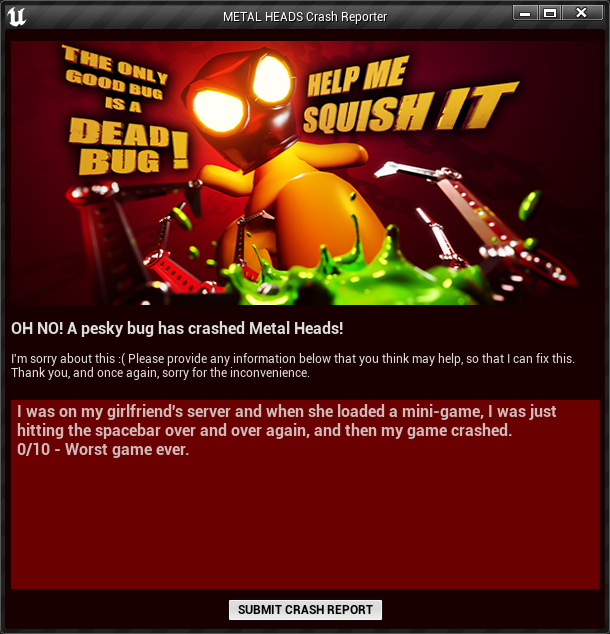
FINALLY, there is now a crash reporter that you can all use whenever the game crashes. It will send the relevant information, so that I can narrow down the crashes that so many people are having, and if you do have a crash, all you need to do is click the SUBMIT CRASH REPORT button! :)
One of the most common issues that people have who refund the game, is the frequent crashes, however with no way of EASILY submitting a crash report, it's no wonder that people refund it and are upset. Sure there's a little guide on the forums, but that's not good enough, it should only require one click of a button, that's it, so that's what I have set up for you all. Obviously you can leave comments that you think may help me hunt down any crashes, and I urge you all to do this if you do run into a crash, as that additional information may highlight the issue and make it a hell of a lot easier for me to hunt down.
This of course doesn't mean that I will be able to immediately fix these crashes, but it at least points me in the right direction.
CRASH FIX
[expand type="showmore"] A crash that occurred when a client was mashing the keyboard or down arrow on their keyboard during loading screens is now fixed. This was fixed thanks to a report from community members LolGod and HasteDay, who play Metal Heads weekly over at HasteDay's twitch channel. https://www.twitch.tv/hasteday
And trying to find this bug, prompted a search for other crashes, which ultimately led to the creation of the crash reporter, so you all have these awesome community members to thank for being so vigilant. [/expand]
OTHER NEWS, WHAT'S THE PLAN? WHY ONLY SUCH A SMALL UPDATE? [expand type="showmore"] In summary, I've been hard at work on creating a fully customizable board game experience, giving you guys the tools to play the board game mode how YOU want to play it, as well as working on new board game maps. I'll provide more detail on this as it gets closer to being finished.
However, when I say I've been "hard at work", that is only when I COULD work.
At the very start of the year, I injured my spine, which left me bed ridden. The last 2 months, I have been laid flat on my back in bed, and not really able to do much at all, including working at my main PC. However eventually, after feeling sorry for myself, I set up my laptop in my room, and started learning new game development related things to help with not only the development of Metal Heads, but my future as a game developer. That's not to say I didn't take it as an opportunity to actually have a break, relax and actually REST, which isn't something I'm accustomed to doing. Thankfully the experience has reminded me once again to take things slow, and not to panic about not getting this done or that done by this or that time....so long as progress is being made, that's the most important thing.
It hasn't been the ideal start to the year for sure, but perhaps it's a blessing in disguise, perhaps it's an experience that has given me a better perspective on not just the game development, but life in general.
I'll find out in ~1 week what the injury actually is, I'm hoping it's just a herniated or bulging disc, and not something like a degenerated disc, or fracture or something nasty that requires surgery. I AM definitely improving, but I also need to be careful and not get over-zealous, thinking that I can bounce right back again. It's going to take time and patience. [/expand]
I hope you are all doing well, and your 2023 is awesome so far!
Until next time, ROCK ON!
HOT FIX: Board Game camera fix.
HOT FIX:
Just a real quick one.
The camera no longer turns 90 degrees in the board game map.
OTHER NEWS: Real quickly, I have been bed ridden for the last 7.5 days due to a spinal injury (possibly herniated disc), so sitting at my PC for more than a minute is insanely painful, only laying down gives relief.. So not a lot of game development happening currently.
In saying that, I have set up my laptop on the TV in my room where I can continue to do some game development, studying new things in Unreal Engine 4 and other software so that once I'm able to sit down at my main PC, I can apply the new found knowledge to Metal Heads.
Hopefully I heal up quickly, but so far, not so fun. :(
Anyway, ROCK ON!
HOT FIX: End Round duplicate message hot fix.
VERSION: Salty Snow #1.24 (public).
Just a real quick one while I work on the next big update.
This just fixes a bug that has been annoying me for a while where the ROUND ENDED message actually is duplicated. This wasn't a major problem, but it's one less thing to worry about.
I have also added some minor texture changes to the online lobby map, there were some untexture catwalks behind the character stage.
I haven't got a lot of work done the last 2 days unfortunately due to another spinal injury (same as last one) which is causing a lot of discomfort (especially when seated or standing) which means I am mostly just laying down in bed at the moment to help with recovery. I've taken a week off my day job to also help with recovery, and getting some scans done hopefully next week so I can work out exactly what the extent of my injury is.
This unfortunately does mean that game dev will be halted a little bit until I am able to sit down for more than 10mins without sciatic pain.
Anyway, that'll do for now!
ROCK ON!
HOT FIX: Boss Fight collision fix, Boss UI fix, Menu UI fix.
VERSION: Salty Snow 1.23 (Public)
Hello everyone!
I hope you all had an awesome end to 2022, and an even better start to 2023!
I didn't really get a break after the update, but I'm glad, because there were some really frustrating issues which are now fixed in this little update.
FIXES: (These bugs only affected online play)
Boss no longer bounces up and down randomly in boss fight mini-game when the boss is AI controlled.
Boss UI now updates correctly.
Main Menu Boss Fight UI no longer overlapping on Client side.
CHANGES: Termination Trail steering is now based on the world, rather than relative to the direction the player is facing. What does this mean? If you are moving down the screen and hold UP, the character will turn slowly to move upwards. Previously, players had to use left or right to steer the bike, based on the direction the player was facing, but every new player was confused by this control method, and as a result, those players were getting frustrated. Please let me know your thoughts on the control change, did you like it as it was previously, or do you prefer the new method?
THANK YOU EVERYONE!
ROCK ON!
HOTFIX: Golden Gear UI, Boss Fight, and other things.
I know I said I would relax....but I can't, not yet at least, because I noticed some nasty bugs!
Today the community and I did a live-stream and during the live-stream, we ran into a lot of annoying bugs, which thankfully, I have fixed most of them after the live-stream.
In no particular order, here are the fixes.
FIXES:
Golden Gear purchase UI will no longer remain on screen after a player has collected the Golden Gear.
When the Golden Gear moves to a new location, it is no longer collectible that turn, and will not spawn on the current path of the player.
Board Game music now plays again.
Tap Out is now enabled again.
Dice Throw animations now working online (previously only worked offline).
Dice Throw camera is no longer broken whenever a player uses an item or goes to the item menu first.
When client runs into a Sticky surface, they should no longer jitter back and forward, player speed variable is now set correctly during online play.
Fixed an issue, where If the host at ANY point, whether it be offline or online, fights the AI boss, then the boss would ALWAYS be AI. This is no longer the case.
Thank you all for your patience, and thank you for your support!
YOU ROCK!
COMMUNITY LIVE-STREAM
Hello my fellow Metal Heads!
I know this is SUPER impromptu, but today I intend to stream Metal Heads and/or Metal Heads game development for most of the day, so please feel free to join us on the Discord community (links below).
The first stream will be starting very soon (@10:40am AEST ( +10GMT)), so come join in on the fun! :D Also, help us hunt down bugs haha.