

Minesweeper Ultimate
1.12 - UI Update
Some behind-the-scenes code refactoring for on-screen UI icons.
1.11 - UI Update
The colours for 'hint' squares are now a little deeper, with the intention of making the game easier on the eyes.
Let me know how you find it!
1.10 - Custom Mode
We can now set custom boards with adjustable width, height and number of mines.
These can be played in all game modes; classic, hex and triangle.
As this is the first implementation of this feature, I'll listen out for any bug reports.
Please let me know if you have any problems with it!
1.0.9 - Bug Fix
I've finally fixed a bug which has been troubling us for some time.
From version 1.0.9, your first click will always reveal a blank tile.
This will help us avoid the frustrating situation of needing to guess at the beginning of a game.
Please let me know about any other bugs you experience.
1.0.8 - New Style Option
Choose your favourite and play!
1.0.7 - Turkish and Traditional Chinese localisation.
I have also fixed some small layout bugs which had longer text strings go off the bounds of the game window.
Let's play!
Kukumushi Virtual Pet
Inspired by early-generation virtual pets like Tamagotchi and Giga Pet, Kukumushi are a fun new experience.
Kukumushi need care, attention and affection to survive and reach their full potential.
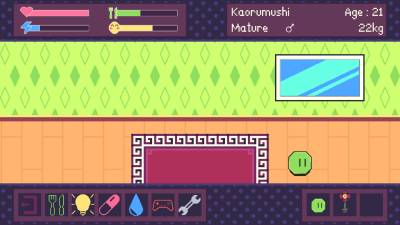
Adopt up to three Kukumushi at once. You'll be very busy taking care of them all!
Are you ready for the challenge?
Adopt your Kukumushi and let the fun begin!
https://store.steampowered.com/app/1855070/Kukumushi_Virtual_Pet/
1.0.6 - Japanese, Korean, Polish localisation.
Let's play!
1.0.5 - Hex Mode Bugfix, Clock Transparency
-Timer can now be toggled to transparent. Click on it before or during the game to toggle its transparency.
1.0.4 - Chording, Windowed Mode
Click on a numbered square. If the number of adjacent flags matches the number on the square, a click is triggered on all other adjacent squares. It's a handy shortcut, but be careful all your flags are placed correctly!
-The game now begins in windowed mode instead of full-screen. Windowed mode and full-screen can be easily toggled by pressing F11 (or Fn + F11 on some keyboards). There is also a small text label in the options menu to remind players of this hotkey.