Last time we covered some of the design decisions on why we swapped to the stance system. Today we’ll focus on Fia and some of the changes this made to her kit. Fia’s two stances are Battlemage and Flameborne. When in Battlemage stance, she primarily focuses on Melee attacks and supplementing those with useful spells, both offensively and defensively.
While she previously used to be able to pick from a pool of abilities, we found that players didn’t really deviate from the main damaging ones, because it wasn’t clear that the other spells had any real advantages.
Splitting them up into 2 separate stances that you can toggle between frees them up to be able to choose when they want to use situational abilities, and when they want to burst their target down.
This also allowed us to expose more of the underlying systems in the form of passive abilities. We’ve developed the poise and focus systems quite a bit between all of the characters, and this lets players be able to have more control over those systems.
For example, Fia used to be able to use her defensive ability to be able to parry anything in the game, but that didn’t feel quite right, when she got hit by a massive attack from a boss, and deflected it with the same ease as Shold, who was made to be able to block anything. So we introduced a threshold where she can still successfully deflect any attack, but if it’s too strong, she still gets knocked down, but takes no damage. Players can now choose to spend a point in increasing the defensive power she has when defending, or optionally just choose to dodge that attack.
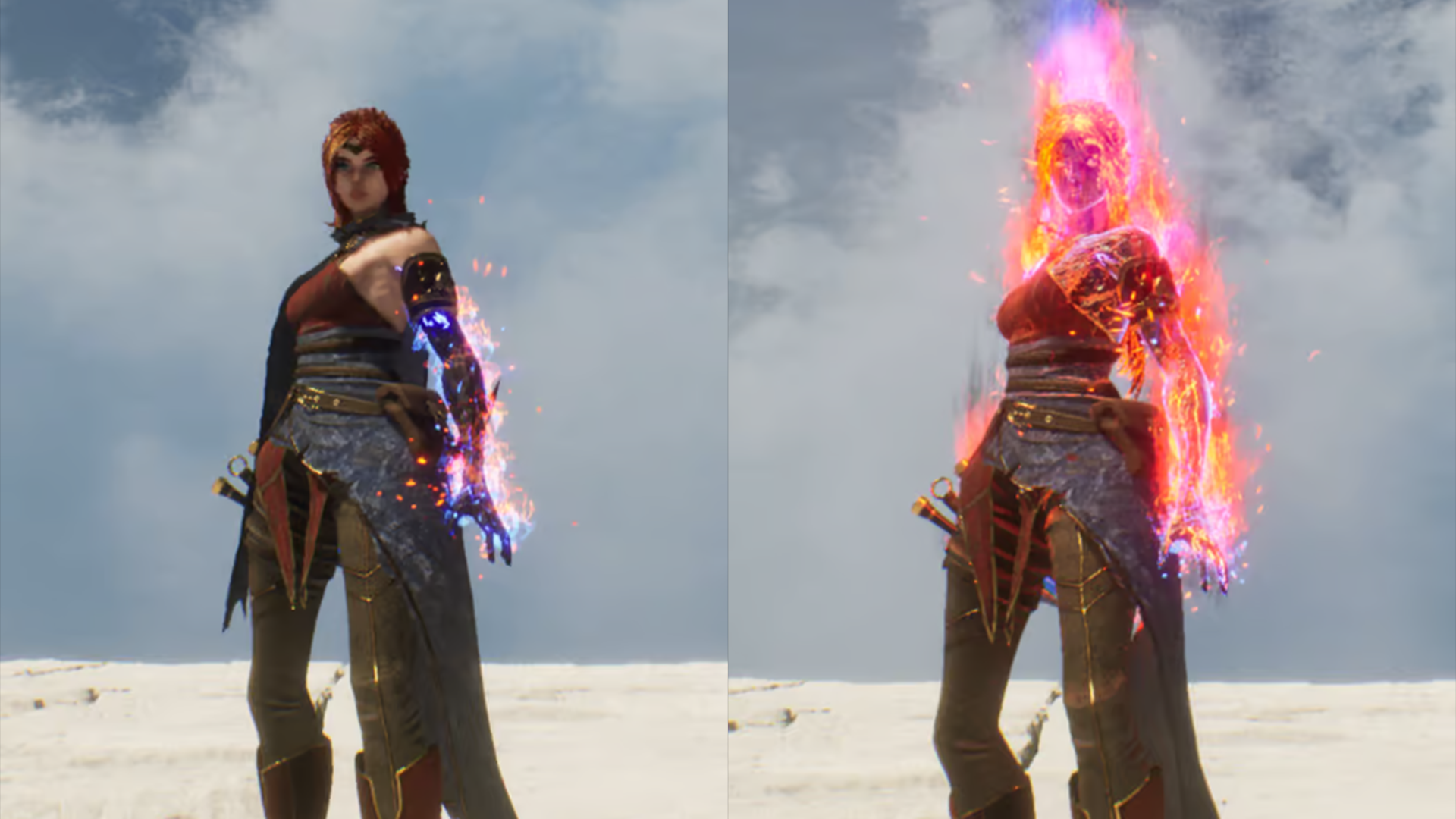
In addition, you can really go all in on defense if you so choose, by adding an ignition effect when defending that will burn anyone you defend against, and significantly increase your focus generation when you successfully deflect an attack, letting you immediately start casting an offensive spell.
We’ve tried to take this kind of approach for all of the passives, where we either expose previously hidden systems or we add extra components to let you really customize how you want to play the character.
Along with the passives, there were new spells that were made for each stance, with the goal of supporting the overall playstyle for that stance.
The Battlemage stance received a new Fire Cone ability that can deal significant close range damage in a wide area. This can be expanded to increase the range or to stun enemies caught in it.
The Flamesword spell is now fully featured as well, offering an option to upgrade from fast kicks to dedicated heavy and charged swings with the sword. These attacks have been designed with enemy groups in mind, so its a good choice to deal with large groups, instead of using the dagger.
The Flameborne stance is still under heavy development, but at the moment, you can enter this stance at any time, and begin to burn your focus pool, but your abilities don’t cost anything.
Fia’s Light attacks are replaced with a Fireshard combo and heavy attacks cast a chargeable fireball, significantly increasing damage with each charge level (up to 3.)
That’s all for this week. Catch ya later✌️
Watch the Devs Play: First Blood
Come check out our latest development updates live on Steam!
Alex Estevan, our community and social media manager will be playing through our latest developer build and showing off the new stance system we are really excited about! It will be the perfect time to discover more about Mortal Rite and get any questions you have about the game answered!
▶️ The live stream session will take place on Steam, Twitch, and Discord at 12 PM CST on Saturday, August 31st.
See you there!
Dev Log 10 - A Dramatic Stance
We’ve been cooking up a new way for players to play around with their kits.
Previously we made some design decisions for player abilities that led to quite a few unfortunate circumstances. We wanted players to master their abilities, and one way we thought of doing that was to have a variety of ways to alter how they used their abilities.
Ah, here’s a great way to make sure that happens. We’ll force every ability to have “Hold” functionality. So anytime the player holds down the button for the ability it should change the way you use the ability.
For a while this was more or less okay. We could think of some alternate ways to use abilities that encouraged tapping the button versus holding it down. One example was for Fia. Her Fireshard ability would launch a small fireball, while holding the button down would launch a bigger fireball, and continuing to hold it would charge it further, increasing it’s size and damage.
Hold: Fireball
Tap: FireShard
Which was great until we started running into issues with other abilities.
Taking Fia as an example again. Her Flame Sword ability, she can summon a sword, but what exactly would the hold do?
This came up pretty often, we wanted “transform/shapeshifter” abilities that would alter what weapon you had or what “mode” you were in, which in testing was a lot of fun, but didn’t have a clear answer for how we’d tackle that Tap Vs Hold functionality.
On top of that, the player could add mods to each ability to change them even further.
Old Customization Menu
Each ability had to have at least 4 mods. This would let players customize their playstyle with each character. It also meant that we were in a very weird spot for abilities like the FlameSword. Most of the mods for those types of abilities would wind up being passive components. Things like increased damage, add fire damage, regain additional focus on each hit.
The passives in those cases ended up feeling more of a forced decision rather than a new way to interact with the ability. Together with the tap and hold requirement, player abilities were in an odd spot design-wise and in terms of player customization. On top of that there were other issues of progression were players would could gather ability points in a very short amount of time and get all the ability mods.
Back to the drawing board, Anthony and Jensen spearheaded a new design to combat most of these issues.
The stance concept assumes from the very start that characters will have at bare minimum two “modes or stances”. This right away takes care of the issue that swapping weapons had, and the requirement for Tap vs Hold was removed completely.
So players will start off with a “Stance Swap” ability for free that let’s you swap back and forth between the two modes.
Please ignore my impeccable UI design. 😅
The system still allows abilities to be customized, without the need for specifically 4 mods per ability. It also lets you pump points into different mods so you can focus more power into a specific playstyle.
There’s been a ton of changes since we introduced the system, and we can get into it some more in a future dev log. But that’s all for this week.
See you in the next one.
Dev Log 9 - CHARGE IT UP
Hello again everyone! This week was all about adding in Dawksin’s Hunters Charge ability.
While relatively straight-forward there were a few hiccups that were a tad unexpected. The idea of the ability is that Dawksin quickly passes through enemies dealing damage and adding shrapnel to anyone in the path.
We already had the base animation for the attack so step 1 was to add our anim notifies that tell Dawksin how to move.
These are little tags with data we can throw onto an animation, that say “Hey do something at this point in the animation!”
So for example:
So how do we break this down? Ignore the long green bar, that's just the animation itself.
Light Green: Prevent additional abilities from activating
Gray: Add some flags on Dawksin.
Ex: 1st one speeds up his rotation in case you want to change your aim.
Ex: 2nd one locks your rotation so you can’t make Dawksin spin in place while moving.
Darker Green? (I made too many things green) : Tells Dawksin to move
Red: Damage windows. One for each blade.
Blue (Beginning): Lets you change your rotation even if you’re locked onto a target.
Blue (End): Ends the animation early if you’re trying to move.
We do put a lot of thought into how each ability feels, so all these notifies are there to make sure it feels good to use. This is also how melee attacks are built.
So if we dig into the movement notify, we can see a ton of options for how to make Dawksin move. In this case, we’re making him move 1000 units forward over the length of the notify which is like 0.13 seconds.
So now our move ends up looking like this: But that’s not quite what a blink is-
ADDING IN THE BLINK
The blink needs Dawksin to disappear, which is no problem, we can make him do that.
(It would be pretty swell, if he came back though.)
Lets add his weapons to the mix, and make him re-appear. I think that’d be for the best.
With that, we have the basis for ability completed!
VISUAL FX
Here we can add some flair to communicate when Dawksin should be doing damage. In the anim notify windows above, we defined when Dawksin was doing damage with each blade.
That’s fine and all, but we need to – SEE - when he’s doing damage.
So here we can add weapon tracers, courtesy of Rod. (Um… while that looks kinda cool, the tracers are not really showing the path of his weapons. Let's look into that.)
So it turns out there’s a bug in the stock effect attachment code from the engine.
Here the tracers are being attached to each weapon bone, which is great, however, the code looks at that and says “ah yes, lets attach it, AND let's take the location of the bone, and offset it permanently”
I can’t override the behavior since we’re using a binary install of the engine. So you know what that means.
Not my favorite thing to do. I typically avoid this as much as I can, but in this case, we attach a lot of effects, so this would affect a ton of particle systems.
A few hours later we now have our own attachment code with all the same bells and whistles. In addition, we can now specify our own custom offsets in case things don’t line up perfectly.
(Hey that looks right)
We’ll tie it all up with the VFX of his cape showing when the blink starts and ends, and some tracers to show the path he traveled.
So that’s most of the ability complete.
From here we start taking care of the edge cases. Anthony showed last week how we could have attacks that take into account when Dawksin stows his weapons, so I added a new variation for when his weapon is stowed.
And in the end we actually changed the attack animation from a 2 hand slash where Dawksin does a spin to instead have him slash his sword in a x pattern, we felt like it fit the attack better.
Anyways that’s all we had time for, see ya’ll next week!
Dev Log 8 - DESTRUCTIBLES
As mentioned in the previous dev log, we use the Level Transition Component to allow us to change anything in the level either at level load time or, if a loading screen is okay, once a level has been loaded. We can add a wall, have a bridge that was standing be destroyed, change weather or theme, or anything that causes the player to have to find a different path through the “same” level. But level transitions don’t replace having parts of a level be destructible… so that’s why today we’re going over our “destructibles”
Destructibles are objects in the game that can be destroyed by walking, sprinting, rolling, or dodging into them, or by attacking them. The goal of destructibles is to make the world feel more alive, solve a few gameplay needs, and to just be fun. We find it fun when, either intentionally or accidentally, you break a destructible and see the chaos unfold.
We like the idea of cover that is destructible so that taking cover from the Heavy Archer on the bridge in the playtest is possible, but you can’t camp there for too long
We have also used destructibles to delay the player from getting from place to place.
Destructible Implementation
In Mortal Rite, destructibles are actors that have one or more static meshes that, based on criteria, can be broken. Upon breaking the destructible a Gameplay Cue is set off and the destructible actor is deleted (deleted here means that the actor is no longer visible and no longer has collision). A Gameplay Cue is a mechanism for easily displaying visual effects for multiple players. The Gameplay Cue knows how to properly display the visual effects for the destructible’s mesh or meshes and can be referenced easily using a Gameplay Tag.
Destructible settings available to a developer:
Lifespan: Time the destructible lives once it is broken.
Tags Must Have to Break on Overlap: Tags that must exist to break when something overlaps the destructible.
Tags Break on Overlap: Tags that will break the destructible on overlap.
Gameplay Cue Tag: The Gameplay Tag for the Gameplay Cue to use when this destructible is broken.
Lock on by Player: Allows this destructible to be locked on by a player.
Lock on by Ai: Allows this destructible to be locked on by an Ai/Enemy.
Startup Tags: Tags that identify this object in the world. In this case, this is a destructible, and we can query for objects with this tag when we want to find destructibles within an area or in the level.
Ways to break destructibles
Overlap: When a character overlaps with the destructible, a check is done to see if the character meets the criteria to break the destructible. The first check is for “Must Have Tags” if they exist. If the character that overlapped with the destructible does not have all of the Must Have Tags set on the destructible, then the destructible cannot be broken on overlap by the character. The second check is to see if the Tags Break on Overlap to see if the character has at least one of those tags. This means that a developer has the ability to determine exactly what can break a destructible. Developers can create destructibles ranging from a destructible that will break if anything overlaps with it, to a destructible that will break only if Shold overlaps it while specifically wearing his Rock Armor and sprinting, to a destructible that will only break if a Boss overlaps with it. Very flexible.
Damage: Destructibles are also on a team. Teams is how we control whether or not something is hostile to any entity in Mortal Rite and only hostile entities can do damage to each other directly (e.g.: sometimes AOE damage doesn’t care about teams at all). If some entity is on a different team, we consider those two entities hostile to each other, and this holds true for destructibles as well. Destructibles default to team 69 (for obvious reasons), which is a team that is hostile to players and, even if the enemies are on different teams allowing them to attack each other, is a team that is hostile to enemies. Destructibles can be set up to have any amount of health so that we can control how easy it is to break them with damage. Sometimes you want to delay a character from entering an area by using a high health wall and sometimes you just want a destructible that doesn’t break on overlap, but will if the player attacks it once.
Other Use Cases: Shold’s rock abilities use destructibles that have their team set to the owning Shold’s team so that enemies can target them and, after a bit, break them, but friendly players cannot break them or target them.
Hope you enjoyed this Dev Log! See you next week! ~Round Toast Studios
Dev Log 7 - LEVEL TRANSITIONS
Greetings Everyone!
As we say in the business, another day another dev log… anyways let’s jump right into it!
“Level transitions” refers to the unloading and loading of assets for a specific level. “Level Transition System” is what we are calling the system that replaces most of the previous systems and logic used to determine what gets loaded dynamically for a level. The “Level Transition System” lives in a component that is globally accessible called a Level Transition Component (LTC).
The LTC manages Data Layers that are part of Unreal Engine 5’s World Partition system. LTC allows level designers to set up configurations for each map that define the following Data Layers.
Each configuration contains:
Display Title: To tell the player what level this is.
Allowed Floor Minimum: Minimum floor this configuration can be played on, meaning the earliest into a run you would be allowed to play this level configuration.
Allowed Floor Maximum: Maximum floor this configuration can be played on, conversely meaning the latest into a run you would be allowed to play this level configuration.
Configured Player Starts: Specific spawn locations for this configuration.
Progress Player Starts: Specific spawn locations that the player can unlock in this configuration.
Layout: Data Layer for the Basic Level Layout.
Dynamic 1: Data Layer that provides level changes specifically needed to support 1-2 players.
Dynamic 3: Data Layer that provides level changes specifically needed to support 3-4 players.
Dynamic 5: Data Layer that provides level changes specifically needed to support 5 players.
(Data layer transitions)
Above is a clip from a test level of the data layers transitioning between unloaded, loading and activated. (BASE)
When a level is loaded, the LTC shows the loading screen and then it determines which configurations are valid for the level and the number of players. The LTC then uses a seeded stream to determine which configurations to load as needed. Once the configuration is chosen, the LTC replicates the needed information to any attached clients (for multiplayer) and waits for the clients to report that they have loaded the Data Layers needed for the chosen configuration. It’s necessary to know when all clients have loaded the configured data layers so that all clients can have their loading screen hidden at the same time. (Living Trees)
LTC has other helper functions such as a function to load the next configuration and a function to reload the current configuration and Reload Current Configuration that are exposed to Blueprints.
(Dead Trees)
Below is a video showing the Nanite Lumen Test level in a very unfinished form. For this clip the NLT level was set up with 3 themes (Cloudy, Thunderstorm, and Dust Storm), and 3 level layers (blank, dead trees, and living trees). Using those layers the following configurations were made: Cloudy/Blank, Thunderstorm/Living Trees, and Dust Storm/Dead Trees. The clip shows Dawksin in a configuration that has a wall blocking him until he uses a trigger to cause LTC to load the next configuration. By the end of the short clip, Dawksin has gone through all 3 test configurations.
The clip is kind of a quick test of the LTC using real assets and it might not look very impressive, but it has helped iron out a lot of bugs.
While we have the technology to load and unload data layers during gameplay, because loading and unloading assets takes time, all level transitions for Mortal Rite will happen during a loading screen when the players are traveling to a location. Once the level has loaded and the game is playable, there should be no level transitions until the players travel to a new level.
Dynamic changes to levels are handled outside of the LTC, but can be persisted via Progress Items, which are used to save progress within levels and throughout Mortal Rite.
Anyways see you in the next one!
~Round Toast Studios
Dev Log 6 - YOU SIMPLY CAN’T RUSH ART
Greetings Everyone!
Howdy, over the past week we got a bunch of small fixes done! White this won’t be the most flashy dev log you’ve ever seen, a lot of these changes are important so we will do our best to explain them clearly!
GENERAL UPDATES
DODGING
The dodge ability was updated to allow each character to have their own dodge distance and duration. Before, we thought it would be great to have a single dodge ability, and have everyone be equal for distance and time.
So then it turns out that was a bad idea, because most of our characters are vastly different sizes. So, uh, let's change that.
Now each character can have their own distances for rolling while not locked on and dashing while locked on, regardless of whether it's a dash or a roll; you can customize the distance of the initial burst of speed for the dodge, and then the sliding to a stop that they do afterward.
JUMP COMPRESSION
We had a whole thing written two dev logs ago about how we fixed the jump compression that was really wonky and having people’s feet go through the floor anytime they landed, BUT it turns out what we thought was going to work, ended up making them do the opposite. (Now their feet hover instead, which is slightly better, but we’re going to go back to the drawing board on this one.)
ANIMATION BLENDING
There was a small problem that we weren’t able to figure out for a while, where if you started or stopped walking, your character's legs would fly out in front of them for a split second.
This seemed really weird until we started looking into the jump compression stuff. Lo and behold, by default, the characters thought they were always sprinting. So anytime we start or stop walking when they’re trying to figure out if they should blend into their idle animation, they start sprinting for a moment.
It's not a huge bug, but it is one that did have us stumped for a while.
ORIENTATION BLENDING
When you lock on to an enemy, your character plays new locomotion sets for walks and jogs. Typically, we just had to make Forward, Left, Right, and Back. The animation system would blend these together to let you walk in the in-betweens, so diagonally in any direction.
The animations ended up not being able to blend very well if you switched your overall direction from forward to backwards. This would only happen if you’re walking forwards-right/left and switch to backwards-right/left. Going from forwards straight to backwards was fine. It's mainly visible if you’re locked on and moving around an enemy. As we should do, because the enemies are tall and imposing.
(When you’re walking left and right and then moving forwards and backward, you now have a new animation to blend with. It's not perfect, but it looks a lot better than before)
So the solution here was to add two more animations (two for walking and two for jogging), that are front-facing. The standard Left and Right animations basically assumed that you were walking backwards before, so that made it impossible to blend nicely from the front.
It's more animations for each character, but it does help them look a bit less jarring when changing directions.
SHOLD UPDATES
Shold got a new IK Rig that let us begin porting over all of his old animations from the UE4 version of the game. This gets us 90% of the way with his animations, except that it didn’t quite fix up everything it should have.
This means we get to go ahead and fix this manually for 290 animations. Yay.
FIA UPDATES
MODEL UPDATES
Fia had some skinning issues where her shirt was clipping through the decorative neck brace, and the brace wasn’t staying intact when her head moved.
That was stopping us from moving her head and neck at all during any animation, so it was a good time to fix it.
Added in Fia’s dagger as well, so she can stop using the default ritual dagger.
Completely ignoring the fact that we like to oversize all weapons, it's important for weapons to be a bit longer than you’d typically expect to make sure they actually have a chance to hit the enemies.
Even the hitboxes for them are oversized to an extent, so make sure that they hit when you expect them to, instead of missing by an inch or two and feeling like you got cheated.
ANIMATION UPDATES
Oh baby, we finally have some custom animations for Fia. Started things off with new locomotion animations for walks, jogs, sprints, jumps, and turns in place. She finally animates differently than the initiate. (Behold, she no longer slouches like that bandaged weirdo
In addition, we got her melee attacks finished as well. Typically, characters have somewhere between 3-4 attacks for their melee combo, but Fia is all about attacking as much as she can to lower the cast time on her spells. More hits = faster spell casts, so, uh, I gave her 11 attacks. (The more you flip your knife, the deadlier you are)
The Initiate has 4 attacks, Dawksin has 7, and now Fia has the most. Still might need to play around with this number, and possibly the timings, but it feels pretty good at the moment.
Look, the important thing here is that we got excited about making attacks, and they’re already done. Relax.
Also, since she’s meant to be really flashy in combat, she does knife flips all the time. This was actually a bit challenging since each animation had to know the orientation of the knife from the previous one, but we think it came out pretty neat, and it helped sell her persona.
We still need to work on her heavy attacks and such, but that should be done pretty quickly.
See ya’ll next week.
Dev Log 5 - ROUNDING OUT DAWKSIN
Greetings Everyone!
This week was all about adding some finishing touches to Dawksin.
Some of the not-so-exciting things were some general bug fixes:
Pierce projectiles sometimes lingered around forever.
When leaving your grapple state, Dawksin would play a jump start animation instead of falling.
On the slightly more exciting side, we continued iterating on the grappling hook to make it feel better to use.
You can control your direction while grappling more toward the beginning of the move, and as you get closer to your destination, you get less control.
- (He also tilts in the direction he’s moving)
With the new addition of him tilting to match his velocity, we figured his animation could look a little better, so we went ahead and updated it, making it so you kick off the wall automatically.
Reticles
Next up was tackling the reticle for the grappling hook.
When the grappling hook hits something (either an enemy or terrain) you’ll automatically start moving towards the hook. I wanted the reticle to show what’ll be hit, and still be readable when you have other abilities like Pierce that also have a reticle.
I’ve increased the size of the reticle so we can see what’s happening.
So now, as you move over enemies, you can see that they are within grapple distance.
If you move over terrain, it is highlighted in yellow
And as you get closer, you can see they are within Pierce’s distance
Icons
I also started updating icons with more final art, and updated them to show what state the ability is in.
Now, during an ability, we can say things like “This ability is ACTIVE!” or “You can RE-CAST this ability!” or “This ability is unavailable”, or “On cooldown”, etc.
Stowing/Sheathing
Since we gave Dawksin a new state where he could sheathe his weapons, we started experimenting around how this would work.
Initially, we tried something like this: He would periodically sheathe his blades, and this little indicator would let you know when it was going to happen.
This wasn’t great, though, since it ended up being pretty distracting. It would also prevent you from using any abilities while this was happening, which didn’t feel very good.
So the next approach was to have him automatically stow his weapons when he performs an ability, which not only feels less intrusive, it also gives the player a chance to control when this happens.
The whole point of this anyway was to give Dawksin a damage boost when his weapons are sheathed so he gets a little more upfront damage since his overall damage is low because he has so much power packed into his Recall ability.
- (Ability -> Sheathe -> Damage Boost)
And finally, to support this, I added a simple way to mark certain frames in our animations as either charge attacks or empowered attacks, and they’ll reference a handy little table to look up what kind of damage boost you get.
That’s about all we had time for this week.
We can’t thank everyone enough for helping us out, and we’ll keep doing our best to make sure y’all get a cool game :>
See y’all next week!
Dev Log 4 - A GRAPPLE A DAY
Greetings everyone,
Today, we’ve got some new updates we personally find very interesting and hopefully you will too, so let’s jump right into it!
Jump Compression
Up first there was some weirdness happening anytime characters jumped, their feet would go through the floor, which was giving Anthony some headaches.
We figured we could tackle this in a procedural way. We’re already using an IK Control Rig to adjust the characters' feet so they don’t clip through the environment, so instead of what we were doing (applying an additive compression animation) we figured we could just push up and down on their pelvis control which should mimic a little bounce from landing.
So, after setting up a little event detection in the animation blueprint, we can control how much each character recovers from a landing whether they’re walking, jogging, or sprinting.
So, after setting up a little event detection in the animation blueprint, we can control how much each character recovers from a landing whether they’re walking, jogging, or sprinting.
Grappling
Now for the main event, grappling. In our last public build, we had quite a few networking issues with Dawksin’s grappling hook, and this was the time to address them.
The ability logic was supposed to keep track of:
Launching the hook
Detect the hook landing
Reeling you in
Allow detaching mid-air
Allow some control while moving
And the movement logic itself was also handling keeping track of:
Your location
Where the hook location was
How much control you get while moving
Self-Canceling when you let go
It was fairly complex and not easy to debug.
So this time, we started fresh and said, ok, let’s revisit what tools the engine has to do this. Turns out that if we flip a few flags with our movement component and tweak some of their movement tasks, we could make the hook a little easier to debug and perform better under bad network conditions.
This is the big ol’ task we ended up repurposing. It looks a little imposing, but it has all the knobs and levers we need to adjust the hook.
If we take a look here, you can see the positions being calculated and interpolated to get you the control you want, while still moving towards the hook.
The nice thing about this is we should be able to hook onto moving targets! But that’s for later... And that about wraps up this week.
See y’all in the next one!
Dev Log 3 - KILLING 96 BIRDS WITH 2 STONES
Greetings everyone,
Here we are with another Dev Log, Take a ride with us on what we have worked on and are working on.
Material Updates
For materials, we made a few minor fixes. Fia’s material was ignoring any part of the texture that didn’t have a color from the engine on it. Like her knives and the bottom of her boots. So now those don’t look like untextured, shiny, pitch black anymore.
Shold got his scarf back now that we’re done with his skinning updates. He also had some updates to his physics asset, so he can simulate the scarf a bit better without it clipping through his arms and torso.
We can now support blood decals on character after hits thanks to Alex. So we went in and added the layer to all of our characters, which started to push the material complexity a bit too far. Which means that we had to go in and optimize a bit to make sure that our materials don’t become too much of a burden for the engine.
This leads us to…
Optimization Updates
When we make characters, we try to make them as high quality as possible, and leave optimization till later. Overall this is good, because the characters end up looking great, but also comes with that looming threat of optimization in the future that no one wants to think about.
After our last playtest and the several nights we spent rushing to optimize everything in a panic, I figured it was probably a good idea to get ahead of it this time. So, Unreal has a handy feature that generates LODs for you.
What are LODs?? LODs are those low-detail models that “pop in” the farther you get away from something. They change the detail on the model because it assumes that you’ve gotten far enough that you shouldn’t notice a drop in detail, and it changes back to higher quality the closer you get. Having these be lower quality helps the engine run faster because it has less geometry and fewer bones to animate, so less work overall. In addition, we also needed to optimize the textures to save on memory. Memory, as it turns out, is a pretty big deal. Most graphics cards don’t have a ton of memory to dish out, which means that we need to make the most out of the memory that we do have.
Most graphics card’s range anywhere from 2GB to 24GB of VRAM, which is a pretty big range. Meaning we need to plan for the worst and hope for the best. The closer you get to using all of your VRAM the slower your game will run. If you run out, it slows down to an unplayable crawl, and we weep bitter tears.
So, armed with that knowledge, what can we do? We went in and found out how much memory each character was taking up, and as it turns out, they were taking up roughly 1.2 -1.5 GB each... so that adds up concerningly quick. However the answer, it turns out, is pretty simple. Unreal lets us change the LOD for each texture, just like we would for a character. So that we don’t have to compress the source texture, people with higher-end machines would be able to use the textures at a higher resolution.
(The way to do that is to look at each character overall, reduce every texture down to its smallest size, and bring it back up slowly to see what the lowest resolution we can get away with is.)
So, we ended up reducing the memory size to about 80 MB for each enemy and about double that for each hero, at around 150-200MB.
While that doesn’t solve it completely, it does reduce the cost by roughly 80% for very little loss in quality. It can still be reduced further, but it would come at a significant loss in quality. So there’s still a bit more balancing to be done, but I do think we can squeeze out a bit more performance. Possibly with the lower quality modes.
Animation Updates
Now comes everyone’s favorite portion of the blog…
“HOW MANY ANIMATIONS DID ANTHONY GET DONE THIS WEEK!” - It's 96; please stop yelling at me.
A good third of these is the Sword Knight, since we needed him to test out a bunch of hit reactions.
Shold is starting to get back up to speed with his locomotion for His Hammer + Shield, and his 2-Handed Axe is looking pretty good. Still needs to get his Rock Armor finished, though. Don’t have much of his melee done, but at least his light attacks are in there.
Fia had some minor cleanup to make her locomotion more smooth. She now has Light and Heavy In-Air attacks as well. Now she just needs standard heavy attacks to be all done with melee.
Most of the animations are locomotion updates for walking, jogging, sprinting, etc, but I like to sprinkle in attacks just to keep it fresh.
Effects Updates
Lastly, we started porting over all the impact effects from the last project. The effects were enhanced a bit to be more visible. They’re all based on the type of surface you’re hitting, and the current list we
support is:
Sand
Stone
Ice
Wood
Snow
Flesh (Characters)
Grass
Metal
Water
Dirt
[TAG-70]
Each one spawns its own different impact effect, and it's also based on your weapon type. Currently, we only support sharp and blunt weapon types, BUT we’re going to be adding more as we go.
For example, we can't use blunt or sharp effects if we’re using a spell like a fireball. We’d need to add fire effects to any impact as well. This also lets us bundle sounds with the effect, but we’re not quite there yet. See ya’ll next week!




 (
( (
( (
(


