

Mutilate-a-Doll 2
Bloody Mess Patch
Add [Detail > Effects > Wound] (particles on bleeding wounds)
Add [Detail > Effects > Collision] (particle on each touch)
Add [Detail > Effects > Collision Explosion] (poof of particles on harder touch, up to once every 30ms)
Add console command "prioritizeselection [0/1]" (or "ps [0/1]") that temporarily toggles tools prioritizing selected items
Modify Delete tool to delete items incrementally for performance (when deleting >20 items at once, otherwise it's instant like before)
Modify [Detail > Selection] list to allow deselecting items with Shift+Click
Fix blunt blood splatters not splattering quite bluntly enough
Bloody Mess:
Modify doll parts that would spawn with pre-bloodymess default healths to increase their healths to match current default healths so they don't feel extremely weak
(Note that this doesn't affect any custom doll that was saved with a manually modified health.)
Fix concuss setting not applying to per-bodypart concussions
Items:
Modify Kinetizer items to trigger on-throw functionality of items (e.g. Cluster Ball splits into three when Kinetizered)
Modify stabbing force thresholds to make it slightly more solid
Modify various bows to shoot slower so they don't cut bodyparts quite as instantly
Modify Senzu Bean to set max health to 90001 to match new doll healths better
Modify (Un)Trigger Field not to affect linked items
UI:
Modify [Detail > Joints] to display amount of joints in the title
Modify [Library > Saved Levels] tooltip to elaborate how things can be added there
Fix library reseting when spawning a custom item
Rename "Favourite" to "Add to Library" in [Content menu > Current Save]
Move temporary properties (debug/locked/grid snap) to the bottom of the properties list
Modify Colour menu to accept pasting #ABCDEF format hex codes, stripping the "#" in the process
Clarify various settings
Fix various tooltips
Misc:
Fix incremental loading failing if no items were saved
Fix Crash still appearing in the Powers menu in some cases (it's supposed to be in Environment > Minigames only)
Bloody Mess Update

Bloody Mess
The most complex update the game has ever seen is finally here.
It adds the most-requested feature ever to the game: Stabbing, and a ton of other relevant things.


MaD Lab is now available on Steam!

MaD Lab is the item modelling tool used to design all the new items in MaD2, and it's now available on Steam. Download it through the Tools category of your Steam Library:

In addition to all the bloody mess, this update also has improvements relevant to MaD Lab:
- Model management has been revamped, making it a lot easier to add your own models to the game.
- Models are now saveable so you can make whatever you want in MaD Lab, and share it with others.
Tired of jointing bananas onto your high-tech space armour to decorate it? Try designing it in MaD Lab!
It'll not only look good, but also have better performance, and won't not immediately explode into a mess of joints in-game. Win-win-win.
Need help with MaD Lab? Ask for help on #MaD-Lab-Models on MaD2 Discord

Bloody Mess Patchnotes
Even after rigorous beta testing (thanks, beta testers,) due to the complexity of the update, and the fact that sweeping changes like these affect essentially every single item in the game - that'd be 2663 at the time of writing - there will inevitably still be some issues left to fix.
As usual, please report all bugs on MaD2 Discord, or the Bug Reports discussions so I can fix them.
The full, massive, patchnotes can be found below.
TL;DR
- Stabbing with sharp items.
- Bullet penetration.
- Dolls are now more durable by default.
- [Spawn > Settings > Alive Settings]
- Detail Tool has new toys, and a new look.
- MaD Lab is now available on Steam, and models are now saveable. Use it.
- Fixed all the bugs. Added more bugs.
STABBING
[expand type="showmore"]
- Sharp items will stab through dolls, cutting them while doing so.
- Stabbing will happen at a medium force or velocity.
(whereas full on cutting happens at a high force or velocity.)
- Plain bullets will penetrate through dolls, damaging them, and slowing down as they pass through.
- Penetration depends on the bullet velocity and size.
(tiny bullets slow down more)
[/expand]
DOLLS
[expand type="showmore"]
- Dolls are now generally much more durable by default, and default healths have been increased.
(This was necessary to give items a wider damage range that was possible before,
since sharp items now deal consistent stabbing damage as they pass through a body.)
- After years of training, dolls can now headstand and bend their arms both ways.
- Individual bodyparts can now be concussed, and
concussion also happens when receiving overwhelming damage over multiple hits
- Dolls will get less adequate at standing as damaged
(as opposed to suddenly flopping to the ground like before)
- Individual bodyparts that are highly damaged, or concussed, will appear limp.
(as opposed to disabling the entire doll's standing like before)
- Health transfers slower between bodyparts by default,
but bleeding and low health bodyparts drain health faster than before.
- Regeneration property now heals for 0.1% of health per frame
(instead of flat health per frame, so it's now stronger, and scales with high-health dolls)
[/expand]
ALIVE SETTINGS
[expand type="showmore"]
Added Alive Settings:
A bunch of multiplier settings that affect dolls and other alive items have been added.
They can be modified via [Spawn menu > Alive Settings] when an alive item is selected, and via [Detail tool > Physics].
- % Health - Health multiplier. (Only available in Spawn menu, as Detail tool has exact health.)
- % Concussion - Damage required to concuss the item.
- % Standing - Standing force. (Or dancing, at higher values.)
- % Skin Thickness - Force required for sharp items to cut and stab.
- % Body Density - Items that stab dense items slow down more, and require more force to detach.
- % Bullet Penetration - How easily plain bullets pass through the item.
- % Global Damage - All damage received multiplier (stacks with other things below)
- % Bullet Damage - Plain bullet damage received multiplier.
- % Blunt Damage - Blunt damage received multiplier.
- % Bleed Damage - Bleed damage multiplier, affecting cuts and wounds.
- % Sharp Damage - Cut damage received multiplier.
[/expand]
DAMAGE
[expand type="showmore"]
Tons of things have been rebalanced to match new doll healths.
Please report if there are any useless items or features that need buffing.
- Cut and cut wound bleeding damage are generally lower
(to compensate for cutting happening continuously as the item is stabbed)
- Plain bullet damages and headshots have been modified to be more in line with new doll healths
- Blunt item damage deals multiple instances of lower damage
(instead of one huge cloud of blood per hard collision)
- Fall/blunt damage against static objects is lower
- Powers and various item features deal more damage to match new healths better
Modify blood visuals:
- The amount of blood and ites spread has been generally lowered,
since stabbing applies *a lot* of damage and wounds
- Blood visual effects have been modified
(bleeding, cut wounds, stab wounds, bullet holes, blunt smacks, etc.)
[/expand]
GAMEPLAY
[expand type="showmore"]
- Add [Freeze Item] functionality (and unfreeze)
(Disables/enables physics for the item, same as setting the item Static, or 0% Weight, but much less clunky.)
(Hotkey: [N], one of few only remaining unmapped keys, modify via [Keymap > Item > Freeze Item])
- Add [Detail > Functionality > Key Toggle] on items
(Choose a key* that toggles the trigger for the item when pressed.)
- Add [Detail > Functionality > Key Hold] on items
(Choose a key* that triggers the item while pressed.)
(* Will override the chosen key's normal functionality entirely.
E.g. If you bind a bunch of items to WASD, those items will do the things instead of the camera moving.)
- Add [Spawn > Skin > Opacity] slider (0-100%) which modifies the transparency of the item
(Note: Applies to the effects layer as well. This is not a bug but just how the graphics work: The effects layer is a child of the graphic, so transparency affects it.)
(Can be set above 100%, in which case the model's transparent layers will also be boosted towards opaque)
- Add [Properties > Resist Gravity]
(Always acts as if gravity was 20 and wind 0, even if environment settings are changed, and ignores gravity-modifying effects from items and the Crush power)
- Add [Properties > Linked Also]
(when triggered, also triggers all linked items)
- Add [Properties > Linked Only]
(when triggered, only triggers linked items.
Note that the base item is untriggered after each trigger, even if it would normally be toggled on.)
- Modify [Properties > Resist Disintegrating] to resist all forms of disintegration
(Note that this also affects alive items disintegrating into blood when out of health)
- Modify Rotate tool hotkey to be [R] in the default keymap because logic
(swapping it with Scale tool, which is now [T])
- Add [Alt+Enter] fullscreen toggle
[/expand]
ITEM MODELS
[expand type="showmore"]
MaD Lab models are now saveable:
- Meaning, anyone can load saves that contain your item models.
- This can increase your designs' performance immensely
(because you can potentially replace dozens of items and a spiderweb of joints with a single item model.)
- Model data is embedded in the save as-is at the time of saving.
(E.g. Modifying the model and loading an old save will still contain the old model.)
- Embedded model data can not reasonably be turned back into a MaD Lab item,
so please back up your model files so you don't lose them.
- Adding a lot of models, and/or very complex models, increases the size and load time of the save.
Item model management redesign:
The extremely clunky in-game management system has been replaced.
Find it via [Library > Item Models] (previously [Local Models]).
- All item model management is now done using the file system
(Simply edit the model file using MaD Lab and the changes will be available in-game immediately without restart.)
(Please back up your model files frequently, just in case.)
- Added [Open Folder] button that opens the folder where models can be placed
(It's located at: %APPDATA%/games.rava.mutilate/Local Store/models)
- Added [Refresh] button that loads all the item models from the folder into the game
- Added [MaD Lab] button that opens MaD Lab site
(note that MaD Lab is now also available on Steam)
- Add "Empty." under Item Models with help text if no models exist
- Models.sol is now obsolete, but it still works for legacy purposes
(Console commands "modelimport" and "modelmanage" can be used for manual model management)
[/expand]
PHYSICS
[expand type="showmore"]
Cutter:
- Cutter now works much better on small cuts. (aka Bag of Chips is no longer indestructible.)
(and as such Min Cut Length setting has been removed as useless)
- Cutter will now continue cutting even if the cut started inside a body
(meaning that embedding explosives inside items should work much better)
- Explosions now cut more, through multiple bodies, and more randomly
Shocks:
- Shocks now arc to nearby items (radius depending on their duration: short shocks will rarely arc, and longer ones will)
- Shock spreading is now much more random (duration fades randomly instead of uniformly, and may increase when spreading to other items for a second wind)
Miscellaneous:
- Fix bullets always colliding on first frame after spawning (even if the victim is supposed to ignore the collision)
- Fix joints not recreating properly when respawning items
[/expand]
VISUAL EFFECTS
[expand type="showmore"]
- Stamping works with any spawned item
(Note: only the detail item can be stamped this way, not all selected items like normally.
Stamping this way includes all effects that are on the item,
so custom items of often-used stamps can be created and then used to stamp after spawning.)
- Add muzzle flash to all plain bullet guns.
- Modify selection highlight vfx
- Modify visual effects masking to look better on complex items
- Fix flipping not flipping stains and stamps
- Fix scaling scaling stamps wrong
[/expand]
ITEMS
[expand type="showmore"]
Add Turbo Propertator
(Overrides linked items' properties with this item's properties)
Add Turbo Linkerator
(Overrides jointed items' links with this item's links)
Add Virtual Triggerstick
(a variant of Virtual Joystick that triggers linked items when pulled from the centre)
Add Compact Detector
(a variant of Item Detector that's identical to it but smaller so it's usable inside gadgets)
Add Beam Blaster
(blasts beams)
Add Caller Ball, a variant of Target Ball
(spawns freezing snowballs instead of sharp ones)
Add Timer Switch For, a variant of Timer
(Toggles trigger for all linked items, counts down to duration, and toggles again.)
Add Snow Grenade
(a freezing explosive variant of snowball)
Modify Gravity Device not to gravity itself because it was annoying
Modify items-as-projectiles to ignore the same type of projectile
(e.g. Bananas from Banana Magazine won't collide with each other.)
Modify placeholder item to be square (instead of stapler, for collider performance)
Modify implosive+explosive items to disintegrate on collision
Modify pencils and icicles to have a sharp tip
Fix Icicle Gun icicles not using its skin
Modify Ragdoll Figure to spawn the ragdoll at its own scale
Modify Light Sabers to use Trigger Force for length
Modify all previously-ultrasharp items to use triggers::CutOnCollision with modifiable triggerForce instead
Modify Antique Lamp, Electric Candelabra, Lightbulb, and Table Lamp not to use laggy shadow casting (which only works for a single source at once)
Modify Kronos Mask+Antenna to have Trigger Duration setting (affects duration of slow motion on hit)
Modify Wrist Rocket Launcher skin so its projectiles can be skinned better
Modify Wrist Rocket Launcher projectiles to inherit skin
Modify Kinetizer not to launch linked items
Modify Energy Sword to have "energy" tag so it appears in search results when searching for "Energy"
Modify Gas Grenade projectiles to respect particle effect overwriting (if there are other similar items, report them, it's unfortunately a manual process to make things-that-spawn-things to work with the effect)
Modify Chest model to have fewer colliders and a skin that matches Open Chest (existing saves are not affected)
Modify Button to have default duration of 1 (stops triggering instantly instead of after the previous 10 frame delay)
Modify Button to use trigger duration (can trigger for a longer time after pressed)
Rename Taser as Tazer so it zaps more
Fix items spawned via hotkeys using spawn skins of different items
Fix crumbler bullets ignoring Crumbler item
Fix Repel not respecting Resist Gust
Fix Wind bullets not working (and they now repel instead of generating explosions)
Fix Inflatable Decoy not being affected by bullets
Fix balloons not being able to trigger some collision events
Fix Battery Trigger being able to trigger items when re-triggered while out of power
Fix Witch's Items not accounting for projectile mass when shooting (causing some projectiles to fly out very fast, or very slow)
Fix Antique Lamp layering issue
Fix Speaker Drone text not respecting camera pan
Fix Mongolian Armour being named Mongolian Armor instead of Mongolian Armour
Add triggers::LightSource (triggerPos(x,y), triggerColour(RRGGBB), triggerRadius(n)) that spawns a Soft Glow around the item
Add triggers::Slowmotion (triggerDuration)
Add triggers::Explode (triggerRadius, triggerForce, triggerCustom="cuts=true;sounds=sfx1,sfx2;particles=particle1,particle2")
Modify triggers::StunGun to use triggerColour instead of static value
[/expand]
TOOLS
[expand type="showmore"]
General:
Modify body picking to prioritize selected items
(Making it easier to pick the item you actually want to interact with. Affects all tools that use picking.)
Modify jointing line to use the joint's colour and have a shadow for legibility
Stab Tool:
Force is much more usable
Doesn't stab instantly, only after mouse is pressed again after dragging
Drag Tool:
Mode toggling doesn't require exact mouseover to make it more flexible
(Press Drag tool hotkey while dragging to toggle between physics and damped dragging modes)
Mode toggling works with RMB/trigger when the item doesn't have a trigger functionality
Detail Tool:
Categorize various things under Physics/Graphics tabs
Add [Functionality > Freeze/Unfreeze] (same as setting Static property but less clunky)
Modify [Joints] to list all selected items
Item indicator line ends near the targeted item instead of directly at its centre
Settings update twice a second (instead of six times a second, for both performance and to make it look less hectic)
Skinning constantly applies changes (and no longer respawns the item when skinning)
Skinning saves and restores previous item and skin in Spawn menu when the skinning menu is closed
Skinning applies to all identical selected items
Skin cloning also clones blood colour
[Settings > Health] automatically increases maximum health when going above it
Fix menu opening offscreen if the item is too high on the screen
Launch Tool:
Launches all selected items (only the clicked one will be initially dragged)
Only rotates the target item while Shift is pressed
Continuously sleeps items so they won't fall when bumped
Link Tool:
Replace lines with arrows
Add hover outline display for linking/unlinking
Add line animation when linking/unlinking
Fix some links not being drawn when multiple items are selected
Weld Tool:
Now applies to all selected items
(Other joints don't make sense to work like this since they're position-based)
Fix quick-welding not respecting joint menu graphics settings
(double tap joint hotkey, drag while pressing, and release)
Line visual starts at item's centre for better preview (since welds are item-item and not position-position)
Misc:
Modify ignore line to be thicker
Modify default joint width to be 2
Modify Piston joint to have break force
Modify selected invisible items to display hull outline while paused
(Since they can't use the glow filter because they don't have graphics)
Fix various linking edge case issues (all selected <-> unselected cases should now work as expected)
Fix concuss power disabling armours
[/expand]
USER INTERFACE
[expand type="showmore"]
Add favourite levels list in the Library (same as Content menu, but more accessible)
Modify various icons
Modify dark menu text to have more contrast
Modify Library categories not to be underlined
Modify properties list not to highlight current selection
Add [Keymap > Item] category and move relevant things there
Rename [Library >> Favourites] as [Favourite Items]
Modify custom item creation via library to have additional tooltips
Modify content deletion tooltips to better indicate that you have to manually save to confirm deletions
Fix quickspawn ([Enter], search, [Enter]) autocomplete not accepting arrow keys, making it slowspawn
Fix Content menu refusing to open more than once
Add default values to some tooltips
[/expand]
MISCELLANEOUS
[expand type="showmore"]
Add console command "selectColour " (e.g. selectColour FF0000) to temporarily change the select highlight colour (only affects select glow)
Add console command "whatdoesthisdo" that displays additional info when an item is selected with the Detail Tool (e.g. trigger class and some internal values that are too obscure to be added to the Detail Tool, but may be useful when adding xml funcs)
Add console command "stampquality <0/1>" which toggles stamp anti-aliasing
Modify all quicksaves of previous session to be stored in a backup file (instead of latest 3)
Modify scrollwheel zoom to be enabled by default
Fix quickloading failing while drag-spawning an item
Fix armours not detaching properly when manually removing the equip joint
Fix weight sometimes defaulting to 20% instead of 100%
Fix colour picker rounding issue causing the colour to slightly change when re-selecting colours
Remove sound panning L/R because it never works right
[/expand]
WORKSHOP
[expand type="showmore"]
Add support for editing existing Workshop items when you re-submit an item with the same name
(Please back up the shared content before you attempt this just in case,
as the game's workshop functionality in general is very shaky.)
[/expand]
Bloody Mess Beta Test
The Bloody Mess Beta Test is a sneak peek at some of the upcoming new features where you can help destroy all the bugs before the update is released.
This is one of the largest updates made to the game ever, so there will be tons of issues, which is why it's releasing on the opt-in Experimental Branch first.
To play the beta, navigate to [Steam > Library > MaD2 > Properties > Betas] and select the Experimental branch. After that, redownload the game and you should gain access to the beta update.
The full, massive, patchnotes can be found below, and all testing and bug reporting should be related to them in some way during the test.
Report bugs on MaD2 Discord, or the Bug Reports discussions on Steam.

------------------------
STABBING, DOLLS & DAMAGE
------------------------

Add physics stabbing:

  - Any item that has a sharp layer will attempt to stab through dolls,
    temporarily disabling collisions and damaging the doll.

  - Stabbing happens at medium force or velocity.
  (Cutting happens at high force or velocity.)

  - Modify sticky items not to lose their velocity when stuck

  Known issue: Weapons may get ejected from stab wounds.
    Stabbing is physics-based, working via weak joints. It's a delicate balance of being able to remove the weapons, and the weapons falling out on their own. I'll keep tweaking it.

  Known issue: Stabbing is not consistent.
    It will likely be different on each load of a save due to physics jitter. This is not something that can be fixed, really, but may be improved.

Add physics bullet penetration:

  - Penetration mainly depends on the bullet velocity,
    but bullets will slow down as they pass through bodies.

  Known issue: Bullets may boomerang back towards the body they stabbed.

  Known issue: Even "weak" bullet-spewing weapons are currently able to penetrate.
  The system will be fleshed out eventually so there's more differentiation between different weapons.

Modify dolls:

  - Doll healths are now 500% of what they were before by default.
    (This was necessary to give items a wider damage range that was possible before,
	 since sharp items now deal consistent stabbing damage as they pass through a body.)

    Known issue: This will break a lot of items that deal flat damage. Report them so they can be buffed.

  - Doll hands now bend both ways.

  - Concussions now require a harder hit.

  - Regeneration property now heals for 0.1% of health per frame
    (instead of flat health per frame, so it's now stronger, and scales with high-health dolls)

Modify various damages:

  - Modify cut and cut bleeding damage to be generally lower
    (to compensate for cutting happening continuously as the item is stabbed)

  - Modify plain bullet damages and headshots to be more in line with new doll healths

  - Modify blunt item damage to deal multiple instances of lower damage
    (instead of one huge cloud of blood per hard collision)

  - Modify fall/blunt damage against static objects to be lower

  - Modify contact damage instance amount not to be capped
    (previously 10/frame)

Modify blood visuals:

  - The amount of blood particles and their spreads has been toned down
    since stabbing applies a lot of damage and wounds

  - Various blood visual effects (cutting, bullet holes, blunt)
    have been modified to be more varied

  - Modify bullet hole graphics to draw on all nearby bodies (to make them look better near bodypart overlaps.)

  Known issue: bullet holes may get drawn vertically on bodyparts while passing through a body horizontally.

  - Modify particles to have a small amount of random friction for variety

Cutter:

  - Cutter now works much better on even the smallest cuts. Bag of Chips is no longer indestructible
    (and as such Min Cut Length setting has been removed as useless)

  - Cutter will now continue cutting even if the cut started inside a body
    (meaning that embedding explosives inside items should work much better)

  - Modify cut sounds to be more varied in volume

Explosions:

  - Explosions now cut more, through multiple bodies, and more randomly

  - Generic explosions have generally more particles

Shocks:

  - Shock spreading is now much more random (duration fades randomly instead of uniformly, and may increase when spreading to other items for a second wind)

  - Shocks now arc to nearby items (radius depending on their duration: short shocks will rarely arc, and longer ones will)


------------------------
       MODELS
------------------------

Redesign model management under [Library > Item Models] to simplify the whole system:

  All model management is now done using the file system, so you can simply edit the model file using MaD Lab and the changes will be available in-game immediately

  Models.sol is now essentially obsolete, but it still works

  Console commands "modelimport" and "modelmanage" can be used for legacy model management


Add [Open Model Folder] button that opens the folder where models can be placed

Add [Refresh] button that loads all the item models from the folder


Add support for saving MaD Lab models:

  Meaning that anyone can load saves that contain your item models

  Doing so increases the save size drastically, especially with more complex models

  Model data is saved as-is at the time of saving. Modifying the model, refreshing, and re-saving will update the model. (Modifying the model, refreshing, and loading an old save will still contain the old model.)

  Saved model data can not be turned back into a MaD Lab item, so make sure you don't lose your source files if you want to modify them ever.

  Known issue (but needs a reproducible save string): Saving a model may cause loading to fail until game is restarted. May manifest as joints loading into upper left corner, or random places.

Modify item models to only load on start instead of each time Library is opened
(since the Refresh button exists now)


------------------------
    VISUAL EFFECTS
------------------------

Add muzzle flash to all guns.

Known issue: Muzzle flash probably shouldn't be on *all* guns as it looks just weird on some of them.

Modify selection highlight vfx

Modify smooth blood to be smaller by default (20 -> 12)

Modify visual effects masking to look better on complex items

Modify spawn sprite position while stamping for more consistent quality

Fix flipping not flipping stains and stamps

Fix flipping causing stamps not to save


------------------------
         ITEMS
------------------------

Add [Spawn > Skin > Opacity] slider (0-100) which modifies the transparency of the item
(Applies to the effects layer as well. This is not a bug but just how the graphics work: The effects layer is a child of the graphic, so transparency affects it.)
(Can be set above 100%, in which case the model's transparent layers will also be boosted towards opaque)


Add Resist Gravity property
(Always acts as if gravity was 20 and wind 0, even if environment settings are changed, and ignores gravity-modifying effects from items and the Crush power)


Add Beam Blaster that blasts beams

Add Caller Ball, a variant of Target Ball
(spawns freezing snowballs instead of sharp ones)

Add Timer Switch For, a variant of Timer
(Toggles trigger for all linked items, counts down to duration, and toggles again.)

Add Snow Grenade, a freezing explosive variant of snowball


Modify items-as-projectiles to ignore the same type of projectile
(e.g. Bananas from Banana Magazine won't collide with each other.)

Modify placeholder item to be square (instead of stapler, for collider performance)

Modify implosive+explosive items to disintegrate on collision


Modify Ragdoll Figure to spawn the ragdoll at its own scale

Modify Light Sabers to use Trigger Force for length

Modify all previously-ultrasharp items to use triggers::CutOnCollision with modifiable triggerForce instead

Modify Antique Lamp, Electric Candelabra, Lightbulb, and Table Lamp not to use laggy shadow casting (which only works for a single source at once)

Modify Kronos Mask+Antenna to have Trigger Duration setting (affects duration of slow motion on hit)

Modify Wrist Rocket Launcher skin so its projectiles can be skinned better

Modify Wrist Rocket Launcher projectiles to inherit skin

Modify Kinetizer not to launch linked items

Modify Energy Sword to have "energy" tag so it appears in search results when searching for "Energy"

Modify Gas Grenade projectiles to respect particle effect overwriting (if there are other similar items, report them, it's unfortunately a manual process to make things-that-spawn-things to work with the effect)

Modify Chest model to have fewer colliders and a skin that matches Open Chest (existing saves are not affected)

Modify Button to have default duration of 1 (stops triggering instantly instead of after the previous 10 frame delay)

Modify Button to use trigger duration (can trigger for a longer time after pressed)


Rename Taser as Tazer so it zaps more

Fix items spawned via hotkeys using spawn skins of different items


Fix crumbler bullets ignoring Crumbler item

Fix Repel not respecting Resist Gust

Fix Wind bullets not working (and they now repel instead of generating explosions)

Fix Inflatable Decoy not being affected by bullets

Fix balloons not being able to trigger some collision events

Fix Battery Trigger being able to trigger items when re-triggered while out of power

Fix Witch's Items not accounting for projectile mass when shooting (causing some projectiles to fly out very fast, or very slow)

Fix Antique Lamp layering issue

Fix Speaker Drone text not respecting camera pan

Fix Mongolian Armour being named Mongolian Armor instead of Mongolian Armour


Add triggers::LightSource (triggerPos(x,y), triggerColour(RRGGBB), triggerRadius(n)) that spawns a Soft Glow around the item

Add triggers::Slowmotion (triggerDuration)

Add triggers::Explode (triggerRadius, triggerForce, triggerCustom="cuts=true;sounds=sfx1,sfx2;particles=particle1,particle2")

Modify triggers::StunGun to use triggerColour instead of static value


------------------------
        TOOLS
------------------------


Modify body picking to prioritize selected items
(Making it easier to pick the item you actually want. Affects all tools that use it)

Modify tool and power radius to be 50px by default (from 40px)

Modify power effect force to be 100% by default (from 50%)

Modify selected invisible items to display hull outline while paused
(Since they can't use the glow filter because they don't have graphics)


Modify Stab Tool force to be much more usable

Modify Stab tool not to stab instantly, only after mouse is pressed again after beginning to drag


Modify Drag tool mode toggling to not require exact mouseover to make it more reliable
(Press Drag tool hotkey while dragging to toggle between physics and damped dragging modes)

Modify Drag tool toggling to work with RMB when the item doesn't have a functionality


Detail Tool:

  Item indicator line ends near the targeted item instead of directly at its centre

  Settings update twice a second (instead of six times a second, for both performance and to make it look less hectic)

  Skinning constantly applies changes (and no longer respawns the item when skinning)

  Skinning saves and restores previous item and skin in Spawn menu when the skinning menu is closed

  Skinning applies to all selected items

  [Settings > Health] automatically increases maximum health when going above it

  Fix menu opening offscreen if the item is too high on the screen


Launch Tool:

  Launches all selected items (only the clicked one will be dragged)

  Only rotates the target item while Shift is pressed

  Continuously sleeps items so they won't fall when bumped


Modify link tool visuals:

  Replace lines with arrows

  Add hover outline display for linking/unlinking

  Add line animation when linking/unlinking

  Fix some links not being drawn when multiple items are selected


Modify ignore line to be thicker

Modify default joint width to be 2

Modify Piston joint to have break force

Modify jointing line to use the joint's colour

Modify jointing line to have a shadow for legibility

Modify weld line to start at item's centre for better preview (since welds are item-item and not position-position)

Modify welding to apply to all selected items (note that other joints don't make sense to work like this since they're position-based)

Fix quick-welding (double tap joint hotkey, drag while pressing, and release) not respecting joint menu graphics settings

Fix various linking edge case issues (all selected <-> unselected cases should now work as expected)

Fix concuss power disabling armours


------------------------
       STEAM
------------------------

Add support for editing existing Workshop items when you re-submit an item with the same name
(! Please back up the shared content before you attempt this just in case, as the workshop functionality in general is very shaky.)


------------------------
    USER INTERFACE
------------------------


Add favourite levels list in the Library (same as Content menu, but more accessible)


Modify main menu icons

Modify Library icons

Modify menu toggle styling to have more contrast

Modify dark menu text to have more contrast

Modify Library categories not to be underlined

Modify properties list not to highlight current selection


Add MaD Lab button under Item Models

Add "Empty." under Item Models with help text if no models have been imported

Rename "Local Models" as "Item Models"

Rename "Favourites" as "Favourite Items"

Modify custom item creation via library to have additional tooltips

Modify content deletion tooltips to better indicate that you have to manually save to confirm deletions

Fix quickspawn ([Enter], search, [Enter]) autocomplete not accepting arrow keys, making it slowspawn

Fix Content menu refusing to open more than once

Add default values to some setting tooltips

Add default values to environment slider tooltips

------------------------
       SAVES
------------------------

Modify all quicksaves of previous session to be stored in a backup file (instead of latest 3)

Fix quickloading failing while drag-spawning an item

Fix complex triggerCustom values causing an issue when saving


------------------------
    MISCELLANEOUS
------------------------

Add [Alt+Enter] fullscreen toggle


Add console command "selectColour " (e.g. selectColour FF0000) to temporarily change the select highlight colour (only affects select glow)

Add console command "whatdoesthisdo" that displays additional info when an item is selected with the Detail Tool (e.g. trigger class and some internal values that are too obscure to be added to the Detail Tool, but may be useful when adding xml funcs)

Add console command "stampquality <0/1>" which toggles stamp anti-aliasing


Fix [Esc] reseting while cancelling keymapping

Modify scrollwheel zoom to be enabled by default

Fix armours not detaching properly when manually removing the equip joint

Fix weight sometimes defaulting to 20% instead of 100%

Fix colour picker rounding issue causing the colour to slightly change when re-selecting colours

Remove sound panning L/R because it never works right
Cryolab Patch
Add Near-Field (Un)Trigger (variants of (Un)Trigger Field that only affect linked items)
Add new Logic items that make more sense and work more like traditional logic gates (doesn't affect saves, old versions are now legacy items and no longer available in the Library as they're pretty much inferior)
Add link to MaD Lab popup when clicking on flask icon
Modify [Detail Tool > Collisions] to only display Projectiles toggle if Items is toggled (because projectiles are items)
Modify various tooltips for clarity
Fix various issues with Virtual Joystick
Fix Flat Oval being a duplicate of Capsule Shape (it's now wider)
Fix Killing property deleting items with Physics Blood enabled
Fix a global issue with skin checks affecting some items, such as Toy Dispenser, causing skin inheritance not to work properly
Fix various model credits
Cryolab Update

The update adds 100+ new items, and editor support to make your own items with functionality!
----
Items
Cryolab update adds 100+ items, around half of which have some kind of functionality. Enjoy.
All the items are available now in [Library > Cryolab].
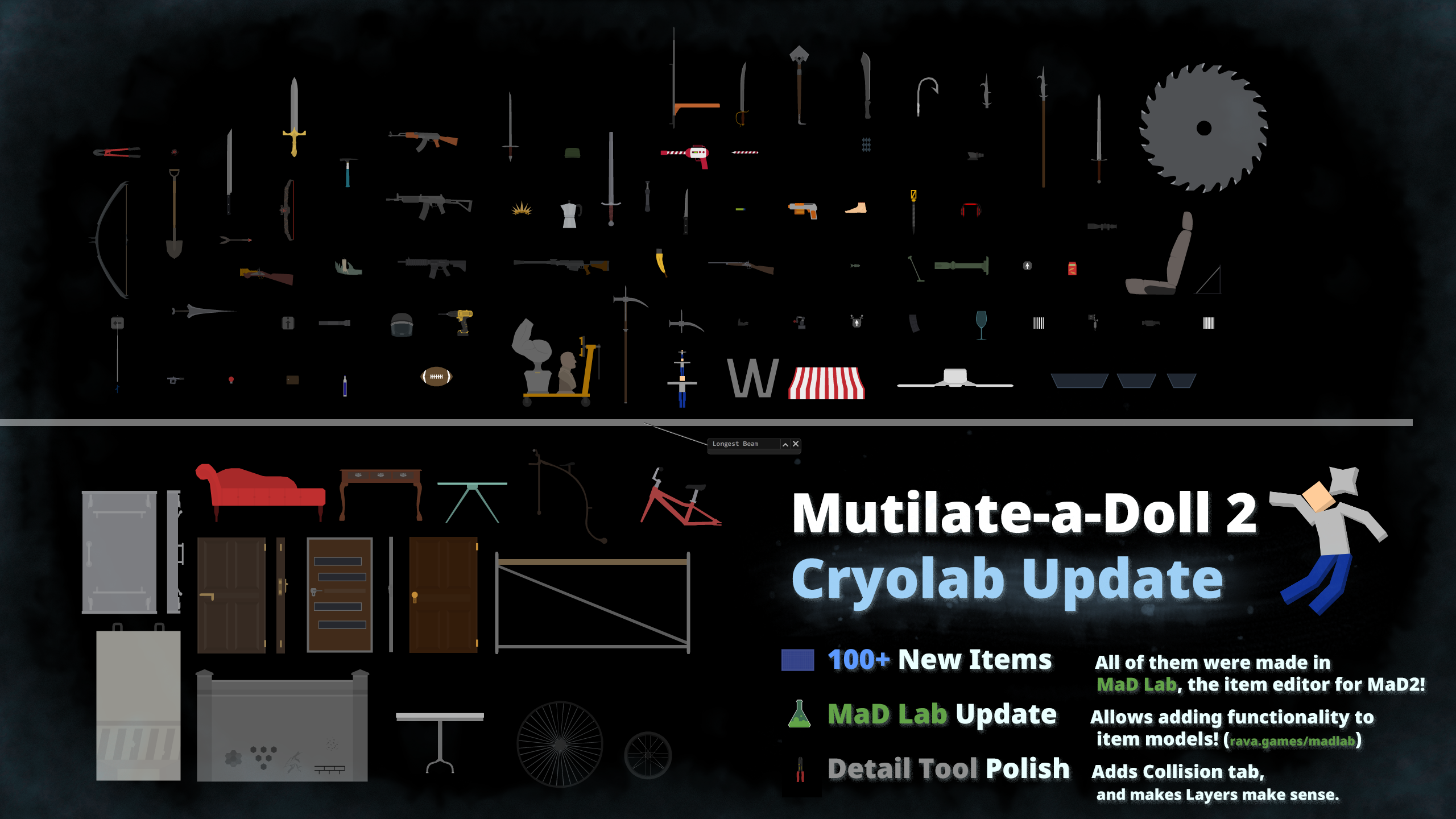
(Click to view full size. There's a lot to see. Or just check them out in-game.)
----
MaD Lab, the item editor for MaD2

MaD Lab is the item editor that has been used to design almost all models in the game. It's publicly available, and can be used to make your own item models.
As of this update, MaD Lab also supports adding a special format of XML that allows you to add functionality to your models, juicing them up. It's a bit complicated, but the Cryolab update's models were entirely made using the new functionality, so it shouldn't be insurmountable, especially when following the documentation.
Design your own model now in MaD Lab!
----
As usual, please report all issues with the update on the Bug Reports forums via Discussions. Thank you, and enjoy the update.
Hattoween Items

Hattoween Items
In October almost 200 new items were released in the form of hats, helmets, headgear, and more each day!
The event is now over, and all the items are available under [Library > Hattoween 2]! Enjoy!
More items will follow at the end of the year. Stay tuned.
----
Hattoween 2.0 is also a fashion show!
Each day, two contestants will do their very best to showcase the new items.
The winner of the contest gets to be mutilated! Guess what the loser of the contest gets? Also mutilated. It's almost like this is just a ruse to showcase the items in an interesting way.
Day 1 - October 16th

Day 2

To get the items, visit the Discussions thread for this post (see below.)
Day 3

Day 4

Day 5

Day 6

Day 7

Day 8

Day 9

Day 10

Day 11

Day 12

Day 13

Day 14

Day 15

Day 16

Maker Update
Maker Update OUT NOW!

New Items
A huge batch of simple items to help customize your dolls and levels has been added.
They also work great with Stamping, another feature being added in this update (see below!)

Stamps
A long-planned feature, [Detail Tool > Stamp] has been added, allowing stamping any item's graphics onto the selected item(s) by dragging and dropping items from the Spawn menu.

Notes:
Incremental Loading
All items in saves and custom items are now incrementally loaded to spread out the loading workload. This means that the game will spawn new items from the save each frame instead of attempting to bruteforce through all of them at once and causing the game to freeze.

Maker Environments
Thanks to Incremental Loading, a set of saves originally shared as User Content by talented players¤ have been added into the game as Maker Environments to showcase them and inspire more creators to create more creations.

Note:
¤ I usually credit all player creations that are added in-game, but unfortunately sourcing the original creator of many of the environments was not possible due to there often being multiple versions by multiple people in the data set that I browsed through. So I've gone ahead and blanket-credited "talented players". I'm sure you know who you are.
One-Way Links
Links are now only created from the trigger item to the target item, as opposed to both of them linking to each other and causing issues.
I.E. Linking from a Button to a Lightbulb will light it up when the button is pressed. Linking the other way around will do nothing because Lightbulb doesn't have a functionality that uses Links.

Note:
Joint Improvements
A new Detail tool tab, [Detail Tool > Joints] has been added.

Piston joints have been reworked
The way the joint is created has been redone, so it doesn't do entirely weird stuff all the time, might actually be usable, and might even make some sense.

Saving Improvements
Visual effects for items are now saved¤, including stamps, any blood, and item effects such as worm holes
Bleeding wounds on ragdolls are now saved (heal or cauterize them before saving if you don't want to save them)
Buffdoll is now saveable¤¤
Additionally:
¤ Dolls will always save their effects layer (unless they've been set Stainless via Properties), but any other items will only save their visual effects if they've been stamped first to avoid bloating the save size
¤ If you wish not to save a very dirty, dirty, doll, simply clean it before saving (there's a power for that, Soap, or the Detail Tool)
¤¤ To be able to achieve full doll functionality and still be saveable, buffdoll bodyparts are pretending they're actually the bodyparts of a normal doll, so respawning or inspecting them will result in normal doll parts instead
Patchnotes
(In addition to the above major features.)
Gameplay:
Increase various value caps:
- Spawn settings
- Health and Max Health
- Trigger Force and Range
- Linear and Angular Damping
Modify default doll healths to make them slightly less immediately squishy:
1800 -> 3000 Head
1200 -> 2000 Torso
 600 -> 1500 Legs
 600 -> 1250 Arms
 600 -> 1000 Hands
 600 -> 1000 Feet
Add [Shift+Camera Move] hotkey to move currently selected items by one pixel in that direction
Add [Pause Settings > Layers] toggles to temporarily toggle layer visibility while making things
Modify Select tool to select all jointed items when double clicking on a body
Modify Detail tool and Select tool to be able to area select static items while paused
Modify Delete tool hotkey quick deletion not to delete static bodies in play mode
Modify Delete tool area selection to not delete static bodies (use select tool to select, and click to delete all)
Modify blunt impact threshold (they now require a bit more force and velocity to deal damage)
Modify velocity's effect on blunt damage by a lot (blunt hits are now more consistently dependant on mass, with velocity being a small bonus top)
Modify effects layer mask to be slightly larger so it covers items properly
Modify minimum spawn scale to be 1% (from 5%)
Modify saving to also save 0 force and duration (radius has to be 1 minimum because math, and Detail Tool won't allow further modifying items with 0 force/duration.)
Add [Performance > Max Collisions] setting
Modify collisions for Max Collisions to not count static-dynamic collisions (e.g. dolls standing)
Add None particle for removing existing particles via Detail tool
Add console command "disablepause 0/1" to entirely disable toggling pause if you're building weird complex stuff and never want to unpause
Fix some culling issues when deleting items
Fix minimum or maximum-sized items not skinning properly
Fix items not being able to disable their own collision events (if there are issues with items not doing their collision things, please report them in Bug Reports)
Fix Camera In/Out hotkeys not breaking free from zoom snapping
Fix Vanilla property not cloning properly
Fix various bullets causing spawn scale issues
Fix giblets not respecting blood colour
Fix all levels loading as contracts after loading a contract
Items:
Replace various models with better optimized versions made in the latest version of MaD Lab with fancy new technology:
Hedge Trimmer, Void Scythe, Stockless Assault, Anti-Air Laser, Makeshift Axe, Mongolian Helmet, Scrap Axe, Arc Storm, Auto Ripper, Desert Eagle, Marksman Rifle, Bane, Glory, Bass Cannon, Blast Pistol, Timekeeper, Soulstorm Bow, Jetpack, Acid Claw, Bandit's Blade, King Drone, Arctic Wolf, Magnum, Chaos, Tyrfing
Modify icicles not to supernaturally freeze things on collision
Modify Projectile Replacer to have a quite harmless default projectile so it won't cause issues if attached before shooting.
Modify Projectile Replacer tooltip to make it more helpful
Modify Sword Breaker not to break blunt swords
Modify Poison Injector to only make bullets poisonous (previously it also made the gun poisonous)
Modify Light Saber blade to work with zoom, and spawn particles
Modify AP Rocket not to explode if contact is set to 0
Modify Earthsplitter camera shake duration to be shorter
Modify Oil Barrel model to make it spawn more centered (doesn't affect items in existing saves)
Modify Cloner (and variants) to not clone ignored items
Modify Black Hole to accept negative Trigger Force values, pushing items away instead of sucking them in
Modify Ammo Belt and Drum Mag to accept negative Trigger Force values, slowing down fire rate instead
Modify Sprites not to despawn
Modify Basket to spawn on layer 2 by default so things can be put in it more comfortably
Modify Health Stimulant to go up to 99999 max health
Modify Toaster, Deepfryer, and Woodchipper to be triggered on spawn
Modify Deepfryer to hiss when frying
Modify Observer Visor to not display ignored items' names
Modify Magnet model to have a drag layer in the middle
Modify Sinister Software to allow drones to target other drones when attached, and to automatically weld to any drones it touches (Speaker Drone functionality is still the same)
Modify Morbow not to target or damage linked items
Modify Repercutio's forcefield not to affect linked items
Fix Munitions Crate layering issue (slightly affects hitbox and existing items)
Fix Blood Bag healing while empty
Fix Breach Shotgun projectiles passing through Crumblers (projectiles stored into Projectile Replacer in existing saves are not affected)
Fix Sanitizer Bottle projectiles becoming gasoline when Projectile Replacered
Fix IV Bag collider being visible
Fix Surgical Helmet errant collider
Fix Hazard Helmet errant layer
Fix Bionic chip reanimation not applying properly on load
Fix Boxing Glove launching sideways
Fix Propulsor not waking up when triggered
Fix magnets not waking up when they attract things
Fix Magic Nail upgrades colliding with the doll that equips them, and add the armour it spawns into the Library as "Upgrade Set"
Fix Door-o-Matic-linked items not clearing their collision contacts after toggling the items off
Remove duplicate Skate from Library
Remove duplicate Work Table from Library
Move Sinister and Paranoid Software next to Speaker Drone in the Library
Switch the naming scheme around for triggers and their "Stop" variants, e.g.:
"Trigger" is now "Trigger Loop" (continously does something)
"Trigger Stop" is now "Trigger" (does something once)
Environments:
Modify Environment menu UI to reduce the amount of boring text buttons:
environment changing, wall toggles, and skinning have been changed into more compact icons
Modify environment filler to be stainless
Modify environment filler height (2000->1000)
Modify Auto-Wind to respect Wind slider
Modify Auto-Wind to randomly change wind direction
Remove wall buttons from various environments where they don't make sense
Optimize Cave environment colouring slightly
Detail Tool:
Add [Functionality > Trigger/Untrigger]
Move [Remove Joints] from Functionality to the Joints tab
Modify Detail Tool not to be pick hidden items while focused on something else
Modify Detail tool to automatically update the UI when more items are added to the selection
Modify Detail tool and Select tool to be able to area select static items while paused
Modify Detail tool skinning to redraw visual effects (they may be wildly offset or weird, skinning before stamping is much recommended)
Fix detail skinning not respecting items' flip state
Fix [Detail Tool > Skin] menu being extra long when minimized+maximized
Fix Detail Tool clicks passing through the minimize button of menus
Fix Detail tool skinning failing to generate a replacement graphic for some items
Fix Blood colour not appearing in Detail tool skinning
Misc:
Modify the game to replace any non-existing item with a placeholder so as not to mess up any joint/link loading or body ordering
Add tooltip when attempting to spawn an item that doesn't exist (please report in Bug Reports if you see any such issues that aren't caused by your own local models)
Fix Drain power not respecting blood colour of dolls
Refactor various bullets from contact listener to their own triggers
Optimize max particle burst
Respect XML
Remove Resist Drain as unused (it literally did nothing)
Fix window position saving causing the game to crash on launch when the monitor is removed from the computer entirely
UI:
Fix Spawn menu item drop detection using incorrect width (causing items not to spawn slightly rightwards of the menu)
Add tooltips to various buttons
Remove colour highlight from Attracting Bow in Library
Modify Mjölnir to be searchable as Mjolnir
Fix importing local models breaking local model management UI list
Modify [Spawn > Skin > Reset] to also reset Blood colour
Modify some console commands to close the console to indicate that things happened
Add tooltip when settings are saved
Fix favouriting via hotkey while dragging causing the item to drop back into the Spawn menu
Modify custom item spawn image to not scale with camera
Modify Library to be wider to better accommodate longer names
Known issues:
Flipping can result in the stamp being drawn upside down.
Skinning via Detail tool after stamping will likely mess up the effects layer.
Multi-selecting items will be weird when it comes to items with multiple incoming and outgoing links. Not all of them are visible. Single-item selections should work fine though.
Incremental Loading Test
It's very much a work in progress, and full release will be later on, once the feature has been tested a bit more because there are so many things that will probably break.

What is incremental loading?
The game will spawn items across multiple frames to lessen the loading performance load. Joints and links will be loaded in a single frame afterwards.
Why?
More complex levels will noticeably chug, or even freeze the game, while attempting to bruteforce everything in a single frame traditionally. Plus it looks really cool while it loads.
How can I test?
0) Opt-in via `[Steam Library > Right Click MaD2 > Properties > Betas tab > Experimental]` and verify your files.
1) Load all the things: Old saves, new saves, custom items, slightly moist saves, etc.
2) Report any issues, and make sure you include the save string (paste to e.g. https://pastie.io/)
----
Notes:
- Reseting while loading will stop loading and reset.
- Hotkeys are disabled while loading because there's a lot of ways to accidentally mess it up.
- Unpausing while loading is currently possible, and custom items won't automatically pause before loading. Loading while simulating will very likely mess everything up.
- Level pictured is "Traditional Japanese House" by iFancyMan
Care Package Update
Care Package Update Out Now!
No surprise this April Fools, just much-needed supplies.
30+ medical items added under [Library > Care Package].

Winter Warmer Update
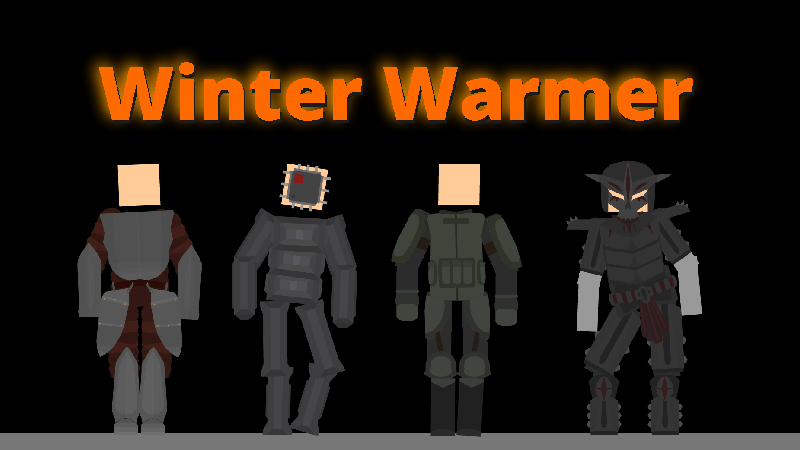
Feeling cold? Grab a set of armour and keep yourself warm.
The Winter Warmer update adds 100-or-so brand new armour pieces, and converts 100 old items into equippable armours.
----
Armour
Add 100ish Winter Warmer armour items
Convert existing armour pieces into armour using the autoequip system:
- Update various unsymmetrical item models to make them work better when converted into armour
- Duplicate all item models that were converted into armour from the Library (so old saves won't affected.)
- Deprecate old armour item models from the Library, only armours will spawn from now on
- Legacy models can still be spawned via Console (e.g. *hazmathelmet* vs *hazmathelmet2*)
Add Bucket under [Library > Household] (in addition to Bucket Helmet that is now armour)
Add Fish Bowl under [Library > Household] (in addition to Bowl Helmet that is now armour)
Add Traffic Cone under [Library > Urban] (in addition to Cone Helmet that is now armour)
Add armour icon in Spawn menu that indicates an item will automatically equip
Modify Armour system to be separate from triggers (allows for much more flexible armour design, but will likely cause some issues initially, please report them via Bug Reports)
Modify Armour to be re-equippable better when flipped or joint cut
Modify Armour boots not to collide with static items when equipped (to allow better standing)
Modify armour to resist concussions
Modify armour that allows overlaps to also be able to attach after another armour piece
Fix Armour Bars setting not working
UI
Add Health and Max Health sliders under [Spawn > Settings] when Alive property is enabled (doesn't affect dolls since they're spawned in a special way, use Detail Tool)
Add new category **[Library > Technology > Traps]** and fill it with various items
Fix Spawn menu minimizing and maximising not maximising it enough
Fix Spawn menu prev/next buttons not respecting flip toggle
Fix Static property not clearing when using Unselect All
Miscellaneous
Modify Animated items to be able to stand even if dead
Modify Animate status not to heal to full
Modify Island UI not to display environment options that don't work properly
Fix delayed spawn not taking rotation into account properly
Fix reset while spawning not reseting spawn scale
Fix weld joints attaching to background when trying to reattach overlapping items
Fix Saber Drone skinning not colouring the blade correctly
Fix Gem Sceptre invisible layer not being invisible enough
Fix Crayon description being unacceptable
Fix snowman projectiles not being allowed to spawn inside items
Modify Blight damage to be more consistent (random180+20 -> random100+random100+50)
Modify Blighted items to spill blight randomly
Modify Blight projectiles to ignore each other
Models
Modify item loading to respect concave decorative layers
Modify local model loading to use graphics centroid instead of physics centroid (hopefully helping with imported item flipping)