

NASCAR Heat Evolution
New Update Available Now!!
We have a new update available for NASCAR Heat Evolution.
Build #1384762
Here are the included additions/fixes:
1. Cars ghost out and are not collidable when driving backwards in Normal Lobbies.
2. Cars ghost out and are not collidable and then are kicked mid race when driving backwards in Hosted Lobbies.
3. Users using simulation physics can create simulation only lobbies with custom setups in Hosted Lobbies.
4. Movie volume is now connected to SFX volume slider.
5. Added a screen adjustment feature in Options->Visuals.
6. Fixed issues with Chase standings not being displayed correctly, or crashing the game.
7. Added 2016 NASCAR Next drivers (only playable in Quick Race mode).
8. Corrected scaling of damage (improved engine damage).
9. Improved Yellow Flags sensitivity.
10. Superspeedway engine/car tuning (improved the RPM engine curve at superspeedways).
11. The correct pit animation is displayed, taking into account how much fuel was remaining in the car.
12. Speed points count up faster when earning a large number of points.
13. Players only get speed points for laps completed.
14. Season standings only shows the drivers in the current season.
15. Track surface improvements at Las Vegas.
16. Fixed crazy bump at Chicagoland.
17. AI Improvements at Dover and Homestead.
18. Updated logo for October Dover race.
19. New engine sounds.
Thank you!
New Update Available Now
A new update to NASCAR Heat Evolution is now live.
Build # - 1354020
The following updates are included:
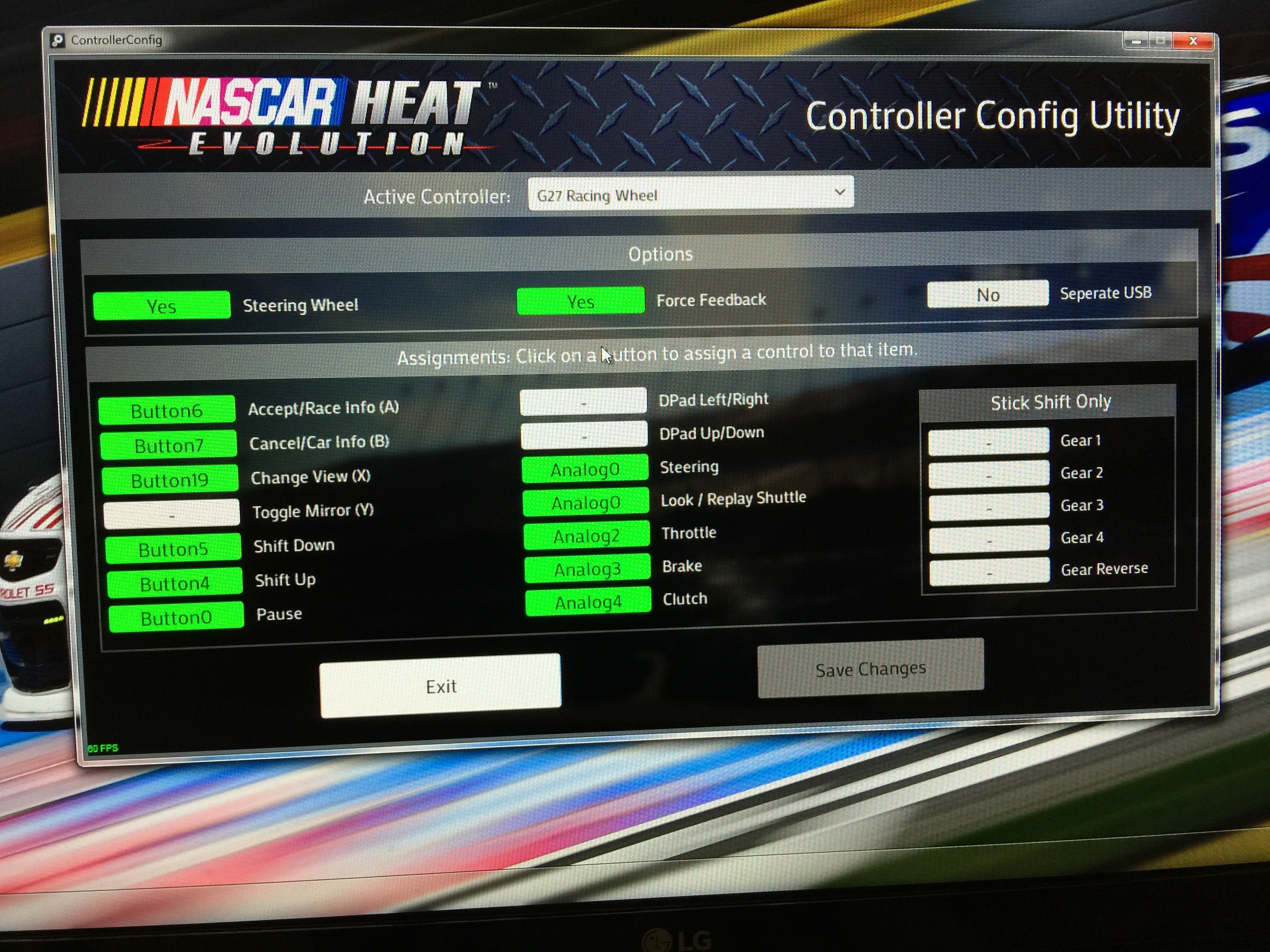
1. Improvements to functionality and clarity of controller configuration utility.
2. Fixed a bug where, when navigating UI with keyboard, it was possible to have gamepad control settings when using a wheel.
3. Fixed tire labels in pitting options.
4. Indianapolis, Michigan, and Pocono are set correctly for group qualifying.
5. Allow users to configure deadspot in controller configuration utility.
6. Added an option to default to using custom setups when in simulation mode (this includes online mode). This option is located in the Game Settings/Advanced Settings menu.
7. Fixed a performance stutter related to loading sound samples.
8. If using an invalid controller profile, inform the player.
9. Minor bug fixes and improvements.
Thank you.
Important Wheel Config Info
(see sample image below)
Thank you.
Update #2 Now Available
We've just released a new update. Here are the details:
Content BuildID: 1340737
1. Allow keyboard control in UI if player has a compatible racing device connected
2. Fixed 2 Challenge videos (Martinsville and New Hampshire were swapped)
3. Improved pitting logic during yellow flags
4. Design and functionality improvements to the Configure Controller screen
5. Replays now display position and lap number
6. Other minor bug fixes and improvements
Keyboard bindings are:
Accept / Race Info / A: A, Enter, Numpad Enter
Cancel / Car Info / B: B, Esc, Numpad Plus
Toggle Mirror / X: X, Space, Numpad Slash
Change View / Y: Y, Tab, Numpad Star
Pause / Start: Pause, F1, Numpad Minus
Left Bumper / Prev Page: PageUp, Left Bracket, Numpad 7
Right Bumper / Next Page: PageDown, Right Bracket, Numpad 9
D-Pad: Arrow keys, Numpad 2,4,6,8
New Content Update Available.
It contains the following:
1. Added an interactive controller configuration tool to help users set up devices that NASCAR Heat Evolution did not recognize. NOTE: Users need to configure separate devices (shifter, pedals, etc) separately from their wheel.
2. Fixed a crash that would happen if more than 4 devices were connected to the PC at game launch.
3. Fixed a post race multiplayer crash.
4. Fixed a problem with race intro videos not playing in career.
5. Fixed a few synchronization issues in multiplayer.
Thank you.