Steam Trading Cards have arrived!
Collect 'em all to unlock unique Necroball emoticons, Steam Profile backgrounds, and coupons for other games!
In addition to that we've made some bug fixes, changes, and for this week Necroball is 25% off!
http://store.steampowered.com/app/563410/
Please leave a review and let us know what you think of Necroball! We only need a few more reviews to get our positive rating to the public.
If you would like to know more about Steam Trading Cards, go here: https://steamcommunity.com/tradingcards
PATCH NOTES 1.3:
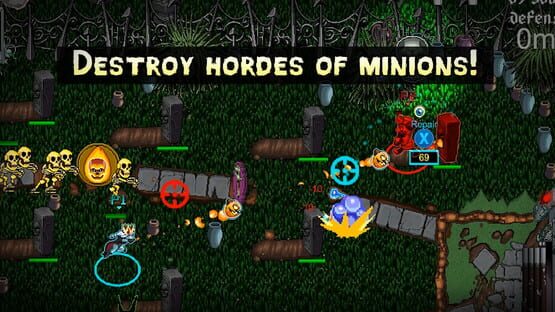
- Removed the health bars on tombstones. This helps reduce the visual clutter and the tombstones already change their sprites to show more damaged versions as they lose hit points.
- All games are 5 minutes long. This currently solves a high-severity multiplayer bug that crashes the game at some point after 5 minutes have been played. Once we solve the issue, game time options will be reactivated.
- Removed damage numbers inside the projectile impact animations. These were originally for us to track damage buffs to make sure they were working and now that we know they are, we have removed the numbers to help reduce visual clutter.
SOME THINGS WE ARE STILL WORKING ON:
- Bugs involving team names being incorrectly assigned when playing multiple games in a row.
- Multiplayer Necroball sync issues.
- Ability modifications (lots of abilities will change in the next patch for the better!)
- Improved aiming mechanics and reticles
Thanks for playing!
-King Crow Studios
Sale + Trading Cards Incoming!
Hello Everybody!
Have you been waiting for Necroball to go on sale before buying a copy?
Next week we got you covered with a sale to promote Steam Trading Cards coming to Necroball!
There will also be some mechanics tweaks and UI changes to reduce visual clutter and give emphasis to the important things on the battlefield.
We'll post more details next week when the sale begins and the cards are available to collect! (Should be Monday!)
Thanks,
-King Crow Studios
Update 1.2 - Multiplayer Bugs & Minion Balance
Hello Everybody!
We put out a patch earlier this week and have been testing it's efficiency with great success! There was a lot of work done around fixing some Necroball multiplayer authority issues involving who owns the Necroball after collision between the host and client.
While the desync happens much less often than it used to, it might still occur and if you see it please send us a bug report to bugs@kingcrowstudios.com or leave a post on our community forum here!
http://steamcommunity.com/app/563410/discussions/
Keep sending us bug reports and let us know what you think about Necroball by leaving a review!
PATCH NOTES 1.2
- Player names should now always show up in multiplayer matches
- Version difference stops the client from joining a match and gives an error message.
- Shadows no longer spawn in the middle of the screen for the client.
- Brunhilde can correctly shoot over ice wall if playing as the client.
- Changed mouse mechanic - now all mouse movement affects reticle
- Removed Unity Splash Screen
- Latency indicator added to in-game portraits
- Added mouse sensitivity slider to options
- Mouse sensitivity and outlines on/off now set by player rather than by match
- Jack's Lightning Rod now correctly affects players.
- Necrocorgi charge-up ability increases minion spawns much more and increases minion speed
- Horde power-up removed from Survival Mode
- Friendly minions removed from Survival Mode
- Ultimate minions and Big Shadow minions have had their HP reduced
- Some crash bugs have been solved
- De-sync issue with the Necroball in multiplayer matches improved
Thanks for playing!
-King Crow Studios
Update 1.1 - Survival Mode Added! 1/17/17
Hello Everybody!
Today we added in Survival Mode for Necroball!
You'll face several waves of enemy minions while you try to keep them out of your goal and survive until the end!
All you have to do is start a game with just one player in the lobby, or everyone on the same team if you want to do co-op, and you'll activate Survival Mode and choose your enemy horde to face.
Please let us know what you think about the new Survival Mode and we'll continue modifying and polishing the existing mechanics in the game.
Speaking of modifying and polishing mechanics, here is our first list of patch notes!
PATCH NOTES 1.1
- Survival Mode added! Play alone or with friends against hordes of enemy minions!
- Zuzu's summoning circle ability no longer allows you, or the Necroball, to jump out of bounds.
- If another player leaves the lobby while the other players are "Ready" it no longer forces the "Ready" players to back out and rejoin.
- Error message now appears when you are disconnected from a multiplayer game due to latency.
- Levels should update automatically when you go back to the lobby, instead of having to exit and recreate the lobby to see the changes. (This bug seems to have spawned some other smaller level tracking bugs we are working on)
- You can now select Yes or No with the controller when trying to Quit Game.
- Game no longer uses the Unity icon when playing.
- Added in Windowed Mode option to Options > Graphic Settings.
- You can now scroll between characters while looking at their character info in the lobby.
- There is now a Controls Screen option in the Options menu.
- Changed flashing text in the lobby from "Press Start or A to Join" to "Press Start or Enter to Join"
Thanks for playing!
-King Crow Studios
Get a copy of Necroball today and help us make our game!
Hello everybody!
Necroball is now available on Steam!
Thanks to everyone that helps support Necroball's development by purchasing a copy in Early Access. We promise to keep updating our builds regularly and fix bugs as fast as possible.
Speaking of bugs, with any Early Access release we know our game has them and we want to address them asap. Right now we are noticing some inconsistencies in our online multiplayer matches and that is our first priority on the bug list. Dropped games, latency issues, and abnormalities in the game lobby are under examination and we should have some progress on fixing them soon.
Our knowledge of these bugs is only because we've had tons of bug reports sent to bugs@kingcrowstudios.com and the Steam forums. This allows us to prioritize things users are encountering the most. Thanks for those emails!
We really have a lot to be thankful for. Our community has been amazingly supportive and we have a plethora of local game dev allies to help us out.
We'll update here with patch notes when we get the next build ready!