v1.2.2 - The Modifiers Update is available on the Testing Branch
v1.2.2 - Game Modifiers Changelog
The Game Modifiers feature has been rolled out to our Testing branch! Rather than waiting for all of v1.2 to be completed (along with its entire features list), I'm switching to releasing features as they're ready for wider-scale testing. Once all features for v1.2 are in the Testing branch and any issues have been ironed out, v1.2 will move to the Main branch.
New Feature: Game Modifiers: 27 unique modifiers that change the game's underlying systems and values. Looking to spice up the challenge, or maybe make things a bit easier? Now you can!
New baked-in logging solution: Prioritizes user anonymity, creates and manages log files and log file rollover. This new logger stores its output in the game's install directory at the following location: ./Nominal/GameLogs.
Various bug fixes
Bug Fixes
Fixed ultrawide monitor support missing in the in-game Escape Menu
Fixed back-end null reference errors in the Annunciator Controller
Fixed bug causing the Doppler Effect achievement logic to be called in an infant loop
Fixed UI highlighting issues when selecting Normal vs. Sim mode in the Mode Select menu
Fixed a back-end resource bug causing Indicator Lights to have the wrong texture applied when off
Accessing the Testing Branch
Repeatable Disclaimer: As with v1.2.0b, v1.2.1b is extremely experimental; ~95% of the original codebase has been completely rewritten. Once again, I've done thorough Quality Assurance on my end to make sure that everything is 100%. That said, humans are fallible so there may be bugs or unintended issues here or there. Because of this, v1.2.1b has been set to Live for all players on Nominal's Testing branch.
There is no password for this branch, so you can update to v1.2.1b by following the steps below:
Go to your Steam Library Right-click on Nominal Select 'Properties' from the context menu Select the 'Betas' tab from the left-hand list in the Properties window From the dropdown in the Betas tab, select 'testing - Beta Testing Branch'
Once the Testing branch is selected, Steam should automatically queue Nominal to be updated (depending on your preferences in Steam).
March Dev Update: Feature Highlight: Game Modifiers
v1.2.2 Nominal Classic, Feature Highlight: Game Modifiers
As we enter March, I want to give everyone a glimpse into what has been in the works for v1.2.2 since the last update/announcement on February 7. Despite some much-needed vacation time, a lot has been completed or, at the very least, planned out. This announcement will primarily go into detail about the upcoming Game Modifiers feature, but includes some other fun bits of information.
Without further delay...
Update on the Status of the Update
As soon as the Optimization Update (v1.2.1) was pushed to the Testing Branch on Steam, work on v1.2.2 - Nominal Classic began. I hit the ground running on all of the planned features (see the roadmap in the previous announcement/storage page/the Offworld Systems website), and I also planned out a few more quality of life features that aren't on the roadmap for design/aesthetics's sake.
A huge shout-out goes out to the members of our Discord Community who helped me track down a lot of bugs, both newly introduced and old-and-hard-to-pinpoint. Thanks to them, I was able to fix a really decent number of bugs in the hotfix v1.2.1.1. So. the game is, quite literally, better than ever.
Though the hotfix took a few days of work away from Nominal Classic, it was well worth it. And, despite the time taken for the hotfix, a couple of the major features on the roadmap have been tackled! For this dev-update, I wanted to focus on one of those: Challenge Modes Game Modifiers.
Game Modifiers (Previously: "Challenge Modes")
Obligatory Disclaimer:The following information, art, assets, mechanics, etc. are still in development and are definitely subject to change both before and after going live on the Testing Branch.
To begin with, the Road Map still refers to this feature as "Challenge Modes," but I've taken to calling them "Game Modifiers" internally as I'm working on them. If this decision stays concrete through publishing to the Testing Branch, then the Road Map will be updated to reflect that.
I've changed this feature's name, because, in my perception, "Challenge Modes" implies individual modes that are used one at a time exclusively, and that those modes are prescribed, fixed, and immutable. Though this was a promised feature at the game's launch, the more I got down to actually planning it out, the less fun these prescribed Challenge Modes sounded to me. Why should I determine that the players can challenge themselves in specific, arbitrary ways? Instead, I decided on the name "Game Modifiers" (not to be confused with third-party mods). Where a Challenge Mode is prescribed and singular, a Modifier (again, to me) is something that can be turned on and off, tweaked, and utilized either individually or in combinations with other modifiers.
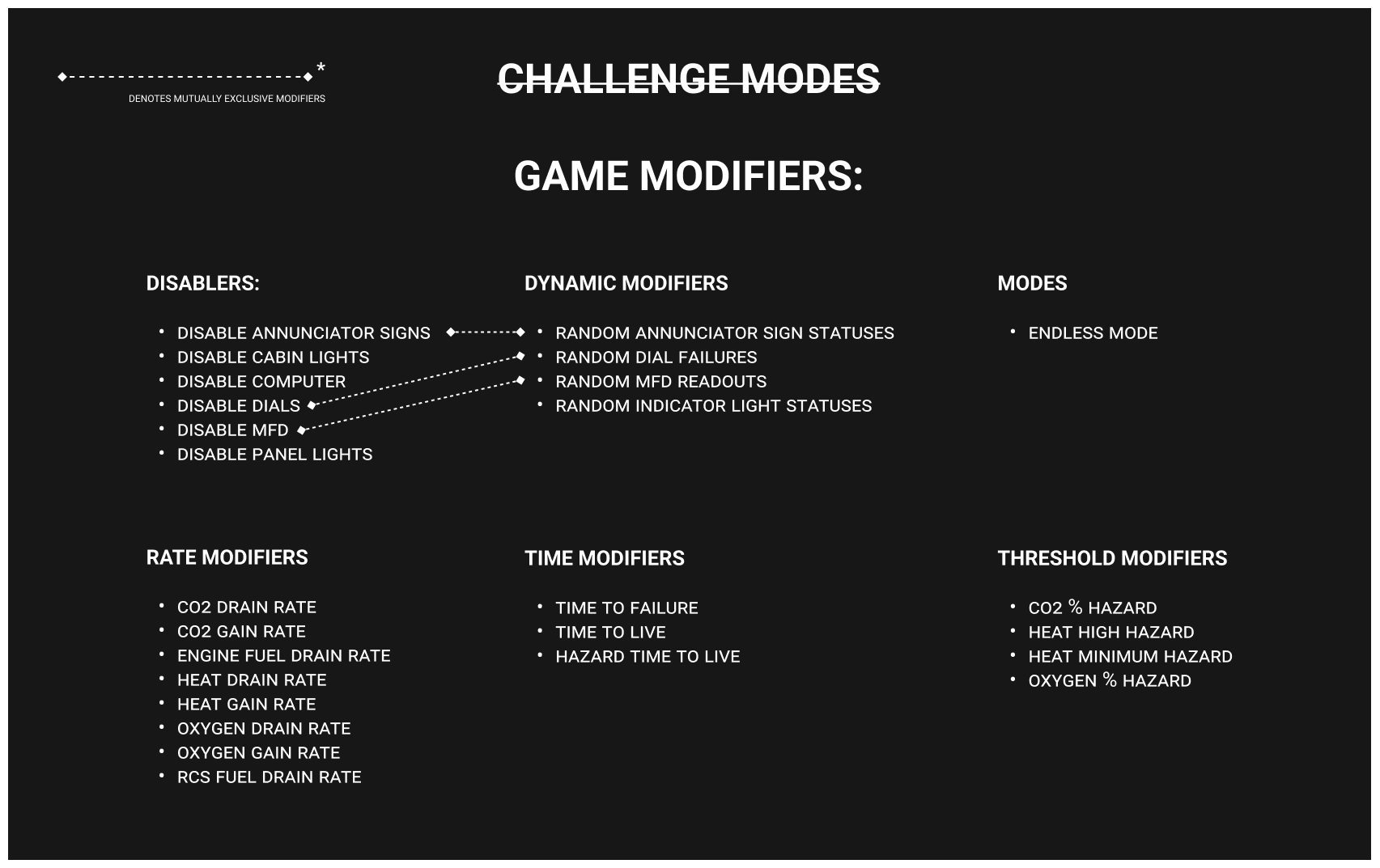
With that, the following list of possible modifiers was determined (details follow the image):
As pictured, there are 27 possible Game Modifiers. Each affects a particular aspect of the underlying mechanics of Nominal. These modifiers are categorized into the following groups:
Disablers: disable particular systems within the Odyssey Capsule
Dynamic Modifiers: randomly affect components of the Odyssey, whether that be a complete failure of a single or more components, or an erroneous output from that component
Modes: affect the round's gameplay at a high level
Rate Modifiers: affect the rates at which values change for various systems
Time Modifiers: affect the time intervals for various meta-gameplay mechanics
Threshold Modifiers: affect the values at which hazards are triggered
Because I chose to make almost every core functionality/mechanic a modifier, some of these modifiers can conflict with each other. So, as shown, some modifiers are mutually exclusive, meaning only one or the other can be enabled at a given time. The mutually exclusive modifier pairs are as follows:
Disable Annunciator Signs & Random Annunciator Sign Statuses
Disable Dials & Random Dial Failures
Disable MFD & Random MFD Readouts
These have been set to mutually exclusive as the inherent mechanic of both modifiers in a pair would negate one or the other.
Moving on: in addition to planning all of the possible Game Modifiers, that means extending the existing menu system to include a menu for enabling and tweaking them. So a new Modifiers Menu has been added from the Mode Select screen. (Note: the current plan is for modifiers to only be enabled once the player has met a certain, to-be-determined threshold, so that players are not overwhelmed right out of the box and have some familiarity with the game's flow before tweaking these values). Below is a quick glance at the current design of the new Modifiers Menu.
I wanted to keep this system simple to digest and utilize, so it is currently presented as a simple scroll view where the modifiers are displayed by category. Modifiers that are just on/off use a simple checkbox, and those that are on/off and have associated values have a checkbox and a slider. Simple as that. There is also a main "Enable Modifiers" setting, so that players can quickly enable and disable modifiers between rounds without having to reset their saved Modifiers configuration.
Thanks to the changes in the Optimization Update, this data is saved in the /Config folder alongside player settings, so that the underlying JSON is accessible. That said, player's should note that, as with player settings, the JSON is validated against known good and bad values to ensure, as best as possible, that broken values do not occur and ruin the game's experience.
All-in-all, I think that going with these Game Modifiers instead of fixed Challenge Modes will enable players to really gear the classic experience to their liking, increasing the challenge as desired and reducing redundancy in play sessions.
If you looked at the list of modifiers in the image above and are curious about what each individual modifier does, here's a handy list. If not, feel free to skip down to the next section.
Disablers:
Disable Annunciator Signs: disables all Annunciator Signs on the Annunciator Panel
Disable Cabin Lights: disables the overhead Cabin Light
Disable Computer: disables the ship computer completely; the screen will not be displayed and commands will not be executed
Disable Dials: disables all Dials on the Dials pannel
Disable MFD: disables the MFD completely
Disable Panel Lights: disable the panel backlights
Dynamic Modifiers:
Random Annunciator Sign Statuses: randomly changes the state of Annunciator signs
Random Dial Failures: disables random Dials on the Dials pannel at random intervals; affected Dials may or may not start working again
Random MFD Readouts: randomly displays erroneous statuses on the MFD panel
Random Indicator Light Statuses: randomly changes the status of random indicator lights at random intervals; affected Indicator Lights may or may not start working again
Modes:
Endless Mode: disables win conditions; failures trigger one after another, survive as long as you can
Rate Modifiers:
CO2 Drain Rate: increases the rate at which the Co2 System fans drain Co2 from the cabin by a set factor
CO2 Gain Rate: increases the rate at which Co2 builds up within the cabin by a set factor
Engine Fuel Drain Rate: increases the rate at which Engine Fuel is consumed/drained by a set factor
Heat Drain Rate: increases the rate at which Heat drains from the cabin by a set factor
Heat Gain Rate: increases the rate at which Heat builds up in the cabin by a set factor
Oxygen Drain Rate: increases the rate at which Oxygen drains from the cabin by a set factor
Oxygen Gain Rate: increase the rate at which the Oxygen System fans pump oxygen into the cabin by a set factor
RCS Fuel Drain Rate: increases the rate at which RCS Fuel is consumed/drained by a set factor
Time Modifiers:
Time To Failure: sets maximum time (in seconds) after the round starts that a failure can occur at; this does not affect the minimum time for failure triggers.
Time To Live: sets the Time To Live value, affecting the given time to solve failures before the round is over
Hazard Time To Live: sets the Hazard time To Live value, affecting how long the player has to resolve hazards before succumbing to them
Threshold Modifiers:
CO2 % Hazard: sets the percentage of Co2 in the cabin before a Co2 hazard is triggered; a lower value means a hazard is triggered sooner
Heat High Hazard: sets the upper temperature threshold for the cabin temp before a High Temp hazard is triggered; a lower value means a hazard is triggered sooner
Heat Minimum Hazard: sets the lower temperature threshold for the cabin temp before a Low Temp hazard is triggered; a higher value means a hazard is triggered sooner
Oxygen % Hazard: sets the percentage of Oxygen in the cabin before an O2 hazard is triggered; a higher value means a hazard is triggered sooner
Baked-in Logger
One thing that has been completely implemented, and that will drastically improve the time needed to identify and remedy bugs is the baked-in logger.
As stated in the previous update, this logger is non-invasive. That means it's not logging any details about your computer whatsoever. While Unity has a provided logging solution, it's often not verbose and doesn't include important details, such as timestamps or the game's version. Unity's provided logger also logs to an obscure location in the user's AppData folder (on Windows systems). I've made a redundant, safe, and efficient logger that will provide valuable troubleshooting information for any errors and bugs so that players can easily know where the log file is ($SteamGameDirectory/gameLogs/$) and provide it to me when reporting bugs.
As seen above, the logger includes the game's version, a timestamp, and tags for the log type to allow for easily identifying where something has gone wrong in the event of a bug, error, or failure. This may not seem like much, but I promise, as a developer, this will make a huge impact on the amount of time it takes for me to investigate, confirm, and fix any bugs.
Next Up
Phew! That was a long one! If you've made it this far, thank you very, very, very, very much! With the Baked-in Logger and Modifiers Menu implemented, next up is actually making the Modifiers do the things they're supposed to! I purposefully picked the Game Modifiers as the first major implementation in this update because of it's complexity and how much it will effect on the back-end. So, I'm currently working on getting that done. Once the Modifiers are completed, it's on to creating the rest of the key features for Nominal Classic, and then some other, smaller quality of life features. All in good time! A game update is never late, it arrives precisely when it means to.
Thank you all so much for your patience and support. I truly think the Nominal Classic update will make Nominal into the game it should have been all along and will bring a lot more shine, polish, and "juice" to the game that it really needs.
Shameless Plug
Has this ever happened to you: You really want to play Nominal with a group, but you don't have anyone to be your Mission Control (or pilot)? Join the Nominal Official Discord and check out the #flight-ops channel!
Has this ever happened to you: You love Nominal and you want to know the latest info and dev updates before they hit the Steam announcements? Join the Nominal Official Discord and check out the #capcom-announcements channel!
Has this ever happened to you: You ran into a bug in Nominal and you don't know how to let the dev know? Join the Nominal Official Discord and check out the #feedback channel!
This is a quick hotfix for various bugs and issues that are present in v1.2.1b. Note: some of these bugs may exist in earlier versions of the game, but are only addressed for v1.2.1.X and higher (currently available on the Testing Branch in Steam)
Changelog - Bug Fixes
Fixed a major bug in the round ending logic that was causing the Results/Game Over screen to never show and leaving the player staring into the void of space
Fixed a bug in the audio logic causing the Effects Volume to be quieter than intended regardless of the value set in the Options Menu (this could give the impression that there is no audio at all once loaded into a game, even with the default value of 50)
Fixed a bug in the Options Menu causing the Apply button and the 'Changes will not be saved' warning to always be visible, even if changes hadn't been made
Fixed a bug in the Options Menu causing the Apply button to call the back-end save function multiple times, causing inconsistent saved values
(Likely) Fixed a bug causing Mouse Sensitivity (Look Sensitivity in the Options Menu) for the first person player camera in Normal Mode to have inconsistent responsiveness and intermittent stuttering
(Likely) Fixed a very weird bug with back-end Unity compilation and script nomenclature, causing the 'startup' logic to not execute for some players, resulting in failures never triggering in Normal Mode
Changelog - Additions & Tweaks
Added canvas scaling support for ultra-wide resolutions
NOTE: This will scale the main menu, its sub-menus, and its background cleanly, but will not push/pull assets around currently. This will require a larger rebuild of the main menu, which will actually be address in the upcoming Expanded Content update(s)
Updated the default settings so that the default Graphics Quality level is 'High' rather than 'Very Low'
Nominal v1.2.1b - The Code Optimization Update - is LIVE on the Testing Branch
Nominal v.1.2.1b - The Code Optimization Update is Live on the Testing Branch
This has easily been Nominal's biggest update yet. Not necessarily in terms of content additions, but in terms of scope and effort. With v1.2.1b, roughly 95% of the original codebase has been completely rewritten to achieve better performance, stability, and maintainability. Each and every script was brought up to modern C# programming standards and patterns. A lot of unused scripts and methods (artifacts from beta and alpha testing) have been removed, reducing the game's overall footprint (code-wise at least).
As Nominal has, essentially, been rewritten from the ground up, I've done thorough Quality Assurance testing, but I still am putting this update onto the Testing Branch, just to be sure nothing escaped my singular pair of eyes.
That said, with v1.2.1b taking over the Testing Branch, v1.2.0b (The Code Refactor Update) has now been set to the main branch of Steam and is the latest canonical version. Your game will update whether or not you're subscribed to the Testing Branch: players who stayed on the MAIN branch will be updated from v1.1.6 to v1.2.0.1b, and those who are subscribed to the Testing Branch will be updated from v1.2.0b to v1.2.1b.
PLEASE NOTE:
- With the update to v1.2.1b, user settings are no longer stored in the Windows registry, but utilize a JSON file in $YourInstallPath/Config/playerSetttings.json instead. As a result your game settings will be reset to default values and you will need to go into the Options menu and reset your desired settings.
- If you were previously on v1.1.6 or earlier and are on the MAIN branch and receiving update 1.2.0b (and 1.2.0.1B), there MAY be issues with the game's loaded Field Of View values for both the normal FOV and the Zoom FOV. To fix this:
Go to the options menu
Change the regular FOV & Zoom FOV values to anything other than their existing value
Click Apply
Change the regular FOV & Zoom FOV values to your desired settings
Click apply
Accessing the Testing Branch
Repeatable Disclaimer: As with v1.2.0b, v1.2.1b is extremely experimental; ~95% of the original codebase has been completely rewritten. Once again, I've done thorough Quality Assurance on my end to make sure that everything is 100%. That said, humans are fallible so there may be bugs or unintended issues here or there. Because of this, v1.2.1b has been set to Live for all players on Nominal's Testing branch.
There is no password for this branch, so you can update to v1.2.1b by following the steps below:
Go to your Steam Library
Right-click on Nominal
Select 'Properties' from the context menu
Select the 'Betas' tab from the left-hand list in the Properties window
From the dropdown in the Betas tab, select 'testing - Beta Testing Branch'
Once the Testing branch is selected, Steam should automatically queue Nominal to be updated (depending on your preferences in Steam).
If Steam was already open before this branch was set live (~2022-02-07 1630EDT), you will need to close and re-open Steam for the Betas tab to appear in the properties window.
Updates to the Roadmap
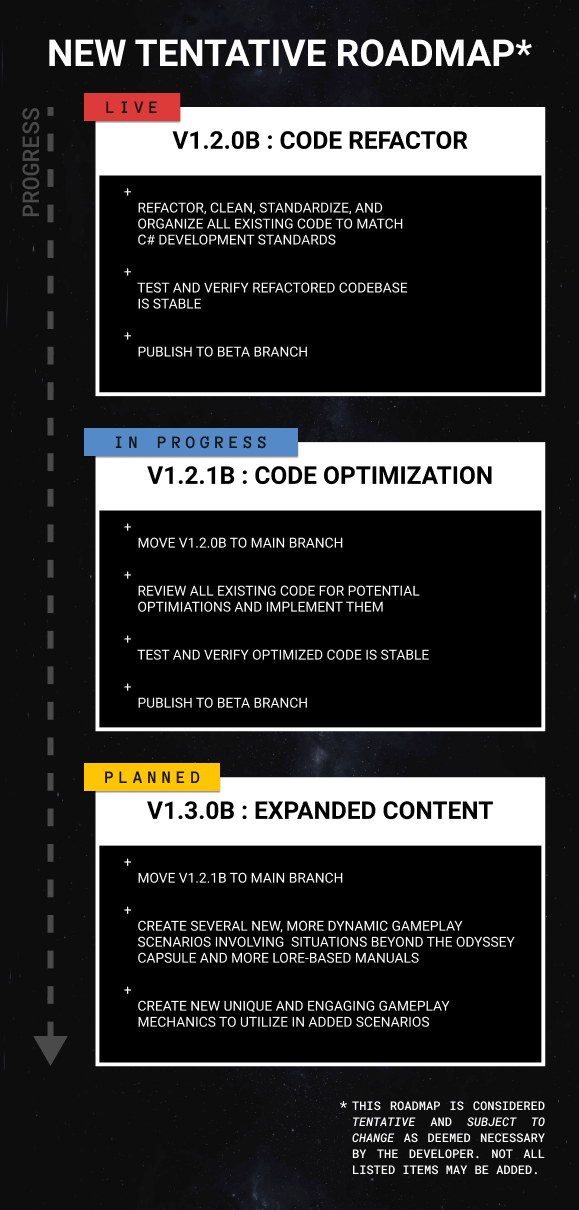
With v1.2.1b on the Testing Branch and v1.2.0b being moved over to the main branch, the Tentative Roadmap has been updated to reflect this progress, and has an additional update added to it.
On the new roadmap (see below) you'll find that the 'Live' card now shows v1.2.1b, a new card 'V1.2.3B: NOMINAL CLASSIC (QOL)' has been added as 'In Progress', and the 'Planned' card still contains 'V1.3.0B: EXPANDED CONTENT.'
I want to address the obvious disruption to the roadmap: the addition of v1.2.3b and v1.3.0b (Expanded Content) staying in place at 'Planned.'
As I was taking the time to rewrite Nominal's codebase, a lot of pitfalls in the existing version's experience (not just its code) and quality-of-life features became evident to me. With the Expanded Content update on the horizon, I really want to improve and solidify the "classic" (or "release") version of Nominal as its own thing. This Classic experience will always be available in the game, as I have no plans, nor do I think it's necessary, to make it its own separate thing. So, since Nominal Classic is going to stay as the originally released content, I want to address these pitfalls and really nail it down prior to moving on to Nominal's flightplan development plan.
So, what are those pitfalls?
1. The Ship Manual:
The existing Ship Manual for the Odyssey Spacecraft is, despite a core feature of the game, a bit of a pitfall. There are numerous editorial mistakes, mislabeled steps, misleading steps, etc. etc. So, I want to give the Odyssey's manual a proper revisit for fine-tuning and editing to make it better than it currently is.
2. (The lack of a) Pilot's Manual:
While I can't speak for the actual space programs of the world, I can speak for actual pilots in real life, since I have a good bit of flight training under my belt. In the real world, pilot's don't keep a copy of their aircraft's full manual on-hand (well, they do, at least in the US, where the FAA requires that to be in the cockpit at all times), but, rather, they tend to keep checklists on their knee board, or within arm's reach, to quickly reference and proceed through various regular procedures (pre-flight inspection, engine start, clearance, taxi, takeoff, etc.).
So, to improve the Nominal SOLO player's experience, and [most likely] bring things closer to real life, I want to create a Pilot's Manual (checklist, short-hand manual, etc.; the name isn't final) that will include easier to follow, simpler checklists with less lore-building fluff, and more actionable procedures. That said, I will keep it true to Nominal's spirit, in that it won't give away *everything* and could still be used by co-op players who are playing the Capsule Commander in tandem with one or more players acting as Mission Control.
3. (The still "coming-soon") Player Profiles & Flight Log:
This was a promised feature upon release that has been "Coming Soon" since the very first non-alpha build of the game. It was waylaid on release to address bug fixes and more high-priority feature additions. It was, sadly, never implemented prior to Nominal's pull from Active Development in the summer of 2021, and it's well past time for it to be implemented.
I want to implement local Player Profiles to support and encourage Couch Co-op/Party Night gameplay and allow each installation to have multiple unique profiles, with each profile tracking stats/performance/etc. for whoever is the Capsule Commander for a gameplay session.
As an extended feature of Player Profiles, I want to add a Flight Log. It's really fun to play Nominal and get all of the achievements, but there's a lot that goes on that doesn't get tracked or rewarded. Having a Flight Log for each profile will allow things like total Flight Time, number of "flights," types of failures by flight, and their results to be tracked and easily viewable by the player(s).
4. (The additional lack of) Challenge Modes:
This was also a promised feature shortly after release that was sadly never implemented. While it won't expand Nominal Classic's content, it will add more ways to play, more ways for players to challenge themselves, and allow for the core game to have just that much more fun-to-be-had than it does in its current form.
5. (The very needed but missing) Baked-In Logger:
Currently, there is no baked-in logger for Nominal. Though a lot of players are super helpful and jump onto the Discord to report any issues they may come across, there's no way for me to easily get the datapoints I need to replicate, duplicate, isolate, and fix those issues. Nominal severely needs this so that bugs can be more easily fixed, especially once new content is added.
With all of that said, you can see the updated roadmap, as well as a more objective breakdown of the details for v1.2.3b - The Nominal Classic (QOL) Update - below.
v1.2.3b - Nominal Classic (QOL)
- Move v1.2.1b to Main Branch - Ship Manual Updates
Fix various typos, incorrect labels, etc.
Remove misleading references to the Launch Abort Manual
Remove misleading "Proceed to X" steps in all procedures
Improve looped steps formatting
- "Pilot's Shorthand Manual"
Create a new checklist-style, shorthand Pilot's Manual geared towards solo-players to improve gameplay
Maintain lore-friendly/lore-building presentation while cutting out a lot of the 'fluff' of the main Ship Manual
- Player Profiles
Implement Player Profile creation and management
Implement Flight Log functionality that tracks each round under a given Player Profile, the total 'flight time' accumulated, the failure and/or hazards, and the flight's outcome (success/failure)
Implement 'Certifications' that track a given Player Profile's successes for various situations (e.g. knowing how to fix a Bus Failure, completing certain Challenge Modes (below))
- Challenge Modes
Implement Challenge Modes and their selection from the Mode Select menu to add more replayability and difficulty to the base content (for those who want it)
- Baked-in Logger
Implement a back-end, non-invasive, non-intrusive logger that logs code outcomes and system information to a dedicated log file for easier bug reporting and investigation
v1.3.0b - Expanded Content
- Move v1.2.3b to Main Branch - Create new dynamic scenarios - Create new and engaging mechanics - Create new "3D First Person Hub" experience to replace existing menu system
Oh, hey! This is new! Good on you for finding this!
Replace all 2D meta-menus (Main Menu, Options Menu, etc.) with a 3D "Hub" that the player can walk through, discover and interact with smaller activities/Easter eggs, launch game scenarios, etc.
Detailed Changelog
BUG FIXES
Fixed a bug causing errors when the Steam API can't connect
Fixed a bug causing the Remaining Time label on the Game Over Menu to be incorrectly formatted
Fixed a bug where engaging the Range Safety Program causes null reference errors in the Game Over menu
Fixed a bug where pressing the Clear Key on the Ship Computer when no mode selector (PROG, VERB, NOUN) is active causes a null reference error
Fixed a bug where cached Zoom Field of View values in the Player's settings could be misread and lead to the game camera being zoomed in to the point of a single pixel (this was a fun one ;))
Fixed Unity coroutine calls being used incorrectly and causing most coroutines to not work as intended due to deactivated parents
GENERAL CHANGES
On first launch, the game now defaults the resolution to the highest supported resolution for the player's monitor, rather than the lowest (my bad!)
The loading screen now actually works (see final bullet in BUG FIXES list)
Completely reorganized codebase/Unity project hierarchy, folders, and structure to make it coherent and easier to work with, build upon, and fix as issues come up
Made a lot of scripts that should have been singletons for performance and accessibility reasons actually singletons
Created new singletons to manage game data that should have existed from the beginning, but didn't
Individually reviewed every script in the codebase and did the following:
Standardized script nomenclature
Standardized method nomenclature
Standardized member variable nomenclature
Standardized function argument nomenclature
Standardized code formatting and layout to follow modern C# standards
Organized methods into code regions for legibility
Condensed redundant functions into singular, more-performant functions
Created new functions out of redundant code blocks
Added more details/functionality to existing debugging statements
Added debugging statements to codeblocks that should have had them
Refactored reliance on large IF, ELSE IF, ELSE blocks to properly utilize SWITCH statements (more performant, easier to read when developing/troubleshooting)
Removed hard-coded arguments/values and replaced them with member variables or enums where appropriate
Removed unused functions
Removed unused member variables
Removed Unity Editor reference serialization to avoid Unity dumping all references when upgrading versions or rebuilding the project and causing development time to bloat and otherwise unnecessary hotfixes (see v1.2.0.1b hotfix as an example)
Created new JSON management scripts and methods to allow for more persistent/accessible hard data (e.g. user settings, game object serialization, etc.)
This will also allow for future content additions to utilize JSON to decrease development time and expose the game's inner workings for modification/tweaking/whatever
Complete remade the Player Settings/Preferences functionality to NOT rely on registry entries, but instead utilize JSON files
Completely revamped how the Steam API connectivity works to make it more reliable and performant for existing uses and future uses
Completely revamped how the Steam Achievements logic works to make it more reliable and performant, and make it easier to add support for additional future achievements
FUN FACTS
Branch started: Dec 14, 2021
Work Completed: Feb 7, 2022
Days to Completion: 55
40 Commits
128,780 total deletions
102,700 total additions
v1.2.0.1b Hotfix
Changelog:
+ Fix missing editor reference rendering the Back button in the Mode Select menu to be inoperable.
Nominal v1.2.0b Is Live on new Testing Branch
v1.2.0b Changelog:
Refactor, clean, standardize, and organize all existing code to match C# development standards
Fixed bugs with the Steam API handling that caused null reference errors if the player was not actively logged into Steam
Fixed a bug causing null reference errors when dying to a High Temperature Hazard and the achievements controller trying to unlock an achievement that doesn't exist.
Accessing the New Testing Branch:
As v1.2.0b is very experimental, I've completed thorough quality assurance on my side to ensure that everything works just as it did (if not better) before the codebase refactor. That said, humans are fallible so there may be bugs or unintended issues here or there. Because of this, v1.2.0b has been set to Live for all players but only on a new Testing branch on the Steam backend.
There is no password for this branch, so you can update to v1.2.0b by following the steps below:
Go to your Steam Library
Right-click on Nominal
Select 'Properties' from the context menu
Select the 'Betas' tab from the left-hand list in the Properties window
From the dropdown in the Betas tab, select 'testing - Beta Testing Branch'
Once the Testing branch is selected, Steam should automatically queue Nominal to be updated (depending on your preferences in Steam).
If Steam was already open before this branch was set live (~2021-12-10 1200EDT), you will need to close and re-open Steam for the Betas tab to appear in the properties window.
Coming up:
With v1.2.0b live, it's time for me to get to work on the next big change for Nominal: v1.2.1b, the Code Optimization update. This one is going to be even more work than the refactor, as anything optimized will need to be thoroughly tested to ensure stability, and small optimization changes can have large effects on many things.
With that in mind, I'm going to do my best to get this update done in a timely manner. While I'm working on v1.2.1b, I'll be sure to hotfix and patch v1.2.0b on the Testing Branch as needed, as well as roll any hotfixes/patches into v1.2.1b to prevent redundant work.
Additionally, while v1.2.1b is underway, I'm going to take some time to create an updated trailer for Nominal. I'm of the opinion that the existing trailer, which uses alpha footage, doesn't do the state of the game justice and is, in fact, scaring away potential capsule commanders! So look forward to a shiny new trailer in the coming weeks as well.
Once v1.2.1b is completed, v1.2.0b will be merged into the main branch and become standard, so that v1.2.1b can have its time on the Testing Branch.
Want to Help Out?:
Thanks for making it this far! I know there isn't anything wildly changed in v1.2.0b, but it's paving the way for bigger and better things, I promise.
While work continues, if you feel inclined to help out or get involved, I strongly encourage you to hop into the Nominal Official Discord server (there's a handy button on the main menu that will take you there :)), where I'm most responsive. I always welcome feedback, suggestions, and questions, and it's the fastest way to let me know if you run across a bug or issue while playing the game.
Cheers & o7, Brian @ Offworld Systems
Nominal Reenters Active Development.
Nominal Reenters Active Development:
Hello, commanders! After about six months of being on a Range Safety Hold, I am happy to announce that Nominal is back under active development.
While my last post in May was very serious and sad to have to write, at that point I really did need to step away from Nominal. It was my first game. I learned a lot of hard lessons. And, I was trying to figure out how to keep making games as a career. There were just so many unknowns, and while I have a background as a full-stack developer for enterprise systems, I just didn't have the gamedev skills necessary to do justice to Nominal. So, I set out to try other concepts, learning and improving my skills as I went.
And I did learn. A lot. And all of that learning led me back to where I started: Nominal. So, if you're up to it, keep on reading to see what all I learned, what I have planned for Nominal, and how I'm going to go about actualizing those plans.
Catching Up:
Heads up: This section is mainly backstory, so if you're more interested in just Nominal, feel free to skip ahead to the next section.
After I stepped away from working on Nominal, I had a lot of grand ideas. Amazing concepts for games that I thought I had the ability to make with the skills I already had. Instead, I ended up spending the last six months skipping from proof-of-concept to proof-of-concept. Each one was more technical and advanced than the last.
I did learn a ton from what I had made for those concepts. I was able to create fully animated, rigged, and dynamic character models, more detailed and immersive looking hard-surface models, complex third person character controllers, advanced and dynamic UI systems, Steam Lobby integration, IK rigging systems, database and network communication, and a lot of other smaller things.
While I learned so much from each of those concepts, I just couldn't stick with any of them. My heart wasn't in it. I wasn't thrilled at the genre or themes that I had picked. And that's where I learned probably the most important lesson I could: don't back-burner a (mostly) completed game that really excites me just to frantically pursue concepts that may have broader appeal and may bring in more money, but that I'm not happy working on.
So, I made the decision to come home, back to Nominal. Back to what excites me and what I'm passionate to work on.
New Development Direction:
With that decision made, I faced a hard question: how would I bring all that I learned back to Nominal and avoid the somewhat pigeon-holed gameplay problems that it has in its original form?
The answer was actually quite simple, and I'm kind of kicking myself for not realizing it sooner: Nominal doesn't just have to be the Odyssey capsule. It doesn't even have to