Ostranauts v0.14.2.13 is now available on Steam, and your clients should be updating shortly.
This is a hotfix update to our recently released "Across the System" update, which fixes unowned ships after character creation, and ship editor nulls when clicking Crew Sim.
Saves from v0.14.0.0 and later should work. Note that if you were experiencing issues in the older save, this patch may fix some, but others may persist depending on the cause.
Using Work On Self right before choosing a starting ship will not longer make that ship unowned.
Clicking Crew Sim within Ship Editor will no longer produce errors if the ship had no breathable rooms.
Just a quick hotfix today to address the main issue of characters starting the game without their ships owned or mortgaged.
It turns out our new Work On Self page could introduce a ship ownership bug if you used it right before choosing a ship. (Using Seek Adventure after Work On Self is a work around.)
Today's hotfix addresses that bug, and you should once again be able to complete character creation and end up owning a ship, even if you use Work On Self right at the end. (Note that certain events can still result in unowned ships. E.g. the gambling one)
The other fix is for the Ship Editor, which could throw errors if the user tried to use Crew Sim and the ship had only airless tiles. This should once again be working normally.
As always, there's plenty more for us to fix, change, and add! And we'll be continuing in roughly that order. In the meantime, let us know if this patch helps you out, as well as if it reveals new problems!
Best, Daniel Fedor Founder, Blue Bottle Games, LLC
Ostranauts Hotfix Patch (0.14.2.12) Is Live!
Hey Folks!
Ostranauts v0.14.2.12 is now available on Steam, and your clients should be updating shortly.
This is a hotfix update to our recently released "Across the System" update, which adds several long-requested character creation changes, plus fixes for AI and some other UIs.
Saves from v0.14.0.0 and later should work. Note that if you were experiencing issues in the older save, this patch may fix some, but others may persist depending on the cause.
Terry's MopTops mod is now officially part of Ostranauts! This adds dozens of new hairstyles and beards.
Sink UI now has indicators for which face part is currently selected, and how many others are available.
Character will now show teeth when changing teeth selection in the sink UI.
Sink UI's hand skin will now change with updated skin type.
Players can now select multiple skills and traits at the same time in the career kiosk (like NEO Scavenger did).
Ugly/Beautiful and Trusting/Suspicious are now correctly anti-traits of each other.
Log no longer spams messages about losing and gaining Shipbreaker career each year.
The young adult threshold range was changed so most players won't encounter it until 20, instead of 19.
Laser torch and hoodie item loot in Seek Adventure is now delivered to the player.
Items should have fewer invisibly-blocked inventory grid spaces now.
Disassembling or destroying items in stacks should cause fewer bugs now.
AI shouldn't choose void tiles as wander destinations anymore.
AI shouldn't spam anti-nausea pills anymore if they are not nauseous.
Crew is now able to access the player's residence via transit.
Alarm/sensor triggering no longer causes them damage, which should make them last longer.
Door lock UI should correctly detect the user's hacking skill now, even if not the captain.
Door lock UI should now alert the user there is no power when they attempt to hack an unpowered door.
The PDA Order toggle buttons should now look more like toggles.
The PDA Install and Order buttons now have a rollover effect.
Damaged FURN items should no longer be in PDA install list.
Unused floating text items were removed from the game, for better performance.
Autopause now ignores more cases that were unimportant/redundant.
Old ledger items and late fees are now consolidated into fewer lines, for better performance.
All payable ledger items are now always visible on the current shift page.
One of the more exciting changes in this update is the inclusion of the MopTops mod! We reached out to Terry to officially purchase rights to use his hair and beard designs in the game, and players can now enjoy a much wider range of possible styles.
While we were in there, we also added a few other tweaks to the sink UI that folks have been asking for. Individual parts now show the current ID and total available, to help find the same one again later. The character will now expose their teeth when changing that setting. And the hand will update color with the rest of the skin changes.
In the career editor, we finally restored the skill/trait selection page to the multi-buy style it originally had (and like NEO Scavenger's). Now, players can "buy" skills and traits using years of training, and some negative traits can help offset that cost.
However! Note that buying skills and traits this way is often more costly than using Seek Adventure, where each event only costs 1 year. The trade-off is that Seek Adventure is a bit more random, and can come with a mix of positives and negatives. But it is usually a net positive, and also may reward you with money or contacts, the latter of which you cannot get any other way except later in-game.
We also (finally!) fixed the missing item loot on some career events.
We fixed a few item-related bugs that were causing either invisibly-blocked grid spaces and/or null exceptions. These were often when manipulating items in stacks or installing stackable items like conduits.
AI should now be smarter about choosing wander destinations, by only choosing tiles with breathable atmosphere. This should also help some cases where AI spawned in the void. AI also got some extra help in avoiding slamming down anti-nausea pills "just for fun." Crew can also now use transit to reach the player's residence(s).
The door lock UI had some slight changes to it to help new users who access it on unpowered doors. And alarms/sensors should no longer be damaged when they trigger, making them last much longer in rooms like the reactor chamber.
The PDA Order and Install UIs had some reskinning done, particularly to the toggles for filtering orders. They should now look and behave more like buttons. And some redundant FURN items were removed from the Install menu.
Finally, some changes to the ledger and other areas of the game should hopefully make things perform better, and run a bit smoother.
As always, there's plenty more for us to fix, change, and add! And we'll be continuing in roughly that order. In the meantime, let us know if this patch helps you out, as well as if it reveals new problems!
Best, Daniel Fedor Founder, Blue Bottle Games, LLC
Roadmap Update 2025 + FAQ
Hey Spacers,
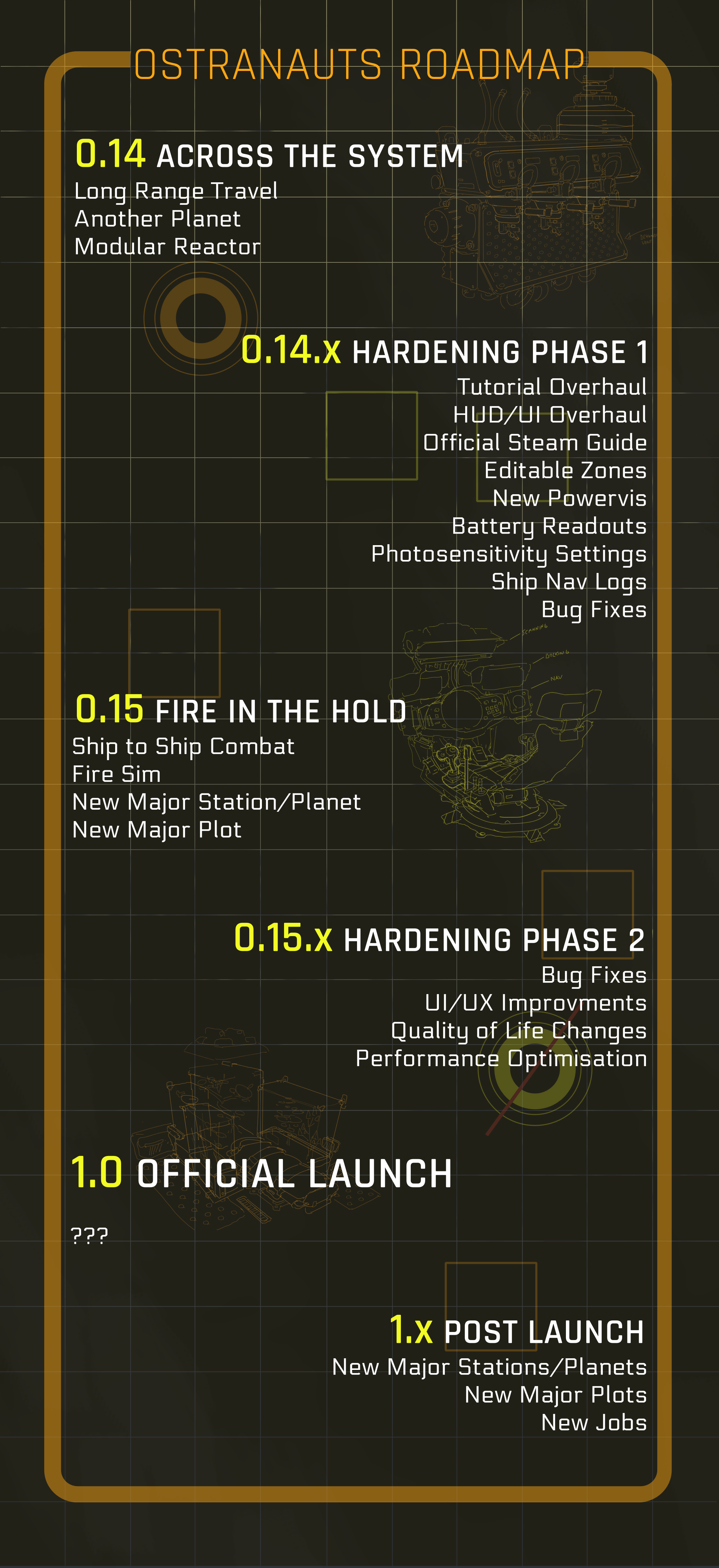
It’s Alexandra from Kitfox again with another Ostranauts Community update. First and foremost, we’ve been working with the dev team to make a more detailed Roadmap which outlines the updates you can expect between now and 1.0 release. Thanks to all your support, we’ve been able to extend development and add Hardening Phase 1 and 2 and much more. We also have plans for future updates after 1.0. We don’t have any release dates to share at this time and details may change as we go along. See below for an FAQ that covers our Early Access plans in more detail.
If you’ve been on the fence about getting Ostranauts, now is a great time to jump in and play! Already this year we’ve updated the game several times with user interface and new player tutorial improvements. You can read the full update and patch notes for yesterday's update here.
We also have bundled with the immersive sandbox detective stealth game Shadows of Doubt! If you own one game, you can get the other with a discount. It’s the perfect starter kit for games that have systematically simulated sci-fi worlds. Check out the Shadows of Ostranauts bundle:
Today we are releasing Adventure Mode for Dwarf Fortress, a sandbox RPG that allows you to form a party and explore your generated world. It’s a completely new way to play Dwarf Fortress and it’s also on sale starting today (at 10am PST/ 1pm EST) at 20% off!
A: We want Ostranauts to become a storytelling platform for space crews in a dystopian System. It's a tall order to fill, and fan feedback has been, and will continue to be, a crucial part of achieving that goal.
Ostranauts is very much a spiritual sequel to Blue Bottle Games’s previous game NEO Scavenger. NEO Scavenger famously held a long early access period, during which the game significantly evolved based on player feedback. Ostranauts follows this precedent.
Q: Approximately how long will this game be in Early Access?
A: Our earlier estimate was approximately four years (late 2020-2024), with a fairly lengthy list of features/content we wanted to add, plus room to incorporate player feedback. During that time, we've been able to add most of those features, including significant improvements suggested by our players.
As we enter our fifth year, we feel confident we can add the last major feature milestone (ship-to-ship combat and fire simulation), plus the supporting content and features to make it worthwhile. Our plan includes time to work on fixing issues and quality of life concerns before we exit Early Access, which is anticipated to be in 2025.
Q: How is the full version planned to differ from the Early Access version?
A: Feel free to check out our roadmap on Steam, or on our Discord, for a complete list of what we've planned vs. finished.
But as of now (January 2025), upcoming changes players can expect by launch include: Ship-to-Ship Combat One More Major Solar System Location One More Major Plot Fire Simulation Quality of Life and UI/UX Improvements Performance Optimization
Q: What is the current state of the Early Access version?
A: Players can currently make a custom character, and fly their starting ship around the boneyard to explore and salvage procedurally generated derelicts. They can use the parts and/or proceeds from that to modify their own ship in any way they want, and/or buy new ships for personal use or repair and resale (a.k.a. ship-flipping).
Players can also take part in short paid missions (gigs), participate in both bespoke and procedurally generated plots, participate in ship racing leagues, or buy and sell commodities for profit (i.e. space trucker).
The game currently has the ability to hire and manage crew, personnel combat, a procedural social interaction system, gamified negotiations (a.k.a. social combat), and a detailed simulation of both social and physiological needs.
The game world consists of two major locations with fleshed-out content (OKLG and Venus), plus a range of procedurally-generated minor locations with basic services.
The game is fairly stable, with most systems experiencing occasional minor bugs. Most bugs can either be ignored or fixed by a save/reload. But some more serious bugs can occur over time, and we generally aim to fix game-breaking bugs as soon as possible.
The UI/UX of the game is functional, but can be janky in places. Most players are able to get along with it as-is, but we are still aiming to smooth out more rough edges before launch.
We regularly update the status of the build with announcements on the Steam Community Hub, as well as notes in-game. Builds tend to be multiple per month, except during some major feature pushes. And we frequently interact with players on our Discord, Reddit, and Steam forums.
Q: Will the game be priced differently during and after Early Access?
A: It is possible the game will have an increase in price at 1.0 launch. The current price was set at Early Access launch, and the scope of the game has changed considerably since then.
Q: How are you planning on involving the Community in your development process?
A: Blue Bottle Games already has a reputation of directly chatting with fans across multiple platforms, including our Discord, Reddit, the Steam Forums, and our various social media accounts.
Our development team primarily uses Discord to talk with each other, so we tend to interact with fans most on there. But our interactions happen frequently on all of the above locations. And we plan to continue this level of player interaction.
-Alexandra
Ostranauts Hotfix Patch (0.14.2.11) Is Live!
Hey Folks!
Ostranauts v0.14.2.11 is now available on Steam, and your clients should be updating shortly.
This is a hotfix update to our recently released "Across the System" update, and includes some fixes for AI behavior, UI, and various crashes/soft locks.
Saves from v0.14.0.0 and later should work. Note that if you were experiencing issues in the older save, this patch may fix some, but others may persist depending on the cause.
Putting leggings inside themselves will no longer destroy the universe.
Using super fast-forward across shifts will now correctly update crew shifts when done.
AI will now try to remove/refresh the air in their helmets at 1.5kPa CO2, instead of 2.0kPa.
Using transit on OKLG to the Port sector will no longer deposit the character inside walls.
It is no longer possible to choose ambient occlusion settings above 4, which is the max intended limit.
The options to use pills and drinks, and trade with NPCs and kiosks, are all now higher in the context menu.
The UI will no longer get stuck after exiting the signal connection UI if user doesn't select a target.
NPCs will no longer use terminals to play games. Only arcade machines.
NPCs will be more likely to limit playing games during work shifts now.
NPCs will no longer watch TV during non-Free shifts, and will limit binging TV.
One of the more serious bugs fixed by this patch is also one of the funnier ones. Attempting to put leggings into their own pocket would cause infinite recursion, crashing the game. The game will now disallow placing items inside themselves.
The threshold for when AI decides to refresh/remove helmets was lowered to 1.5kPa, which is where the helmet CO2 alarm kicks-in. Previously, they would wait until 2.0kPa, which was cutting it too close to hazard passing out.
We also fixed the bug that prevented AI from updating their work shifts after finishing a period in super fast-forward. And tempered the AI's predilection to playing games and watching TV, even when they were supposed to be working.
We adjusted the ambient occlusion slider to max out at 4, instead of 10, which was intended to be our maximum setting. Over 4, the main visual impact it would produce is progressively slower framerate, even on high-end GPUs.
Context menu options for drinking, using pills, and trading were all adjusted to be higher priority, so they are more likely to be the first option in the list (instead of drop/pick-up).
And the signal UI will no longer get stuck with a blank screen if the user cancels out of connecting an appliance to a sensor.
As always, there's plenty more for us to fix, change, and add! And we'll be continuing in roughly that order. In the meantime, let us know if this patch helps you out, as well as if it reveals new problems!
Best, Daniel Fedor Founder, Blue Bottle Games, LLC
Ostranauts Hotfix Patch (0.14.2.10) Is Live!
Hey Folks!
Ostranauts v0.14.2.10 is now available on Steam, and your clients should be updating shortly.
This is a hotfix update to our recently released "Across the System" update, focusing on improving the new player tutorial, plus several player-reported bugs and pain points.
Saves from v0.14.0.0 and later should work. Note that if you were experiencing issues in the older save, this patch may fix some, but others may persist depending on the cause.
There is a new tutorial derelict spawned at the end of the new game tutorial sequence, guaranteeing that users get useful loot to sell on their first trip.
Starting tutorial had several improvements made to wording and logic.
Added a new tutorial step to remind players to hide damage overlay again after using it.
The MegaTooltip UI now begins the game collapsed, with a tutorial explaining how to expand it.
Destructive actions on objects are now always listed last, to avoid mis-clicks in the context menu.
The Escape key will now correctly close the QAB before the inventory UI, even after the target item changes modes.
Sinks will no longer display two "Restore" options.
Exiting a UI with an open drop-down menu no longer soft locks left mouse button.
Using PASS to visit a station for the first time no longer skips intro encounter screen.
PASS will no longer take players to the LA construction zone.
PASS trips will no longer double-charge upon arrival.
Ledger line items will no longer get stuck unpaid in past pages due to rounding errors.
Work lamps no longer operate without batteries.
Thermostats and other alarms switching states should now cause less lag.
The way game data jsons are loaded should now produce less memory waste.
Buy/sell prices adjusted to better support flipping damaged items for profit.
NAV's Match Speed function will no longer have stuck thrusters after player releases thrust keys.
Undocking no longer gets stuck showing previous ship's docking ring if user exits the UI before it had a chance to clear.
Prescription painkillers no longer mention OTC painkillers in the log.
NPCs will no longer recreationally drop social moves on the floor.
Items that are dropping and fail for some reason should now get correctly added to the ship, instead of becoming ghost items.
Missing drag slot items will no longer throw null exceptions when save games load.
Stackable items should now cause fewer null exceptions when an added item is null.
Katydid ship layout adjusted to allow access to its NAV station.
NPCs should no longer spawn outside the aerostat in Encantado's lounge.
Sleep states now have more descriptive tooltips.
The new tutorial derelict is one of the more noticeable changes in this update. Historically, players were at the mercy of RNG when docking with their first derelict. And in some cases, this derelict could be nothing more than a docking ring and a trash pile or two, making it completely useless.
Now, if the player is following the beginning tutorial, the game will spawn a special derelict near OKLG after the player finishes the maneuvering portion. This new derelict has a fixed layout, and is designed a bit like a puzzle box to help new players acquaint themselves with the game's many systems. It also shields them from police, hauler, and salvager interference for the first little while as they get their feet wet.
We also changed a number of things in the starting tutorial to make it more player friendly and helpful. This ranges from clearer wording to new tutorial steps, aimed at both educating players better, and reducing frustration.
Speaking of player frustration, the options to Scrap, Uninstall, Dismantle, and Bash are now prevented from appearing at the top of the quick action button (QAB) list. Many players were tripped-up by those options sometimes appearing as hotkey 1, where we usually have innocuous actions like Inventory or Use.
That, plus the QAB should now correctly close first when hitting Escape, even after the targeted item changes state (e.g. off to on, opened to closed, etc.).
The PASS service and ledger had a number of fixes applied. Plus work lamps will no longer run without power. (Sorry!)
A few minor performance improvements also made their way into this build. First, the thermostat/alarm lag bug should be fixed, as the game will no longer recalculate room stats every time one of those changed color or switched on/off.
Second, the way we log info while opening game data (jsons) is now more memory efficient.
Finally, there were a number of null error and other fixes added as part of this patch.
As always, there's plenty more for us to fix, change, and add! And we'll be continuing in roughly that order. In the meantime, let us know if this patch helps you out, as well as if it reveals new problems!
Best, Daniel Fedor Founder, Blue Bottle Games, LLC
Ostranauts Hotfix Patch (0.14.2.9) Is Live!
Hey Folks!
Just a stealth patch here to address a bug which was causing tooltips to get stuck showing the same message until a reload. This patch should prevent that from happening anymore.
As always, let us know if this doesn't resolve the issue for you, or causes other issues!
Best, Daniel Fedor Founder, Blue Bottle Games, LLC
Ostranauts Feature Patch (0.14.2.8) Is Live!
Happy New Year, Folks!
Ostranauts v0.14.2.8 is now available on Steam, and your clients should be updating shortly.
This is a feature update to our recently released "Across the System" update, adding more user interface improvements, and making REDACTED less annoying.
Saves from v0.14.0.0 and later should work. Note that if you were experiencing issues in the older save, this patch may fix some, but others may persist depending on the cause.
Holding the Left Alt key will now highlight both nearby interactive objects and UI hotkeys.
We added a tutorial step to highlight this new Left Alt feature.
Loading a save game doesn't use hard drive temp folder anymore. It opens straight into memory.
The REDACTED will now only cross over to a new ship via airlocks.
The REDACTED will now either lie dormant or start disappearing after finishing certain branches of the REDACTED plot.
The list of HULL items in the PDA's build menu now has generic wall, floor, and doors at the top.
Humans no longer get floor bump maps applied to their bare legs/arms.
PowerViz lines no longer get stuck on screen when switching ships in ShipEditor.
Racks no longer block light/cast shadows.
Stacks of items no longer disappear if something inside the stack changes damage state.
Stack item counts update in the inventory correctly now.
The version of flirting that is a reply no longer uses the same name as the opening flirtation move.
The MegaTooltip received a visual overhaul to look more consistent with the HUD, and be easier to read.
The MegaTooltip correctly shows human faces again.
UI Tooltips were reduced in size a bit.
Several items had their descriptions added or fixed.
Deleting a save file on the Main Menu save list will no longer throw a null reference error.
We've added a new tutorial step early on in a new game to teach the user about our "highlight interactables" and "show UI hotkeys" features. Many players reported having an "ah ha!" moment when they discovered this undocumented feature. Now, holding the Left Alt key will highlight both of these things.
We also changed the way we load lave files to load them directly into memory, instead of uncompressing the zip files into a temp folder on the hard drive first. This might speed up load times for some users, but the main benefit here is fewer hard drive read/write operations, which was important to some SSD users.
Many users will also notice the HUD was further reworked, and the MegaTooltip now shares the same visual style as the rest of the HUD. We also adjusted the style of the condition capsules (a.k.a. tags) for items to be less intense, reserving the brighter capsule colors for more important conditions.
The REDACTED plot received some love, as well, and it should now be a little less aggressive when crossing from one ship to another. Plus, finishing the related plot in a few ways can curb its growth, and even decimate it.
We noticed some players being annoyed that the wall options in the PDA HULL build menu were after a long list of specific floor types, so we moved the generic floor and wall to the top for easier access. Note that if you aren't picky about which wall or floor to build (or only have loose versions of the ones you want), you can use these without choosing the specific wall model from the longer list.
Two minor, but possibly annoying visual issues were also finally resolved. The racks no longer block light/cast shadows, and humans no longer have those floor bump maps appearing on them when wearing certain outfits.
A few fixes for stacked items also mean fewer lost items, as we discovered and fixed a bug that deleted whole stacks if something in the stack changed state (like became damaged/destroyed).
And we reduced the size of the text in a few tooltips which seemed excessively large compared to the rest of the UI.
As always, there's plenty more for us to fix, change, and add! And we'll be continuing in roughly that order. In the meantime, let us know if this patch helps you out, as well as if it reveals new problems!
Best, Daniel Fedor Founder, Blue Bottle Games, LLC
Ostranauts Hotfix Patch (0.14.2.7) Is Live!
Hey Folks!
Just a quick hotfix here to avoid errors when using PowerViz on certain large ship designs.
This fix caps the number of vertices drawn for a power network to avoid exceeding the draw limits. Theoretically, this could mean extremely large ships with lots of power routes see segments missing in the overlay. But at least this avoids errors in all but extreme cases until we can get a better optimization in place.
Best, Daniel Fedor Founder, Blue Bottle Games, LLC
Ostranauts Feature Patch (0.14.2.5) Is Live!
Hey Folks!
Ostranauts v0.14.2.5 is now available on Steam, and your clients should be updating shortly.
This is a hotfix to our recently released "Across the System" update, adding improved autopilot, ship logs, flashing screen accessibility options, and more.
Saves from v0.14.0.0 and later should work. Note that if you were experiencing issues in the older save, this patch may fix some, but others may persist depending on the cause.
Options menu now has ability to adjust/disable sparks, flickering lights, and spinning parallax backgrounds.
Autopilot shouldn't cause reactor explosions/flame-outs as often anymore with certain reactor designs.
Autopilot will now show an alert objective on-screen when it disengages.
Ship logs have been overhauled to show more useful info.
PowerViz now shows animated lines where power is flowing, instead of yellow sprites in each tile.
New paperdoll sprites for laser torch, welder, screwdriver, and hacksaw.
Undocking from a ship no longer triggers the proximity alarm for that ship.
The docking ring of the other ship is visible for longer after undocking now.
The REDACTED #1 and REDACTED #2 plots are now possible to complete if both have been started simultaneously.
Quests to retrieve special parts from LA aerostat now have better payouts and more reasonable requirements.
Some players have requested relief for the excessive flashing of damaged lights, sparks, and the dizzying parallax background on spinning ships. So we added new preferences in the Options menu for controlling these effects.
Autopilot got a bit more love this update, too. We fixed a few more situations where the autopilot would incorrectly balance FLOW/CYCLE, which should hopefully reduce the cases where it flames-out (or worse, explodes). Furthermore, when autopilot *does* disengage, we've added an objective alert, similar to proximity alarms, to let the user know.
While doing that, we also decided it was finally time to start logging these events on the ship's NAV. So the NAV logs got an overhaul that will now track significant ship events. You can view these logs on the NAV's "Ship Logs" button.
PowerViz also got a bit of attention, and we finally switched it over to use the same pulsing line animation that alarm signal connections use.
Undocking will no longer immediately create proximity alarms and show "NO DOCKING CLEARANCE." Instead, it will now show the receding other ship's docking ring for a little while. We felt this was probably nicer, especially for new users who might think they did something wrong right after undocking.
Finally, several quests have had fixes and balancing done.
As always, there's plenty more for us to fix, change, and add! And we'll be continuing in roughly that order. In the meantime, let us know if this patch helps you out, as well as if it reveals new problems!
Best, Daniel Fedor Founder, Blue Bottle Games, LLC
Ostranauts Devlog #1 - HUD Rework and Quality of Life Updates
Hey Spacers,
We'd like to introduce the first of many devlogs from the Ostranauts team! There's been several major quality of life updates that have recently been implemented and this video will outline what's been done. You can watch the video here or on Youtube:
In the video, Dan explains several hardening phases the team is going through; bugfixes and quality of life updates to address a lot of the community feedback before moving on to the next major content update. We hope to do many more of these devlogs in the future to help show off all the work the team is putting into the game. What kind of topics would you like to see in future devlogs?
New to the game? Check out the Steam Starting Guide!
The team has been working on a beginners guide for Ostranauts on Steam. It takes you through about the first 30 minutes of gameplay as is a great place to start if you're new to the game!
As a reminder, you can subscribe to receive these updates via email by subscribing to the Kitfox Games newsletter. You can also join the Blue Bottle Games Discord or the Kitfox Games Discord to chat with fellow Spacers about Ostranauts!