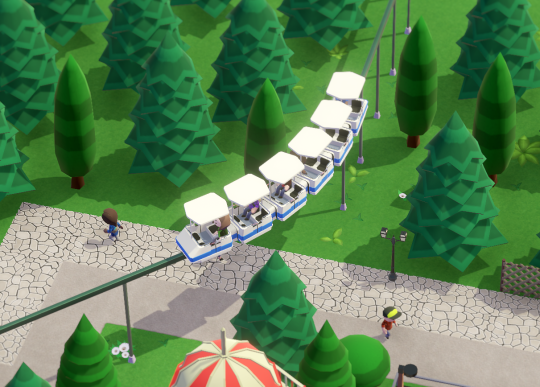
One of my favorite things in simulation games is seeing your creation come alive and just sitting back, watching all the bustling activity. In Parkitect it’s mostly all the guests running around who are responsible for creating this effect, and it’s not quite yet where we want it to be. “The more the better” has been a sort of unofficial motto throughout development for us, whether it be object counts, park sizes or the amount of rides - the more we can add the better it’ll be for this game.
Guest counts are still lower than we’d like though and right now is the last good time to properly solve this, since increasing the amount of guests also affects the money balance and the entire campaign. Improving guest performance has been a constant task nearly every month throughout development and it’s at a point now where the only significant further improvements can be gained from multithreading. The main hurdle there is that Unity, the game engine we’re using, is making multithreading really difficult. They are currently making very impressive progress to improve that for the future, but it’s too late for Parkitect to use the solutions they are working on. So I have finally started with finding my own solutions for these difficulties. It’s a very annoying task that requires going through the entire guest AI code and making it compatible, but so far it looks like it’ll be worth it!
As a first smaller improvement, overall performance in Beta 7 will be up to 15% better in busy parks.
The really big improvement will not be in Beta 7 just yet, but I hope I can release an experimental version for anyone interested in testing sometime during June. In the first tests it looks like we should be able to have quite a few more guests while at the same time having better performance overall. Here’s a small teaser:
That’s 8000 guests in a pretty detailed and big park (Northern Highlands), with roughly 1500 guests on screen, running at 65 FPS!
This is just a stress test of course and we won’t increase the guest count anywhere near this dramatically, because 1) it turns out “the more the better” has a limit where it stops being fun and 2) the game needs to run on weaker systems as well. Comforting to know though that guest performance should never be an issue again after all of this! You should also actually start seeing guests complain about long queue lines...
Devlog Update 193
We’re back to working on the campaign again, so you know what that means - not too much to show right now :) We made some good progress on figuring out and implementing how scenarios are going to be unlocked this week.
Since this would be a very short devlog update otherwise, let’s talk some more about the campaign, and first of all who’s working on it. We’re extremely lucky to have two very talented builders from the community working on scenarios for the campaign: Silvarret and Joshua Tjarks. You have probably seen some of their work already, and so you’ll know that they are great park designers and very passionate about theme park games :) Our main goal for the campaign is to make every scenario feel different in some way - especially of course by giving scenarios unique settings, but also by varying the starting conditions and goals and having a nice difficulty progression. These two have been busy for 6-8 months now and they came up with so many ideas that in the end the campaign grew a bit bigger than we originally expected...
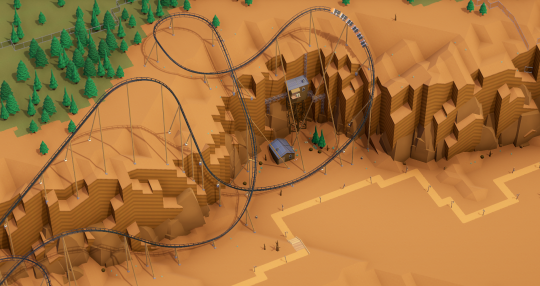
As a sneak peak to give you an idea what to expect, here’s a quick look at one of the scenarios - Coaster Canyon by Silvarret:
As a slightly easier scenario this park has lots of flat space for building huge coasters, and there’s also some space at the top of the canyon as an interesting option!
Building on a blank canvas can be difficult, so most maps come with some small pre-built structures to set the mood and hopefully provide you with inspiration for your own additions! We can’t wait to see what you’ll come up with :)
Devlog Update 192 + Beta 6
Beta 6 is now available for download! The full change log is at the end of this post.
Devlog
We added the Mini Monorail from this months Art Stream:
It’s a low-capacity, but also low-cost transport ride especially suitable for small parks (or short distance transportation in a bigger park). While working on the campaign we noticed that the bigger Monorails we already had make most sense in big parks and the Miniature Railway can be hard to fit into existing parks, so this new Mini Monorail nicely complements the transportation options in the game filling these gaps.
Garret continued adding and animating ride lights:
And Gordon finished a great new background music song! You can listen to a preview here.
Beta 5 Build Challenge Results
All submissions can be found on the Workshop - thanks for everyone participating! These are the 5 winning entries:
For Beta 6 the new Build Challenge is to build a Giga Coaster! There's a special new rule for this challenge: You can't use more than $10,000 of your budget on scenery. There's a display telling you how much you can still spend on scenery items above the "Submit" button, so keep an eye on that!
The top submissions get included in the next game update as default blueprints.
Changelog
Devlog Update 191
Art Stream
Come join us on Garrets Twitch channelon Wednesday (April 25th) at 1pm PDT to chat while watching some new Parkitect art being created.
Devlog
The control hint box was redesigned. Hopefully more people will actually notice and read it now :D
Gabby made new pine trees:
The object pipette is being improved to start building at the same height and rotation as the object that’s being copied. It also shows the name of the hovered object and the deco window jumps to the category and position of whatever you’re copying.
Janitors and Mechanics received customization options for controlling which tasks they should work on:
This can be quite useful for example if you want to have a few janitors who should only clean paths without getting distracted by anything else.
Devlog Update 190
As planned, we’re working more on the campaign now and so everything else that’s getting done is mostly polishing.The path builder got some small improvements, the most important one being that it doesn’t move the “cursor” anymore if a path can’t be built for some reason (for example because of the location being blocked).
Previously it would continue moving no matter what, so in this example you’d continue building paths on the other site of the shop. That seemed like a useful behaviour in some situations but really wasn’t. It confused people and when they tried to “undo” their paths it confused them even more, because using the bulldozer button would not move the cursor back through the blocked location.
Transport system pipes automatically snap to the correct height now when hovering existing pipes (just like paths already did). These things can be a bit annoying to build and there are still a few things we should do to improve that, but this is a good first step.
The terraforming tool was notoriously destructive when terraforming near vertical cliffs with the smoothen feature enabled. It was improved to preserve vertical cliffs, which creates far less unpredictable huge terrain changes that are hard to clean up.
Water is one of the things where I can make a dozen tiny changes without ever being entirely satisfied, and so it has been changed once agan.
And finally, the flat ride lights have customizable colors now. An option to disable the lights has been added as well.
Devlog Update 189
Just a quick update this time - this week was all about doing press/community work and collecting feedback (wow, there has been a ton). We also managed to release a couple of minor patches.
The plan for this month is to spend most of our time on working towards finishing the campaign, so Beta 6 will probably mostly contain polishing, fixes and smaller features.
The reactions to the graphics update have been absolutely amazing, much better than we expected really! It has brought a lot of new players to the game too, and so both our subreddit and Discord are very active right now - if you haven’t already, maybe you want to join too? :) Thanks for everyone who is a part of our small community, we really appreciate your support :D
Beta 5 is now available for download! The full change log is at the end of this post.
Devlog
Garret made a whole bunch of new decorative lamps during this weeks Art Stream:
And he lit the Swinging Ship to show how our ride lights work:
And we’ve added a new visualization to the track builder that highlights all the invidiual block sections. When using a block system there can never be more than one train inside each “block” of the ride for safety reasons, with a “block” being the section of the track between two positions at which trains can safely be stopped (so they can wait there until the block ahead of them is clear).This is a bit convoluted to explain in text, so hopefully this new visualization makes it easier to understand.
Beta 4 Build Challenge Results
All submissions can be found on the Workshop - thanks for everyone participating! These are the 5 winning entries:
For Beta 5 the new Build Challenge is to build a Car Ride! The top submissions get included in the next game update as default blueprints.
Changelog
Devlog Update 187 - Visuals Update (3/3)
Art Stream
Come join us on Garrets Twitch channel on Wednesday (March 28th) at 1pm PDT. This time Garret will show how we’re updating old rides and will create some new scenery pieces. He will also demo the visuals update.
Devlog
Lights on!
Did you ever feel like your park looks a bit... boring when it rains? After this update that will no longer be the case, because all the lights actually work now.
And if you like it really dark you can turn on the new night mode whenever you want!
The Asset Editor has been updated so mods can use lights as well.
To fully capture the atmosphere of a theme park in the dark we’re updating all flat rides with hundreds of tiny lights.
Moreover, most of these lights also receive unique animation sequences. I have built us a tool for placing and animating the lights, and Garret has been busy working with it. So far we’re at over 6.000 animated lights, but there are still a bunch of rides left to update!
If you want to learn more about how we’re creating light animation sequences you should check out this weeks Art Stream where Garret will show how it works.
The new rendering pipeline allows us to use decals, so we can nicely project graphics on top of 3D geometry now. This is especially useful for the zone visualizations. Previously we drew zone borders that followed the terrain and rendered them on top of anything else. This didn’t work very well with objects that aren’t near the ground:
Now with the decals we can show the borders exactly where they are:
Both screenshots show the exact same zoning, but note how in the old one you can’t really tell which parts of the raised path and the buildings belong to which zone without going into a top-down view.
Decals also allow us to properly project puke onto stairs, which clearly is the killer feature everyone has been waiting for ;)
It really is nice to have though for gameplay reasons too, since the flat old sprite would sometimes get clipped so much on stairs that it was entirely invisible.
We added a new rain protection visualization (and all visualizations have these legends now at the top of the screen):
It might seem a bit pointless since "roofs protect from rain” is intuitively understandable without a visualization view... We added it because there was nothing in the game that told you that this is actually something the game keeps track of, so it’s mostly there to remind you that you might want to take this into account when designing your park.
Garret finished a new ride, the Monorail Coaster:
This very unusual looking coaster is fairly cheap to build and fits into small footprints, but is still capable of all the elements you’d except from a big steel coaster. On the downside it has a relatively low capacity. You can also spot a new shop here, the Funnel Cakes stall!
We added a higher-quality tilt shift effect that looks more interesting than the old one:
Of course by default it’s very subtle and not as strong as on this picture, but it’s nice to crank it all the way up every now and then for taking screenshots.
And finally, there’s a new tool for exporting big 4k screenshots of the entire park:
Devlog Update 185 - Visuals Update (1/3)
While last month was focused on maintenance work, March will be all about visuals.We have switched rendering pipelines from a forward renderer to a deferred render over the past few weeks, which completely changes how the game is being rendered and allows us to use some nice modern graphics features with very little performance cost.
To begin, we’ve added Ambient Occlusion which adds some shadows to occluded areas, giving the entire scene more depth. It works very well with Parkitects clean art style and is something we wanted from the beginning, but previous versions we tried were very performance heavy and flickery. This one is nearly free and very stable and high quality.
We also gave the camera a bit more perspective and overhauled the lighting and color balance.
We’ve also enabled a slight bit of tilt shift by default. As usual there are graphics settings for these new effects so you can adjust them to better fit your preferences.
Here are some more comparsion shots (click for full size)!