Fixes for control issues with using a game controller on the main menu
Crouching slide added
Adjustments to minimap system
Adjustments to Piko's uppercut attack (Planning to change to a different button in future)
Adjustment to desks in classroom so player "should" not get stuck anymore
Ability to advance dialog during the scene where Piko first meets Neko. (press up on dpad) Still needs to be further adjusted to use the controller buttons instead.
Tomato Girl Boss softlock fix. "Let us know if it still happens"
Hey there fellow Piko Pikoers! *insert old guy with a skateboard meme
First off wanted to let you all know why the version suddenly jumped from 0.11 to 0.13. There was a kinda large issue with 0.12 which was fixed and with all the other additions to the build, we decided to name it 0.13 instead. 0.12 has been safely quarantined away from the public!
There are still various issues remaining in the game and some new ones have appeared such as dialog text having vanished, but will be working hard on finding the cause and getting that bug squished! So we do apologize for the "dust" while we work to get things back in proper order!
As always we thank you all for being so patient as Marquet continues to burn the midnight oil and continue on with the development of Piko Piko!
Our next news post we will be sharing more gifs that show what else is in store for Piko and her adventures, so stay tuned!
For those who want to report bugs or leave feedback please use the links below!
We wanted to bring you folks a quick little update on whats been going on with development! Managed to shake out a few more gifs from Marquet during his busy development schedule.
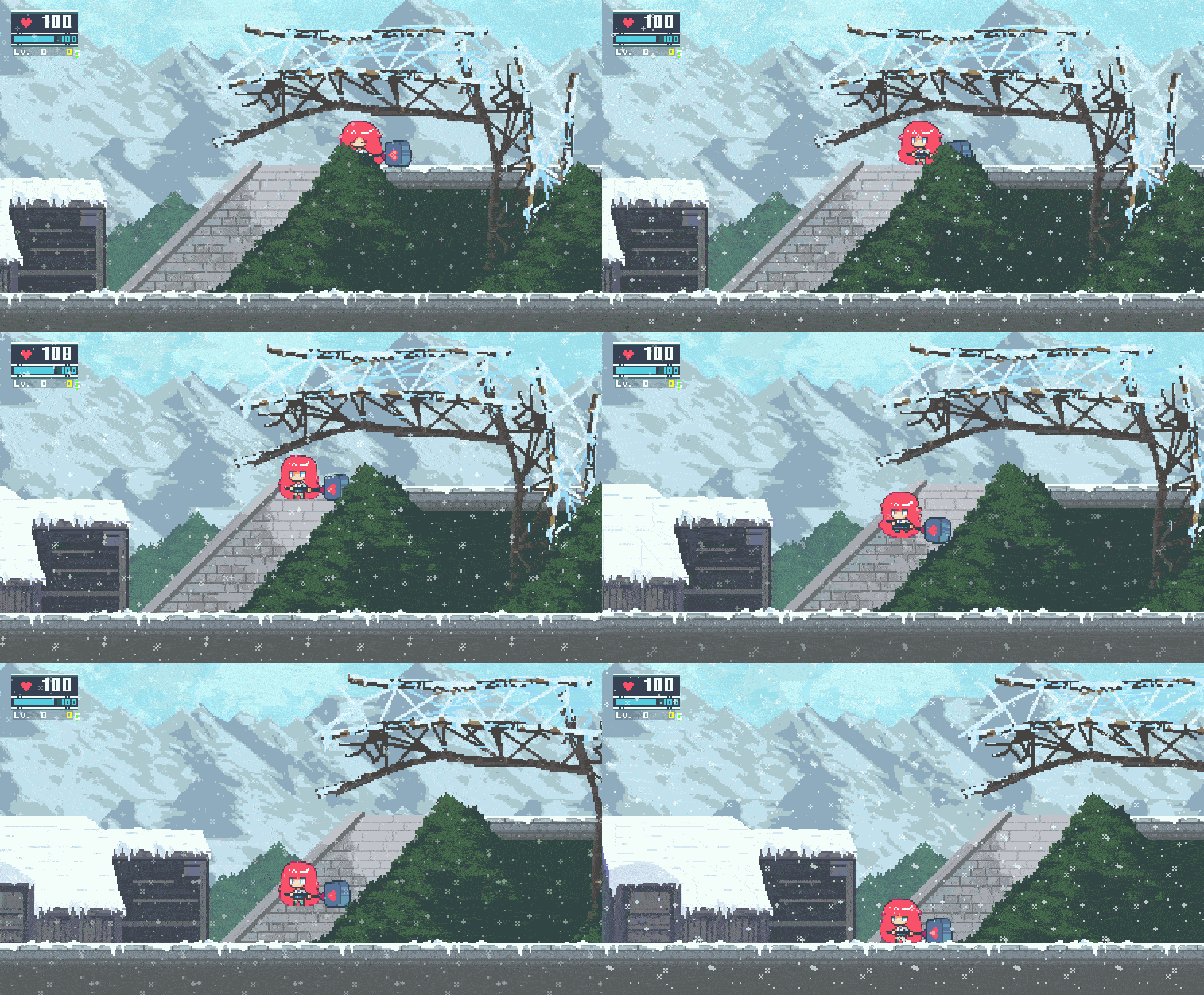
Something quite fitting for the colder weather, a new wind effect that you can see here pushing Piko down the stairs.
Next up we have a new sliding system for Piko allowing her to pass through small spaces!
Or to smash expensive looking pottery OwO
Marquet has also been busy trying to get those bugs squashed so we appreciate your patience with the development of the game and thank you all for your support!
Piko Patch Notes - Version 0.11 - October 28th
Patch Notes
Save File System Optimization.
Startup Resolution, Volume, Language menu able to be controlled with controller.
New Map (Tower) added to the game.
New Miniboss added to the game.
Fixed the issue with the Drill clipping into walls.
Adjustment to Nyan's movement speed.
Adjustment to the size of the collision box for Piko's Charge Attack. (made larger)
Minor fixes and adjustments.
Testing a new jumping attack. (Spinning Piko Hammer Uppercut)
not official name. :)
Hello Piko Piko fans!
In today's update, due to the large changes and adjustments to the Save File system we highly suggest users to delete their current Save Data and start over fresh with the improved Save System. This should help prevent any errors occurring due to old save data being used.
Default location of the Piko Piko game save folder.
We do apologize for this more extreme measures, but thank you all for your continued support and understanding during the Early Access period of Piko Piko!
For those who want to report bugs or leave feedback please use the links below!
Wanted to give you folks a quick update on whats been going on with development!
Currently Marquet has been busy with working on adjustments to the game along with progressing with game development.
Enjoy the following gifs below of the new area that is being worked on! And a brief look at one of the newly created enemy types. :)
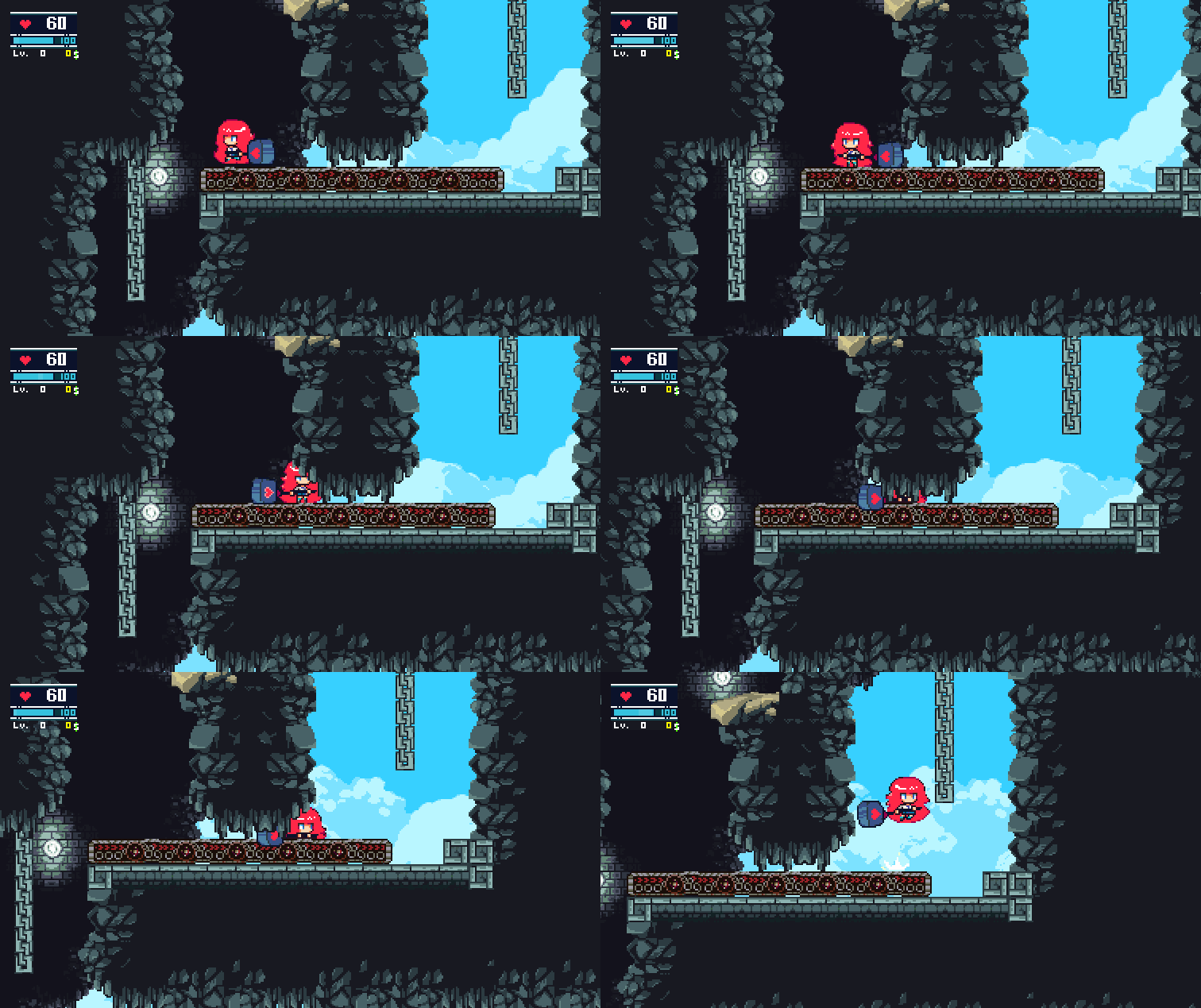
Conveyor belt test
Watch your step!
A new challenger appears!
As always do keep those bug reports coming in as the creator is doing his best to get issues fixed and adjusted. :) So all of the information you provide is a huge help!
Will be working on trying to keep these sort of mini news posts a bit more constant! So be sure to tune in next time also!
Piko Patch Notes - Version 0.10 - October 3rd
Patch Notes
Fixes to game save file functionality with Steam, preventing save files from being deleted.
Fixes to issue with Status showing in incorrect positions.
Hello Piko Piko fans!
The update today is a very minor one, but dealing with the critical issue where game save files would be deleted by Steam due to being in the wrong directory. So when a file verification check is run, Steam removes the save files as it was not considered part of the installation.
As always the Marquet will be doing their best with the development of Piko Piko and we would like to thank all the fans for their continued patience and support!
Piko Patch Notes - Version 0.09 - September 26th
Patch Notes
Fixed the ENTER menu on game startup.
Fixes to collision.
Further adjustments to new save game menu and functionality.
Game now autosaves when player passes by a save Statue.
New death animation for player when life reaches 0.
Minimap system has been done.
Menu now displays the CANCEL / SELECT keys.
Further adjustments on the softlock issues.
*This latest patch will update the main branch of the game. So you folks who are using the [pikoalphatest] branch of the game, feel free to switch over to the main branch.
We will let everyone know in the event if an update will use the alpha branch again!
******************
Hey there Piko Pikoers!
We know its been a while since the last update and we do apologize about that! The good news is that Marquet has been hard at work further improving the critical backend features of the game such as redoing the Save System and how there now is a proper Autosave functionality when the player runs past a save statue. Due to various issues with the older save system the implementation of the new save system took a bit of time to get right. Example of the new autosave system.
Asides from that Marquet was busy further working on the new text display system and we are still currently working on adjusting the display and formatting for all the languages.
The artist has made a neat new animation for Piko when her life reaches zero. Check out the example gif below!
Here is an example gif of the changes to the minimap. Though please do ignore the "Map: Piko House" text display as that still has not been adjusted!
We appreciate your continued support and patience and we will see you all next update!
Piko Patch Notes - Version 0.08 - September 13th
Patch Notes
Full overhaul of Save Game System
Balloon Text dialog display system reworked for new text implementation.
Achievements have been added. (Temporary Icons)
All localized languages have been added. Japanese, Chinese (Simplified), Korean, French, Spanish, Portuguese. Formatting issues currently exist with the non-English but will be cleaned in time for launch.
New hit effect for when player hits an enemy.
*The latest patch can be found on the [pikoalphatest] branch of the game. Instructions on how to access it are within the link below.
https://steamcommunity.com/app/1079200
Hey there Piko Pikoers!
Thank you for your continued patience during the development process of the game! Marquet has been on a mad coding spree with continuing his work on overhauling the text system which now should include the fixes required for the speech bubble text display!
This has also allowed him to implement all of the localized languages, [Japanese, Chinese (Simplified), Korean, French, Spanish, Portuguese] into the game too which can be selected at the options screen before starting the game. Example gif below.
Although as mentioned above in the patch notes, currently all of the other non-English localized text currently have formatting issues with linebreaks and such. But we will be getting these adjusted and fixed before launch!
Now that major issue with the reworking of the text display system has been fixed, Marquet will be returning to the main development with the game and fixing the issues which currently exist.
Alpha Branch instruction access for Piko Piko Early Access
Instructions on how to access the "Alpha branch for the latest version of Piko Piko"
Early Access users can access the branch by following the steps below.
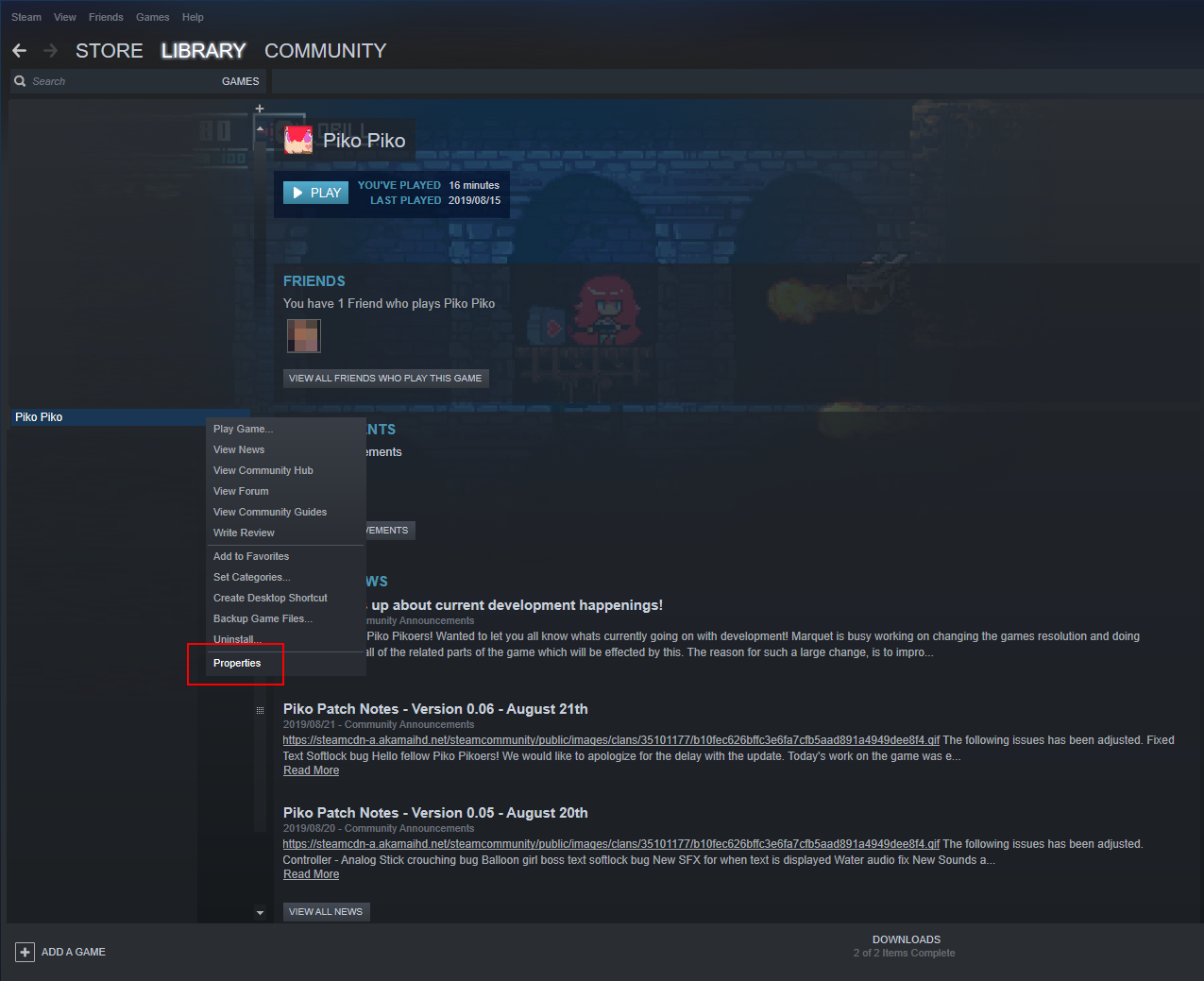
In your Steam game Library, right click on Piko Piko and select "Properties" in the drop down menu.
On the Piko Piko - Properties window select the "BETAS" tab.
Enter the beta access code "pikopikopiko" then press the "CHECK CODE" button.
"Access code correct, private beta 'pikoalphatest' is now available" will display under the beta access code section.
Open the "Select the beta you would like to opt into:" drop down menu and select "pikoalphatest - Alpha build branch"
Close the window.
Back in your library Piko Piko should display as "Piko Piko [pikoalphatest]"
To switch back to the previous version, just open the beta drop down menu again and select the Opt out of all Beta options
We will switch the Alpha branch to the Main Game branch of the game once we confirm that the new version is in an acceptable condition for the switch.
Piko Patch Notes - Version 0.07 - September 4th
Patch Notes
Change of the games default resolution from (384 x 216) to (768 x 432)
Selectable resolutions - 384 x 216 original / 768 x 432 / 1532 x 834 / Full Screen
Japanese localized text has been added. Though formatting adjustments have not been made yet.
Dash has been replaced by Nyan's drill throw skill - Use with C key (keyboard) or Y button (controller) - Dash will be relocated to another key
Hello fellow Piko Pikoers!
Thank you for your patience during the pause between updates! Marquet has been working hard on adjusting the game to allow for proper text implementation with the title for all of the languages, which will be a huge help for development.
The explanation would be quite long, but the short of it is the new resolution changes has allowed for the use of standard text font. Therefore cutting down the need with implementation and adjusting of localized text. This also includes English.
When starting up the game the current initial settings screen cannot be navigated with a controller at the moment so please use the keyboard to make adjustments to the settings and starting the game.
With the new changes and new issues that will appear, we have decided to make Version 0.07 on a Alpha branch of the game. So users can also go back to playing with the previous version as we work on adjustments to the newer build.
Early Access users can access the branch by following the steps below.
In your Steam game Library, right click on Piko Piko and select "Properties" in the drop down menu.
On the Piko Piko - Properties window select the "BETAS" tab.
Enter the beta access code "pikopikopiko" then press the "CHECK CODE" button.
"Access code correct, private beta 'pikoalphatest' is now available" will display under the beta access code section.
Open the "Select the beta you would like to opt into:" drop down menu and select "pikoalphatest - Alpha build branch"
Close the window.
Back in your library Piko Piko should display as "Piko Piko [pikoalphatest]"
To switch back to the previous version, just open the beta drop down menu again and select the Opt out of all Beta options
As always we would like to thank everyone for their support and patience during early access and hope you will continue to enjoy the game!
Here is the new Nyan Drill toss who want to see it in action. Its pretty OP currently if you can hit a boss multiple times with it in a row so its very much so still a work in progress! :)
*Not so secret secret, you can also make drills appear from the air by clicking around where the mouse pointer is supposed to be in game. So enjoy it before its removed!
Quick heads up about current development happenings!
Hey there fellow Piko Pikoers!
Wanted to let you all know whats currently going on with development!
Marquet is busy working on changing the games resolution and doing adjustments for all of the related parts of the game which will be effected by this.
The reason for such a large change, is to improve how the text for the game is handled.
Currently the game is using not actual text, but sprite fonts. Meaning the letters you currently see in the game are sprites.
The problem with this is that it makes for doing languages that use non-English characters, such as Japanese, Chinese, Korean etc more difficult and much more work development wise to ensure that it is implemented and formatted correctly.
Once that has been properly adjusted we will be able to add in the other planned localized languages Japanese, Chinese (Simplified), Korean, French, Spanish, Portuguese much easier.
Then have the main focus return to the development of the game.
Will keep everyone updated with news posts here in the Steam Community so stay tuned and we greatly appreciate all your support!








 Example of the new autosave system.