We've been busy behind the scenes at the soup factory preparing a new update... which is available to download now!
The update addresses some issues reported in relation to network stability and we're grateful for your patience as we investigated the problem.
What's New
- Network Stability Improvements - Japanese localisation fixes
Thanks for your continued support, it really means a lot to everyone here at Q-Games <3
Nom Nom Galaxy is now fully playable on a Steam Deck!
We have pushed some minor changes to Nom Nom Galaxy to make it fully playable on the new Steam Deck.
Text selectable on the Steam Deck
Steam Deck control support
Bug Fix: 'The Great Business Soup Off' Achievement
Salutations, Astroworkers!
The introduction of custom planets seems to have broken 'The Great Business Soup Off' achievement, but today's update should remedy that.
Many thanks as always for your patience and support!
Nom Nom Galaxy v1.05 Update: Black Screen Bug Fix
Greetings, Astroworkers!
A number of you have reported getting a black screen when trying to access the options menu. Today’s update addresses this and hopefully fixes the issue.
It's been an elusive bugger, so if you find the problem still occurring, let us know in our Flies in the Soup - Bug Reports forum. Please include the following details about your PC and what was happening when the problem occurred:
Key PC specs:
CPU
GPU
Memory
DirectX version
OS
Screen resolution and refresh rate
Number of monitors in your setup
Other details:
When/where did the bug occur?
Can you reproduce it?
We’d also love to hear from you if this does fix the problem for you. Let us know!
Thanks as always for your patience and support!
Untitled
DIY Discovery! Nom Nom Galaxy Update Ver. 1.04
Astroworkers, we have returned! Today’s update includes the ability to make and play on custom planets, a feature requested by many! Yes, you can now design your own stages to share with friends! Here we’ll explain the steps necessary to carve out your own section of the galaxy.
Basics
To create a custom planet:
1) Open the custom planets folder located within your Nom Nom Galaxy folder (Steam\steamapps\common\NomNomGalaxy\custom_planets)
2) Create a new folder here for your custom planet. Folder names can include standard alphanumeric characters as well as spaces, hyphens (-), underscores (_), and the pound sign (#).
3) The custom planets folder contains a file named NomNomGalaxy_palette.pdf which shows what pixel colors correspond to what map features.
Using the color palette info, make your own planet in an image editor like MS Paint. One pixel corresponds to one map tile, and different pixel colors correspond to different kinds of map tiles. For example, black pixels are standard terrain, grey pixels are stone blocks, and blue pixels are water.
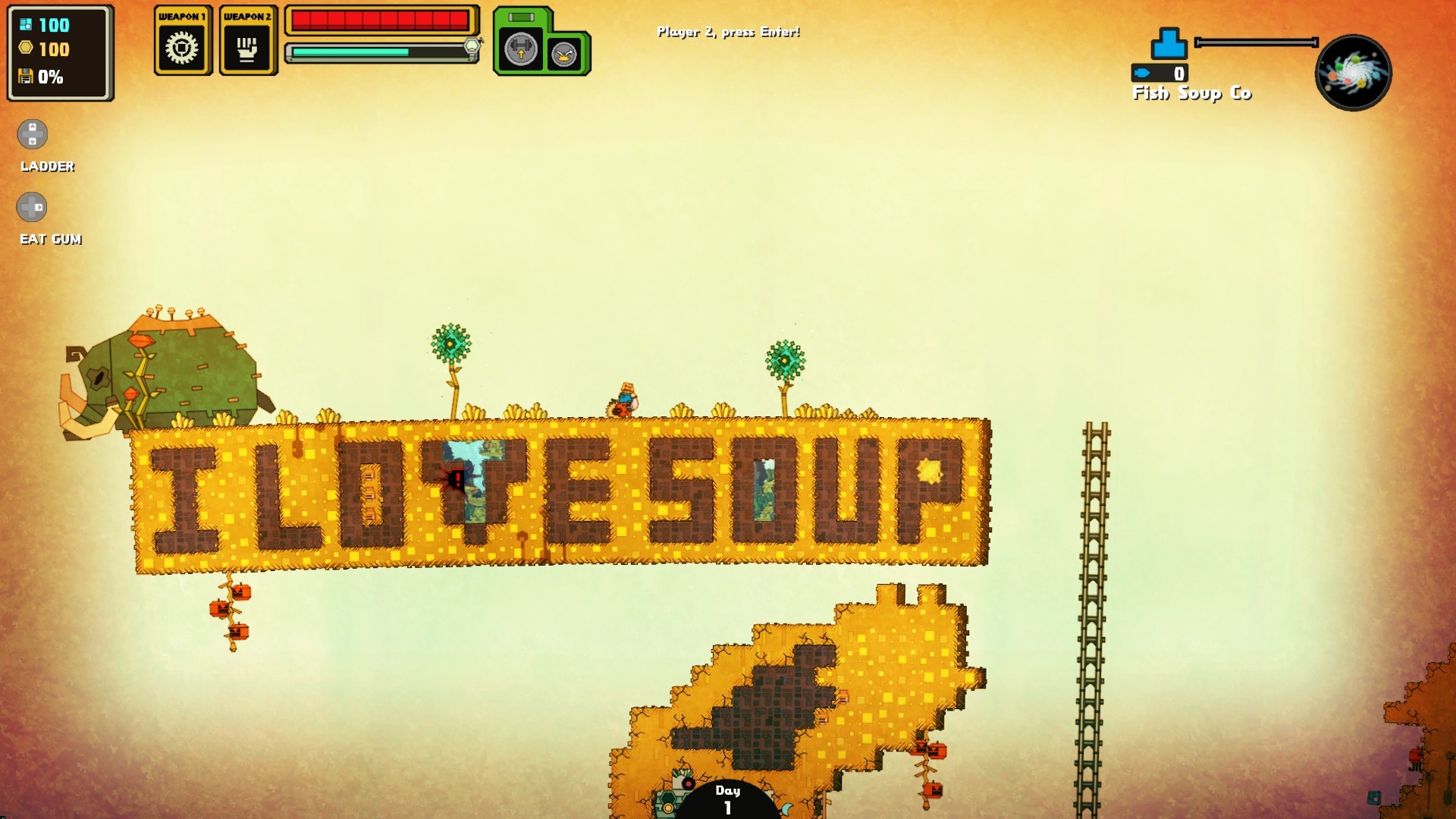
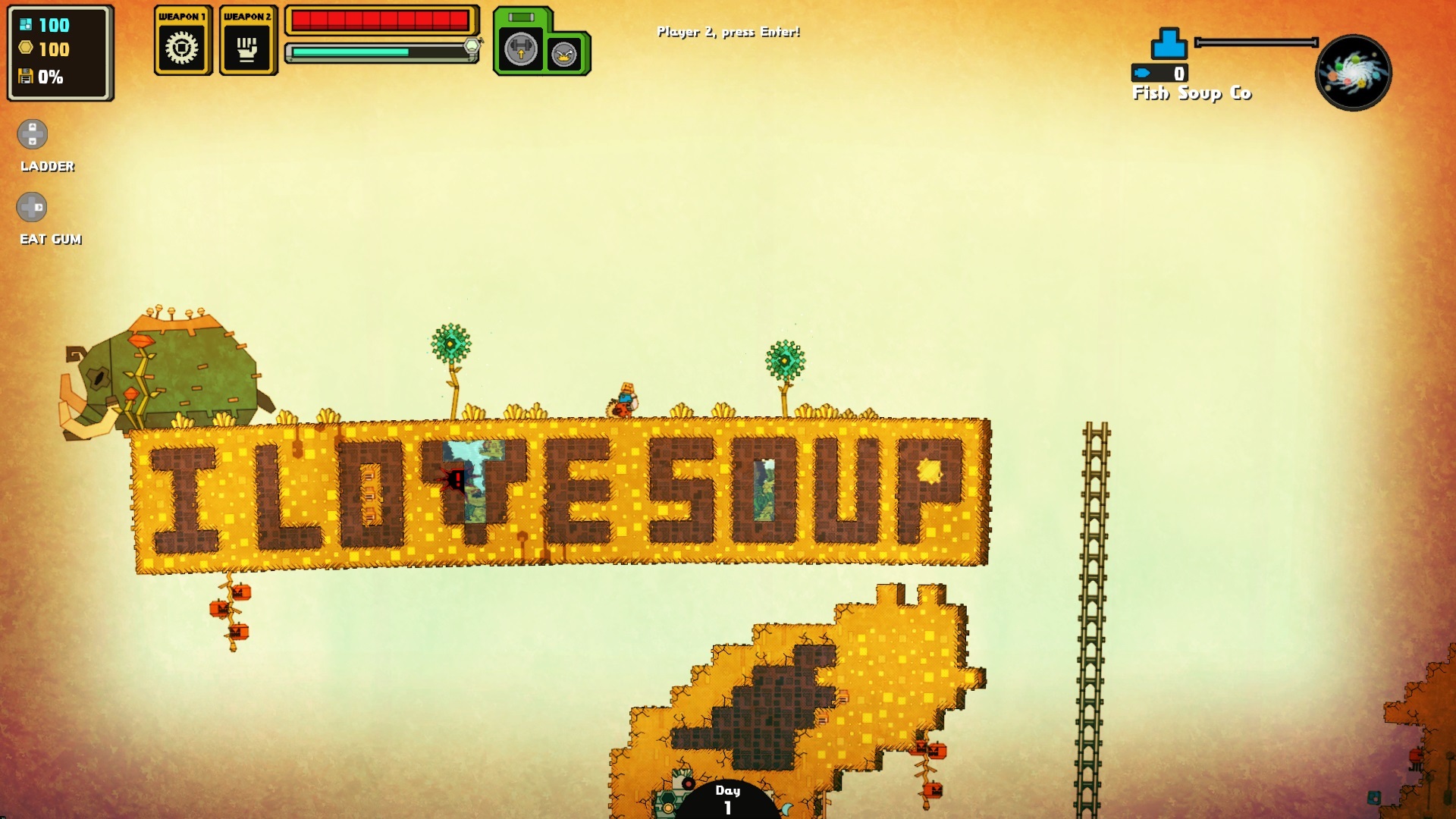
The placement of rare plants, animal nests, and certain creatures is determined by single pixels. Note that some require a certain amount of space for proper placement. In the above screenshot the orange pixel representing a mammoth is placed above the "I love soup" platform due to its large size.
4) Save your custom planet as a PNG file and add “_map” to the end of the file name (example: “Custom Planet_map.png” for a stage called “Custom Planet”).
5) Restart Nom Nom Galaxy and your new stage should appear in the list of custom planets accessible via the SoupCo Planet Database planet.
Tips
Your planet design may not work well (or at all) on your first attempt, but don’t give up! Trial and error are key. There are also a few things you can do to build a better world:
-As a general guideline, maps shouldn’t exceed 160,000 pixels. For example, current maps include sizes such as 400x400, 320x500, and 250x640.
-The planet background and foreground colors are currently randomized, so if you're not happy with the results try changing a pixel. One small change may do the trick.
- Make sure the bottom layer of your planet is filled in. While it’s possible to make floating islands (as demonstrated in one of the samples included), you’ll still need sturdy ground.
- Give yourself enough matter. No matter how lovely your planet is, you won’t be able to build an equally lovely factory without enough raw materials.
- Remember, factories aren’t waterproof! Getting water in your factory can shut everything down. Of course, you might think of a way to overcome it...
Post your best creations! We’ll be on the lookout for strange and interesting planets to share on Twitter and Facebook!
We've also made a number of improvements and bug fixes!
Control Improvments:
- Added mouse support for the maintenance menu (options are now clickable).
- Added mouse support for the company name entry field at the start of the game.
- Added ability to plant ingredients with the X button (Xbox format controller).
- Added ability to rotate construction parts with the mouse wheel.
- Added ability to close the office menu with the same key used to open it.
UI Improvements:
- Updated on-screen UI hint for “Throw” to the left mouse button to help clarify that throwing direction is determined by pointer position when using mouse and keyboard.
- Newly acquired gum is now sorted with the same type instead of being added in chronological order.
Other:
- Changed Fever Time music.
Fixes:
- Fixed an issue that caused players to get stuck in the tutorial.
- Fixed an issue where players could join a multiplayer session before a second controller option was available.
- Fixed an issue with the options menu displaying invalid resolutions for the active display in multiple-monitor setups.
- Fixed an issue where attempting to click options at the bottom of the key bindings menu could inadvertently select a list item in the background instead.
- Fixed an issue in which the game would crash at startup when the settings file wasn’t deserialized properly.
- Fixed an issue where the game would crash when the window was resized.
- Fixed an issue found to desync multiplayer sessions.
- Fixed minor localization issues.
- Fixed other miscellaneous bugs.
We hope this update enhances your SoupCo profit margins to the max!
Nom Nom Galaxy v1.03 Update
Greetings, Astroworkers!
As promised, we have an update for you! It addresses a number of issues you've helped us pinpoint while improving the game's UI and overall performance.
Here's the breakdown:
What’s New
UI Improvements:
Added ability to change controls and key bindings from the pause menu’s options screen.
Added ability to change display mode and resolution from the pause menu’s options screen.
Added ability to navigate the options screen with both keyboard and gamepad regardless of which control scheme is currently selected for gameplay.
Added keyboard support for the construction and research menus.
Changed default pause key to Esc, which functions with both the keyboard and gamepad control schemes.
Changed default confirm key to Enter.
Added ability to rotate construction parts with the arrow keys or your key bindings for left and right movement (e.g., A and D by default). We hope this improves usability for left-handed players using keyboard and mouse.
Added ability to rebind the “stamp object” key used during construction.
Performance and Optimization:
The game will now default to the dedicated GPU on NVIDIA Optimus and AMD Dual Graphics laptops.
Multiplayer games will no longer drop to 30 fps.
Removed the option to run the game at 30 fps.
Added the following graphics quality presets to the options menu:
High: Enables all post-processing effects.
Medium: Disables anti-aliasing.
Low: Disables anti-aliasing, fake 3D, dust, fog.
Fixes:
Fixed issues with language and resolution settings not saving properly.
Fixed an issue that caused players to get stuck in the tutorial when using keyboard and mouse.
Fixed an issue that caused players to get stuck in story scenes if a controller wasn’t connected.
Fixed an issue that caused players to get stuck in the key bindings menu.
Fixed an issue with the construction menu’s cursor behavior in online multiplayer.
Fixed an issue with the laser tower targeting nearby items and friendly robots as enemies.
Fixed an issue with “magnet” indicators incorrectly appearing in places where construction parts would not actually stick.
Fixed an issue with DirectInput controllers crashing the game.
Fixed miscellaneous crashes related to the stun tower and tourist bus, amongst others.
Fixed minor localization issues.
Fixed other miscellaneous bugs.
There's still much to be done and we'll be tackling it as resources allow, so stay tuned!
Much love and gratitude for your patience and support!
Happy New Year!
A big thanks to all the players of Nom Nom Galaxy! Just a quick note to say that we are actively working on an update for a number of the issues that have been brought up and will post an update very soon.
Nom Nom Galaxy Version 1.01 Patch
Patch Day, Astroworkers!
We have a small patch this week to address some save data issues as well as fix some problems that were causing black screens for some of you. We've also brought back GSA-002, the 2nd tutorial planet, which includes some more advanced gameplay tips. This planet previously required completion to advance, but is now optional.
We're continuing to work on improving online stability and should have another patch later this month.
Version 1.01 Change log
Fixed bug where client progress data was overwritten with host progress data.
Client changed an option on the pause menu, which was then autosaved.
Changed not to overwrite client data with host data.
Fixed bug where client factory data was overwritten with host factory data.
If the host disconnects for some reason, the host migrates to another person but the original host's data overwrites the new hosts data.
Will display an error message and pause the game when a host disconnect is detected, then back out to the planet select screen when the dialog box is closed.
Fixed bug where game crashed when starting SOOP with a conquest factory
Data saved with a dirt block inside a factory (in item state)
Changed not to crash
Fixed bug where game crashed when resuming SOOP game
Invalid data saved when exiting pause menu
Improved data load
Gameplay Adjustments
Other bug fixes
Soup's Done, Come & Get it! Nom Nom Galaxy out of Early Access!
Well Astroworkers, the time has finally come for you to venture into the expanse of the Galaxy and feed the hungry masses! Nom Nom Galaxy ver. 1.00 is now open for business!
It's been a long journey since we first released on Early Access almost a year and a half ago - even longer if you count our time as PixelJunk Inc when this blog first started. We've learned a lot along the way! Two PAX Prime attendances in the Indie MEGABOOTH, awards at Brazil's Independent Games Festival and GDC China's Independent Game Festival, appearances at SXSW 2015, Gamescom 2014, PSX 2014, BitSummit 2013 & 2014, Indiecade 2014 and EGX 2014... whew! We've been hoping all over letting people sample the soup! Add to that the huge contributions that all of our Early Access players have added and we fell like we've got a soup that's been seasoned by the best Astroworkers on the planet.
The full release of Nom Nom Galaxy adds:
Of course, the work for an Astroworker is never done, so we'll be continuing to improve Nom Nom Galaxy over the next few months. There are a lot of things still be requested in the forums that we'd like to address. I don't want to get into details now, but we're hoping to add a few modes to keep the soup flavors just as interesting as the first taste.
To celebrate the launch, we've got a week-long 20% discount on Nom Nom! Head over to Steam and check it out!