

Pocket City
Cyberpunk-themed visual mod now available!
To activate the mod, open the settings menu during gameplay and scroll to the mod section. Click on the Add New Mod button and select the folder the mod was extracted to. Activate the mod using the dropdown in the Mod List. Enjoy!
I was hoping to set up a Workshop item for this, but it turns out the Steam Workshop is quite complicated to work with and requires more API integration. In the meantime, I've simply uploaded this as a zip file which you can download and use :)
Minor Update: Steam Overlay
Minor Patch
- Back-end update to prepare for upcoming visual mod
Update August 29, 2022
- Controls update: Allow road build by holding [Shift] and clicking to create straight paths without dragging
- Controls update: Add hotkey [Shift] to toggle multi-build
Update August 25, 2022 #2
- Fix bug in multi-build where some spots are shown incorrectly as invalid
- UI: Increase size of Multi button
Pocket City - Official Release and First Update
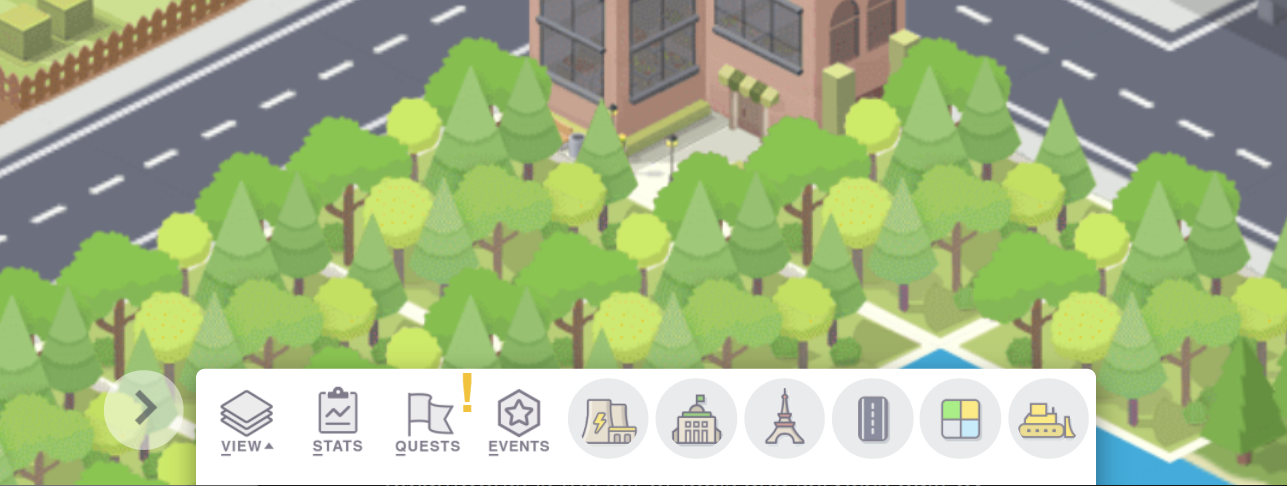
Pocket City is now available on the Steam store! An initial update has been added with minor bug fixes and a new feature to expand the bottom menu to show build options. To activate the expanded menu, click on the arrow button beside the menu. Enjoy!
- Bobby