

PogoChamp
Hotfix for Input Device Problems
I've added some code to detect situations like this, and a menu that allows users to enable/disable specific input devices. You can open this new menu by holding down ~ or start for 2 seconds, but if you haven't had any issues then you shouldn't need to mess with this menu.
Weekly Progress Report #86: 1.0 Next Week!
1.0 on May 26th!
It's almost time! 1.0 is right around the corner. The game is more or less "done" pending some new bugs that pop up. With the 1.0 happening next Thursday, this will be the last "Weekly Progress Report" post. I'll still be fixing bugs & working on new features as they come up, but the progress reports and updates won't be weekly anymore.
Final Cinematic
Changelog
- CONTENT: Added a real cinematic that plays when you get all Rainbow Gems.
- BUG FIX: Fixed bug that caused the game to glitch out if you loaded a replay and a level at the same time. (Prevented players from deselecting the leaderboard while a replay is loading).
- BUG FIX: Push It 2: The Limit goal zone was clipping into the floor slightly.
- BUG FIX: Pressing "Reset" in Movement settings in options menu didn't properly apply settings.
- BUG FIX: Fixed occasional camera jitter in replays.
- BUG FIX: Added water obstacle back to The End.
Weekly Progress Report #85
Changelog
- UX: Reorganize the options menu: Removed the "Speedrun" section, and replaced it with an "Interface" section, renamed "Controls" to "Movement", and then moved around a bunch of the options to fit the new categories.
- UX: Add an option to show the attempt number in the UI.
- UI: Add Achievement icons for Get Over It and Om Nom Nom.
- DEV: Remove some unused assets.
- UI: Add an option to hide the mouse cursor either automatically when a controller is used or permanently.
- GAMEPLAY: Increase the speed of the barrier in Gotta Go Fast, because it wasn't fast enough.
- BUG FIX: High Score achievement wasn't properly unlocking on Steam. This will reset the achievement in your local save.
- BUG FIX: Swimming was counted as being in the air for stats & achievements.
- GAMEPLAY: Changed the 2 star time on Console Gaming from 50 to 60 seconds.
- BUG FIX: Some level geometry was overlapping on Air Control.
Weekly Progress Report #84
Changelog
- BUG FIX: Down The Chute's 2 star time was 90 seconds, changed to 19 seconds like it should have been.
- BUG FIX: Push It To The Limit goal zone no longer clips through the floor.
- BUG FIX: Allow people to select screen resolutions that are slightly higher than the resolutions reported by their screens.
- BUG FIX: Display resolution should no longer show 800x600 incorrectly sometimes. This was mostly an issue the first time the game was booted up.
- BUG FIX: several level entry points clipping into the ground.
- VISUALS: Minor lighting adjustments on some levels.
Weekly Progress Report #83: 1.0 Approaches
1.0 Announcement
After 2.5 years of development and over a year in Early Access, I can officially announce that PogoChamp 1.0 is scheduled for May 26, 2022! It has been a great experience so far, and I'm really proud of the game I've created. I'll be using the next few weeks to finish up the remaining backlog tasks and doing as much marketing work as I can before 1.0.
While 1.0 doesn't necessarily mean the end of development, I don't currently have any firm "post release" plans for the game.
Changelog
- UI: Update the stats menu UI.
- ACHIEVEMENTS: Added new achievement "Trick Shot: Hit multiple targets in a single shot in Target Practice".
- UI: Add Achievements to the main menu,
- UI: Remove the menu where you pick from "Statistics", "Achievements" and "Leaderboards".
- UI: There is no longer a "Leaderboards [Coming Soon]" menu item in the main menu. The per-level leaderboards in standard mode should be sufficient for that.
- BUG FIX: In the menu where you pick the game mode, hitting down when selecting the reset button didn't move the cursor.
- ACHIEVEMENTS: "Pogo Champ" achievement is now "Beat all levels", not "Beat 100 levels".
- BUG FIX: The speedrun timer now includes all game time, not the weird subset of times that I had it include initially.
- BUG FIX: The "Hold to skip" text when skipping cinematics sometimes wouldn't disappear.
- UX: Add option to show more rows in leaderboards. Instead of 25 rows you can now show 25, 50, 100, or 250 rows. These numbers are a maximum possible, but most levels have 50-100 leaderboard entries.
Weekly Progress Report #82
New Cutscene (All Stars Obtained)
If you're already a Pogo Champ, you may have seen the placeholder cutscene for obtaining all the stars in the game. It was a black screen with white text that said pretty much "A cutscene would go here! What should it be? I don't know!" Well in the lead up to 1.0 it was finally time to make a real cutscene, so here it is! Hope you like it.
Changelog
- ACHIEVEMENT: Added "High Score" achievement. "Score 3x as many points as you need in a level with a scoreboard."
- UX: Adjust achievement menu size.
- BUG FIX: Anonymized leaderboard names didn't carry over in replays.
- UX: Toggling UI visibility now hides names in leaderboard replays.
- BUG FIX: Exclude engines from occlusion culling in The Beginning so the animation plays properly.
- BUG FIX: Ball power up in The Beginning now only triggers once.
- UX: Allow you to skip credits by holding start or escape.
- BUG FIX: Fix glass shatter SFX.
- BUG FIX: Hydroplane-ing uses ring style power ups now.
- SFX: Add sound effect to gate opening.
- SFX & VFX: Add visual and sound effect when bouncing on bounce pads.
- SFX: Add sound effect to flames in This Is Some Bull.
- SFX: Add sound effect to breakable platforms.
- UX: Add option to disable in-game achievement notifications.
- BUG FIX: Om Nom achievement now works properly with ragdolls (should be more reliable to unlock).
- CONTENT: Added a real cinematic for obtaining all stars.
Weekly Progress Report #81
LiveSplit Auto Split Support
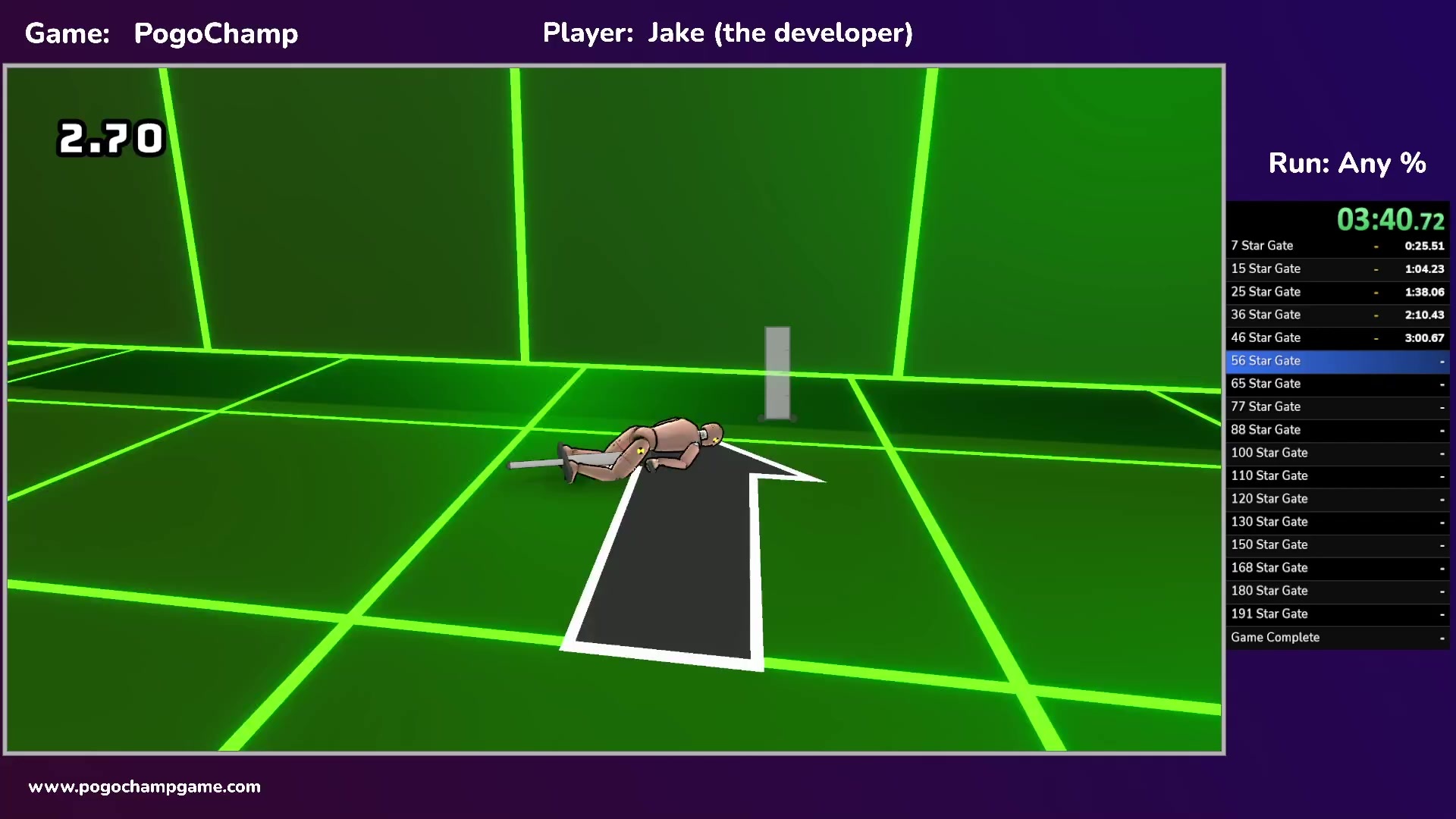
I spent a few days this week working on adding support for LiveSplit auto splitters, and making an auto splitter for the game. It's now available in the LiveSplit client! Simply select PogoChamp from the game menu and pick your run type!

The auto splitter has a few different modes you can use depending on the run you're doing and your preferences for number of splits:

I've also worked on updating PogoChamp's speedrun.com page to include new speedrun types (Any %, All Levels Complete, All Stars, All Rainbow Gems), and some premade splits files. And yes, I know that a perfect "All Rainbow Gems" run would also count for "All Levels Complete" and "All Stars", but until someone does it, those other categories are still relevant.
I also made a few LiveSplit split files that you can use to get set up. They're available here: https://www.speedrun.com/pogochamp/resources
For anyone interested in making your own PogoChamp auto splitter, the code is public: https://github.com/JakeRabinowitz/PogoChampAutosplitter , and if you have any questions feel free to ask in the comments or pop into the PogoChamp discord.
How to Add Auto Split Support to Unity Games
After going through the process myself, I decided to make a guide for other Unity developers on how to add auto split support to Unity games. You can check it out here: https://jakerabinowitz.hashnode.dev/adding-livesplit-auto-split-support-to-your-unity-game
It includes an explanation of LiveSplit & auto splitters, and example source code from PogoChamp.
Changelog
- BUG FIX: Fast Travel achievement no longer unlocks automatically.
- SPEEDRUN: Export various game state variables so that auto splitters can use them.
- BUG FIX: Time spent in level select is now added to the total playtime.
- BUG FIX: Changing profiles while not connected to Steam was throwing an error.
- UX: Add special logic for camera recentering when you have a jetpack in zero gravity. Now uses a combination of your angle and velocity instead of just velocity.
- UX: Add "Reset Camera" help text when the Y axis of your camera is not in the normal range.
- BUG FIX: Some arrows in the options menu were the wrong color.
- VISUALS: Some minor lighting improvements in various levels.
- BUG FIX: Finally add colliders to the doors in The End.
- CONTENT: Add 2 more gates to the level select, at level 90 (200 stars) and 95 (210 stars).
- BUG FIX: Fix bug where reset camera hint displayed in 2D levels.
- UX: Add rotation to the character model in level select.
- BUG FIX: Fix issue with the floor geometry in "The End" which could cause some bad bounces.
- BUG FIX: Fix issue where auto split levelIndex variable wasn't properly set for The End when entered from a cutscene.
Weekly Progress Report #80: All Levels Now Playable!!
This marks the end of any planned new levels, but I'm not done working on PogoChamp. There are still a few features I plan to add, and lots of places that need more polish & attention.
Level 100: The Beginning.
I'd rather not spoil anything about the end-game content, so I won't be including a level teaser in this post, but I hope those of you who make your way through to the end will enjoy what's in store.
Unofficial VS Mode
Over the last couple weeks, I started brainstorming ways to play PogoChamp competitively against your friends. I was focusing on ways to play that didn't involve any new features to be added to the game, and I came up with something I think is pretty fun. WaltzingDucks (the current #1 player on the leaderboards) and I played this a few times and had a blast.
C.H.A.M.P.
This is a variant of the Basketball game HORSE, for PogoChamp.
This mode is for 2 players, but could probably be modified to support more.
The game is first to 5 points. Players take turns competing in individual levels, alternating “Attack” and “Defense”.Steps
* If the Attacker completes a level but still has attempts remaining, they can try the level again, but only the final attempt counts as the challenge time.
- Attacking player picks a level that hasn’t been chosen yet.
- Attacking player has 3 attempts to complete the level.
- If they beat the level, that becomes the challenge time*, and move on to step 3.
- If they don’t beat the level, the next player becomes the attacker, and you repeat step 2.
- Defending player now has 3 attempts to beat the challenge time on that level.
- If they don’t beat the time in their 3 attempts, the attacker gains a point.
- The Defending player becomes the new Attacker, go to step 1.
Setup
To see what the other person is doing, you’ll both need to be screensharing. You can do this by going into a Discord voice channel and both picking “Stream” (doing it in a direct call will replace the other person’s stream). Feel free to use the #stream-1, #stream-2, etc channels in the PogoChamp Discord for this. I can also create additional channels that only allow 2 people if you want to play privately..
This works best with multiple monitors, but should be fine if you only have 1, you’ll just need to swap back and forth if you want to watch the other person’s attempts.
When you set a challenge time, just leave your game on the replay, so the other person can watch it & compare / plan their route. This will also prevent the need to remember what the challenge time was exactly, because the replay shows the time.Variations & Optional Rules
- You can change the number of attempts from 3 to any other number you want. WaltzingDucks and I found that 3 felt pretty good, but we’re also probably the 2 most experienced PogoChamp players in the world, hahah. If the experience/skill level difference of the two players is big, you can give players different numbers of attempts as a way to make it more fair.
- Level Veto: you can add in some number of Vetoes that people can use to force the attacker to choose a different level. These can either be done at the beginning of the match, or after a player picks a level you can have the option to veto it.
Speedrunning
With all the levels available, it's now open season for speedrunnning! PogoChamp already has a page on Speedrun.com. The two current categories are "All Levels complete" and "All Rainbow Gems", but let me know if there are other categories you'd like to see.
Currently I'm using the in-game timer for listing speedrun times, but I also plan to add support for autosplits external timers like LiveSplit to the game
Changelog
- CONTENT: New level: The Beginning. (#100).
- CONTENT: New Level: The End. (#101).
- CONTENT: Added end-game cutscenes (still need some work / SFX stuff).
- CONTENT: Added credits.
- BUG FIX: Transcendence achievement is now unlockable.
- BUG FIX: Beyond Perfect achievement is now unlockable.
- BUG FIX: Updated Supernova unlock condition from 300 stars to "all stars".
- BUG FIX: Fix completion % measurements in the profile menu.
- BUG FIX: Fix achievement notification text overlapping for long achievement names.
- BUG FIX: Fast Travel achievement has been reworked to be attainable again (it used to be "Use the quick select menu", but that menu doesn't exist anymore, so now it's "Warp between levels in Level Select", which you can do by just hitting left/right, or clicking on a level that's more than 1 away from your current position).
Weekly Progress Report #79
There's no visible changes to write about this week. I'll be going on a vacation starting Wednesday for 8 days, so the next update post will come out on April 9. The plan is to have working versions of the final level & cutscenes as part of that release, but the official "1.0" will be at a later date after I've finished the completionist cutscenes and some other features & polish I've had on my backlog.
Weekly Progress Report #78
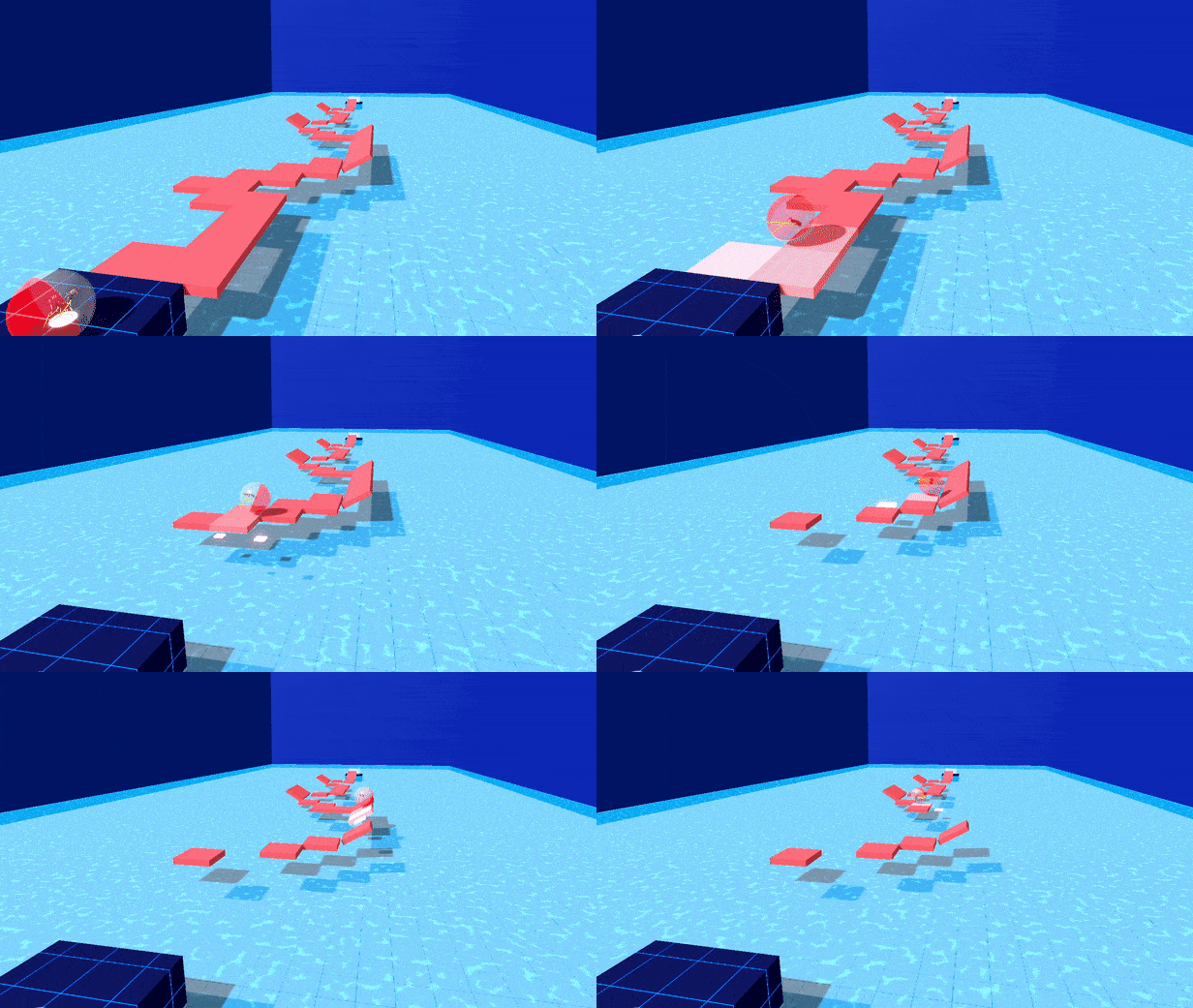
New Level: No Hesitation (#50)
Changelog
- BUG FIX: Fix issue where moving quickly through the level select could result in being on the wrong level in certain situations.
- BUG FIX: Fix Null Reference Exception related to Options Menu tooltips.
- BUG FIX: Options Menu "Reset" buttons work again.
- UX: Remove Under Construction sign from Level Select.
- PERF: Use Object Pooling for the orbs in the Level Select tubes.
- BUG FIX: Fix a bunch of DoTween errors when closing / resetting levels.
- PERF: Use Baked Occlusion Culling in the Level Select for another 90% reduction in rendered tris/verts!
- CONTENT: New level: "No Hesitation" (50)
- DEV: Lots and lots of work & bug fixes for the final level stuff.