Genre: Real Time Strategy (RTS), Simulator, Strategy, Indie
Poly Universe
Weekend Update (0.9.1.3)
And just like that, it was time for another weekend update!
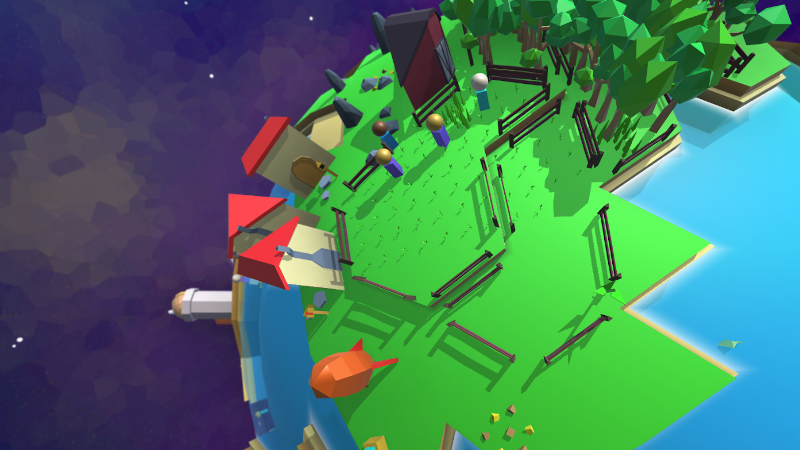
For the past few weeks I've been working on improving the game's art style. This has been a bit tricky for me because I want to achieve a consistent look -- where all the terrain, buildings, plants, and creatures feel like they belong in the same chunky, triangular world. ...But at the same time having enough detail to catch and hold one's attention.
I'm by no means done, but I think this update shows a lot of progress:
I've swapped out the plain blue/black space background with a nebula. This took a long time to get right because a _realistic_ nebular next to a low-poly polygonal world looks very out of place. I've experimented with Voronoi algorithms in pixel shaders to come up with a look for outer space that is both colorful and matches the triangular look of the game.
I've made new models for Vaults and Storage barns. These were (in my opinion, at least) the worst untextured offenders in the game, since you saw them early on.
Farms and Arbors now have wooden fences around them, instead of just being a decal on the ground.
Construction sites have warning signs around their boundary.
Here's a quick screenshot of what some of this looks like in-game:
That's it for now! See you all next weekend for another update. -Pouchmouse
Weekend Update - (0.9.1.2)
Good morning everyone and Happy Sunday! I've just uploaded a small update with two important changes:
The UI for the Save and Load screens has been expanded, so if you gave your save files long, descriptive names they won't get cut off anymore. I hope. Unless you really wrote an entire essay in the save file's name, in which case maybe it will still get cut off?
Boats don't fly anymore. There had been an issue where a boat's bobbing motion would gradually be accumulated each time you saved and reloaded, until the boat was occupying a spot normally associated with satellites. This update should bring them back down to earth. =)
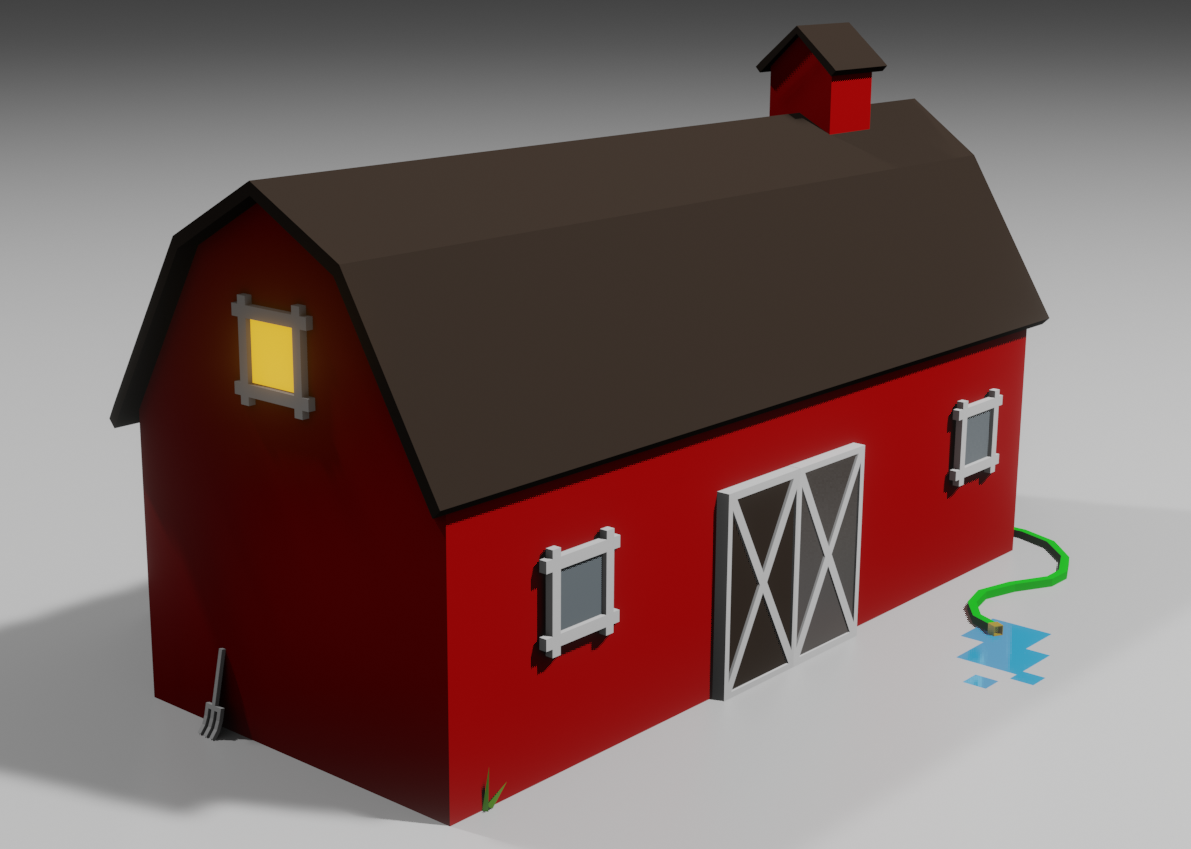
This past week I've also been getting back into practicing 3D modelling, with an eye towards improving the game's looks. To be honest, I'm not happy with how the current buildings are made, and I'll probably redraw all of them. But I'll be prioritizing the ones that are the most temp looking.
Here's a test render I made while experimenting with what the Storage building might look like:
I'm looking to write some custom export scripts in Blender that will make it easy to add cosmetic variations to buildings, so no two will look exactly alike. This isn't in the game yet but hopefully next weekend we'll have some improved buildings playable.
Thanks for playing! -Pouchmouse
Update 0.9.1.0 - Professions
Morning, everyone!
Version 0.9.1.0 adds a much needed change to how workers are assigned to buildings. The problem up until now was this: A building has an ideal number of workers that you have declared should work there. And it also has an actual number of workers, which can sometimes be lower than the ideal number due to the fact that workers have died without there being anyone to replace them. The old UI just showed a single number - the number of workers currently working at the building - but it didn't show the ideal number. So in the aftermath of a particularly deadly invasion, it could be difficult to understand where new workers would be going as the population recovers.
I've changed the worker UI to be icon based, to show both the number of workers who are actually able to show up at a building right now, and the number of workers that you would ideally want going there. As new workers grow up, they'll fill in the 'ideal' slots until the building is returned to its ideal workforce size.
The Professions menu (the one that lists all buildings and their workers) has also been tweaked to show both the current output of each building and - if the building isn't fully staffed - the output it would have if it had all the workers it's requesting.
I hope this helps with keeping the planet organized and productively employed. =)
Update! 0.9.0.3
Hi all- Version 0.9.0.3 is live! This is a small update that addresses some of the suggestions folks had in the comments:
* The Professions menu now shows advanced buildings that were missing from it before.
* The Professions menu also correctly updates to reflect the latest world if you switch planets while leaving it open. =)
* The tooltip on the Population bar (that small one in the upper right corner) will now tell you about the Happiness and Healthiness of your population.
* I found a bug where the quantity of goods being shipped between worlds would sometimes be reduced to '1' for each type of resource. This is fixed now, and trade routes should reliably deliver their intended amounts.
* Also, Peabs on colonization missions weren't disembarking from their ship until you looked directly at their planet. This should be fixed now, though I don't think it was having much of an impact on gameplay since you had to look at the planet to give them orders anyway. =)
Cheers! -Pouchmouse
Update 0.9.0.2
Hi all- Version 0.9.0.2 is live, and it fixes a few important problems. For one, the movement speed of your citizens wasn't being initialized until you looked at the world they lived on. So if you loaded a game with multiple planets, Peabs on each planet would be stuck in place until you visited their world. Also, I've extended the UI for trade missions so that it's possible to see how much cargo is currently onboard a ship, and when it is next scheduled to launch. If a planet is desperately in need of resources it's now also possible to launch a ship ahead of schedule.
Enjoy! The next update should be ready on February 2nd.
January Update - Story Mode
Hello everyone!
I've just wrapped up a major update to Poly Universe, including a bunch of advanced resources, new building types, and a story/campaign mode. So here's what's in the latest build, which I'm affectionately referring to by its nickname "Version 0.9.0.0":
* New advanced resources like Diamonds and Silicon can only be found on certain worlds. And no, it's never the world you start on. Sorry! These and other advanced resources are necessary for building new late-game structures.
* I've retooled the way research works. There's no longer an arbitrary tech tree, but rather it becomes possible to research things as you discover them by visiting new worlds. (E.g. you unlock the option to research silicon production when you first colonize a sandy planet). This means that how you develop tech is unique to each play-thru and determined by how you explored the universe.
* There's an actual story! Characters from your crashed ship talk to you now and several story-lines unfold in parallel, with each story-line detailing a different way in which the depths of outer space are trying to kill you.
* And if you don't like stories and just want to play a civ-building game in space, there's also Sandbox-mode which shoves the story to the side and gives you access to everything right at the beginning.
* Also, there's a raft of gameplay tweaks. Most notably: Your Peabs grow up faster, and learn faster from Schools, so the early game has less downtime. But, there are now stricter limits on what can be transported between worlds when doing Colonization and Trade missions, so these mid-game actions require more planning.
Enjoy!
Roadmap Update - Modding!
It took a bit of work, but I've gotten Poly Universe to the point where much of the content is moddable and the process for modding is (hopefully!) quite easy.
To create your own mod, you can start by downloading the sample here:
https://github.com/Pouchmouse/Poly-Universe-Sample-Mod
Place that sample mod in your local mods directory -- which is probably C:\Users\yourname\AppData\LocalLow\Pouchmouse\Poly Universe\Mods\Local. You can always check the 'Mods' menu in game to see the exact location of your local mods directory).
Now restart the game and go back to the Mods directory. The sample mod you downloaded should appear in the list of available mods. You can click it on and off just to see that it has an effect. It will change the opening theme music, replace the button click sounds with laser sound effects, and change the tree models to trees that are somehow even more low-poly than the normal ones. =)
Head back to the sample mod directory, and you are free to go absolutely nuts adding stuff. The info.txt file contains a complete list of the files that are moddable inside the game. Anything that you want to change in your mod, just include a file with that name inside your mod directory. When you have something you'd like to share, return to the game, find your new mod in the list, hit the Upload to Steam button, and it will appear in Steam Workshop.
Happy Modding!
Game Roadmap Update! (number 1 of many)
I just realized I didn't really announce this in any 'official' capacity, but:
Roads and Bridges have been added to the game!
Roads and bridges can be found in their own tab on the central 'Build' menu, and come in two flavors. You can build stone roads, which let your Peabs move slightly faster, or if you're flush with resources you can splurge on Steel roads, which improve walk-speed even further.
These features come with a side of improved pathfinding algorithms, so the whole game runs faster when you have worlds with 100+ citizens.