I’ll keep this one short, because there isn’t a lot to unpack here. I wanted to get an update out as soon as Chaos Destruction could be showcased to you and now is that time!
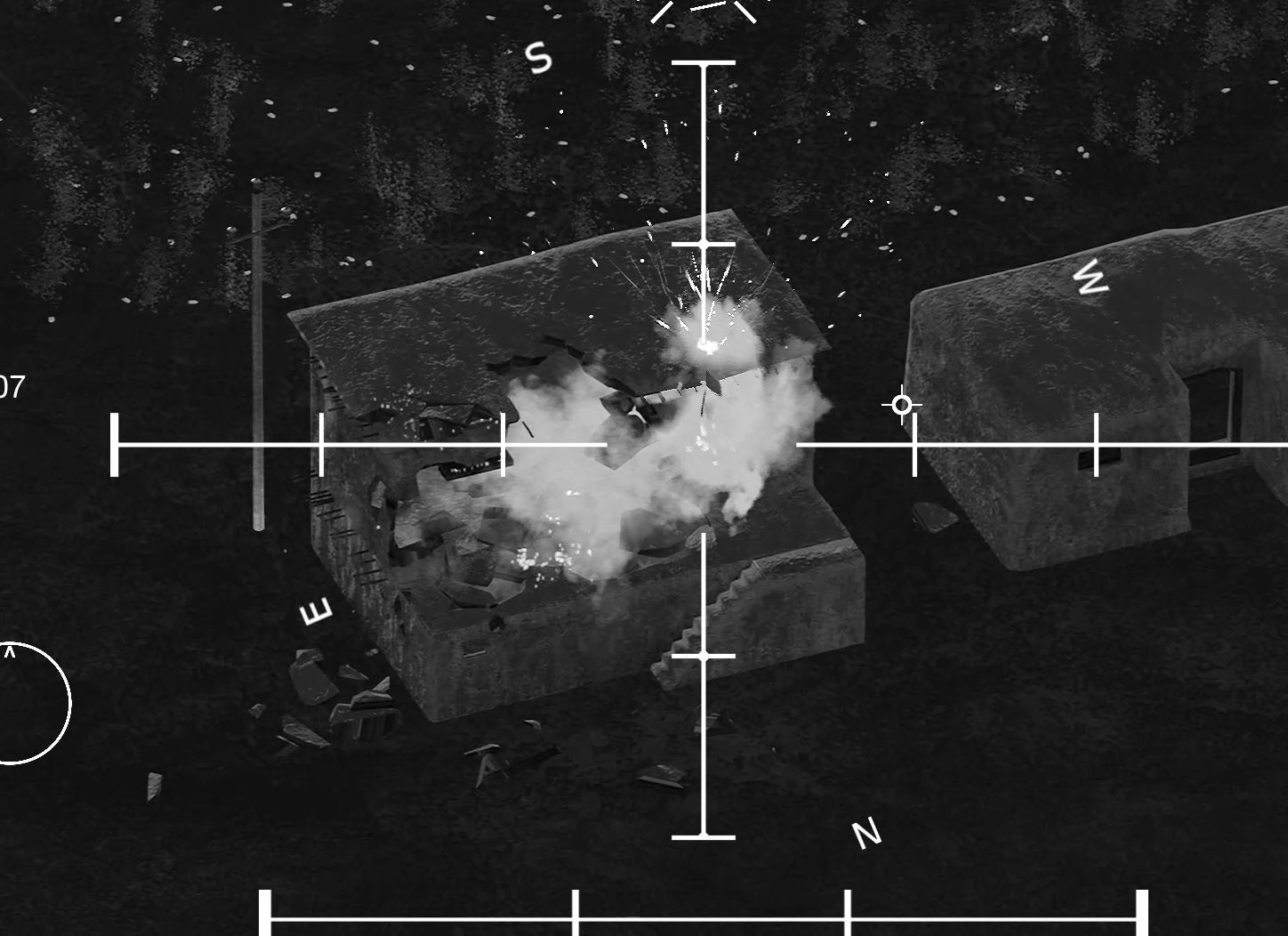
Chaos Destruction
Keep in mind, this is very early in development of the destruction system using Chaos and there is a lot to tweak and optimize before it can be injected into the already established scenarios. To move towards that, I’ll need some solid feedback on its performance for everyone, so I can gauge how things need to be adjusted.
To start, I’ve set up destructible meshes to basically look good, so there are quite a lot of fractures in each mesh (more fractures, the more performance overhead, but better-looking destruction). It seems to run decently in my tests, but I need to hear how it is running for you. There are several levers I can pull to improve performance (trade off with quality typically), so I need to get a good baseline before I start tweaking stuff.
To test this, I added a small destruction map/scenario (it is found in the scenario section) that simply throws you in game with destructible objects and some AI running around; nothing to fancy. There isn’t any specific UI built for this scenario, so there isn’t any ability to respawn anything (you’ll simply need to go back to the main menu and re-enter the scenario to reset).
It is important to note that the 40mm and 105mm are the only guns that will damage objects now. The test missions run the AC-130U variant, so don’t expect anything to happen to the buildings/objects with the GAU-12U 25mm.
If you are experiencing bad FPS; you can attempt to scale down your resolution in the display options (70% scaling generally provides a good boost in performance, with very limited impact on visual quality). If this doesn’t help, let me know in a steam discussion or in the community discord.
Other things
There are a few bug fixes that got worked out, with some tweaks to weapon accuracy and impact effects.
I will also mention, some people were bent out of shape because of the gun overheating feature added in the last update. You can now find a toggle switch for this in the gunnery settings.
And that should do it. I encourage you all to reach out if you have questions or concerns about anything. Although my primary mission is to create a game I want to play, I need to hear your opinions to ensure I stay grounded (it’s easy to be in the clouds when you work on your own). I do believe your contributions since the beginning have substantially helped the game to improve, so keep it coming!
Thanks again for all the support and I’ll see you in the next update!
Change Log
Bug Fixes
Fixed a bug that prevented you from exiting the input menu with the escape key
Fixed a bug that allowed you to tab through the various UI elements on screen, while in game
Fixed a bug that prevented the gun overheating warning from removing itself appropriately
Fixed the menu bug once again (hopefully we don't see it again)
Fixed a bug allowing the player to fire the GAU-23A faster than the established rate of fire
Fixed a bug that caused the material on the GAU-23A to be distorted, on the AC-130J variant
Visual Effect Updates
Tweaked some of the impact effects to have smaller spark particles (these sparks looked abnormally large, especially when using gunships with better zoom)
Gunship Updates
Improved the accuracy of the L60 Bofors 40mm cannon to be more reflective of real life.
Decreased the accuracy of the GAU-2A 7.62mm, M61 Vulcan 20mm, and GAU-12U 25mm to be more accurate to real life.
Adjusted the initial rotation of the guns to be closer to the center of the crosshair.
UI/Menu Updates
Removed the "Developer Message" from the main menu.
Added links to the discord, steam discussions, and steam news hub (update history) in the main menu.
Map/Scenario Updates
Added a new basic destruction test scenario.
Update Build 0.6.5 Hotfix #1
Changelog
Fixed a bug preventing the Gun Pitch and Yaw Tweak input setting from showing in the control options.
Fixed a bug that prevented the Joystick Visual Assist setting from staying set from scenario to scenario.
Update Build 0.6.5
I don’t know about you all, but it feels like time is just flying by faster than ever. It has been another month (and a half) and I hope everyone is doing well! This update would have been released two weeks ago, but I had a family vacation and was uncomfortable making the release and not being available to deal with any big issues.
This month (and a half) of development unfortunately had a lot of spinning wheels, so I couldn’t make a lot of progress in areas that I was hoping to make. However, I was able to knock out some of the important features that needed to be added.
Advanced and Custom Gunnery Modes
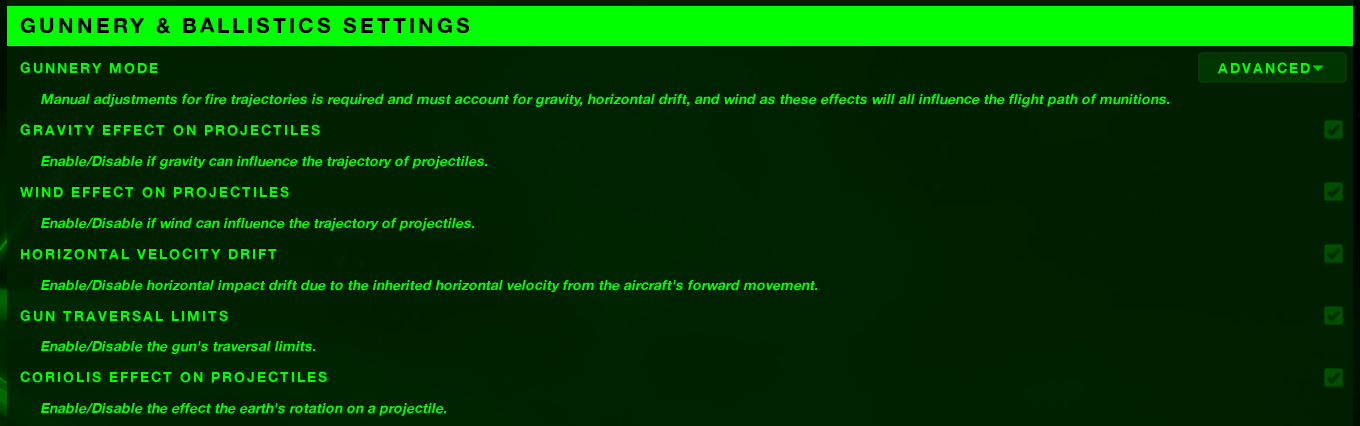
You are now able to toggle on effects that will alter the trajectory of your munitions. These effects include gravity, wind, horizontal drift (initial velocity from the flight of the aircraft), and Coriolis effect. The Fire Control Computer UI (default key is ‘o’), will provide you with key information that will help you estimate how these factors will impact your munition.
Additionally, you are now able to make “tweaks” to the relative pitch and yaw of the guns, allowing you to zero them to your sensor’s crosshair. Right now, all these adjustments are manual (like adjusting the elevation and windage on a rifle) and there is no automation in how this change depending on distance, firing angle, etc. This is something I’d like to integrate in, so it is closer to how real-world gunship functions. At the very least, I’d like the Fire Control Computer to calculate an estimated range given a specific trajectory angle, altitude/distance, and munition velocity, allowing you to adjust based upon these variables, then fine tune by conducting a “tweak” or “two-shot.”
With that in mind, it is important to pay attention to the range you zero your gun to, then adjust your aim appropriately as that range changes from target to target. You certainly can continue to tweak the gun’s pitch and yaw, but sometimes the best you can do is utilize the old fashion “Kentucky Windage.” (Believe it or not, this has been a very common practice in Gunship’s engagements. The Fire Control Computer can only help so much.) You can expect this to continue to evolve. I think it is in a reasonable spot right now but think there is more to be done.
The guns are also now able to overheat, preventing the player from continuing to engage when they reach certain temperatures. This will add a new strategic dynamic to the game, requiring you to maintain firing discipline. As soon as the guns get over 900 degrees, the guns will need to cool down prior to being able to fire again. You can see the current temps of the guns in the Fire Control Computer UI.
Chaos Destruction
Destruction is an important feature that I believe the game needs to have and a lot of time was spent working on making that work this month. Unfortunately, there isn’t a lot to show for it now, because there are several walls to climb for it to be possible in Project Gunship.
First off, just to give some context; one of the main changes from Unreal Engine 4 was their discontinuation of utilizing Nvidia’s PhysX engine for physics calculations and simulations. Throughout the later version of UE4, Epic began implementing their in-house created physics system called “Chaos,” that was available for testing, but discouraged to ship any games utilizing because being in alpha/beta it was prone to changes. As mentioned previously, one of the big changes between the UE4 and UE5 was relieving PhysX with Chaos, their in-house physics system.
Unfortunately for me and Project Gunship, I was maybe a bit too zealous to port the game over to the newer engine; without fully understanding how everything would translate. UE5 did make a substantial amount of editor and performance improvements, along with some new and shiny features that most likely are the future in game development, but I assumed all aspects would have been improved over UE4. Chaos’ destruction tools to create fractured geometry collections (destructible objects) were much more refined and user friendly than what PhysX provided. However, stable performance is questionable and any relative control of how objects break apart seems impossible without engine code modification. Despite that, I believe I have some complicated pathways towards getting it working but as usual, it’ll take some time to figure out. So unfortunately, no destruction this update but as soon as I get it working, I’ll release a test map for you to play around in and gauge the performance impact (I’m hoping I can do this in the next few weeks).
UI/Menu Updates
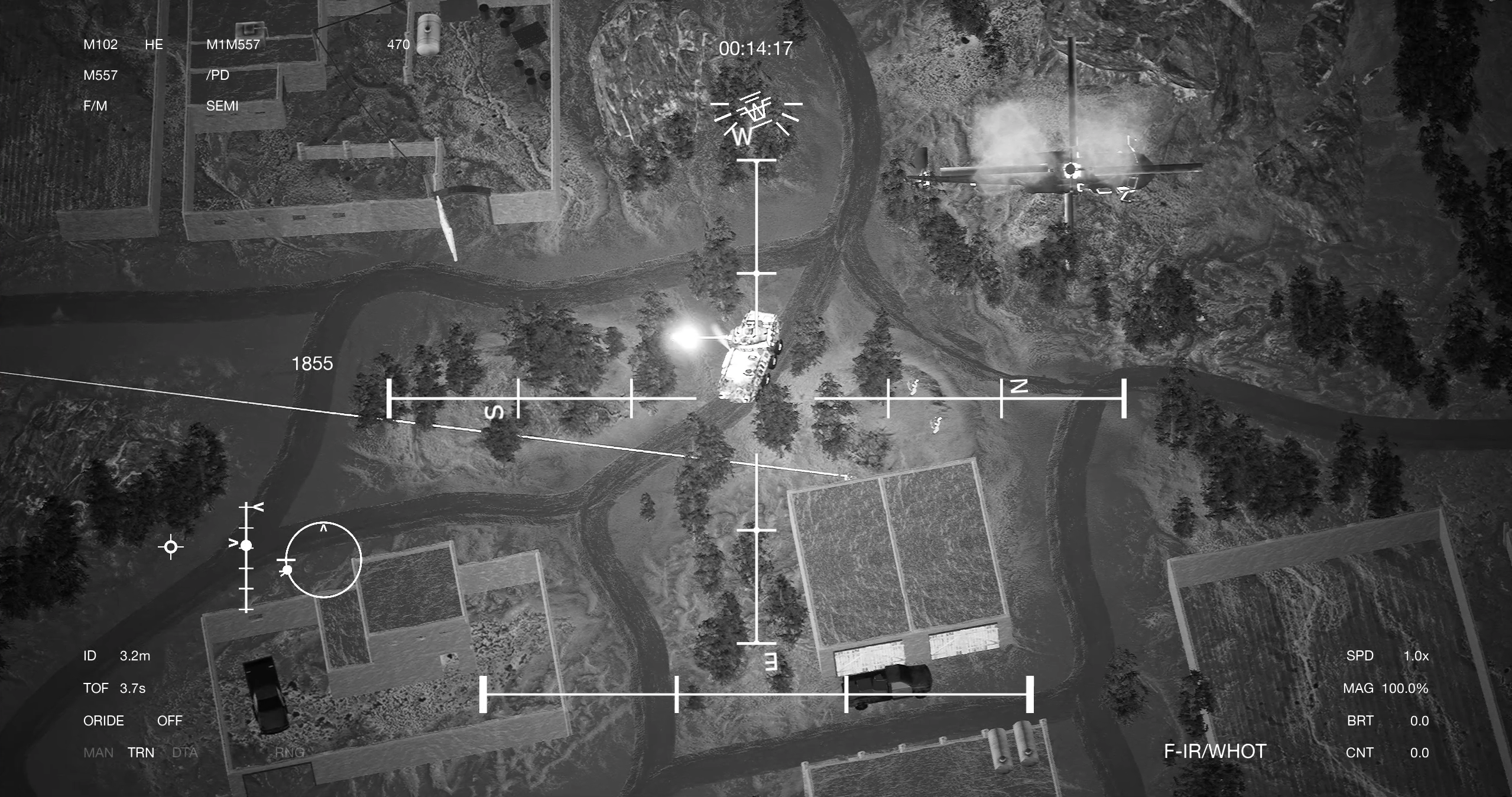
I’m also excited to provide some new UI features that will help improve the experience for everyone. One of which is a visual assist for the joystick emulation. This provides a visual indication of the input control for the sensor. The longer the line, the faster the sensor will be moving in the direction it is pointing (this can be toggled on and off in the options menu).
Additionally pressing the “escape” key while in menus will effective “go back,” as all of us have been conditioned to do (be sure to let me know if there are any menus that get missed).
I should also mention; the training information has been updated to match the updated features. I'm hopeful this will be a little more helpful as I've added videos and images to illustrate the concepts.
Outside of those main features, everything else is relatively minor. You can view the full changelog below. I’m very grateful for the opportunity to be working on this project and to interact with such good people in the community. I apologize for the slow development, but I am confident the game will turn out to be something special for us all.
Be sure to let me know if you have any complaints, suggestions, bugs, or issues and I’ll do my best to knock those out quickly. I hope everyone is doing well and will see you again in the next update!
Changelog for 0.6.5
Bug Fixes
Fixed a bug preventing the player from changing the Fire Control Computer (Tangent Indicator) input in the options menu.
Fixed a bug that prevented the Resolution Scaling from working properly.
Fixed the bug that causes the weapons to continuously fire (get “stuck”) when changing weapons too quickly while firing.
Visual Effect Updates
Made some minor tweaks to each impact’s spark effects to be smaller in size.
Removed the impact decals and added low velocity sparks to mark impact locations.
Added dynamic materials to the gun static meshes on the aircraft to increase with their heat variable.
Gunship Updates
In Simple Gunnery Mode, fixed the issue causing rounds to be off-center depending upon the range the projectiles travel. These should all hit dead center now.
Updated the AC-130H to only have the L60 40mm and M102 105mm, and not have the M61. This depicts the late stage of the variant and provides greater distinction from the AC-130E.
Made slight performance improvements to the projectile class.
Reworked the audio class, which should provide incremental performance improvements (most likely in loading times).
Added the ability to adjust the brightness and contrast of the sensor display.
Tweaked some of the post process settings to give a clearer image (more contrast)
Added “Advanced” Gunnery effects that will influence your projectile. These include gravity, wind, horizontal velocity drift (inherited horizontal velocity from the aircraft’s forward movement), gun traversal limits, and Coriolis effect.
Added the ability to tweak the pitch and yaw angle of the guns to zero them in.
Added the ability for guns to overheat. They will be unable to fire until they’ve cooled off (this is a first pass at this feature, so it is likely to be tweaked).
Adjusted the Sensor’s location on the gunship for historical accuracy.
Removed a small delay that existed when changing weapons, which was an attempt to deal with the stuck firing bug.
UI/Menu Updates
Added the much requested “escape” key as a back button in the menus. This should work in all menus.
Unlocked the “Advanced” and “Custom” Gunnery Modes in the general settings. Advanced will activate all projectile influencing effects, while Custom will allow you to toggle whichever influences you’d like.
Added additional information to the Fire Control Computer UI; you can now track the aircraft’s bank target, gun temperature, and gun tweak angles.
Added a visual assist for the joystick emulation. This will help you visualize the input control of the sensor. It is on by default but can be switched off in the options.
Updated the training information and roadmap in the main menu.
Map/Scenario Updates
[CASEVAC Scenario] Fixed a bug causing the enemy to not have a target after the aircrew is picked up.
[Raid on Khalid Ahmed Scenario] Fixed a bug that prevented the mission time from being accurate in the mission debrief.
[Raid on Khalid Ahmed Scenario] Made some adjustments to help the vehicles travel faster, so the player doesn’t have to wait so long.
Consolidated the “Zombie Rush” scenarios, into the scenario section. Now they will show one “Zombie Rush” scenario for each map, with potentially multiple scenarios per map.
Update Build 0.6.4
Hello again! Another month of dev gone, and I’ve got some content to release, along with some needed improvements/tweaks, plus an exciting look into the future.
Gunnery Updates
One of the big features from the last update was changes to how gunnery worked in game and after receiving a lot of feedback, I’ve began reworking this again. Previously, I had incorporated an exaggerated effect on munitions trajectories, depending upon the firing geometry relative to the aircraft. The goal of this was to be a step in the direction of more realistic ballistic trajectories that real life gunships must constantly deal with. I’d guess maybe half of the player base was happy and interested in this change, while the other half was confused and frustrated with how it changed the gameplay.
In response to this, I’ve decided it’s most important to allow the player to decide how the game plays. The player will be able to choose a simple, advanced, or customized gunnery experience in the options menu. Here is a rundown of these:
Simple Gunnery Mode: The Fire Control Computer will handle all needed adjustments so rounds will always impact in or close to the center of the sensor’s crosshair.
Advanced Gunnery Mode: The player will be responsible for tweaking the gun’s rotation (pitch and yaw) to accommodate for gravity, horizontal velocity drift, and wind. This will require vigilance throughout engagements, keeping eyes on important data points (i.e., wind speed, distance to target, traversal angle, etc.) to keep the guns on target and accurate.
Custom Gunnery Mode: The player can turn on and off whichever features they want to deal with. This includes gravity, horizontal velocity drift, wind, and even traversal limitations.
In this current update, the “Simple Gunnery Mode” is the only available setting as I am still working through the intricate aspects of implementing the advanced ballistics. An important part of this is providing the necessary tools (data points in the fire control computer UI) that allows the player to make educated guesses on trajectories. Turns out (duh), these kinds of data points require complex math formulas to solve and I’m working on this. At the same time, it is about twisting the game engine in the right way to produce accurate simulations. Unfortunately, this isn’t something that is just ready out of the box, so to speak.
Another important change is regarding the “impact indicator,” as I’ve coined since the beginning. This little icon in the HUD, I originally hijacked to represent the point in world space where munitions would impact. The game simply would do a boresight line trace from the activated gun and display that location in the world on the screen. However, this indicator is meant to simply provide reference to the sensor operator where the slaved weapon is in its traversal range. As the indicator approaches and moves off the screen, the guns are no longer slaved to the sensor’s view as they’ve hit their traversal limit.
I’m pretty sure this change will cause some players some grief as they’ve become accustomed to utilizing this as the aiming point, but the goal is to bring the aiming point back to the center of the crosshairs. Hopefully if you are one of these players, you don’t experience too much whiplash from the change.
Gunships Updates
Another important change this update is implementing the AC-130E “Pave Aegis” and AC-130H “Spectre” gunship variants. In history, much of the changes from variant-to-variant included improvements that were extremely important in real world operations but have little to no gameplay substance (an example would be improved aircraft specifications or fire control computer improvements). So, part of the challenge is creating enough distinction between these variants to allow for unique gameplay.
AC-130A “Pave Pronto”: Slightly improved sensor compared to the AC-130A “Project Gunship II” variant (less blurry, increased zoom) and adds two 40mm Bofors cannons that fire simultaneously.
AC-130E “Pave Aegis”: Improved sensor and gun configuration sporting the M61 Vulcan 20mm, two 40mm Bofors cannons, and the M102 105mm howitzer. (This is my favorite variant so far)
AC-130H “Spectre”: Improved sensor and HUD (inline with the AC-130U variant) with armament including the M61 Vulcan 20mm, one 40mm Bofors Cannon, and the M102 105mm howitzer. This is very similar to the AC-130U “Spooky” gunship but maintains the green FLIR vision.
As development progresses, we may see other additions or tweaks to these, but I’m relatively happy with the differences between them as it provides some individualism and uniqueness. The double 40mm Bofors cannons is quite entertaining.
Work In Progress on New Maps and Assets
My original plan was to build out all the scenarios in a particular conflict, then move on to another, but I think adding more variety and the ability to use the other gunship variants is more important. So, I’ve been working on two new maps. These are very early in development so a lot will change by the time of release. I've spent a good amount of time on asset creation and now starting to put the maps together. Here is a quick look at the early progression:
As soon as these maps are completed, I’ll release them with a training scenario on them initial, then begin working on scenarios.
To conclude, be sure to reach out if you have any suggestions, questions, or bug reports. I’m always happy to talk about the game and will continue to work hard to bring more content each month. Hope all is well with you all and I’ll see you at the next update!
Changelog:
Bug Fixes
Fixed a bug causing some radio comms to repeat in CASEVAC Down.
Fixed a bug preventing the player from changing the input for the tangent indicator.
Fixed the duplicate menu bug (believe I found the root cause on this one).
Fixed a bug preventing players from changing their inputs to mouse buttons.
Fixed a bug not allowing destroyed vehicles to be removed in the Training Range.
Disabled Texture Streaming feature in UE5 that was causing low quality textures.
Visual Effects Updates
Tweaked the smoke trail of the AGM-114 Hellfire to be fuller and fade away quicker.
Gunship Updates
Reduced the likelihood of seeing turbulence while flying.
Tweaked the gunnery to be less complicated.
Adjusted the size of the laser point for the laser designator to be smaller on the ground.
Changed the “impact indicator” to be portrayed accurately. Rather than providing visual indication where rounds would land, this is used to give a visual indicator as to where the guns are in their traversal range (in conjunction with the tangent indicator).
Tweaked the Tangent Indicator (Fire Control Computer HUD) to include more information.
Tweaked the AC-130A “Pave Pronto” variant to fire two 40mm rounds at a time.
Added the AC-130E “Pave Aegis” gunship; this variant features the M61 Vulcan 20mm rotary cannon, (2x) L60 Bofors 40mm autocannons, and the M102 Howitzer 105mm cannon. IR sensor is slightly improved from the AC-130A (less blur and better zoom with green tint).
Added the AC-130H “Spectre” gunship; this variant features a similar armament as the AC-130E (minus the double L60 Bofors 40mm; just a single cannon), but with an improved sensor (better HUD details, better zoom, and less blur with green tint).
AI Updates
Temporarily adjusted the gunship targeting distance of the ZU-23 and ZSU-23. This will be adjusted when damage can be taken in the gunship.
Tweaked the dismemberment values.
Made some improvements to the vehicle’s collision avoidance system (will spend more time on this in the next few weeks).
UI/Menu Updates
Updated the loading screen.
Updated the options menu to fit the style of the other main menus.
In the options menu, created a “General” section and consolidated the accessibility options there.
Added a mouse sensitivity setting in the options menu.
Added a setting to toggle the mouse utilizing a joystick emulation mode. You can turn this off to have regular mouse movement on the sensor.
Map/Scenario Updates
Tweaked the aircrew and LAV25 accuracy in CASEVAC Down to be more accurate.
Added a new Training Range scenario on the Afghanistan village map.
Updated the Training Range scenario to function closer to the previous continuous firefight mode. Added the ability to spawn most of the available vehicles, along with friendly forces.
Added a new scenario: Raid on Khalid Ahmed.
Update Build 0.6.3 Hotfix
Changelog:
Potential fix for the menu bug (this should be it... hopefully I didn't jinx it)
Update Build 0.6.2 Hotfix
Changelog:
Fixed a bug preventing inputs to change in the options menu.
Update Build 0.6.1 Hotfix
Changelog:
Potential fix for the menu bug (options menu remains on screen when in game).
Update Build 0.6
Hello!
It’s been quite a while since I’ve talked with you all last and it’s been for good reason. I hope you didn’t think the project got abandoned because that will not happen! There have been substantial improvements to the foundational functionality of the game and has paved a nice road towards the future.
There were quite a few features that were built very early on in development when I had much less experience and know how compared to today. One of these things was the gunship itself. It wasn’t until I attempted to “fit” a physical model into the confines of my old gunship class that had me realize it needed to be rebuilt.
This small project to bolster the gunship class turned into a substantially bigger project because of how all the pieces were fit together. Having to rebuild one thing, required me to rebuild another, and another, and another. In the end, I basically rebuilt 90% of the game’s core functions in those past few months… something I didn’t intend to do and something that required completion before I could even think about making another release.
Nonetheless, things function substantially better on both ends and I’m excited about how it has improved the game overall. Additionally, with it feeling so polished already, far less time will need to be spent on these core features, allowing me to really focus on building out the pieces everyone is waiting for, playable content.
Although I wish I could have more content available in this release, most of my focus in the immediate future will be on building out scenarios and tools to iterate faster with them. The included scenario “CASEVAC Down” is a new take on the previous “Blackhawk Down” scenario in the Firefight mode. Scenarios going forward will be structured to last at least 10 minutes long, with plenty of opportunity to rain steel or watch friendly forces do their thing. Keep an eye out for more scenarios coming out in the next few weeks.
In addition to that, all the (previously known as Infestation Wave Mode) Zombie Rush scenarios are new and the game mode has been changed. Instead of surviving waves of zombies to unlock new weapon types, you select which gunship variant you’d like to utilize. Each gunship has set weapons and ammunition and the overall objective of the game is to defend the friendly units from zombies for as long as possible. Zombies are spawned as they are killed, and they become stronger as time progresses. Scores are calculated at the conclusion, accounting for time survived, total kills, and the difficulty selected (multiplier). Scores are then saved on a scoreboard to show your personal achievements. I’m sure there is some balance changes that need to be made for this, but I’ve found this to be a much more enjoyable game mode than what was previously implemented.
In addition to the reworked Zombie Rush game mode, the previously released “sandbox” mode is included as well. You can find this in the “Scenario” selection, named the “Training Range.”
Another important piece to point towards – a lot of new assets have been added to the game. This includes new character meshes (for both enemy and friendly forces), vehicles, buildings, foliage, etc. I tried to include all of these in the change log, but I’m sure I left something out. Additionally, I’ve reworked all the visual effects and I believe, have achieved some very realistic effects. These alone are probably one of my favorite changes as it makes firing the weapons so much more rewarding (perhaps I’m alone on this one? Haha). All in all, you should start to see visual improvements all around and I’ll continue to improve this going forward.
This is getting a bit long now, but I’d like to mention a few more things.
Training & Information: It has been clear the learning curve is a bit steep, so I was sure to create training materials to help everyone understand everything they need to be successful in game. Check out the new training menu, which documents these key features and controls.
Destruction System: Destruction has alluded us again… this is a demon I very much intend to kill. Unreal Engine’s new Chaos Destruction system is a little rougher around the edges than I had initial expected, so I haven’t been able to make a lot of headway here. I do think destruction is an important feature for the game, so I haven’t given up on this.
Gunship Variants: With the new gunship classes, there are new HUDs for each gunship variant. These will become more applicable when scenarios are released featuring them (i.e., Vietnam scenarios featuring the AC-130A, etc.). I really want to start getting into other conflicts, so this is going to be coming soon. There also isn’t a whole lot of different between the E and H variant, which possibly will change soon.
Danger: Although there are several vehicles in the game right now that will shoot at the gunship, you will not take damage. The foundation is in place, I just need to connect the dots to have it all working as you’d expect.
I believe that was everything I wanted to touch on in this update, but I’m sure I’m forgetting something. Like I had mentioned at the beginning, I’m working full time on this game and have been for the past few months. I will continue to work full time until the game is completed, and you have more than enough content for the price you paid.
I greatly appreciate all the support and feedback from everyone, I know development is slow but slow and steady wins the race! Be sure to reach out via the steam discussion forum or join our discord (see the pinned item in the steam discussion page for a link) if you’d like to ask specific questions to me or provide any feedback on new features or bugs.
Thanks again and I’ll see you in the next update!
Changelog (I’m confident I didn’t get everything in here):
Made lots of performance optimizations to the projectiles, Infantry AI, and Vehicle AI.
Fixed a bug causing the mouse to be inverted by default for new players.
Changed the name of “Infestation” to “Zombie Rush.”
Reworked all Zombie Rush scenarios and added a new one called “Forest.”
Changed the main menu background.
Improved the IR Strobe on friendly infantry to be more visible to make PID of friendly units easier.
Improved the navigation system to be cleaner and simpler. This should forever kill the stall bug.
Tweaked the weapon traversal limits slightly to agree with the new Gunship model.
Tweaked the vehicles center of mass to prevent them from flipping too easily.
Improved all vehicles with weapons to properly aim (yaw & pitch) at their targets (you’d normally see alignment issues when offset on uneven terrain).
Complete overhaul of all projectiles and their associated variables.
Tweaked all the impact effects.
Tweaked the size of the projectiles while in flight.
Tweaked all munitions to have realistic max effective ranges.
Improved the 20mm and 25mm impact sound effect.
Improved the RPG-7 and AT4 backblast effect.
Tweaked the OPFOR Anti-Tank infantry to only be equipped with an RPG. They will engage both infantry and vehicles when in sight.
Tweaked the order of which enemy units are target (Infantry, Vehicles, and the Gunship) – unit specific. For instance, a Dshk technical will target other vehicles first, then infantry, then the gunship (if in range). The ZSU-23-4 however, targets the gunship first, then vehicles, then infantry.
Tweaked the Zombie material to show cold (since Zombies are already dead). After meeting their second death, they slowly fade away.
Tweaked the scale of the world. Distances and speeds are more reflective of real world. This applies to both the aircraft and the projectiles.
Tweaked the material on the AGM-114 Hellfire to become “hot” as it flies toward its target.
Tweaked the laser material to be less visible the further the distance it travels.
Tweaked the camera shakes for all weapons. Added a small shake for the AGM-114 Hellfire firing off.
Changed the laser designator controls (input “L” now locks the laser to a specific point, while “Right Mouse Button” actively tracks).
Updated the “Gun Ready” audio.
Rebuilt the “gunship” character to be more robust and performant.
Added an AC-130 gunship model to the player.
Added muzzle flashes for each gunship weapon.
Added residual shrapnel effects from the M1 M557 105mm HE.
Added an Aiming Offset for all infantry (now they aim up/down at their targets).
Added an Aiming Offset animation for the gunner on the Pickup Truck Dshk variant. The gunner’s hands stay connected to the weapon as he aims higher and lower.
Added an Infrared laser to friendly units that activates when they target an enemy.
Added (4) new insurgent character mesh.
Added a new US military character mesh and adjusted the IR Strobe
Added a ZSU-23-4 “Shilka” light armor tank.
Added three new variants of the MRAP (unarmed, w/ MK19, and M240).
Added an infantry transport (HMMWV) with four variants (unarmed, w/ M2, MK19, and M240)
Added an LAV-25 light armor tank.
Added Infrared Panels to the MRAP to help identification of friendly vehicle.
Added new textures for all existing buildings and compounds.
Added new compounds and objects for the environment.
Added a loading screen.
Added a new exit screen to honor the lost AC-130 Gunships and their crews.
Added a new training menu with important game details.
Added sandbox mode which allows you to spawn units as you wish. (Definitely more updates coming to this in the future)
Added a new version of Zombie Rush (previously known as Wave Mode). Instead of surviving waves, the zombies endlessly spawn until the friendly units are killed. Zombies’ health and numbers increase over time. Scores are generated based upon kill count, time in mission, and difficulty selected.
Removed the early access message on startup.
Update Build 1.0.0.5. Hotfix #9
Changelog:
Fixed a bug that was causing the infantry animations to get stuck.
Removed some trucks from the FOB Jackson wave mode, to prevent a bug where the zombies can’t enter the base and stack up on the wall outside.
Attempted to solve the MRAP spawn issue in scenario 3 in firefight mode.
Smoothed out the map to hopefully prevent vehicles from flipping over.
Tweaked the speed of the pickup to minimize rollovers.
Fixed an issue causing friendly infantry to spawn without a weapon in scenario 1 in firefight mode.
Update Build 1.0.0.5 Hotfix #8
Another update for you today – as usual, didn’t get everything in this one that I wanted to, but an update is overdue. Development is moving along and it’s nice to really start seeing things coming together on the front and back end. Obviously, we still have a long way to go to give all the content this game deserves, but the key features are really coming together.
One of the features that saw a lot of development the past few weeks is the vehicles. I made some solid progress on their implementation, and they are ready to be added into the game for testing. Some of the vehicles being added are:
Although at this point, their usage is still minimal, but I’m excited to get these things more utilized in the near, near future. In addition, since the back-end work is basically done, I can start focus on adding a nice variety of different vehicles. Some of the ones I’ll be working on next are:
• Pickup w/ SPG-9 AT • Rework the ZU-23 AAA • BRDM-2 9P148 ATGM and 9P31 AA • ZSU-23-4 Shilka AAA • T-64 MBT • T-72 MBT • Ural 375 truck • Mortars • VBIEDs
Having this kind of variety will keep the battlefield interesting and diverse. In addition to these new models, coming up next is allowing certain assets to be a direct threat to the gunship. At this point, you’ve been completely safe in the air, but that will change as we begin to really introduce anti-air units that can/will target the gunship.
I’ve also been working on the new “gunship” class that will bring with it new HUD displays (depending on the variant) along with the ability to fly the gunship. This potentially will be released in the next update to be tested in the new training mode, to allow playtesting of the mechanics. I’ll keep everyone posted on this one.
Another feature that I hoped to have fully worked out in this update, was the new radio chatter from the AC-130 crew. One of my primary goals for the game is to create an immersive experience for the player and audio is a very important part of that equation. I’m working on building an extensive library of radio transmissions from each crew member in the gunship, allowing unique (relatively non-recurring) responses to whatever is going on. It would be very easy for these to become extremely repetitive, taking away from the important immersion factor. I’m confident I can have this in the next update as well.
As I had mentioned in the last update, training mode has been temporarily disabled because a lot of the new features weren’t compatible with the old map. Ultimately, my intention is to expand and improve the usefulness of this mode (you know… actually perform its intended function), which means the entire thing needed to be restructured. Although this isn’t included in this update today, this will be released in the next update so stay tuned.
And finally, destruction is still yet to come. With moving to UE5 – although we are now granted a new system to handle this, a lot has changed in the implementation compared to the old system. Because of this, I’ve spent countless hours attempting to connect the dots to get a result I’m satisfied with, but I still haven’t found it. This still needs work to figure out how to best approach this issue and hopefully it’ll be ready for the next update.
I’m grateful to everyone and their support – I never thought when I started this project, it would grow to where it is at today and that I’d be able to do this full time. Shoutout to everyone who has provided constructive feedback to the project and helped alter the direction in a positive way. I’ll continue to work hard to polish and improve the experience for all! Thanks, and hope everyone has a fantastic day and weekend!
-Sklor
Changelog:
Fixed a bug causing the IR laser to not stay connected to the aircraft as it moves.
Fixed an input bug causing the camera not to move with the mouse.
Fixed a bug causing the infantry to move while crouched.
Fixed a navigation bug causing zombies to get stuck outside the FOB in the wave mode.
Fixed a bug causing the infantry to move while in the crouched state.
Tweaked the impact decals to take longer to fade and be removed.
Tweaked the blood decals to be removed after a certain randomized time (between 2 and 4 minutes)
Tweaked the auto-kill feature for zombies to not add to the player’s kill count.
Tweaked the weapon cursor to be hidden when weapons are “Safe.”
Tweaked some minor variables in Scenario 2 in the Firefight mode.
Cleaned up the in-game rifle sound.
Forced the engine to utilize DX11 for now (hopefully solve a crashing bug for certain people). Will add an option to change between DX11/DX12 in the next update.
Made some performance improvements to the Infantry and Vehicle entities.
Added new functions for UI Accessibility (buttons for inputs).
Added a new vehicle (MRAP w/ M2 heavy machine gun) that can be found in the Firefight mode currently.
Added a new vehicle (Pickup w/ Dshk heavy machine gun)
Added a new vehicle (Pickup w/ ZU-23)
Added a new vehicle (BRDM-2)
Added new dynamic vehicle materials that change as the vehicle is operating.