Pushing a quick update to improve some of the existing systems and add a few new requested features. The changelog will be relatively self explanatory, but I'll elaborate on a few of the changes.
1. Subtitles: At the moment, these are turned on without the ability to turn them off. This is temporary and will be added in the near future. I plan on (finally) adding audio setting controls in the next game update, which will include the option of turn on/off subtitles.
2. Changes to Wave Mode: There have been a few adjustments to this mode, but the most notable is the added option of selecting the type of enemy on each map. Additionally, an "endless" setting was created that provides the player the ability to select the weapons they want to utilize to defend their friendly units from unceasing enemies (don't worry, those weapons come with unlimited ammunition as well). Similar to the regular modes, the game ends when enemies get too close to friendly units.
Now, just to give a quick update on what is being worked on behind the scenes.
1. AI rebuild: In preparation for scenarios, it was appropriate to rebuild the AI to meet the expectations for scenarios to play out realistically. This includes improved reactions to Gunship interaction (incoming rounds), engagements with other AI characters, squad/team communication and coordination, and more. As soon as this is finished, training mode will be outfitted with the ability to spawn friendly/enemy units, who will engage with one another.
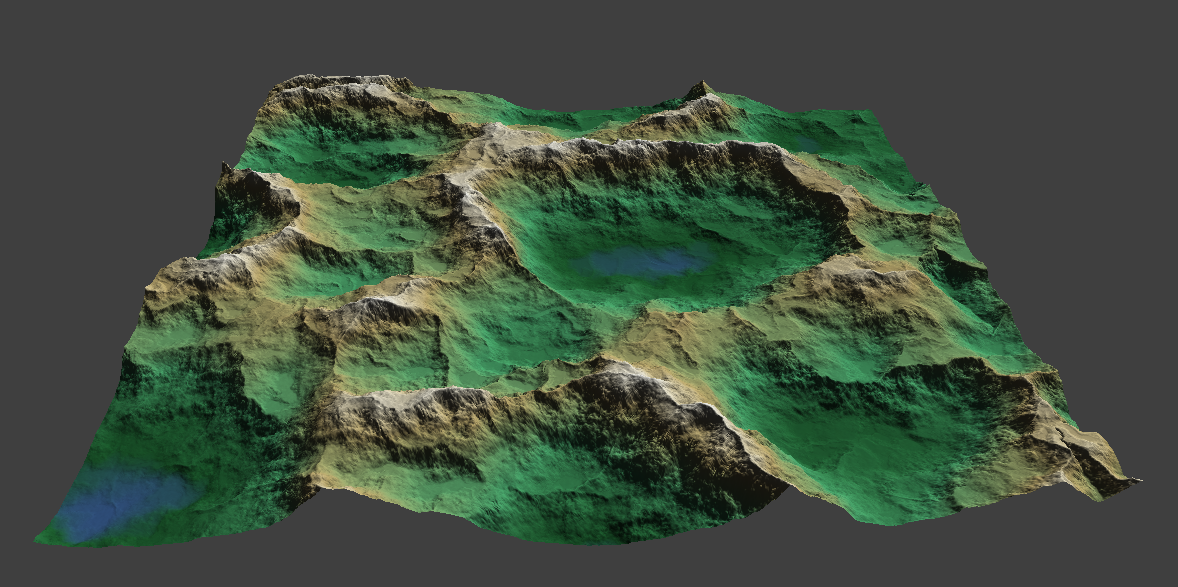
2. Map building for Realistic Scenarios: I've also been working on new maps to be utilized for the upcoming scenarios. Here are some screenshots showcasing one of the new maps (Korengal Valley anyone?):
3. New Infestation Mini-Campaign Mode: Due to a lot of the feedback I got with the last update, I've taken a step back on this and am reevaluating its implementation. Most of the work is already done on this, so hopefully it won't be much longer before it is released.
As always, I appreciate all your support and suggestions and will continue to release content as soon as possible. Thank you!
Changelog:
Added subtitles for radio transmissions
Added a wave and kill counter for Wave mode
Added bugs to Wave Mode
Added additional spawn points for enemies in Wave Mode
Added "endless" setting for Wave Mode
Removed "cha-ching" sound from Wave Mode
Decreased the volume of the end game music in Wave Mode
Decreased the health of the enemies in Wave Mode
Increased the amount of enemies that spawn in each wave in Wave Mode
Adjusted the sharpness of the camera to be less blurry
Enemies spawned in Wave Mode will have random speeds (some fast, some slow)
Fixed a bug that prevented the player from switching weapons if you ran out of ammo in Slot 2
Build 1.0.0.3 Hotfix #2
Fixed another bug causing the player to not be able to switch weapons after running out of ammo with the Vulcan (if it was in slot 2 or 3).
Build 1.0.0.3 Hotfix #1
Quick hotfix to hopefully solve the infamous "stall" bug that causes the aircraft to miss navigation points and attempt to go back and hit them.
Also, fixed a small bug causing the 30mm autocannon to not fire immediately in slot 2 and 3.
Update Build 1.0.0.3
As some of you may already be aware (information is passed through the community discord, join if you want to receive more real-time updates or if you have any questions for me: https://discord.gg/rYXRxN2ESu), as I was about half way through developing the new game mode (know as "Mini-Campaign Mode", I had a change of heart.
Originally, the idea was to extend the infestation mode (now known as "Wave Mode") of defending friendly positions from invading zombies, to now allow players to collect points from kills and utilize them to purchase new weapons, munitions, fuel, etc.
However, I decided to change not only the gameplay loop, but to implement something different from zombies. Although this is still a work in progress and anything is subject to change, the new concept takes it a bit further. The player will now need to "secure" areas for resources to be gathered, to help further the campaign against the "bugs" (Cue the Starship Troopers theme).
The goal of the mode is to clear infested areas of bugs and their eggs, in order to allow friendly units to capture resources in those areas. The AC-130 will be limited to only a specific amount of time on target, depending upon the amount of fuel you are able to "build." Capturing supplies allows the building of new weapons, munitions, and fuel in order to continue to fly sorties and survive new rounds. On occasion as well, you will be required to defend your friendly base from invading bugs. The game will continue until you can no longer build enough fuel to fly the next mission, which with the lack of air support leads to the demise of your friendly units (game over).
I am still working on this mode and hopefully will have it completed early next week. This will be released as soon as it is done.
Now, I wanted to quickly give a shout out to all the "hardcore" players out there who have been patiently waiting for the realistic scenarios. These scenarios are next on the list and I will release those as they are completed, rather than waiting until the next big update day (December 24th). At least for this next update, I've decided the goal should be to just have everything released by that date, rather than that date being the day to release. So stay tuned on this.
To finally conclude, this update today is simply to push some improvements that have been held back by the longer development time of the new game mode. Much of these have been requests from players (thanks for the feedback!) so glad that we together can work together to make the game better!
Changelog
Increased projectile shrapnel ranges for Mk238 30mm, PGU9B 40mm, and PGU9C 40mm
Increased shrapnel count for several munitions (25mm, 30mm, and 40mm)
Fixed GAU-23 30mm autocannon to fire immediately, rather than beginning to fire after a small delay
Removed the breathing sound effect
Improved the projectile tracer to be more visible through flight
Added blood bursts when enemies are dismembered
Made improvements to the landscape material
Waves Mode (previously known as "Infestation") - changed zombies to dismember upon round completion
Added additional radio transmissions for changing weapons and added a slight delay (this follows roughly, the normal process of weapon activation in a real AC-130 - will have more on this later)
Added a small "injured" procedural animation for characters when they take damage (may be pretty subtle at this point)
Made some adjustments to the ragdoll physics
Updated the audio for firing the GAU-23 30mm autocannon and added a camera shake when firing
Update Build 1.0.0.2 - Partial Update
It has been overwhelming to see the interest and support from everyone for the project since early access release and it continues to provide me with vindication on the work being done.
Jumping into early access, I was motivated to establish an aggressive update schedule and cadence to set users expectations, allow greater transparency in development, as well as to push myself. As we all can relate to the analogy in our lives, when it decides to rain it usually pours, many life events seem to collide consuming much of the anticipated development time. Because of this, I haven't been able to complete everything I wanted to in time for this particular release.
As of now, a partial update has been released granting a tutorial in the training mode. It is pretty barebones and simplistic at this point, but it should give players a better understanding of the HUD elements, as well as how to operate the weapons. I'll revisit this tutorial and make appropriate changes to make it more robust in the next few months.
The other big piece I was hoping to have done by now, is the new game mode that takes infestation to a new level. All this work is in preparation for the upcoming campaign modes as systems are developed to be utilized later; while at the same time, providing more playable content for you. I anticipate this will take another week to be completed. I'll push this release as soon as I possibly can.
Overall, there is still a lot more to be done, but I'll be sure to crank through it as quickly as possible. The feedback I've received has been extremely helpful in making the game better and I encourage everyone to continue reaching out with ideas, issues, and bugs.
Feel free to join our discord (https://discord.gg/rYXRxN2ESu) and communicate with me directly on anything. I think this type of open communication from player to developer is critical in making great games.
As I've mentioned before, I appreciate all your support and will continue to work hard on providing you with the very best. Thanks!
Change log
Added a small tutorial in the training mode that gives a run-down of the HUD and weapons
Added extra weapon details on the HUD (weapon and ammo types displayed for quick reference)
Added +10 AI button in the training mode options
Added additional HUD elements to declare camera lock and weapon misalignment with the camera
Incrementally increased the zoom amount of the camera
Improved the impact dispersion system to display more accurate ranges
Increased the total amount of AI that can spawn during waves in Infestation
Bug fix - Solved issue in infestation when firing weapons between round completion, it'd cause the weapons to continue to fire non-stop
Bug fix - Solve issue causing the aircraft to "miss" its nav target, resulting in it dropping speed to 0
Update Build 1.0.0.1
Quick update this morning to add a few desired features. The player feedback has been extremely helpful and I'll continue to take advantage of that to improve the game.
Added ability to change key inputs
Increased shrapnel counts on all explosives by 50% (should improve hit chances)
Added a slight delay to allowing weapons to go ready, preventing incessant firing (minigun, rotary and auto cannons will need to 'reset' prior to firing again)
Added resolution support for 2560x1440 and 3440x1440 (if you have bugs or issues in these resolutions, please reach out to me! I do not have a 4k monitor or ultra-wide to test these resolutions myself)
Fixed Bug: UI issues in Infestation causing text to extend beyond the borders its parent box
Comprehensive Guide to Playing Project Gunship
Introduction . . . . . . . . . .
With the release into early access, it has become abundantly clear how important a comprehensive guide is for players to understand how to operate in Project Gunship. Since the tutorial is still under development, we wanted to create an informative post that should bridge the gap.
Aircraft Operation . . . . . . . . . .
As of now, all navigation is handled automatically (speed, altitude, and bank angle). This will change in the future, but currently isn't anything you need to worry about.
Camera Operation . . . . . . . . . .
In order to utilize the camera, you must activate it (right mouse button) which will allow you to begin looking around. Deactivating the camera (same button) with remove your ability to influence the camera and will cause your weapon selection to change to "SAFE." In order to utilize the camera and weapons, you must reactivate the camera with the right mouse button.
If you'd like the camera to track on a specific point, press the 'T' button and the camera will maintain the vertical and horizontal angle to stay on target.
Adjusting the FLIR mode between white hot and black hot is simply done with the 'X' button.
Heads Up Display (HUD) Elements . . . . . . . . . .
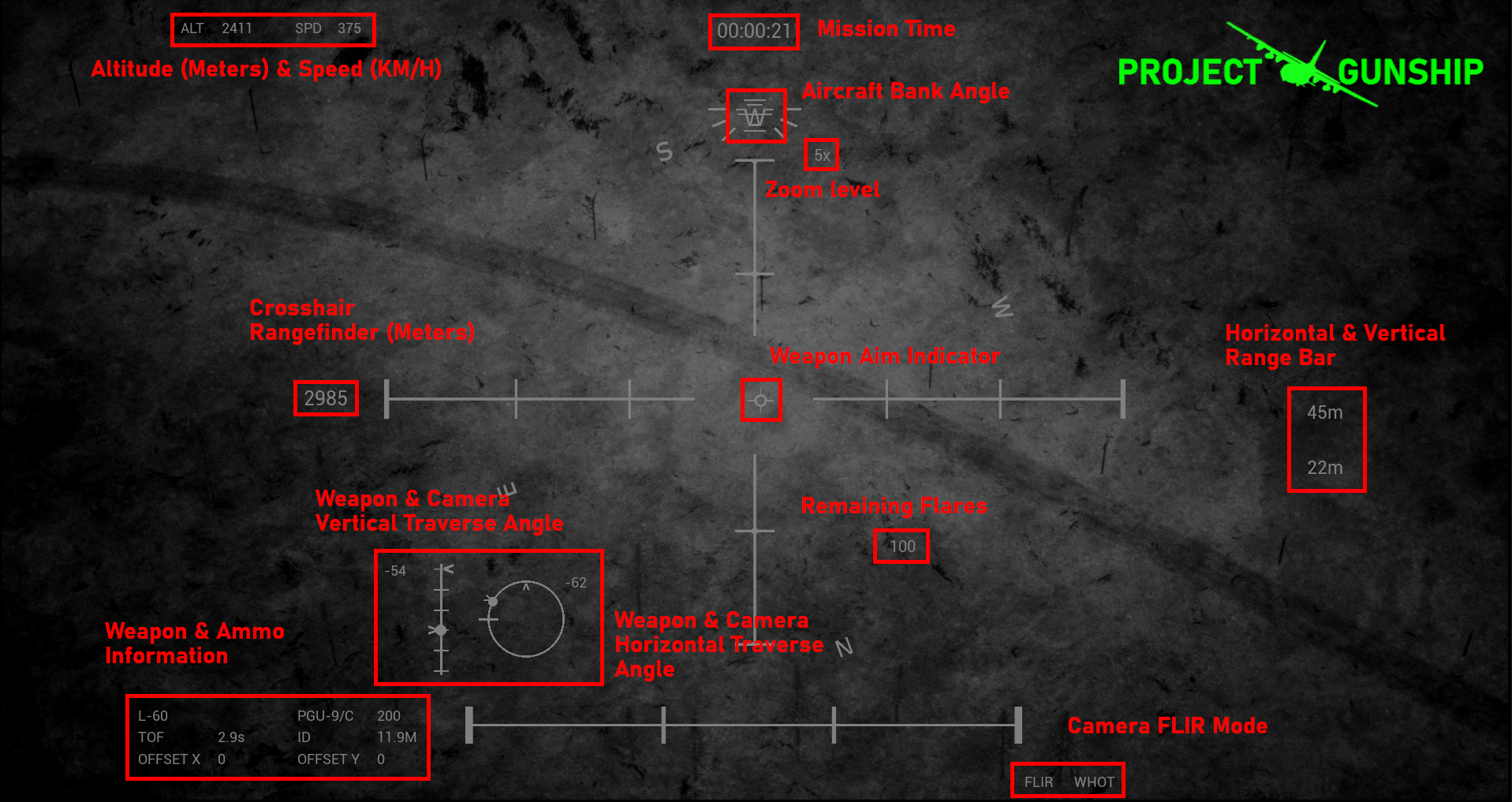
There are a few informative indicators and elements to the heads up display (HUD) that will help you be more effective in understanding the current state of the aircraft and weapons, as well as when engaging targets. Here is a breakdown of these elements going from top to bottom:
Aircraft Altitude and Speed: This simply gives the current altitude in meters and speed in km/h.
Mission Time: This shows the time on mission in Hours : Minutes : Seconds format.
Aircraft Bank Angle: This shows the current bank angle of the aircraft in its left turn holding pattern.
Bank at 0 degrees Bank at 20 degrees
Zoom Level: This tells the level your camera is actively zoomed at.
Crosshair Rangefinder: This shows the current range in meters, to the center of the crosshair (screen).
Weapon Aim Indicator: This indicates the current aim point of the weapons.
Horizontal and Vertical Range Bars: These indicate the distance from end to end for both range bars in the crosshair. Top number indicates the horizontal range bar, and the bottom number indicates the vertical range bar.
Weapon and Camera Vertical Traverse Angle: This indicates the angle both the camera (chevron) and the weapon (ball) are currently at vertically.
Remaining Flares: The number of flares the aircraft has remaining to use.
Weapon and Camera Horizontal Traverse Angle: This indicates the angle both the camera (chevron) and the weapon (ball) are currently at horizontally.
Weapons and Ammo Information: From top-left to bottom-right; Selected weapon name, selected munition, remaining ammunition for selected, time of flight in seconds, impact dispersion in meters, weapon aim indicator offset X, weapon aim indicator offset Y.
Camera FLIR Mode: Indicates the active FLIR mode (white hot or black hot).
Weapon Traverse Limits . . . . . . . . . .
Because the weapons are mounted on the side of the aircraft, they are restricted to how far they can traverse. There are important indicators for this that the player can utilize to understand where the weapons and aircraft are facing. (1) The weapon aim indicator will provide context of where you can expect rounds to impact and (2) the horizontal and vertical traversal indicators.
Horizontal Traversal - shows the weapon indicator (ball) and the camera indicator (chevron) Vertical Traversal - shows the weapon indicator (ball) and the camera indicator (chevron)
There may be times when you see the weapon aim indicator begin to drift without moving the camera, this is caused by the aircraft changing its direction or bank angle, as you maintain a sight picture on a particular point or target. You will need to wait for the aircraft to fix it's flight angle and/or bank angle in order to allow the guns to get back on target (future updates will give you more control over this).
In order to use the Hellfire missile, or the GBUs, you must first designate a target with your laser. To do this, click the 'L' button to turn the laser on. It will aim at the center of your crosshair. You can turn it back off by simply pressing the button again.
If you'd like to activate real time tracking of the laser, hold the 'L' button and the laser will begin to constantly track to the center of your crosshairs. All precision guided projectiles will track to the point of your laser.
Weapons and Munitions . . . . . . . . . .
The gunship has (3) selectable weapon slots (number keys '2', '3', and '4'), along with a "SAFE" slot (number key '1') that is also automatically triggered when deactivating camera control (right mouse button). You will not be able to change the selected weapon slot when the camera control is deactivated.
Some weapons have multiple ammo types that can be cycled through with the 'Z' key. All precision guided munitions require the laser designator to be active in order to fire ('L' key). Holding the 'L' key will also activate real-time tracking of the laser to assist in hitting moving targets.
Below is a list of the available weapons and munitions, along with their effectiveness. As a general rule, High Explosive (HE) and High Explosive Incendiary (HEI) rounds will output a substantial amount of shrapnel making them a more effective area effect weapon, while Armor Piercing (AP) and Semi Armor Piercing (SAP) require direct hits to be effective.
Due to the caliber and rate of fire, this weapon can get a lot of rounds on target but isn't very accurate. It is most effective when used as an area suppression weapon against infantry and light vehicles.
M61 Vulcan 20mm Rotary Cannon Fire Rate (rounds/min): 6,000 Projectile Speed (meters/second): 1,050 Munition Types: PGU-28A/B Semi Armor Piercing High Explosive Incendiary (SAPHEI) Point Detonation
Similar to the minigun in accuracy, but with increased lethality due to the higher caliber, the Vulcan is a step up in effectiveness against infantry and light vehicles when compared to the minigun.
GAU-12/U 25mm Rotary Cannon Fire Rate (rounds/min): 4,200 Projectile Speed (meters/second): 1,000 Munition Types: PGU-25 High Explosive Incendiary (HEI) Point Detonation, PGU-38 High Explosive Incendiary (HEI) Point Detonation
Substantial increase in accuracy and lethality, this weapon is very effective against infantry and light vehicles.
GAU-23/A 30mm Auto Cannon Fire Rate (rounds/min): 200 Projectile Speed (meters/second): 1,080 Munition Types: Mk238 High Explosive Incendiary (HEI) Point Detonation, Mk258 Armor Piercing (AP) Point Detonation, Mk310 High Explosive (HE) Proximity Detonation (Airburst)
With the reduced rate of fire and larger caliber, this auto cannon is more effective in selective targeting and minimizing collateral damage. Effective against infantry (especially the airburst rounds) and light vehicles.
L/60 Bofors 40mm Cannon Fire Rate (rounds/min): 90 Projectile Speed (meters/second): 850 Munition Types: PGU-9B High Explosive (HE) Point Detonation, PGU-9C High Explosive Incendiary (HEI) Point Detonation, M81 Armor Piercing (AP) Point Detonation
Considered the sniper in the sky, the Bofors is very effective at getting rounds on target and destroying infantry, light/medium vehicles, and buildings.
M102 105mm Howitzer Cannon Fire Rate (rounds/min): 6 Projectile Speed (meters/second): 500 Munition Types: M1 M557 High Explosive (HE) Point Detonation, M1 M732 High Explosive (HE) Proximity Detonation (Airburst)
A literal flying artillery gun, despite the 105's longer reload time and slower muzzle velocity, it is extremely effective against infantry, light/medium vehicles, and buildings. The airburst round is devastating to infantry, eliminating the effectiveness of cover and foxholes. Though it may struggle against heavy armored vehicles, a well placed round can cause catastrophic destruction.
AGM-114 Hellfire Missile Projectile Speed (meters/second): 445 or 995 mph
The hellfire missile is precision-guided missile and extremely accurate and effective against all point targets. Requires the laser designator to be active to fire.
GBU-39 Small Diameter Bomb (SDB) Projectile Speed (meters/second): Gravity
The GBU-39 a precision-guided glide bomb, effective against all soft and hard targets. Requires the laser designator to be active to fire.
GBU-53/B StormBreaker Small Diameter Bomb (SDB) Projectile Speed (meters/second): Gravity
The StormBreaker is an upgrade from the GBU-39, adding improved maneuverability and seeking abilities to effectively engage moving vehicles. Effective against all soft and hard targets. Requires the laser designator to be active to fire.
Input Quick Reference . . . . . . . . . .
Note, this may become obsolete when the player gains the ability to change their input controls
Fire Weapon System: Left Mouse Button
Activate Camera Control: Right Mouse Button
Camera Zoom In: Mouse Wheel Up
Camera Zoom Out: Mouse Wheel Down
Camera FLIR Selection: X
Camera Lock On Target: T
Weapon Safe: 1
Weapon Slot 1: 2
Weapon Slot 2: 3
Weapon Slot 3: 4
Change Ammunition Type: Z
Laser Activation: L
Laser Activation (active tracking): Hold L
Release Flares: F
Hopefully this guide is helpful in making your experience in Project Gunship more fulfilling. As development continues, it is possible for features and controls listed above to become obsolete or change. I appreciate your support! Thanks!
-Sklor
Build 1.0 Hotfix #1
Releasing a quick hotfix to deal with a bug that prevents the player from changing their weapon. Would occur when the player had "none" in a weapon slot and they attempted to fire. Deactivating the camera with the right mouse button would change the weapon selection back to "SAFE," but you wouldn't be able to change the slot after that.
After the fix, I haven't been able to replicate the issue again. Be sure to comment or let me know via our discord if you continue to see this issue.
Project Gunship Released to Early Access!
We are excited to announce the release of Project Gunship into early access! It has been a lot of work to get to this point, but the work is far from over! Our intent for Project Gunship is for it to be an "all in one" experience, featuring the many AC-130 variants, weapons, and munitions throughout its operational history. Although this initially release only scratches the surface of content we want to provide, there will be plenty more coming in the near future.
Currently, the game features only two playable game modes: (1) Infestation and (2) Training.
Infestation simulates an AC-130 protecting friendly units from a zombie invasion, allowing the player to progress through waves while utilizing each weapon available to the AC-130. There are (4) variations of this, but each map has the same basic gameplay.
Training mode gives you the ability to test the different weapons and munitions against destructible buildings and spawn-able AI.
Here is a look into our roadmap of upcoming releases:
Sep. 24, 2022: Release of Infestation Mini Campaign. This mode will provide a step up from the initial release version of Infestation, adding the ability to collect and manage resources. The concept will still revolve around wave gameplay, but with the added logistical challenge of spending collected resources where they are required (i.e. weapons, ammunition, fuel, etc.). This game mode will be another step towards the Infestation Campaign that is planned to be released in the future.
Dec. 24, 2022: Release of Realistic Scenarios for the Middle East conflict. With these, you will be able to experience realistic, simulated engagements of missions flown by AC-130s in the Middle East conflicts. These will include air interdiction, responses to troops in contact, armed escorts, and more.
Mar. 24, 2023: Release of Infestation Campaign. This will be the final release of game modes in the Infestation series. Further building upon the last release, this will extend gameplay to a campaign map, requiring the player to now make strategic decisions to stop the zombie infestation in the AO. Collecting resources, building weapons, munitions, base defenses, combat outposts, etc. - and clearing zombies from areas will be the name of the game here.
Beyond this, we plan on extending our scenarios into other conflicts, both historical and fictional, to highlight the particular AC-130 Gunship variant for each conflict. From Vietnam, Grenada, Panama, Desert Storm, Somalia, to the War on Terror, you'll be able to utilize these gunship variants:
AC-130A Project Gunship II (1966) - GAU-2/A 7.62mm minigun and M61 Vulcan 20mm cannon