After hearing reports of issues regarding Oculus users being unable to play the game after a recent software update, I took some time to investigate the cause of the issue and come up with a solution.
A new build has been pushed into the beta branch. This build will automatically detect if the SteamVR or Oculus software is running at launch, and then adjust for each SDK accordingly. The solution in place seems to work, but it still needs time to test for regressions and any other hardware-specific issues. Once I can verify the build is stable and works, I'll move it to the main branch so it'll be launched by default.
For now, you MUST opt-in to either this branch, or the Oculus branch, in order to play the game on the Oculus Rift.
To opt into the Oculus branch, right click on the game in your library, click "Properties," and then click on the BETAS tab. The Oculus branch is available without any password and will launch the native Oculus SDK version of the game.
To opt into the Beta branch, you must right click on the game and click on the "Properties" option. From there, navigate to the Betas tab. Enter this password into the box:
puppychefbeta
Finally, click on the "Check Code" box. This will unlock the beta channel for you. You can then opt into the beta branch from the drop-down menu on the Betas tab. Steam will then begin downloading the beta. If it does not, restart Steam and try again.
If you would like to help test, any and all help would be greatly appreciated. You can contact me directly to report any and all issues you may come across by using my website's contact form listed below:
https://www.theneptune.site/#contact
Once again: If you enjoy the game, I'd like to kindly ask that you consider leaving a review to tell others about your experience.
Thanks again for playing!
Puppy Chef Academy - Update 2.0 Now Available!
A new update for Puppy Chef Academy is available. It addresses some issues from the game's initial launch as well as some new issues that appeared after merging the game's beta branch into the main branch back in December of last year.
The core focus of this update is to prioritize quality-of-life improvements and general bug fixes. Here is what changed:
Objects beyond your immediate reach can be picked up with a laser pointer extending from your hand. This should help users with smaller or rectangular play areas, but it's still recommended that you play the game with a play area of at least 1.5 meters by 1.5 meters.
Updated the game’s library assets for the Steam Library Beta.
Updated the prop reset logic to be less prone to failure. Props that are hidden from view (i.e. behind a bowl) but are not touching a designated reset zone (such as the floor) will be candidates for resetting. Props that somehow fall through the world geometry or are otherwise falling infinitely should reset.
In case your microphone isn't set up correctly, the time between Georgia, Oatley, or Guts asking you to say something and the time the game automatically advances has been reduced from 15 seconds to 6 seconds.
Objects that reset should now have a reasonably sized poofing effect. Before, the poofing effect was being scaled wrong and resulted in an uncomfortably large poofing effect that obscured your vision.
Increased the game's speed-reading scale to 5x the normal reading speed instead of the original 2x. Fast readers out there can now enjoy reading the game at a faster pace.
Tying in to the previous change, animations are handled differently now. Previously, speed-reading through the game at certain sections (i.e. the game's epilogue) would cause a walking or turning character to try to catch up to the dialogue. This would, at best, cause characters to walk through world geometry. In a worst-case scenario, the character would be stuck in the turning animation and walk in place endlessly. To address this, character animations now work at (almost) any speed, so speed reading should be less likely to negatively impact the game.
Added an auto-advance feature that lets the game automatically proceed during story and gameplay segments, similar to a traditional visual novel. This can be toggled on and off at any time (except during the very first prologue scene) by pressing down either track pad button on a Vive wand, or by pressing either analog stick on an Oculus Touch controller.
Fixed a minor issue with the hub room where the center table had no collider
Fixed a bug where props could be persistent between scenes
Fixed a bug where your hands would disappear when placing food items into a pot or pan while holding them instead of dropping them into the pan
Fixed a bug where food items you add to pots, pans, etc would not re-enable themselves.
Removed the need to open the SettingsOS laptop in the hub room since most people either ignored it or didn't realize what it was
Fixed the kitchen floor collider in all recipes so items dropped no longer fall to rest lower than the floor's mesh, causing them to "disappear" beneath them.
Fixed a mistake where items that were counting down to reset would play their poofing effect when being picked up
Fixed a bug where the player could not control Wacky Bear Game during the intro scene for the crepe recipe
Fixed a bug where the chef hat wouldn't reset in certain areas in the muffins recipe intro scene
Added a button that unlocks all recipes in the main hub
Addressed an issue where objects in the pan (such as bacon) would fall through the bottom when picking it up
Fixed the collider on the omelette during the omelette recipe so collider actually lines up with the mesh and no longer leaves an invisible collider hanging off the side of it. Did the same for the crepe.
Bulgogi recipe - Increased the collider size of the bulgogi slices so they're easier to pick up
Bulgogi recipe - Changed the carrot slices and cauliflower slices from several individual slices to single groups, making them infinitely easier to pick up by hand. Also locked their containing bowl down to cut back on physics problems.
Bulgogi recipe - Reduced cooking time of bulgogi slices from 20 seconds to 10 seconds
Bulgogi recipe - Locked the pan down during the pan cooking step to keep bulgogi slices from falling through the pan
Bulgogi recipe - Locked the pot down during the rice cooking step since it was unstable
Bulgogi recipe - Fixed a bug where the cabbage would disappear between the pouring and stirring steps
Onion soup recipe - Locked the pan down to keep onion slices from flying everywhere or falling through the pan
Onion soup recipe - Fixed the crying effect when cutting onions
Onion soup recipe: Reduced the onion slice cooking time from 30 seconds to 15 seconds
Onion soup recipe - Reduced white wine vinegar simmering step from 20 seconds to 10 seconds
Curry recipe - Locked down the pot and pan
Curry recipe - Reduced onion and chicken cooking time from 20 seconds to 10 seconds
Curry recipe - Fixed the crying effect when cutting onions
Lamingtons recipe - Fixed an issue where the knives would not hide themselves during later steps
Pizza recipe - Locked the pot down for the tomato sauce recipe
Pizza recipe - Fixed a bug where the baking stone placed at the beginning of the recipe was no longer visible
Pizza recipe - Reduced the baking step length from 12 seconds to 6
Disabled the music during the crepe recipe's end scene to better reflect the tone of the scene
Updated the grocery store scene with a music track that previously went unused instead of just ambient outdoor sounds
Fixed a bug during the very final scene where the fading object would be stuck to the floor instead of fading in front of your eyes as intended.
The Oculus build of the game should now properly fade between scenes.
General stability and performance improvements and decreased load times
More updates may or may not arrive as my time permits. Please feel free to report any lingering issues you come across in the game's Steam forums linked below, and I'll do my best to address them if I can. https://steamcommunity.com/app/921520/discussions/
One more thing. If you enjoy the game, please consider leaving a review. Again, thank you very much for playing Puppy Chef Academy! I hope you'll enjoy this new update.
Puppy Chef Academy Goes Free on Friday, April 26th
Hello everyone,
First, I would like to sincerely thank each and every one of you who took time to play the game, take videos, and share with your friends. It really does mean a lot to me.
Yes, the title is correct: Puppy Chef Academy will switch from paid to free on Friday, April 26th.
If you have purchased the game within the past two weeks, please make use of Steam's refund system. A convenient link to help refund the game through Steam is linked below:
My reasoning for switching from paid to free and final note about the game is stated below:
It is truly amazing to see how much this project has changed in just a few years since that very first scribble on the back of my college notebook. The game has gone through so many changes; some good, some less than great, but in the end it turned into what is ultimately my longest and greatest achievement of my game development career so far. Writing and developing twelve episodes connected by an overarching story spanning nearly two hours is certainly an accomplishment! When I think of the game, I think of all the great memories I had during its development, and the stories shared with the people involved with it. Thank you to everyone who cheered me on, who picked me up when I was down, and believed that I could do it, and helped me persevere through some of the lowest lows of my life in order to bring at least some happiness to the world by finishing this game. Words can not fully describe how thankful I am for everyone involved with this project, but for now, all I can manage is just a simple and sincere: "Thank you."
Sadly, it's time to close this chapter of my career, and move on to other things. As much as I wish I could have continued this game's story past the end, I just can not continue the game's development. As a way of saying thank you to everyone, the game is now free. Permanently. Just play it, and enjoy it for what it is. I'd rather have a hundred people play my game and never see a dime from it than have a hundred dollars and see so few people play it and share their experience with others.
If you enjoyed the game and would like to pay for it in some way, all I ask is that you consider donating how much you felt the experience was worth in whatever way is the most convenient for you.
Thanks again to everyone for your support. I hope to see at least some of you when I begin my next project!
Until next time!
Don't forget to check out the Puppy Chef Academy communities on Reddit, Discord, and more!
Puppy Chef Academy - Big Update! Fixes, Localization Support, and Native Oculus Support!
Hello, chefs!
First, I would like to sincerely thank you to each and every one of you who took the time to play the game, share it with your friends, and make videos of you playing. I genuinely appreciate it! Puppy Chef Academy is made for you, and I couldn't be happier to have the opportunity to bring that fun and enjoyment to you.
Now, some of you may have noticed that there's a thread in the game's forums that's been continuously updated in tandem with the game's beta channel. Today, all of the improvements from the beta channel are being merged into the main channel for everyone to enjoy! It's a long list of changes, but they have all improved the game in their own way. The list is so long, that I'm going to put the patch notes at the very bottom this time.
Moving on: While reading the changelog, you might notice there's a line that mentions localization support. Is it true?
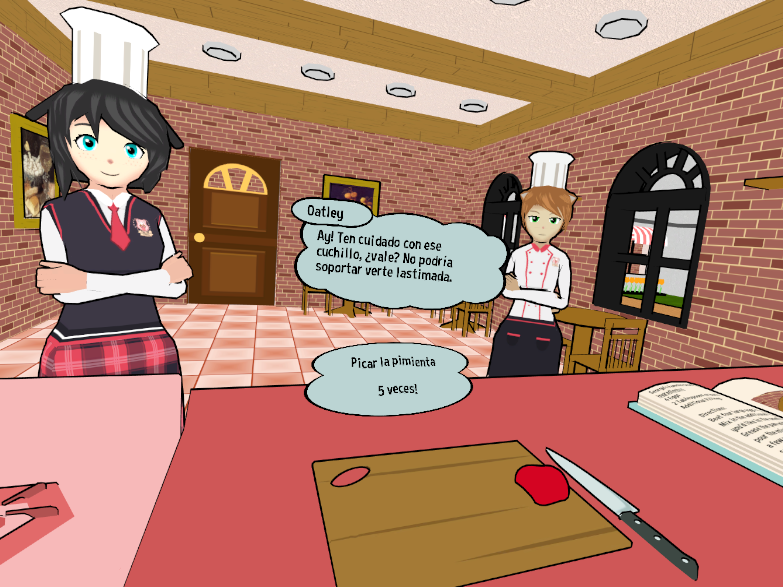
Yep! You can now add user-made localizations to the game. Note that it's still rudimentary and some elements of the game will still be in English, but it's a work-in-progress. There should be an example localization.xml file in the game's files that contains a (very rough) Spanish localization and instructions on how to make and activate a localization. If you or someone you know is interested in localizing the game for your language, let me know and I'll do what I can to help bring the game to your native language!
Now for the big one: The game now has a native Oculus build! You can now launch the game through the native Oculus Home build without ever needing SteamVR. Hooray! A big thank you to the folks at Oculus for allowing me into their Oculus Start program and giving me the opportunity to create a native Oculus build for you all to enjoy.
The native Oculus Home build is nearly identical to the SteamVR build, however, the native Oculus build includes Oculus-specific features and adjusts the gameplay accordingly for Oculus users. These features include pausing the game while the headset is taken off as well as switching the grab button from the front trigger to the grip trigger (as I've been told it's the more natural "grabbing" motion for Oculus users).
To access the native Oculus build, simply right-click on the game in your library, click on "Properties," go to the BETAS tab, and then opt into the Oculus branch. No passwords needed, just opt-in and the game will update.
And that's it! Phew, what an announcement. Again, thank you all so much for playing the game. As usual, if you encounter any problems, please feel free to reach out to me through the contact form on my website, as I'm notified immediately: http://www.theneptune.site/#contact
Until next time, cheers!
Don't forget to check out the other Puppy Chef Academy communities on Reddit, Discord, and more!
Without further ado, here is the big list of changes:
Changelog for December 5th, 2018:
Updated the game to Unity 5.6.6
Replaced the old academy model
Better performance as a result of replacing the academy model
Fixed some minor typos in the game's dialogue
Improved loading times
Malasadas recipe:
- Fixed the collision behavior of a fork that would previously get stuck
Lasagna recipe:
- Changed a step to pour ingredients instead of colliding them with the pan to be more consistent with the rest of the game's mechanics.
- Fixed the haptics and appearance of the players hand when interacting with a fork during the first mixing step
- Reduced time required to cook beef in the pan from 12 seconds to 6 seconds
- Changed one of the pouring step's instructions to match the current step
All recipes:
- Fixed the bowls so if you crack an egg inside of one, the egg will affix itself into the bowl as intended
Improved hand animations: Hands will now animate when pressing the trigger, grip button (or grip trigger on Oculus Touch), and touch pad (or joystick on Oculus Touch)
Changed advance text button to fill when the trigger is pressed, not touched. This keeps users using Oculus Touch from accidentally triggering the advance dialogue button.
Replaced lower-resolution splash logo with high-resolution logo
Fixed the post-miso recipe scenes where the dorm building wall used to overlap Oatley's dorm window
Fixed an issue where the player's hands would not appear for some users
Fixed(?) an issue where the pointer beam would occasionally disappear at the start of certain scenes
Replaced stove model with new model, increasing performance as a result
Reduced poly count for light fixtures found in the kitchen, further resulting in better performance
Moved the settings screen from the TV behind the player to a laptop on the desk. You can access these settings by lifting the laptops's lid. This should help users with only front-facing setups.
Updated the academy model once more. The model uses fewer materials, resulting in fewer draw calls and better performance
Changed the behavior of the fridge doors, cabinet doors, and drawers so they are no longer beholden to Unity's unpredictable physics system. They will remain stationary until they're interacted with. This way, they no longer open, freak out, explode, or fling objects around at completely random intervals.
Tweaked the teleporters in one of the end scenes for the pizza episode so that the player does not have to turn completely around to complete the scene. This should also help front-facing users.
By (un)popular demand, you can now play Wacky Bear Game in your dorm after finishing the Crepes episode.
Fixed an issue where some characters were placed lower than they should have been during certain scenes.
Added a prop to the room which appears after finishing the Curry episode
Fixed an issue where eggs would not crack open
Added rudimentary localization support. Check (your game path)\Puppy Chef Academy_Data\StreamingAssets\LocalizationText.xml for more information on how to change the game's language. The only translation so far is in Spanish which only includes the title screen and the omelette recipe. The translation uses a combination of first-year college Spanish knowledge and google translate as a proof-of-concept. If you'd like to offer a translation in your language, please contact me via my website at http://theneptune.site/#contact
Announcing: Puppy Chef Academy Beta!
Hello again, chefs!
Well, it's officially been one month since Puppy Chef Academy launched on Steam! Where does the time go? Anyway, I hope you're all enjoying your time at the academy, learning how to cook, and making friends. As for me, I've been chipping away on features and fixes for you all to enjoy. Now I'm here today to inform you all about Puppy Chef Academy's beta channel, and also give some instructions about how to access it.
---
What's in the beta?
Simply put, the beta channel of Puppy Chef Academy is where the latest, cutting-edge version of the game has been pushed. The beta channel includes the latest build of the game with various fixes, changes, and features that haven't gone through an entire quality assurance cycle yet. That means that if you encounter an issue in the main game, there might be a chance it's already fixed in the beta branch! And if it isn't already, then as always, you can message me directly or post in the forums to make suggestions which will then be added to the beta.
Once I feel confident enough in the beta branch that I believe it won't be a deterrence to anyone in the main branch, that's when I merge the main branch with the beta branch, making the newest build available for all users.
What's not in the beta?
When brand-new recipes are introduced into the game, they will not be pushed into the beta branch. Builds that introduce new recipes will be pushed into a separate branch for internal testing. When the new recipe is ready, it'll merge with both the main branch and beta branch. This way, new recipes can be enjoyed by everyone at the same time, not just those in the beta.
How do I access it?
In Steam, right click on the game and click on the "Properties" option. From there, navigate to the Betas tab. Enter the following password into the box:
puppychefbeta
And then click on the "Check Code" box. This will unlock the beta channel for you. Opt into the beta branch from the drop-down menu on the Betas tab, and Steam will begin downloading the beta.
Where can I find patch notes?
Since not everyone will be participating in the beta and won't want to be spammed with patch notes for a build they aren't playing, patch notes for the beta branch will reside in the game's Steam forums. These patch notes will be continuously updated alongside the beta branch and include a timestamp so you'll know when the last update was made.
---
As always, thank you all so much for playing Puppy Chef Academy! The game wouldn't be what it is today without your support. Have fun!
Until next time, cheers!
Don't forget to check out the other Puppy Chef Academy communities on Reddit, Discord, and more!
You may have noticed an update for the main game was just pushed to you. It's a small update, it just fixes the name of one of the credits.
The demo was also updated, which fixed a couple typos during the mixing step and also re-arranged that step's layout to match that of the full game.
Thank you, I hope you're enjoying the game!
Puppy Chef Academy is now available!
Welcome, chefs!
After a long and relaxing Summer break, it's time to crack open the textbooks once more and start a new year at Puppy Chef Academy! We hope you're all looking forward to cooking and baking your way through the semester.
See you soon!
- Georgia
A message from the developer:
I'd like to extend a sincere thank you to each and every one of you who told your friends about the game, shared it on social media, and made videos. Really, thank you: You're the reason I do this!
I hope you all enjoy the game just as much as I've enjoyed creating it for you. It's been a long road with many twists and turns, but hopefully the wait was worth it. I did my best to make a consistent experience across HTC Vive, Oculus Rift, and Windows Mixed Reality headsets in the hopes that you'll have fun with the game no matter what device you play on. Moving forward, I plan on adding more features, more episodes, and more recipes for you all to experience and enjoy, so look forward to seeing those! And of course, future content updates will always be free to owners of the game.
One last thing: If you have any bug reports, suggestions, questions, or comments, please feel free to get in touch with me. The contact form on my website will notify me immediately of any and all messages sent through it, so it's really the best way to contact me! Here is the link:
http://theneptune.site/#contact
You actually don't have to fill out any personal information, it literally just sends whatever you put in the box to my email. You could make it all up if you want, but don't expect me to contact you back if you don't put an actual email address in!
If you're not comfortable filling out the form, then feel free to make a post in the game's community forum. I don't check it as often as my email, so please be patient if I don't respond immediately. I'll respond as soon as I can!
Anyway, thank you all once again. I hope you'll enjoy your stay here at Puppy Chef Academy!
Don't forget to check out the other Puppy Chef Academy communities on Reddit, Discord, and more!