Today's update was a long time coming, and adds some exciting new features while also fixing a bunch of troublesome bugs.
Here's what's new:
New Features
When generating a custom puzzle image, there is now a menu that lets you choose from 30 different styles. Choose "General" if you'd rather describe the style yourself, or choose "Classic Style" if you'd like to stick with the style Puzzle Together has been using up until now.
You can now generate multiple custom puzzles simultaneously -- no more need to wait for one to complete before starting another.
Improved quality of custom generated puzzles.
Custom puzzle generation now has better understanding of non-English image descriptions.
Added a bunch of new table color options, under 'Settings'.
A pop up asks you to confirm before sorting pieces, to help prevent accidental sorting.
There is now a 'ping' sound when a chat message is received.
Added the option, under 'Settings', to turn off the ability to change the camera angle by right-click dragging the mouse.
Under 'Settings', in the menus of actions that can be assigned to mouse buttons, you can now rotate pieces left (counter-clockwise) as well as right (clockwise). So, if you'd like, you can assign one mouse button to rotate in one direction and another button to rotate in the other direction.
You can now zoom closer in and further out. Also, the speed of zooming in/out and changing camera angle with the keyboard has been increased.
Any player in an open puzzle can place pieces in their final position, so long as at least 90% of the puzzle's connections have been made.
On the "Join a Friend's Puzzle" page, there is now a copy button next to the join code, to let you easily copy the code to your clipboard so you can paste it in a message.
Bug Fixes
When you change your username or e-mail address under 'Settings', you no longer need to hit enter for the change to take effect.
If a puzzle was completed when there was no connection to the server, it never registered as being completed. This has now been fixed, and any affected puzzles should now show up as completed when you enter them.
When using ctrl+click to add a piece to the set of selected pieces, it will no longer also cause the piece to rotate.
When you "like" (favorite) an AI generated puzzle, it will now appear on the Library page when you select "Favorites" from the Show menu.
When you purchase an AI generated puzzle, it will now appear on the Library page when you select "Purchased" from the Show menu.
Fixed a bug that would cause the game to hang when entering a puzzle, if you had left the previous puzzle while pieces were still selected.
A sort can no longer be started if another sort is in progress.
Fixed a problem that could cause the puzzle box to permanently disappear.
Added logging to help find a problem that prevents some players from being able to make purchases.
May Update
This month's update improves the search function, and fixes some bugs. Here are the details:
- The search function now shows matching results from Puzzle Together's whole puzzle library, not just the collection of AI generated images. Also, the AI images that it does show are higher quality than before.
- Fixed an issue with the database that would cause problems connecting to the game each day sometime between 4am and 8am EST, for about 20 minutes. It could also cause disconnections and issues keeping track of stats and progress throughout the day.
April Update
It's a small update this month, with the following changes:
- Fixed a bug that could cause pieces to disappear or become stuck to the table in multiplayer puzzles. Hopefully this is the only problem that was causing this to happen, but do let me know if you still encounter these issues after this update.
- Fixed a problem that could cause the "Loading..." screen to get stuck for a long time when the game starts up, for accounts that have played many puzzles.
- Improved the quality of the AI puzzle image generator. If you tried generating images in the past but were disappointed with the results, give it another go! There's till a lot of room for future improvement, but the quality is now significantly better than it was.
March Update: New Piece Shapes, Share Puzzles with Your Mobile Account, & More!
This update includes a few new features and bug fixes that have been a long time coming! Here's the list:
New puzzle piece shapes! When you start a puzzle you can choose from Unique Shapes (no two pieces will have exactly the same shape), Repeating Shapes (piece shapes repeat in a 5x5 pattern; this is the way all puzzles have been in the past), or Identical Shapes (all pieces have the same shape -- for an extra challenge).
You now have the option to link your Steam Puzzle Together account with your mobile account, so that purchases, as well as the list of puzzles you're working on, are shared between the two accounts. To do this, go to the Settings page (in Puzzle Together on Steam), click on "Link Accounts", and enter the username and password of your mobile Puzzle Together account.
The functions of the mouse buttons can now be customized. On the settings page, there are dropdown menus to select the functions of tapping the left, right, and middle mouse buttons. By default, they do what they've always done -- tapping the left button rotates a piece, and tapping the right button brings up the Sort menu. But now, any of the buttons can be configured to do either of those, or to start/stop dragging (see next item).
Some players would prefer to tap a mouse button once to pick up a piece, then tap it a second time to drop the piece -- rather than dragging it the whole way. This is especially important for players who have difficulty or pain when holding down a mouse button. The Settings page now includes the option to configure any of the mouse buttons to start/stop dragging. This means that one click will pick up a puzzle piece, and a second click will drop it. Likewise, one click on the puzzle table will start panning the view, and a second click will stop panning.
The list of icons for puzzles on the "My Puzzles" and "Open Puzzles" pages now includes icons showing whether the puzzle has unique, repeating, or identical piece shapes. Each of the icons now also has a tooltip to explain what it means.
Fixed a bug that prevented the Steam overlay from appearing (and so prevented purchases from being made) on Mac OS.
Fixed a problem that could prevent music from playing.
Fixed a bug that prevented some puzzles from being made open to the public.
Fixed a bug that would prevent a player from logging back into their Steam Puzzle Together account after they had created or logged into a non-Steam account from the same device.
The number of free custom (uploaded) puzzles that can be available at one time has increased from 4 to 6.
December Update
Here's what the December update includes:
Puzzles can now have up to 3000 pieces!
Every puzzle now has a 40 piece option
Faster sorting of large groups of pieces
Sorting color can now be sampled from the puzzle box
When two sorts are happening at once, pieces no longer scatter everywhere
Fixed a bug when searching for puzzles similar to a custom puzzle
Happy holidays, and enjoy the puzzling!
Choose from Millions of Puzzles with the New Search Bar!
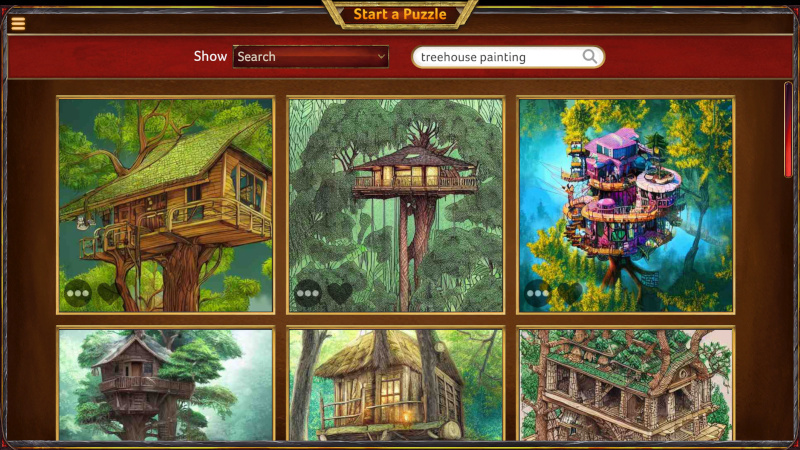
Today's update makes it much easier to find just the puzzle you want to make, by adding a new Search Bar on the Start Puzzle page. Just type a few words describing the sort of picture you're looking for, and a bunch of puzzles fitting that description will appear!
What's more, you can now search for puzzle images that are similar to a puzzle you like. Just press the menu button (...) on a puzzle's icon, and select "Show Similar Puzzles".
These search features are powered by a new and growing collection of millions of images! There's no limit to the variety of puzzles available to you. And of course, you can still generate your own images from a description, or upload your own picture, on the Custom Puzzles page.
There are now so many choices, it would be handy to be able to keep a list of puzzles images you like, and might want to return to later. That's why this update also introduces a new "Favorites" feature. On the Start Puzzle page, just press on the heart on a puzzle's icon to mark that puzzle as a favorite. Select "Favorites" from the Show menu to see your list of favorites.
Finally, the UI has been made a little slicker, shadows are now working properly again, and a few bugs have been fixed.
Enjoy!
October Update
This month's update adds a couple of new features to custom generated puzzles, and fixes a longstanding bug.
First, custom generated puzzles can now be made open to the public, so that puzzlers from around the world can join in your creations! When you start your puzzle, simply select "Open to the public" from the dropdown, and your puzzle will appear in the Open Puzzles list for all players.
Puzzle Together is a game for all ages, so if you generate a puzzle image that our filter flags as having adult content, the option to make it open to the public won't be available. You can still play it on your own or with friends you invite, though!
Next, when you unlock a custom generated puzzle that you've created, in addition to being able to make the puzzle with up to 2000 pieces, you'll now also receive 10 free generation credits. It often takes a few tries to generate a puzzle image that looks good, and this will give you more freedom to experiment.
Finally, I've fixed a longstanding bug that would cause pieces to "jump around" when another player moved or connected them. There are also a few other minor bug fixes and tweaks; for example, when you upload a custom puzzle image, you're no longer required to provide a title for the puzzle.
Enjoy!
Create Any Puzzle You Can Imagine, in Seconds!
With today's update, you can now assemble puzzles of any image you can imagine! Simply write a short description of the image you'd like, hit "Generate Puzzle", and in seconds your puzzle will appear. Do you like to make puzzles of anime characters? Landscapes? Dragons? Goats wearing tuxedos? Whatever you can dream up, Puzzle Together can now give you the puzzle.
Simply select "Custom Puzzles" from the menu, enter a description of the image you want, and hit "Generate Puzzle". After a few seconds the new puzzle will appear at the top of your list of custom puzzles. Hit "Play" to select options and start the puzzle. From this start page, you can also hit the download arrow on the puzzle's image, to download the custom image you've generated to your own computer, if you'd like.
It seems a bit like magic, but this is all done using cutting edge AI technology that converts the description you give it into an image. This technology has been integrated with Puzzle Together so you can create exactly the puzzle you want to work on, right when you want it.
Creating these images takes a lot of computing power, but we've kept the price low. You can generate 25 puzzle images for 1 puzzle credit (which costs $1 USD or less), and for a limited time you are given one free puzzle generation per day. Once you've created your puzzles, you can download the image to your own computer if you'd like, and play it with up to 40 pieces. As with any other puzzle you can also unlock it for 1 puzzle credit, allowing it to be played with up to 2000 pieces.
Puzzle Together already had over a thousand great images to choose from, and let you create puzzles from your own images. But with today's update, there is truly no limit to the puzzles you can make!
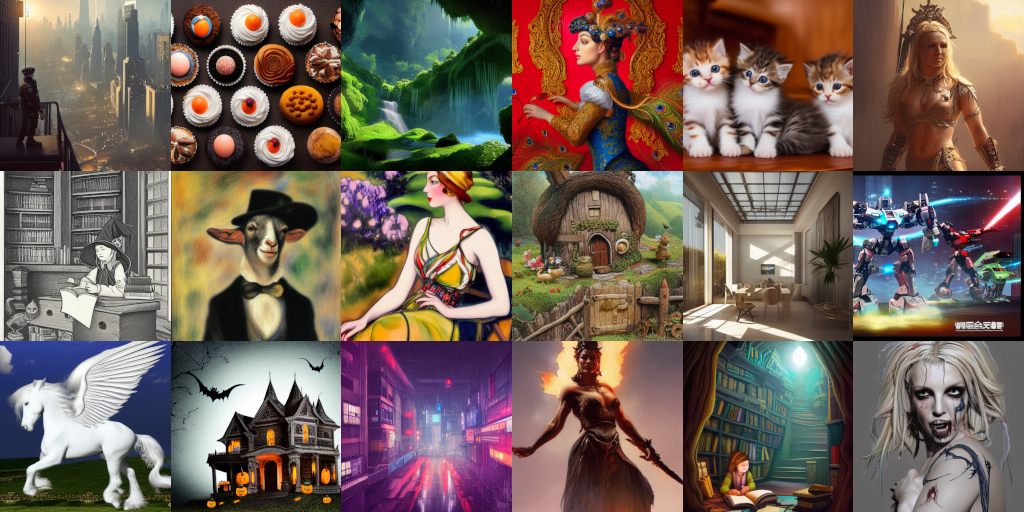
Examples of puzzle images generated from a description. Click here for more.
May Update
This month's update adds one often-requested setting, makes tweaks to improve a few features, and fixes some bugs.
- Under Settings, you can now choose from four different table surfaces: the normal light wood, dark wood, and black and white surfaces. You can choose a table color that contrasts with the puzzle pieces or just makes your eyes more comfortable.
- Pieces can now be dragged while you're in selection mode. You no longer need to switch in and out of selection mode to move several groups of pieces around.
- Fixed a bug that would cause the sorting arrow to pop up sometimes when not wanted, while moving pieces.
- Fixes issues to prevent pieces from occasionally disappearing or becoming stuck and unmovable.
- A few other small usability fixes.
April Update
This month's update refines the selection system and adds a new sort feature. The two changes work together to make it a lot easier to group together the pieces you're looking for.
First, when you enter select mode (by pressing the button with a arrow drawing a box) you can now press on individual pieces to select or deselect them. This is in addition to being able to draw a box around a group of pieces to select them all. Being able to select individual pieces makes it easy to, for example, select all the pieces that appear to be part of a particular object.
Next, a new sorting option has been added, called Spread. This takes all of the pieces (or if you've selected pieces, then it just takes those) and arranges them neatly in a circle. One use for this is to layout all of the pieces at the start of a puzzle, so that none are overlapping.
These two new features can be used together to make it easy to sort together the pieces you want to work with. Enter selection mode and click on all the pieces you want, for example each piece that is part of a certain object. Then use the Spread option to arrange all of those selected pieces together in a neat group, at the place on the table where you'd like to work with them.
Finally, another recent change requires that a player in an open puzzle connect several pieces together before they will be allowed to place pieces in their final position on the mat. This is to prevent 'trolls' from going into an open puzzle, taking large groups of connected pieces that players are working on, and placing them permanently in position on the mat -- which makes it much harder for the players to continue working on those sections. Now players who are new to an open puzzle will need to put some work in before they can place pieces in their final position, work that trolls usually don't have the patience for.
Fun facts: over 900,000 puzzles have been completed in Puzzle Together, and over 347,000,000 pieces have been connected... so far!