

Railbound
Community Items now available!
You might've already noticed, but Community Items have been enabled for Railbound this week!
If you've played the game since launch for at least 5 minutes you should've already received some cards - and should be able to trade, collect or just leave them be in your inventory :)
Also, all of the items (except for Trading Cards) can also be found in the Points Shop: https://store.steampowered.com/points/shop/app/1967510
Enjoy!
- Luke from Afterburn
Railbound in Dev.Play 2022 Indie Awards!

Hi,
Thanks for your continued support of Railbound. We're currently hard at work on updates for the game, but we'd like to let you know that the game is participating in the Dev.Play 2022 conference this week!
As part of the celebrations there's an Indie Festival streamed live on Twitch - you can check out Railbound in there on Monday, October 24th starting from 7PM CEST (we'll be there to answer some Q&A!).
Furthermore, as part of the Eastern European Games Sale, Railbound will be discounted during this week on the store:
https://store.steampowered.com/app/1967510/Railbound/
For today only you can also get it at a discount with our previous games, Golf Peaks and inbento :)
Cheers,
- Luke from Afterburn
Railbound v1.10 (10 Oct 22) - Stability Update
Patch notes for Railbound v1.10:
- Fixed crashes related to shadow mapping on certain devices,
- > We’ve finally figured out what plagued certain Android (Samsung S10 and others) and PC (laptops with Intel HD Graphics cards) devices and devised a fix for it,
- > For those interested, we strongly assume it was related to sampling oversized shadowmap textures via bilinear filtering using SampleCmp; once we tweaked the shaders it got better,
- > After this update PC players should no longer need to switch to the [intelfix] branch or use the Focus Mode in order to be able to play the game,
- Fixed Steam Deck input issues,
- > Now you should be able to play the game using regular controls without issues,
- > The issue was caused by two independent problems - one was related to our code that checks for whether a device supports touch and defaults to that input method if possible, and the other was the fact that mouse input (triggered by RS and the right touchpad) counted as a gamepad interaction,
- Reworked the level decoration system,
- > On the surface everything should look the same, but on the inside, we’ve revamped the way we store decorations - instead of Prefab Variants we now keep that information in Serialized Assets,
- > Thanks to that we’ve been able to decrease the game’s size by 30MB on all platforms (that’s roughly 15-30% depending on the platform!) and give ourselves an option to reduce loading times in future patches!
- Improved directional input responsiveness in level select / game,
- Fixed being able to see a grey skybox on some levels in World 8,
- Fixed wrong hint overlay in the hidden level,
Thank you for your continued support of Railbound and we hope this update helps you enjoy the game even more. We've got more stuff planned for 2022, so stay tuned :)
- Luke from Afterburn
Railbound v1.06 (16 Sep 22)
Patch notes for Railbound v1.06:
- Updated Unity version to 2021.3.9f1,
- > This should fix issues with VSync on MacOS & other various problems,
- Updated game logo during loading screens,
- > Because it took a whole week for one of us to notice that we were using the older version in-game,
- Updated layout in 3-3A to prevent unwanted solution,
- Improved long loading times / freezes on certain devices,
Known issues for Railbound v1.06:
- We've heard complaints about the game being unstable on Windows 11 when using integrated graphics cards (like the Intel HD 620); we're investigating a fix,
- [Steam Deck] Input is not working as intended, for a workaround please refer to https://steamcommunity.com/app/1967510/discussions/0/3426698343833828352/#c3426698343835002953
Railbound v1.05 (14 Sep 22)
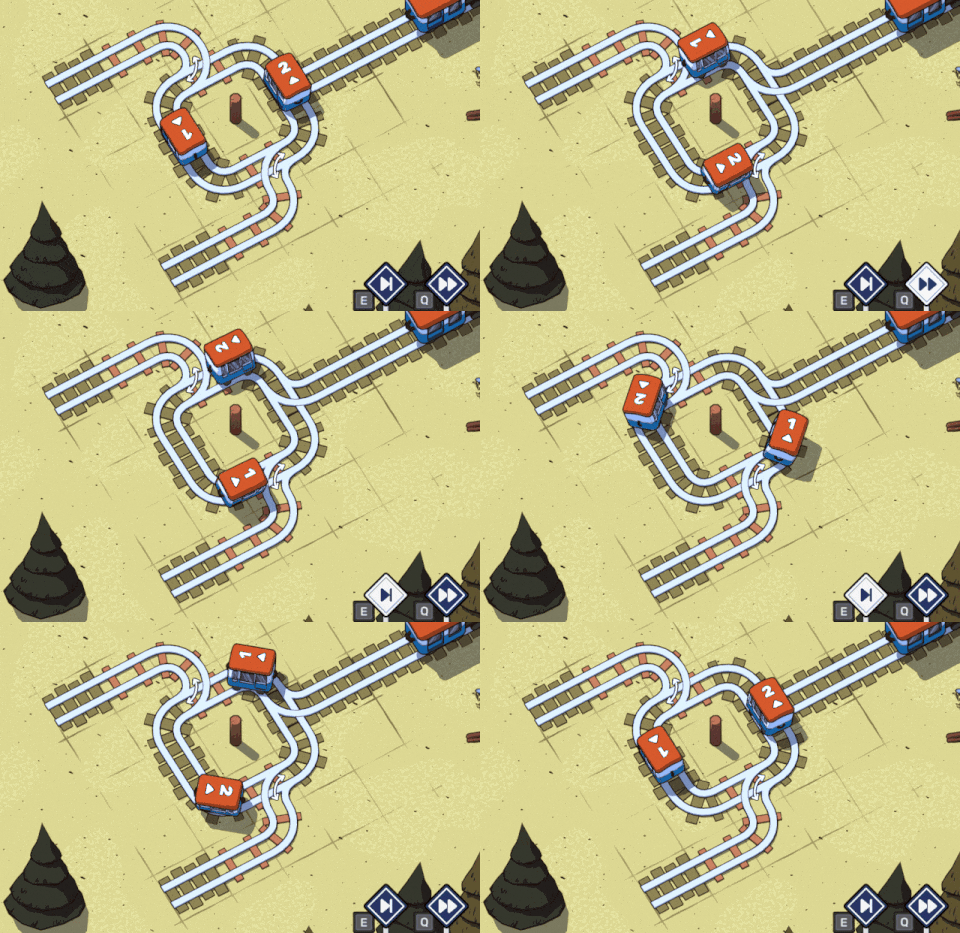
Patch notes for Railbound v1.05:
- Added Slow Motion Mode,
- > Use this new button to slow down the speed of the game and get a better look at where your carriages are going!
- Updated level structure:
- > updated layout for levels 2-5A, 4-5, 4-8B, 6-6, 6-8, 6-8A,
- > added new level 2-5A (old 2-5A is now 2-5B),
- > added new level 6-8A (old 6-8A is now 6-8B),
- Fixed railway cars clipping into barriers in certain cases,
- Fixed tutorials on 1-3 and 1-9 not reacting properly to removing junctions,
Known issues for Railbound v1.05:
- [Steam Deck] Input is not working as intended, for a workaround please refer to https://steamcommunity.com/app/1967510/discussions/0/3426698343833828352/#c3426698343835002953
- [MacOS] Using the V-Sync toggle in Settings can sometimes freeze the game, this is related to a Unity issue which should be fixed once we update the editor: https://issuetracker.unity3d.com/issues/mac-metal-player-freezes-when-vsync-is-turned-on-with-button-onclick-event
Railbound v1.04 (11 Sep 22)
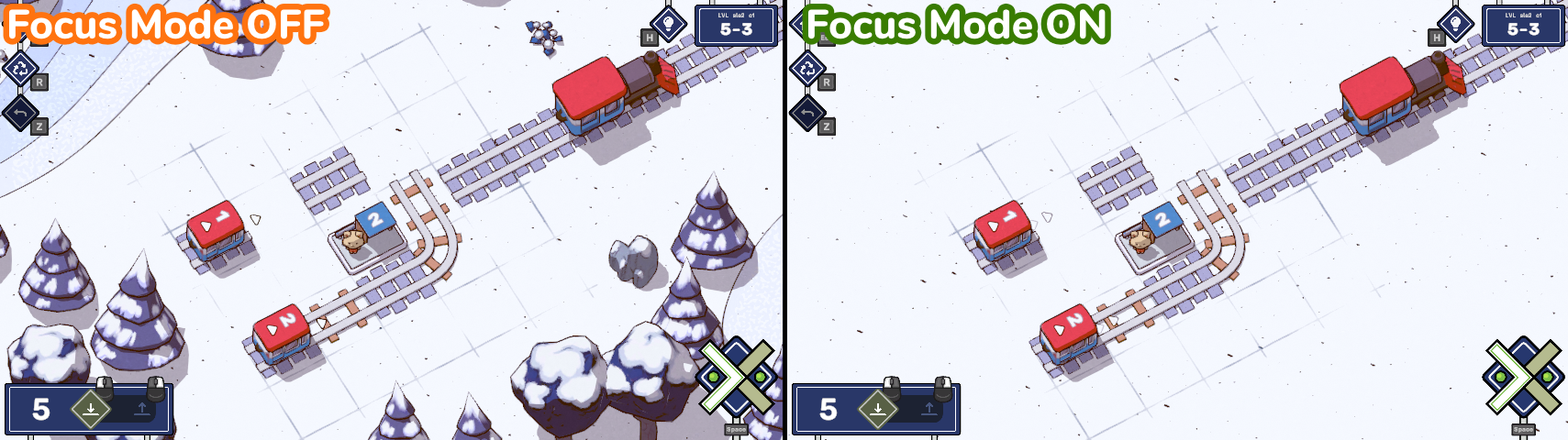
With this mode enabled, all distractions will be hidden, and you can focus just on the puzzle. An additional benefit of Focus Mode is that loading times for levels will be shorter which should allow players experiencing these issues to play the game while we work on a more permanent solution.
TL;DR - if you’re experiencing crashes or problems with loading times, Focus Mode might help.
Patch notes for Railbound v1.04:
- Added Focus Mode,
- > It can be found in Main Menu > Settings > Accessibility,
- > When enabled, levels will be loaded without decorations, improving loading times & performance while also making it easier to focus on the puzzle,
- Fixed version number in main menu being cut off by screen edges on certain devices,
- Fixed arrow buttons in settings not changing their sprites when interacted with,
Known issues for Railbound v1.04:
- Steam Deck input is not working as intended, for a workaround please refer to https://steamcommunity.com/app/1967510/discussions/0/3426698343833828352/#c3426698343835002953
- On level 1-9 the tutorial can sometimes improperly point the player to tap on a tile that is untappable,
- On some devices the game crashes during loading,
- [MacOS] Using the V-Sync toggle in Settings can sometimes freeze the game, this is related to a Unity issue which should be fixed once we update the editor: https://issuetracker.unity3d.com/issues/mac-metal-player-freezes-when-vsync-is-turned-on-with-button-onclick-event
Railbound v1.03 (10 Sep 22)
Patch notes for Railbound v1.03:
- Improved stability on some devices,
- Fixed black stripes (zebra-like) appearing on in-game objects on certain devices,
- Fixed the selection marker appearing in a wrong position when navigating to the “Other” tab in Settings using keyboard / gamepad,
- Fixed not being able to skip more than 1 level when navigating the level selection using keyboard / gamepad,
- Fixed smoke billowing from tunnels after a train crash not having the correct color,
- Fixed world selection UI not having the proper highlight after returning to main menu from a level,
- Fixed arrow buttons above/below category buttons in settings not being interactive,
- Fixed being able to unlock the “Complete all Bonus Levels in World” achievement without completing all bonus levels in that world,
Known issues for Railbound v1.03:
- Steam Deck input is not working as intended, for a workaround please refer to https://steamcommunity.com/app/1967510/discussions/0/3426698343833828352/#c3426698343835002953
- On level 1-9 the tutorial can sometimes improperly point the player to tap on a tile that is untappable,
- [MacOS] Using the V-Sync toggle in Settings can sometimes freeze the game, this is related to a Unity issue which should be fixed once we update the editor: https://issuetracker.unity3d.com/issues/mac-metal-player-freezes-when-vsync-is-turned-on-with-button-onclick-event
Free content coming in late 2022!
The game has just launched but we're astounded with the reception it has received so far. We're really happy that you're enjoying Railbound's twisted tracks & relaxed atmosphere, which is why we're thrilled to announce that World 8 is not the end of your journey!
Later this year we're going to expand the game with free updates including:
- accessibility fixes, including a colorblind mode,
- new worlds with a brand-new mechanic - semaphores,
- and more!
Check out our exclusive teaser presented at the GameSpot Swipe showcase earlier today to see them in action:
https://www.youtube.com/watch?v=PJf_NFi5oXQ
Have a great time with the game!
- Luke
Railbound v1.02 (08 Sep 22)
Patch notes for Railbound v1.02:
- Replaced hidden level with a different one,
- > We thought up a more interesting puzzle for it, so even if you’ve found it before, give it another try!
- Updated colors in the settings menu,
- Updated credits,
- Removed old APIs to make the game a bit leaner,
Known issues for Railbound v1.02:
- Steam Deck input is not working as intended, for a workaround please refer to https://steamcommunity.com/app/1967510/discussions/0/3426698343833828352/#c3426698343835002953 or https://steamcommunity.com/app/1967510/discussions/0/3426698343833828352/#c3379410661793251746
- On level 1-9 the tutorial can sometimes improperly point the player to tap on a tile that is untappable,
- [MacOS] Using the V-Sync toggle in Settings can sometimes freeze the game, this is related to a Unity issue which should be fixed once we update the editor: https://issuetracker.unity3d.com/issues/mac-metal-player-freezes-when-vsync-is-turned-on-with-button-onclick-event
Railbound patch v1.01
- Updated level structure:
- > new puzzle for level 4-5,
- > updated layout for levels 4-2 and 7-8C,
- > reduced rail count for level 7-8A,
- > removed levels 7-7 and 8-8,
- Updated decorations on World 1,
- Updated icon for the button used to close settings menu,
- Updated visuals for the level selection indicator in main menu.
- Fixed level selection indicator being visible on mobile,
- Fixed cloud overlay on World 8 bonus levels,
- Fixed floor aliasing on level 1-1 for Low/Medium quality settings,
- Fixed game UI sometimes being visible on loading screen when returning to main menu,
- World 8 bonus levels no longer award the “Cutting Corners” achievement chain,
- Optimized textures for decorations (lowered build size by 20MB on PC!),
Known issues for Railbound v1.01:
- [MacOS] Using the V-Sync toggle in Settings can sometimes freeze the game, this is related to a Unity issue which should be fixed once we update the editor: https://issuetracker.unity3d.com/issues/mac-metal-player-freezes-when-vsync-is-turned-on-with-button-onclick-event
- On level 1-9 the tutorial can sometimes improperly point the player to tap on a tile that is untappable,