Rooms 2.0 has some serious updates, with new tools for managing your hierarchies and objects faster and easier!
More additions to ranged weapons!
Expanded Rec Room Studio access to more eligible creators!
Rooms 2
We've added a few new menus to help with managing Object Hierarchies in Rooms 2.
Connect Widget: When selecting a non-circuit object, a connection icon will appear on the right of the selection (or below it if the selection is large). You can drag this icon to another object to parent the selection to that object. Or you can tap or click the icon to quickly edit in and out of objects, group and ungroup objects, move objects to the room level, and copy and paste objects across hierarchies.
Object Widget: When selecting any object, a nameplate will appear. You can select the name like a shortcut to the 2D hierarchy menu, or the "..." to access the Quick Action Menu for familiar options like configure.
New shapes can now exist directly at the Room Level or within Gizmos, eliminating the need for automatic container creation.
We've added some features that allow you to control if the room is "edit-ready" and ready for creation. Rooms will now load as edit-ready for Creators by default, and you can specify how you want edit-ready rooms to load for other players in your subroom settings. You can also visit the "This Room" page to know if your current room instance is edit-ready!
You are now able to save up to 50 updates to Rooms 2 inventions. While you have a Maker Pen selection, use the "Save Invention Update" in the quick action menu to add a new version to an existing invention. Use the "Version" dropdown on the Invention Details page to pick which version you want to spawn.
There is now a limit of 150 Replicator copies that can be Pre-Allocated across all Replicators in a Room to prevent loading timeouts. If a Room's total Preallocated Copies is above this number, only the maximum number of copies will be generated.
You can now mark your custom Object Properties as synchronized, so everyone in the room sees the same value for that property!
'Enable Pivot Select' and 'Disable Pivot Selection' options will now affect 'MakerPen drag select'.
New objects spawned will no longer be grabbable by default.
Now the Unsaved Animation controller animating in a loop will continue when another player joins the room.
Replicated objects will no longer pop to the origin when reset.
Fixed an issue where a Replicator created through Cloning or Invention wouldn't properly replicate its circuits.
Fixed an issue where deleting objects in Advanced Creation Mode would create problems with the hierarchy menu.
Fixed an issue where you couldn't recolor certain shapes.
Rec Room Studio
We've expanded RRS access to 50% of eligible creators! Click HERE to see if you got access. We plan to get access out to all users very soon.
Improved Inspector performance when Studio Functions are super lengthy.
Changing the target of a Studio Function instruction will now preserve the method and arguments even when the previous target had been destroyed.
Adding new instructions to a Studio Function will now duplicate the content of the previous instruction.
Added more base settings in RRStudio for objects in R1 rooms!
Ranged Weapons
Added new config options to Ranged Weapon Props. Not all weapons will support all of these options.
Infinite Ammo (boolean)
Default Total Ammunition (integer)
Use Ammunition Magazine (boolean)
Ammunition Magazine Size (integer)
Reset on Ammunition Exhaustion (boolean)
Added new Ranged Weapon Prop nodes into beta. Similar to the new config options, these will only work on certain weapons.
Ranged Weapon Prop Get Default Total Ammunition
Ranged Weapon Prop Get Ammunition
Ranged Weapon Prop Reset Current Ammunition
Ranged Weapon Prop Set Current Magazine Ammunition
Ranged Weapon Prop Set Uses Magazine
Ranged Weapon Prop Set Infinite Ammunition
Ranged Weapon Prop Set Magazine Capacity
Ranged Weapon Prop Set Total Ammunition
Added new "Ammunition Changed" Event to Ranged Weapon Props
General Improvements & Bug Fixes
Added a smart suggestion feature to Circuits. Select and drag out of the desired port on a circuit, hold the selection in an empty space for a few seconds, and then select or search for recently used circuits in the smart circuit menu.
Added a subroom level toggle to enable/disable Beacons.
Inventions that were saved with world position from the dorm can now be spawned at the same world position in any room.
Fixed a bug where a rare timing issue was causing all Object Boards in a Room Instance to become destroyed.
Fixed a soft lock issue when opening the watch store from the navigation bar.
Fixed an issue with aim-assist support in UGC rooms for provided weapons.
Localized text fixes for the "New" data token on room cards.
Player boards will now clear values off of all output ports when they are bound to a player.
Fixed a logout issue.
Experiments
We're trying out some upgrades to melee weapons on Screens to make them more reliable, consistent, and fun
Removed slowdown while charging an attack (just like Swing Handle, and VR)
Reduced movement boost while executing charged attacks
Charge attack input is faster in most cases
Repeated attack inputs are more reliable to chain together
Can now hold wave button with a sword to block attacks (so it's possible to do while dual wielding for all controls)
Third person swing is more accurate to the reticle / nearby enemies
Third person screen shake is reduced (since the added camera distance exaggerates it a lot)
Please see here for convenient links to controls, tutorials, comfort options, news, and more:https://rec.net/creator
We love to hear your feedback, so please don't hesitate to let us know what you think using the Creator Forum here: https://forum.rec.net/
Rec Room PATCH - the "First of the Year" Edition
TLDR
Added more configurable objects to RRStudio
Visual bug fixes and efficiency updates
Seasons are changing, RIP winter app icon :,(
Rooms 2
Added text filter when choosing the Object to Pool for a Replicator.
You are now able to save updates to Rooms 2 inventions. While you have a Maker Pen selection, use the "Save Invention Update" command in the quick action menu to add a new version to an existing invention. Use the "Version" dropdown on the Invention Details page to pick which version you want to spawn. You'll be able to save up to 50 versions of each invention.
Rec Room Studio
The following objects are now configurable in RRStudio!
Audio Sampler, Rotator Gizmo, Piston Gizmo, Respawn Point V1, Respawn Point V2, SFX, Holotar Projector V1
Object Tags are now configurable in RRStudio!
General Improvements & Bug Fixes
Made a small change to make the room search experience quicker.
Notification cards now make more efficient use of space.
Restricted the usage of beacons and their visibility when in drawing and anchored studio canvas mode.
Fixed a bug where hair and beard previews weren't updating correctly.
Fixed a bug where costumes appeared with no pants/shoes. Sorry, Donald Duck impersonators!
Fixed a bug with PSVR comfort mode rendering errors.
Fixed a bug that would unintentionally change your body type while creating a new account.
Fixed some edge cases where third person mode could not interact with certain objects reliably.
Reduced hitching when pushing updated Player Definition Boards
Upgraded scrolling in the Maker Pen palette by improving page buttons, making it easier and faster to browse and find exactly what you need
Fixed a bug where beacons occasionally will not show up if directly joining a partied friend's room.
The event creation page will now validate your event's date and time as you set it. RIP, "Longest event ever!!!1!" events.
Bye bye wintery app icon, my Shayla :,(
Experiments
We are going to launch an experiment to disable the "Use Classic Bean" option for some players again. We've put a lot more work into updating the animations and feel of the new beans to closely match the classic beans, and we want this round of feedback before disabling it for all players in a future update.
Please see here for convenient links to controls, tutorials, comfort options, news, and more:https://rec.net/creator
We love to hear your feedback, so please don't hesitate to let us know what you think using the Creator Forum here: https://forum.rec.net/
Rec Room UPDATE - the “First of the Year” Edition
TLDR
Inventory Items, Room Offers, and Rewards are now part of Inventions!
SO MANY updates, fixes, and customization for ranged weapons.
Object Properties have been added in beta!
We added “In-Room Voice Privacy Settings” for who you hear AND who hears you!
More updates and fixes for FBA and upgraded bean avatars.
You may have seen some of these notes in our patches - and that’s intentional! Since some platforms only get major updates, we want to make sure they know what’s new too.
Avatars
We updated our hat placement logic a bit. Hats will now rotate and offset better– unfortunately, this may have moved your hats around, Sorry!
Bean avatars can now try on pants and shoes in the watch store without switching to full body first.
You’ll now slide in the direction you’re moving, instead of being based on your input.
Your upgraded bean avatar found its balance and now stands up straight!
The upgraded bean also got some small updates to animations while moving around.
Fixed an issue where left and right hands picked things up differently - now it’s the same!
Fixed a bug where you couldn’t scale upgraded bean avatars' facial features all the way up or down.
Fixed a bug where the bottom half of a specific eye type could begin clipping through part of your mouth. Yucka.
Rooms 2
Inventory Items, Room Offers, and Rewards now function as part of Inventions! Any new inventions that are saved in a room with chips that reference a specific Inventory Item, Room Offer, or Reward will bake that information into the Invention. When the Invention is spawned in a Room that does not have that content, it will create a new respective piece of content in that Room!
Fixed an issue where frozen props inside a container could prevent you from using the Move, Rotate, Scale, Manipulate, or Delete tools on it.
You can now delete frozen objects using the advanced creation mode hierarchy!
Updated the invention palette tab to use carousels.
Made resetting objects work as expected.
Resetting objects now resets their children, if they have any.
Resetting objects now resets any properties applied by circuits.
Resetting objects now resets any tags changed by circuits.
Fixed a bug where some objects imported from Rooms 1 inventions would lose their object boards. (This won't fix objects that this already happened to, unfortunately - you'll need to re-spawn the invention to get a new, not-broken copy.)
Fixed a bug where using the Connect tool to re-parent to an object which was already selected could break the Circuits hierarchy.
Changed invention previews so they are no longer physical.
"Toggle Button Set Is Pressed" chips are now working!
Fixed a bug where the active Sun Direction component would be ignored when you join a room.
MakerPen Clone operation will work now if the pivot is selected.
Fixed the error message when cloning and copying pivot.
Added the Showcase Poster.
Replicator
Replicators will now assign authority of the object that they spawn to the player who used the Replicator Spawn Next Object Chip. This solves some issues with players other than the room authority correctly positioning spawned objects.
The amount of chips that can be added to Replicators and Player Definition Boards is now limited by memory usage.
Studio objects that have been replicated will no longer leave *spooky ghosts* inside a trigger volume when they are returned to the replicator.
Fixed an issue where having a Replicator with a positive number of Preallocated Copies but no Target Object could cause a room to fail to load.
Replicated objects with Handles will now no longer take your hand with them to the great beyond when returned to the replicator.
Circuits
Added Object Properties in beta! These allow you to store values on any object with an Object Board by configuring a name and type. New chips to get, set, and check for the presence of each unique property will be added to the palette. Like variables, Object Properties can be synced or unsynced, and come with 'On Changed' events that fire when the value has been modified!
Added the Player Left Hand Is Pointing and Player Right Hand Is Pointing chips in beta.
Fixed a bug that you can not configure the sample audio chip properly in ACM.
Fixed Object Misaligned with the Cursor And Self-Surface Snapping in ACM on Surface Snapping Mode.
Improved performance of Chip cloning and of inventions containing Chips.
Fixed a bug where the wrong Circuits chips would be visible/invisible after using the Hierarchy window to jump around between levels.
Fixed “On Changed” events not firing for synced variables defined inside a Player Definition Board.
Fixed a bug where some ports wouldn't properly update their type if a connected object board was removed.
General Improvements & Bug Fixes
The "Voices I Can Hear" settings have been replaced with an "In-Room Voice Privacy" slider that affects who you hear but also who hears YOU in the Room. We also reordered the slider so random party members don’t get the most intimate position on the slider. Note that Voice Calls aren’t affected by this.
VR players' beacon game is on point! No, literally - next time you're in a party or on a team in an RRO, point and press your controller's main trigger. You'll drop a beacon at the location the laser beam touches!
Added quick chat for everyone, including juniors!
You can now use that sniper scope again while prone!
Added a new volume slider to the Audio settings page that controls the volume of Party Voice Calls separately from other Room voices.
You will now open straight to party chat if you open chat and are in a party. Makes sense, right?
Added better visibility for rooms that require a version update.
The reaction wheel is now even snappier!
Place now only affects specific maker Shapes and not Tools+.
A lot of players were not seeing the "Supports Juniors" toggle and accidentally leaving it on for rooms that weren’t Junior-appropriate. To improve this flow we're making some changes:
Say goodbye to the "Supports Juniors" button in Room Settings > Moderation. The new hotness is "Age Rating" selection in the main Room Settings area!
You now have to pick an Age Rating (All Ages or 13+) before publishing a room. You'll get a helpful popup if you try to publish without selecting an option!
Existing rooms that kept their "Supports Juniors" toggle to the default value will see no option selected for "Age Rating", but will still support junior players for now. But you should pick an Age Rating anyway, so we know you mean it!
Added home menu notifications to Nintendo Switch™.
Fixed an issue with Auto Fire in The Rise of Jumbotron.
Fixed a significant hitching problem for Quest 2 and Quest 3 players using Meta Link PCVR. Players should no longer experience hitches during longer play sessions!
Fixed a bug where the "Join Room" button could be disabled if you canceled inviting friends to join a room with you.
Fixed a bug where room instances might become un-joinable if you edited a bunch of Circuits.
Fixed a bug that prevented players from talking in Party Voice Call during loading screens.
Fixed a bug where unowned items are unlocked when entering the portfolio of another player who wears those items.
Fixed a bug where the Flintlock wouldn’t show the highlight beacon.
Disabled Selection Bounds Rendering when MakerPen is dropped.
Fixed a bug where a handle might become unable to be picked up.
Fixed a bug where players with a large number of owned Avatar Items could not access said owned items.
Fixed a potential issue with longer play sessions getting logged out on Nintendo Switch™.
Fixed "nada, no rooms found" overlapping room search results when browsing by category.
Fixed a bug that was causing the title screen to skip over the ‘new account’ page.
Updated UI Elements in the Influencer Support Code flow. Also fixed a typo.
Fixed an issue where players would crash when browsing carousels in the store.
Fixed an issue where the quick action menu would not appear after your selection changes in R1.
Crashes are becoming less common thanks to a number of fixes!
Updated meetup code UI.
Now players with all room roles have access to view the Permissions tab in room settings!
Fixed blindingly light instruction text in the Room Loading Screen settings.
Ranged Weapon Updates
Customize ranged weapon prop behavior: Lots of new options to configure ranged weapon props in various new ways. Want to make the laser tag shotguns more accurate? Go for it!
New options for ranged weapon props! All of these can either be configured with CV2 chips, or directly via the config menu of the gun. This brings a level of control similar to what you already have for Gun Handle and Projectile Launcher-based weapons to our weapons in the maker pen palette.
Accuracy - affects both the spread of bullets (like from a shotgun) and the accuracy with which screens players fire.
Recoil - affects recoil on screens and controller haptics on VR.
Projectile Speed.
Projectile Lifetime.
Projectile Impact Force - Modify how strongly shooting a physical object will move it.
Projectile Gravity.
Sound Enabled.
Manual & Automatic Fire Rate.
While Projectile Launchers could previously have customized sound and gravity in their config menu, we did not have chips for them before. The new chips that let you control sound and gravity for our ranged weapon props will work for projectile launchers too.
Not all new properties will be available for all weapons. If you want full control you can still use custom weapons with gun handles + projectile launchers, but we at least wanted to give creators more control over the weapons that we have. For example, you cannot use these new properties to make a paintball pistol have automatic fire.
Gun Handles can now be configured to have a "Center" reticle option.
Other CV2 features: New chips to check whether a weapon is on cooldown (meaning the gun is unable to shoot due to fire rate) or reloading.
Various Ranged Weapon & Projectile Launcher bugfixes:
Reduce scenarios for players accidentally shooting themselves with weapons made from a Projectile Launcher and a Handle of some sort. This can be reenabled with the “Can Hit Player Holding Tool” setting if you’re trying to use projectile launchers for some weird purpose that needs this.
Fixed issues where projectile launchers hooked up to a gun handle with automatic fire wouldn’t actually fire as fast as circuits told them to. The max fire rate of projectile launchers has been raised from 15 to 30 (in addition to some under the hood changes to account for the fact that it wasn’t actually previously reaching its max fire rate). By default, this will only affect new projectile launchers for backwards compatibility reasons. To update your old ones to use this fix, configure them with the maker pen and disable the “Use Legacy Projectile Throttling” setting.
When hovering over a CV2 port of type Projectile Launcher, you should now see the object's name like normal.
Fixed a bug where From Creation Object could say its result was valid with the Is Valid chip when the output type was Projectile Launcher but a Ranged Weapon Prop was passed in, even though passing it into projectile launcher chips would give invalid errors.
Bullets shot from a projectile launcher clamped to a gun handle will now explode paintball mines like regular bullets do.
Fixed a bug where running Ranged Weapon CV2 chips on certain not-yet-supported ranged weapons broke circuits execution without a CV2 error - these will now log a warning but continue execution.
Fixed a bug where the Rec Room Object Reset chip didn't properly reset all Ranged Weapon/Projectile Launcher configurable fields.
List of all new ranged weapon chips: (*Note: anything prefixed with “Ranged Weapon Prop” works only on our existing maker pen palette weapons, but similar functionality should already exist on either Projectile Launchers or Gun Handles. Anything prefixed with just “Ranged Weapon” can work either for our existing weapons or for Projectile Launchers too.*)
Ranged Weapon Prop Get Is On Cooldown.
Ranged Weapon Prop Get Is Reloading.
Ranged Weapon Prop Get/Set Projectile Impact Force Multiplier.
Changed Dodgeball to count outs only on the player that was hit (finally, no more catch-outs!)
Dodgeballs no longer count as out when they hit another player.
Rec Room Studio
You can now configure mood chips!
Object boards are now configurable!
Fixed a bug where Rec Net Image components could cause the game to crash when used in a Unity Button.
Fixed a bug where the Sun Constant and Sun Direction chips could not be used to change the sun.
It is now possible to select and preview SFX, Music, and Ambience audio tracks.
Removed the cause of StackOverflow when multi-selecting with a dropdown.
Experiments
On Screens, we have released an experiment which improves the Place feature in several ways:
The object will now be maintained on the player Y axis when moved up and down.
There's now a yellow outline indicating if the object is overlapping with other collisions in the world while being placed.
Updates to the visual appearance of room cards across the pages of the Watch to show a "new" tag for rooms first published in the last month.
Starting an experiment that adds a new "Best Popular Match" card to the Rooms Search page to allow players to go to a room related to their search that is most likely to have other players to play with.
Some players will now be able to find events in the play menu!
Experiment to add a new feedback survey at the end of Party Voice Calls.
Adding a banner to shoes/bottoms tabs for experiment and design feedback.
We are going to launch an experiment with Nintendo Switch™ performance improvements that decrease your loading times. If all goes well, everyone will get the improvements!
Please see here for convenient links to controls, tutorials, comfort options, news, and more: https://rec.net/creator
We love to hear your feedback, so please don't hesitate to let us know what you think using the new Creator Forum here: https://forum.rec.net/
Rec Room PATCH - the "Last of the Year" Edition
TLDR
Some avatar body updates, bug fixes, and a small movement update... plus toes!
We added beacons so you can now ping locations and communicate even quicker.
Winter Wonderland is here! Celebrate the holiday season with us in \^WinterWonderland.
This is our last update of the year! Thanks for being part of our community, this has been an amazing year and it's all because of you. Happy holidays and we'll be right back here with updates in a few weeks!
Avatars
Improvements to existing culling groups and new avatar body models: futureproofing for new culling groups, improved hand deformation for bean avatars, and even toes for full body avatars!
Bean avatars can now try on pants and shoes in the watch store!
Your new bean avatar found its balance and now stands up straight!
The new bean also got some small updates to animations while moving around.
You'll now slide in the direction you're moving, instead of being based on your input.
Fixed a bug where the bottom half of a specific eye type could begin clipping through part of your mouth. Yucka.
Rooms 2
Fixed an issue where frozen props inside a container could prevent you from using the Move, Rotate, Scale, Manipulate, or Delete tools on it
You can now delete frozen objects using the advanced creation mode hierarchy!
General Improvements & Bug Fixes
VR players' beacon game is on point! No, literally - next time you're in a party or on a team in an RRO, point and press your controller's main trigger. You'll drop a beacon at the location the laser beam touches!
Added quick chat for everyone!
Changed the mobile app icon to something a little more chill.
Added a new volume slider to the Audio settings page that controls the volume of Party Voice Calls separately from other Room voices.
You will now open straight to party chat if you open chat and are in a party. Makes sense, right?
Added better visibility for rooms that require a version update.
The reaction wheel is now even snappier!
Fixed a bug where the "Join Room" button could be disabled if you canceled inviting friends to join a room with you.
Fixed a bug that prevented players from talking in Party Voice Call during loading screens.
Fixed a bug where unowned items are unlocked when entering the portfolio of another player who wears those items.
Fixed a bug where players with a large number of owned Avatar Items could not access said owned items.
Fixed "nada, no rooms found" overlapping room search results when browsing by category.
Fixed a bug that was causing the title screen to skip over the 'new account' page.
Updated UI Elements in the Influencer Support Code flow. Also fixed a typo.
Fixed an issue where players would crash when browsing carousels in the store.
Updated meetup code UI.
Now players with all room roles have access to view the Permissions tab in room settings!
Removed the cause of StackOverflow when multi-selecting with a dropdown in RRStudio.
Rec Room Studio
You can now configure mood chips!
Experiments
On Screens, we have released an experiment which improves the Place feature in several ways:
The object will now be maintained on the player Y axis when moved up and down.
There's now a yellow outline indicating if the object is overlapping with other collisions in the world while being placed.
Updates to the visual appearance of room cards across the pages of the Watch to show a "new" tag for rooms first published in the last month.
Starting an experiment that adds a new "Best Popular Match" card to the Rooms Search page to allow players to go to a room related to their search that is most likely to have other players to play with.
Some players will now be able to find events in the play menu!
Experiment to add a new feedback survey at the end of Party Voice Calls.
Adding a banner to shoes/bottoms tabs for experiment and design feedback.
Please see here for convenient links to controls, tutorials, comfort options, news, and more:https://rec.net/creator
We love to hear your feedback, so please don't hesitate to let us know what you think using the new Creator Forum here: https://forum.rec.net/
Rec Room UPDATE - the "The Big One" Edition
TLDR
Crescendo will be available on Mobile and Quest very soon!
Double shot is back!
A bajillion new chips (widdewawy) and a Smart Circuits recommendation system!
Bonky's Inferno is now available to play and to copy!
This is our first Major Update and first update on Nintendo Switch(tm), we've added some performance-improving fixes. Try them out and say hi to all our new friends!
Avatars (featuring special guest, Locomotion!)
You can finally adjust the hat position of all of your favorite hats with Full Body Avatars! As part of this update, we also fixed the bug so you can "Use Legacy Position" once again for Full Body Avatars (and eventually for the floating bean) ;)
We increased the ranges for your mouth, eyes and nose placement for even more customization!
Tweaked the way upgraded bean eyes are mapped from classic bean outfits.
We've been having an issue with blue Full Body items, which have been fixed. Now you'll no longer be blue (da ba dee da ba di)
Fixed the reflection on the S.glitch Astronaut helmet.
New locomotion chips: Player Get Is Standing, Request Balance Animation, Player Get Is Balancing, Local Player Set Animation Param Balance, and Request Stop Avatar Locomotion Animation
New locomotion events: On Stand Stopped, On Slide Stopped, On Balancing Started, On Balancing Stopped
Fixed animation issue when modifying steering values and using FBA in third-person.
Request Slide now has a Min Duration so you can change how long slides last. It also supports infinite slides and changing the request parameters via a second request while sliding.
Circuits
Added MakerPen Smart Circuits, a dialog accessible from the Connect Tool that recommends certain chips based on the port you drag from. A search bar is also available to find specific chips from the chip library without having to access the Maker Pen palette.
Added the ability to double-select a line in the logging console and teleport to the source chip.
Added search bars to more config menus for various nodes.
Added "Max Speed" and "Acceleration Duration" ports to the Locomotion Request Wall Climb Start chip, which allows you to control how quickly players climb! Ascend (or descend) to new heights more quickly!
Added a new Vector3 Angle node which calculates the angle between two Vector3s.
Added the Vector3 Mask chip, which lets you keep or zero out values by dimension in a Vector3.
Added the FormatValue chip! You can now use C# format operators to format integer, float, and string values!
Added New Outfit Tag chips, Player Get Equipped Avatar Item Tags and Player Outfit Slot Flag Constant! We'll have a developer blog on how to use these coming soon on rec.net!
Added a new Vertical Cylinder Contains Point chip, it checks whether a given point is inside a Vertical Cylinder or not.
Added a new AABB Contains Point chip, which checks whether a given point is inside an Axis-Aligned Bounding Box (AABB) or not.
Added a new If Is Valid chip that combines the "If" and "Is Valid" chips, making it easier and more convenient to check if something is valid. We used it on ourselves - it said Valid B)
Added Player Left/Right Hand Is Closed chips to detect if a player's hand is closed in circuits.
Added a CV2 chip to get a Room Offer by Name.
Added a new chip in beta that lets you adjust the field-of-view (FOV)! Friendly reminder that this chip is currently in beta and the limits for the chip may change as we tune things!
Added Closest Point On Line Segment & Closest Point On Line, Audio Player Get Current Volume, and Player Get Is AFK chips in beta.
Rounded out our rounding chipset with a couple of new entries: Round To Decimal Place and Truncate To Decimal Place.
Fixed a bug where you could get stuck for a very long time "waiting for a Circuits snapshot," and therefore couldn't edit Circuits in a room.
Fixed the Go To Room chip not working when the target is not the local player.
Fixed the Bug where the Equipment Slot Emphasize chip could fail if executed too quickly.
Fixed a bug that caused Room corruption after changing the type of a Data Table column when there were chips that referenced that column in the room.
Rooms 2
Fixed a bug where VR players would sometimes be sent to their dorm when saving the room. You wouldn't believe us if we told you what the problem was. Seriously.
Fixed a bug which could cause large objects to rotate a little bit after a Room was saved. We think this bug may have friends... keep your eyes peeled and let us know if you see similar behavior!
Fixed a bug that would sometimes cause objects to fly all over the place when a Room was loaded. We informed Facilities - they assure us that they've bolted everything down.
Replicator Returned Objects and Target Objects will no longer be included in results from tag query chips (ie Get First With Tag, Get All With Tag).
R2 Beta Blocker Bug Fixes
Editing now works on Animation gizmos.
The Numeric field with +/- buttons now has correct icons.
Added type filtering to property list in Event Definition.
Fixed a bug where different people wouldn't agree on the scale of small objects. How small is 'small', really? Well, now you'll be able to see for sure!
Fixed an error where inventions with chips in R2 could not be selected.
Fixed a bug where shapes would sometimes appear with the wrong scale when joining a Room.
Fixed inconsistent scaling behavior when scaling multiple shapes simultaneously.
Improved tube scaling behavior to be more consistent.
Fixed a bug where the Projectile Launcher couldn't hit players.
Fixed an issue where Room Sun Modify's Blend Time input wouldn't work.
General Improvements & Bug Fixes
Crescendo will soon be available on Mobile and Quest platforms! (Yes, we also fixed a few things on the Switch version too!)
Added occlusion culling, and optimized lighting for mobile. Yay, more frames!
Fixed a bug where the mirror kept shooting every second once fired. Everybody knows that the boss fight was too easy, right?
Re-added the Dracula bat animation. Now you know who's who.
Fixed an issue in Garden of Sorrows where the whip would not work in a specific spot.
Double Shot has returned for the bow!!! We worked on a fix for the longbow to allow Double Shot while still preventing infinite shot and have added it back. Shoutout to Boethiah for helping us bring this back and helping us get it right. Note that RecRoyale still won't have Double Shot, like always.
Added "Place", a new way to interact with objects! Now you can pick up and place objects with precision on screens, instead of dropping or yeeting them across the room.
Added a new option to choose if other players in the Room are muted and/or if you are muted to them while in a Voice Call.
The Voice Call icon in player nametags now changes to indicate if they are in your call or not, as opposed to just any call.
Some of the RRO rooms would cause an full body avatar or upgraded bean to look like it was animating at double speed on Nintendo Switch(tm). It did look pretty funny, but if you're reading this it's already been patched.
The addressable world is now 2 millimeters smaller in every direction. Reductio ad absurdum, the Roomiverse is a singularity in 16 million years (a few hundred millennia).
Adjusted the language of the notice you'd get regarding RR+ already being on another Rec Room account.
Fixed an issue accepting game invites from your phone's notification screen.
Fixed some jitters while using Share Camera selfie on Screens, and performance issues when using the Share Camera's settings.
Fixed a bug where the Manipulate Tool would scale both ends of a shape if the anchor setting was turned on.
Fixed an issue some players had when leaving R1 Rooms with spotlights.
Fixed an issue where Circuits were breaking spawner gadgets.
Fixed a bug that made it so the bow and goblin wand could be grabbed off center when passing between hands.
Fixed an issue where VR players could not reposition items when passing between hands. Enjoy your new Extendo arms!
Fixed several issues with viewing other players' outfit items on their profile page.
Rec Room Studio
Added support for cloning RRS Rooms!
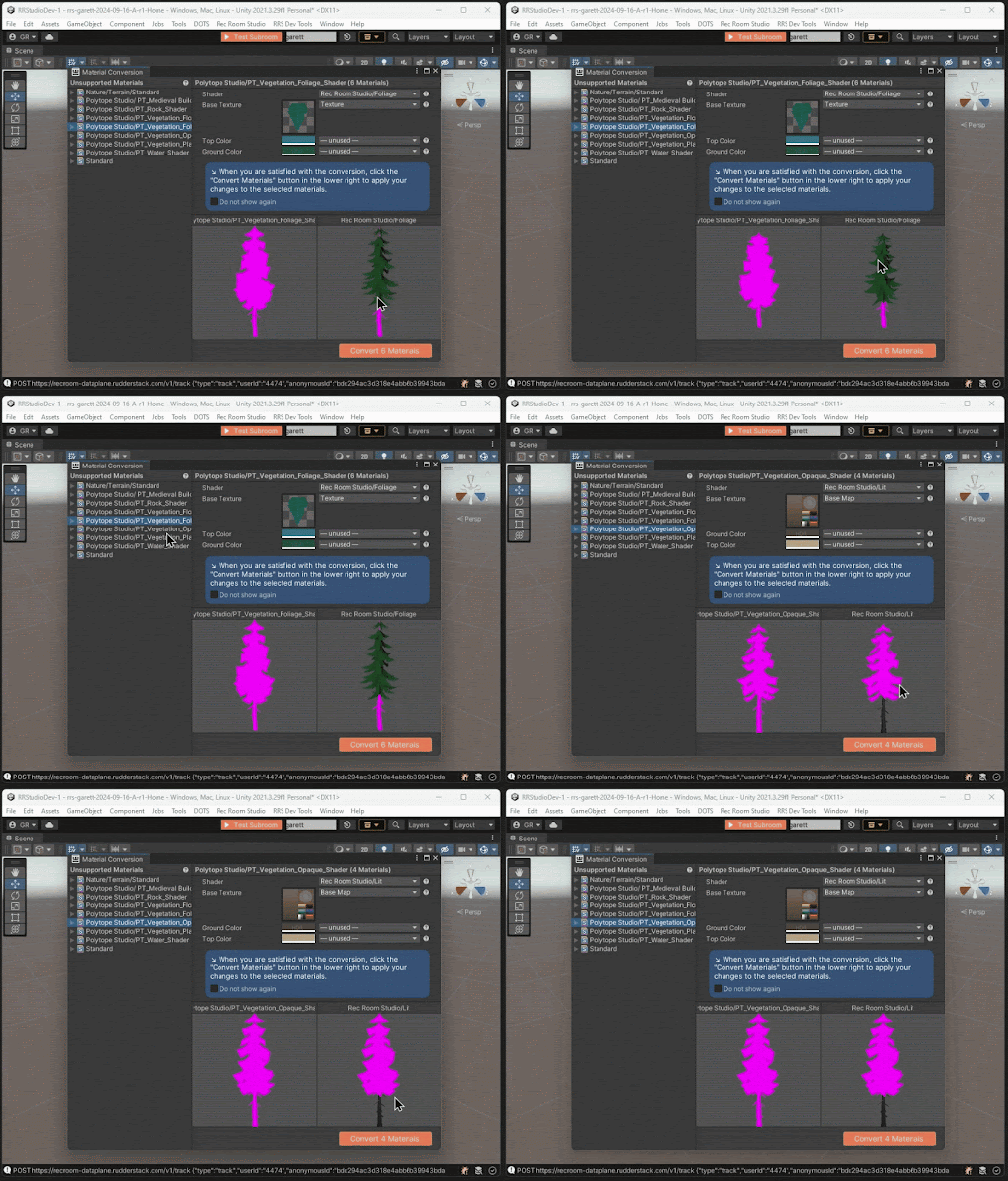
The new Material Conversion window assists you in converting third-party materials to render properly in Rec Room.
Added a dropdown menu to select age range settings for your Room.
Fixed an issue where Terrain with details (e.g. trees) would render those details in magenta when played in Rec Room.
Experiments
We're trying out different tunings for the distance and volume at which voice calls activate. Let us know what you think!
Started an experiment that will autofocus the search bar when you navigate to the player search page to allow immediate typing.
Started an experiment where new users will see the categories page on the bulletin board in their dorm after completing orientation, or until they click the "show me all rooms!" button.
Please see here for convenient links to controls, tutorials, comfort options, news, and more:https://rec.net/creator
We love to hear your feedback, so please don't hesitate to let us know what you think using the new Creator Forum here: https://forum.rec.net/
Rec Room PATCH - the "Little Wonders" Edition
Beacons
Have you ever needed to point something out to a friend, or ping strategic points in Paintball? Beacons are now the answer! Beacons are only visible to members of your party and/or team. Double-tap the screen on mobile, double-press the right bumper on controllers, or middle-click on PC while playing in a Party or Team to use beacons! All non-VR players have access to this feature right now, and VR access is coming soon!
General Improvements & Bug Fixes
For VR players using grid snapping, twisting your arm while you're drawing a ribbon or tube no longer twists them, removing those strange twists and turns of shapes that randomly showed up.
Fixed an issue some players were having when accepting game invites from their phone's notification screen.
Fixed a bug that required you to reselect a player to gift when gifting through someone's wishlist.
Fixed a bug where room instances might become unjoinable if you edited a bunch of Circuits.
Fix a bug where unowned items are unlocked when entering the portfolio of another player who wears those items.
Mobile Home
Enabled Landscape Mode for Mobile Home
Added better indicators of Rooms that require a version update.
Experiments
Previously, we experimented with providing a feature to precisely Place Rooms 1.0 shapes set to Decoration or Environment on Screens. Now, we’re continuing that experiment with other objects that have physics like weapons, food, dodgeballs, etc. Thanks to all the great feedback so far we’ve been continuing to iterate on this feature, so please continue to let us know what you think!
We’ll soon be experimenting with controller controls on the watch menu. You will be able to use the L and R shoulder buttons to highlight the desired tab, then wait a second for the page to switch over. Let us know what you think!
Please see here for convenient links to controls, tutorials, comfort options, news, and more: https://rec.net/creator
We love to hear your feedback, so please don't hesitate to let us know what you think using the new Creator Forum here: https://forum.rec.net/
Rec Room PATCH - the "Place Precisely" Edition
General Improvements & Bug Fixes
Added "Place", a new way to interact with objects! Now you can pick up and place objects with precision on screens, instead of dropping or yeeting them across the room.
Fixed an issue with notifications disappearing once you've interacted with them. We're busting ghost (notifications) this spooky season B)
We fixed an issue with the FBA version of the Dirt Bike Chest Protector - should show up the correct color now!
Fixed several issues with viewing players' outfits on their profile page.
Even faster MakerPen load times.
Please see here for convenient links to controls, tutorials, comfort options, etc.:https://recroom.com/community
We love to hear your feedback, so please don't hesitate to let us know what you think.
Rec Room PATCH - the "Updated Update" Edition
TLDR
No more double invites! You won't be asked to invite friends who are already in the room you're going to.
Gave some TLC to slide and teleport animations for FBA and Upgraded Bean.
Fixed some issues with broken Data Table UI, Customize Anywhere, and chip culling performance.
Added support for cloning RRS Rooms!
Avatars
We heard your feedback and gave some love to our slide and teleport animations on both Full Body and Upgraded Bean Avatars. We hope this helps level the playing field for PvP games!
Customize Anywhere is now a tab in the Watch.
Fixed a bug where the Customize Anywhere button wouldn't take you to the Customize Anywhere page.
General Improvements & Bug Fixes
Fixed an issue where a broken UI was preventing Data Tables from being viewed or edited.
Fixed an issue where the "back" arrow wouldn't appear on Watch store carousels.
Fixed certain item lists not updating.
Added search bars to more config menus for various nodes.
Players will no longer be asked to invite online friends who are already in the room they're going to.
Improvements to chip culling performance.
Rec Room Studio
We've now added support for cloning RRS Rooms! Users will first have to confirm they own the right to use all assets within their room for it to be cloneable, then you'll be able to share your creations with everyone.
Experiments
Started an experiment with audio settings where the microphone is turned off by default on new accounts and we're testing a variety of UI changes to let the player know their microphone is muted.
Rolling out a more performant chat experience to some players.
Please see here for convenient links to controls, tutorials, comfort options, etc.:https://recroom.com/community
We love to hear your feedback, so please don't hesitate to let us know what you think.
Rec Room UPDATE - the "Rectober 2024" Edition
TLDR
The Material Conversion tool is now available! Check out our dev blog for info on how to use it.
Spooky season is upon us, join us for Rectober!
Name limits have been increased for invention, inventory, and offer names.
Rec Room Studio
The new Material Conversion window assists you in converting third-party materials to render properly in Rec Room.
General Improvements & Bug Fixes
Fixed an issue where 'back' arrows wouldn't appear in Watch Store Carousels.
Fixed a bug with the background app splash screen on iOS.
Spooky scary new Rectober app icon on mobile O_O
Increased the max character limit for invention, inventory item, and offer names to 40 characters!
Please see here for convenient links to controls, tutorials, comfort options, etc.:https://recroom.com/community
We love to hear your feedback, so please don't hesitate to let us know what you think.
Rec Room UPDATE - the "Fully Functioning" Edition
TLDR
You can now customize your Reactions from your Profile page!
Functions! Check out all the new chips you can use inside of Functions below.
Fixed holster placement issues in VR and the handshake interaction between VR and other platforms.
Optimize your meshes in RRS with the click of a button using ProBuilder Optimization!
Avatars
Your avatar shoes just got an update! We added feet data... don't make it weird.
Fixed a bug that added a nose and eyebrows to saved outfits when loading in Modern Bean.
Fixed a bug where the Watch would disappear when switching body types.
Functions
Function Call Nodes can now be used in inventions!
Fixed a bug where Functions could end up in a bad state after deleting one of their output ports. They should now... function correctly (ba-dum-tssssss).
The following chips are now usable inside of Functions:
Data Table Get All Rows Containing
Data Table Get Column Count
Data Table Get First Row Containing
Data Table Get Row Count
Data Table Read Cell
Rooms 2.0
Added LocalPlayerSetLocomotionVFXEnabled. This new chip allows you to disable various feedback effects in R2 so you can cleanly replace them with custom effects.
Fixes for Hierarchy view:
Gamepads are now able to reorganize hierarchy!
You can now scroll through hierarchy view on touch platforms.
You can now 'undo' the "Edit Out and Move Selected" operation.
Fixed a bug where the "Select Entire Invention" button in the "options" menu could result in invalid selections.
The "Make Invention" option in the Makerpen options menu will now appear even if you have part of another invention selected.
General Improvements & Bug Fixes
Take your Reactions to the next level with basic customization on your Profile page!
Fixed an issue where in VR if you physically moved or rotated yourself in your play area, the hip equip slots would become incorrectly placed. This issue was prominent in Rec Royale, now you should be able to catch Ws without fumbling through your weapons!
Adjusted the hip slots volume placement when VR player goes into crouch and prone to reduce false positives.
We heard your feedback that the new default shirt for costumes was causing clipping issues. Now, when you equip a costume that hides torso items, you'll see the old default shirt again.
Improved the Screens-to-VR Handshake interaction, so for Screens players interaction with VR players:
The prompt for accepting a handshake from a VR player changed from "Add Friend" to "Extend Hand". (The VR player can complete the interaction.)
The progress bar around the prompt was removed since it only requires a tap.
For handshake offers started this way, the Screen player's gesture will return to neutral after a completed handshake.
Faster load times for the Makerpen.
Object highlights/outlines on mobile are now scaled correctly for iOS, Android, and Quest.
Fixed certain grid lists of room cards having missing rows.
Cleaned up UI hydration for controller users.
Fixed visibility on some advanced microphone settings to match platform capabilities.
Fixed incorrect sizing on the Play search page.
Fixed a bug where some users with a lot of saved outfits weren't able to log in.
We changed the default t-shirt for new users to the Untucked Tee.
Fixed an error on the bug report page.
Storefront boot performance optimization.
Rec Room Studio
A new component called ProBuilder Optimization can now be used to save memory when using ProBuilder by creating optimized Unity meshes for runtime! If you add the component to your existing ProBuilder Mesh objects, you can use the Optimize button in the Inspector to create an optimized mesh. If you need to edit the mesh again with ProBuilder, the Edit button restores the original ProBuilder Mesh component.
Experiments
- Starting an experiment for a new title screen landing page that will affect some players. This will give players the ability to join friends that are already online in public rooms from the title screen!- Starting an experiment for party size warnings when traveling to a room too small for the size of your party. No Bean or FBA left behind!
Please see here for convenient links to controls, tutorials, comfort options, etc.:https://recroom.com/community
We love to hear your feedback, so please don't hesitate to let us know what you think.