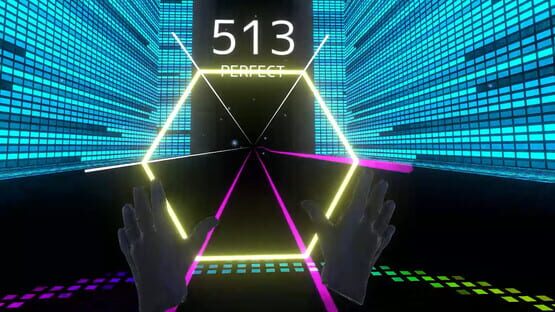

Resonark X
"RESOANRK X LITE" is available on the Oculus Store (Quest / App Lab)
Quest2(90Hz) and VRM linkage function are also supported.
Enjoy this new VR rhythm game that uses both hands!
This title is currently available on App Lab.
Please search for "RESONARK X LITE" (exact match) in the Oculus Store, or via the link below.
https://www.oculus.com/experiences/quest/3405379359561787/
As a function exclusive to the Oculus version, you can play games with your own avatar through DMM VR Connect ( https://connect.vrlab.dmm.com ).
Please register your VRM to your account beforehand, and then connect it from within the game.
RESONARK X version 1.4 "Beginning of Fest" Release Notes
In this update, we've added new songs and made some functional improvements.
[Added songs/difficulty levels]
In this update, we've added new songs and improved functionality.
The following 7 songs (x 3 difficulty levels) have been added.
* Heroes(game ver)/ Zpinkpong
* P.N.R. / はがね
* Tune your bass to ours / Ryo Arue
* The Shirushi of Untravellers / DUALYS(DRIVE.+yuugen6)
* Chase the shadow(2021 rework)/ 影虎。
* Imagination / WiredLain
* Xenophobia - Resonark Edit / Tatsh
Added difficulty levels for the following songs.
* Tutorial / Noshi [Advanced, Nightmare]
[VR Mode]
* The sound effects can now be turned on or off. The sound effects can now be turned on or off in the "In-game SE" section of the Play Preparation scene.
* More variations of clap operations.
* When the "Clap Type" is set to "GRIP" on the Play Preparation scene, you can clap by holding the grips of both hands (GrabGrip buttons).
* When the "Clap Type" is set to "DIST", the clap operations can be controlled by the distance between the two hands.
* Camera work behavior has been added and fixed.
[Both modes]
* The background of the performance scene has been added.
RESONARK X version 1.3 "Submarine Pt.3"
This update includes the addition of the "VRM linking function" in VR mode.
[Track additions]
The following 5 songs (3 difficulty levels) have been added. A total of 28 songs can be played.
- Aragami / xi
- conflict / siromaru+cranky
- Join / Tatsh feat.musica
- Voiceless Mind / musica
- PEKO PEKO BATTLE / yuugen6
[VR Mode enhancement]
Added the ability to link to VRM. Currently, it supports calling from local files and calling in cooperation with VRoid Hub ( https://hub.vroid.com/ ).
The VRM integration screen and various settings have been added. It is now possible to change the size of all the models in VR mode including the VRM model at once.
You can now change the angle of the camera that relays the performance scene in VR mode to the desktop screen.
You can select one of the following: a camera that projects the same position as the HMD, fixed cameras (two types), or an auto camera.
You can also choose whether or not to display the score panel.