you can now adjust the games difficulty in the settings.
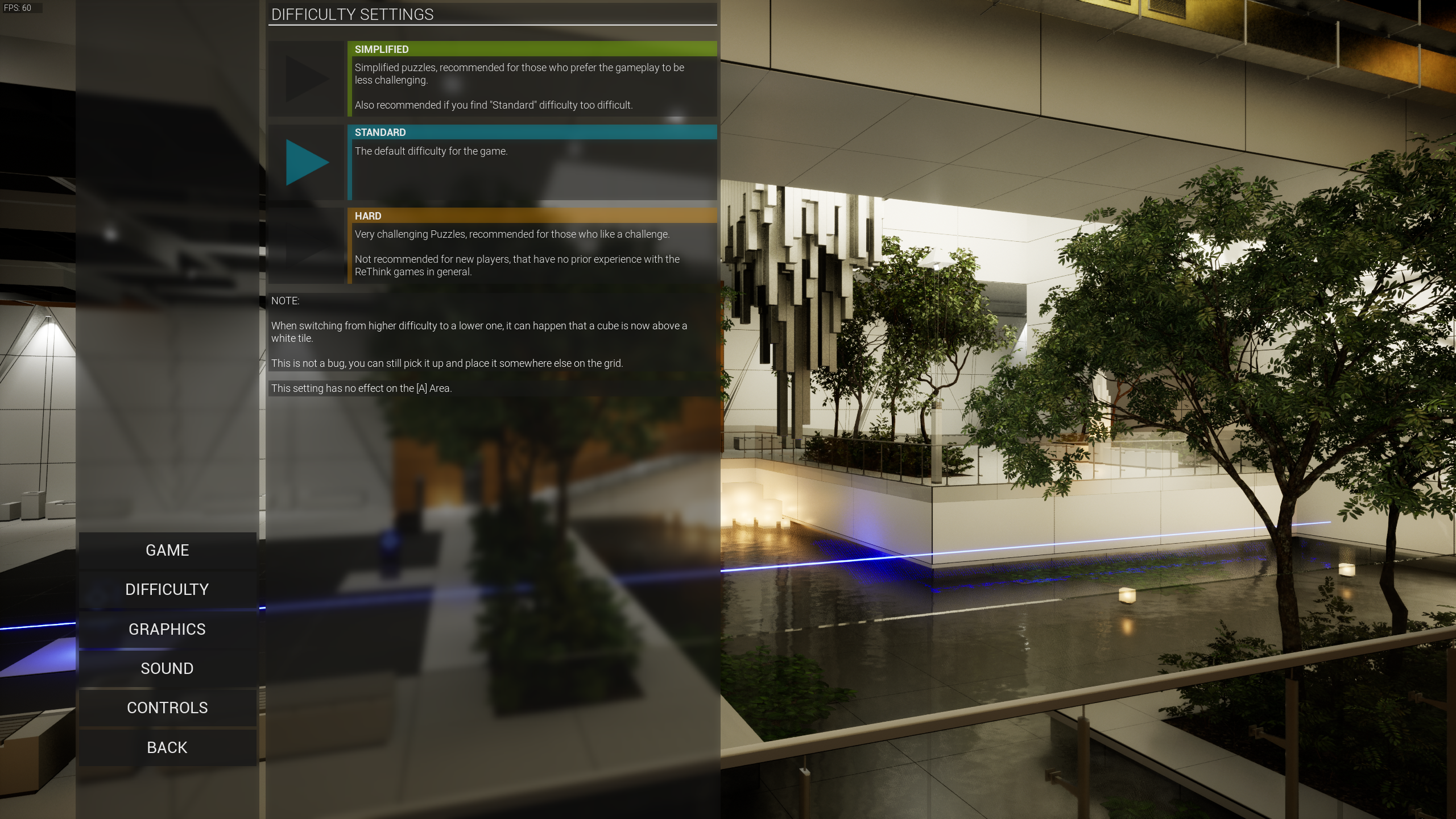
The options can be found within the settings menu, and look like this:
The game will default to the "Standard" difficulty, but can be changed to any other setting whenever you want.
These settings only affect the B,C,D,E areas. The game will show a Note (like the other tutorials) about the difficulty settings when entering the B area.
Here is how the 3 settings look on a smaller puzzle:
[Hard] is as it was prior to this patch, with every tile accesible:
[Standard] removes some tiles to place cubes on, removing a lot of possibilities for non working solutions: [Simplified] reduces the accessible tiles to the ones necessary for the default solution (the one inteded by me), with some additional tiles. There are a few puzzles that did not get any changes with difficulty, since they already had very few tiles to begin with (mainly 2 in the B area) - there simply was nothing to make it simpler.
If you change difficulty from a higher to a lower setting, it may happen that a cube then is on a white tile - this is not a bug! You can move the cube from its position like you always could, but not back onto the white tile:
This Update is a compromise, it isnt perfect, but it aims to give everyone what they need. No solution was nerfed, and everyone can still access the game as it was when it launched, it just defaults to a more digestable difficulty now.
This Update also adds a few "shortcuts" to certain puzzles that had some waiting time in the past, until things rotated back into place.
Difficulty Update (soon)
Hello,
I have good news for everyon who got stuck in the game, or found it too difficult in general.
Later this week, there will be a patch that adds a difficulty option to the game, which you can change at any time.
Important: I did NOT nerf anything, or change any solution - everything is still exactly the same.
So, how does it work?
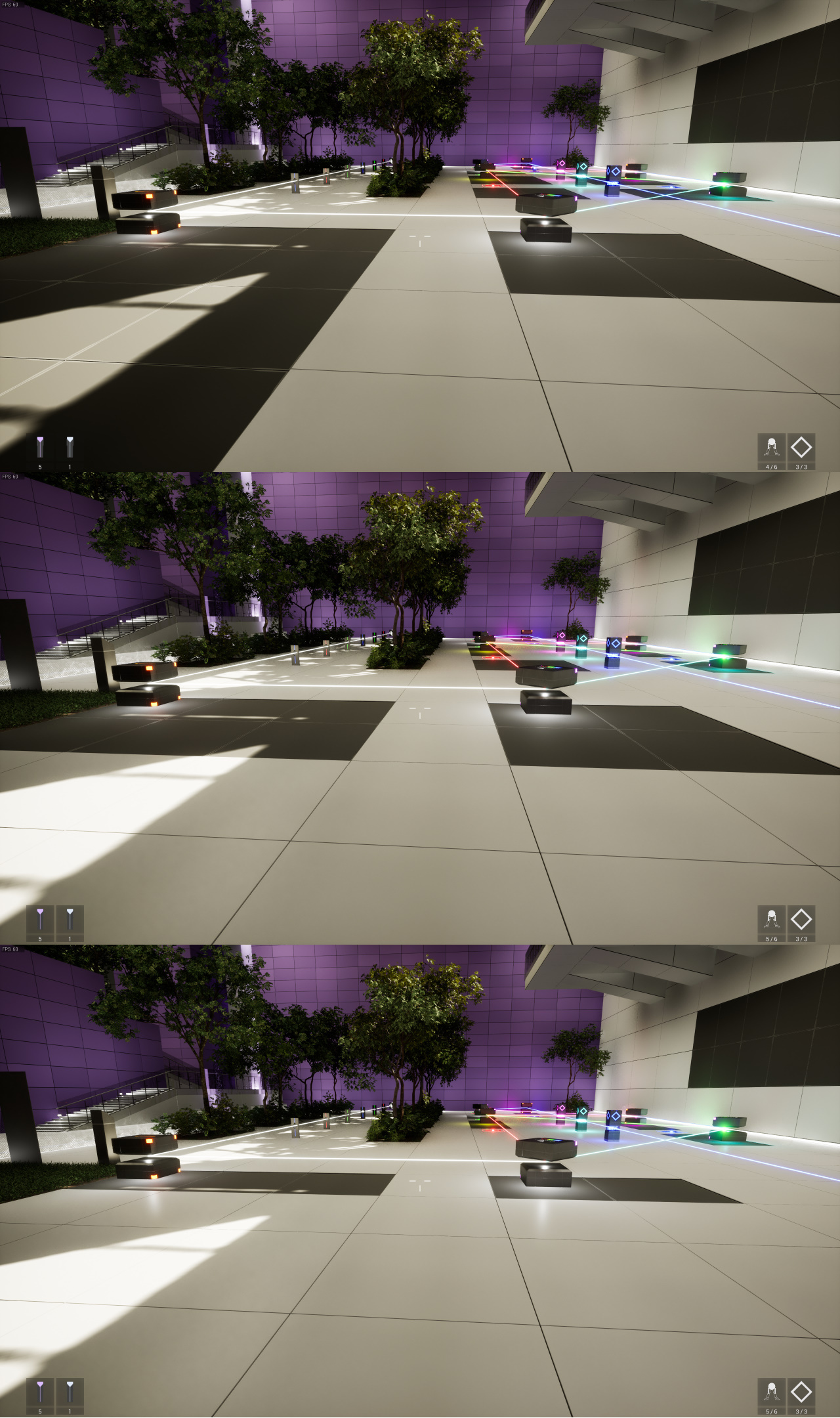
Depending on the chosen Difficulty (Normal, Hard, Simplified), the game will hide tiles that are not needed for the intended solution. (The game will default to "Normal", and ask about difficulty when entering the [B] Area.)
It will look like this (Top: Hard, Mid: Normal, Bottom: Simplified:
All this will do, is reduce the amount of possible "missplaced cubes".
It will not reset any existing puzzle-solution, but a cube may be on a white tile after the patch. That is no issue though, since you can still grab it and place it somewhere else.
This update will not interfere with savegames etc, the difficulty is saved seperately.
Upcoming Update - New Content, better Performance, QoL improvements etc.
Hello,
I dont have that much to show currently, since it will take a bit more time until I get the update done, but it will come with the following improvements/additions in addition to the ones already made in previous patches. (PS: No, the game is not "broken" or anything like that, I just found ways to improve it with relatively little effort.)
Upcoming changes (planned):
- An additional Section between B and C, to improve the transition from Tutorial to "actual Puzzles", especially for new players.
- Performance improvements regarding the GameThread, which will bring somewhere between 25% and 92% more FPS in situations where you are limited by the GameThread. (This also has a small effect on the RenderThread, therefore in general slightly increasing FPS even in situations where the GameThread is not the limiting factor.) NOTE: This will have no (noticable) impact if you are heavily limited by your graphics card.)
- Additional Puzzles in each area that will act as "buffer" and allow you to skip 2 puzzles per area and still progress through the game, by providing more Keys than you actually need. (to prevent people getting stuck because they cant solve 1 of 21 puzzles in an area.)
- Additional (optional!) difficult puzzles at the end, for those who solved all previous puzzles and have the excess keys from previous areas.
- "Shortcuts" in certain puzzles to reduce the wait at the end. (Specifically: puzzles that take quite a bit of time to change states.)
- New Fences that are more visible than the current ones (see image below)
When? This year, I expect, but certainly not before Christmas.
Thats all for now, more on this once I actually have something to show besides raw numbers and Fences. While speaking of fences, here are some fences:
Regarding the Performance IMprovements in GameThread (CPU) limited situations:
Release, if you find bugs... please report them
Hello,
as the title already implies, I just "pressed the button" and made the game playable for everyone.
If you find bugs, please report them, so that they can be fixed. (I will be here for the next ~16 hours now and observing whats going on.
Have a nice day.
Release moved by 1 day, to tomorrow (November 1st)
Hello,
first of all, I want to apologise for the inconvenience caused, but let me explain why.
I have now been testing stuff, and fixing small bugs for the last 16 hours because I underestimated the actual Size of my own game. (Yes, I know, it sounds stupid, but the game is huge... not just "20 puzzles more" in comparison to the previous one.)
Technically, I could rush it now... but you deserve better than that, which is why I am giving myself another day, allthough I am aware that this will annoy some people. (I am really sorry about it, but I think you prefer a less rushed game :P)
Given that the game also uses a "new" Engine (UE5) I am double-checking everything... and its worth it, I still found a few bugs that UE5 caused and implemented workarounds. (nothing big, but sometimes UE5 just does weird things.)
The game itself is fine, but I also dont want to be exhausted when I press the release button... when its actually important that I am "there" and able to fix possible issues quickly.
Have a nice day, and again, I am sorry - I didnt plan it like that.
PS: If you are wondering "how big it is", here is a hint: ReThink 3 fits into this game multiple times.
RTX 4090, 12vhpwr - this is important.
Before I get into Details, let me make one thing very clear:
This is not the fault of the game (it can happen on any! game), it is solely nvidias negligence in quality control that is causing the issues that force me to write what you are currently reading... believe me, I would rather not have to write this.
So, Now that I got that out of the way, time to explain what is going on, for those that are not already aware of it.
Issue:
The nvidia supplied 12vhpwr Adapter that comes with every RTX 4090, can (under certain circumstances, which arent really known yet) melt itself, just by playing games. (depending on when this is noticed, the amount of damage can vary from "almost none" to "you need to RMA your RTX 4090".)
You can find (some, by far not all) reports of this happening here: https://www.reddit.com/r/nvidia/comments/ydh1mh/16_pins_adapter_megathread/ https://www.reddit.com/r/nvidia/
Why this is relevant to ReThink 4:
Because the game contains optional rendering features (like: Software Raytraced fully dynamic Global Illumination) that can be enabled by Players. Obviously, a RTX 4090 can run this absolutely fine, even at 4k60 (based on my calculations/expectations), but it will push the GPU close to its theoretical limit, if not against it.
Most games that are currently released are incapable of actually utilizing a RTX 4090 properly, but ReThink 4 can do that, depending on Resolution and if VSync is disabled or not.
This obviously means, that (if everything is turned on, and on higher resolutions like 4k..) a RTX 4090 will run close or at its power-limit of at least 450W... which, if you happen to have one of the faulty cables... will melt that thing quickly.
I am even more concerned about overclocked RTX 4090s that have a theoretical powerlimit of 585W, since the power-slider goes to 130% from what I know... obviously turning any faulty cable into a molten mess.
The "Fix":
1: If you have a modular power supply from a known manufacturer (like: be quiet!, Corsair, etc.), they should already be selling proper connectors for a few bucks, so that you dont need to use the nvidia supplied adapter. (This is the best option available.)
2: If you dont have a modular power supply, then replace the adapter or wait for whatever nvidia will do with them - probably a recall, if I had to guess. Also: do NOT run the game at maxed out settings in 4K or even 1440p with VSync disabled, until you got a replacement for the adapter.
3: If you decide to ignore my warning, then dont let the game run unattended on your PC as long as you are using an nvidia supplied 12vhpwr-adapter!
Notable things:
- Just because the Connector looks "fine" from the outside, doesnt mean that the inside didnt already start melting - see Reddit for plenty of images of that.
- This ONLY (as far as I know!) affects the nvidia supplied Adapters, the ones that come with a RTX 4090, the ones that were delivered with RTX 3090 Ti cards are fine!
- AMD is not affected at all, and their new cards arent using the connector, according to AMD.
- Older nvidia cards are not affected either, since they dont use 12vhpwr.
- Intel isnt affected either, as they too are not using 12vhpwr.
- I will NOT take any responsibility for anyone ignoring this and then claiming that ReThink 4 melted their connector, it is not the games fault.
Closing Words:
I am really annoyed that I have to write this, thanks nvidia... but its better to be safe than sorry.
The game is not at fault for this, it has been running for hundreds of hours on different Graphics cards, drivers etc. without any issues. (To name some: 1070 Ti, 1080, 1080 Ti, 6700XT, 6900XT, Vega 6)
There is no issue whatsoever with "what the game does", it just so happens to be one of the first games (if not the first, if we ignore tech-demos) that utilizes the new Technology that is provided by Unreal Engine 5.
I expect nvidia to do *something* within the next days, probably a replacement of all adapters - a recall..... but so far, they have been rather silent on the issue.
So, I am done here, have a nice day, go play something nice.
Let's talk about Performance
Hello,
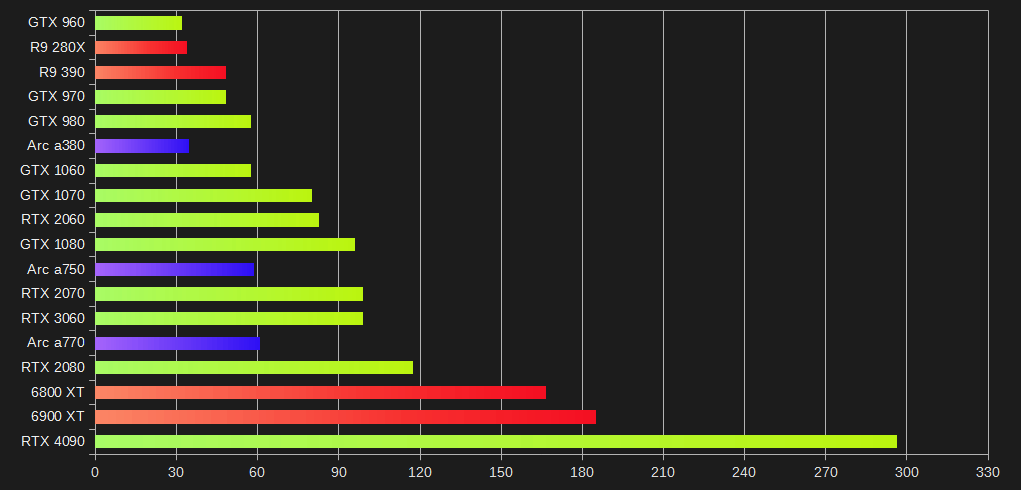
Since I now have data on how Intels GPUs perform in UE5, I can finally provide a good overview on how the game should perform.
For transparency reasons: The Data I am using comes from Techpowerups GPU database, Benchmarks for other Unreal Engine games, and the Review for the a750 and a770 from JayzTwoCents.
The baseline was my own GPU, a 6900XT, everything else is calculated based on percentages - therefore are estimates!.
The final performance obviously depends on your system configuration, Temperatures, Drivers, etc. so dont take them as "written in stone".
Intel Graphics cards are put in "where they should be", based on performance in other games, but they underperform massively in UE5, judging by the Benchmarks I have seen. (Intel needs to fix the drivers, nothing I can do here.)
Benchmarks are for 1080p. If you cant find your own Graphics card, use whatever is comparable. High End Cards will be bottlenecked by your CPU at lower settings, the ~300 FPS of a 4090 are theoretical.
The shown numbers are pretty much worst case, I specifically have chosen a place in the game that has a lot of trees and foliage in view, most of the time performance is much better.
Lowest Settings:
Just as the previous games, this one should do fine with a GTX 960 / R9 280X for minimum requirements. Of course, technically it is possible to run the game at lower resolution and/or resolution scaling and maybe get away with a graphics card that is even slower than the aforementioned ones.
Old highest Settings:
This is the same setting as previous games had as maximum, therefore the performance is not much different, aside from the impact the larger maps have. With minor adjustments the game should run at 60fps just fine. The older nvidia cards do not perform very well under DX12, this is why they are a bit lower than one would expect. (Tested it first hand on a 1070 Ti)
Highest possible Settings:
These Settings are meant for current high end and future graphics cards, but the visual impact is big. 1080 or higher can run these settings at ~30 fps (my old 1070 Ti could too, so it should be fine.) CPU also is an important factor here, since there is a big impact there too, so there will be differences based on the CPU being used, even if the Graphics card is the same.
These settings are optional, no one is forced to use them, the game will look like the previous games if disabled.
Everyone also gets Temporal Super Resolution by default now, this replaces AntiAliasing and is already included in the Performance numbers.
Conclusion:
As promised over a year ago, the game still runs "just fine" on old hardware with pretty much zero changes to system requirements. (based on my estimates, which are based on real world data.)
That said, I do not recommend using the old AMD cards, since they were "dropped" in terms of support by AMD, and similar will be happening to the 960 etc. for nvidia in the foreseeable future.
The game, or better: the engine... also does not run on anything older than the "Maxwell" architecture from nvidia (GCN for AMD), which is the reason why I have chosen a 960 for system requirements instead of a 780 etc. Given the age of these cards this should not be an issue anyway, but I want to be open about it - this is nothing I could change.
I also noticed that the game will tell you, if a driver has "known Problems". This does not stop you from using it, but whatever problem the driver has with UE5 might be observed. (mostly older drivers, when UE5 was still new.)
Some of the smaller improvements/changes.
Hello,
today I dont have anything too special, just 3 short videos of some of the changes/additions etc. I have mentioned in the past.
Aside from that, since some people were concerned about the game, these videos show the game as it is right now (when writing this).
Important: Please do not use the FPS-Counter in the top left as an indication of "how it runs on low end hardware", since the game still contains the same settings that previous games had, with similar performance. (The graphics you see here are optional, not mandatory.)
I will talk more about performance and how everything scales closer to release, but its fine.
Everything is still unfinished, I am aware of some visual issues in some of the videos (too dark trees, missing decoration etc.)
As I already said in the past: I took every feature from previous games (RT and RTE) that was not stupid, and put it into the game, two of these are shown off here. To be more precise: The rotating walls/floor-thing comes from RTE2, while the flippable walls originally were in RT2. (but there is more, I just picked these two, for now.)
The second video shows two things:
First part: How the cubes with two lasers work now, and the additional markings on the tiles for situations where you cant see the bottom half. All cubes have these, the Reflectors dont need them for obvious reasons.
Second part: I changed the "thing" that is used to select/deselct/move cubes around in a way, so that it becomes taller/more visible the further away it is from you. I did this, so that it is easier to determine the precise location on walls and in larger puzzles.
Third video shows:
First part: just a quick overview of a part of one of the earlier maps, nothing special. I put this in, to show that the Screenshots etc. are real, not some photoshopped/pre-rendered thing which is impossible to run in realtime.
Second half: The new Teleporters, since the game needs to change maps sometimes. (even though, maps are already quite large now.) Please ignore the "hiccup" after teleporting, this is a known UE5-issue it seems, it happens when UE5 is done compiling the shaders it needs (for some reason, DX12 does that at runtime) - improvements to this are on the UE-roadmap for 5.1. (which I hope to come out before the game is released, otherwise I will update it after release.)
Game canceled, no more ReThink games.
Hello,
as the title already suggests, I decided to stop making "ReThink" games today.
I do lack the skills and capabilities that are needed to make this game work (Its Engine issues, as usual.), and financially I also cant take the burden anymore.
Aside from that, I lost all joy in making these, there is only pain and suffering now - which simply is not a good foundation to create something.
Thats it, I dont know what the next game will be, only that it wont be a ReThink.
That said, I want to thank everyone who played these games in the past.
Have a nice day, and thank you.
Let's talk about some of the changes.
Hello,
so, in the past I mentioned that quite a few things have changed in comparison to the previous game (RT3), but did never really show what that meant. That changes today.
I will go through the things that got changed/removed and how they are replaced/enhanced, one after another.
Just keep in mind: everything below is from an unfinished game, I often leave things in a visually unfinished state as long as it works from a technical point of view for a long time, since I dont need more to build stuff.
Important: None of these changes/additions are made to dumb down the game, this is just to get rid of duplicate things and unnecessary clutter. (If anything, the new things allow me to create even more complex things.)
Cubes:
Removed cubes (in comparison to all previous games, not just RT3):
- 3-way cube, since the same functionality can now be achieved by using two 2-way cubes
- 3-way-cube (switchable), because it never aligned well with the 2-way-cubes (switchable) in terms of switching between directions. There also is a better replacement now, more on that further down.)
- "portal cubes" (white in RT3), due to them causing way too many problems when rotatable etc. (might replace them with something static that has similar functionality, but have not yet done it.)
Changed cubes:
- all cubes with 2 lasers: can now redirect lasers into any direction, not limited to 90 degrees (45 to the left/right) anymore.
- "programmable cube" (the one where you can select where which color goes): Is a 2 laser cube now, was previously 3. The "splitting" now works subtractive, which means: The color you split away is not part of the leftover color anymore. (Example: You can not have Yellow on one Side and Magenta on the other anymore, it would be Yellow and Blue now.)
This is more logical than having a weird point in the puzzle where colors appear out of nowhere
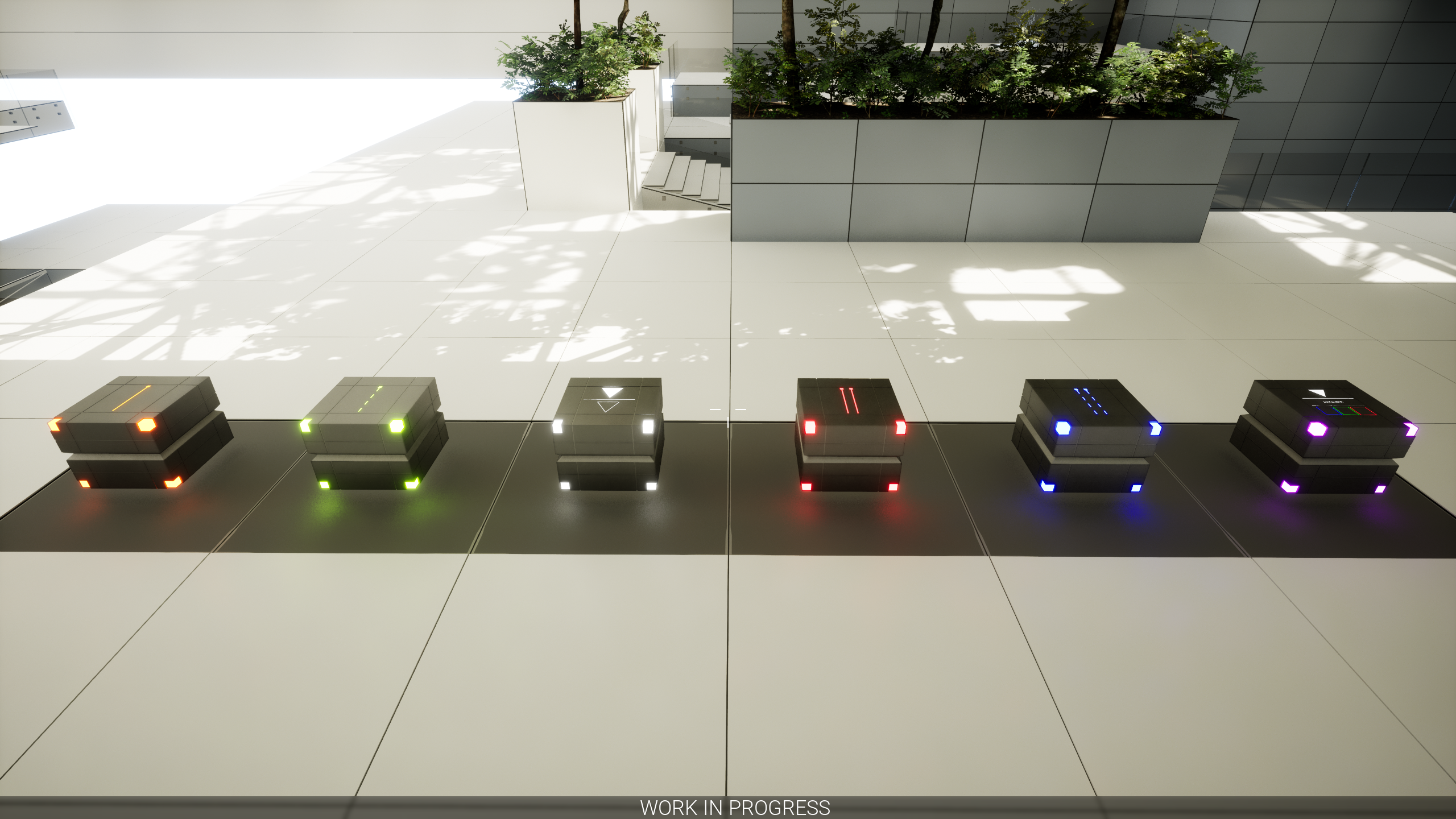
So, these are the cubes that will be in the game (please ignore the hole in the wall, its just a random spot where I dropped the cube, that was unfinished.):
From left to right: - Orange (same as it always has been, single laser redirector) - Green (same as Orange, but can be switched on/off, replaces the numbers on top of yellow cubes from RT3) - White (like orange cubes, but inverts the color it gets hit with. Example: Red -> Cyan, Yellow -> Blue.) - Red (the usual "splitter/doubler" for lasers, but it can now point in any direction for each laser.) - Blue (same as it always has been, a switchable red cube, can also be rotated in any direction independently) - Magenta (2 lasers like the red cubes, independently rotatable, programmable in terms of how a laser will be split up. Example: Incoming Color: White -> Outgoing Color: Top: Blue, Bottom: Yellow.)
The cubes are pretty much controlled like they always were: - single redirecting cubes are rotated by scrolling with the mousewheel (can obviously be changed.) - double redirecting cubes rotate the top half with the mousewheel, and the bottom half with SHIFT+Mousewheel.
Yes, for People who are used to the previous games (especially the ones who played all of the games :P) this will be something to get used to, but after a while "it just works" - at least that was my experience when I had to get used to this change.
There will also be optional indicators that you can enable to make the directions of each half more visible, if the already asymmetrical cube design isnt enough.
"Targets":
Removed symbols: - Circle - Triangle
The additional Symbols only were there because of the switchable cubes, but I have a better replacement now, which means that they got obsoloete. Square and Cross are still there, since they make sense in a lot of puzzles and are useful during the tutorial.
Changes: "Targets" can now be stacked, which means that the same spot in the puzzle can be occupied by two different colors/symbols at the same time.
This really helps with the puzzle size, since many of the previously needed targets are now combined, which on the other side makes things easier to understand/overlook.
In addition to this, solutions are not as "visible" at first glance anymore as previous, because the typical "rows of targets" are gone - mostly.
Example (this puzzle would have been a lot larger in previous games, but in the end just waste a lot of space.):
Additional Targets:
As I already said, I axed the 3-way switchable cubes and replaced them with something else.
But what is it? A new target-type in combination with movable puzzle-parts, which are player-controlled like the switchable cubes.
What does it look like? Like this (from an unfinished Puzzle! It also shows the independent rotation of cube-halves.):
As you can see in the above image, there are 4 different solutions at the same time, each of them being needed for something, just as the now removed symbols/cubes previously.
Even better, if a switchable Cube would be in such a puzzle, there would be 8 total solutions/options to solve, more than the 3-way switchable cubes ever could achieve.
These new Target-Tiles can (and are) also being used to move around puzzle-parts etc. since the pattern can also be used as some kind of "address" where something should go, and so on.
PS: Dont worry, you can control movable things with the press of a button on your keyboard, no more signs, like RT3 had them.
Other changes:
Obviously, I did not stop there with changes, which means that there is some more I want to show off now.
"Energy Fields":
All of the previous games had these "Energy Fields" to keep things in a puzzle (especially RTE-Games), but I always found it annoying that they were so visually prominent and usually came with a lot of glass-walls etc.
These "energy fields" are now just on the floor, which removes a lot of previously needed walls from puzzles and also allows me to morea easily seperate Puzzles into different parts. In addition to that, they are visually far less distracting than previous version, and there are also a lot less glass walls to run into :P
Puzzle-Layout Obviously, cubes that are meant to be used in a puzzle have to be somewhere, so that they can be accessed by players.
In previous games, the cubes were just somewhere on the "grid" which also was used for the solution, I changed that for many of the puzzles - especially the more difficult ones.
Cubes are now (often, not always) in a seperate Area that is logically disconnected from the actual puzzle, so that there is a place where they can be stored without interfering with the unfinished solution.
Both of these changes currently look like this (just an example, game is still unfinished.):
Just some rambling:
With RT4, I wanted to look at the problems/issues that earlier games had in terms of control, puzzles, design etc. and improve on this. When playing RT1/2/3 again, I noticed a lot of things which I wanted to get rid of for this game, therefore all of these changes at once.
There are also things in the game which are completely new to the series (have not shown/explained these yet, but sometimes you can spot something unknown in a screenshot :P) and there are plenty of small/big experiments in the game itself, like some of the puzzles.
RT4 wont suddenly fix all issues, but it should be a big step into the right direction. (Even if there will be some hiccups.)
So, enough of me blah-blah-ing, lets end this with a random screenshot I took, just looking up somewhere: