Behind the Scenes of the 2021 FIRST Global RoboCo Challenge
Howdy, RoboEngineers!
Last week, we showcased some of our funniest RoboCo glitches, bugs, and bloopers! This week, we’re taking an equally fun look behind-the-scenes of the 2021 FIRST Global® RoboCo Challenge (FGRC21)!
Our collaboration with the world-renowned FIRST Global was Filament Games’ biggest undertaking in recent memory. Three livestreams, three unique challenges levels, and two months of social content take a lot of planning and hard work to pull off and we never could’ve done it without the combined efforts of our friends over at FIRST Global as well as our own production and development teams.
Design is Everything
You can’t make a compelling video or website without a fantastic designer. Luckily, we have one in the form of Tracey Reinke, Filament Games’ web and graphic designer. Originally an engineer, Tracey started at Filament in 2019 after she switched to a career in design. Since then, she’s done everything from rebranding Filament Games’ website to making Discord emojis to creating cool motion graphics for social media. With FGRC21 specifically, she was in charge of designing the look of the website as well as designing the logo and helping our video producer, Josh Bartels, with editing the videos. Here’s Tracey’s account of how exactly she went about doing all that design work:
When it came to designing the logo for the challenge, I wanted to make sure it was an image that encapsulated both FIRST Global and RoboCo’s brands as well as invoked the feel of a competitive event. To do this, I first took the badge shape and ribbon banners that are commonplace in competitive events and combined it with FIRST Global’s font. I then added in some RoboCo charm by covering the logo in metal plating and adding in the RoboCo arm from RoboCo’s logo.
I also took a lot of inspiration from Twitch when designing the layout of the livestreams but used RoboCo colors and font to make everything look unique. One of the biggest things both Josh Bartels and I wanted to make sure of was that the visuals and narrative flowed seamlessly, so we looked to sports content like the Olympics and even ESPN broadcasts to help figure out the tone and transition elements we wanted. I also made sure that, when designing the thumbnails for each video, that I used elements specific to each challenge (i.e. a robot holding a sandwich for the Qualifiers thumbnail) to further differentiate segments of the competition from one another.
However, probably the biggest challenge and most important part of the design process was figuring out how to showcase each team’s robots in an exciting and individualistic way. To do this, Josh and I came up with a design in After Effects that includes the team’s robot, its name, their country, and their country’s flag.
What’s interesting about this design in particular is that we had to have the RoboCo development team build a green screen room for us! Once we received the robot file from FIRST Global, I would download the file, import the robot into RoboCo and then take it into this green screen room where it would automatically rotate. I would then import the captured clip into After Effects, add the robot name and the team name, and add the team’s flag to the background to give it that personalized, awesome look!
Putting The Designs in Motion
[previewyoutube="NQTpX3kFiGA;full"]
On top of designing a new logo and website, we also had to put together three livestreams. The mastermind behind those livestreams is Josh Bartels, a name you may have heard on this devblog before. Not only does Josh produce all the videos and music for RoboCo, he also produces music and videos for all the other games we have going on at Filament Games! Having just celebrated his ten year anniversary at the company this year, we’re convinced that there isn’t a single video or audio challenge that Josh can’t tackle and, what’s even more impressive, is that Josh produced, edited, and composed all the music for FGRC21 while also taking care of a newborn baby!
To learn more about how Josh goes about making music specifically, we highly encourage you to check out his breakdown below of how he composed FGRC21’s main theme. You can also check out the YouTube playlist containing all of FGRC21’s livestreams here.
[previewyoutube="fviqppQjNSw;full"]
Getting RoboCo Ready
In addition to all the work done by Tracey and Josh, RoboCo’s development team also had to get the game ready for deployment. Not only did they add a first pass on robot painting and QA test the game for this milestone, they also had to propose a scoring system for the FGRC21 that was balanced, aligned to FIRST Global standards, and easy-to-understand. To speak more on how that scoring system came to be, here’s devblog staple and Lead Game Designer Luke Jayapalan:
We started from the elements that the game already scores: the main and sub objectives central to each challenge, as well as the time the robot took to complete the objectives, the total cost of the parts used to build that robot, and a penalty deduction for any property damage or unhappy humans. We left this score unchanged so that participants could reference their in-game score and apply this toward their FGRC21 score.
We expected participants in the FGRC21 would want to really show off their skills and make more versatile bots than might happen in a typical single-player setting. So we decided to award additional points for completing the secret objectives in each challenge. In the single-player game, secrets are fun things you can discover that unlock cosmetic rewards, but they aren't necessarily things you'd want to do over and over again. So we left them out of the single-player score to avoid creating that expectation and making the gameplay too grindy. But for FGRC21, it made more sense to include them, so we started with the participant's in-game score, and we added 500 points for each secret completed in the same run.
We also knew that evaluating robots in a purely quantitative way will never yield as interesting a result as bringing in some qualitative measures. So FIRST Global provided a panel of judges who could score each bot up to 2500 points in each of three categories: Mechanics, Innovation, and Aesthetics. These scores helped reward important qualities that are difficult for a computer to measure like, "Has significant effort been applied to the robot's aesthetics with remarkable results?"
The overall scoring model worked well for FGRC21 and supported a good range of strategies. But we learned for next time that it probably wasn't that important to stick to the single-player mode's time-to-score conversion. When we do this again, we're excited to give all participants the same time limit (similar to how FIRST® LEGO® League is run), because then we can put replays side-by-side with each other and make the broadcast even more exciting!
And that’s just a small look into everything that went on behind-the-scenes of FGRC21! In addition to Tracey, Josh, and RoboCo development team, we also have to give a huge round of applause to Filament Games’ Dan White, Brandon Pittser, Alex Stone, and Jennifer Javornik for organizing everything as well as FIRST Global’s Stephanie Slezycki and Khadijah Bagais for their enormous contributions to designing and running the event, facilitating our conversations with participants, and expanding our social media presence. We’re so excited to produce more competitions in the future and can’t wait to get more young people involved in the world of digital robotics!
If you want the chance to be a part of the next FIRST Global RoboCo Challenge, make sure to check our FIRST Global’s website https://first.global/ to learn more. If you missed FGRC21 and are curious about the results, visit our website https://www.fgrc21.roboco.co/ or read our recap of the event here. Next week, Luke Jayapalan returns to talk about the cello and violin duet in our Silicon Sonata challenge, so get your cello bow ready!
Last week, we revealed some new RoboCo cosmetics, including a platypus bill, a giant robot eye, and a cardboard box. However, while we were making the robots for last week's blog, we came across some bugs crawling around in the warehouse. These aren’t your average, run-of-the-mile ants or mosquitoes though. No, they are the digital kind and their infestation has driven RoboCo topsy turvy!
From The 2021 FIRST Global RoboCo Challenge, to RoboCo’s development team to our very own Discord, here are some of the funniest glitches, bugs, and bloopers we’ve ever encountered in the game so far!
We hope you enjoyed this funny devblog and have a fantastic April Fool’s! Let us know what glitch, bug, or blooper you found the funniest in the comments below and in our Discord. Next week, we’re going behind-the-scenes of The 2021 FIRST Global RoboCo Challenge with Josh Bartels, Tracey Reinke, and Luke Jayapalan to learn more about all the work and science that went into making this massive and first-of-its-kind event happen!
We hope you've been having a fantastic week and an excellent start to Spring (if you're in the northern hemisphere)! Last week, our VP of Marketing and RoboCo expert, Brandon Pittser, broke down RoboCo's exciting history from past to present. This week, we're keeping the excitement rolling by unveiling more new cosmetics for RoboCo.
Spoiling the Spoiler
Our first new cosmetic allows RoboMechanics to take their cars to a whole new level of cool! Whether you're building a monster truck, a sports car, a sedan, or a Formula 1 racer, the new spoiler accessory makes any car feel race-day ready!
Basically, I'm Very Small
Whoever said you couldn't make a robot out of a molehill? Christened "Little Guy" by the RoboCo dev team, this may be the cutest accessory RoboCo has ever produced and the most popular companion for both robots and humans alike!
What's in the Box?
We're not sure what to make of this accessory. Is it just a cardboard box? What happens when you look underneath it? I'm too scared to check, but maybe you can let me know later.
Straight Out of a Sci-Fiction Movie
Less of a single accessory and more of a collection, we've gathered some familiar science-fiction robot tropes and put them straight into RoboCo! This collection includes a modem face, breaker panel, radiator block, open gasket, compact rail, and cable relay. Trust me, robots covered in these cosmetics will make the aliens and space cowboys feel right at home!
I Spy with My Giant Eye
If Little Guy is one of the cutest cosmetics RoboCo has ever made, then this Giant Eye is one of the creepiest. Maybe it's the blinking? Perhaps it's the color? Whatever it is, a robot wearing this eye is a robot I don't want to mess with.
What's Venomous and Lays Eggs?
And our final cosmetic is nothing other than a Platypus Bill. However, venom secretion and the ability to lay eggs are sold separately.
And that's it for this week's devblog! Are there any other ideas for cosmetics you can think of? Let us know in the comments down below or on Discord. Next week, we found some bugs crawling around in our warehouse, and you wouldn’t believe what they’ve done to RoboCo!
As we gear up for our RoboCo Steam release later this year, I’m feeling a bit nostalgic. It’s been a long roboroad, friends. We started dreaming this dream all the way back in 2016 - a bygone era of Snapchats, athleisure wear, and fidget spinners. Now in our final year of pre-release development, I think it’s time we looked back on the many evolutions of RoboCo over the years. Without any further ado, here is a brief timeline of RoboCo history:
These were the first viable mass-produced consumer-level high-fidelity VR headsets on the market, unless you count the Virtual Boy, to which I say: fair point. Our working name for that early version of the game was RoboEngineers, because as an educational game developer par excellence, we naturally wanted to infuse the game with authentic STEM learning opportunities and real engineering design thinking.
Just like real engineers, we created a prototype and iterated extensively, starting with RoboCo’s pleasingly snappable parts, and moving on to stretching and resizing, active / edit modes, a laser pointer to help with VR precision, part detachment, joints, rods, motors, transmitters, and even some early robots.
We also experimented with some early audio and challenge courses, a concept which would later evolve into the challenge levels that constitute our campaign mode today.
November 2017 - December 2017
With a prototype in hand, we took the next natural step - pitching publishers! In preparation for the pitch sessions, we dialed in the game hook and the overall feel of the gameplay, experimented with different paradigms of play mechanics, and even started adding basic human characters and interactions. We were super excited to show off our game and find the perfect publisher!
Narrator: They did not find a publisher.
As it turned out, we were a bit early to VR for publishers - with a lack of mainstream consumer adoption, VR hardware still felt like too much of a gamble to invest substantially in VR content. Sometimes, an idea is just too visionary. But we were not deterred! As I mentioned earlier, our work was funded by a Phase 1 NSF SBIR grant, which means that we were eligible to apply for a Phase 2. Thanks to the herculean grant writing strength of Filament Games CEO Dan White, we successfully landed the second phase of the grant and moved on to creating a Desktop mode for RoboCo which would strengthen our publishing position and our offering for educators.
Phase 2: Making a Desktop & VR Prototype about Robotics
April 2018 - June 2018
During this phase, we started working on a Desktop mode, which involved translating our user interface to 2D and figuring out how to accommodate mouse and keyboard inputs - a massive departure from the previous VR controller input scheme.
We tested various aesthetic approaches, played with a few versions of IK legs, established a basic structure for challenges, and even experimented briefly with jumping human babies (which can be seen on the earliest posts of this very devblog) that have all since been moved to a safe daycare far, far away from RoboCo HQ.
June 2018 - September 2020
The NSF Phase 2 Funding started to kick in in June 2018, and this Phase was substantially longer than Phase I, so this development cycle lasted all the way into late 2020. During this time, we added more 3D artists, more engineers, and started to prototype our current set of challenges. We also picked a new brand name - RoboCo!
Our art style also really started to solidify at this point, with a special emphasis on bringing life, humor, and charming clumsiness to our human characters. This was accomplished in part by bringing more Rulescript into the experience, allowing us more granular control over human behaviors.
Content creators like ScrapMan, kAN Gaming, and Durf started playing with RoboCo and shared it with their audiences, and tbh we loved to see it. The building tool started to expand with more part manipulation abilities, and we experimented with different forms of challenge level scoring. During this phase, we also developed RoboCo’s iconic Bistro level, where over 1 million sandwiches have been served at varying degrees of service quality. This level formed the demo we brought for our first public-facing event: PAX 2019.
[previewyoutube="Z7O21nmVsWM;full"]
Our experience at PAX was incredible - countless cool people came through our booth to make countless cool robots, and we couldn’t be more pleased with the results. As mentioned, our demo had players playing the Bistro level, building a bot that could convey a sandwich from one side of a restaurant to another, but the way the player went about it was up to them. We saw clawbots, carts, cranes, and even one catapult! The creativity and ingenuity on display was really exciting – we designed the game to allow for lots of solutions to every challenge, and it was super satisfying to see players come up with ideas that we had never anticipated.
PAX also equipped us with two things to take back home to Wisconsin; namely, sore throats and a massive infusion of user feedback. In-booth input and surveys from players helped us refine our building tools, start experimenting with more part manipulation tools, and focus our efforts on the much-requested and badly-needed Undo feature! We also implemented a physics overhaul to bring greater fidelity to the physics-driven behavior of objects in the game, added more challenges, polished existing challenges, and started adding a ton of new art assets.
From here, we geared up for a Closed Alpha playtest in 2020. As part of our NSF funding, we’re required to do rigorous testing and research about the funded project, so that we can ensure we’re delivering on the educational outcomes we promised to the NSF! Working with our partner WestEd, we had hundreds of players from both K-12 schools and our Steam community run through the levels of the game, providing even more valuable feedback and confirming a lot of our design hypotheses. The Closed Alpha gave us the design ammunition we needed to update challenges, refactor our humans (known internally as the smartening), and solidify our Undo feature. We were basically ready to launch into Early Access at this point, but then something crazy happened…
Phase 3: Joining Forces with FIRST Robotics!
September 2020 - Present
Thanks to an introduction from our good friends at REV Robotics, we formed a collaboration with FIRST in early 2021 which extended and strengthened our development runway. In our original proposal to the NSF, we specifically mentioned that the digital robotics experience we envision is inspired by programs like FIRST, which is having a profound impact on young people, helping them launch positive career trajectories and make connections that will last a lifetime. To be collaborating with FIRST on RoboCo brings our vision full-circle: more than ever, we were positioned to bring digital robotics to people all around the world, with the credibility and prestige of the FIRST brand at our side. The collaboration with FIRST allowed us to add some key features that dramatically expand the game experience - namely, new scoring features around time and cost, a much-requested Programming feature, part painting to customize robot aesthetics, Steam workshop sharing, RoboRepair tutorials to introduce basic game concepts, and context and HUD tips that improve quality of life across the board.
The collaboration with FIRST also opened a lot of doors for us, and we’ll have much more to say on that soon. 👀 For a glimpse of the future where digital robotics facilitate exciting tournament-style competitions between real robotics teams, check out our FIRST Global RoboCo Challenge recap here.
That just about brings us up to date! Stay tuned as we get ready for our release later this year - we can’t wait to share what we’ve got in store.
And that’s it for this week’s devblog! What part of RoboCo’s history did you find the most interesting? Leave a comment down below or tell us about it on social media or within our Discord! Next week, we’re unveiling more new cosmetics for RoboCo (including one that belongs to a popular marsupial), so make sure to swing by next Friday for another entry!
Today, we're premiering the first episode of Check Out Our Robots!
Check out Our Robots is a brand new YouTube series that highlights some of the most incredible robots made across our community. From the 2021 FIRST Global RoboCo Competition to our development team to our very own Discord, these robots represent the greatest heights of engineering that can be achieved within our beloved sandbox robotics game. Make sure to check out the first episode below and let us know your thoughts in the comments or on social media!
As stated previously, we're also uploading Shorts to RoboCo's YouTube channel every Tuesday, Thursday, and Friday. Here are some of our most popular uploads!
[previewyoutube="Sf3FytVLF-c;full"]
[previewyoutube="hXYqRTW8QyU;full"]
[previewyoutube="XvV1vTan_Cc;full"]
These shorts, along with Check Out Our Robots, are just two examples of how RoboCo plans on upping its YouTube game this year. Make sure to subscribe so you don't miss out on other exciting series that we plan on releasing this year (including RoboCo Speedruns), as well as a new episode of Inside RoboCo!
And that's it for this week's devblog! What was your favorite robot from Check Out Our Robots? Are you excited about more RoboCo videos? Let us know on social media and Discord! Next week, we're taking a deep-dive into RoboCo's history courtesy of our stupendous VP of Marketing, Brandon Pittser! Trust me; you won't want to miss it!
Two weeks ago, we defined and talked about how excellent robot programming is. Last week, we revealed that Python was our coding language of choice. But how does one get their code from their script editor into RoboCo? Well, that's what today's devblog is all about. Here's a step-by-step guide to how to program your robot in RoboCo!
Step 1: Grab a Microcontroller
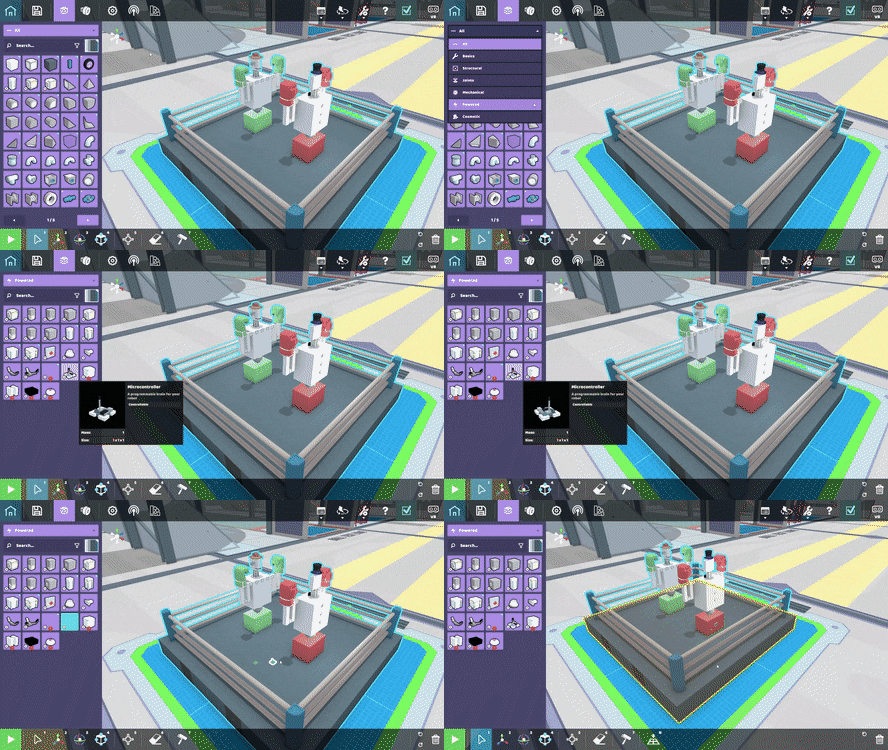
To open the robot programming main menu, you first need to add a microcontroller to your robot. A brand new part, the microcontroller is the "brain" of your robot. You can find this part in the Powered section of the Parts inventory.
Now that you've added the microcontroller to your robot, go to the Controls interface and select the part. That'll bring up a menu like the one below:
This is essentially the main menu for robot programming in RoboCo and is where you'll load and attach your code.
Step 2: Write a New Script or Load a Previous Script
Now that you've attached your microcontroller, we can go ahead and start adding in the code itself. To start, you have a couple of options.
Option 1: Add New Script
If you haven't written code for your robot already, you can create a new script. You'll have the option to name your code and then save it to the "Script Folder." The Script Folder is a new file management location separate from your robots folder where all your scripts for RoboCo live, thus making it super easy to reuse code across multiple robots.
The easiest way to access it is by clicking the "Open Script Folder" button in the microcontroller interface. You can also access it by going into File Explorer and following the path: This PC → Documents → my games → RoboCo → [Your Steam Username] → Scripts.
There are a variety of apps you can use to write this code. We recommend Visual Studio Code, but you can also use other applications like Notepad ++ and Sublime. If you decide to use Visual Studio Code, we recommend downloading the Python extension with it.
You'll use a custom API to talk to your robot, like asking a sensor what it detected or telling a motor to spin. To learn how to do this, you can access the API documentation by clicking the "API" button in the microcontroller interface.
Option 2: Load a Script
If you have already written code for your robot, you can load the code directly into RoboCo by clicking the "Load Button." That'll take you straight into your Script Folder, where you will select the desired code.
Step 3: Assign Your Ports
Once you've written your new code or loaded in your existing code, your interface should look like this:
We included a "Script Preview" so that you could easily check that your script matches what you expect after you load it in. When you edit and save a script in your external script editor, RoboCo will detect that the file changed and automatically update with the changes. This allows for quick iteration if you have RoboCo on one monitor and your script editor on another.
For your robot to function, you have to map and assign your ports to the necessary parts. These could include any controllable parts (motors, pistons, LED panels, lightbulbs, etc.) or our brand new sensors, which we will cover in a future dev blog!
You can either choose to map these parts automatically using the "Auto Assign" button or map them manually, like in the example below. This option is beneficial if you have multiple microcontrollers or if you want to limit parts to specific actions. You can do this by either selecting the part in the Controls Interface or by clicking on the part with the Select Tool on your robot.
Step 3.5: Check For Errors
In addition to a script preview, we also have an in-game debug message console! When you hit play, the game will begin executing code. If an error occurs while playing, a notification will appear. You’ll then be able to open up the Debug Console, allowing you to see the full error message as well as a history of errors.
The Debug Console also lets you filter to errors or print statements, clear the history, or set the game to Pause on Error. You can also copy the error and paste it into your script editor to investigate there. We hope it will make diagnosing problems and getting back to playing with your robot much easier!
Step 4: Let Your Robot Do Its Thing!
And after all that's said and done, it's time for your robot to do its thing!
[previewyoutube="EEeV55-GfU0;full"]
When you save your robot, you'll notice a little icon next to it like the one pictured below.
This is meant to show that it comes with Python coding. When you share your robot via Steam Workshop, it will be accompanied with any associated code. Not only will this allow players who have trouble with coding to experience full-blown robot programming, but it will also allow players to build on each other's code, eventually leading to super-robots that can solve any challenge thrown at them (or that's the dream anyway).
And that's it for this week's devblog! Was this a helpful guide? Are you excited about adding your Python code below? Let us know on social media and Discord! Next week, we're taking a break from programming and taking deep-dive into RoboCo's history courtesy of our stupendous VP of Marketing, Brandon Pittser! Trust me; you won't want to miss it!
Last week, we announced robot programming was coming to RoboCo and why we thought it was so cool. However, we didn’t reveal what programming language we decided to go with.
As you may have gathered from the title, Python is our language of choice. However, it wasn’t an easy decision. Today, we’re exploring what exactly went into that decision, including why why we decided to go with written code and why we went with Python over other popular languages like Java and C++.
Finding the Right Approach
As we began design on robot programming, we considered several options for how it could be done. We ultimately decided to start with support for written programming in the Python language. We hope to later extend this with an external Blockly helper tool that will provide a visual programming alternative.
But let's take a step back and see how we came to that conclusion. There are valid reasons why a game might use any of the options we considered below. In RoboCo's case, we aim to support both general gaming audiences and education-centric audiences like FIRST robotics teams, and we want to have a strong launch on Steam Early Access. Therefore, we evaluated our options by looking for the best overlap between those two audiences, by considering the user experience, and by aiming for the smartest use of development time.
Option 1: Node-Based Programming
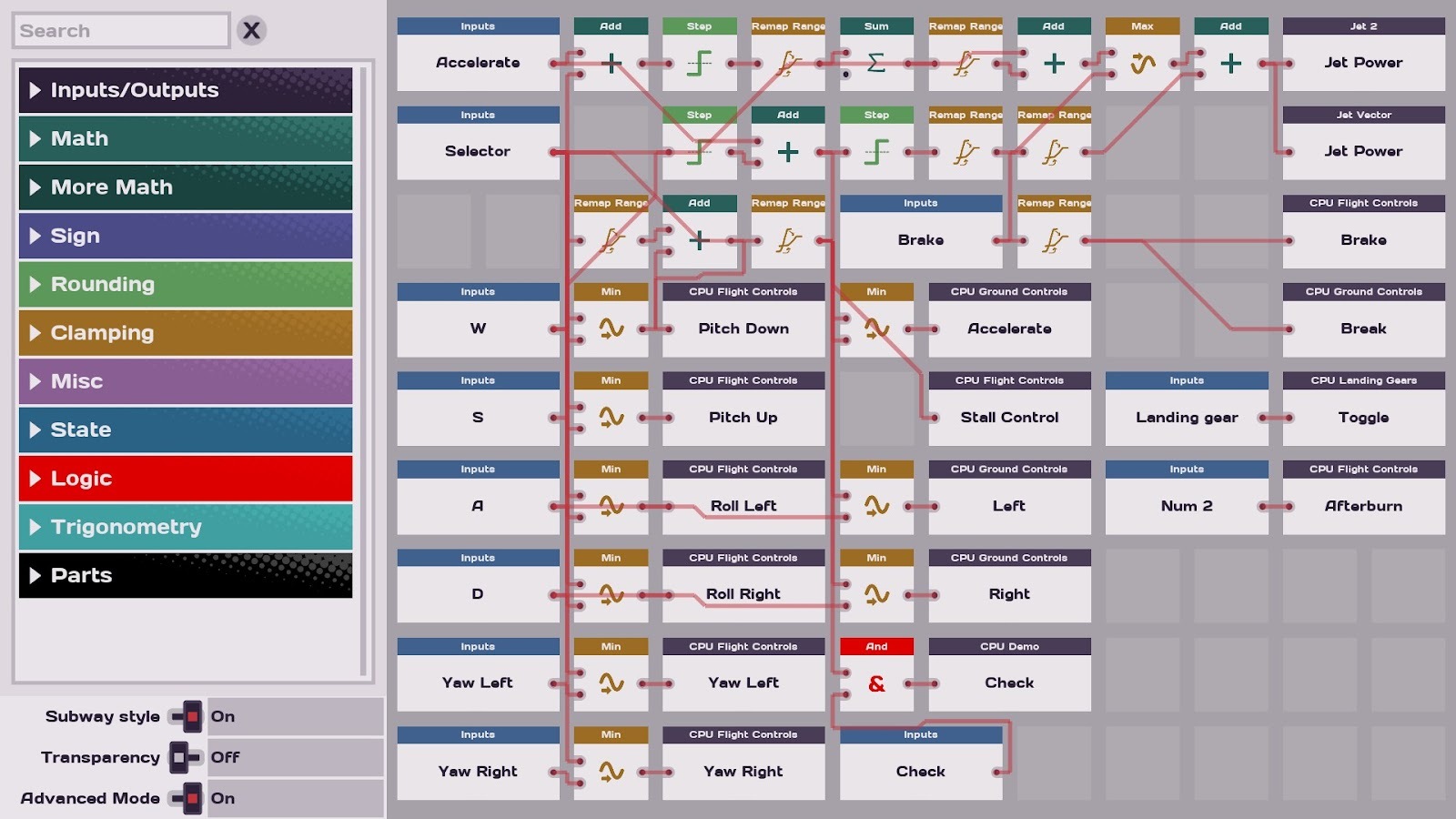
How It Works: Place nodes (the rectangular cards in the picture) and connect them with lines that define their inputs and outputs. The flow from node to node describes the robot's behavior.
Node-based programming is designed to visualize how an input is processed through a series of logical instructions and eventually yields an output, which is pretty much what robot programming is all about.
If you arrange your nodes and lines well, you can view a lot of logic in a compact form on screen at once.
Why We Didn't Choose It:
Describing complex logic using nodes and lines can quickly lead to spaghetti-like visualizations that are hard to follow.
The most notable instance of node-based programming in robotics at the K-12 level was LEGO EV3-G, and LEGO has retired this language in favor of word block programming with its new Spike Prime line of products. This change may make the node-based approach less familiar to the next generation of students.
Considering we don't have any precedent for a node-based interface in RoboCo, this could also have been time consuming to build.
Option 2: Physical Logic Blocks
How It Works: Place physical blocks that serve as units of simple code: a timer that counts down, a button that sends a signal when pressed, a logic gate that only lights up when a condition is met. Connect the output of one block to the input of another block to form a series of instructions. Technically, this is still a form of node-based programming like above, but now the nodes occupy physical space in the game world.
It is easy to set up simple behaviors, such as "After this timer counts down to zero, turn on a light."
Since players are coding with physical blocks in an environment, they may stay more immersed in the game world while coding.
Coding in this way can inspire fun, puzzle-like thinking: How can I combine these simple game pieces to make something powerful? Much like when players use redstone in Minecraft to make 3D printers.
Why We Didn't Choose It:
Creating even a moderately complex behavior out of such simple units can require lots and lots of logic blocks strung together. This is the cumbersome flipside of that puzzle-like thinking.
If RoboCo had logic blocks that were physical parts on the robot, then any robot with complex logic would become big and unwieldy. If the logic blocks were still physical but were attached in some other editing mode separate from normal robot editing (e.g. zooming in on the circuits of the robot's brain a la Logic Bots), then RoboCo would need a new interface and systems to support that other editing environment.
The skills that a player develops from coding in this manner may not transfer as easily outside of the game. This approach is pretty different from how computer programming would be practiced in most settings. Working primarily with logic gates is more likely to be done in an electrical engineering context.
Option 3: Scratch-like Word Blocks a.k.a. Block-Based Programming
How It Works: Snap together word blocks to form instructions that are very similar to written code.
This form of visual programming is the most likely to be familiar to the average computer science student or teacher. It also has a strong presence in the robotics community via LEGO, Makecode, VEX, and REV.
Word blocks are very similar to written code, But they still have some visual programming benefits that make things less intimidating when you're starting out: You can easily browse an inventory of blocks to see what's available. So if you know what you want to do but you're not sure how, you might see something in the inventory that gives you an idea. The shape of each block also indicates how it can snap to other blocks, helping you assemble structures like conditionals, loops, and functions.
This easy to understand quality doesn't just help students; it means any age or experience level in the general game audience could quickly start to get cool behaviors happening. Word blocks aren't the most common approach for games but it does happen (e.g. Modbox).
Many block-based programming tools allow users to easily output their word blocks to written code. So this form of visual programming pairs well with written code.
How We Want To Support This In the Future:
Even though we're focused on supporting written programming for now, our aim is to add an external Blockly helper tool for RoboCo in the future. This will let you assemble word blocks in your web browser and export written Python code that RoboCo will understand.
Option 4: Written Programming
How It Works: You read at least a little bit of the documentation (boo!) and then you start writing out cool things for your robot to do (yay!)
Writing code is the most common way that people do computer programming. Any coding skills that players might already possess should transfer to Robo, and likewise any skills that users develop in RoboCo should transfer back to the real world.
No matter what form of programming we had chosen, we would need a way for the game to interpret user-made code so that robots can carry out instructions. Integrating an interpreter for a written language has the advantage that RoboCo could immediately understand tons of important instructions built into the language (like loops, conditionals, math operations, functions…). This means we could focus on adding the custom API instructions that let you talk to your robot, like asking a sensor what it detected, or telling a motor to spin.
Players editing their code in an external IDE like VS Code will get much better quality of life features than we could recreate in-game: syntax highlighting, auto-complete, multi-select, undo, copy-paste, find references, go to definition, auto-import, rename all, etc. That's not to say the game won't hold up its end of things when it comes to quality of life: The game notices any time you save your Python script file, so you can have both the game and the IDE up and quickly make and test changes. And we recently finished a handy in-game debug console with a history, filters for print statements vs. errors, a Pause on Error toggle, etc.
By saving time implementing robot programming, we can instead spend that time making RoboCo an overall better game in preparation for its Early Access launch. An example of this was the brand new part coloring system that we shared in a previous blog. It made sense to us to spread our efforts across several areas instead of going too deep on just one.
While we lose some accessibility by not having visual programming right away, we don't give up any power. Indeed, having a written code interpreter makes the possibility space for users larger than it would have been with any other approach.
Why Did We Choose Python?
Ok, so that covers why we chose written code as the foundation of robot programming in RoboCo. Some of our coding enthusiasts may be curious how we settled on Python as our language of choice.
First of all, we knew that using an interpreted language inside RoboCo would be much more practical for technical reasons. This immediately took compiled languages like Java or C++ off the table. Interpreted languages also allow for a faster iteration speed for players writing and testing their code.
Second, we wanted a highly popular language so that more of our experienced coders might already be familiar with it, and more of our beginning coders might soon encounter it. Python is one of the most popular languages around.
Third, we wanted something relatively easy to use. Python aims to be readable, avoid complex syntax, and use straightforward English to the extent that it can. It is often recommended as a good language for beginners.
Fourth, we wanted something that made sense for robotics teams and educators. Probably because of the combination of our second and third points, Python is a coding language commonly taught in schools, is part of the Project Lead the Way curriculum, and is supported by educational resources like CoderZ or CodeCombat.
Finally, while any and all coding experience is valuable, and underlying concepts are more important than the language itself, it doesn't hurt that Python in particular is highly in-demand for jobs, making it quite relevant for students outside of RoboCo. Knowing Python could lead to a career in various fields, including software engineering, data analysis, product management, machine learning, or mechanical engineering. Combined with our company mission of “creating playful experiences that improve people’s lives,” these reasons made Python the perfect choice for RoboCo.
Bringing Your Robot Commands Into RoboCo!
But how exactly does all this work? How do we get our code from Python into RoboCo? Well, that’s a great question and one that we’ll save for next week’s blog, where we’ll showcase step-by-step how best to write your code, upload it, and get your robots running all by themselves!
Today, we’re excited to share our first glimpse at a long-anticipated feature for RoboCo. Robot programming is underway and our robots have A.I.!
What is Robot Programming and Why Is It So Cool?
In simple terms, robot programming means creating a set of instructions for a robot to carry out. These instructions might be created with written code or with a visual interface.
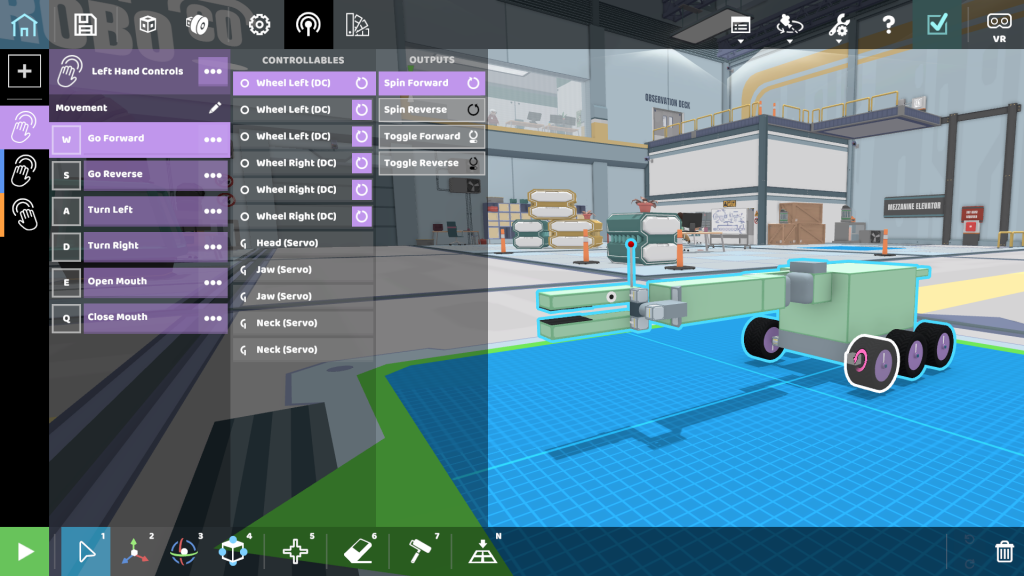
To some extent, RoboCo has already had a small bit of robot programming via its Controls interface. For example, let’s say I want my dino bot to move forward. For that to happen, I have to hook up some instructions in RoboCo that tell the robot how to do that.
I open the Controls interface
I select the key that I want to map the action to: W on my keyboard
I select all desired parts: All the wheels on the left and right side of the robot
I select my desired action: Spin Forward
Now, whenever I hit the W key, my robot will move forward!
But with only the Controls interface, you are pretty limited in the instructions you can give. You can have lots of actions, but each action has to remain simple like the "Press W to Spin Forward" above. This limitation leaves the player no choice sometimes but to try to grow extra fingers to manage 15+ key commands, like this impressive effort from FGRC21:
Work smarter, not harder, they say. So imagine if you wanted your robot to do more, but do it in a smarter way. For example, you want to:
Press just the W key, and thereby tell a four-legged robot to carry out a complex series of motor and piston movements that would make all four of its legs walk forward
Automate a robot so it could act entirely on its own
Manually control one aspect of your robot, like driving it around, while automating another aspect, like using sensors as an aim assist on a robot claw arm
That’s the power that comes with full robot programming. To make this possible, we needed to add two things to RoboCo: 1) sensor parts like distance, color, etc. that we'll discuss in a future blog, and 2) a way to give robots far more complex instructions than our Controls interface could support.
The Controls interface is still going to be front and center in RoboCo, as we expect it to be the main thing most players employ. But if you want to take your robot to the next level, then it's time to flex your typing fingers (and your brain) and get coding!
Even if you don't plan to program robots yourself, you'll still benefit from robot programming. People in the community can upload robots they made, complete with their code, to Steam Workshop. That means everyone gets to see more awesome robot creations, and you may even want to download and experiment with some of them yourself.
What Programming Approach Did We Pick?
Now that you know what makes robot programming so exciting, I’m sure your next question is: how will I code my robot in RoboCo? Well, that’s what next week’s blog is for! Next Friday, reveal what programming language we decided to go with and why we picked that specific language! Until then, we hope this first-ever footage of a robot delivering a soda entirely on its own gets you hyped!
[previewyoutube="in69N0DtGnQ;full"]
And that’s it for this week’s dev blog! Are you excited about robot programming? Let us know in the comments below, on social media, or within our Discord!
Love is in the air both this weekend and at RoboCo HQ! To celebrate Valentine’s Day, our robots have put together a special dinner for a lucky couple! Check out the video below to see how it went!
Speaking of YouTube, our team has been uploading shorts to RoboCo’s YouTube channel three times a week! If you’re looking to keep yourself entertained between episodes of Inside RoboCo and premieres of our new series, make sure to tune in every Tuesday, Thursday, and Friday evening! You can also catch up on any shorts you missed by checking out the YouTube playlist here.
And that’s it for this week’s devblog! Would you hire a RoboCo robot to plan your Valentine's Day dinner? Are you excited about our new YouTube Shorts? Let us know in the comments below, in Discord, or on social media! Next week, we’re talking about the very exciting updates we’ve made to robot programming. Hint: the word rhymes with “smartifical smintelligence”.
Get Sucked In By RoboCo’s Hot New Flame and Vacuum Effects!
Happy Friday, RoboEngineers!
We're excited to share progress on some of the bigger developments we've got in the works soon. For one thing, you may have heard we're working on robot programming for this cool robot-building sandbox game of ours. 😉
But RoboCo development is a blend of ambitious new initiatives and small refinements on existing elements to get the details just right. So with several team members each bringing their talents to various parts of the game, we'd like to zoom in close today and celebrate two of the lovely little updates that make the world of RoboCo a little more believable with each passing week.
Set Fire to the Candle!
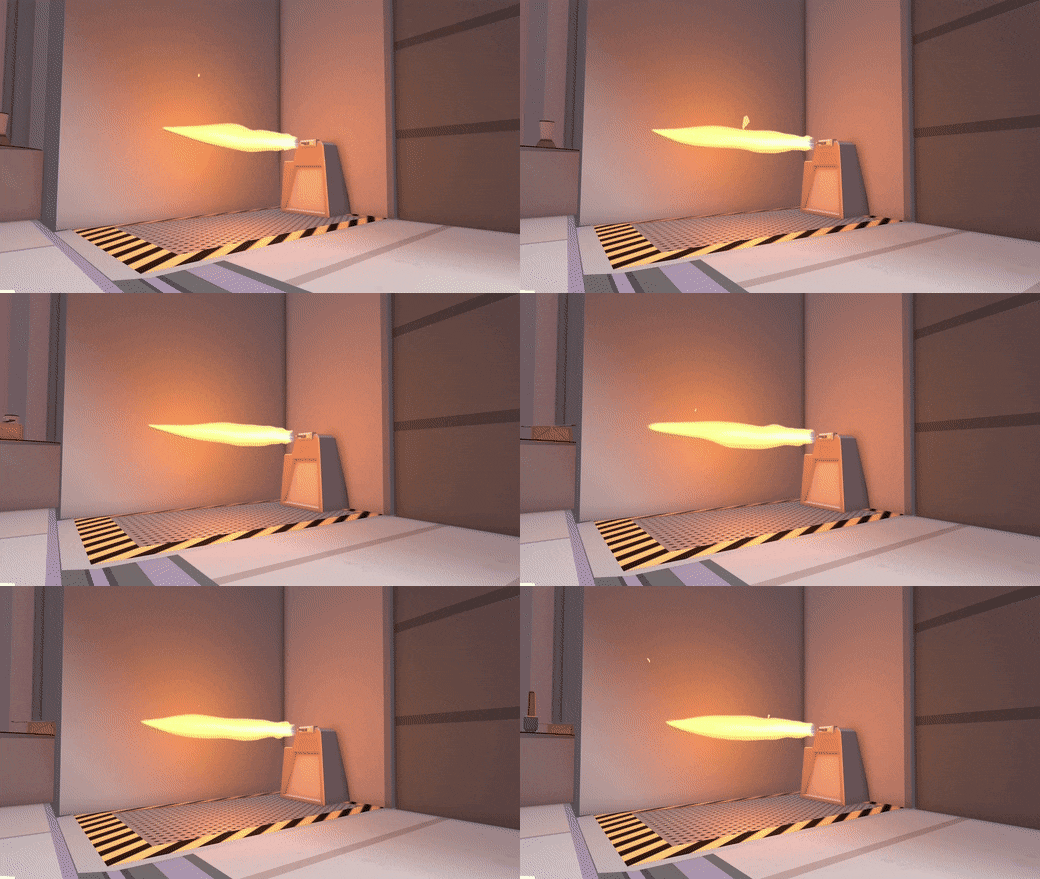
Our hottest new changes are the revised flame effects in Silicon Sonata! Our previous flames were a particle effect that was a fairly realistic fluid simulation, and we wanted a more flat, cartoony style to better fit the rest of RoboCo's art style. Our 3-D Artist Demetri came up with these new flames that fit perfectly in the world of RoboCo!!
Even Wood and Chips benefited from this small redesign. See how happy these humans look now that they’ve got a bright, orange campfire to keep them warm:
Powerful Cyclone Technology For Superior Suction!
We also updated the vacuum effects. When you increase or decrease the power of your vacuum, the effect now changes in size (i.e. the air is sucked in from a greater surrounding area) and speed. This was a bit of visual feedback that we realized we were missing when it came up in a user test. Check out the example below!
And that’s it for this week’s devblog! Are you as mesmerized by the new flame and vacuum effects as we are? Let us know in the comments below or tag us in Discord or on social media. Don’t forget to tune in next week for a special Valentine’s Day dinner special featuring your favorite RoboCo bots!