We are very excited to announce our new update, which is now LIVE!
For this update, we have implemented a handy auto-save function. This new feature will be very useful for all Tycoons out there, especially those of you using PxP. Auto-save can be turned on or off via the Options menu.
As always, our development team remains committed to improving RollerCoaster Tycoon World. In addition to auto-save, we have made other fixes to further improve your overall game experience. Further details can be found below.
Thanks for playing!
Team RCTW
Build ID: 3101935
<*>Crash – Fixed crash when saving a blueprint.
<*>Crash – Fixed a crash at 100% park loading screen when a saved blueprint can’t be loaded.
<*>Crash – Fixed a crash for terrain painting at the edge of the park area.
<*>General – Added auto-save functionality.
<*>General – Added option to turn on/off auto-save.
<*>General – Added option to set auto-save interval.
Post-Release Update #9: Pathing Updates and Urban PxP!
Hello Tycoons,
As we shared previously, we have continued with our transition of RollerCoaster Tycoon World to a new development support team. We had to provide the team with the ability to review the code base and to do a wholescale review of the game and subsequently identify the areas where they could best contribute in terms of their work and our following updates.
We are now in a position to present to you our next update which is live now.
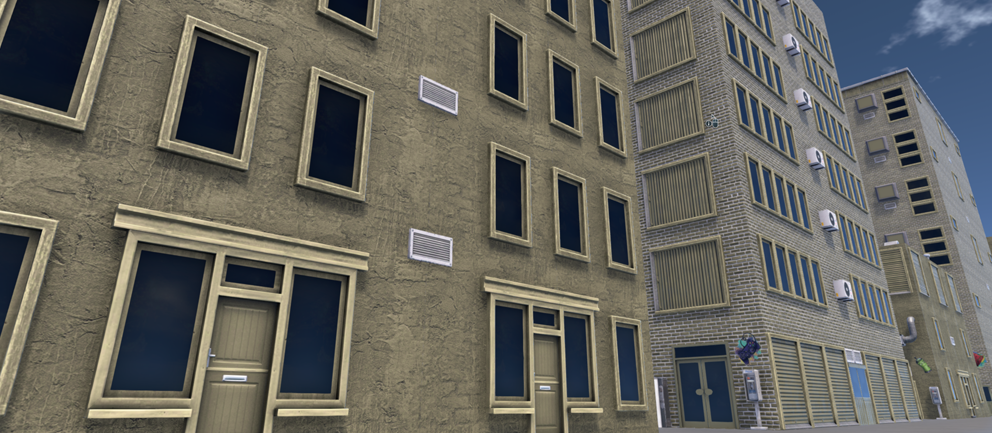
With this update, we have made significant improvements to the pathing system (we encourage you to check it out and provide us with feedback!), fixed a number of bugs and have implemented an Urban PxP Pack.
Moving forward, the team will be focusing on continued improvement of game systems and features – please see below the latest items we’ve improved and content we have integrated as part of this update; thanks for your comments and for playing RollerCoaster Tycoon World.
Best,
Team RCTW
Improvements
[General] – Pathing - Optimized path mesh generation and created algorithm for generation of node points. This allows for more options during path generation.
[General] – Pathing – Adjustments for snapping to path to account for updated path construction system. This has reduced a snapping radius to the center of the intersection and added a seamless transition of the path node cursor between a path and its intersection. It is now possible to connect paths at different distance from the center or a road intersection.
[General] – Path collisions modified to improve the experience of path construction. Collisions are less restrictive and provide more options to build paths at different positions and angles.
[General] – Fixed a path collision that was preventing construction of legal paths.
[General] – Pathing - Deadzone Issue – Where path is not snapped to the path when hovering over the center of the intersection.
[General] – An issue where kiosks would disappear randomly.
[PXP] – Urban PxP pack integrated.
[PXP] – Horror “Deco & Lights” – ‘Spooky Arched Window” fails to move if the player tries to move the asset anywhere.
[PXP] – Horror “Deco & Lights” – Rotation Indicator are misplaced for ‘Tall Old Blue Tile Roof’
Urban PxP Pack – 38 pieces includes the controller item cited below)
Walls (9 Total Pieces)
Brick Façade Closed
Brick Façade Opened
Brick Half-Wall
Brick Wall
Concrete Façade Closed
Concrete Façade Opened
Concrete Half-Wall
Concrete Wall
Decorated Wall
Roofs (1 Total Piece)
Bitumen Roof
Tiles (1 Total Piece)
Cork Floor
Extras (4 Total Pieces)
Fire Hydrant
Street Phone
Soda Vending Machine
Vending Machine
Deco & Lights (23 Total Pieces)
Atari Graffiti
Balcony Stairs
Big Roof Windows
Blue Awning
Condenser Unit
Front Door
Front Door with Shutters
Front Door with Windows
Game Controller Graffiti
Garage Door
Goose Neck Roof Vent
Green Awning
Large Vent
Pyramid Roof Window
Roof Edge
Roof Edge Corner
Roof Ventilation Tube
Small Roof Window
Small Vent
Spray Paint Graffiti
Window
Window Shutters
Window Double Door
RCTW – Post-Release Update #8: Horror Pack!
Hello Tycoons,
Happy Halloween! We are pleased to introduce our newest update, containing a number of improvements to the game as well as the Horror PxP Pack! The Horror Pack features 35 ghoulish new pieces just in time for the spookiest day of the year - Halloween!!!
Our new development team is focused on technical issues that players may experience, and we will roll out future updates as we make these fixes.
Thank you again for building and sharing your park creations.
Best,
Team RCTW
Patch Notes
Audio: Removed running water sound from most Xmas Scenery.
Audio: “Rotation” and “elevation” now plays sounds when switching between them with keyboard keys.
Audio: “Close Park” and “Open” buttons in park info window now have default sounds when clicked.
Crash: Missing user created content while playing offline.
General: Stability Improvements.
General: Menu - When park is loaded “Primary Keys” and “Alternate keys’ texts are now aligned correctly
General: Tycoon Credit and completed challenges are now saved when returning to the Main Menu without saving.
General: Esc shortcut now exits options when in-game.
Gameplay: Story Mode - Influencer may not arrive in park as scheduled.
Gameplay: Mechanic stalls no longer have highlight flickering and shouldn’t cause stuttering.
GUI: Error message when attempting to open a coaster that the user cannot afford now displays amount needed.
LOD: Medic health kits no longer disappears when zooming out.
Main Menu: Sandbox – There is no limit for the number of characters when searching for the save files in Main Menu. The character limit has been set to 30.
PXP: Ungrouping PxP building no longer causes the building to stay highlighted after hover.
PXP: Ungrouping or removing PxP building from group no longer leaves persistent highlight on PxP building after hovering over it.
Scenery: Carrot Top no longer visible when zoomed out.
Scenery: Garden Arch Ride sign no longer snaps to paths unlike other Ride Signs
Scenery: Small/Medium/Large Island Bushes are now grouped in adventure theme
Settings: Edge scrolling speed slider is now working as intended.
UI: Ambient Occlusion text in-game graphics settings now correctly displayed.
UI: Options OK Button does not change color after clicking anywhere.
UI: UI no longer shifts to the left when selecting “create” tab in path menu.
Horror PxP Pack – 35 pieces
Walls (5 Total Pieces)
Old Stone Half Wall (Should be Old Wooden Half-Wall)
Old Wooden Façade Closed
Old Wooden Wall
Old Stone Wall
Old Wooden Faced Open
Roofs (6 Total Pieces)
Inverted Old Blue Tile Roof Corner
Old Blue Tile Roof Corner
Tall Old Blue Tile Roof
Old Blue Tile Roof
Tall Inverted Old Blue Roof Corner
Tall Old Blue Tile Roof Corner
Tiles (2 Total Pieces)
Light Wooden Floor
Old Wooden Floor
Extras (12 Total Pieces)
Curved Foundation Block
Gargoyle Statue
Horror Fence
Old Stone Stairs
Old Wooden Pole
Stone Foundation Block
Curved Foundation Block Corner
Gravestone
Horror Fence Corner
Old Wooden Beam
Spooky Signpost
Stone Foundation Block Corner
Deco & Lights (10 Total Pieces)
Barricaded Arced Wooden Door
Gargoyle Wall Decoration
Old Wooden Door
Spooky Arced Window
Spooky Closed Window
Big Spider Web
Little Spider Web
Skull Wall Torch
Spooky Barricaded Window
Spooky Half-Round Window
Developer's Note - 10/2/17
Hello Tycoons,
We know you have been eagerly awaiting news on the continued support and development of RollerCoaster Tycoon World and we greatly appreciate your patience.
First and foremost, we would like to extend a big thank you to all our fans for your feedback and support of the game. We remain committed to the continued development of RCTW and have moved these efforts to a new team. During this time, we have performed an in-depth review of the game and have identified issues that we want to address over the coming months.
The switch to this new team allows us to focus our efforts on improving the game and addressing any issues that players may experience. Moving forward, our core focus will be on bug fixing and providing new PxP asset packs.
We are currently working towards our next update and will have more news to share soon.
Thank you again for your support and keep building and sharing your incredible park creations with us!
Best,
Team RCTW
Post-Release Update #7: Medieval Theme Pack
Hark! The bugles sound the call of victory, for the fearsome Dragon has been smote and a great reward has been bestowed upon you, our faithful Tycoons: our MEDIEVAL PxP PACK! Our latest update includes over 67 new Medieval PxP pieces to bring your park to Olde Timey-life. As usual we also have a number of fixes and optimizations include in this update. Read on for more details, and playeth RCTW today!
FULL UPDATE LIST
New Content Pieces - Medieval Theme PxP Pack – 67 total pieces
Walls (13 Total Pieces)
Fortress Arch
Fortress Closed Façade
Fortress Façade
Fortress Half Wall
Fortress Rampart Half Section
Fortress Rampart Section
Fortress Rampart Wall
Fortress Wall
Medieval Half Arch
Medieval Wooden Closed Façade
Medieval Wooden Half Wall
Medieval Wooden Open Façade
Medieval Wooden Wall
Roofs (16 Total Pieces)
Medieval Flat Tile Roof
Medieval Flat Wooden Roof
Medieval Tile Inverted Roof Corner
Medieval Tile Inverted Tall Roof Corner
Medieval Tile Roof
Medieval Tile Roof Corner
Medieval Tile Round Roof
Medieval Tile Round Tall Roof
Medieval Tile Tall Roof
Medieval Tile Tall Roof Corner
Medieval Wooden Inverted Roof Corner
Medieval Wooden Inverted Tall Roof Corner
Medieval Wooden Roof
Medieval Wooden Roof Corner
Medieval Wooden Tall Roof
Medieval Wooden Tall Roof Corner
Tiles (2 Total Pieces)
Fortress Decorative Floor
Fortress Floor
Extras (26 Total Pieces)
Fortress Column
Fortress Corner
Fortress Corner Large
Fortress Curved Wall
Fortress Curved Wall Large
Fortress Decorative Column
Fortress Half Arch Large
Fortress Pillar
Fortress Small Arch
Fortress Tower Top
Fortress Tower Top Large
Fortress Wall Trim
Fortress Windowed Corner
Fortress Windowed Corner Large
Medieval Balustrade
Medieval Corner Balustrade
Medieval Fortress Short Trim
Medieval Fortress Trim
Medieval Guard Room
Medieval Hanging Sign
Medieval Road Post
Medieval Suit of Armor
Medieval Weathervane
Medieval Well
Medieval Wooden Beam
Medieval Wooden Column
Deco & Lights (10 Pieces)
Medieval Glass Window
Medieval Small Wall Vine
Medieval Square Glass Window
Medieval Thin Glass Window
Medieval Torch
Medieval Wall Hanging Vine
Medieval Wall Vine
Medieval Windmill
Medieval Wooden Door
Medieval Wooden Window
Improvements
Post-Release Update #6 – Asia PxP and More!
Spring is here, and with it comes even more fun in your park! With this update we are pleased to introduce some exciting new PxP offerings. Below you’ll find details on our brand-new Asia pack and new additions to our Sci-Fi pack. We’ve also included some Easter pieces to celebrate the season. Asia and Sci-Fi pieces can be found within the PxP menu in-game, and Easter items are split across the scenery menu. As usual we also have a number of fixes and optimizations as part of this update. Read on for more details, and thanks for playing RCTW!
FULL UPDATE LIST
New Content Pieces
Asia Theme PxP Pack – 39 total pieces
Asian Rock Wall
Asian Wood Wall
Temple Half Wall
Temple Open Wall
Temple Support Wall
Temple Windowed Wall
Asian Wood Half Wall
Temple Closed Façade
Temple Open Façade
Temple Support Entrance
Temple Wall
Asian Flat Roof
Asian Short Roof Corner
Asian Tall Roof
Asian Tall Roof Inverted Corner
Asian Short Roof
Asian Short Roof Inverted Corner
Asian Tall Roof Corner
Asian Timber Floor
Stone Block Floor
Rock Floor
Wooden Panel Floor
Asian Bench
Asian Railing End
Asian Railing Fill
Asian Spire
Asian Stone Steps
Asian Tree
Asian Wooden Beam
Golden Dragon Statue
Large Asian Brazier
Standing Asian Lantern
Stone Foundation Block
Wooden Column
Asian Door
Paper Lantern
Asian Wall Lantern
Temple Windowed
Space Colony Sci-Fi Themed PxP Pack – 6 pieces
Space Colony Neon Floor
Space Colony Foundation Block
Space Colony Neon Frame
Space Colony Industrial Rail
Space Colony Industrial Rail Corner
Space Colony Industrial Roof
Easter Scenery - 12 pieces
Egg Trash Bin
Egg Hunt Fence
Easter Fence
Easter Fence End
Carrot Top
Rabbit Statue
Purple Tulip
Yellow Tulip
Red Tulip
Pink Tulip
Garden Arch Ride Sign
Garden Lamp
Improvements
Crash: Game crashes when user places some PxP pieces, then placing some PxP stalls and going back to the PxP menu.
Crash: A nulref was observed hanging the game on the Main Menu.
Crash: Game can hang on for several minutes on the Main Menu.
General: Move loading weight away from the Main Menu.
Main Menu: Asset creation for Main Menu.
VFX: The water PxP VFX do not show up if the game is paused before selecting VFX on.
VFX: Split or remove the ground effect from the dripping water effects.
Post-Release Update #5 – Water Features!
Hello Tycoons,
Spring is just around the corner, and with it comes a brand-new update for RCTW. With this update, we are providing several requested fixes and optimizations, along with some new PxP “water feature” items to provide you with even more customization opportunities for your park.
Read on for more details, and thanks for playing RCTW!
New Content Pieces
Pools and Fountain Pack – The pack contains 38 fountain pieces (called the “Fountain” Pack) and 6 new lights (added to the “Modern” Pack)
Basic Water Pools/Puddles for use in conjunction with other scenery items.
Water VFX taken from fountains (dripping water, jets, splash effects, etc.)
Improvements
Sandbox - Limited Money Toggle
We have added an additional toggle for those players who would like to create a Sandbox park with all items unlocked, but want the challenge of limited money. You can toggle this on when creating a new sandbox map to play.
HUD Updates for Specialty Track Pieces
Mechanisms Update - We have made adjustments to the Coaster Mechanisms tab. All mechanisms are now displayed at once, instead of having to scroll through icons.
Specialty Pieces Update:
List now displays 9 thumbnails at once.
Easier navigation.
Each thumbnail now shows an easier to read real track preview option.
The Build button is now next to the Specialty thumbnails.
Bug Fixes
Coasters: Pre-built coasters cannot be opened if funds are lacking.
Coasters: Coasters: The Mechanisms tab should be swapped with the Specialty pieces.
Crash: Game hangs when going back from the Main Menu after starting the Building Rides tutorial.
Crash: Game hangs when loading Dusty Dunes sandbox save 1.
General: The first ESC press should dismiss the previewed object (like the right click)
General: The green circle where you can place scenery to influence excitement/theme only covers about half the ride on both Downtown Traffic and Bugmania Whimsy Rides.
General: Whimsy Rides influence areas has been increased.
Path: Path Repaint & Queue coloring polish
Patrols: Moving staff employee’s building will reset all employee’s behavior from assigned patrol areas to free roam.
Patrols: Mechanics’ current action in the Employees tab reads “Walking” when they are fixing a ride.
PXP: Changing the color of the Whimsy Lights only changes the light emanating from them.
Theme: Sci Fi Entertainer Helmet Fix.
Theme: Whimsy PxP color updates on lights
Theme: Optimizations and bug fixes for Valentine assets
UI: Add Limited Money Toggle.
UI: Re-generate icons for all the specialty pieces of the Coaster Builder
Unity 5.4: Sci-fi Entertainer helmet is not see through.
Post-Release Update #4 – Valentine’s Day!
Hello Tycoons,
It’s time for a new production update! Love is in the air in this month’s patch, as we’ve added a number of romantic Valentine’s Day assets along with additional bug fixes. The full list of fixed issues is below.
To accompany this update we have a couple of announcements. First, we would like to welcome our newest volunteer admins, Peaches and Beaker86, who will be helping out in the forums. Make sure to say hi!
We’ll continue with more Coaster challenges in the coming weeks – be on the lookout for a special Valentine’s Day Challenge soon!
Thanks for playing RCTW!
Team RCTW
New Valentine’s Items:
Chocolate Wonders Restaurant
Romantic Fence
Romantic Fence End
Romantic Couple Statue
Lovely Heart Light
Romantic Light
Décor Birdhouse
Romantic Bench
Lovely Trash Can
Chocolate Box Trash Can
Swan Fountain
Bug Fixes
Blocker: Game gets stuck in an infinite loading when returning to Main Menu from Mission 1.1
Coaster Builder: Invisible Auto-Complete Node
Crash: Mission 1.1 – Game crashes when attaching a path from the exit of a ride to the main path.
Crash: Game hangs after deleting a medium or large path that clips through the limit fence, changing the path type and repeating the process.
General:: The screen briefly turns white the first time selecting a Heat Map filter.
General: Grammatical errors can be seen in the topiary scenery descriptions.
General: The info box for rotation does not show up when rotating PxP and coaster tracks.
General: All rides will show up as closed when loading a park.
Lighting: The first light you place does not have lighting.
Options: The option window will not be centered on a 4k monitor with 4k resolution.
Pathing: Paths and Queues can be created unrealistically low over other paths, in some cases causing terrain to overlap the underlying path.
Pathing: After modifying a path to a new texture, the path is no longer selected.
PXP: New Modern PxP Extras screenshots/thumbnail shows beneath the pieces, instead of the top.
Save/Load: Resuming Mission 1.2 when the Fame Event has started but the Influencer has not arrived will cause a hang on the loading screen.
Save/Load: Prevent forbidden characters from being used in filenames.
Scenery: Some scenery cannot be displayed as selected.
Scenery: The Wondrous Arch is labelled as global scenery while it should be adventure themed.
Terrain: The coasters supports levitate when the player selects to ‘Flatten’ the terrain.
UGC: Offline screen is missing.
UI: Broken rides do not always have a wrench UI icon.
Post-Release Update #3 - Unity 5.4!
Hello Tycoons,
Happy 2017! Today, we are proud to announce our latest update which we know you have been eagerly awaiting.
Our latest update focuses on RCTW’s upgrade to Unity 5.4, bringing a host of upgrades and performance boosts that will benefit the game as a whole. Overall, Unity 5.4 should improve performance and user experience on lower-specced machines. Please note that specific results that you see will be dependent on your own PC setup.
After our internal testing with Unity 5.4, we’ve seen the following improvements:
GPU Instancing - With this fix, you’ll see performance improvements with parks that feature multiple instances of the same PxP assets. Previously mesh combine would store the combined mesh and uncombined state of the object in memory and subsequently reduce performance, but this GPU instancing will replace the mesh combine Speed improvements have been most noticeable on lower end machines.
Post Processing Stack - Unity 5.4 optimizes how the game creates and displays visual effects, resulting in increased frame rate performance. This should help parks for users that love FX Generators.
Optimization of Ride Cameras – Parks with lots of rides in them may see slight FPS increases from ride cam optimizations.
Main Menu Optimization - Overall navigation and UI transitions are smoother.
Along with our upgrade to Unity 5.4, we’ve made a number of bug fixes. The full list of fixed issues is below.
Thanks so much for playing RCTW!
- The RCTW Team
BUG LIST
Camera: Following a Fame event peep out from the park will get the camera stuck outside the park.
Camera: Activating Free camera makes the game hang.
Camera: Peepcam doesn’t take Peep posture into consideration.
Credits: Credits have been updated.
General: Going to the park expansion crashes the game.
General: Game hangs when loading a Luminous Isle sandbox/mission.
General: Save/Load – Unable to load save due to NullRef about trash.
General: Peeps can be observed in a souvenir holding animation when sitting on a bench or picnic table.
Grid: When rotating a building, and activating the grid the building can snap back and be 1 degree off.
Grid: The local 1x1 Grid has a broken snapping during the Coaster Builder when at non-90 degrees angles.
Loading: Loading screen hangs for a few seconds on Atari splash screen during first launch.
Missions: On Mission 1.3 – Title crashes while mass deleting rocks on first play through.
Missions: Neglecting to hit [Show Me] for the Fame Event tutorial in Mission 1.2 will force the user to restart Mission if Fame Event completes.
Missions: Mission 1.5 – Test stats are not calculated when in ride cam while testing the roller coaster for first time. Missions: Fame events – Sensitive Sam fame event fails when the park is clean.
Objectives: Mission 1.7 – The first objective of ‘Think Big’ gets completed when clicking a peep.
Options: Camera – The ‘Auto zoom out camera if object too large’ has no functionality in gameplay.
Paths: Creating elevated paths has black flickering on the base pillar before placing it.
Polish: Operator Animations have been tweaked and adjusted
PxP: Grid overlay when raising a piece is no longer transparent.
PxP: The game crashes when placing a few PxP pieces down, using the trash can icon to delete those pieces and toggling the grid on and off.
PxP: Placing a PxP pieces with grid activated and selecting a tile piece and deactivating the grid will lower the tile 1m.
PxP: The grid flickers when placing any of the PxP premade except the western ones.
PxP: PxP walls flicker when placed in the middle of 2 other walls.
PxP: When player toggles grid on and off after placing a piece, it elevates to 4.2m.
PxP: Whimsy – Placing the “Minatare Maze” or the “Floating Tower” premade PxP building makes the grid rotate.
PxP: Individually selected pieces are rotated when toggling the grid on and off.
PxP: The 4m Barrier aligns with the middle of grid squares instead of the border.
PxP: Any extra PxP piece will flicker when placed on top of walls when overlapping.
PxP: Placing a premade/blueprint, then placing any scenery, will cause the game to use the PxP grid rather than the Standard grid.
PxP: The 4x4 Grid is broken in multiple situations.
PxP: Some pieces overlap instead of stacking when perfectly aligned.
Scenery: Peeps don’t sit on Whimsy-themed benches
Scenery: Certain plazas and 1 ride have black flickering textures.
Scenery: The snow globe Center pieces’ globe is textured black.
Scenery: The Lollipop flower scenery piece differs from the thumbnail picture.
Scenery: Colored Queues – Color applies on the path even if the ‘Rails’ UI is active under the ‘COLORS’ tab.
Terrain: Crash – Flattening terrain that has been lowered to the lowest level will crash the title.
Terrain: Modify Terrain – The coasters supports levitate when the player ‘Flattens’ the terrain.
UGC: Whimsy – Unable to select [Whimsy]m theme when creating UGC
UI/UX: Text strings in peeps thoughts tab are cut if park/ride name is too long.
UI/UX: Starting missions that have broken rides have up scaled repair icons.
UI/UX: [Spacebar] can be used to confirm menu selections which simultaneously pauses/resumes gameplay.
Post-Release Update #2 - Whimsy Theme and Holiday Decorations!
Hello Tycoons,
Happy Holidays from all of us at team RCTW! Today, we are proud to announce the release of our next update, chock full of new content including a new theme, a new camera and Holiday decorations, along with additional bug fixes and improvements. Read on for details!
For this update, we’ve gone BIG!!! We’re adding a whole new theme – Whimsy! – which comes with 3 new flatrides and a host of theme-specific scenery items and PxP items that can be placed instantly in your park or used to design your own holiday creations. Whimsy is a playful, kid-friendly new theme guaranteed to bring a smile to tycoons of all ages. Check out our latest flatrides The Montgolfières, Bugmania and Downtown Traffic below!
Paired with the removal of Scenery collision that we introduced in our last update, we can’t wait to see how your parks evolve. Remember to share your new creations via Steam Workshop!
Along with these updates, you’ll also find a number of Holiday items to bring seasonal cheer to your creations. Look in your scenery menu to find Holiday assets including a Snowman, Gingerbread Man, and Snow Globe!
In total this update includes:
• 3 Flat Rides
• 44 Whimsy Scenery (Including Paths & Queues)
• 6 Holiday Items
• 60 Whimsy PxP & 1 premade
Lastly, we have optimized the camera, making it easier than ever to craft your dream park and view it in all its glory.
And make sure to check out our brand-new trailer, showing off the latest and greatest from RCTW!
Read on for more specific details of the contents for this latest update along with our full list of bug fixes. We’re continuing to work on additional updates and fixes so stay tuned for more details in the future!
- Team RCTW
----------------------------------
FULL UPDATE LIST
WHIMSY THEME! New content includes: Whimsy Rides, Shops, Scenery, Paths, and PxP (Look out for the teddy bear icon to denote assets that are part of the Whimsy theme). Full list of Whimsy Theme contents are below.
Audio: Deleting sound for scenery assets will no longer be audible once per 2 assets deleted
Camera: Updated camera and optimization.
Camera: The Ride cam in the Super Flyer no longer freezes mid-air.
Content: Whimsy Theme (3 FlatRides and additional scenery)
Content: Additional Generic PxP
Content: Holiday Items
Finances: Marketing UI has been updated to have appropriate screenshots.
General: The Deluxe Edition Art Book has been updated.
General: Peeps will no longer teleport out of the park after placing a no entry sign on the edge of the starting path.
General: Preview image now updates after overwriting a previously saved blueprint.
General: Holding left-click over any color and pressing 'ESC' at the same time will no longer cause the in-game cursor to disappear.
General: Switching quickly between Stop/Test/Open buttons on a Coaster will no longer grey out one of the buttons.
General: Coasters are no longer always highlighted when switching between different sub-sections of the Park Income Heat Maps.
General: Heat maps for Shop only is now consistently only showing Shops.
General: Peeps now enter the Theatre/Auditorium ride in a more natural order.
General: Deleting a queue with peeps on it will no longer result in peeps walking in the air.
General: Mechanics now target the closest roller coaster to fix.
General: A white stroke highlight is no longer displayed around the entire track during the Test tab if the coaster was edited by clicking on the track
General: Placing a scenery object with manual elevation will no longer stop terrain hugging on subsequent assets.
General: Selecting Flatland will no longer change the starting wallet amount from $25,000 to $10,000.
General: Preview image now updates after overwriting a previously saved blueprint.
Localization: "Il" should now be written "oeil" from the hints menu during mission 7 of map 1.
Mass Delete: The music of multiple mass-deleted Speakers will no longer be audible.
Main Menu: Creative Hub Tabs will no longer retain content from other tabs or lose content altogether when switching through different pages/tabs.
Main Menu: Can now unhide hidden items in the Creative Hub.
Main Menu: Creative Hub dropdown for Public/Private/Local dropdown now has appropriate text when not dropped down.
Missions: Player should now be able to click on whole icon of Tycoon Credits locked item to purchase it.
Pause Menu: Fixed bug that caused some of the Pause menu options to be invisible when completing all the objectives in story mission 1-1 and using the Pause menu button
Peeps: Peeps no longer take extended periods of time to exit a Closed park.
Peeps: Purchases Page now includes park tickets.
Peeps: Peeps can no longer enter the park with the carrying a teddy bear animation.
Peeps: Tweaks/fixes to Peeps textures
Peeps: Fixed bug that caused Medics to sometimes not have their bags in their hands.
Peeps: Staff member heat map highlight no longer reverts when picking them up and dropping them.
Piece-by-Piece: More fixes to the PxP Grid.
Piece-by-Piece: Selected PxP piece no longer remains highlighted even after player finishes the pxp building.
Piece-by-Piece: Selecting Add More Packs button within the PxP builder now brings user to the Packs section of the Creative Hub.
Piece-by-Piece: All Egypt PxP now match their screenshot/thumbnail image color.
Piece-by-Piece: 'Save Blueprint' button in the PxP editor is no longer available after deleting all PxP in the building.