I've made just a few minor changes to the build while working on the game this week. It mainly addresses some issues with Adventurer systems.
Optimised a number of calculations in Adventurer Pathfinding system.
Made Optimisations to Adventurer Emote system.
Made Optimisations to Adventurer Thought system.
Fixed a bug causing the UI to lock when investigating an AI Kingdom's log.
Fixed a bug stopping buildings from clearing inside the build menu list when there should only be one instance of it in the kingdom.
I'll be announcing the new content we're working on soon.
As always, thanks for playing. :)
Cheers,
Matt
RPG Tycoon 1.3.5 Hotfix - Now with Cloud Saves!
Hello everyone,
I've just pushed an update to the Steam build of the game that addresses a number of issues and bugs discovered by the community. I've also spent some time uniforming the UI and cleaning up a few menus, making them easier and less frustrating to navigate.
Additionally the major feature this update brings is the support for Hero Residence Relocation, in other words, you can now relocate your heroes home without having to delete them or fire them or similar workarounds. If you wish to change a Hero's abode, simply select them in the Hero View and click the "Move" button and select an empty house. Similarly, if you have multiple empty homes when hiring a new hero, you can choose where to house them before they join you.
I'm also pleased to announce that Cloud Saves are now functional for RPG Tycoon and support cross-platform play. So if you're like me and have a Mac Laptop and a Windows Desktop or vice-versa and wish to play your Kingdom saves, you now can!
There's no update video this time I'm afraid as the patch is mostly bug fixes, optimisations and UI tweaks. For a full list of changes check the notes below.
Patch Notes
It's worth mentioning that we're working on some new content both as a free update to the game and a DLC expansion that's going to drastically change the way the game is played in the coming months.
As always thanks to all of you for purchasing and supporting RPG Tycoon, it still means so much to us, I'm excited to show you what we're working on shortly. Be sure to follow the blog or join the mailing list if you wish to find out more.
All the best,
Matt
RPG Tycoon 1.3.3 Hotfix Released
Hi,
I patched the game overnight to fix a couple of bugs still hanging around from the last 1.3 update.
Fixed null reference error with Kingdom Naming on the start.
Fixed alignment issue when selecting to rename an item or character from the object info box.
Fixed an issue causing autosaves to stop working after year 1.
As always, thanks for the support and I always appreciate the feedback.
RPG Tycoon 1.3.2 Hotfix Released
Hi All, I've just pushed a minor update to take care of some of the issues brought up from the 1.3 build earlier in the week.
Fixed Duplication of fields from Kingdom Overview Screen.
Fixed alignment of Quest UI boxes
Fixed a list misalignment issue for buildings in kingdom overview screen.
Added Save Game confirmation box when saving after naming a file to show it has actually saved.
Thanks for the feedback.
Matt
RPG Tycoon Updated to Version 1.3
Hello everyone,
I've just updated RPG Tycoon to Version 1.3, which brings a few UI Changes, optimisations and bug fixes as well as a couple of new features to the game.
One of the most significant features is the new overhauled Build Menu UI which has now been split into two separate panels. The previous layout was trying to cram a lot of information into a small space without clearly conveying that information. Now, as you scroll through buildings and decorations, each items information is neatly presented in the adjacent panel. As a bonus, this also allows you to easily compare two items by selecting one and hovering over any other item you wish to compare it with. You can also sort up and down each item more efficiently too by toggling the sorting options. Huzzah!
The second main feature is the introduction of Survival Mode. In survival mode, you must remain the leading Kingdom each year in order to continue. If you end the year and another Kingdom has more points than you, it's game over. Challenging you to survive at the top, for as long as possible. It's intentionally difficult and I'd be interested to see the longest duration many of you will be able to survive for. To enable survival mode, simply enable it during the Kingdom Set-Up screen.
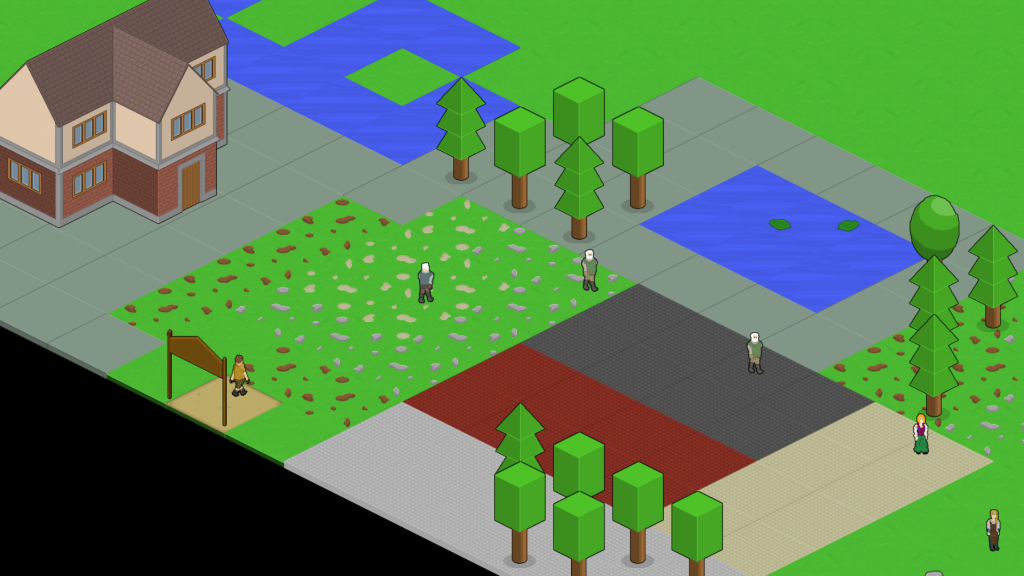
Finally, I'd been meaning to implement this decorative feature earlier in development, however for one reason or another never managed to get around to it. So upon request from a few players I've finally implemented a new Floor Tile system. This system allows you to place different tiles on top of the terrain, or underneath buildings to add a more decorative element to the Kingdom.
Floor Tiles can be found in the new Roads section of the build menu, however as far as gameplay is concerned, floor tiles work differently to roads in that they have no effect to walking speed and can be built on. They act simply as a terrain changer. Once placed, they cannot be deleted, but must be replaced by another floor tile (all of the base terrain types are included as floor tiles). In the image above is a few example of the new floor tiles and a few objects placed on them. For modding, simply use the new "TYPE_FLOOR" definition in a buildings "Type" XML tag to import the tile properly additionally "CATEGORY_ROAD" has been added to the "Category" tag to separate buildings from Roads and Tiles.
The update also brings a number of balance and optimisation improvements. Such as improved AI to make them more active and balance score more appropriately to the game difficulty, as well as performance optimisations to characters path-finding and some adjustments to the data handling to help avoid any bleed between old and new save-games.
For a quick look at what's new, as always, I've put together a developer walk-through of some the new features. For a full list of improvements and fixes check the patch notes below.
https://www.youtube.com/watch?v=9H0nTFyEU7Y
This update changes the way some parts of the data is handled, so although old saves should be fine it's possible it may have an effect on your savegame. Starting a new savegame is always recommended with each update.
Patch Notes
EDIT: A bug with front tiles being left behind when relocating a building has now been fixed with the 1.3.1 hotfix.
As always thanks to all of you for purchasing and supporting the game, it still means so much to me.
All the best,
Matt
RPG Tycoon Updated to Version 1.2 - Share your Kingdoms!
Hello, I'm happy to announce that RPG Tycoon has just been updated to v1.2.
Although there isn't a huge number of content additions, this version of the game brings a number of bug fixes and improvements to the way that saving and loading of data is handled in RPG Tycoon. I was originally planning on releasing these features as part of a planned larger update later, however I became aware of several issues that needed addressing thanks to a number of reports and felt that it would be worth implementing this as a standalone update instead.
Upon loading the new build of the game your old .SOL files will be backed up, converted and moved to the new Saves folder in the main RPG Tycoon folder of your Documents directory, and updated to the new .rpgt save format. This new save system removes the three slot limit and now players can create and manage an unlimited number of Kingdoms using the new in-game manager. Players can also create back-ups of their Kingdoms throughout stages of play by using the new "Save As" button located in the Options/Escape menu, should they wish to return to an earlier version of their Kingdom later.
Additionally, the new manager will allow you to share your saved Kingdoms to the workshop for the rest of the RPG Tycoon community to download and play by simply using the "Share" button located in the Load Game menu when connected to Steam. A couple of example Kingdoms are already available over on the Steam workshop community hub, feel free to subscribe to these and try them out yourself or check out the preview video below for more information on how to upload your Kingdom.
https://www.youtube.com/watch?v=v2140TEduPo
There are also a number of bugs that have been fixed and various other optimisations. The full patch notes are below.
New Features / Improvements
Bug Fixes
Although previous saves should still work. As always, it's recommended to start a new save-game between versions. If you experience any issues and really want to work with a previous version for whatever reason a "rollback" build has been created via the Betas tab on Steam to the last working build.
I still have a few things planned for the game that I'd like to get working and were the main motivation for implementing the new save-system, so now that it's in place I'm going to experiment with the ideas I have for the next update. Until then, I look forward to seeing your Kingdoms shared on the workshop!
Cheers,
Matt
RPG Tycoon Updated to Version 1.1 - (25% Off This Week!)
Hi there,
I'm happy to say that RPG Tycoon has just been updated to Version 1.1. This version introduces a number of new, highly requested, features including a move building/object tool and a custom game balance mode as well as a number of bug fixes. You can find a walkthrough of the new features in this new video.
https://www.youtube.com/watch?v=UUNAmYmcVPw
To celebrate the release of v1.1 the game is 25% off for the duration of the week (25th April - 2nd May), so if you haven't picked the game up yet, now is the perfect time!
http://store.steampowered.com/app/314240
As always, this update should allow you to load a previous save and most of the new features should work without any issues, but it's recommended to start a new save game to ensure the best experience.
Patch Notes
New Features
Post-Launch and 1.1 Update Plans
Hi Everyone,
It's been a little over a month now since RPG Tycoon launched and I just want to thank everyone who has picked it up the game and engaged with it since launch, many of you have been so positive about it and delivered such wonderful and friendly feedback, which I really appreciate.
As I mentioned on release, after working full time on the game for two years mostly on my own, I needed some time away to re-charge a little. It's been quite a hectic March for me personally and for the company.
I spent March amongst some of the most amazing and talented indie developers and enthusiasts from all over the world and took part in a 3 day game jam before spending a week in San Francisco for GDC where I spoke to a number of different folk from across the industry. It was a really pleasurable, inspirational and eye-opening experience, which was exactly the break I needed in order to get me refreshed for getting back into it!
Whilst away, I've been carefully reading your feedback. I've already had plans and started working on a 1.1 update which will integrate some of the discussed ideas from the RPG Tycoon community (that's you lot). One of the top requested features is allowing players access to game-balance. So the main feature of the update will include an advanced set-up mode for players that wish to completely tweak their experience of the game.
As with anything, now that more people have been playing I've noticed a number of bugs that had gone unnoticed before that need ironing out, so they'll always be top priority.
I'll also be working on further optimisation for performance and cleanup, as well as various UI and experience improvements.
Watch this space.
PS. It's been awesome seeing so many of you getting engaged with the workshop tools! I've played a few of the custom mods myself. If you want to get stuck into modding (it's super easy) there's a guide / videos here.
1.0.9 Update
I've just updated the game to 1.0.9 - this brings a few more fixes brought up by the community and a heavily requested feature I found some time to implement. There is now a repeat last option and assign buttons when viewing your quick quest combos that will automatically assign the supplies for you.
1.0.9 Patch Notes
Added Repeat Last button to Supply Selection Screen.
Added Assign button to Combo History View in Supply Selection Screen
Removed Review menu from Sandbox Mode
Blueprints can no longer be used up if an expansion is already available
Free Expansions now save
Fixed tipbox conflict for level stores in Sandbox mode
Removed Animation from Combo History popup
Heroes can no longer be fired while not idle.
Fixed bug allowing mutliple Combo History windows to be opened.
Fixed and rebalanced Hero Training.
Fixed Hero Quarters tracking on Objectives upon reloading.
Fixed Forcefield Upgrade to not rely on previous upgrades to work
Forging typo fixed to support Lumber properly
Fixed various typos.
Fixed various null pointer errors
I'm planning some more improvements a little down the line, but I wanted to get this one implemented asap due to its popularity, I hope it serves its purpose as expected for you.
Best,
Matt
1.0.8 Update
Hey there, it's been a crazy launch for me! Again, huge thanks to everyone that's purchased the game this weekend. I really appreciate your support.
The last patch took care of a lot of the bugs that carried through after launch but late last night I discovered that Valve had changed some things on their back end which were causing issues launching the game on Mac with the current way I was building the game. Hopefully, I've solved those issues now.
I've also been talking to a couple of modders and enabled some features that will make the process a little easier.
1.0.8 - Patch Notes
(Hopefully) Fixed Mac launch issues
Fixed an inventory bug.
Fixed Library Books saving incorrectly. (May need to start a new save for this to fully work again)
Fixed Hero Condition being stuck at 100 on reload.
Fixed Loss of Context from Keyboard Shortcut during Build Mode.
Fixed Bug allowing you to use keyboard shortcuts to open locked down menus during campaign.
Added support for .fnt files in Mod Uploader
Added Button to refresh mods forcing mods to update.
Fixed Create Mod Button to Link to Modding Guide
Added a Level 4 difficulty to AI Mode on Hard
Added Keyboard shortcut "R" for Relations Menu
Added Keyboard shortcut "L" for Library Menu
Huge thanks to anyone that's gotten in touch to report any of the last little bugs, hopefully most of them have been ironed out now, but I'll keep active throughout the week in-case anything crops up.
I'm also grateful for feedback from many of you, I'll look into some of your suggestions for any "major" patches in the future.
Again, this Hotfix shouldn't cause issues loading saves but it's always best practice to start a new game after an update for the best performance.