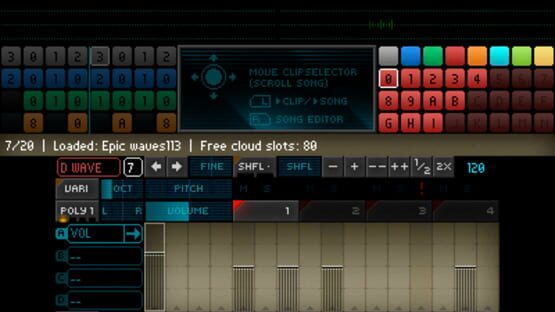

Rytmik Ultimate
Untitled
Featured Songs August 2017
https://youtu.be/Mjm8gDV721o
Featured Song: Fevered Heads by Beat Boffin (Rytmik Ultimate)
https://youtu.be/hjaGH-eTpRU
Featured Song: Man With The Machine Gun by Pabloinz (Rytmik Ultimate)
https://youtu.be/9cg6SfPgGik
Featured Song: Acappella Miles by Lumpyy (Rytmik Ultimate)
https://youtu.be/Uo1AZuHWyAE
Rytmik Cloud Expansion

Rytmik Ultimate allows you to share songs with other users using the Rytmik Cloud and to play songs stored in Rytmik Cloud. Users can also exchange their compositions and cooperate on them.
Slots
Each user has a limited number of slots on Rytmik Cloud. Purchasing the basic version of Rytmik Ultimate gives you 40 slots. You can get more slots in several ways.
- Getting The Musician (Silver Disc) achievement adds you another 5 slots.
- Getting The Music Star (Gold Disc) achievement adds you another 5 slots.
- Getting The Hitmaker (Platinum Disc) achievement adds you another 5 slots.
- DLC Rytmik Cloud Expansion adds you another 42 slots.
- DLC Rytmik Cloud Expansion 2 adds you another 210 slots.
How RYTMIK CLOUD works
When you select the PUBLIC CLOUD or USER CLOUD category, Rytmik Ultimate connects to the shared storage called Rytmik Cloud. To use this feature, you need a functional network connection. When storing a song, you can specify its access privileges (UNLOCKED, LOCKED, SEMI-LOCKED or PRIVATE). UNLOCKED means the song will be visible for all and everyone can load and edit it. LOCKED means that the song will be visible for all, but other users can only play it using PREVIEW function and won’t be able to edit it. SEMI-LOCKED means that the song will be visible for all, other users can only play it using PREVIEW function, but clips can be used, modified and redistributed. PRIVATE means that other users can’t see the song.
http://store.steampowered.com/app/697380/Rytmik_Cloud_Expansion/
http://store.steampowered.com/app/697410/Rytmik_Cloud_Expansion_2/
Featured Songs July 2017
https://youtu.be/G76ckIz80rM
Featured Song: DuckTales Collab by TSGEvans (Rytmik Ultimate)
https://youtu.be/sdBlVfGZa-I
Featured Song: Planet Virt by Dogan (Rytmik Ultimate)
https://youtu.be/e5VLfPy0Gd8
Featured Song: Ultimate Fear by Gabe (Rytmik Ultimate)
https://youtu.be/UR3mj20qrk0
Featured Song: Woodfall Temple by Michael7 (Rytmik Ultimate)
https://youtu.be/NFWYBdIlH7g
1st Steps with Rytmik
This page also contains an image guide 1st Steps with Rytmik.
http://rytmikultimate.com/Steam/?page=help

Team Work
More details in this guide:
http://steamcommunity.com/sharedfiles/filedetails/?id=1089632910
Featured Songs June 2017
https://youtu.be/z_Od_cBkzcY
Featured Song: ETERNAL VICTORY by L1NK (Rytmik Ultimate)
https://youtu.be/Vzn6y4HHwYA
Featured Song: scumix by Scum (Rytmik Ultimate)
https://youtu.be/8uyV8DyG4m4
Featured Song: Stronghold by hoZer (Rytmik Ultimate)
https://youtu.be/bMgPj7s-Zws
Featured Song: BLOODY STREAM by Seara (Rytmik Ultimate)
https://youtu.be/XapO36m4YFo
New Tutorial - Chords
Short video tutorial here:
https://www.youtube.com/watch?v=ya8BRby7guU
Instrument Chord mode
- Allows multiple notes to be played at once from one instrument
- Pressing PC/Mac Keyboard rewrites selected note(s)
- CTRL+ PC/Mac Keyboard adds note(s) to selected position
- LMB at pitch note area transposes selected chord
- CTRL+LMB – adds note to the chord or adjusts selected note pitch
- CTRL+RMB – removes last note from the chord
- Adjust note VOLUME or parameters B,C,D by LMB - set all chord notes together. Or LMB + CTRL - set only selected note.

Update 1.73 hotfix
- BUG-FIX: Mp3 export file time fixed
- BUG-FIX: note input by PC/Mac Keyboard is not enabled when WIDE FX is on
Update 1.71 hotfix
- New: Change shortcut for Fullscreen switch from Ctrl+F to Alt+F
- New: LMB on clip again when playing clip preview - stops the clip preview.
- BUG-FIX: Clip preview is not working
- BUG-FIX: First click on unselected note changed note pitch