The store price for ScreenSpace is being reduced! Moving forward, it will be listed at $0.99, down from the previous $1.99. The prices for all currencies are now as follows:
USD $0.99
CNY ¥6.00
EUR €0,99
GBP £0.89
CAD $1.29
AUD $1.50
JPY ¥120
KRW ₩1,100
RUB 42 ₽
AED 3.00
BRL $3,49
ARS$ 82,00*
CHF 1.09
CLP$ 620
COP COL$ 2.800
CRC ₡ 500
HKD HK$ 7.00
IDR Rp 9 699
ILS ₪ 3.50
INR ₹52
KWD 0.20KD
KZT ₸300
MXN $13.39
MYR 3.00
NOK 11,00kr
NZD $1.49
PEN 2.50
PHP 35.95
PLN 4,49
QAR 2.79
SAR 2.75
SGD $1.10
THB ฿23.00
TRY 11,00*
TWD $22
UAH ₴26
UYU $32
VND 15.000₫
ZAR 11.00
USD $0.99
USD_CIS $0.90
USD_SASIA $0.90
Thank you for playing ScreenSpace. I hope the new prices are more worthwhile!
* Note for Argentina and Turkey: Due to a listing error, the price for the game in Argentinian pesos and Turkish lira were significantly lower than other regions. With this update, those prices are going up to match the listed prices of other regions. Thank you for your understanding.
Update Incoming: Version 1.1
An update for ScreenSpace is inbound. During this time, the game will not launch.
Start time: 5/15/2022, 11:43 PM (EST)
End time: 5/16/2022, 12:30 AM (EST)
The patch notes are below:
Bug fixes:
- Fixed the game score showing the highest score reached in a previous run when starting a new game.
- Fixed low quality text and images.
- Fixed an issue with the timer bar not showing as completely filled during the game over screen.
General changes:
- Restructured the main menu and options menu, and removed tooltips from the main menu.
- Consolidated all gameplay instructions to one panel on the main menu.
- Added developer logo to the game upon startup, and updated credits.
Gameplay:
- Changed clickable areas from completely screen-wide buttons to smaller squares.
- All games now start with the red button active first. Each click after the first will still be random.
- Timers no longer count down automatically. They will now count down once a button is pressed.
- Clicking an incorrect button will now cause a short delay of one second before the timer resets. During this delay, buttons cannot be clicked.
Graphical changes:
- Changed background visuals, and added a scrolling animation.
- Rearranged and changed the appearance of various game buttons.
- Reduced overall color saturation of the game.
- Refactored visual feedback for hitting/missing a button.
- Removed screen lens distortion and particle effects.
- Reduced intensity of bloom and chromatic aberration effects.
- Removed effects toggle, as it has not become useless due to reduced/removed visual effects.
- Changed "game over" text to read "game complete", and changed color from red to yellow.
- Added options for VSync, resolution and FPS cap.
Audio changes:
- Remastered "hit" sound effect, and included pitch variations.
- Changed the "miss" sound effect.
- Changed the toggle music/sound effects options into global sound sliders.
Update: Version 1.1
Version 1.1 is now out! The patch notes are below.
Bug fixes:
- Fixed the game score showing the highest score reached in a previous run when starting a new game.
- Fixed low quality text and images.
- Fixed an issue with the timer bar not showing as completely filled during the game over screen.
General changes:
- Restructured the main menu and options menu, and removed tooltips from the main menu.
- Consolidated all gameplay instructions to one panel on the main menu.
- Added developer logo to the game upon startup, and updated credits.
Gameplay:
- Changed clickable areas from completely screen-wide buttons to smaller squares.
- All games now start with the red button active first. Each click after the first will still be random.
- Timers no longer count down automatically. They will now count down once a button is pressed.
- Clicking an incorrect button will now cause a short delay of one second before the timer resets. During this delay, buttons cannot be clicked.
Graphical changes:
- Changed background visuals, and added a scrolling animation.
- Rearranged and changed the appearance of various game buttons.
- Reduced overall color saturation of the game.
- Refactored visual feedback for hitting/missing a button.
- Removed screen lens distortion and particle effects.
- Reduced intensity of bloom and chromatic aberration effects.
- Removed effects toggle, as it has not become useless due to reduced/removed visual effects.
- Changed "game over" text to read "game complete", and changed color from red to yellow.
- Added options for VSync, resolution and FPS cap.
Audio changes:
- Remastered "hit" sound effect, and included pitch variations.
- Changed the "miss" sound effect.
- Changed the toggle music/sound effects options into global sound sliders.
Update 5/16, 4:30 AM EST - Changes:
- Fixed a "missing executable" error. If this is still happening, try reinstalling the game.
- FPS Slider and VSync toggle have been temporarily disabled due to not functioning properly.
- Until a fix is released, the frame rate will be locked to 60.
- Fixed volume sliders starting at their lowest settings.
Update 5/17 - Changes:
- Changed FPS slider into FPS button, and removed VSync toggle. With the new settings, you can limit the frame rate by either 30, 60, or your monitor's refresh rate.
- Fixed frame rate values not being saved when restarting or returning to the menu.
ScreenSpace v1.1 Patch Preview
Hi, there!
It's been some time since the game released, and like I mentioned in the previous news update, I've got a few details to share about the version 1.1 patch. Note that these screenshots are from the work-in-progress version of the game.
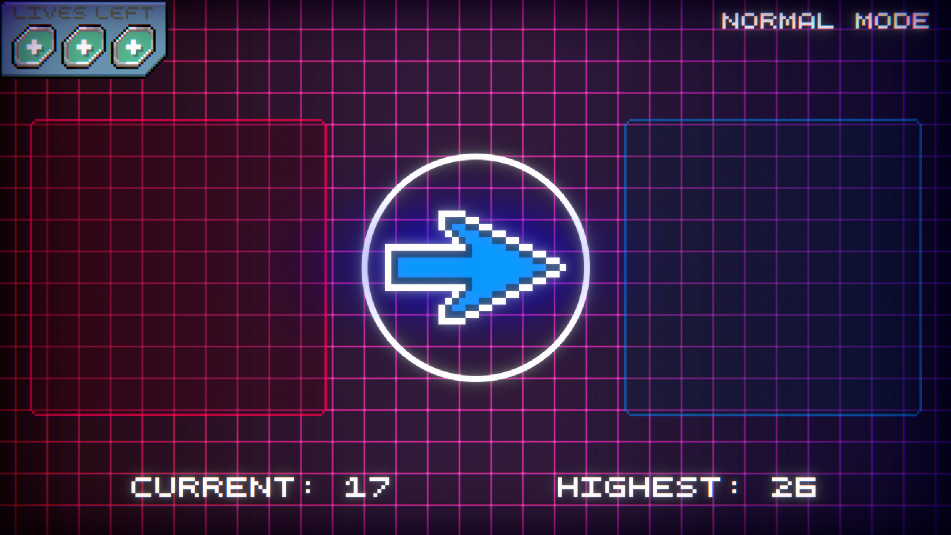
The game will be changing in a few ways with the new patch, and the most noticeable update (aside from the snazzy new visuals!) is the improved gameplay. Instead of clicking on any random part of the screen, you'll now have to click in either of the colored boxes to score. This update in particular was an idea I've had before release, but ultimately chose not to implement at the time. With a clear visual representation of where to score, players should be able to focus more easily on the game, and build a cadence of clicking left and right more easily. In addition, because of this change, the issue where it's possible to earn easy points by clicking near the center arrow will be removed. Use it while you can!
I've also changed the timer to only start ticking down after the first click, as well as guaranteed the red square to be the first one active at the start of each run. These changes should add a bit of predictability to the beginning of each session, while also complementing the new gameplay updates, as well as the change to player lives in normal mode detailed below. I'll be looking forward to feedback on these updates!
Player lives have needed to change for a while, and the solution is fairly simple. Rather than keep the current "you lose, wanna continue?" method of play, you will instead have three lives to use before the game over screen appears. This should make that screen appear less often during any given play session.
Another major addition is the new options menu! This adds some proper display and sound settings the game currently lacks.
There are a lot of other things coming in alongside these, so here's a list of a few major updates to expect:
Changed the gameplay buttons to be smaller squares with increased visibility.
Added graphics options for screen resolution, fullscreen, vsync and FPS cap.
Replaced mute buttons with volume sliders for music and SFX.
Changed how lives are handled in normal mode. You start with three lives, and lose one with each miss.
Added the ability to restart a run without returning to the menu.
Changed the timer so it only starts running after the first click.
Each run, the red button will always be enabled first. Every selection afterward will still be random, of course!
Made various graphical changes to the menus.
Game instructions, player scores, and credits have all been moved into the new options menu.
Reduced overall color saturation, and reduced/removed some post processing effects.
These are only a few things to come with the 1.1 patch. The complete patch notes will be available when the update goes live in May, and I can't wait to release it!
Thanks for reading, and enjoy the game!
The ScreenSpace Development Journey
Hey, there!
I'm the sole developer for ScreenSpace, and I'd like to thank you for checking my game out. A fair bit of time has passed since the game's release, so I figured I'd post an update about it. It's not right to just make a Steam release then go radio silent, so let's talk about the game for a bit.
I've got two things to cover, starting with the project's origin story, and finishing with a small preview of an upcoming update that I'm working on. If you've got some spare time, give this a read!
Project Origin
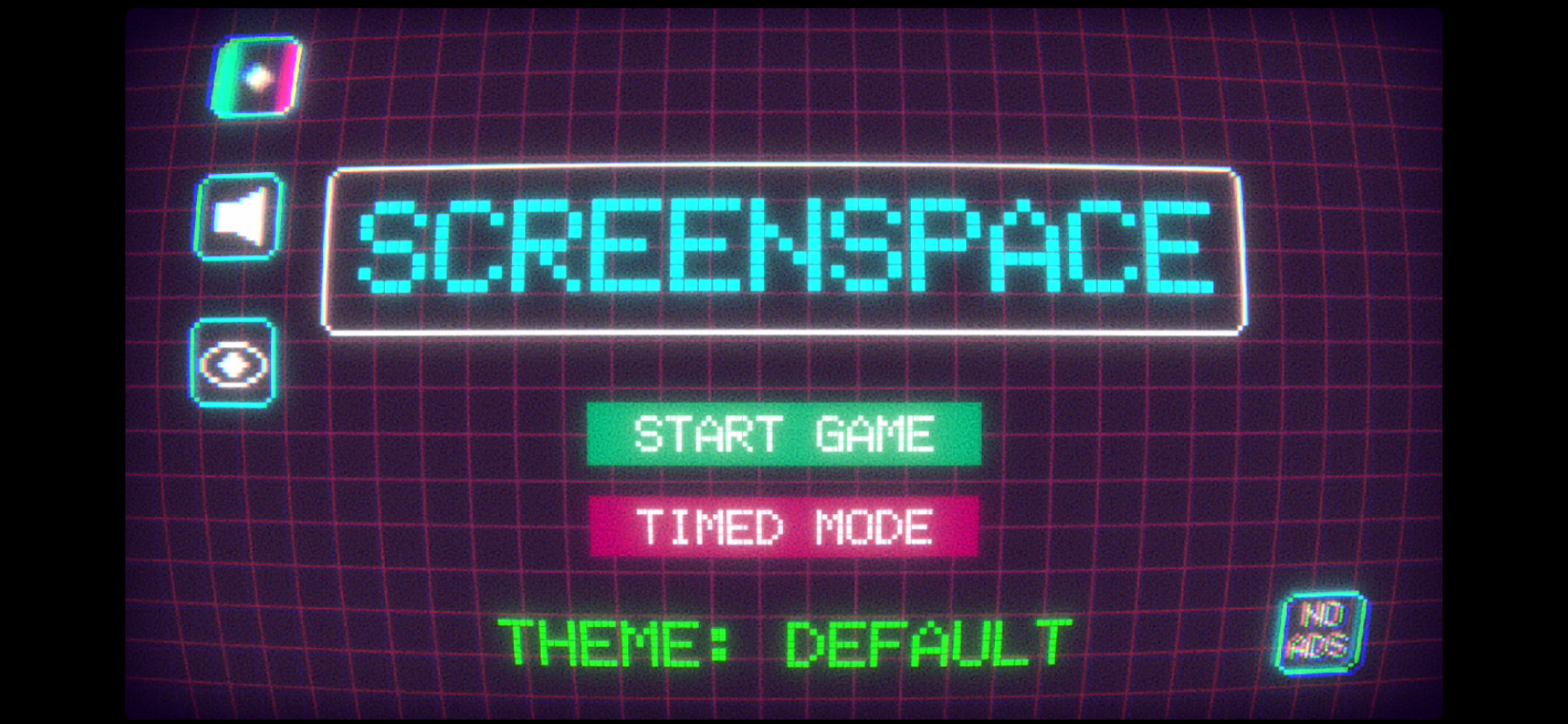
I had originally made this game as a hobby project. I had never developed a game before this one, and had no formal schooling or prior game releases either. As a result, the earliest version of ScreenSpace was very rudimentary and plain. Check out screenshots from the May 2020 test build:
You could probably tell by seeing that cheeky, nonfunctional "no ads" button, that it was initially developed for mobile devices, and you're exactly right! I figured mobile would be the easiest platform to develop on for my first game, especially if it's not too big a project.
The very first thing that needed to be built was the random button selector. It was definitely easy to do, but I needed to account for the possibility of colorblind players getting confused. Therefore, I changed the color scheme and added arrows to the center circle.
It started to come together nicely! From there, I added a small series of graphical touch-ups and visual effects until I got a final product. The game was ready for launch!
PC Version
It's such a good feeling to successfully release a product out to the wild. Imagine the thought: your game is on someone's storefront! It's so awesome, yet terrifying at the same time. It convinced me that more can be done to improve the game even further. Better performance, cleaning up code, etc. But then it hit me: the best thing to do for the game's longevity is to bring it to the wide PC audience. So I got to work, and surely enough, I managed to bring it to you here!
With all that said, I cannot thank you enough for joining me on this bizarre, terrifying-yet-interesting journey! Now, let's wrap this up with a little info on the game's first update.
Version 1.1 Inbound
The first major update for the game is mostly quality of life additions and visual adjustments, with one major change to the gameplay. The biggest takeaway from this update, at least to me, is an adjustment to the clickable areas in the game space. That change in particular reduces the overall size of each clickable area, but increases their visibility. This fixes the possibility of cheesing both Normal and Hard mode by clicking near the center of the screen to minimize the effort in playing. Make use of it while you can!
I'll release a dedicated patch preview separately from this post, but for now, here's what to expect:
Core gameplay change - clickable area reduced, but visibility increased.
Starting timer delay - in both Normal and Hard modes, the timer won't start until you click a button!
Graphics options (resolution, fullscreen, VSync)
Adjustable FPS Cap (sorry this wasn't already added!)
Reduction of visual effect intensity.
Reduction of color intensity/contrast.
New music!
Other visual updates to the menus, fonts, and timer.
I currently don't have an exact release date for this update, but the target is currently near the very end of March 2022. Keep an eye out for the full patch preview in the upcoming days for more.
That's it from me! Make sure to post some screenshots of your highest scores to the community hub, I'm very interested to see how far you can go. If you have any questions, feel free to ask or post a discussion! Until next time, take care!