The in-game workshop is coming to life! Today we rolled out a new patch for ScribbleIt! It is now possible to choose a thumbnail for your custom word packages. Also you can now easily edit the description of your new package. Furthermore we changed the way word packages are displayed in the browse menu and added a simple search bar.
We hope you like the changes. As always we encourage you to give us feedback or opinions about the game in the discussion forums or on Twitter!
Patch-Notes:
Added thumbnail editor to workshop item editor
Added description editor to workshop item editor
Added detail page for workshop item
Implemented in-game search
Bug fixes:
Fixed brush size selector has tooltips, despite not being visible
Patch-Notes 0.6
Patch-Notes 0.6
Hey guys and especially Linux Users, Scribble It! can now be played on Linux systems. That's basically all for todays update but good news nontheless right?
Patch-Notes:
Added linux support
Slightly improved rendering speed by disabling unused features
As always we encourage you to give us feedback or opinions about the game in the discussion forums or on Twitter!
Patch-Notes 0.5.1
Patch-Notes 0.5.1
Yesterday evening we deployed patch 0.5.1. It contains several fixes for the workshop and some slight changes to the default settings when creating a game of Guess It! and Rate It!.
Patch-Notes:
Added missing spanish word packages
Added missing french word packages
Changed default drawing time in Guess It! and Rate It! to 90 seconds
Moved sights, luminaries and countries word packages to workshop
Removed DirectX 10 support
Bug Fixes:
Fixed some in-game elements where not correctly clickable
Fixed tags in workshop items are not correctly set
Fixed strings in workshop metadata where not correctly read by the game
Fixed elements of host explanation where focusable
As always we encourage you to give us feedback or opinions about the game in the discussion forums or on Twitter!
Patch-Notes 0.5
Patch-Notes 0.5
Good news for our friends from France and Spain! We have added spanish and french word packages to the game.
Patch-Notes:
Added spanish word packages
Added french word packages
"ss" can now be written instead of "ß" and has the same effect
a whitespace " " can now be written instead of "_", "-", ".",";" or "," and has the same effect
Improved closeness for non ASCII character when their ASCII equivalent was written or vice versa e.g. ä --> a
As always we encourage you to give us feedback or opinions about the game in the discussion forums or on Twitter!
DevBlog #2 Creating a Sharp UI with Distance Fields
Welcome back to the second issue of our Scribble It! Developers Blog. This time we explain our usage of Signed Distance Fields as a method to make our UI razor sharp on almost any resolution. Scribble It! is a 2-dimensional game. As such it is predestined to also run on machines with low-end hardware. Maybe someday even on a smartphone.
Machines that have very old GPUs or even rely on onboard GPUs most often have a rather small texture memory. Yet modern games require the loading of a lot of big textures to make them visually appealing. To cope for that often times the player can reduce the texture quality in a settings menu - but that obviously makes the game look worse.
Using low resolution textures on 3D models to get a smooth gameplay might be a worthy tradeoff. But blurry 2D elements in the User Interface would seriously disturb the entire gameplay of Scribble It!. After all the game basically consists of only texts and UI elements. We therefore needed a way to make the UI and text elements very sharp but without loading those big textures. Storing many high definition textures for all the different elements would mean high hardware requirements which is not somethin we wanted. There had to be a way to create sharp UI elements without using big textures.
We found the answer in a technique presented in a 2007 Valve Corporation paper by Chris Green called „Improved Alpha-Tested Magnification for Vector Textures and Special Effects“. The presented usage of Distance Fields allows you to create sharp images on many screen resolutions. These Distance Fields make it possible to use small textures even for the highest resolutions. This way texture memory usage is being minimized and the game still looks good. Looking towards a possible mobile release for Scribble It! this was just what we needed.
This technique implicates that the resulting representation is „limited in terms of topology of features which can be represented“. Or to put it in other words: The approach is not feasible for really detailled and complex artwork. For Scribble It!'s rather simplistic approach to UI design this was not an issue.
Afterwards we created a shader to render the final texture from the MSDF. In this step the main challenge was to get smooth edges for every resolution. After testing out several different approaches to tackling this problem we found a solution that worked for us. We made the amount of smoothness that is applied to each pixel depended on the ratio of texture size and actual size of the render target. The following material function is what we used to achieve that goal.
When generating a MSDF we can set a value for pxRange which represents the amount of surrounding pixels that will be included in the computation of the current output pixel. Specifically the pxRange determines how much the thickness parameter influences the final render. Another parameter called roughness is responsible for how smooth the edges will be and can be changed in the MSDF material. This allows for a relatively comfortable adjustment of the different textures so they look good depending on their size and the type of artwork that they contain.
Below are some examples of what happens if the roughness or pxRange values are not correctly set. To make the different artifacts more visible we increased the thickness of the depicted avatar a bit.
Overall we are pleased with the way we were able to use MSDFs to create sharp UI elements and texts. We had to make some adjustments to existing algorithms in our material and ultimately we are happy with the result. We hope you gained some insight into topic from todays issue of our DevBlog!
Stream viewers can now vote which word the streamer should draw
The voting phase will now be skipped, when only one word could be selected
Added functionality to click on guess input text field to make it more familiar with commonly known text fields
Added pop-up for chat messages in player list
Added stream tab in in-game and lobby chat windows
Added pop-up to distinguish between audience and streamer guesses
Added button to show and change status of stream chat connection
Added game setting to disable the stream integration for all players
When selecting a color while using eraser you now automatically select the last selected brush tool aswell. This way after using the eraser tool you can return to drawing faster
Bug fixes:
Fixed shape without width or height could be created
Fixed stats being tracked multiple times for hosting players
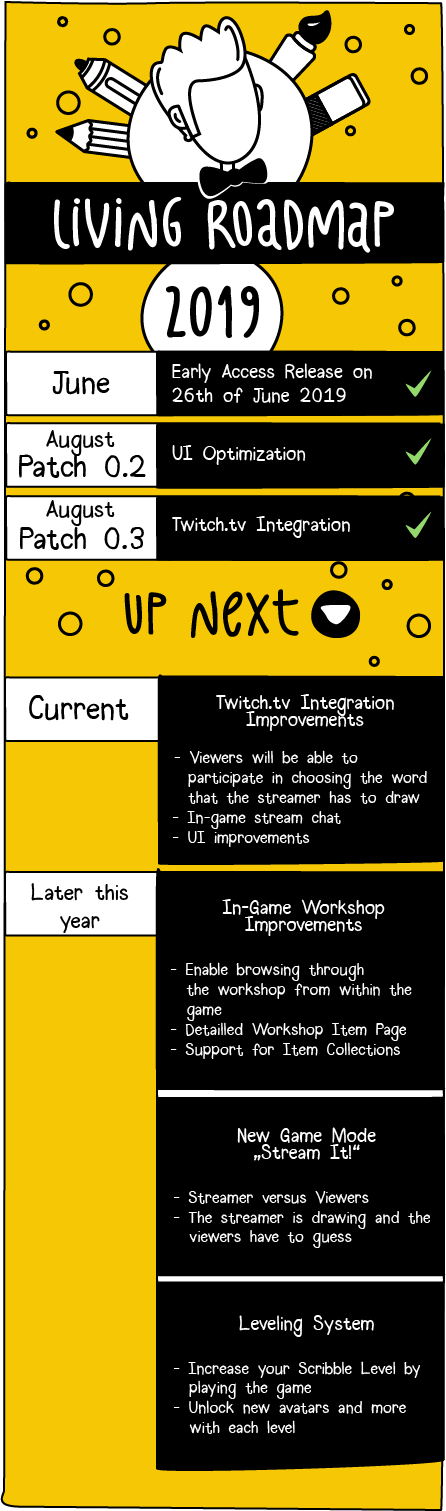
The road that lies ahead
Today we present our plans for the future of Scribble It!
We created a living roadmap that will give you an idea about which feature we are currently working on and what is to come in the near future.
As is the case in most projects, sometimes things change and priorities shift. Therefore this roadmap is subject to change. If we do need to change things we will let you know in further announcements.
Have a nice day!
Patch-Notes 0.3.2
Another day - another round of bugfixes.
This time around we fixed bugs concerning the fill tool and button behaviour in the entire UI.
Bug fixes:
Fixed fill tool sometimes filling the whole canvas
Fixed buttons are not correctly clickable with single click
Fixed scroll hints not closing correctly when other tool is selected
Patch-Notes 0.3.1
Earlier this day we pushed a new update for Scribble It!
We mainly focused on some smaller bugfixes and Quality of Life updates to the Twitch.tv integration.
Added message to distinguish stream viewer's guesses
Added option to disable scroll hint
Added disconnect message
Bug fixes:
Fixed game crashing after round, when Twitch integration was enabled
Fixed problem with disabling Twitch.tv integration while ingame
Fixed incorrect Simon Artwork in gameplay settings
Patch-Notes 0.3
Patch v0.3 is now live.
This patch is mainly about the first, very simple integration of Twitch.tv which enables viewers to make guesses for their broadcaster in Scribble It! and Guess It! game modes.
<*> Added functionality to integrate Twitch.tv streams into the game
A guide on how to do this can be found here <*> Educational animations have been added to the game mode selection menu
<*> You can now open a players steam profile by clicking their profile picture