I hope you all enjoyed the Halloween festivities, whether you chose to play with a friend or not. However the time has come for Azuria to return to normal. This is a quick update to say farewell to Halloween till another time.
In regards to Multiplayer, I have kept track of issues that players have been having and I am looking towards more substantial solutions to tackle latency de-syncing for players in further geographic locations. In the mean time, I recommend that if you play, you aim to find a host physically closer to yourself.
I'll be doing simulated tests that focus on higher latency. With the aim to make it more playable for those with less favourable network connections.
Halloween has come to end. The town of Azuria has returned to normal.
Fixed an issue with servers not unlisting properly from the browser.
Fixed a bug with the lighting after midnight.
FPS counter had been added. It shows when the menu screen is open.
Previously I only had this displayed in my own developer mode, but I want players to view it too.
Latency indicator has been added. It displays in the bottom right in multiplayer mode. Again, I had my own developer-only display of this. However I need player feedback on experience vs latency.
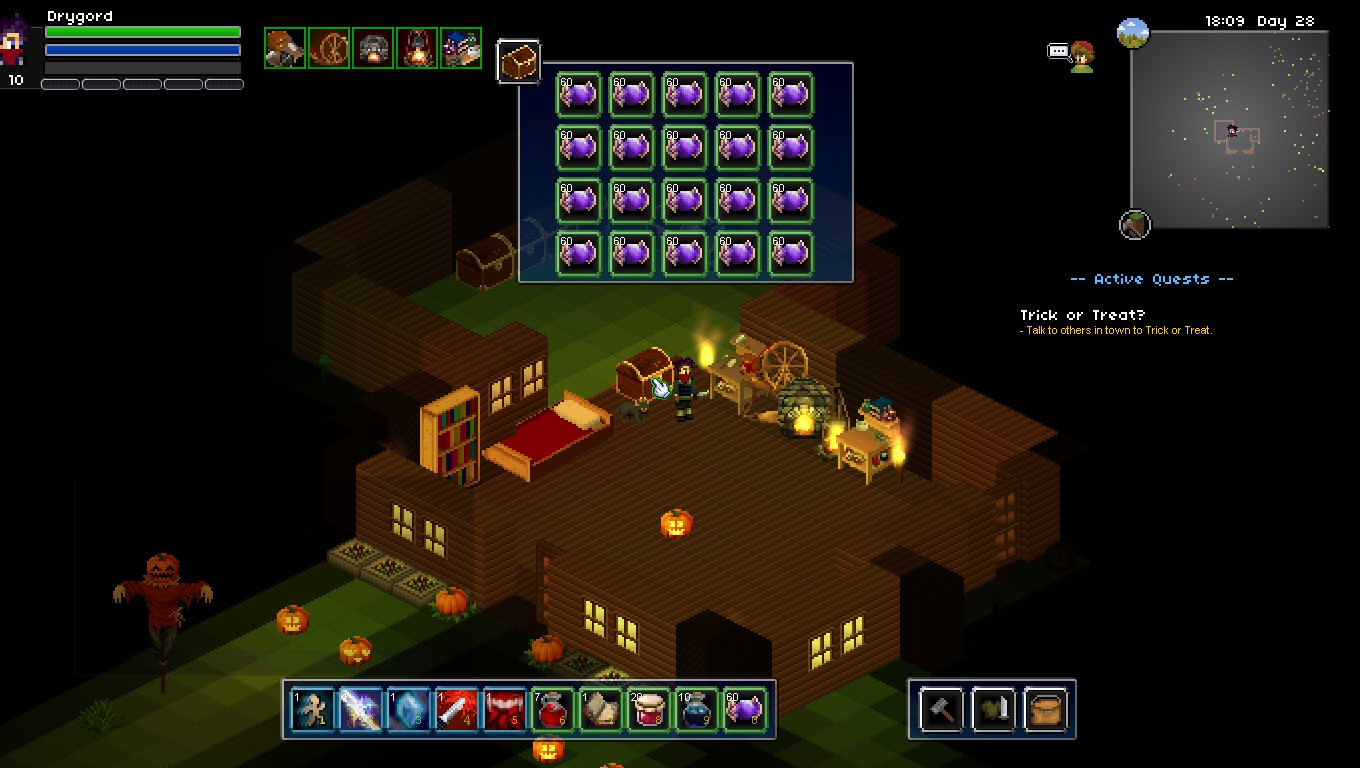
PS: Credit to primalredemption for this amazing screenshot of his personal candy stash. Just don't eat it all at once!
Build 7 - Multiplayer, Halloween & More
Multiplayer (Online Co-op)
Finally! The Halloween festivities return this year, but this time with the new Multiplayer game mode available! This version of Multiplayer is Online Co-op for 1-5 players. It works by using a Steam lobby system. One player chooses to act as the server by hosting and playing. Then joining players can view a list of available servers on the Multiplayer browser. For this build, the only game type available for Multiplayer is Co-op. This means that you will be playing cooperatively together and not attacking each other.
In terms of save data, the host takes ownership of the World and the players keep their own Character data. You can play through the game in the same way you would Singleplayer, including accepting quests and talking to NPCs. Servers can also be password protected and when viewing available servers, you can filter them to show only servers hosted by your Steam friends.
Please be aware that Multiplayer development is still on-going and you may experience some bugs. If you encounter any issues, please see the Steam Discussions for bug reporting. This kind of development is rather problematic, so I am expecting a certain amount of code fixing to do.
Character Profile Re-Design
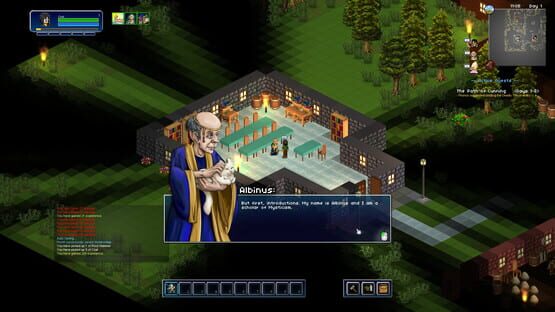
The profile images shown for NPCs during dialogue have been changed to a pixel style aesthetic. We feel this better suits the style of the game, compared to the previous illustrated look. You can click on the image above to see the new profiles at the size they appear in game.
Sound Re-Vamp
Most of sound effects have have been recreated and finalised for a more consistent sound style. Many of the abilities and monster sounds have been changed, some drastically different, or others less so. Overall, the quality is definitely better and I think certain things are given the quality they deserve now. In particular the Sentientpede sounds a lot more intimidating and now matches it's stature. Many thanks to Chris Dain, who was drafted in to perform the mighty task of revamping.
Halloween
Medea the Witch has returned to Azuria. This follows a return of last year's festivities. Azuria is aglow with Halloween decor. Take part in Trick or Treat (now with friends!).
Other Notable Changes
During big builds like this, I'll often forget to mention little tweaks/changes that get lost in everything else.
However here are a few things to note:
10 more Hair Styles have been added
Some HUD GUI elements have been redesigned in line with multiplayer changes.
A costume item slot has been introduced. This is to allow for players to equip whole outfits that change the appearance of the character, but do not effect the combat statistics.
The Paint Blaster is now classified as a costume item, but still provides the ability to paint.
New costume item Blue Maid Outfit has been added.
Most of all, I hope you all enjoy Multiplayer and I hope you all have a great Halloween!
Thanks!
Phill
Future - Multiplayer (Online Co-op)
It is still in the early stages of development, but I wanted to share that this is now in progress. I want to share this, so that the community is informed as to what is happening behind the scenes for the time being. Multiplayer development can be problematic and time consuming, so I'm not able to give an ETA just yet.
The first form of Multiplayer is likely to be a Co-Op game type with possibly 1-4 players.
It will use a Lobby system to help with browsing a list of available games to join.
Servers are player hosted through the game itself.
Choose an option in game to host and then play while hosting.
Please be aware that the above may change during development.
But I look forward to being able to share more ヽ(・∀・)ノ
Thanks,
Phill
The Official Shards of Azuria Wiki
I'm pleased to share that the official wiki solution for Shards of Azuria is now live!
Many thanks to Gamepedia for providing such an excellent wiki service.
In terms of content on the wiki, there is already a great start.
I hope in time it becomes an invaluable resource for any players of the game.
If you feel inclined to contribute, then feel free to create an account and perhaps
start with the Gamepedia Help Wiki:
http://help.gamepedia.com/Gamepedia_Help_Wiki
Thanks!
Phill
Build 6.2 - Fixes & Changes
Changes:
- Reduced the aggro radius of the Bear and also the rate of health regeneration
- Input validation added to prevent other actions while casting.
- Day/Night lighting has been tweaked so that it isn't as dark at night or in caves (light intensity also tweaked appropriately for day/night situations).
- The sound effect and mechanic of the NPC dialogue has been changed.
- When attacking with the cursor, the direction the character faces is now based on purely the position of the cursor and not the position of a selected block (at it's base).
- Prevented melee occuring when clicking on some GUI elements
- Experience gain from enemies has been adjusted so that it is no longer randomized and now always at the max of the range it was defined (Between 15-30 exp is now always 30).
This overall increases the experience gained from enemies and ensures that it feels consistent when gaining it.
- Melee cursor changed so that if you aren't precisely targeting an enemy, it will still attack in the direction of the cursor and detect any enemies in range.
- Spell casting has been changed to no longer be cancelled when hit.
Instead, the cast bar progress will be partially reduced and not completely halt the casting.
Mystic Bubble will now also nullify the effect of cast bar push-back.
- While casting a spell, you now automatically face the direction of the cursor.
Deadly Thrust has been changed: - Aiming and targeting has been changed to be based on the position of the cursor.
- Functions in all directions, instead of just 4 way.
Ice Shard has been changed: - Removed the Stun (it was a bit too effective when combined with Deadly Thrust)
- Intellect to Damage coeffient increased
- Changed the appearance of the targeting
- Radius increased
- Mana cost increased
Shard Blade has been changed: - Aiming and targeting has been changed to be based on the position of the cursor.
- Functions in all directions, instead of just 4 way.
- Strength to Damage coeffient increased
Freight Train has been changed: - Aiming and targeting has been changed to be based on the position of the cursor.
- Functions in all directions, instead of just 4 way.
- Strength to Damage coeffient increased
- The speed of the charge has been reduced
Infernal Misery has been changed: - Aiming and targeting has been changed to be based on the position of the cursor.
- Functions in all directions, instead of just 4 way.
- The projectile fired no longer collides with your pet item
Mystishock has been changed: - Aiming and targeting has been changed to be based on the position of the cursor.
- Functions in all directions, instead of just 4 way.
Arc of Pain has been changed: - Projectile visual has been changed
- Aiming and targeting has been changed to be based on the position of the cursor.
- Functions in all directions, instead of just 4 way.
- The projectiles no longer disappear on first impact, but continue to damage any enemies in it's path.
- Now also bounces off blocks
Flash Attack has been changed: - Aiming and targeting has been changed to be based on the position of the cursor.
- Functions in all directions, instead of just 4 way.
Fixes:
- Fixed item looting so that you can now pick up stackable items if all of the the inventory slots are occupied, but there are still unfilled stacks of the item type.
- Fixed the Ability: Unseen recipe requirements
- Fixed timer issues that occured due to the game timer not functioning correctly.
Once example of this was the shruiken trap blocks that continued to spawn objects while gameplay was paused.
- Fixed crashes occuring when teleporting with a Wooden Chest open. Also properly exits the GUI during.
- Fixed issues with automatic crafting that was caused by the chosen number of items to craft exceeding the max stack of items involved.
The amount selectable when auto crafting is now limited by the lowest max stack of the item requirements.
Credit to OnsenManju for providing detailed examples.
- Fixed an issue with cursor object selection, which was causing crashing with the eggs in the Sentientpede room.
- Fixed cooldown timers on the action bar that were still animating while paused
Build 6 - Rivers, Fishing, Abilities & More
It’s taken longer than expected with these changes, as I think there was a bit too much taken on for a single update. But here we are at last! Now to try and summarise all of the changes…
One thing to note first, is that for these changes you will have to create a new world. You can use the same character, but you will not be able to experience the new map unless you do so.
Custom Design / Procedural Generation
In my last post, I shared my thoughts on wanting to switch to using custom design for maps over generating them. The feedback on this topic was interesting as it shows a desire to still retain an element of generation. Basically I want to reassure you all that the world creation will continue to use a mix of both custom and generated areas.
However, one distinctive difference with this build is the addition of rivers and other custom designed areas. For the Woodland, the way this is constructed is by first generating a random “base” of the area, then a custom/static layer is printed on top to produce the mix of the two.
One thing to note here is that I had to create a developer-only map edit mode to facilitate much faster editing of large areas. It’s good that this exists now for future use.
Rivers & Fishing
There are now rivers running throughout the Woodlands, with small and large fish lurking in the waters. You will need to craft a Fishing Rod and to carefully cast your float out next to a fish. Any fish caught can then be sold to a vendor for a generous price. Four rods are currently available and each increases your chance of catching more valuable fish.
Fishing Rods and Crafting Requirements:
Wooden Fishing Rod (Branch, Branch, Reed Grass)
Iron Fishing Rod (Wooden Fishing Rod, 10x Iron Ore)
Ruby Fishing Rod (Iron Fishing Rod, 10x Ruby Gems)
Gold Fishing Rod (Ruby Fishing Rod, 10x Gold Ore)
As for the fish – You will catch different ones depending on where you are in the Woodland. Below are the fish that are available:
Gully
Perch
Trout
Salmon
Golden Gob
Moon Speck
Crab
Shrimp
Yopper
Carp
Pike
Azure Toad
Runed Skipper
Abilities
Four new abilities have been added. Orb of Light is a non class specific ability to simply help add a bit more light when you want it. The other 3 are more defensive options for each of the class types. On a related note, the crafting requirements for some abilities have been adjusted to make some more readily available.
Orb of Light
Summons a mystical Orb of Light that orbits the caster and illuminates the surroundings. Lasts 30 seconds. 1 min cooldown.
Unseen
Briefly go out of sight. For 4 seconds, you are completely invisible and will not be detected by monsters. 20 sec cooldown.
Mystic Bubble
Envelops the caster in a bubble of mystical energy. Prevents knockback and transfers 20% of damage taken into consuming mana instead. Lasts 8 sec. 30 sec cooldown.
Brace For Impact
You prepare for impact, reducing damage taken for the next 1 second by 80%. 14 sec cooldown.
Queen Bee Mini Boss
There is now a mysteriously large hive in the Woodland. Proceed with caution if you don’t like large flying insects.
There are however two new items to craft if you manage to pluck up the courage to vanquish it.
Stinger Staff
Chitin Crest
Cursor Based Melee & Interaction
One of the sore areas for feedback has been around the movement and melee systems. Changes have already been made to allow for full directional movement by holding down RMB. However there were still issues with the melee system being difficult to aim/position for new players.
With this update, the melee system for both players and enemies has changed to be range based. That is, enemies will now also move in any direction and once in range, will directly attack the player.
More importantly, you can now melee attack enemies and objects by using RMB. The cursor now accurately selects/highlights enemies, blocks, doors or NPCs to either attack or interact with.
Misc Changes
There have been so many small tweaks/changes, but here are more notable ones:
Added a Sort Inventory button
The character’s position is now shown on Alris’s Map
Fixed an issue with the collision on the edge of the map
Hand cursor for object interaction no longer shows in menu
Blocks that are out of sight of the player (FoV) will now appear more transparent in order to allow for other closer blocks to be seen.
Happy New Year! Planned Future Update - Build 6
(ノ°∀°)ノ⌒・*:.。. .。.:*・゜゚・*☆
Happy New Year everyone!
For many reasons, 2016 was a turbulent year, full of shock and bewilderment.
I hope that for all of us, 2017 turns out to be a better year.
A year full of positive changes without any regrets.
2016 was still an incredibly significant year for Shards of Azuria and the two of us at Blue Potion Games. It has been massively rewarding to see it first successfully go on Steam Greenlight and then be released on Early Access. The reception has been very humbling and reaffirming. It confirms that doing this is worth it. Play testing, youtube videos, streaming, reviews and discussions have made it all an amazing experience.
THANK YOU to everyone that has contributed. We will make sure that Shards of Azuria continues to improve as 2017 goes on.
Planned Update – Build 6
It’s been a while since my last post, so I wanted to take the time to give some details on what to expect with a future update.
I am expecting the update to be ready sometime during February, but it could extend if more work is required first.
So what is expected to be in the update?..
– Custom Design Revamp
I mentioned this in my last post. This is not a decision to take lightly, but I feel is the right one.
Procedural generation of map areas is being phased out in favour of custom designing the map areas.
So while the world won’t look any different each time you create a new one, it should be a higher quality than before.
Doing this has meant there have been various development related things need, like a dev only map edit mode.
With this change, the current maps are also being revamped in their layout and appearance.
– Water, Rivers & Fishing
– Crop Growing
– New Abilities (Unseen, Mystic Bubble, Brace for Impact, Orb of Light)
– Queen Bee Boss
– More equipment/weapons
– Inventory Sort Button
This is merely a summary for now, the rest of the changes will be detailed within the full patch notes when the update comes.
I hope you have enjoyed the Christmas break and I wish you all the best this year!
Build 5.1 & Future Plans
5.1 Thoughts
Last night Build 5.1 went live, which brought an end to the Halloween event and added an option to choose a movement control alignment.
The movement options are to allow players to play with keyboard controls aligned to different directions, so you can choose which feels natural. Originally at the start of Early Access, the movement system was aligned so that "up" (W key) went towards the top left of the screen. This was because of the 4-way diagonal movement, which had to be aligned to either top left or top right at that time. After the recent change to allow for 8-way movement and mouse control, the alignment was changed to be at the middle of the top. A new player will now find the default controls are set up so that if they press the 'W' key, they will move straight up the screen.
In theory, this should be the most simple alignment for a new player to understand. However some existing players also felt the original movement system was more appealing. Because of this, I have introduced a control option to allow players to choose between any of the 3 movement alignments (top left, top, top right).
I hope you all enjoyed the Halloween event and secured a good supply of candy for safe keeping, without being tricked too much. The Halloween event was good bit of fun to add and I hope you enjoyed it, even if it was a temporary thing. Being able to change the appearance of the town for a seasonal event was nice, although it has meant a subtle design change going forward. During the Halloween event, you would have had to create a new world in order to see the updated Halloween town. This isn't ideal, as most people don't want to abandon any world they already have (even though the same character can be used). Creating a world of your own is neccessary because of the modifiable nature of it. However, because the town itself is protected from being changed by the player, it does not need to be your own'copy'. Therefore, going forward, protected areas like the town will always show any updates that have been done. Unprotected areas like the Woodland will still require a new world be created, in order to see any updates.
Future Plans
I would have liked to provide more changes within this build, but I have been preoccupied with planning for the longer term. It has been tough to decide on what is best in terms of a development plan right now. There are 3 distinct areas of work that I want to explain. While I have already started with the codebase port in the background, I would love any feedback on any of these topics. So please, don't hesitate to share your thoughts on the direction I'm looking to take.
Codebase Port
One of the things I've wanted to do for a long while now, is taking the time to port the existing game codebase to use a more modern API. When this project started, I was using an older DirectX based engine called Haaf's Game Engine (HGE) and never thought that I'd continue things this far down the line. I'm glad the project has grown into something bigger than I expected, but at this point HGE is no longer suitable. Porting the codebase will be a significant technical task, but will put the game in a better place for development in the longer term. General game development will be better, but will also open things up for future cross platform support. Doing this also ties into the next subject, as a better foundation will be good for onto other things like Multiplayer.
Multiplayer
This is very important. It has remained a massive goal for a long time and is finally coming to the point where this can be developed. There are still hurdles to overcome though, as mentioned with the current codebase, I want to lay the right foundations for this. Developing multiplayer itself will also take time, which could have been put towards content or other changes. Still a lot of design to figure out, but I believe it will be a very fun addition to the game and will be worth the effort.
Custom Design
A reoccuring design topic is the divide between procedurally genrated and custom designed areas. At present, the game has large procedurally generated areas, with custom 'templated' areas to inject a more personal touch where needed. While procedural generated areas have their benefits in terms of the scale of the area and replayability through randomness, we still find the benefits aren't enough. As a whole, the custom areas are still better. It's far easier to give it the personal touch and design things in a more natural way. Even in regards to large areas, we feel that using an entirely custom approach would give better & faster results for new areas. The main thing that would be lost, is the randomness of the areas for replayability. But as it stands, there is only a small noticable difference between newly created worlds. To make up for any lost replayability factor, there would likely be more frequent and higher quality content being produced.
Build 5.1 Patch Notes (7th Nov)
- Fixed an issue with the Sleeping status effect causing crashing after saving while asleep.
- In light of the temporary Halloween changes to the Azuria town, it has been decided that the same source map will always be used for the town, regardless of what world you are playing with.
This means that you will not have to recreate a world to see any town changes.
- The Halloween event has come to an end. All items acquired during the event will remain, but the town will return to normal.
- Fixed a bug with trying to open a Wooden Chest while another was already open (close proximity)
- Control Scheme options for WASD movement alignment (Esc Menu->Controls)
Build 5 - Controls, Halloween & Tweaks
Control System Revamped
- Movement has been changed to include mouse based movement in all directions by holding down Right Click.
Existing WASD keys can still be used to move, but are now aligned upwards and not diagonally.
WASD keys now also function by combining keys to give up to 8 directions of movement.
- Interacton with NPCs, doors or other objects can now be performed by Left Clicking on them while in range.
The existing method of pressing the E key while in front of objects still exists.
- Melee at present still acts in 4 directions, but can now also be performed by Left Clicking.
When Left Clicking for Melee, it will also change your characters direction to where you clicked.
Halloween
– The town of Azuria has been given a rather creepy makeover.
You will need to create a new world if you are interested in the Halloween event (you can still use the same character).
– Medea the Witch has appeared in town and a couple of things to talk to you about.
She is also selling some Halloween related goodies.
– Trick or Treat. Test your luck with the locals in town.
– The ‘ledges’ into cave sections has been trimmed down
– Pumpkins will appear in the Woodlands during Halloween
Misc Changes
– Tweaked the alpha/hiding of blocks that obscure the player
– Increased the size of the required enclosed room for sleeping
– Steam API check change to allow offline play
– Introduced another type of text alert to the player.
– Lowered the Sell->Buy value multiplier from 10 to 4
Planned Update Oct 24th, Controls, Tweaks & Halloween
Hi all!
This is my first real announcement since launch. It has been a bewildering, but very rewarding experience. The feedback and engagement has been so amazing. I've tried to soak up everything that has been said to try and make the best decisions moving forward.
I'm working towards an update on the 24th. I've got plenty I want to change and tweak for then, but my main priority is the control scheme. This has been the main stumbling block for feedback and is clearly something that I can improve on.
As I type this, I'm already deep within developing and testing a revamp of the current player control system. I'm testing a free, full direction movement system. Mouse based, holding RMB to move. WASD movement will still be there, but it will be effectively 8-way movement and crucially, will be correctly aligned upwards (NOT diagonal).
Revamping a control system like this takes some care though, there are abilities I'm evaluating and changing where it is appropriate. Some will also gain an all direction component to how they work.
I'm also closely looking at the way the player Melee attacks. It's quite likely this will be changed to be more intuitive in terms of targeting and made to operate with the mouse (LMB). Interacting with NPCs, doors etc may also also be switched to respond on mouse click.
As ever, I'm always welcome to hear your thoughts or feedback. So don't hesitate to give your opinion on these upcoming changes.
Also... Expect some creepy looking things inhabiting town for Halloween.



 Wooden Fishing Rod (Branch, Branch, Reed Grass)
 Iron Fishing Rod (Wooden Fishing Rod, 10x Iron Ore)
 Ruby Fishing Rod (Iron Fishing Rod, 10x Ruby Gems)
 Gold Fishing Rod (Ruby Fishing Rod, 10x Gold Ore)
 Gully
Gully
 Perch
Perch
 Trout
Trout
 Salmon
 Golden Gob
 Moon Speck
 Crab
Crab
 Shrimp
 Yopper
 Carp
Carp
 Pike
Pike
 Azure Toad
 Runed Skipper


 Stinger Staff
 Chitin Crest


