

Shwip
Update 2.07 - Bug fixes and ui improvements
- Style mode music now doesn't suddenly cut out
- Uploaded scores are now correct
- Minor UI improvements and fixes
Huge thanks to Shiny1 on twitch for hilariously finding these bugs.
https://www.twitch.tv/theshiny1
Enjoy!
2.0.6c Hotfix - Mines & UI Fixes
- Mines no longer get less effective the longer you play in Arcade and Style.
- UI Score no longer jumps around.
2.0.6b hotfix - FX Missing - how embarrassing!
Shwip has left early access!!!
https://discord.gg/zMtdKrYu9j
Again, thanks for all the support from our fans.
Shwip finally leaves early access August 3rd, 2021!!!
THAT'S IT FOLKS! WE'RE HERE!
What's changed since early access?
- We've completely redone the input system, allowing for all types of controllers now. We used to only support xbox.
- Added a new Tutorial mode to help introduce mechanics.
- Finalized Style mode after all your wonderful feedback.
- Completely redid how teams work in multiplayer. You can now form even or uneven teams.
- Implemented various UX improvements for menus and other screens.
- Rejigged many new under the hood mechanics to make porting to other platforms easier.
- Balanced and rejigged minefield and arcade modes after player feedback.
- Added and adjusted visual effects like mine explosions, magnets and spawns. PLUS we made the whip look super badass!
- Added adjustable visual settings for particle effects.
- Added new sound effects and cleaned up others.
- Added new tracks for style mode.
- Fixed an insane list of over 200 bugs and small annoying items.
What took so long?
Looking back, we overestimated how long we would be in early access and after all this time, we're finally here. There is no rule book for launching and building games, it's our first go at this and we're doing the best we can. Thanks for hanging on, and we hope you enjoy Shwip!
A huge thanks to our fans and followers
Through your feedback, your videos, your laughter and undying love for the game - we thank you from the bottom of our hearts!
Shwip 2.0.5 Release notes
- Added a much needed tutorial mode for new players
- Fixed a shwipball teams bug
- Improved mine explosions and other visual tweaks
- Fixed a few audio bugs
- More bug fixes surrounding inputs
Thank for sticking with us everyone! We'll be out of Early Access in no time :D
Shwip V2.0.1 Patch
Improvements & Additions
- Mine detonation time has been increased.
- Adjusted difficulty of Arcade mode.
- Added new spawn sounds for smaller enemy spawn events.
- Made Strife (purple) enemies shoot faster and more accurately.
- Minefield: Checkpoints no longer expire and remain at 1 second at the end of its countdown.
- Minefield: Checkpoint bonus gives you points instead of time now.
- Minefield: Increased the checkpoint damage radius.
- Minefield: Shows indicators for where checkpoints are located outside of players camera.
- Minefield: The shield is no longer spongy.
- Integrated Discord Rich Presence.
- Added UI interface sound effects.
- Implemented a better Keyboard/Mouse control scheme page.
Bug Fixes
- Fixed bug where the camera would lose track of the player in spectacular fashion.
- Target fixation achievement now works as intended.
- Local leaderboards now post scores properly.
- Quick restart now works for all connected controllers.
- Stats screen shows more... stats.
Join the discord community for real time feedback and discussions.
Shwip Mega Patch V2.0.0
What’s been added?
A thank you!
Thanks for sticking by us. We're looking for feedback so feel free to head on over to the Community hub and let us know. Shwip will officially leave early access after this patch so stay tuned for more information.
Available September 10th, 12:00 PM.
Devlog 11 - A user experience exercise
Shwip has a pretty complex set of controls to grasp when first getting hold of the controller or keyboard so it’s no surprise that there can be some level of frustration. Early on, we admittedly assumed players would grasp the control styles after a series of playthroughs, but we’ve changed our tone after hearing so much of the same feedback.
We’ll start with what we originally had, and move on to the new and improved screens, so get comfy!
CONTROLS
Shwip currently has 4 distinct game modes and 4 control styles. Each mode has different elements unique to that mode. Some modes share control elements, while others remove and add others – there’s no wonder players were confused.
Our first series of enhancements was to the control layout screen.
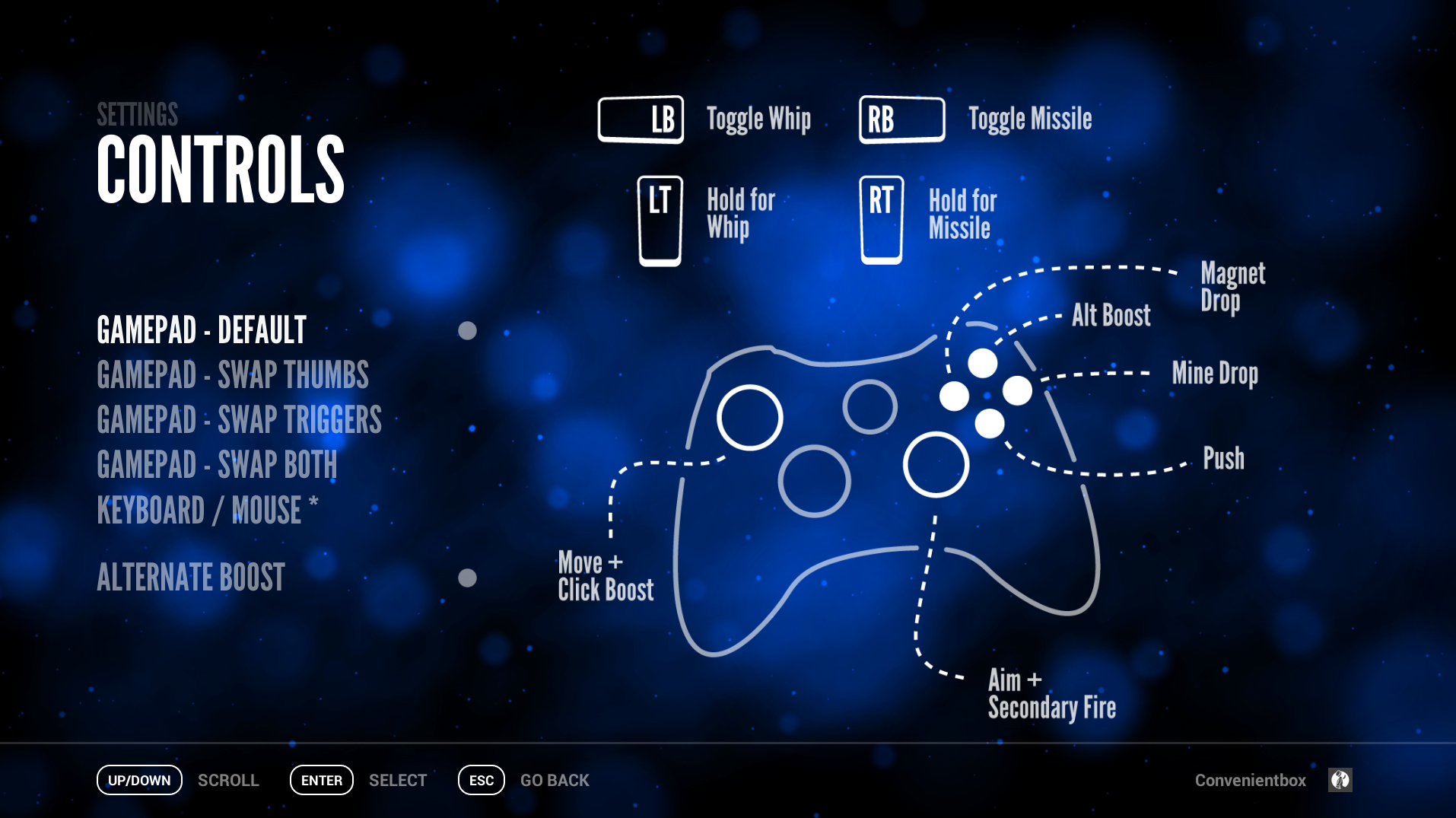
The screenshot above shows our first attempt at a controls screen. Notice anything wrong? There’s currently no way to know what controls exist for other modes. Time to fix that.

This new controls screen will now show players the different modes and their unique controls styles. The new unity input system has certainly made it easier to create unique bindings and showcase them, so thanks for all the hard work Unity!
Let’s move on to mode enhancements.
GAME MODES
As mentioned earlier, each game mode has a unique set of controls. Originally, we had two separate areas to let players know what they were in for.


These two screenshots show how we let users know about the game mode they’re about play. While informative, they don’t exactly go out of their way to embed themselves into the players mind. Originally, you had to dig through a series of menus to get the information, we set to change that.

Our second attempt aimed to give players more of an overview of the unique aspects of each mode. The additions seen here was a direct response to the feedback we got from players during our roadshows. These screens appear before you start a game, and give players a chance to read more about the mode. Furthermore, they can dismiss these screens so they don’t show up the next time you play ( which happens a lot 😉 ).
Unfortunately, these screens suffered from a serious flaw. They were flat images. Realistically, players will have a large variety of control types and situations. We assumed most players would use an Xbox controller, and geared our UI to that. What we forgot, and partially due to the old Unity input system being so lackluster, was a complete disregard for pc and keyboard users. So again, we set to change that.


The screenshot above is our newest game information screen. The screens now display dynamic control styles depending on which device the player is using. Awesome! We hope this new series of screens helps players grasp the game modes better, enabling them to play as we originally intended. The screens even go as far as to display BOTH keyboard and gamepad buttons in multiplayer.

The screenshot shows how the UI changes to display a pair of control styles – all dynamic and updates in real time. Those enhancements continue to the new team selection screen for multiplayer.

A CONCLUSION – WHAT WE LEARNED
We’re a two person team here at Jamhammer Games with a lot to learn about game design and how it affects our players. This experience has helped us gain a new respect for our players and those who have tested Shwip for us over the years. Look forward to these improvements in our next Update due soon on Steam! Take care.
First Look - Style mode Alpha Gameplay
Check out a short glimpse into some alpha gameplay for Style mode. Currently we have a task system in place. Completing said tasks will give you a nice boost for your turbo-meter, and once that is full you'll be able to utilize a few new abilities including a shield and slow-motion! Stay tuned for more updates, we'll be posting minor milestones for feedback.