

Simian Rising
Performance and Cosmetic Improvements
Most of the work done over the past few weeks has been directly related to Campaign mode, but since these changes have resulted in a smoother experience in general, this update has been introduced as an intermediary step.
Click here to see more detailed information in the Steam forums.
Now With 100% More Burnination
Anyhow, for those of you who looked at the store page and thought the game made by some alt left green-warrior type, I've made a compromise. The offensive beam and offensive field are now capable of evaporating trees, almost instantaneously. In most cases it's still more efficient to go around them, so the choice is yours.
Disclaimer: Very few actual trees were harmed in the making of Simian Rising. All Caps Industries opts paperless whenever possible and the office printer's natural state is unplugged. On the other hand, countless thousands of virtual trees have been evaporated in the course of development and testing. They grow back fast though--at least for now--and I feel that if someone wants to take out a tree, doing so to a virtual one is a viable alternative.
Disclaimer: Nobody to this point has accused All Caps LLC or any member thereof of being an "alt left green-warrior type."
Disclaimer: The "100%" mentioned in the headline is just a number meant to sound impressive. In reality this number is probably larger, but that all depends on how you measure it.
Improvements to Hot Key Assignment
When the game was released, there was a way of accomplishing this, but I've since come to the conclusion that it was too obscure. It was too difficult to tell which systems were attached to which keys, which systems could be assigned to custom keys, and the drag and drop method in use was just too clunky.
Well, now those shortcomings have been addressed! I think this new method of assigning keys to systems is much better than the old one.
In build mode, if a system can be assigned custom hot keys, a new panel will show in the module detail window.
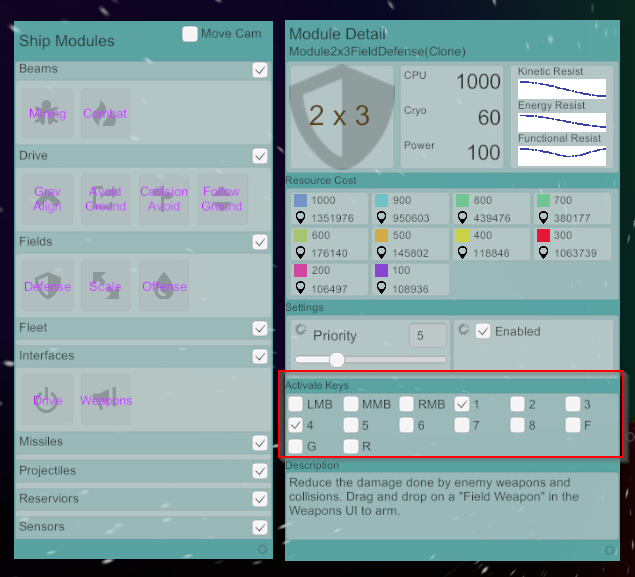
If you'd like your defensive field to activate with the "1" key and the "4" key, just check those boxes. If you'd like your offensive field to activate with the "2" and the "4" key, click that module icon, and check those boxes in the details window too.
Now you can turn your defensive field on and off with the "1" key, the offensive field on and off with the "2" key, and force both active with the "4" key. Much better than the old way, and it's easy to see how your ship is configured.