I have a great pleaseure to announce that Smart Cube is a part of a new bundle on IndieGala.
You can get Smart Cube, plus other 11 games at a low price. Here is a link for more details: https://steamcommunity.com/groups/indiegala#announcements/detail/1706192127161728692
Smart Cube is hidden!
It looks like Smart Cube doesn't exist on Steam, why?
https://store.steampowered.com/updated/all/
Because all the news about updates, even if I marked it is an update, it doesn't appear on "Recently Updated" section from Steam and even I own "Smart Cube" and I checked with my brother Steam account, om "Recently Updated", from Steam client, there are two tabs: All Updates and Your Games & Software Updates, also here "Smart Cube" doesn't appear. I did an investigation and here cannot be a hidden algorithm, because on this list I can see a lot of games with "Learning" restriction feature and with less reviews or no reviews and this means, here are not displayed just the popular games.
Here is an example:
https://store.steampowered.com/app/921660/Quirky_Crystal_RPG/ This game has "Learning" and no user reviews. But, also, it looks like a little bit outdated, since it doesn't run on HD resolution and it looks to me as an old game that I will never buy. Ok, now "Smart Cube" is in the same situation, but I think my game is more nice, but I will be bad with me and I will say: "Smart Cube" is the same as "Quirky Crystal RPG", but maybe a little bit more nice, but if this is true, why, this game appears on "Recently Updated" section and my game not? This cannot be an error, since, when I wrote "Fix Update 1" it didn't appear.
Please note: What I wrote here is just a procedure, since "Recently Updated" is a page in movement and when it will be accessed, later, it will be different and even if I captured it, this will not be considered an evidence. Also, here I will ask some people to comment here, in order to confirm it.
Fix Update 2
Bugs list:
Jump Pad that blocking the player back movement fixed.
Elevator that blocking the player to grab or create jump pads and cubes fixed.
Player rotation that activate or deactivate the elevator fixed.
The error when the player may build a cube inside another cube fixed.
Improvements list:
The gaps have been virtually filled in order to prevent the player to fall.
The player can create or destroy cubes from a very small distance. - But, please note: If the player will add a cube that will collide with him, a virtual force will push him outside the cube to prevent the blocking player inside the new cube.
The music quality is now in high quality, since it has no compression set.
Fix Update 1
New movement system
The movement system has been replaced with new one that works better. So, now you can more naturally jump forward or jump on edges. Also, the new movement system has the capability to be controlled in air.
New rotation system
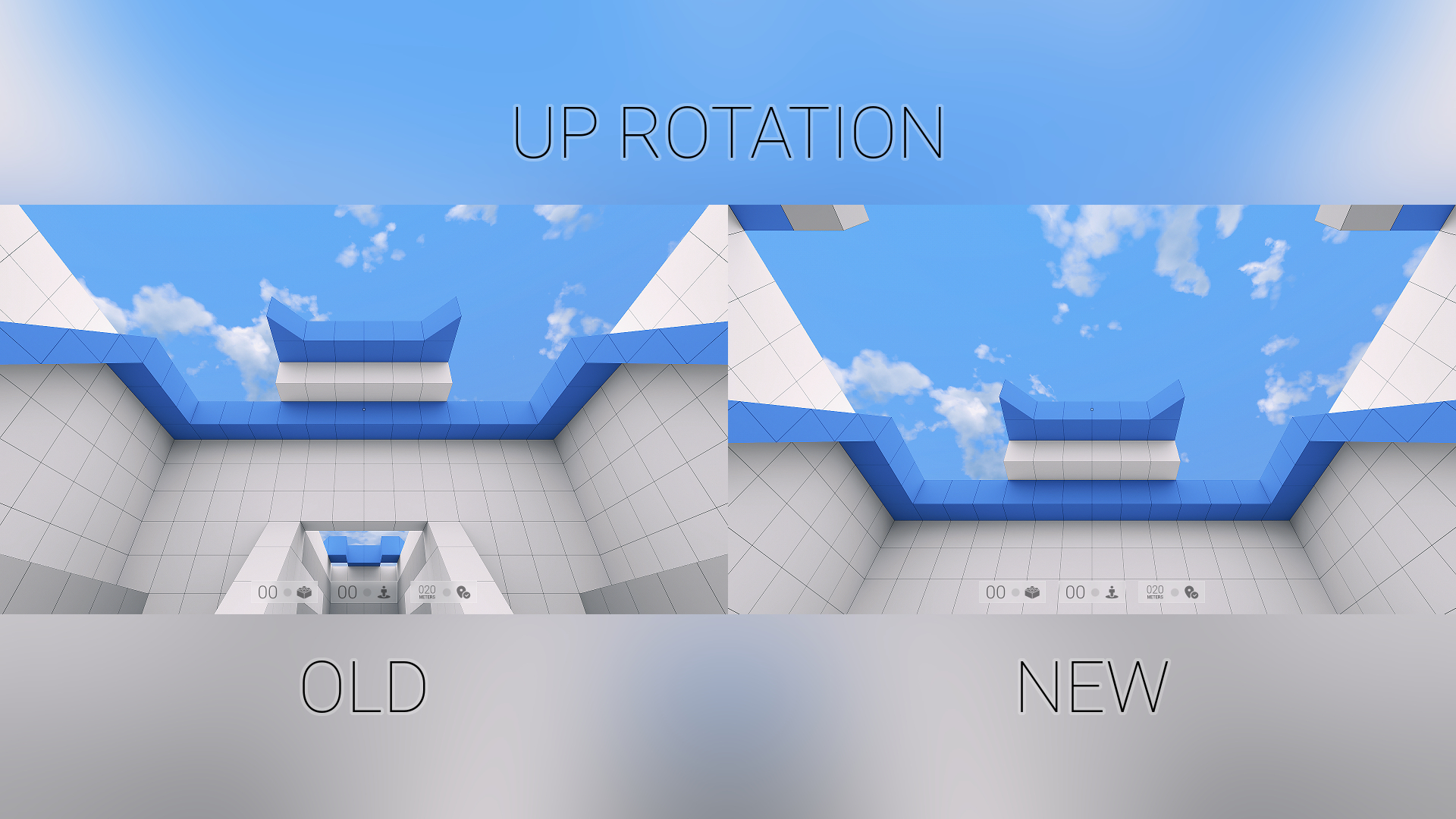
The limit rotation has been eliminated and now the player can be rotated up, much more.
Cube builder fixes
The player can build or destroy cubes from a small distance, more closely, but not much more, since the player can enter in conflict with the collision of cubes.
Graphics improvements
The image quality has been significantly improved and now the overall elements and the lines can be seen better, so, the blurry problem is almost fixed. And at least, now Smart Cube runs with more frames per second (Plus around 30 FPS).
User interface
The background images from main menu and loading are random and the problem about switching the game between windowed and full screen has been fixed.
Have fun playing Smart Cube!
Smart Cube Out Now!
Smart Cube is Now Available on Steam and is 20% off!
Grab it now with a special launch discount.
Have a great gameplay!
Official Trailer
The Official Trailer for Smart Cube is LIVE.
You can watch it on Steam or YouTube.
https://youtu.be/ET5DBo6I3sU
What's next?
Smart Cube is ready for a launch on Steam, tomorrow.
Demo Update 3
Here's a list with the changes on this update:
Menu > Play > Continue: will open maximum level 4, not the menu again
The player can't build cubes under him, since finally, I considered this a cheat
The default sound volume for effects has been set a little bit down
The menu can't be opened when first or restart tutorial is on screen
A sound will be heard out when the tutorial will be displayed on screen
Since I added a sound on tutorial, I disabled key pressing obligation
The bad transition between the buttons from menu has been fixed
Back action from the menu can't be made until the "fade in" animation isn't done
What's next?
I sent full version to Valve for review it. So, in few days, Smart Cube will be live on Steam!
Demo Update 2
Smart Cube Demo has been updated to a new version.
I would like to send many thanks to all Steam players that reported errors or shared their gameplay and helped me to make Smart Cube better and perfect before its full release.
New errors has been fixed and new suggestions has been added.
If you already played Smart Cube, please go to Settings -> Reset, in order to apply the new fixes.
Here's a list with the changes on this update:
The jumping is more responsive and the player can jump more easily on cubes and edges
Tutorial for opening the menu by escape key has been deleted because it was pointless
The water zone on level 1 has a platform to prevent the fearing of falling into water
The elevator has been fixed to be more responsive when the player is touching it
Into level 2, I included a arrow for guiding the player to use the elevator
Mouse sensitivity with a lower value has no twisted motion in left / right
Mouse sensitivity has been set to a lower value as default
The missing texts from few languages has been added
Loading screen errors has been fixed
What's next?
Smart Cube is almost ready for a full launch, coming soon.
Demo Update 1
Smart Cube Demo has been updated to a new version.
After the demo version has come to Steam, a lot of players reported some errors.
Also, few players sent me few suggestions about some improvements and features.
Here's the list with the changes on this update:
I added a new level (level 4) for a better experience to Smart Cube Demo
The graphics quality has been increased for classic / office monitors
The game may run on a 144 Hz monitor with more that 60 FPS
The bright white from the top zone has been fixed & level lighting is normalized
The player can easily build cubes under him, if the player jump over a cube
I added as default a small transparent crosshair for a better accuracy in game
The tutorial asks to press ENTER key to confirm you finished to read it
The puzzles includes a way to recovery from a mistake with no level restart
Double press of escape key that blocking the input totally has been fixed.
Steam Cloud between demo & full. So, you will play from level 5 in full version
Demo Out Now
Smart Cube Demo is now available for free download on Steam. So, give it a try!
The demo version contains only first 3 levels. About difficulty, this will be increased level by level, but from the demo version you can't feel this, because the game wants to help the player to acomodate with the game and because this, the game doesn't start with a high difficulty.
Thank you for your time and don't forget to follow / wishlist the game!