Disabling both Command Module RCS blocks now gives a game over screen.
v0.2.12: Bug Fixes and Demo Update
Changes/Bug Fixes
Removed the old restriction preventing portrait layout from being used in-game.
Audio and chunk size settings are now properly saved and loaded. You will need to re-adjust these settings for them to take effect.
Changed the minimum selectable screen resolution to 1024 x 768.
Demo Changes
Adjusted the planets featured in the demo to force the use of the upgrade system.
Devlog #002: Bigger Than Expected Update
Remember back to the previous Devlog where I said I wanted to do a number of things over several, small, incremental updates? Well, that didn't quite go as planned. First off, I started working on the updates about 2-3 weeks late. And of course there was a lot of time debugging when things didn't work as intended. But here's what I originally intended to do as individual updates.
Update base screen resolution to 1024 x 768.
Migrate settings storage out of PlayerPrefs and into a Settings.INI file.
Separate button and axis assignments and give another visual guide on axis interpretation.
Improve how the game handles Unity's axis reporting.
Add version and edition labels to the main menu.
Of course, some of these items were going to be combined. For example, adding the version and edition labels to the main menu (which auto-updates every time the version changes) were supposed to be in the same update. But that still left about 3 or 4 updates that were supposed to happen over a slightly longer period of time. So how many items are left? Well, I forgot to change the settings code so that you can no longer select any resolution below 1024 x 768, but I might let that slide. That just leaves updating the help screen so that it's up to date with all of the changes that have been made.
I am not looking forward to updating the help screen. I think I would rather create a bunch of help pages on Solar Lander's website and have the Help button send you there instead. Of course, for the Steam Edition, you can always press "Shfit+Tab" and get quick access to any guide you want, but that's not going to be an option for all editions of the game. And that also depends on me and others making guides on how to play the game. I believe the Solar Lander website (perhaps as a wiki) is the way to go.
I've also thought of a few things I may need to update just in case someone somehow manages to break my game. So there will probably be at least one more update for that. Of course, if you find any bugs, do let me know.
Future Plans
Once I've finally finished all of the incremental updates to the Physics Update (hopefully, will be just one more update), I will be able to proceed with working on my game engine so that (at least for the Windows version at first) Solar Lander will no longer be on the Unity engine. Currently, it's the GUI library I'm writing that is the limiting factor, as it does not yet contain support for buttons, toggles, sliders, or other interactive GUI elements. The GUI system should be simple enough to complete. Currently, the non-Unity version of the game shows the splash screens (unless you skip them), then gets stuck on the loading screen. By the way, Solar Lander might be getting some loading screens for the Modding Update depending on how long those screens appear during testing.
Also, for the Modding Update, I've typed-out an ASCII flow chart of game states to make it easier to keep track of the game's target architecture. That should make it simpler for me to implement all of the game states. Speaking of which, there will be changes to the in-game state machines so that if you or the command module crashes, you will hear the sound of the crash every time before you are taken to the game over screen.
Also, I'm thinking of adding some floating text for when you land and redock telling you how many points you earned from those events. And even color-coding it to indicate if you beat your previous record. Also, I intend on implementing the self-destruct system for the modding update. Using it will trigger an instant game over, so don't actually use it.
Other Projects
By the way: The main reason why it took me about 2-3 weeks to get started on the first of the incremental updates is because I have many other projects to work on, and I've been rotating them. So I would work on one project for a bit, then another project, then another project. I will be continuing this pattern until all of my projects are complete. Since Solar Lander's Physics Update is still the current project in the rotation, the next of the incremental updates should happen soon(ish). But I believe after that, most of the v0.2.x updates will be taking place outside of the game, followed by a final v0.2.x update before I resume work on the Modding Update.
v0.2.11 - Settings and Controls Update
This is going to be among the last of the v0.2.x updates to help smooth things over for the upcoming Modding (v0.3.x) Update. This first one is sort of designed as a preview of the control system that it coming to Solar Lander in the Modding Update. The control assignment table and how controls assignments are handled have been heavily modified. Here's what the new assignment system looks like, which includes a ton of changes behind the scenes as well.
Changes to the Demo
The changes made to the game warrant an update to the free demo version.
The demo version now uses the same Progression system as the full version, but with only 3 levels.
As a result of using the full version's Progression system, you may now play with it's upgrade systems.
Changes in v0.2.11
The base resolution of the UI has been increased from 800 x 600 to 1024 x 768.
In-game settings have been moved away from Unity's PlayerPrefs and into an INI file.
The game will convert your PlayerPref settings to the new system, preserving all of your settings.
The game will now save the resolution that you have selected in addition to the resolution index.
The game will change the resolution to the one that is (theoretically) the closest to the specified resolution.
Button and axis controls have been separated.
The game now better handles differences in how Unity reports analog control positions.
Assigning a key, button, or axis to a control will erase all duplicate assignments.
In-game axis assignment instructions have been clarified.
Additions in v0.2.11
The Increase FoV and Decrease FoV controls are now fully-functional, changing the FoV of the skybox camera in 1° increments.
There is now an axis assignment table below the key/button assignment table.
The axis assignment table has a button for primary and secondary axis assignments.
The axis assignment table has a feedback area showing the raw value of the control (increasing values always go from left to right, not to be confused with how the craft will respond to your inputs).
There is now a camera zoom axis to replace the old zoom behavior. You can now, for example, have the zoom accelerate and decelerate.
Bug Fixes in v0.2.11
The Field of View setting can now be changed through the settings screen.
The maximum camera zoom is now able to zoom out to show the entire planet on less than half the screen.
The maximum camera zoom calculation now properly takes into account whether the screen is in portrait mode.
The player control system now gets initialized with the correct time acceleration value.
Devlog #001: Starting the Devlog Series
New Devlog Series?
I figure I may try something new: A devlog on the first of every month (assuming I remember to do it) to keep players informed about the development progress I'm making for this game. Now, if the first falls on a Saturday, then the devlog will be posted on the second or the third of that month. Again, if I remember to do so. No promises. Also, I simply can't do once a week. Also, assuming that I continue this series, what should I name it?
General Progress Report
So, you may have noticed in a previous announcement that I intend to dump the Unity Engine for the v0.3.x Modding Update. So here's what I have done since making that announcement:
Create a graphics library for use in my own game engine.
Create a GUI library for use in my own game engine.
Update my input library for use in my own game engine.
Create the game engine core.
Create a "simple" test app to make sure that the engine works properly.
Create some splash screen logic.
Here's the video showing off the splash screen that I made:
Physics Update Plans
I've recently been considering making some small (or big depending on how you count it) updates to the v0.2.x Physics Update. These updates would include an updated base resolution (from 800 x 600 to 1024 x 768), and incrementally changing the settings control assignment system to be more in line with how the Modding Update's settings and control assignment system will behave. This of course will still be on the Unity Engine since I don't plan to remove the Physics Update from the Unity Engine.
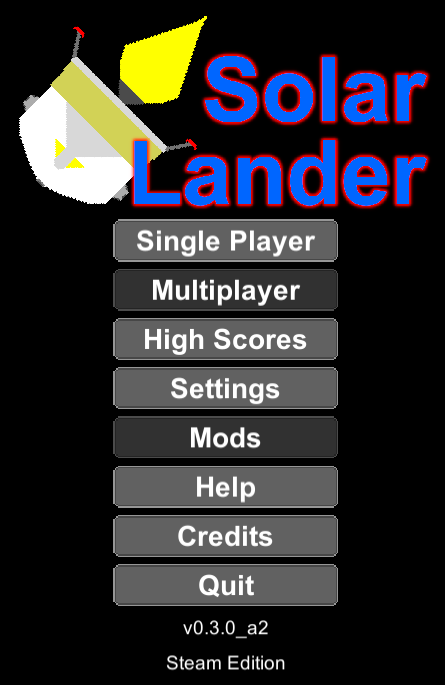
Here's what the new main menu screen will look like. And for the settings screen, you will get something along the lines of this. Although you will probably find some options outright disabled. For the control schemes, I originally took inspiration from the gMotor games (such as rFactor 1). And while I am still taking inspiration from such games, the current implementation is simply not good enough for what I want to do for the modding update. So, here's the new controls page: I've taken inspiration from FSX for this new control assignment layout. The response tab is largely unchanged. But now I can more easily implement new axis assignments, like so: Every axis will now tell you exactly how it's interpreting your inputs. Note that this is the raw value that the game is getting from the input device. The feedback area tells you how the spacecraft will respond to your inputs.
These updates will also move the location where your settings are stored from out of Unity's PlayerPrefs and into "Users\\AppData\LocalLow\TChapman500\Solar Lander". Don't worry, every version of Solar Lander past v0.2.10 (the current version) will be able to convert your settings from Unity's PlayerPrefs.
One more thing, these final incremental updates to the Physics Update will help bridge the gap between the Physics Update and the Modding Update, making it easier for the transition to actually happen.
Modding Update Plans
Although I intend for the v0.3.x Modding Update to use my own game engine, none of my libraries are yet made for any platform other than Windows. So I will have to maintain a Unity and non-Unity editions of my game until I can get my libraries working on macOS (currently not supported) and Linux. That's already proven to be "fun". Each edition will be updated individually as I am able to get my libraries working on other platforms.
The modding update will include control profiles. So you can load whatever profile you want based on what controllers you have plugged into the system. Profiles will be saved separately from the rest of the settings. Keyboard assignments will be saved as part of the game settings. Button and axis assignments, along with the sensitivity and null zone adjustments, will be saved with the profile along with the joysticks used in the profile. Another thing that the modding update will bring are stuff like replays and changing the auto save and auto delete behavior. What you see checked in the image below is what the game currently does (except for auto save). By the way, the Unity Engine uses single precision physics, but my game engine is going to use double precision physics. So until I can get my game engine working on all platforms that my game is available for, you may notice a few things related to the limitations of single precision in the Unity edition of my game that shouldn't be there in the non-Unity edition.
Game Engine Development
In order to take the game off of the Unity Engine, I either have to move to a different game engine (eg: Godot, Unreal) or make my own. I chose the route of making my own. This way, I don't have to worry about any of the bloat from the other game engines (eg: Solar Lander currently runs the 3D physics engine every tick even though it never uses any 3D physics objects) or suspicious firmware that'll bankrupt me. And Solar Lander isn't the only game that I will make with this new game engine.
One thing that I started doing is, for each game that I'm working on that'll use my game engine, I've been duplicating a lot of the logic. Bad move. So over the past couple of weeks, I've been moving the logic that I've been needlessly duplicating into the engine core. And I've been refining the logic along the way. Though I still haven't decided if I'm going to implement Lua into the engine core yet.
Change of Plans for Modding Update Development
Unity recently changed their pricing model so that any developer that makes $200,000/year or more, AND has 200,000 or more total app installs that use the Unity runtime will have to pay $0.20 per install. This means that once I meet the new criteria, I have to pay Unity $40,000 for my work. This includes game demos, re-installs, installs on multiple devices, and pirated installs. Fortunately, I don't make that much money per year so I don't have to worry about this extra payment yet. But it does mean that I'm taking Solar Lander off of the Unity engine before I qualify for those fees. Plus, it also means that Unity is essentially forcing their own, proprietary, tracking software into a game that I have decided long ago will NOT have any such software in it. And I wouldn't trust their tracking software anyways.
Here are a list of things I've been working on to put the Modding Update in the beta branch on Steam.
New base UI resolution of 1024 x 768 (old base resolution was 800 x 600).
The addition of retro throttle controls (not available in the default game modes).
Additional controls for using the keyboard to provide a constant throttle output at levels other than 0% and 100%.
Zoom controls to allow for smoothing-out the transitions between zooming and not zooming.
New UI elements on the High Scores screen to allow users to select between different leaderboards and refresh the current leaderboard.
A check to make sure you cannot accidentally assign a button, key, or axis to two or more controls at the same time.
Use a stack for navigating between different game menus, among other UI performance enhancements.
Migrate joystick button and axis assignments, and response values into controller profiles rather than as part of the game settings.
What I have in store for Solar Lander is to move it to my own game engine (which is a work in progress still). That way, I know that the game will only have software that I explicitly put in it. Some of the software that I will be using is actually available on my GitHub page. In addition, Unity tends to bloat the game loop with a ton of stuff that my game just doesn't need. Granted, I can take a lot of that stuff out of the loop (which requires code to do that, which will increase load times), which is what I was originally going to do. But since Unity forced my hand, Solar Lander will now get a clean game loop.
There will be some downsides to this though. First, it does mean that Solar Lander's Modding Update will not be available for Linux, since right now, I'm only familiar with the Windows API. That will have to change fast. Secondly, I will have to delete the previous versions branches since these versions will still be on the Unity Engine. And the biggest downside: More delay for the Modding Update, which I would have liked to have been out on the Beta branch right now, possibly coming to the main branch.
Accidentally Published Demo Version
I accidentally published the Demo Version of Solar Lander rather than the Full Version. This update fixes that error. Sorry about the inconvenience. I do have some ideas on how to prevent such mistakes from happening in the future, so this should (in theory) be the last time this happens.
v0.2.10 - Cursor Size Fix
The cursor size should now be the same across all platforms that Solar Lander is available on.
Linux Version Should Now Be Available
This game does have builds for Linux, but they couldn't be accessed until now. Sorry to all the Linux users who tried to play Solar Lander. I had known about the problem for a couple of months and tried unsuccessfully to search for a solution (couldn't find the right page in Steamworks). Finally, I contacted Steam support which pointed me to the correct page and I was able to implement the fixes in about 1 minute. Sorry it took me so long to fix the issue.
v0.2.9 - Progression Save Fixes
It has been brought to my attention via the forums that there are some issues when saving files. This build fixes these issues. Here's the full change log.
Fixed a bug where progression wouldn't save if there was a save file already present.
Fixed a bug where the save button wasn't greyed-out after landing.
Save files are no longer auto-deleted upon loading the game.
To save while playing progression, press escape on any level (except the first level) before you land and click "Save". Your level, score, attempts, and lander stats will be saved. To load this save, start a new progression game, and at any time during any level, press escape and click "Load". You will immediately start at the beginning of the level that you saved on.