

Space Bob vs. The Replicons
Minor Audio Hotfix - 12 Aug 2022
This also brings the main branch version in line with the newly released demo.
Main Update 15 - Now Live
Introduction:
If you haven't played in years, it's time to take another look. If you're thinking about picking up the game, you couldn't have picked a better time.
Take a look at the brand new 'Funky Gameplay' trailer and then read on to see how it shaped the very fabric of this update.
Main Update 15 - Weapons & War Overview:
Double the Pew Pew Pew Pew Pew Pew and more Replicons to Pew Pew Pew Pew Pew Pew!!
More bullets, more explosions, more enemies, more variety, more carnage. Everything has been tweaked to make combat faster, more fun, and more exciting and, by making the player more powerful, it's allowed for far more diversity and unpredictability in Replicon combat behavior without increasing the overall difficulty.
There's also a brand new predictive camera system blended into the existing framework and a host of other quality of life improvements suggested by the players. Thanks everyone who offered such great feedback after the most recent updates. You were an inspiration.
Weapon Overhaul
- The fire rate of all the weapons have been doubled! Pew Pew Pew Pew Pew Pew.
- The fire rate of the lander's gun has been doubled.
- The damage of all weapons have been reduced by approximately 40-60% to compensate.
- The time that Replicons are shocked has been reduced to compensate.
- The energy cost of firing each weapon has been halved to compensate.
- The recoil push back for each weapon, on the player, has been tweaked on a per weapon basis.
- Self damage from the rocket pistol has been reduced to trivial levels.
- The rocket pistol's knock back has been doubled. This thing is a beast now.
- All the weapon visual effects have been juiced up.
Combat Overhaul
- Replicon spiders now scuttle around much faster like real spiders.
- The maximum number of Replicons on any given planet, at any given time, has been increased by 40%.
- The spawn rate in order to reach that maximum number has also been increased by approximately 40%.
- The shield values for each Replicon have been altered to suit the new weapon damage values.
- The Replicon Invasion speed (how quickly they spread across the system) now ranges from 75% - 200% normal speed based on the game's difficulty. (This only affects Invasion Mode. This was previously 50% on the easiest difficulty and 100% on all other difficulties.)
- Replicon combat AI, behavior, and movement characteristics have been significantly updated.
- Replicon spiders can now move at a variety of different speeds - often faster than Bob.
- Replicon rasks can now move at a variety of different speeds - rarely but sometimes faster than Bob.
- Replicon wasps can now move at a variety of different speeds - occasionally faster than Bob
- Replicons shock duration is now varied creating more combat unpredictability.
- Replicons now react in various ways after being shot. They might start dodging, become even more aggressive, turn away, or simply carry on as before.
- Replicon rask jump trajectories are now far less predictable.
- Although Replicon wasps can survive and function in water, they now prefer to avoid it, and can't see the player through it's surface.
- To balance the other changes, and maintain overall difficulty, wasp damage has been reduced by 20%, rask damage has been reduced by 25%, dart damage has been reduced by 25%
Quality of Life Improvements:
- The camera system has been overhauled. It's now smooth as butter and uses far more advanced tracking and prediction algorithms.
- The 'tap to cancel' functionality of the grapple gun has been removed by default.
- Simply tapping the fire button will now fire a grapple if it has a valid target. This is far more intuitive behavior.
- It is possible to re-enable the old behaviour again by setting tapToCancel = True in gameConfig.ini if you prefer it.
- Simply tapping the fire button will now fire a grapple if it has a valid target. This is far more intuitive behavior.
- A new slider has been added allowing the player to choose the game's difficulty prior to starting the tutorial.
- A new 'Reset Game' button has been added for Survival Mode at the game select screen.
- A new hotkey has been added to allow toggling of the user interface.
- Using the 'Reset Game' button, for either game mode, now resets Dave's conversation history and memory for that game mode only.
- The physics system has been extended to test if either Bob or his lander have glitched into an impossible position and offers the option to reset both.
- The crafting recipe for a new lander now requires 100 fuel and the lander will spawn with 100 fuel.
- Improved the font styling and readability of Dave's chat panel again. This was also tweaked in the last update.
- Updated the tutorial to simplify the instructions during the grappling gun section.
- Replicon Wasp shield value and scared status is now saved allowing 'wasp balloons' to still work after reloading.
- To aid performance on lower end machines, Replicons will stop dropping loot if there are more than fifty pieces of loot already on the current planet.
- Reduced the damage taken by bumping into crystals by 40%
- Reduced the damage taken by bumping into the various stalactites by various amounts. 10%-40%
Miscellaneous Improvements:
- The central Replicon station's main event has been tweaked.
- A disabled mechanic, that caused wasps to spawn during this event, has been reactivated.
- To compensate, and also to make the event more manageable on higher difficulty settings, the laser damage has been reduced by 40% and slowed by 20%
- A disabled mechanic, that caused wasps to spawn during this event, has been reactivated.
- The drop pod sequence at the start of the tutorial has new visual effects.
- Various UI text element quality improvements
- Updated the tutorial to reflect the changes to 'tap to cancel'.
- Updated the dialog that appears after completing the tutorial, for the first time, to more clearly state that it's possible to directly click on grapple lines to select them.
Bug Fixes:
- Fixed : Missing planet name added to the starting planet.
- Fixed : Replicon spider drop ships now receive splash damage.
- Fixed : Inconsistencies with the use of bullet points in the difficulty slider information texts.
- Fixed : After loading a save, Bob would sometimes have the incorrect footstep sound for the surface he was initially standing on.
- Fixed : A bug that allowed Bob access to the refinery ship during the tutorial.
- Fixed : A bug that prevented Dart (spiky ball) Replicons from appearing on regular planets.
- Fixed : A text bug on the game complete screen that read "Continue to Start Act 2", instead of "Continue to Start Act 3".
Final Notes:
The plan is still to release a demo ASAP. It was meant to go live for the Summer Sale, but then work began on the trailer, and that took a couple of weeks, and then the trailer inspired this update to increase the combat speed and here we are - running behind schedule like any good game development.
Not to mention the fantastic feedback you guys have given over on Discord to help polish off the last few rough edges and improve the overall QOL for the players.
So the current plan is to release the demo in a month or so, or whenever the next discount happens. If you find anything that still grinds your gears, please don't hesitate to let me know either here in the discussion forum or over on Discord where it's much easier to chat and share ideas. https://discord.gg/VUKM4tR3
Patch 1.443 Update Notes - Now Live.
Introduction
Hot on the heels of Main Update 14 last week (announcement here) came a flurry of little patches to quickly address some smaller issues and now we have a much bigger one. Combined they offer new features, new crafting, and even more QOL improvements in preparation for the upcoming demo release. Other than a few minor bug fixes all the changes since Main Update 14 can be seen below.
Don't forget you can come join us on Discord now for all things Space Bob and to keep up to date on the development of the new game. I'll even be offering the community the chance to create some of the new game's content sooner than you may expect.
Patch 1.443 - New Features & QOL improvements.
• Default max grapple length reduced from 40 to 30.
• New Craftable Upgrades Added.
- Grapple Length Extender (doubles max grapple length to 60)
- Grapple Length Maximizer (triples max grapple length to 90)
- This allows grapples to reach the planet from orbit and opens up new gameplay options and strategies.
• The grapple physics system has been reworked and tightened up to resolve some edge case issues and ensure consistency throughout all actions.
- Fixed unintended grapple pull speed reductions witnessed with very long grapples.
- Grapple pull speed is now consistent at all lengths. This makes upgrading grapple pull speed far more noticeable.
- Fixed a bug that could cause long grapples to extend when viewed at large distances under heavy load.
• QOL - The grapple gun and the grapple rope selection systems have been redesigned, rewritten, unified and improved.
- This is a big qualitiy of life improvement that makes selecting grapples easier, faster and more intuitive.
- The grapple attached to the players grapple gun now highlights whenever it is the active grapple line for consistency.
- Cycling through grapple connections now includes the grapple line attached to the player's grapple gun.
- The active grapple now highlights green when idle or expanding, and yellow when shrinking.
- Using either grapple cycle hotkey will now automatically highlight and activate the last previously highlighted grapple.
• Bob's jetpack thruster audio now cuts out correctly when he has no jetpack fuel
• Bob's jump height has been increased. This is most noticeable when his jetpack is out of fuel. Increased from 25 to 40.
• Further refined and tweaked the new system that automatically slows Bob near points of interest in the refinery ship (added in patch 1.434 below)
• Fixed issue where some text elements could randomly disappear on the System Map panel at specific windowed resolutions.
• Dave's first message, after starting Act 2 for the very first time, has been rewritten to give the player a better sense of what is happening and what they need to focus on next.
• When extending a grapple line, the grapple ghost no longer disappears when reaching maximum length.
• Fixed a bug introduced in Main Update 14 that caused Steve's messages to slide off the screen on a timer like Dave's messages. This was unintended and they now correctly remain on screen until the player presses the 'Continue' hotkey.
• Fixed a number of typos (please report all typos. Screen shots really help to track down the most obsure mistakes)
• Replicon spiders can no longer change direction multiple times per second. This prevents them from twitching uncontrollably when trapped in a tight space.
• All Replicon base stations now appear at the start of the game when starting a game in Act 2 or later. This gives players starting in Act 2, for the very first time, a more obvious new place to explore. The central station has a '!' icon on the system map from the very start of Act 2 now.
• Added fuel as a refinable resource to a few additional wasp, rask, and spider drop pod loot pieces that appear after they are destroyed. Helps to recover when out of fuel. Replicon loot already has plenty of energy.
• Rask damage tweaked again.
In Main Update 14 Rask damage was reduced from 2.7 to 1.3. Further playtesting showed this was a step too far especially with the newly lowered default difficulty setting. Their damage has been increased to 2.0.
• Crafting Recipe Changes
- Due to Main Update 14 reducing the default difficulty (with 50% damage reduction) the recipe for the various armors has been slightly increased.
- The illmenite requirement for Carbon armor and the boot upgrades has also been slightly increased.
• The music now transitions more slowly, from calm through to intense, while playing on the default easiest difficulty now.
- This is to balance with the slower replicon expansion speed on lower difficulty.
• 20% of Wasps will now fly away from Bob when below 50% health. This can be exploited to gather groups of these 'scared' wasps to form the equivalent of a hot air baloon for carrying Bob or loot. Have fun.
Build 1.434 Patch notes:
◦ Bob's suit no longer takes minor damage when bumping into the walls of the refinery ship or his own lander. (Thanks twitch/ClimateChanj for playing the game on 3 hours sleep and getting irritated by little things, hehe).
◦ Improved the system to allow Bob to escape if trapped by physics related glitches.
It now detaches all grapples from the lander, and teleports the lander and Bob back to he refinery ship.
◦ Bob now slows down automatically when near points of interest, or narrow spaces, in the refinery ship
- Main Update 14 increased Bob's acceleration and movement speed to make his movement more responsive. A side effect of this meant that he moved too quickly to feel comfortable inside the refinery ship.
- This new system is a quality of life improvement to solve that.
◦ To avoid confusion, the hotkey labelled "Cancel / Back" was renamed to "Cancel Grapple / Back"
◦ Fixed an issue that could cause the 'Continue' text to disappear at some window resolutions
Build 1.432 Patch notes:
◦ Fixed an issue with the WR display on the speedrun overlay,
◦ Fixed some text on the newly updated Recent Salvage panel from not displaying at some windowed resolutions.
Main Update 14 - Now Live.
A PERSONAL UPDATE
I'm back!
I've been gone for such a long time that it makes sense to start out with a little personal update to let you all know where I've been, what's been happening, and why Space Bob is suddenly getting an update after more than three years. If you don't care about the personal stuff, I'll fully understand if you prefer to skip to the What's New section below, but for those that care, here goes.
Even the most hardcore Space Bob fans will probably be unaware that a week after Space Bob's 1.0 release I unfortunately suffered a heart attack. I only previously shared that info publicly with Dr_Doof on his twitch stream.
Solo game development can be notoriously stressful, especially around release, and after eight years of flat out dev work my health, both physically and mentally was in the dumpster. I was emotionally exhausted and by the time Space Bob was ready for release I didn't have the strength left to give the game the marketing energy it deserved. I’d put everything I had into development and made the classic mistake of hoping the quality of the game would sell itself.
The result was that things didn't go to plan, and it quickly became apparent that the game wasn't going to magically find it's audience. If gamers didn't know the game existed then it wasn't going to sell in enough volume no matter how good it was.
Ultimately, that series of events meant that I had no choice but to step away from game development to focus on my health and find a way to pay the bills. I'll be honest and say that after completing the promised six months of post-release content, I simply couldn't face even thinking about game development any more. I was financially broke and burned out.
I took a regular job and started taking proper care of myself. The end result is that I learned some valuable life lessons and I'm now in a much better place both mentally and physically and genuinely enthusiastic about game development again.
SO WHY A NEW UPDATE NOW?
For quite some time, I've been wanting to release a demo for Space Bob. I wanted to give it one last chance to find it’s audience, and it’s too late for a regular marketing push. It would be incredibly difficult to get anyone interested in covering a three year old game, but a demo might encourage more players to give it a whirl and who knows, maybe someone like Giantwaffle might find it, play it, love it, and start a new ball rolling. I can but dream.
Before any of that though I felt like it was essential to make a few tweaks and changes.
A free demo will mean that a lot of new players will likely download and play it on a whim without reading anything about the game and they’ll have no idea how challenging it is/was. Space Bob has a deceptively cutesy looking exterior that confuses too many players into thinking it's going to be an easy casual experience. Many aren't even aware it has permadeath before buying it.
If I didn’t make some effort to solve those issues then releasing a demo could do more harm than good. I also had a number of things that I wanted to tweak or polish and, finally, I wanted to add at least one or two extra features to say thanks to the fans and give them a new reason to save Bob at least one more time. So here we are.
WHAT'S NEW in build 1.43?
• New installs of the game now start on the lowest difficulty setting by default.
- This hopefully allows more players to learn the ropes before becoming discouraged.
- Previous builds started with the difficulty slider set one notch higher which was the equivalent of double the incoming damage.
- If you are a new player, and prefer a challenge, make sure to move that slider back one notch to the right (it’s just below the Play button).
• The tutorial has been tweaked and refined.
Especially the grappling gun section.
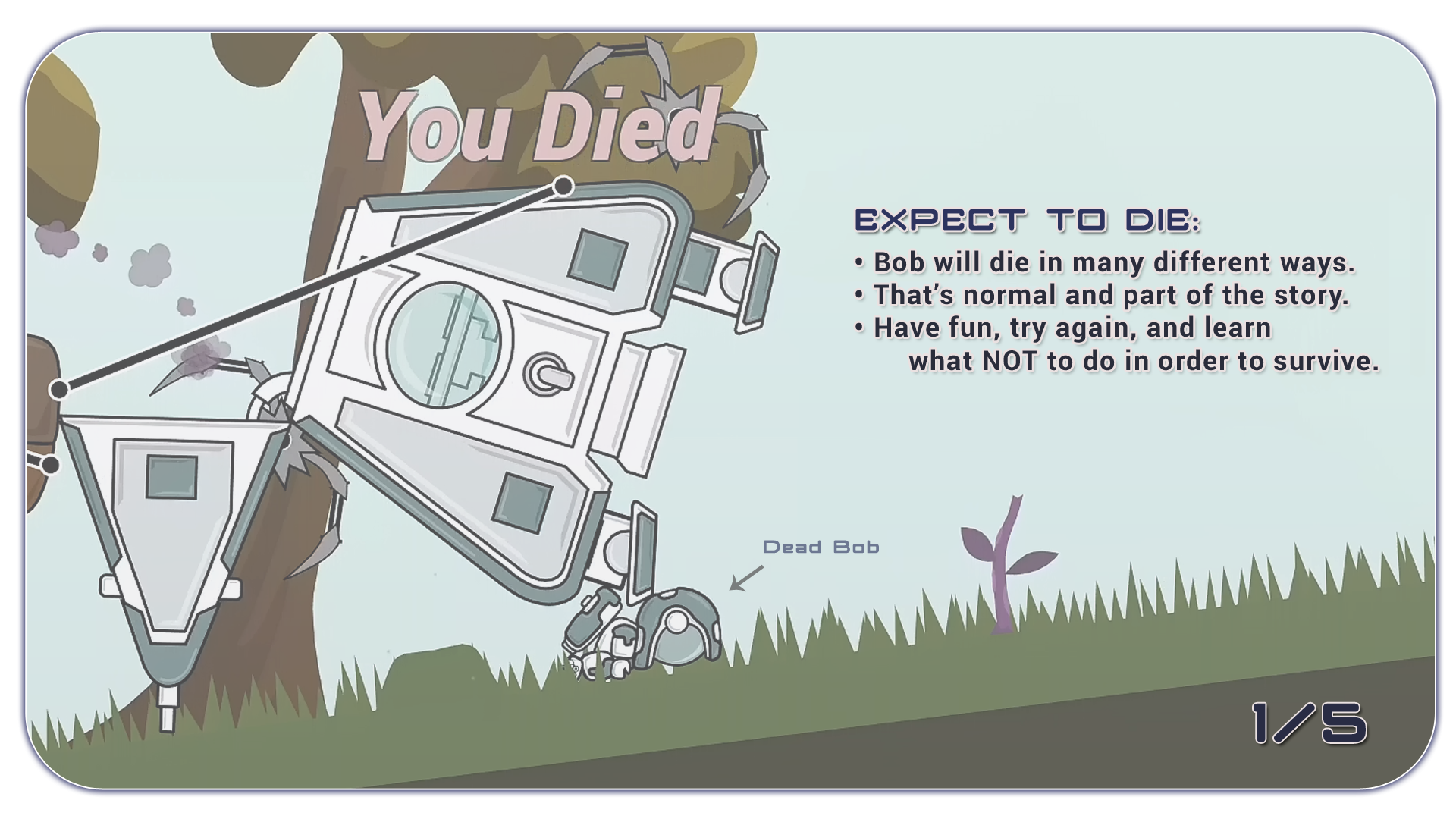
• A new visual ‘Getting Started’ panel has been added.
- This points new players in the right direction and gives the early game more focus.
- It pops up the first time a player enters the lander after the tutorial.
- It looks like this and has five pages of quick visual tips:
• The edge of the screen now pulses when Bob is near death.
• The 'You Died' screen has been redesigned and also now includes a tips section.
- These tips can be manually cycled and include tips and clues about secrets that even some of the more experienced players may not know about.
• Dave’s message panel has been updated and improved.
- It can now be reopened manually which causes his last message to repeat.
- This can be achieved via an onscreen button, a hotkey, or even by simply clicking the edge of the screen near to where the message panel appears.
- The font design and coloring has also been reworked to be more readable.
- The speed of the dialog appearing has been increased slightly.
• The ‘Recent Salvage’ panel has been redesigned.
• Bob’s movement, while walking/running, is now far more responsive.
- Bob now accelerates, and changes direction, more quickly.
- This leads to his grounded movement feeling much snappier.
• Miscellaneous changes:
- Rask damage has been more than halved from 2.7 to 1.3
- Various UI tweaks and improvements throughout the game.
- Fixed a rounding bug with the reported temp/perm upgrade values from upgrade machines.
- Power Cubes can no longer be salvaged.
- The lifting power of the familiars has been significantly increased once they are upgraded.
- The default music volume has been lowered.
NEW FEATURES
New In-Game Speedrunning Overlay and Leaderboards
This is something I always wanted to add to the game but never had the time to include before.
Throughout the entirety of Space Bob’s development I always planned features and gameplay with speedrunning in mind. From the very beginning I wanted to make a game that could be completed in an hour and this new feature will allow you guys to try and achieve that goal while having a leaderboard to share your progress.
Close to the 1.0 release, I encouraged twitch/DrDoof (who had the the #1 high score at the time), to give speedrunning a try and after a few attempts he set a personal record of 89 minutes. I’m not 100% sure if sub one hour is possible, but I have a hunch that it might be. If you stream your attempts be sure to let me know and I’ll come hang out; I don't care how big or small your channel is.
I doubt we’ll ever get the attention of Summoning Salt or Karl Jobst (love those guys) but I’d be happy if we only had a handful of players actively fighting for the top spots.
There are actually two new speedrunning challenges, each with their own leaderboard. The first is the easy one that just about everyone can get involved with. It’s the speedrun to pass through the Jump Gate as fast as possible and we’ve already seen sub ten minute times on that one during the beta test. The second leaderboard is for the full game and will be far less contested and active.
There’s also a new speedrunning overlay where you can see your current time and split times compared to your previous best at various checkpoints in the game. This is very similar to the most popular external speedrunning overlays but this one is built into the game and triggers the split times automatically. It can be toggled on and off with a hotkey; go to Options/Controls and bind a new hotkey if needed. It’s ‘Y’ by default.
• Upgrade machines can now spawn as Epic(10% chance) or Legendary(5% chance)
The upgrade machines that give out permanent or temporary stat bonuses now have Epic and Legendary variants.
- Epic machines increase previous bonuses by 30%.
- Legendary machines increase previous bonuses by 100%.
BRAND NEW GAME GUIDE:
For more information, plus tips, tricks and videos, on how to not only beat the game but also how to achieve the fastest times on both speedruns, take a look at this guide. It'll teach even the most inexperienced players how to reach the jump gate in under fifteen minutes, and even Space Bob experts will likely find tips and strategies they didn't know before.
https://steamcommunity.com/sharedfiles/filedetails/?id=2804067995
Beta Build 1.43 Now Available:
Speedrun Changes:
Main update 14 introduced two new speedruns that in hindsight had too many restrictions. These restrictions have now been removed. The 'Full Game' speedrun can now be completed on any difficulty. You can save your game, go through the jump gate and die as many times as you like and it will still register to the leaderboards once you finally beat the game. The timer starts at the beginning of Act 1 and keeps ticking until you defeat the mothership.
Due to this change, the Jump Gate speedrun should now be done from the start of Act 1 because if you try to do it in a later act it will include the time spent playing through the previous acts. See below for how to reset the timer.
IMPORTANT:
If you were in the middle of a game, prior to build 1.43, it will not register to the Full Game speedrun leaderboards in build 1.43 UNLESS you had never died or used the Jump Gate while playing on the previous build. If in doubt use the new Reset button to start a new game, or ask for more info.
The new Reset button:
This can be found in the Invasion Mode section on the game select screen. Holding the button for four seconds will reset Invasion Mode back to Act 1, reset your speedrun timer and wipe Dave's memory. If you have played a lot of Space Bob, and Dave isn't saying much anymore, this button will make him forget he ever met Bob and he'll be full of small talk and advice once again.
Please be aware that wiping Dave's memory affects Survival Mode too, so you may find Dave repeating tips and advice he's already told you in that game mode too. It doesn't reset anything else in survival mode though.
This button replaces the old semi-secret "hold 'F7' at the main menu" developer tool that also reset the game.
Rask damage has been more than halved:
Rasks are the jumpy, rolling purple Replicons that everyone hates. Well they became sad at being so hated and decided to be a bit more friendly. Their previous damage of 2.7 has been reduced to 1.3 after some dedicated playtesting.
Yes, they did too much damage. They were always meant to be deadly, but their damage comes from a time when the whole game was far more dangerous. Damage throughout the rest of the game was slowly reduced but the Rasks remained a little too lethal especially if they managed to attach themselves to Bob.
It's now possible to shoot them off and survive as long as you're quick and you're are wearing at least some form of armor. If you get a chance to test this change let me know what you think. I want them to remain feared and dangerous, but I don't want them to cause quite so much frustration as before.
This build is a release candidate:
No more changes are planned for Main Update 14 and so if you find any last minute issues let me know. If all goes well the plan is for it to exit beta next Monday (May 16th).
As a side note: I'll also be updating the big speedrunning guide that was posted last week too, to reflect the changes in build 1.43. If you didn't see it before you can find it here and it should be updated by the end of tomorrow (May 11th):
https://steamcommunity.com/sharedfiles/filedetails/?id=2804067995
Main Update 14 Beta - Now Live
The public test for Main Update 14 is now live in the public test branch. Full patch notes are available in game and will be released publicly here on Steam when this build goes officially live for everyone (probably next week).
The major new features of this build are based around speedrunning. There are new speedrunning leaderboards and a speedrunning split time overlay. There's lots of other tweaks and improvements too. For more information, download the beta and check the 'What's New' tab on the main menu.
Have fun, let me know if you find any issues and if anyone needs help accessing the public test branch let me know.
Note: Everyone can try out this public test prior to it's full release next week. Simply swap over to the publictestbranch in the game's beta options and use the password 'iunderstandthisisatest'.
Oh, and twitch/Dr_Doof will likely be doing some speedruns and testing of this new build over the coming days so pop by and say hi. If he's playing Space Bob, the chances are I'll be hanging out with him too.
Main Update 13 - Now Live
Survival mode is here, Bob!
Main Update 13 is a complete game changer. For everyone who likes their games to last for tens of hours, survival mode is here to save the day.
Survival Mode Highlights:
Unlike the short-term rogue-lite mechanics of the original Invasion mode, where time would continually reset when traveling through the jump-gate, in survival mode the jump-gate is gone. Well, to be more precise, the Replicons have shrouded it's jump beacon meaning Bob can no longer see it. If he's going to have any chance of finding his way home, he's first going to need to spend hours collecting the materials required for a massive sensor upgrade.
This makes Survival mode a single huge continuous game mode that will take tens of hours to complete. You can play it as an open ended traditional sandbox survival game or work towards the long-term goal of escaping.
Return of the Life Saving Teleporter:
Survival mode completely replaces the old Exploration mode and only the emergency teleporter survives this huge change. This is great news for those who aren't the biggest fans of the permadeath mechanic because as long as Bob has enough energy to power his emergency teleporter (and that's easy to do at the lower difficulty levels) then he'll be teleported to safety a moment before he dies. He can even collect enough energy to stockpile multiple 'lives'.

Crafting Remix:
Another big change - in Survival mode - is a dramatic increase in the number of materials required to craft the various upgrades. This suits the slower pacing perfectly and you will also find that the difficulty slider has a much bigger impact on gameplay than you are used to.
Dynamic Difficulty:
On the lower difficulty levels you can kick back and relax with Replicons that not only do less damage but also invade far more slowly. However if you enjoy a more serious survival challenge then at the higher difficulty levels the cost of the teleporter becomes so prohibitive, and crystals and other resources become so scarce, that you'll need to rethink everything in order to survive. With six difficulty levels available you should be able to find one that perfectly suits your mood or ambition.
Respawning Resources:
Survival mode brings another new feature in the form or respawning crystals and illmenite. This takes many hours but it means Bob could technically survive forever.
Realtime Leaderboards:
There's also new leaderboards for survival mode but unlike invasion mode your score updates every few seconds so even if you die your score will still count.
Craftable Lander, Grapple Cycling, and much more....
It doesn't end there though as the base game has also had a huge number of improvements, tweaks, and bug fixes. For example, Bob can now craft a replacement lander if he destroys his first one and the scoring system has had a big buff. Then there's a much improved grapple selection system that allows Bob to cycle through all visible grapples via a pair of new hotkeys. Mouse users can take this a step further and select grapple lines directly by clicking on their end nodes.
Main Update 13 - Build 1.3 - Full Changelog:
There's no point repeating everything twice, so take a look down below at the complete list of everything that's new and we'll see you on the leaderboards.
Survival Mode - Features and Changes:
- Six dynamic difficulty settings for survival mode dramatically alter how the game plays out by manipulating many different aspects of the game. See below.
- Bob's refinery ship is equipped with a life saving teleporter that Dave can use to teleport Bob to safety the moment before he dies. As long as he has enough energy to power it, Bob can't die.
- The cost of the teleporter is tied to the chosen difficulty.
- The teleporter is disabled at max difficulty.
- The cost of the teleporter is tied to the chosen difficulty.
- The amount of starting resources is tied to the chosen difficulty.
- Lower difficulties provide enough resources to power the teleporter from the start.
- Higher difficulties begin with barely enough to fund your first away mission.
- Lower difficulties provide enough resources to power the teleporter from the start.
- The number of resources that can spawn on any given planet is tied to the chosen difficulty.
- At lower difficulty levels resources are abundant but at the higher levels crystals and illmenite become so scarce that only the most efficient salvage experts will survive.
- At lower difficulty levels resources are abundant but at the higher levels crystals and illmenite become so scarce that only the most efficient salvage experts will survive.
- The materials required for all crafting recipes have been increased five-fold to better suit the long-term objectives of Survival mode.
- This is less extreme in practice than it sounds. The overall pacing of Survival mode is much slower and far less time critical than the default game mode.
- This is less extreme in practice than it sounds. The overall pacing of Survival mode is much slower and far less time critical than the default game mode.
- The speed of the Replicon invasion varies based on the chosen difficulty settings.
- This ranges from four times slower at the lowest difficulty setting to fifty percent faster at the highest.
- The arrival of the various Replicon defense stations has also been equally slowed. They appear later and expand their influence more slowly.
- The logic determining how and when individual Replicon drop ships appear on each planet has also been rewritten to suit the very different gameplay requirements for survival mode.
- Replicons spawn over a much longer period of time and take considerably longer to respawn after being killed.
- This dynamic spawn rate then increases over time based on the current difficulty setting.
- This ranges from four times slower at the lowest difficulty setting to fifty percent faster at the highest.
- Crystals, illmenite and carbon plants all now respawn.
- This takes many hours and varies based on planet type and resource type.
- This takes many hours and varies based on planet type and resource type.
- The spawn chance of craftable upgrade machines is significantly lower in Survival mode.
- Bonus upgrade dispensers will spawn in their place.
- Bob is expected to craft the majority of his upgrades in Survival mode.
- There are a maximum of two craftable upgrade machines per game but there's no limit to the potential number of bonus upgrade dispensers.
- Bonus upgrade dispensers will spawn in their place.
- Exploration mode achievements/challenges have been removed and replaced with new survival mode achievements/challenges.
- Many changes to Dave's dialog have been made to suit Survival mode.
- Additional dialog and conversation for Dave has been added to Survival mode.
- The Mega Cube and all related storyline elements are either absent or inaccessible during Survival mode.
- The music selection dynamically alters to match the slower pacing of survival mode based on the chosen difficulty setting.
- A 25,000 point penalty is applied if Bob is forced to use the teleporter (dies) in Survival mode.
New Features for both game modes:
Main Update 12 Now Live!

It's been a busy month, with many long days, but here it is! Main Update 12 is live.

[Open in a new tab to see full size images]
Overview
Main Update 12 brings some big changes including a new atmospherics system which improves the look and mood of almost every planet. See below for more details.
Eleven completely new planets were also added which is a huge milestone as it means that every planet is now unique! There's no longer any need to reuse the same planet design more than once in a single game. This in turn allows for every planet to finally have it's own name and basic description.

Twin Stick Controls - Behind the back aiming
Then we have a much requested feature that allows Bob to shoot behind his back. This works automatically when using mouse and keyboard but requires a new twin-stick control scheme for gamepad users.
WARNING: There are numerous reasons why twin-stick controls were not chosen as the default control scheme for Space Bob. Although it allows for independent movement and aiming it is significantly more difficult to learn. It also means that the hatch and zoom controls needed to be moved to the d-pad which makes it very difficult to simultaneously perform these actions while moving.
For that reason the original single stick control scheme remains unchanged and is still the default recommended control scheme. But, for those that want to experiment with dual analog controls they can now be enabled easily in the 'Controls' panel.
Tip (How it's meant to be played): To aim and move in different directions while using single-stick controls, use the 'Disable Movement Hotkey' while aiming and shooting in the air.
Updated Skid Physics
Another new feature is a small but often requested improvement to how Bob slides around. A new extension to the physics system has been added that only triggers when Bob begins to slide. The amount of slide can now be altered to allow for precise tweaking on a surface by surface level. To that end, every surface in the game has been updated to work with this new system. More info below.

Build 1.2 Changelog
New Features
- All planets have been visually updated:
- A new visual effects system has been added. This allows for a variety of new atmospheric effects to be implemented. Planets can now appear bright and sunny or dreary and overcast. Some have effects like fog, mist or sand storms, while others have caves that get darker the deeper Bob descends into them. Most planets have been updated to take advantage of at least one of these new visual effect layers.
- The various effects for planetary collisions, including footsteps, have been reworked and improved.
- Various tweaks and improvements have been made to rain, snow and hail on a per planet basis.
- Grass generation has been updated to allow grass to generate only on specific parts of a planets surface.
- Fixed two nebula textures that were half of their intended resolution.
- Frozen and air geyser particles now correctly collide with liquids rather than passing through them.
- A new visual effects system has been added. This allows for a variety of new atmospheric effects to be implemented. Planets can now appear bright and sunny or dreary and overcast. Some have effects like fog, mist or sand storms, while others have caves that get darker the deeper Bob descends into them. Most planets have been updated to take advantage of at least one of these new visual effect layers.
- 11 new planets added.
- All planets are now unique. The game no longer re-uses the same planet design more than once in a single game.
- All planets now have unique names instead of 'Planet 15', Planet '24' etc.
This allows planets to be recognized by name alone. - Basic preliminary scan data descriptions have been added to the majority of planets. These descriptions can still be manually edited or replaced.
Previously defined user-made planet descriptions will override the new defaults. - A fourth act 3 arena planet has been added. Each power cube is now found on a unique planet with a unique arena to defeat.
- All planets are now unique. The game no longer re-uses the same planet design more than once in a single game.
- Bob can now shoot backwards. He is no longer required to face in the direction he wants to shoot. This works automatically with mouse controls.
- A new twin-stick option for gamepads has been added to allow independent movement and aiming via the use of both analog sticks.
- A new option to 'Set Twin-Stick Defaults' has been added to the 'Controls' screen.
- NB: The 'disable movement' hotkey can be unbound when using twin-stick controls as it serves no purpose.
- A new option to 'Set Twin-Stick Defaults' has been added to the 'Controls' screen.
- New friction system for Bob added.
- This allows for much more precise and flexible control over how Bob will slide on any given surface. This has been set manually for every surface so he can still skid and slide around as much as before on surfaces like loose gravel or ice but he'll slide far less on hard surfaces like metal. On a surface like deep sand he'll stop almost instantly but he'll still slide a little on grass.

Tweaks and Changes:
- Heavy Hail damage has been tripled. Be careful.
- Exploding mushroom damage has been doubled.
- Ice Geysers are now far more dangerous especially without armor upgrades installed. They now do damage and freeze Bob solid 60% faster than before.
- Echo/Reverb settings inside caves has been adjusted for each planet.
- The objective panel now shows the current act.
- Weapon fire now causes a small amount of camera shake based on recoil force.
- A selection of new Dave messages have been added that trigger when arriving at specific planets.

1.2 Bug Fixes:
- Fixed some planet surfaces not having the appropriate universal friction settings applied.
- Fixed a navigation issue on the 'Controls' screen while using a gamepad.
- Fixed a number of misplaced (hovering) scenery elements on various planets.
- Fixed the red '!' icon, that represents the central replicon station after act 1, being half it's intended size.
- Fixed the 'Continue' UI prompt from becoming stuck on screen after viewing the Challenges screen
- Fixed a bug that would allow gamepad users to navigate to the planet description input field on the system map.
- Fixed a bug that would allow the 'Jump To' button to appear when there wasn't quite enough fuel to jump.

Please Note: Previous mid-game saves are not compatible with this version due to significant changes in the system generation code. Checkpoint progress is however retained.
If you run into any bugs,new or old, please let me know because as far as I'm aware there aren't any.
Coming in Main Update 13
Survival Mode!
___________________________
Edit:
Build 1.201 Patch (15th Jan 2018)
Various minor tweaks and fixes to Main Update 12:
- The recently added lander hatch obstruction checks now only occur if the hatch is nearly closed.
- Fixed the water being visible through the fog of war on Galostea IV.
- Refinery ship doors now detect and open when any object moves close to them.
- Data on the number of Replicon drop pods spawned is now saved/loaded to prevent Dave incorrectly commenting when the first of each drop pod type is detected after reloading a saved game.
- Fixed a potential cause of unintended physics drag while flying the lander.
Development News - Main Update 12

Before I share some dev news can I say a big thanks and welcome to everyone who picked up the game during the Steam Winter sale.

(Open images in a new tab to see full size versions)
Here's the news:
100% Unique Planets coming in MU12
The primary focus for Main Update 12 was to add the final planets necessary to make it possible to generate systems where every single planet is unique. It's technically possible for a system to generate with 54 planets so to be certain that every planet could be unique we needed 54 base planet designs in total. Main Update 11 added a few more but we were still only up to 43.
Main Update 12 will fix that. 11 new planets are already finished bringing us up to the magic number 54. This change also means that planets can now all have unique names instead of 'Planet 2' or 'Planet 34' etc. Believe it or not, this feature to name planets has been coded into the game for nearly 3 years but until this point didn't make sense to use.
There's still a couple of days work ahead to implement the new system generation code and to individually name all the planets but this will definitely be included in MU 12. If there's time, the plan is to update the planetary notes for each planet too so that they don't start blank but instead have some very basic info. This might seem like a small job but with 54 planets it's going to take some time so it might need to wait until MU13. We'll see.

New Atmospheric Effects
While creating the new planets I experimented with an idea suggested here in the forums to make a 'dark' planet (see example pic above). You probably already realize that Space Bob's art style doesn't use lights so it's not as simple as turning off a light to make things dark. Instead I experimented with overlaying dark transparencies to create the illusion of darkness. This worked surprisingly well to alter the mood and atmosphere especially on the asteroid planets. My experiments with this lead to trying out similar effects to create a type of hazy dust over the surface of a planet and then to the opposite effect of brightening up a planet so it looked like it was in bright sunlight.
All of the new planets already include some form of the above experiments with atmospheric effects and they really do add another lovely layer of atmosphere (no pun intended) and visual variety to the game. This system is planned to be extended across many, if not all, of the older planets too over the coming days so that the whole game has a fresh new look for MU12.
The screen shots included in this post will give you an idea of some of my experiments so far.

Twin Stick Control System
This has been requested many times and it's now a reality. MU12 will allow rebinding of the aim controls on gamepads allowing for a twin-stick control scheme where the player can aim in any direction while moving and facing in any other direction.
With practice, aiming and moving in different directions was always possible but many players still complained that it wasn't possible after hours of play so a more traditional twin stick system was made available for those that prefer it.
A new twin-stick default keybinding setup has also been created and the new system also transfers over to mouse and keyboard users who will also be able to aim completely independently of movement when MU12 is released.

Bob's new boots
Some of you may remember the changes made to add additional friction to various surfaces in the game a few patches ago. This was to allow variation in how much Bob would slide against various surfaces but it didn't prove to be as successful as hoped. The problem was that when friction on a surface was increased to reduce how much Bob would slide it also made it impossible for him to walk up some steep slopes on high friction surfaces.
MU12 will have a new dynamic system included that finally resolves this issue and allows every surface to have individual settings to simulate friction that don't interfere with Bob's ability to walk up slopes. This is already working so Bob will now stop almost instantly on surfaces like rubber or sand, but will still slide on ice and loose gravel type surfaces. Every major surface in the game has been individually updated to work with this new system. So, if you were one of those players who disliked how much Bob would slide around then MU12 will have you covered.

Survial Mode - Interested?
Finally, what do you think to the idea of swapping 'Exploration Mode' for 'Survival Mode'. Exploration mode was originally implemented as an experiment to make an easier game mode for players to learn the game but that was before the difficulty level sliders were added. Only about 20% of players ever try exploration mode and I've been seriously considering replacing it with survival mode.
Survival mode would remove the jump-gate and have Bob trapped and trying to survive for as long as possible. Key resources like crystals and illmenite would respawn and we'd likely have a system that caused deterioration of upgrades over time so they would break and need to be replaced. I think an initial version of this mode could be up and running relatively quickly and could then be expanded upon over time if it proved to be popular.
Let me know what you think because it could easily become the primary focus for MU13.
Build 1.101 Hotfix Notes
Build 1.101 Changelog:
• Bug Fix: Player written notes for the new planets, added in Main Update 11, no longer overwrite notes for other planets or each other. Independent notes can now be written for each of these new planets.
Ooops. Unfortunately Main Update 11 went live without giving the new mushroom biome planets their own unique note ids. This meant that if you tried to change the planet notes for one of these new planets they would overwrite the notes for another planet. Some of the mushroom planets even shared the same incorrect id causing them to overwrite notes for each other.
This update solves this issue but please be aware that you will need to write new notes for all affected planets.
Development Update:
Main Update 12 is already well under way and should be released around the middle of January if everything goes to plan. It's going to be a surprisingly big one. :D