

Squad
Squad 4.3 Live
Squad 4.3 is coming right now, ready to be downloaded! You will find all the changes made by the update listed and detailed in our Release Notes [URL LINK]
Please share with us your thoughts on the update, and if you encounter any technical issues, you can report them in our dedicated Technical Issues Report thread directly in the forums. [URL LINK]
At ease,
SQUAD UPDATE V4.3 RELEASE NOTES
Features
Added the “Manicouagan” map. This is a complete remake of our Manic-5 map.
Map Layers
- Manicouagan AAS v1 - CAF vs RGF
- Manicouagan AAS v2 - USMC vs RGF
- Manicouagan AAS v3 - USA vs RGF
- Manicouagan Invasion v1 - CAF vs RGF (RGF Attacker)
- Manicouagan Invasion v2 - CAF vs RGF (CAF Attacker)
- Manicouagan Invasion v3 - USA vs RGF
- Manicouagan Invasion v4 - USMC vs RGF
- Manicouagan Invasion v5 - USMC vs RGF (Flooded Map)
- Manicouagan Invasion v6 - CAF vs PLA
- Manicouagan Invasion v7 - CAF vs IMF
- Manicouagan RAAS v1 - CAF vs RGF
- Manicouagan RAAS v2 - USMC vs RGF
- Manicouagan RAAS v3 - USA vs RGF
- Manicouagan RAAS v4 - CAF vs PLA
- Manicouagan RAAS v5 - USMC vs PLA
- Manicouagan RAAS v6 - USA vs PLA
- Manicouagan RAAS v7 - CAF vs IMF
- Manicouagan Seed v1 - CAF vs IMF
- Manicouagan Skirmish v1 - CAF vs RGF
- Manicouagan Skirmish v2 - USMC vs RGF
- Manicouagan Skirmish v3 - USA vs RGF
Note: This map replaces Manic-5, which will no longer be playable, nor available in the modding SDK
Added two new features, Find Match & Server Tagging.
Server Tagging
Server owners have the ability to tag their servers with the list of tags that we provide. These tags can be used to quickly find a server in the Server Browser. You can filter tags via the updated filter panel. Tags include:
- Language
- Game Modes
- Playstyle
- Relaxed - Communicate, coordinate, play for fun
- Focused - Play to objective, play to win
- Milsim - Tactics and subordination
- Relaxed - Communicate, coordinate, play for fun
- Experience Preference
- New Player Friendly - Explore the game and learn the ropes
- Experience Preferred - You are expected to know game mechanics and common server rules
- New Player Friendly - Explore the game and learn the ropes
- Map Rotation type
- Set Rotation
- Map Voting - For servers using their own map voting system
- Set Rotation
Note: Untagged servers will be shown only when you have server browser filters on default (or unfiltered)
Server Browser
In addition to having tags, the server browser also has new tabs that will allow you to quickly hop back on a server that you liked:
- Favorites tab
- Recents tab
- Find Match
You can search for a server by pressing the Find Match button on the main menu screen. There is a Search Preferences menu that will allow you to narrow down the type of server you want to play.
In addition to tags and game modes, search preferences include:
Find Match type
- Multi-Choice (default) - Will show 3 servers to choose from
- Automatic - Connects to the first found server
- Maximum Ping
- Minimum Players
- Match Elapsed Time
Additional notes on how Find Match works:
- Only shows modded servers if you have these mods installed
- Doesn’t show full servers
Redesigned the Main Menu UI
We are excited to announce a new visual update to our main menu. We revamped the design to be more sleek and modern while making it easier to navigate. The new main menu features a cleaner layout with updated graphics and animations that enhance the user experience. We hope you enjoy our main menu's new look.
Rework of the Militia faction
Role Configurations Highlights:
Command & Support Roles
Squad Leader 01
- AKS-74U + Iron Sight + 45-round magazines
- 2x RGD-5 Frag Grenades
Squad Leader 02
- M4 + M68 Optic
- 2x RGD-5 Frag Grenades
Squad Leader 03 (Unlocked at Squad Size 2)
- AKS-74 + 1P29 Optic
- 2x RGD-5 Frag Grenades
Squad Leader 04 (Unlocked at Squad Size 3)
- AK74 + GP25 + 1P63 Optic
- 2x 40mm HE Grenades
- 1x RKG-3 Anti-Tank Grenade
Squad Leader 05 (Unlocked at Squad Size 6)
- AK74 + GP25 + 1P78 Optic
- 2x 40mm HE Grenades
Medic 01
- AKS-74U
- 2x RGD-5 Frag Grenades
Medic 02
- AKS-74 + 1P29 Optic
- 1x RGD-5 Frag Grenade
Direct Combat Roles
Rifleman 01
- FAL
- 2x RGD-5 Frag Grenades
Rifleman 02
- M4
- 2x RGD-5 Frag Grenades
Rifleman 03
- AKS-74 + 1P63 Optic
- 2x RGD-5 Frag Grenades
Rifleman 04
- M4 + M68 Optic
- 2x RGD-5 Frag Grenades
Rifleman 05
- AKS-74 + 1P78 Optic
- 1x RGD-5 Frag Grenades
Rifleman 06
- SKS + PU Optic
- 2x RGD-5 Frag Grenades
Ambusher 01
- FAL
- 5x Fragmentation Rifle Grenades
- 1x Personal Camouflage Net
Ambusher 02
- M4
- 2x RGD-5 Frag Grenades
- 2x RKG-3 Anti-Tank Grenade
- 1x Personal Camouflage Net
Automatic Rifleman 01
- Minimi + No Tracers
- 1x RGD-5 Frag Grenade
Fire Support Roles
Infiltrator 01
- AKS-74U + 45-round magazines
- Vz 61 Skorpion
- 2x RGD-5 Frag Grenades
- 4x RKG-3 Anti-Tank Grenade
Automatic Rifleman 02
- RPK-74 + 1P78 Optic + No Tracers
Grenadier 01
- M4
- 2x RGD-5 Frag Grenades
- 5x RPG-7 Fragmentation
Grenadier 02
- AK74 + GP25
- 10x 40mm HE Grenades
LAT 01
- FAL
- 5x HEAT Rifle Grenades
LAT 02
- AKS-74 + 1P29 Optic
- 2x RPG-7 HEAT
- 2x RPG-7 Fragmentation
Marksman 01
- SVD
- 1x RGD-5 Frag Grenade
Specialist Roles
Machine Gunner 01
- PKM + 1P29 Optic + No Tracers
HAT 01
- AKS-74U
- 2x RPG-7 Tandem HEAT
- 2x RPG-7 Fragmentation
HAT 02
- FAL
- 2x RPG29 Tandem HEAT
Saboteur 01
- AKS-74U
- 3x Timed Explosives
- 3x TM62 Anti-Tank Mines
- No IED
New & Updated Weapons
FAL Rifle Grenades
The militia can now make use of rifle grenades for their FAL rifles. There are fragmentation & HEAT rifle grenades available depending on which role is used. Due to a limited effective range, these warheads will pack a slightly bigger punch than the underslung grenade launcher rounds from other factions.
RKG-3 Anti-Tank Grenades
A blast from the past, the RKG-3 anti-tank grenades have returned to the game. After being thrown into the air, the RKG-3 will deploy a parachute to orient itself downwards to damage vehicles it makes contact with (it will not do splash damage to vehicles). The grenade will have limited effectiveness against infantry and is currently unable to damage vehicle components (ex: engine, tracks, ammo rack - this is a known issue).
AK Series Reload Animations
Militia has received a new set of reload animations for their AK series (AK-74, AKM, etc) weapon which will give them a slight decrease to the reload speed of these weapons. A tactical reload (still ammunition in the current magazine) will see the current magazine quickly swapped out with a new one that’s already in-hand, while the dry reload (no ammunition in the current magazine) will depict what’s colloquially known as an ‘Iraqi reload’. These new animations will also apply to the Insurgent faction but conventional factions using AK series weapons will continue to use the original reload animations.
AK Series Iron Sight Picture
In addition to the new reload animations, we’ve also adjusted the sight picture on the AK74, AKM, SKS, AKS74U, Mosin, PKM, PKP and PPSH using iron sights to prevent the weapon from being skewed. This also moves the iron sight’s sight picture closer to being more authentic although we feel we’ve struck the right balance between looking realistic (which when done so with 100% realism, many players find difficult to use) and usable.
New & Updated Vehicles
BM-21 “Grad” Rocket Artillery Truck
The BM-21 “Grad” is the first MLRS (Multiple Launch Rocket System) to be added to the game, and arguably the first true self-propelled artillery vehicle that we have added. It fires powerful 122mm rockets with a minimum arming distance of 100 meters, has a minimum firing distance of 900 meters, a maximum firing distance of 1500 meters on even ground, and will only be present on larger maps within the game.
Due to its limited effectiveness at shorter ranges, getting the most bang for your buck out of this weapon system will involve closely communicating and coordinating with spotters to ensure that you are hitting an area populated with relevant targets, and that your rockets are landing on target. It will be used most effectively against mass concentrations of infantry in the open, enemy FOBs, or static light to medium vehicles
Armored Ural & Technical
The militia will be receiving several variants of an improvised, up-armored Ural 375, as well as modern pickup trucks. The idea behind these vehicles was to offer a bit more protection to the light vehicles of militia since their overall vehicle line-up is lacking compared to more conventional factions. Hastily-welded steel sheets will protect some of the vehicle’s occupants from small-arms fire although larger caliber ammunition will still pass through.
The up-armored vehicles will provide limited survivability to occupants when inadvertently running into enemy infantry. The up-armored technicals will still be served best by ambushing enemies or used in defensive positions that offer maximum protection. The armored Urals will provide slightly more reliable transport and logistical support for the militia, as they will rely on supplies for their defensive specialization, and doubly-so as they continue to lack helicopter support.
- Armored Ural 375 Transport
- Armored Ural 375 Logi
- Armored Technical Transport
- Armored Technical Logi
- Armored Technical M2
- Armored Technical SPG-9
- Armored Technical DSHK
BMP-1 & SPG-9 Update
With 4.3 we’ve adjusted the minimum arming distance and recoil impulse of the BMP-1’s 2A28 “Grom” main cannon and the SPG-9 recoilless rifle. The arming distance has been reduced from 35 meters to 6 meters and recoil impulse has been lessened, these changes should make these weapons more effective in combat in addition to bringing their values more in line with authenticity.
New Flag & Voicelines
Militia will now have a new flag and updated character voice lines.
New Vehicle Camouflage
Militia vehicles have received a new coat of paint as we’ve updated their camouflage pattern to be something a bit more realistic looking!
New Emplacement
ZIS-3 Field Gun
The ZIS-3 field gun is the first of its kind to be added to the game. It is a weapon emplacement, with up to two being able to be constructed within Irregular Militia Forces FOBs. It will have fragmentation, HEAT, and smoke ammunition types available so will be effective against both infantry and vehicles at long range but be cautious as prolonged use will sap a FOB of ammunition supply.
The ZIS-3 will best be employed in ambush positions, covering choke points or used in positions with long lines of sight where the threat of return fire will reduce the likelihood of quickly incapacitating the operator. This weapon is a relic of world war 2 and as such its HEAT ammunition lacks the armor penetration capabilities of modern weapons (only 120mm of armor penetration) but will still need to be taken advantage of in order to offset the Irregular Militia Forces’ lack of conventional heavy vehicles.
New Fortifications
Dirt-Filled Ammo Boxes
Militia will receive a lineup of new defensive fortifications crafted out of dirt-filled ammo boxes in the new update. These will be their basic building blocks for defensive positions. In addition to these, militia will still have access to log walls and sandbags.
Tank Traps (Hedgehogs)
Tank Traps are cheap and quick-to-build fortifications that can be used to block off roads, bridges, or choke points in order to set up an ambush on vehicles. Vehicle occupants will have to dismount and deal with tank traps in order to clear the path so it will be ideal to lay these in locations where militia can ambush the vehicle or its dismounts otherwise these will only be a marginal nuisance.
Hull-down Position
The hull-down position is a fortification whose primary intent is to offer additional frontal and side armor protection for armored vehicles such as the BMP-1 or T-62 on even ground. Up to two can be built per FOB and will allow the militia’s older-generation armored vehicles to contend against their better conventional counterparts.
Camouflage Netting
As part of the update, the Irregular Militia Forces will get access to several new camouflage net fortifications. The lean-to, wall, and canopy will provide multiple opportunities for concealing not only infantry fighting positions but the canopy in particular is large enough to conceal vehicles, HABs, hull-down positions, or can just be used as a decoy position to confuse enemy UAVs.
The camouflage netting fortifications will help the militia both set up ambush positions at critical choke points or simply enhance a larger defensive position.
System & Gameplay Updates
- Made further visual improvements to the US Army soldiers
- Configured multiple vehicles to eject players from open seats when in deep water
- Retextured medium and large ammo crates
- Rebalanced machine gun mag counts to overall increase the amount of ammo carried by AR / MG kit roles
- Removed Ticket Bleed from RAAS layers on all flags except when all flags have been captured (which still has -60 tickets per minute mercy bleed) This is intended to incentivize more dynamic movement along flag lattice, affording teams that have been pushed off a middle flag more time to stabilize, reconstitute and strategically plan a counterattack.
- Removed -10 ticket loss when a flag is lost for the AAS, RAAS and Skirmish game modes. Currently, teams that lose a flag are already at a large detriment due to - having lost ground/key strategic land areas; likely having lost one or more FOBs in the area (each FOB is -20 tickets); likely have lost several infantry tickets (give ups); losses of any additional vehicles/logis (costing tickets) or disabled vehicles at the lost flag (which now cannot resupply or quickly rebuild FOBs). This change is intended to make losing flags less of a blow to the overall battle.
- In Seed mode, flags now only require 1 player to capture
- Made improvements to two-handed gesture animations
- Added idle animations for the Preview and Customize screen soldier
- Made improvements to the camera animation on the PLA ZSL10 Wheeled APC open-top turret
- Added desert camo for the QJZ89 Remote Weapon Station
General Bug Fixes
- Fixed a client crash related to SQVehicleWeaponTOW
- Fixed a client crash related to USQEmotePlayer::OnEmoteEnded
- Fixed a client crash related to ScriptCore.cpp
- Fixed a client ensure issue related to RetractBipod
- Fixed several visual issues with the shop and customize screens
- Fixed multiple minor visual issues related to clipping while emoting or gesturing
- Fixed an issue that could cause 2-handed gestures not to work correctly on certain layers
- Fixed an issue that could allow players to use squad leader specific gestures while dragging bodies
- Fixed an issue where a player could find themselves unable to lean and ADS if a third person emote is triggered during the transition from prone to standing
- Fixed an issue where players could appear to hold items like their weapons while using the facepalm emote
- Fixed an issue where users could not use the applause gesture with the decoy rock item equipped
- Fixed an alignment issue with rocket launcher animations
- Fixed an issue that caused the ASLAV APC to have no engine sound at max revs
- Fixed an issue that prevented the icon for the SPG-9 emplacement from appearing after it had been built
- Fixed an issue that caused the barrel of the C7A2 M203A1 to disappear in third person when switching to any grenade ammunition type
- Fixed an issue that caused the barrels of the C9A2 LMGs to be invisible in third person
- Corrected incorrect Chinese text on the PF98 HAT Launcher’s laser rangefinder
- Fixed an issue that caused bullet tracers to spawn from a soldier's chest instead of their weapon barrel
- Fixed a collision issue with the LAV2 Coyote
- Fixed an issue that could cause water splash SFX to be inconsistent across multiple players
- Fixed several issues related to the graphics settings display
- Fixed an issue that prevented the icon for ammo crates from appearing when another player is too close to it
- Fixed a minor visual issue with the BRDM-2 Spandrel
- Fixed an issue that caused the M38 DMR’s optic to be invisible in third person
- Fixed an issue that could cause the turret for the M2A3 IFV woodland variant to swap to a desert texture when the vehicle is destroyed
- Fixed an issue that caused the ironsights of the AUS EF88 Rifle to be invisible in third person
- Fixed an issue where spawn screen layer names could block interaction with spawn points in rare circumstances
- Fixed an issue that caused a character model to appear shiny and warped
- Fixed an issue with the voiceover for objectives becoming neutral
- Fixed minor visual inconsistencies between first and third person sleeves for certain US Army kit roles
- Fixed an issue that caused the first person weapon reloading animation to become desynced when using freelook
- Updated the weapon selection order of the ZTZ99A MBT to the standard set used by other vehicles
- Fixed several incorrect tooltips for open-top turret weapons
- Fixed an issue that caused the FV520 CTAS40 IFV vehicle to be incorrectly labeled as “FV520 WCSP IFV” on the interact popup
-
Map Updates & Bug Fixes
Al Basrah
- Fixed a pair of minor visual issues
Anvil
- Fixed a lighting issue on AAS v2
Black Coast
- Fixed several minor visual issues
- Fixed an issue that could cause the UH60 to explode upon spawning on the Essex
- Fixed several visual issues with the Subpen
- Fixed an issue where players could fall through invisible holes under the sub launch bays in the Subpen
- Fixed an issue that caused Client Log spam when the radial menu was opened and closed
Chora
- Fixed a visual issue that could cause gaps in the wall to form
Fallujah
- Fixed multiple minor visual issues
Goose Bay
- Fixed a landscape issue that could cause players and vehicles to become stuck in a lake on the Western side of the map
- Fixed several minor visual issues
- Fixed an issue that allowed a radio to be placed in an unreachable spot at the Refinery
- Fixed an issue that could allow players to shoot below fences
Gorodok
- Fixed an issue that caused some PLA vehicles to not appear inside the main base rearm zone on RAAS v12
Harju
- Fixed a minor visual issue relating to roads
- Fixed an issue that caused some RGF vehicles to not appear inside the main base rearm zone on RAAS v5
Pacific Proving Grounds
- Fixed an issue on v2 where USMC had four LAV25 ARVs instead of the listed two
Yehorivka
- Moved an incorrectly placed ammo crate on RAAS v10
- Fixed an issue that could cause players to spawn on the roof when having the RUS main spawn selected on TC v3
SDK Updates & Bug Fixes
- Updated mod SDK to v4.3
- Updated mod versioning to v4.3. This requires mods to be re-cooked with the v4.3 SDK—any mods using the v4.2 SDK will be incompatible with v4.3.
- Fixed an issue where players could become invincible if entering the admin camera while within a main base, while in editor.
Manicouagan Map Spotlight
Lore: After making a successful amphibious landing at Goose Bay in Labrador, Canada, opposition forces have pushed south along the 389 Highway into Quebec and seized the Daniel-Johnson hydroelectric dam and the surrounding area. This has crippled the power infrastructure of the northeastern United States and prompted counter-attacks from US and Canadian forces. After a lull in the fighting, US and Canadian forces are making a final attempt to retake the dam.
Manic-5 was originally an experimental map that played around the ideas of creating more linear flow within the game space, as well as experimenting with drastic changes in elevation. And although the most positive element of the map was probably the novelty at how the map felt different from other maps in the game, Manic-5 suffered from numerous design problems such as:
- Poorly flowing paths between points of interest (POIs)
- Linear pathing didn’t feel as good as having the freedom to choose an approach to an objective
- The drastic changes in elevations tied up potential gameplay area, made traversal tedious and time consuming, as well as created overly powerful overwatch positions which could control large areas of the map
Rework Goals
When beginning the rework of the map, the two priorities were to retain elements of the original map and to bring the design more in line with the most enjoyed Squad maps (such as Yehorivka and Gorodok), in particular the concept of allowing players to have freedom when it comes to choosing how to approach an objective or POI.
The first major step in the rework was to clamp how drastic the changes in elevations were. Overall the elevation changes on Manicouagan are roughly 60% of what they were in the original map. This step enabled resculpting of the terrain to allow much better flow between adjacent POIs, open up more area of the map for gameplay, and limit how powerful elevated overwatch positions could be. In order to preserve some of the original spirit of the map, there are still relatively significant changes in elevations, but care has been taken to craft these more carefully to avoid or mitigate the issues we saw in the original. The Daniel-Johnson dam remains on the map but it too was shrunk to about 70% of its original size, and efforts have been made to mitigate it from being used as an overwatch position over the valley below.
Dam - Manic-5
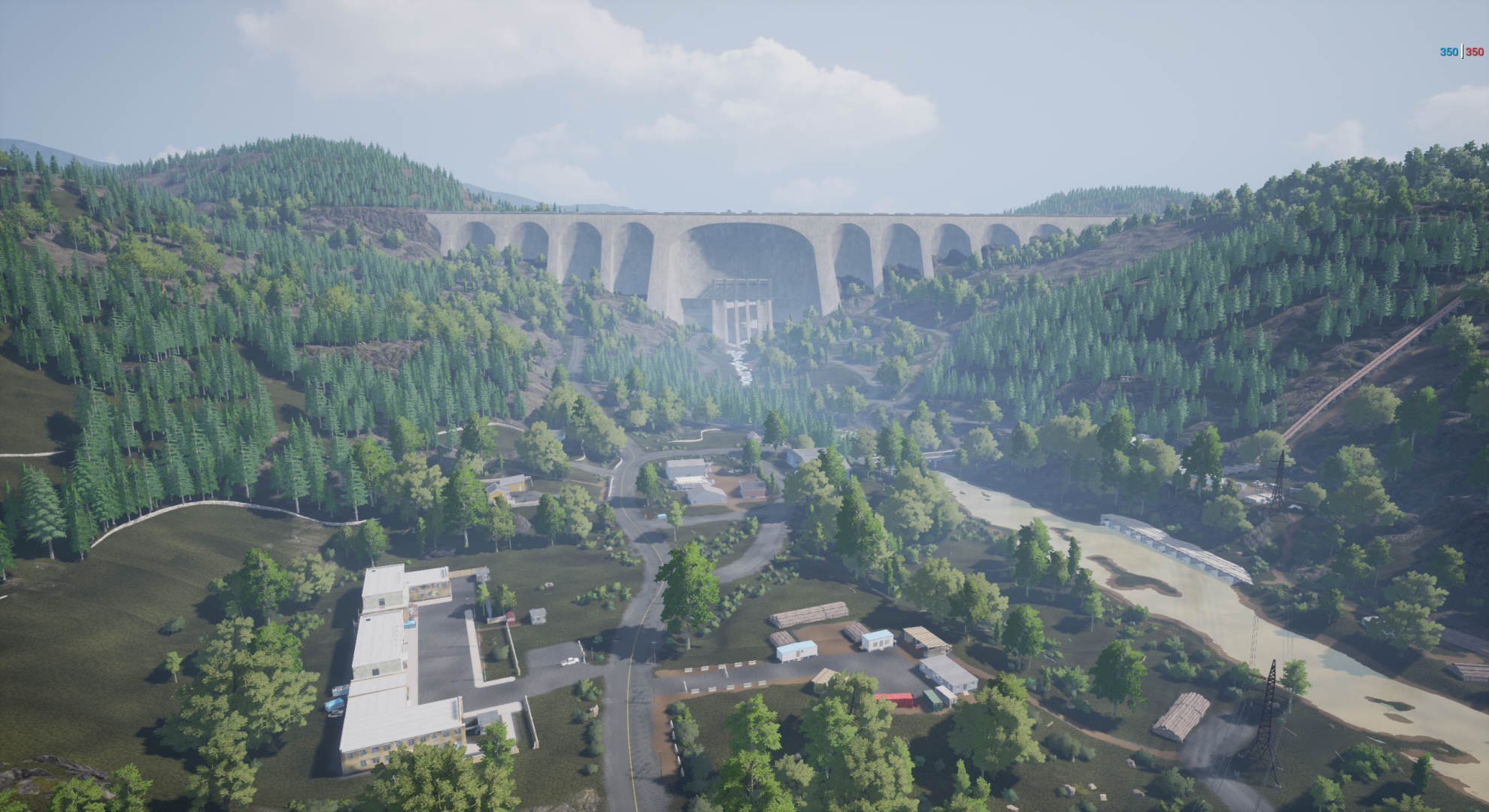
Dam - Manicouagan

After the elevation was reduced, the density and distribution of POIs was pre-planned to improve the balance between having a good variety when random POIs are selected on a game mode like Random Advance and Secure (RAAS), while keeping the distances between points roughly fair and usable for more symmetrical game modes like Advance and Secure or Skirmish. And although lots of new POIs have been created for Manicouagan, many of the originals still exist in some form, although their position or composition may have changed. In general, most of the POIs on Manicouagan will have multiple numbers and types of approaches, these generally fall into three categories:
- Open approach - suited for vehicles or high-risk & high-reward tactics
- Covered approach - suited for infantry leap-frogging from cover to cover
- Concealed approach - suited for a disciplined squad to have a chance at sneaking onto the objective before being noticed
Another large part of the Manicouagan rework was to integrate amphibious water systems into the map. The reservoir behind the dam and the rivers that cut through the map have been updated with deeper water. These will provide opportunities for amphibious-capable factions to flank and approach enemy positions from unsuspected directions. Factions that lack amphibious capabilities (such as the US Army or Canadian Armed Forces) will be limited to making use of the bridges and shallows that form crossing points for their ground assets. In order to prevent factions without amphibious capability from being too punished or bottlenecked at crossing points, the main rivers on the map will be shallower towards the edges of the map to ensure they still retain freedom to access most parts of the map and the coloration of the water on the minimap will reflect this.
Thanks for reading, we’re excited for you to experience the new version of the map and here are a few extra shots of the before and after rework!
Antenna - Manic-5

Antenna - Manicouagan

Firebase Mississauga - Manic-5

Firebase Borris - Manicouagan

Irregular Militia Forces Spotlight
The Irregular Militia Forces faction is getting an overhaul to bring them more up to par with the other factions in the game. We’ve long felt that the militia were the weakest faction compared to the rest and have been looking forward to bringing them on par with our latest factions. We’ve updated them in a way that also leans into the concept of creating more unique-feeling factions.
Eventually we want each faction to have a unique feel, strengths, and weaknesses, leaning into asymmetrical design. For militia our changes have focused around making them more ambush and entrenchment/defensive focused, as well as improving the quality of their infantry since their vehicle line-up still leaves a lot to be desired when compared to conventional factions.
Faction strengths: The faction will excel at rapid mobility, ambushing, entrenchment (ie. defensive positions), and mobile artillery. These strengths will be emphasized by teams who use higher degrees of coordination and communication.
Faction weaknesses: The faction suffers from a weaker line-up of vehicles, especially having no helicopters and older-generation infantry fighting vehicles and main battle tanks. In addition to this they also have weaker command strike abilities compared to conventional factions.
NEW ROLES
Ambusher
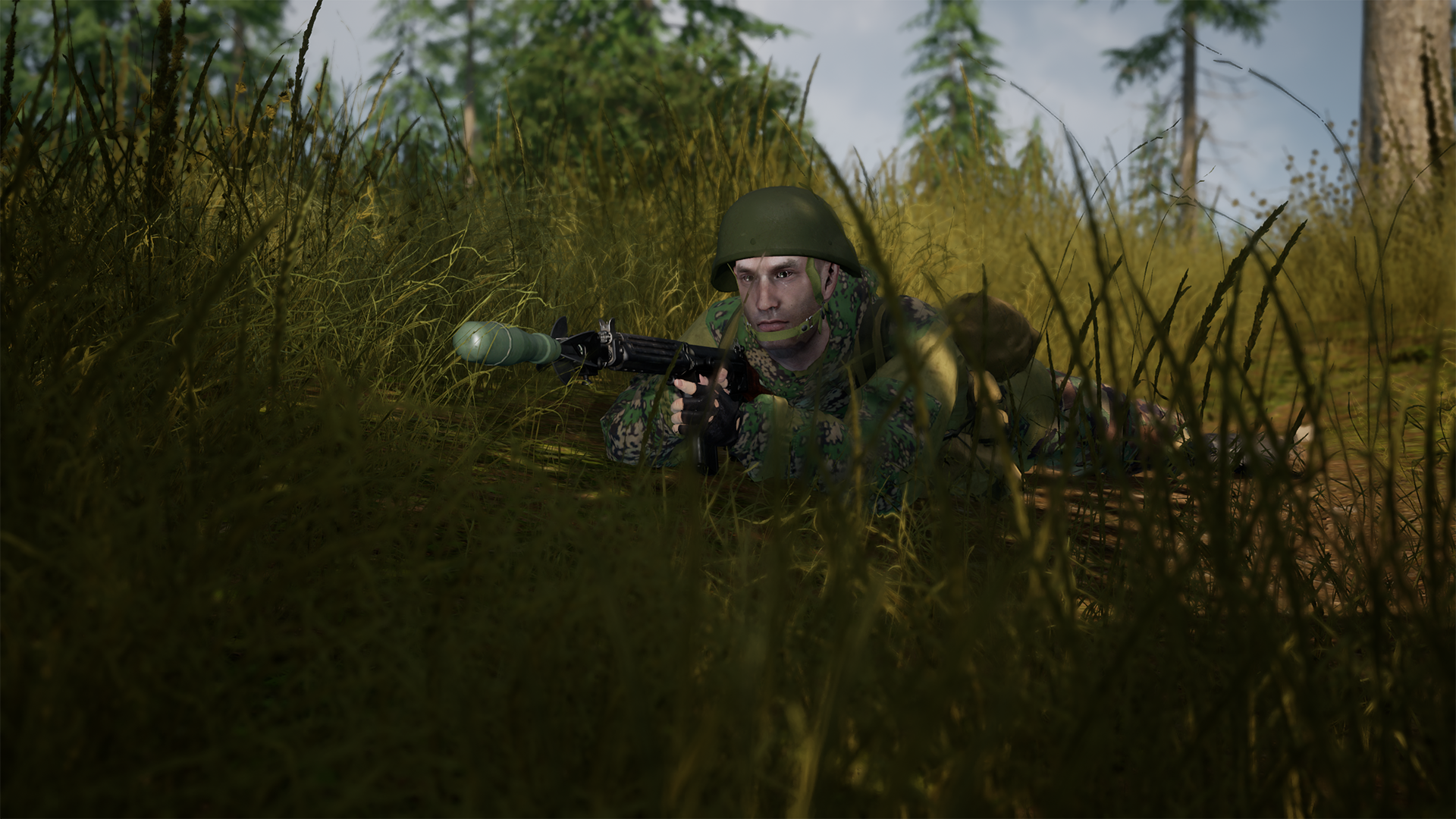
The ambusher is a special role that only the irregular militia forces will have access to. As their name implies, they are expected to lay ambush positions enabling their squad to launch surprise attacks on passing enemy infantry or vehicles, or to provide concealed camouflage positions as part of a larger defensive effort. Having only weapons with iron sights and limited ammunition will mean that they will need to rely on the rest of their squad to help them clean up targets that aren’t taken out in the initial ambush.
You will find them in the ‘direct combat’ roles category. They will make use of a deployable personal camouflage net that will conceal one soldier lying prone on even ground. You will have access to two loadout variants available, one with fragmentation rifle grenades, and one with short-range anti-vehicle hand grenades. These weapons are more difficult to use than their conventional equivalents.
- Ambusher 01
- FAL
- 5x Fragmentation Rifle Grenades
- 1x Personal Camouflage Net
- FAL
- Ambusher 02
- M4
- 2x RGD-5 Frag Grenades
- 2x RKG-3 Anti-Tank Grenade
- 1x Personal Camouflage Net
- M4
Infiltrator

The infiltrator is a close-quarters focused role versatile against infantry and vehicle that will best serve their squad by being present during the opening moments of a close-range ambush or by maneuvering under cover fire to enemies hunkered down in hardpoint positions such as buildings or bunkers, letting their grenades loose and being on point for clearing them out.
They are available in the ‘fire support’ role category and will be of limited use at long range. Similar to the ‘raider’ role of the insurgents faction, they make use of a high-capacity, short-range primary weapon (AKS-74U with 45-round magazines) and fragmentation grenades. In addition to this they also carry a machine pistol as a secondary weapon, and RKG-3 anti-tank grenades.
- Infiltrator
- AKS-74U + 45-round magazines
- Vz 61 Skorpion
- 2x RGD-5 Frag Grenades
- 4x RKG-3 Anti-Tank Grenade
- AKS-74U + 45-round magazines
NEW VEHICLES
BM-21 “Grad” Rocket Artillery Truck

The BM-21 “Grad” is the first MLRS (multiple launcher rocket system) to be added to the game, and arguably the first true self-propelled artillery vehicle that we have added. It fires powerful 122mm rockets with a minimum arming distance of 100 meters, has a minimum firing distance of 900 meters, a maximum firing distance of 1500 meters on even ground, and will only be present on larger maps within the game.
Due to its limited effectiveness at shorter ranges, getting the most bang for your buck out of this weapon system will involve closely communicating and coordinating with spotters to ensure that you are hitting an area populated with relevant targets, and that your rockets are landing on target. It will be used most effectively against mass concentrations of infantry in the open, enemy FOBs, or static light to medium vehicles.
Armored Ural & Technical

The militia will be receiving several variants of an improvised, up-armored Ural 375, as well as the modern pickup truck. The idea behind these vehicles was to offer a bit more protection to the light vehicles of militia since their overall vehicle line-up is lacking compared to more conventional factions. Hastily-welded steel sheets will protect some of the vehicle’s occupants from small-arms fire although larger caliber ammunition will still pass through.
The up-armored vehicles will provide limited survivability to occupants when inadvertently running into enemy infantry. The up-armored technicals will still be served best by ambushing enemies or used in defensive positions that offer maximum protection. The armored Urals will provide slightly more reliable transport and logistical support for the militia, as they will rely on supplies for their defensive specialization, and doubly-so as they continue to lack helicopter support
NEW EMPLACEMENT
ZIS-3 Field Gun

The ZIS-3 field gun is the first of its kind to be added to the game. It is a weapon emplacement, with up to two being able to be constructed within Irregular Militia Forces FOBs. It will have fragmentation, HEAT, and smoke ammunition types available so will be effective against both infantry and vehicles at long range but be cautious as prolonged use will sap a FOB of ammunition supply.
The ZIS-3 will best be employed in ambush positions, covering choke points or used in positions with long lines of sight where the threat of return fire will reduce the likelihood of quickly incapacitating the operator. This weapon is a relic of world war 2 and as such its HEAT ammunition lacks the armor penetration capabilities of modern weapons but will still need to be taken advantage of in order to offset the Irregular Militia Forces’ lack of conventional heavy vehicles.
NEW FORTIFICATIONS
Camouflage Netting

As part of the update, the Irregular Militia Forces will get access to several new camouflage net fortifications. The lean-to, wall, and canopy will provide multiple opportunities for concealing not only infantry fighting positions but the canopy in particular is large enough to conceal vehicles, HABs, hull-down positions, or can just be used as a decoy position to confuse enemy UAVs.
The camouflage netting fortifications will help the militia both set up ambush positions at critical choke points or simply enhance a larger defensive position.
Hull-down Position
The hull-down position is a fortification whose primary intent is to offer additional frontal and side armor protection for armored vehicles such as the BMP-1 or T-62 on even ground. Up to two can be built per FOB and will allow the militia’s older-generation armored vehicles to contend against their better conventional counterparts.
Squad 4.3 arrives on the 15th of March!
Update Squad 4.3 will be here soon on the 15th of March!
It will bring with it a massive rework for the Irregular Militia Forces, the Manicouagan new map (a complete remake of Manic-5), a new Quick Play feature and many more bug fixes, improvements, and optimizations to the game. Keep an eye out for more details coming soon!
Next week we will publish the complete Release Notes for you to check and learn all the latest additions that made it to the game in 4.3.
At ease,
Squad 4.2 is live
Squad 4.2 is now live and ready to be downloaded! For all the details about the new content and fixes, head to our Release Notes.
We would love to hear your thoughts on the update and get feedback on any new issues you might encounter, so please share with us directly in our Technical Issues Report thread in the forums.
At ease,
Unreal Engine Upgrade 4.27
In addition to bug fixes and cool new content that will be part of this week’s release, update 4.2 also includes an Engine Upgrade. This update is a technical back-end improvement that may not add flashy content to the in-game experience, but is an integral part of us continuing to upgrade Squad and ensure that it has a lot of longevity to come. It will also help to better support us in all of the exciting content plans we have for 2023.
We’ll be keeping a close eye on how this engine upgrade impacts performance, and thank you all in advance for any bug reports you send our way. We will add a dedicated forum thread for reporting issues directly related to the engine upgrade.
For those of you that are interested in all of the technical nitty-gritty, we’ve got a great breakdown of the engine upgrade below! For those of you that are less inclined to keep reading, just be on the lookout for anything you wish to report - performance edge cases or new bugs, we want to be aware of all of it. Thank you for partnering with us in the continued quest to make Squad better!
---------------------------------------
What is an engine upgrade?
Squad is built using Epic’s Unreal Engine. In this blog we’ll use the term Unreal Engine or UE here to refer to both UE4 and UE5. UE5 is an evolution of the development line of UE4, not a separate development started from scratch.
Squad’s origins are closely tied to UE4. Squad started development on one of the first versions in 2014, and released on Steam with version 4.10 in 2015.
Since then Epic has released 20 major updates to the Engine, and Squad has been following. Often multiple engine releases were combined in one update, leading to a total of 6 engine upgrades since launch. Engine upgrades are often a major effort, especially for a large game like Squad, since existing game functionality will need to be adapted to changed engine functionality.
Why upgrade the engine?
It is possible to get engine improvements into the game without updating the engine. We can bring individual fixes from new engine versions into an older version (merging), which we frequently do for crash fixes for example, or we can even start developing the engine independently from Epic. The former becomes harder the further behind we are in engine versions, as changes pile up on top of each other. The latter would prevent us from benefiting from the work all the talented people at Epic do.
We decide, whether to update the engine, based on a number of factors
- How meaningful the improvements of the new engine version are for Squad
- The time we have to invest into upgrading the engine
- How much complexity we remove by reducing the number changes we have back-ported from newer engine versions
- What benefits are we getting from 3rd party plugins, which are only available for the latest engine versions
Improvements in the engine could be better performance, better visuals, supporting new features, as well as new tools and workflows to support the development.
Does it give better performance?
In the early days of the engine, there weren’t any large-scale multiplayer games like Squad on UE, and the requirements of this type of game weren’t well supported. Squad launched with a maximum player count of 40 per server. Successive updates to the engine, especially during the “Fortnite period”, enabled a much larger scale for the game, but in turn usually required us to remove some of our own optimizations, in favor of using the engine’s way of making the game run better. That’s why an initial release of Squad on a new engine version often didn’t significantly increase performance, but the following updates did, as we were able to gather more information on shifting bottlenecks and used the new tools to their full potential. Engine upgrades enable us to make the game run better, or to maintain performance while we’re increasing the scale and features available.
DirectX 12
From a technical perspective the most impactful change we made in this update is in the graphics API. While UE4 has supported Direct3D 12 (the graphics API part of DirectX 12) for years, in the past the disadvantages outweigh the benefits of using the low level API in Squad. With UE 4.27 we found that DirectX 12 is now ready for Squad and enabled it as the default graphics API. Direct3D 12 brings huge gains in rendering scenes with lots of objects, as it allows the necessary CPU work to be better distributed. This has the potential to create new bottlenecks, with buffers getting flooded with the sheer amount of data available and the frame rate potentially being less stable.
In the past months we spent a lot of time on overcoming issues like this. We expect that DirectX 12 will be the best choice for almost all Squad players, but since there are countless possible system configurations we can’t know for sure and included the option to switch back to DirectX11 in the main menu. If you experience issues, please give it a try and send us feedback. DirectX 12 also allows support for advanced temporal upsampling algorithms.
AMD FSR 2
We have integrated AMD FSR version 2.1.2, which is the latest version available for Unreal Engine. FSR 2 is an open-source temporal upsampler. Based on information in the current and previous frame, as well as information passed in from the game, like how the camera is moving, it can calculate more detail into images than has been rendered. This allows to render games in a lower resolution than the native monitor resolution and then upsample the image to the native resolution, without a significant loss in image quality.
This upsampling process takes far less time and memory on the GPU, then rendering the image natively at that resolution would take. In short, using FSR gives better performance in scenarios where you are GPU-bottlenecked. There are also temporal upsampling solutions from Nvidia and Intel, which we’re evaluating. For this release we decided to ship with FSR 2 only, as it is supported on all GPUs and as an open-source solution was easy to integrate.
What else can we expect from UE 4.27?
The focus of the engine upgrade has been performance. Depending on your individual system, it is possible to get double the frame rate, or more, in some scenes compared to previous versions. The gains will be more limited or non-existing when there are lots of moving objects, like other players, vehicles and projectiles around you. That is because all the necessary updates your client computes and you receive from the server will start taking up more time than the rendering of the scene. Squad is making heavy use of distance and visibility based optimizations, to reduce how many times objects are updated. The engine comes with advanced methods to help determine what information is most relevant to you at any given time and focus on updating what really matters to you. We are now working on transitioning some of our optimizations to these advanced methods, to unlock better performance in situations, which are full of action.
A difference that will be immediately visible is the new water, which was possible to create thanks to better support by the engine for the features required to render it. The new engine version also comes with many bug and crash fixes, as well as tools and workflow improvements. Over time these will enable us to rework existing features and content in Squad for better performance or visuals. In total there are tens of thousands of engine changes between UE 4.23 and 4.27. Some of these changes will bring new bugs, many of which we have found and fixed, but there will be others which we haven’t. As always, please report any new bugs you encounter in discord.
Why not upgrade to Unreal Engine 5 instead?
Unreal Engine 4.27 is generally considered a very stable and mature release, as many of the more ambitious and experimental changes to the engine were developed for UE5. Taking this intermediate step allows us to gather information on the state of the game with this version, making it easier to pinpoint the root cause of any issues we may face in a future engine upgrade. If an issue doesn’t appear on UE4.27, but it does on UE5, we can look at the changes between those versions. If we try to jump a lot of engine versions at the same time, this becomes much harder due to the accumulation and stacking of changes.
SQUAD UPDATE V4.2 RELEASE NOTES
Update Squad 4.2 will include and focus on the upgrade of the game engine to Unreal v4.27, improvements to the visuals of the US Army faction (new uniforms & character models), a new map layer (Mutaha Seed v1, USMC vs RUS), new emotes introduced to the game and many more bug fixes, improvements, and optimizations to the game.
Check out the full detailed list of new features and changes down bellow.
System & Gameplay Updates
- Upgraded game engine to Unreal v4.27
- Added DX12 as the default graphics API
- You can still opt to use DX11 by selecting it in the Settings menu
- Added support for FSR2 upscaling
- Added DX12 as the default graphics API
- Reimplemented and updated the Graphics Benchmark tool
- Clicking the "Defaults" button on the Graphics Settings Menu will run a benchmark test on both your CPU and GPU and automatically apply recommended graphics settings once complete. As there have been some changes and optimizations to the graphics settings as part of the engine upgrade, we strongly recommend running this benchmark once you have updated Squad.
- Clicking the "Defaults" button on the Graphics Settings Menu will run a benchmark test on both your CPU and GPU and automatically apply recommended graphics settings once complete. As there have been some changes and optimizations to the graphics settings as part of the engine upgrade, we strongly recommend running this benchmark once you have updated Squad.
- Increased HAB spawn activation delay from 20 to 30 seconds
- Added a new map layer, Mutaha Seed v1 (USMC vs RUS)
- Increased PLA ZSL10 APC cupola gunner mags from two to ten
- Made improvements to the visuals of the US Army faction, including:
- New and improved uniforms, including a new forest camo variant
- New and improved character models
- A complete remodel of the M17 MHS Pistol
- Updated ammo boxes and equipment
- New and improved uniforms, including a new forest camo variant
Features
- Added a new feature, Emotes
- Access the emotes radial menu in-game by holding the “X” key (Learn more about emotes: LINK)
- Access the emotes radial menu in-game by holding the “X” key (Learn more about emotes: LINK)
General Bug Fixes
- Fixed a server crash that could occur in EOSServerSubsystem when kicking players - This fix addresses the main issue with modded layers and those should now work
- Fixed a rare issue that could cause a user to disconnect from a server while pushing a helicopter from the rear
- Fixed an issue that could cause servers to hitch on ensures, causing player disconnects
- Fixed a long-standing issue where enemy zones could become impossible to capture after placing a friendly HAB inside of the area in Territory Control
- Fixed an issue that caused modern technical vehicles to accelerate extremely fast after backing up into the water
- Fixed an issue that caused the engine sounds for several vehicles to be quieter and harder to hear from afar than intended
- Fixed an issue that caused the aim down sights animation for rocket launchers and binoculars to not appear to other players Removed unnecessary notifications in the tutorial
- Fixed a bug that caused frag grenades not to play SFX or VFX on concrete
- Fixed an issue where the GB FV432 APC’s engine could not be destroyed with weapons
- Fixed a minor visual issue that could occur while aiming down sights in the AUS Mag58 Jeep
- Fixed a minor visual bug with the PLA ZBD04A’s turret
- Made several improvements to the appearance of the PLA ZTZ99A MBT
- Fixed a bug that prevented the rangefinder of the PLA PF98 launcher from displaying properly in local training mode
- Fixed an issue that caused the PLA QJY88 RHIB to cost five tickets instead of one
- Fixed an issue that caused the PLA QLG10 grenade launcher to cost ten ammo instead of seven
- Adjusted several PLA weapon and vehicle names for accuracy
- Corrected the item description for the PLA QBU88 marksman rifle
- Fixed a bug that caused the PLA LAT kit role to display rifles incorrectly
- Fixed an issue that prevented the wrecks of PLA ZSL10, ZBL08, and ZBD04A vehicles from sinking
- Fixed an issue that prevented environmental effects (sand, snow, mud) from appearing on PLA soldier uniforms
- Fixed a bug that allowed the driver of the PLA ZBL08 IFV and ZSL10 APC to be killed by explosive rounds hitting the vehicle’s front side
- Fixed a bug that prevented the front water shield of PLA ZBL08, ZSL10, and ZBD04A vehicles from successfully deploying in the water
- Adjusted the PLA ZBD04A IFV’s weapon loadout to follow the standards set by other vehicles in the game
- Adjusted the order of the BTR80 Woodland APC’s gunner weapon selection
- Fixed a missing ammo rack component on the PLA ZBL08 HJ73C desert variant
- Improved animations on the PLA ZSL10 APC when interacting with the open-top turret
- Fixed a visual issue with the turret of the PLA ZTZ99A MBT vehicle
- Fixed an issue with the reticle on the T72B3 MBT’s turret
- Fixed several issues relating to vehicle icons appearing incorrectly
- Fixed several visual issues with Insurgent soldier models
- Fixed an issue that could cause the medic role to appear as available when there are already two medics in the squad
Map Updates & Bug Fixes
- Black Coast
- Minor visual fixes
- Minor visual fixes
- Chora
- Minor visual fixes
- Minor visual fixes
- Fallujah
- Fixed an issue where a weapon cache would spawn floating in the air on Insurgency v1
- Fixed an issue that caused water splash VFX to display inappropriately while shooting inside tunnels
- Fixed an issue where a weapon cache would spawn floating in the air on Insurgency v1
- Gorodok
- Added obstruction to an exploitable spot for radio placement
- Minor visual fixes
- Added obstruction to an exploitable spot for radio placement
- Harju
- Fixed an issue where defender and attack staging zone text was incorrect on Invasion v5
- Added new loading screen music
- Fixed an issue where defender and attack staging zone text was incorrect on Invasion v5
- Kohat
- Updated the minimap
- Fixed an issue where PLA players were mistakenly able to build the HJ8 ATGM
- Updated the minimap
- Lashkar
- Fixed a bug that allowed PLA SLs to use the buddy rally feature and the commander to use CO abilities near vehicles on Invasion v4
- Fixed a bug that allowed PLA SLs to use the buddy rally feature and the commander to use CO abilities near vehicles on Invasion v4
- Narva
- Fixed an issue where PLA had four logis and no transport truck on RAAS v6
- Fixed an issue where PLA had four logis and no transport truck on RAAS v6
- Pacific Proving Grounds
- Fixed an issue that caused the vehicle list on v2 (PLA vs USMC) not to appear
- Fixed an issue that caused the vehicle list on v2 (PLA vs USMC) not to appear
- Skorpo
- Fixed an issue where helicopters crashed into the water would not respawn
- Fixed an issue with the minimap on RAAS v2 and v3
- Fixed an issue that caused a player to hit an unintended obstacle while running in the trench at M8-2-7
- Minor visual fixes
- Fixed an issue where helicopters crashed into the water would not respawn
- Sumari
- Fixed an issue that could cause the map to appear washed out, negatively impacting performance
- Fixed an issue that could cause the map to appear washed out, negatively impacting performance
SDK Updates & Bug Fixes
- Updated mod SDK to v4.2
- Updated mod versioning to v4.2. This requires mods to be re-cooked with the v4.2 SDK — any mods using the v4.0 SDK will be incompatible with v4.2
Known Issues
- Depending on the specific hardware setup, some players may experience frame rate stutters during gameplay - most notably while aiming down sights. If this happens to you, please switch to DX11 in the Graphics Settings Menu, restart the game, and try again.
NOTE: With this update, we have forced a cache clear (reset of game options) due to changes and optimizations to the graphics settings as part of the engine upgrade. There are new options to explore, so go check them out! Additionally, remember that you can use the "saved keybind preset" feature to load your old keybinds if you’d like.
Squad 4.2 release on February 8th!
Update Squad 4.2 is well on its way and will be here on February 8th 2023!
It will include and focus on the upgrade of the game engine to Unreal v4.27, improvements to the visuals of the US Army faction (new uniforms, character models), a new map layer (Mutaha Seed v1, USMC vs RUS), new emotes introduced to the game, and many more bug fixes, improvements, and optimizations to the game.
With this update we continue to improve the playing experience of Squad and hope to hear your feedback on the changes when they go live!
Next week we will publish the complete Release Notes for you to check and learn all the latest additions that made it to the game in 4.2.
At ease,
- OFFWORLD OUT!
Emote Showcase
We know you have questions, so let’s talk in depth about the emotes that will be coming along with the rest of the 4.2.
Emotes are animations which you can use to support VOIP communications, interact with each other, celebrate in-game situations, or brighten up down time. We hope they will enhance the social, gameplay, and cinematic aspects of your Squad experience. Our approach to introducing emotes is grounded in authenticity. Above all we wish to preserve the spirit of Squad and protect the immersion that each of you seek in its cooperative experience.
Firstly emotes will come in two flavors: Emotes and Gestures.
Emotes and Gestures
Emotes are full body animations. When triggered they will display a 3rd person view of your character. Moving, aiming down sight, jumping, crouching or going prone, switching gear or similar action will interrupt the emote. Emotes can only be used in the main base or during the staging phase, as they show a 3rd person view, we wanted to make sure players couldn't use this feature to give themselves an advantage by peeking around corners.
Gestures are an upper body hand sign animation that you can trigger. Unlike Emotes it only involves movement of the hands and arms. Gestures happen in 1st person, without obstructing your movement. Gestures offer more leeway before being interrupted, you will be able to move while performing them, however aiming down sight, jumping, going prone, firing your weapon, switching gear or similar action will interrupt the gesture. Gestures are available at all times throughout the battlefield.
Using Emotes
The emotes you have acquired can be equipped on the Customize screen which can be accessed from the Main Menu. It will display a preview of the emote as well to help you make a choice. A checkmark on the emote will also inform you of which one you currently have equipped.
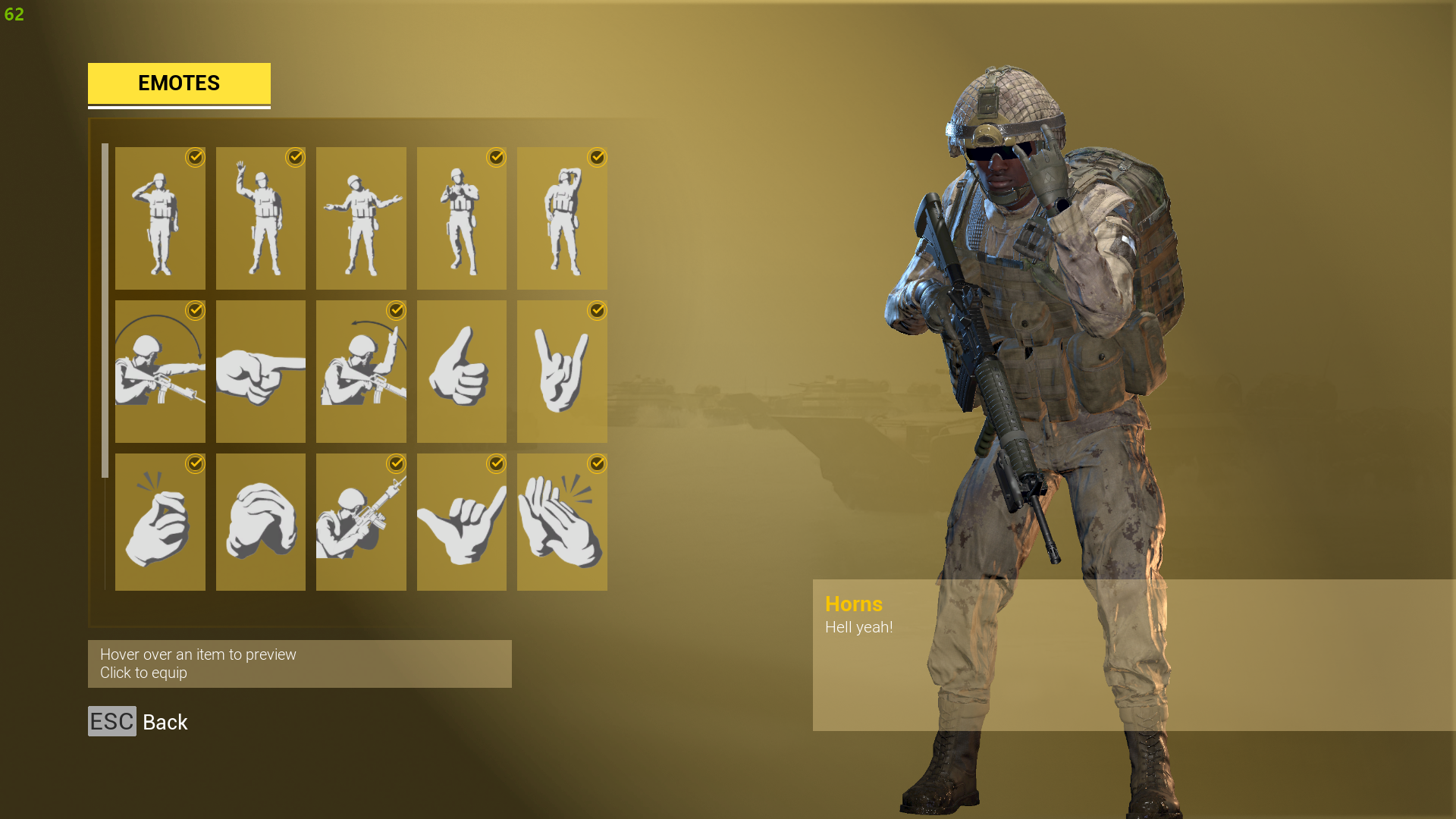
Now that we have our emotes equipped, let’s use them!
Before anything, there is a new keybind that activates emotes (X by default) and can be changed in Settings. While in game you can press the assigned key to bring up a radial menu.
Hold the Emote key to open the emote wheel and click on an emote of your choice to activate it. This cannot be done while aiming down sights.

On the release of Squad 4.2 we will have a few available options for you to try. Free options will be directly available on release. Other options will be available for purchase a few hours later (Grunt and R&R Pack). Both the Grunt and R&R Pack will be available for 3.99 USD upon release. Prices may vary depending on regional currencies. Take a look at the exhaustive list below to know the content of each pack.
Free - Inventory
Every player will be receiving for free one Emote and two Gestures in their inventory directly. The Wave Hello (Emote), Point Forward (Gesture) and Move Out (Gesture).
Wave Hello - Emote

Point Forward - Gesture

Move Out - Gesture

Free - Recruit Pack
The free Recruit Pack will be available to all players on the launch of Squad 4.2. You can claim the pack for yourself from the Main Menu, open the Store and select the Free Recruit Pack. Clicking "Claim" will take you to the Steam store, where you can acquire it for free. It should quickly appear in your inventory of the Customization Menu afterward. The pack includes two Emotes (Salute and Shrug) and two Gestures (Come Here and Thumbs Up).
Salute - Emote

Shrug - Emote

Come Here - Gesture

Thumbs Up - Gesture

Grunt Pack
For all of you grunts out there we have the Grunt Pack, it includes one Emote (Slow Clap, best used when your heli pilot misses the landing pad... again). and four Gestures (Horns, Finger Snap, Fist and Palm, and High Ready).
Slow Clap - Emote

Horns - Gesture

Finger Snap - Gesture

Fist and Palm - Gesture (PLA Faction Exclusive)

High Ready - Gesture (Only available with Rifles, Handguns and LMGs)

R&R Pack
If you want to let loose a little, the R&R Pack is there for you. It includes one Emote (Facepalm, because really, we all have those moments) and four gestures (Hang Loose, Applause, Shh and Finger Wag).
Facepalm - Emote

Finger Wag - Gesture

Applause - Gesture

Shh - Gesture

Hang Loose - Gesture

Thank you for your continuing support as we continue improving Squad through creating new content, features, and other improvements for you to enjoy.
OFFWORLD OUT.